












Form Creation Quote
Good afternoon Greg,
You have let us know that you would like us to make the RCIA & Baptism Registration Form and finish the completion of the parish registration form.
Since this is a change from the original design, I have met with the developers and put together an estimated quote for you to approve.
The update is as follows:
- Create RCIA & Baptism Forms Finish the Parish Registration Form
The cost is as follows:
Estimated Hours: 2.5
Estimated Cost: $175
Standard Support Rate: $70/hour, prorated
If you approve of this cost, please click the "Yes" button below and we will add this item to our to-do list today.
Thank you,
Cody Armock
Web Content Specialist, Web Department
877-923-0777
 Cody Armock
Good Morning Greg,
Just a reminder to approve this quote proposal so that we can convert those forms into the Online Fillable versions. Without the quote approved, we do not have the time to go in and convert those forms! There should be a button to approve on the previous email.
Let me know if you have any questions!
Have a great weekend,
Cody Armock
Just a reminder to approve this quote proposal so that we can convert those forms into the Online Fillable versions. Without the quote approved, we do not have the time to go in and convert those forms! There should be a button to approve on the previous email.
Let me know if you have any questions!
Have a great weekend,
Cody Armock
Web Department, Diocesan
877-923-0777
 Greg Henkel
Cody,
Just approved it.
Please email me a copy of the quote.
Thanks.
Greg
Just approved it.
Please email me a copy of the quote.
Thanks.
Greg
Greg Henkel
Cody,
I'm not sure if I confirm the 2nd question with you or Mark (sales rep).
* Old website content & accessibility will lapse Aug 16th--if not renewed within 30 days all material will be gone (Did you guys xfer entire content from old website?)
* I wanted to confirm that our domain name will stay the same but it now is listed with Diocesan; We also have SSL and web hosting with you guys, correct?
Greg
I'm not sure if I confirm the 2nd question with you or Mark (sales rep).
* Old website content & accessibility will lapse Aug 16th--if not renewed within 30 days all material will be gone (Did you guys xfer entire content from old website?)
* I wanted to confirm that our domain name will stay the same but it now is listed with Diocesan; We also have SSL and web hosting with you guys, correct?
Greg
Cody Armock
Hey Greg,
All the necessary content should be migrated from the old site.
That is correct. The domain name will still be https://st-vincentdepaul.org/, but the hosting (once the site is launched) will be through us and the same with the SSL certificate.
Cody Armock
All the necessary content should be migrated from the old site.
That is correct. The domain name will still be https://st-vincentdepaul.org/, but the hosting (once the site is launched) will be through us and the same with the SSL certificate.
Cody Armock
Web Department, Diocesan
877-923-0777
Greg Henkel
Cody,
I couldn't access the policies or procedures page under the "borrowing books" section when I clicked on the respective links in the website section below. Any suggestions?
https://stvincentdepaul.diocesanweb.org/go-deeper-with-us/where-do-i-start/tools-for-growth/parish-library/
I couldn't access the policies or procedures page under the "borrowing books" section when I clicked on the respective links in the website section below. Any suggestions?
https://stvincentdepaul.diocesanweb.org/go-deeper-with-us/where-do-i-start/tools-for-growth/parish-library/
Greg Henkel
Cody,
I couldn't access the policies or procedures page under the "borrowing books" section when I clicked on the respective links in the website section below. Any suggestions?
https://stvincentdepaul.diocesanweb.org/go-deeper-with-us/where-do-i-start/tools-for-growth/parish-library/
I couldn't access the policies or procedures page under the "borrowing books" section when I clicked on the respective links in the website section below. Any suggestions?
https://stvincentdepaul.diocesanweb.org/go-deeper-with-us/where-do-i-start/tools-for-growth/parish-library/
Cody Armock
Hello Greg,
Those are the links that I took from the existing site. I don't know which Google Files they go to, so I am unable to help with that. I would suggest contacting whoever is in charge of the library and seeing if those files have changed places or if they have a PDF version of them.
Cody Armock
Those are the links that I took from the existing site. I don't know which Google Files they go to, so I am unable to help with that. I would suggest contacting whoever is in charge of the library and seeing if those files have changed places or if they have a PDF version of them.
Cody Armock
Web Department, Diocesan
877-923-0777
Greg Henkel
Cody,
Please email me a copy of the quote when you get a chance. I need to attach this to the PO. I tried to print the quote after I hit "accept" and it just vanished.
Please email me a copy of the quote when you get a chance. I need to attach this to the PO. I tried to print the quote after I hit "accept" and it just vanished.
Cody Armock
Here is the copy Greg:
Good afternoon Greg,
You have let us know that you would like us to make the RCIA & Baptism Registration Form and finish the completion of the parish registration form.
Since this is a change from the original design, I have met with the developers and put together an estimated quote for you to approve.
The update is as follows:
- Create RCIA & Baptism Forms Finish the Parish Registration Form
The cost is as follows:
Estimated Hours: 2.5
Estimated Cost: $175
Standard Support Rate: $70/hour, prorated
If you approve of this cost, please click the "Yes" button below and we will add this item to our to-do list today.
Thank you,
Cody Armock
Web Content Specialist, Web Department
877-923-0777
Greg Henkel
Cody,
You probably won't get this message till Monday but I"m trying to edit the website this weekend, but when I select several different pages and choose "edit page", action=edit shows up in the URL but a white, blank screen appears and I'm unable to edit that page. This has happened with the following pages: "Join SVDP parish, Becoming Catholic, Baptism to name a few. I did Crl F5 for a hard reset and still nothing changed.
Any suggestions?
Greg
You probably won't get this message till Monday but I"m trying to edit the website this weekend, but when I select several different pages and choose "edit page", action=edit shows up in the URL but a white, blank screen appears and I'm unable to edit that page. This has happened with the following pages: "Join SVDP parish, Becoming Catholic, Baptism to name a few. I did Crl F5 for a hard reset and still nothing changed.
Any suggestions?
Greg
Cody Armock
Hello Greg,
I will have the developer look into this. This is odd and has not happened on any other site, but we will see what we can do.
Cody Armock
I will have the developer look into this. This is odd and has not happened on any other site, but we will see what we can do.
Cody Armock
Web Department, Diocesan
877-923-0777
Greg Henkel
Still cannot edit those certain pages--screen goes blank white when I choose "edit page."
What's up with that?
What's up with that?
Cody Armock
Hey Greg,
I am having the developer look into this issue and hopefully, he can come up with a solution shortly. We know what may be causing it, but it is just coming up with the fix for it.
Thank you for your patience!
Cody Armock
I am having the developer look into this issue and hopefully, he can come up with a solution shortly. We know what may be causing it, but it is just coming up with the fix for it.
Thank you for your patience!
Cody Armock
Web Department, Diocesan
877-923-0777
Greg Henkel
Cody,
I noticed the accordion blocks are all jumbled up when accessing via cell phone. They are fine on the desktop platform. Can the developer fix this?
When will the forms be completed?
I noticed the accordion blocks are all jumbled up when accessing via cell phone. They are fine on the desktop platform. Can the developer fix this?
When will the forms be completed?
Greg Henkel
On cell platform on "Becoming Catholic" page, GK Chesterton quote is directly above staff block instead of "Got more questions Contact me."
Cody Armock
Hello Greg,
What page has the accordion block jumbled up on mobile? This will provide more direction to the developer so that it can be fixed.
The forms will be completed today. I have already completed the Baptism (just need to add the tweaks that you added in the email to it ) and the Parish Registration is fully completed.
The reason that the quote is above the staff block is because that is the way it is laid out in the backend. The staff block is not part of the columns (although it might look that way on the front end). You also have a columns nested within a columns nested within another columns. This should never need to happen. You will only ever need one "Columns" (note the 's') block with multiple "Column" (no 's') blocks within it. You can then adjust these "Column" blocks to the desired width. This is what was happening with that Join the Parish page we went over last week Monday.
The headings were also full width, this is rarely needed as well and that's why one of the headings was touching the scroll bar. It doesn't match the website very well. You also don't need a Group block pretty much ever.
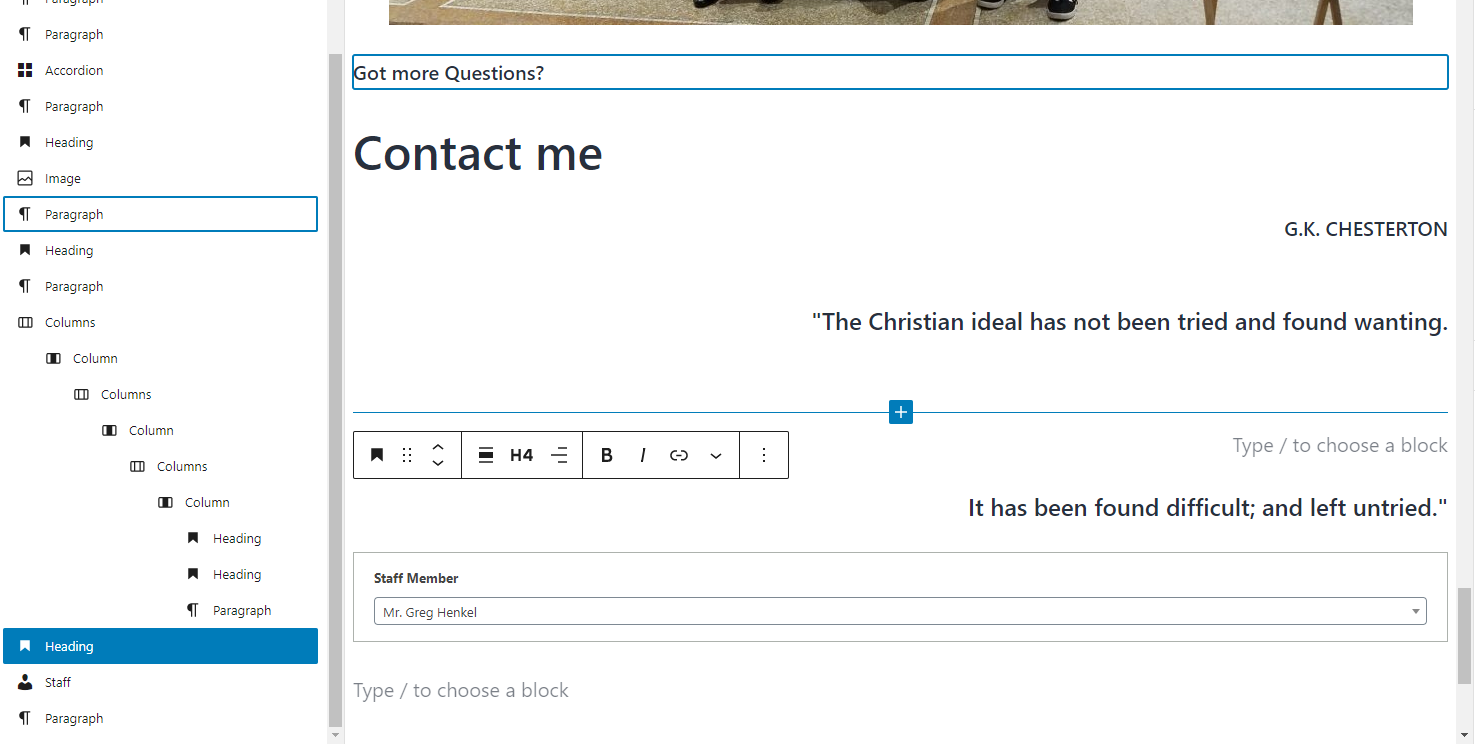
The site will show on mobile how things are ordered in the backend editor. I.e. Higher block will show above the lower block. Right now, the order for that bottom part of the page is (seen in the first screenshot too, missing group though, but it was there):
What page has the accordion block jumbled up on mobile? This will provide more direction to the developer so that it can be fixed.
The forms will be completed today. I have already completed the Baptism (just need to add the tweaks that you added in the email to it ) and the Parish Registration is fully completed.
The reason that the quote is above the staff block is because that is the way it is laid out in the backend. The staff block is not part of the columns (although it might look that way on the front end). You also have a columns nested within a columns nested within another columns. This should never need to happen. You will only ever need one "Columns" (note the 's') block with multiple "Column" (no 's') blocks within it. You can then adjust these "Column" blocks to the desired width. This is what was happening with that Join the Parish page we went over last week Monday.
The headings were also full width, this is rarely needed as well and that's why one of the headings was touching the scroll bar. It doesn't match the website very well. You also don't need a Group block pretty much ever.
The site will show on mobile how things are ordered in the backend editor. I.e. Higher block will show above the lower block. Right now, the order for that bottom part of the page is (seen in the first screenshot too, missing group though, but it was there):
- Paragraph of "Got more Questions?"
- Heading for "Contact Me"
- Paragraph of "G.K. Chesterton"
- Group
- Columns
- Column
- Columns
- Column
- Columns
- Column
- Heading for "The Christian ideal has not been tried and found wanting."
- Heading with nothing in it
- Paragraph with nothing in it
- Column
- Columns
- Column
- Columns
- Column
- Columns
- Heading for "It has been found difficult; and left untried."
- Staff Block
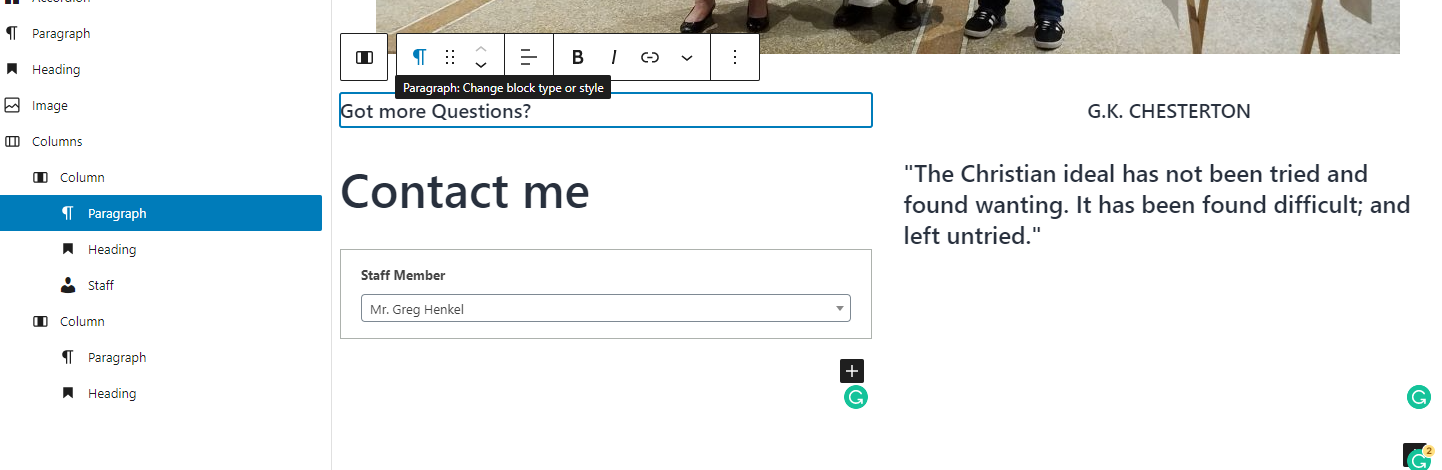
The better way to show it and where it will be correct on Mobile is in the second screenshot (and what I changed it to on the website.)
- Image of Father with the new Catholics
- Columns
- Column
- Paragraph of "Got More Questions?"
- Heading of "Contact Me"
- Staff
- Column
- Paragraph of 'G.K. Chesterton"
- Heading of Chesterton's Quote
- Column
Let me know what page that accordion is acting up on though and I'll have the developer look into it.
Cody Armock
Cody Armock
Web Department, Diocesan
877-923-0777
 Greg Henkel
See below.
Cody Armock
Hey Greg,
Nothing came through after you said, "See below." If you are trying to include an attachment or something, Basecamp has a hard time with those, so please send/forward it to webdepartment@diocesan.com and I can take a look at it there.
Thank you,
Cody Armock
Nothing came through after you said, "See below." If you are trying to include an attachment or something, Basecamp has a hard time with those, so please send/forward it to webdepartment@diocesan.com and I can take a look at it there.
Thank you,
Cody Armock
Web Department, Diocesan
877-923-0777
Greg Henkel
Good news--I can now edit the pages I couldn't the last few days on desktop (B/c Catholic, Baptism etc).
Greg Henkel
I replied in red next to your questions. Did you not receive those comments?
Greg Henkel
I'm editing the "Adoration page" and my contact block image was replaced with an image of the Eucharist on the desktop. Why are things so unstable currently?
Did you receive my edit notes in red on my previous email? I cannot use the menu pulldown to navigate around on the cell platform--makes it impossible to access some pages. Previously I was able to use the menu button on the cell platform--not sure what's happening.
Did you receive my edit notes in red on my previous email? I cannot use the menu pulldown to navigate around on the cell platform--makes it impossible to access some pages. Previously I was able to use the menu button on the cell platform--not sure what's happening.
Cody Armock
Hello Greg,
Yes, the developer figured out that the Staff block was causing problems with those pages. I am glad that it is fixed now.
I did not receive your comments. Basecamp does not like attachments, but you can send them to webdepartment@diocesan.com and I can see those there.
The Mobile Menu should be working now, we noticed that earlier and had the developer fix it. You may have to clear your phone's browser's cache.
There was a big update to WordPress recently, but things are stabilizing. I think there might have been some testing with it, but without access to the revisions of the Adoration page, I cannot see who changed the contact block to the image block of the Eucharist.
Cody Armock
Yes, the developer figured out that the Staff block was causing problems with those pages. I am glad that it is fixed now.
I did not receive your comments. Basecamp does not like attachments, but you can send them to webdepartment@diocesan.com and I can see those there.
The Mobile Menu should be working now, we noticed that earlier and had the developer fix it. You may have to clear your phone's browser's cache.
There was a big update to WordPress recently, but things are stabilizing. I think there might have been some testing with it, but without access to the revisions of the Adoration page, I cannot see who changed the contact block to the image block of the Eucharist.
Cody Armock
Web Department, Diocesan
877-923-0777
Greg Henkel
Hello Greg,
What page has the accordion block jumbled up on mobile? This will provide more direction to the developer so that it can be fixed. "Becoming Catholic, Baptism, Adoration--it appears any page that has an accordion block is jumbled up on mobile Also, on mobile the menu button pulldown (top right corner) does not work. I cannot quickly navigate to other pages. It seems like it was operational a few days ago.
The forms will be completed today. I have already completed the Baptism (just need to add the tweaks that you added in the email to it ) and the Parish Registration is fully completed. Great.
The reason that the quote is above the staff block is because that is the way it is laid out in the backend. The staff block is not part of the columns (although it might look that way on the front end). You also have a columns nested within a columns nested within another columns. This should never need to happen. You will only ever need one "Columns" (note the 's') block with multiple "Column" (no 's') blocks within it. You can then adjust these "Column" blocks to the desired width. This is what was happening with that Join the Parish page we went over last week Monday. It looks like he partially fixed it but GK.. is now next to X104 and the quote is jumbled next to "Email me." If he just drops everything down a few lines and it should solve the problem.
What page has the accordion block jumbled up on mobile? This will provide more direction to the developer so that it can be fixed. "Becoming Catholic, Baptism, Adoration--it appears any page that has an accordion block is jumbled up on mobile Also, on mobile the menu button pulldown (top right corner) does not work. I cannot quickly navigate to other pages. It seems like it was operational a few days ago.
The forms will be completed today. I have already completed the Baptism (just need to add the tweaks that you added in the email to it ) and the Parish Registration is fully completed. Great.
The reason that the quote is above the staff block is because that is the way it is laid out in the backend. The staff block is not part of the columns (although it might look that way on the front end). You also have a columns nested within a columns nested within another columns. This should never need to happen. You will only ever need one "Columns" (note the 's') block with multiple "Column" (no 's') blocks within it. You can then adjust these "Column" blocks to the desired width. This is what was happening with that Join the Parish page we went over last week Monday. It looks like he partially fixed it but GK.. is now next to X104 and the quote is jumbled next to "Email me." If he just drops everything down a few lines and it should solve the problem.
Cody Armock
Hello Greg,
The accordion issue and the menu issue should now be fixed. You will need to clear your phone's browser's cache to see the new fix for it. If there are any issues with that, let me know.
All of the forms are now completed and I have made pages for each them. You can move the pages around and add them in the menu where you would like them. I also included the link to the PDF version of each of them on their respective pages.
This was an issue with the staff block on mobile. There are content fixes that could be added to fix this, but the better option was to make the fix in the code for the staff block, so I made a to-do for the developer to fix it and that should be completed shortly.
Lastly, Arthur told me about the Reusable block issue and I just wanted to clarify something about that. When you first add the Separator Heading Center or Separator Heading Left reusable block, you will the little lego brick icon and the name of the Reusable block, then it is the drag icon or the up/down arrow icons and next to that is the Convert to regular blocks Icon (seen in red box below). That button will turn it into a heading and separator block unique and changeable without affecting any other reusable blocks.
If you see the second image, then that means you are still changing all reusable blocks, so click the brick icon on the far left and click the Convert to regular blocks Icon.
The accordion issue and the menu issue should now be fixed. You will need to clear your phone's browser's cache to see the new fix for it. If there are any issues with that, let me know.
All of the forms are now completed and I have made pages for each them. You can move the pages around and add them in the menu where you would like them. I also included the link to the PDF version of each of them on their respective pages.
This was an issue with the staff block on mobile. There are content fixes that could be added to fix this, but the better option was to make the fix in the code for the staff block, so I made a to-do for the developer to fix it and that should be completed shortly.
Lastly, Arthur told me about the Reusable block issue and I just wanted to clarify something about that. When you first add the Separator Heading Center or Separator Heading Left reusable block, you will the little lego brick icon and the name of the Reusable block, then it is the drag icon or the up/down arrow icons and next to that is the Convert to regular blocks Icon (seen in red box below). That button will turn it into a heading and separator block unique and changeable without affecting any other reusable blocks.
If you see the second image, then that means you are still changing all reusable blocks, so click the brick icon on the far left and click the Convert to regular blocks Icon.


I hope this helps!
Cody Armock
Cody Armock
Web Department, Diocesan
877-923-0777
Greg Henkel
Cody,
Good afternoon.
Sorry I've been in and out of the office in meetings etc the last few days. I had a chance to look at the website last night. Update is as follows:
Accordion & menu issue--looks great
Forms:
Registration Form--great---Please change & have submit button go to amayville.stvparish@gmail.com (mailto:amayville.stvparish@gmail.com)
RCIA Form: Please add: Today's date (upper right hand corner),
* On the 1st page in section II after the question (and box options) asking " your interest in the Catholic faith..." please add the following question: Do any other members of your household want to become Catholic?
* Marital status: add box for received annulment
* Conditional for Single and widow/widower should not show Marital History below correct?
Baptism Form addition left out--
* Under Question #3 please add the following questions:
* Has the Father been previously married? (This was added) If yes, is his spouse still alive? If yes, where and when did the marriage take place and who was the Officiant? (These 2 questions were not)
* Has the Mother been previously married? (This was added) If yes,is her spouse still alive? If yes, where and when did the marriage take place and who was the Officiant? (These 2 questions were not)
I will try to look at reusable blocks later today. Still planning for Aug 4th launch.
Good afternoon.
Sorry I've been in and out of the office in meetings etc the last few days. I had a chance to look at the website last night. Update is as follows:
Accordion & menu issue--looks great
Forms:
Registration Form--great---Please change & have submit button go to amayville.stvparish@gmail.com (mailto:amayville.stvparish@gmail.com)
RCIA Form: Please add: Today's date (upper right hand corner),
* On the 1st page in section II after the question (and box options) asking " your interest in the Catholic faith..." please add the following question: Do any other members of your household want to become Catholic?
* Marital status: add box for received annulment
* Conditional for Single and widow/widower should not show Marital History below correct?
Baptism Form addition left out--
* Under Question #3 please add the following questions:
* Has the Father been previously married? (This was added) If yes, is his spouse still alive? If yes, where and when did the marriage take place and who was the Officiant? (These 2 questions were not)
* Has the Mother been previously married? (This was added) If yes,is her spouse still alive? If yes, where and when did the marriage take place and who was the Officiant? (These 2 questions were not)
I will try to look at reusable blocks later today. Still planning for Aug 4th launch.
Cody Armock
Greg,
I changed the Notification email to amayville.stvparish@gmail.com.
The RCIA Form collects the date the user submits the form, so that "Today's Date" is an unnecessary field, hence why I did not add it.
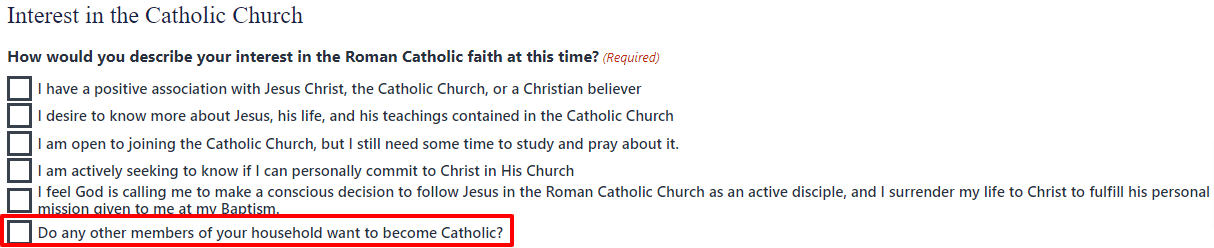
I already added that question to the checkbox field of "How would you describe your interest in the Roman Catholic faith at this time" under the "Interest in the Catholic Church" section title.
I added that box for Received Annulment to Marital Status and corrected the Marital History section with the correct conditional logic.
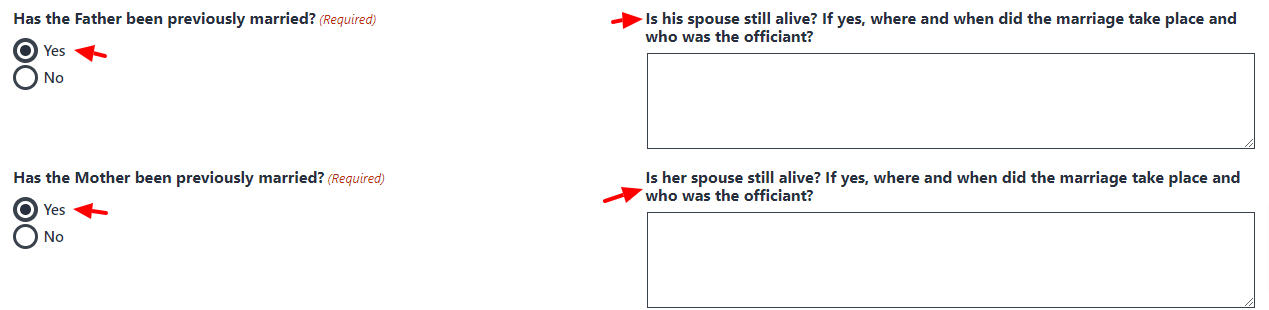
I did not leave out the Baptism questions for that. I made them conditional based on those two questions, so that those people only need to see it. There is a lot of conditional logic in the forms, so if something is not added on there, it is probably hidden until a condition is met or it didn't fit with the rest of the form.
Sounds good for the launch date.
Have a great weekend!
Cody Armock
I changed the Notification email to amayville.stvparish@gmail.com.
The RCIA Form collects the date the user submits the form, so that "Today's Date" is an unnecessary field, hence why I did not add it.
I already added that question to the checkbox field of "How would you describe your interest in the Roman Catholic faith at this time" under the "Interest in the Catholic Church" section title.
I added that box for Received Annulment to Marital Status and corrected the Marital History section with the correct conditional logic.
I did not leave out the Baptism questions for that. I made them conditional based on those two questions, so that those people only need to see it. There is a lot of conditional logic in the forms, so if something is not added on there, it is probably hidden until a condition is met or it didn't fit with the rest of the form.
Sounds good for the launch date.
Have a great weekend!
Cody Armock
Web Department, Diocesan
877-923-0777
Greg Henkel
Cody,
Thanks for changing the email address and sorry for not seeing the info on the forms you already added.
Thanks for changing the email address and sorry for not seeing the info on the forms you already added.
Greg Henkel
Cody,
Good afternoon.
See below requests. Thanks. Greg
* "Join Our Flocknote Newsletter"--Instead of having it set up for the user to subscribe directly to Flocknote, Amanda would like to receive the person's name and email and then she will do it for them along with other stuff she will send them. You can leave the "subscribe" button there but in reality it will simply be a "submit" (to Amanda) button
* "Parish Registration confirmation"--Change existing statements to the following:" You will get a welcome email to this address ______________. Add Amanda's contact block to lower left-hand corner.
* The "submit" button for "Connect" and "Contact Us" should both go to Amanda's email
* I updated the "Connect" page within the last 2 weeks and instead of a single Question box I added an accordion block with multiple questions. The header was "I am interested in" with the accordion block underneath this. I know I updated the page. That block should have been saved, correct?
Good afternoon.
See below requests. Thanks. Greg
* "Join Our Flocknote Newsletter"--Instead of having it set up for the user to subscribe directly to Flocknote, Amanda would like to receive the person's name and email and then she will do it for them along with other stuff she will send them. You can leave the "subscribe" button there but in reality it will simply be a "submit" (to Amanda) button
* "Parish Registration confirmation"--Change existing statements to the following:" You will get a welcome email to this address ______________. Add Amanda's contact block to lower left-hand corner.
* The "submit" button for "Connect" and "Contact Us" should both go to Amanda's email
* I updated the "Connect" page within the last 2 weeks and instead of a single Question box I added an accordion block with multiple questions. The header was "I am interested in" with the accordion block underneath this. I know I updated the page. That block should have been saved, correct?
Greg Henkel
Cody,
Our parish secretary sent me the below calendar link. Please add the following calendar link to our Parish Calendar page. TY.
Greg
Our parish secretary sent me the below calendar link. Please add the following calendar link to our Parish Calendar page. TY.
Greg
Cody Armock
Hello Greg,
You have to send the link directly. It did not come through basecamp.
Cody Armock
You have to send the link directly. It did not come through basecamp.
Cody Armock
Web Department, Diocesan
877-923-0777
Greg Henkel
Cody Armock
Hello Greg,
* "Join Our Flocknote Newsletter"--Instead of having it set up for the user to subscribe directly to Flocknote, Amanda would like to receive the person's name and email and then she will do it for them along with other stuff she will send them. You can leave the "subscribe" button there but in reality it will simply be a "submit" (to Amanda) button
* "Join Our Flocknote Newsletter"--Instead of having it set up for the user to subscribe directly to Flocknote, Amanda would like to receive the person's name and email and then she will do it for them along with other stuff she will send them. You can leave the "subscribe" button there but in reality it will simply be a "submit" (to Amanda) button
- I have this setup and the developer is working on fixing the styling of it
* "Parish Registration confirmation"--Change existing statements to the following:" You will get a welcome email to this address ______________. Add Amanda's contact block to lower left-hand corner.
- Confirmation Done. The Amanda staff block would have to be added on the page, can't be done in the confirmation and I do not think it is necessary to have it on the page.
* The "submit" button for "Connect" and "Contact Us" should both go to Amanda's email
- Done
* I updated the "Connect" page within the last 2 weeks and instead of a single Question box I added an accordion block with multiple questions. The header was "I am interested in" with the accordion block underneath this. I know I updated the page. That block should have been saved, correct?
- Talked about this on the phone.
Cody Armock
Web Department, Diocesan
877-923-0777
Greg Henkel
I forgot to send the link in the original email. Did the below link come though in the previous email?
Cody Armock
Hello Greg,
The link still did not come through. You can try just copying and then right-clicking in the email to me and clicking Paste as Plain Text (Ctrl+Shift+V)
Cody Armock
The link still did not come through. You can try just copying and then right-clicking in the email to me and clicking Paste as Plain Text (Ctrl+Shift+V)
Cody Armock
Web Department, Diocesan
877-923-0777
Greg Henkel
Cody Armock
Hello Greg,
The calendar link has been received and added to that page.
Cody Armock
The calendar link has been received and added to that page.
Cody Armock
Web Department, Diocesan
877-923-0777
Greg Henkel
Cody,
Good morning.
Aug Inst supplied the Formed image to me, and I cropped it down but the blue letters still don't fit in the box. The Lighthouse image is the same way but I thought since Formed only has 6 letters I could shrink it to fit. Is it possible? If so, how do you make it fit? Thanks.
https://stvincentdepaul.diocesanweb.org/go-deeper-with-us/where-do-i-start/tools-for-growth/?preview_id=402&preview_nonce=cfe85295ac&preview=true
Good morning.
Aug Inst supplied the Formed image to me, and I cropped it down but the blue letters still don't fit in the box. The Lighthouse image is the same way but I thought since Formed only has 6 letters I could shrink it to fit. Is it possible? If so, how do you make it fit? Thanks.
https://stvincentdepaul.diocesanweb.org/go-deeper-with-us/where-do-i-start/tools-for-growth/?preview_id=402&preview_nonce=cfe85295ac&preview=true
Cody Armock
Hello Greg,
Cropping the image will actually make it worse in that instance. The buttons are looking for nearly a square image to put in there and if it does not have one then it will crop it till it fits. I just added the Formed image and edited it to be in the center of a much bigger canvas/background so that it fits better. You would just have to do this with the Lighthouse image too.
Cody Armock
Cropping the image will actually make it worse in that instance. The buttons are looking for nearly a square image to put in there and if it does not have one then it will crop it till it fits. I just added the Formed image and edited it to be in the center of a much bigger canvas/background so that it fits better. You would just have to do this with the Lighthouse image too.
Cody Armock
Web Department, Diocesan
877-923-0777
Greg Henkel
Cody,
Good afternoon. I hope you are doing well. We are off and running with our new website. Thanks for all your help.
You had previously mentioned that I would have access to the same images that our bulletin editor uses in putting together the weekly bulletin. How do I access these images or who should I contact to make this happen?
Thanks.
Greg
Good afternoon. I hope you are doing well. We are off and running with our new website. Thanks for all your help.
You had previously mentioned that I would have access to the same images that our bulletin editor uses in putting together the weekly bulletin. How do I access these images or who should I contact to make this happen?
Thanks.
Greg
Cody Armock
Hello Greg,
You're welcome!
I don't remember if I said that or not. You would have to ask the bulletin editor about the images. I am not sure how bulletin editing works exactly, so I am not sure if that is possible or not, but I would imagine that you could bring the images they use in the bulletin over to the website through a flash drive, email or other way of sending images to one another. There are those free stock image websites that I linked the User Account email I sent you after the first training. Those are also really helpful resources for finding good images.
Cody Armock
You're welcome!
I don't remember if I said that or not. You would have to ask the bulletin editor about the images. I am not sure how bulletin editing works exactly, so I am not sure if that is possible or not, but I would imagine that you could bring the images they use in the bulletin over to the website through a flash drive, email or other way of sending images to one another. There are those free stock image websites that I linked the User Account email I sent you after the first training. Those are also really helpful resources for finding good images.
Cody Armock
Web Department, Diocesan
877-923-0777
Greg Henkel
Cody,
Good afternoon.
Augustine Institute sent me this web banner, and I tried to add it to the post section and it didn't display all the info b/c it is landscape instead of portrait image. How can I shrink this to fit?
Greg
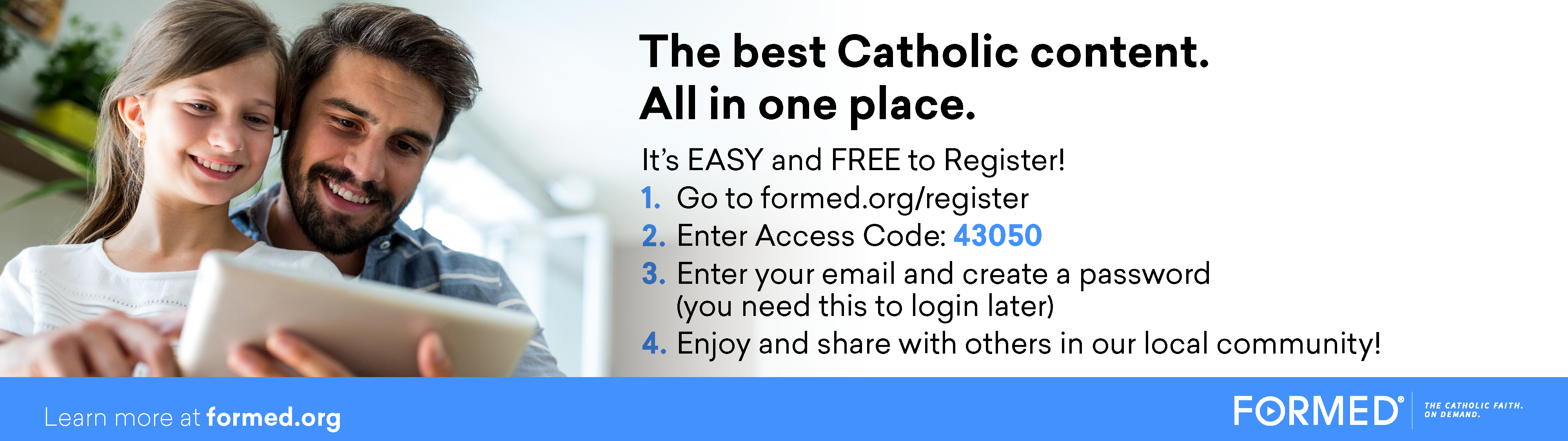
Good afternoon.
Augustine Institute sent me this web banner, and I tried to add it to the post section and it didn't display all the info b/c it is landscape instead of portrait image. How can I shrink this to fit?
Greg
Cody Armock
Good Morning Greg,
The easiest way would be to put it within the content of the post rather than the featured image of it. There isn't really a way to make display everything to fit unless you add a large background to it to make it a 3:2 (width:height) ratio, or crop it to that ratio, which would cut off stuff anyway. So, putting it in the content of the post and having something else or even nothing as the featured image would be the best option.
Cody Armock
The easiest way would be to put it within the content of the post rather than the featured image of it. There isn't really a way to make display everything to fit unless you add a large background to it to make it a 3:2 (width:height) ratio, or crop it to that ratio, which would cut off stuff anyway. So, putting it in the content of the post and having something else or even nothing as the featured image would be the best option.
Cody Armock
Web Department, Diocesan
877-923-0777
Greg Henkel
Cody,
Good afternoon. I had another "Post" question. I believe I will have at least 50% of posts that might not need additional links listed in the announcement and could have all the info listed on the face of the post w/out needing to go to another page. However, the # of lines and the margin width restrict the amount of info you can add to the post. Could you or the developer move the caption up to be middle aligned with the top and bottom of the block? This would allow more lines of words to be displayed on the initial page w/out having to "click here" for more information. The "... click here takes up unnecessary space that could be utilized by additional words. I only need 20-24 words on average to be displayed in the block. With the date being prominently displayed in the top left, this eliminates additional words that are not needed for the post.
Thanks.
Greg
Good afternoon. I had another "Post" question. I believe I will have at least 50% of posts that might not need additional links listed in the announcement and could have all the info listed on the face of the post w/out needing to go to another page. However, the # of lines and the margin width restrict the amount of info you can add to the post. Could you or the developer move the caption up to be middle aligned with the top and bottom of the block? This would allow more lines of words to be displayed on the initial page w/out having to "click here" for more information. The "... click here takes up unnecessary space that could be utilized by additional words. I only need 20-24 words on average to be displayed in the block. With the date being prominently displayed in the top left, this eliminates additional words that are not needed for the post.
Thanks.
Greg
Cody Armock
Hello Greg,
Sorry, I am just getting to this email now. I will be out of the office tomorrow, but I will be back in on Monday. There is always going to be a click here link to go to the full post. This is because certain things like images, buttons, and other non-text blocks will never be pulled into that excerpt. It is always good practice to have users click on the click here link to view the full post in case there are certain things that will not be pulled into that excerpt.
I can ask the developer if it is possible to double the amount of words in the excerpt, but I think it is more number of character based rather than word based.
Cody Armock
Sorry, I am just getting to this email now. I will be out of the office tomorrow, but I will be back in on Monday. There is always going to be a click here link to go to the full post. This is because certain things like images, buttons, and other non-text blocks will never be pulled into that excerpt. It is always good practice to have users click on the click here link to view the full post in case there are certain things that will not be pulled into that excerpt.
I can ask the developer if it is possible to double the amount of words in the excerpt, but I think it is more number of character based rather than word based.
Cody Armock
Web Department, Diocesan
877-923-0777
Greg Henkel
Cody,
Good morning.
I got the following message when trying to make changes to our website this morning:
"There has been a critical error on this website. Please check your site admin email inbox for instructions."
Greg
Good morning.
I got the following message when trying to make changes to our website this morning:
"There has been a critical error on this website. Please check your site admin email inbox for instructions."
Greg
Cody Armock
Hello Greg,
Is it working now? The developer was making some changes to work on the excerpt fix you asked about last week.
Let me know if there is still an error after refreshing
Cody Armock
Is it working now? The developer was making some changes to work on the excerpt fix you asked about last week.
Let me know if there is still an error after refreshing
Cody Armock
Web Department, Diocesan
877-923-0777
Greg Henkel
Sorry I was swamped today---yes it is fine now.
There is no way to eliminate the words, "click here" even if there is no additional characters on the 2nd page? Several other websites I looked at were able to contain everything on the initial post.
There is no way to eliminate the words, "click here" even if there is no additional characters on the 2nd page? Several other websites I looked at were able to contain everything on the initial post.
Cody Armock
Hello Greg,
As I have said, there is no way with the current system without redesigning it entirely, which would be several hours quoted out to remove those words.
The "Click Here" link, as I have said, acts as a failsafe too because not everything will be pulled in as an excerpt such as any file blocks, image blocks, button blocks, etc. that have been added to the post. Plus, it helps to train the user in a way to click more to see the full post.
Also, please note that as the website is now launched and the two weeks of free support has ended, all questions and issues should be directed to webdepartment@diocesan.com. Mary, our support specialist, will be able to help you there.
Thank you and God bless,
Cody Armock
As I have said, there is no way with the current system without redesigning it entirely, which would be several hours quoted out to remove those words.
The "Click Here" link, as I have said, acts as a failsafe too because not everything will be pulled in as an excerpt such as any file blocks, image blocks, button blocks, etc. that have been added to the post. Plus, it helps to train the user in a way to click more to see the full post.
Also, please note that as the website is now launched and the two weeks of free support has ended, all questions and issues should be directed to webdepartment@diocesan.com. Mary, our support specialist, will be able to help you there.
Thank you and God bless,
Cody Armock
Web Department, Diocesan
877-923-0777
Greg Henkel
Cody,
I tried to reach you by phone earlier today. Disregard the message. I figured it out.
Have a great weekend!
Greg
I tried to reach you by phone earlier today. Disregard the message. I figured it out.
Have a great weekend!
Greg