











Launch Today
Good morning Everyone,
As we prepare to launch your website this morning (between 9am and 1 pm), we ask that you please refrain from logging into the website and making any changes until you receive an email from us letting you know that your website is launched. This way, nothing will be overwritten or go unsaved as we change URLs and add SSL certificates.
Please let us know if you have any questions, otherwise, someone from our team will reach out to you this afternoon.
Cody Armock
Web Content Specialist, Web Department
877-923-0777
 Charmaine Carter
Thank you Cody!
Charmaine A. Carter MD, MTh
Director of Adult Faith Formation
Cathedral of St. Jude the Apostle
5815 5th Avenue North
St. Petersburg, FL 33710
727-430-1281
Charmaine A. Carter MD, MTh
Director of Adult Faith Formation
Cathedral of St. Jude the Apostle
5815 5th Avenue North
St. Petersburg, FL 33710
727-430-1281
Charmaine Carter
Hi Cody.
Regarding the Staff and Clergy page,
I cannot figure out how to shift the order. I would like to fix the alphabetization. Joanne Daez currently is listed before me (Charmaine Carter), but should be after me.
* Charmaine
Regarding the Staff and Clergy page,
I cannot figure out how to shift the order. I would like to fix the alphabetization. Joanne Daez currently is listed before me (Charmaine Carter), but should be after me.
* Charmaine
 Cody Armock
Hello Charmaine,
Under the Staff Members module on the left side in the menu (in the backend) there is a menu item for Order, you can then drag people up and drag to reorder the staff then to see the change on the staff page, just refresh that page.
Thank you,
Cody Armock
Under the Staff Members module on the left side in the menu (in the backend) there is a menu item for Order, you can then drag people up and drag to reorder the staff then to see the change on the staff page, just refresh that page.
Thank you,
Cody Armock
Web Department, Diocesan
877-923-0777
Charmaine Carter
Thank you!!! I did it!
Charmaine Carter
Hi Cody,
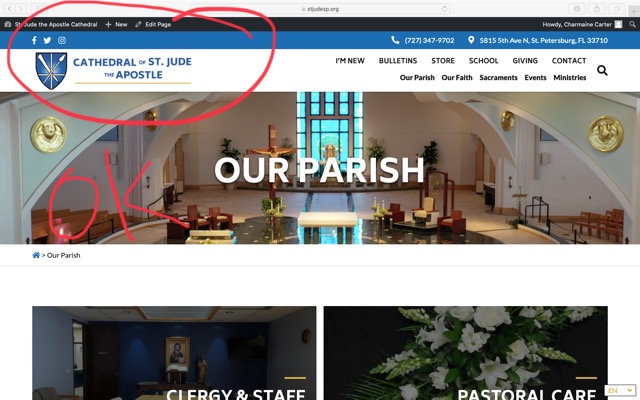
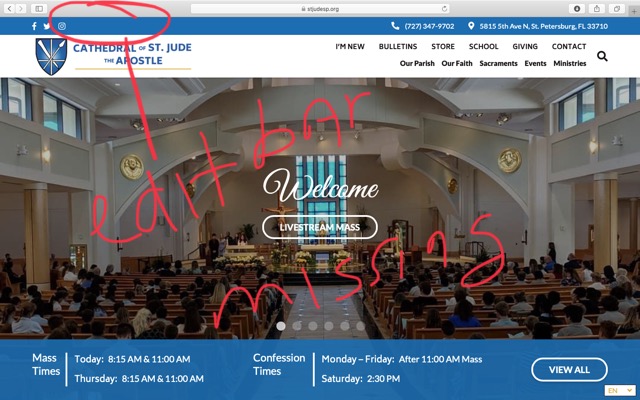
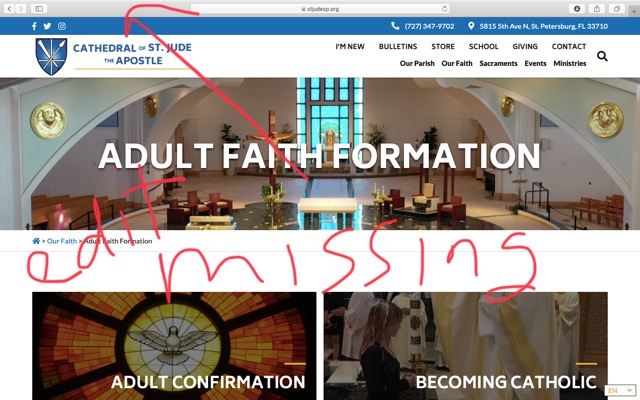
When I log in to edit, I get the edit bar on all pages except 1/ the Adult Faith Formation lead page and 2/ the Home Page.
Can you assist with that?
Charmaine A. Carter MD, MTh
Director of Adult Faith Formation
Cathedral of St. Jude the Apostle
5815 5th Avenue North
St. Petersburg, FL 33710
727-430-1281
When I log in to edit, I get the edit bar on all pages except 1/ the Adult Faith Formation lead page and 2/ the Home Page.
Can you assist with that?
Charmaine A. Carter MD, MTh
Director of Adult Faith Formation
Cathedral of St. Jude the Apostle
5815 5th Avenue North
St. Petersburg, FL 33710
727-430-1281
Cody Armock
Hello Charmaine,
Can you send me a screenshot of what is missing, just so I can better understand the issue?
Thank you,
Cody Armock
Can you send me a screenshot of what is missing, just so I can better understand the issue?
Thank you,
Cody Armock
Web Department, Diocesan
877-923-0777
Cody Armock
Hello Charmaine,
I think I may have an idea of what it may be, please try refreshing those pages, it might be that the browser saved a cached version before you logged in. Let me know if that works!
Thank you,
Cody Armock
I think I may have an idea of what it may be, please try refreshing those pages, it might be that the browser saved a cached version before you logged in. Let me know if that works!
Thank you,
Cody Armock
Web Department, Diocesan
877-923-0777
Charmaine Carter
Yes. The edit bar is on the top of the first pic, but not on the home page or Adult Faith Formation.
[cid:01D04A15-9390-4F0B-B9FE-1F5A6B8231CE-L0-001]
[cid:489BC641-5285-45AB-99F3-BABFEA06FAB1-L0-001][cid:A3A9E68C-E37C-4FAF-8BFE-51B12DE2D339-L0-001]
Charmaine A. Carter MD, MTh
Director of Adult Faith Formation
Cathedral of St. Jude the Apostle
5815 5th Avenue North
St. Petersburg, FL 33710
727-430-1281
[cid:01D04A15-9390-4F0B-B9FE-1F5A6B8231CE-L0-001]
[cid:489BC641-5285-45AB-99F3-BABFEA06FAB1-L0-001][cid:A3A9E68C-E37C-4FAF-8BFE-51B12DE2D339-L0-001]
Charmaine A. Carter MD, MTh
Director of Adult Faith Formation
Cathedral of St. Jude the Apostle
5815 5th Avenue North
St. Petersburg, FL 33710
727-430-1281
Cody Armock
Hello Charmaine,
I am pretty sure you just need to do a regular refresh and if it still doesn't show then do a hard refresh (Instructions here) that should have the admin bar show up.
Thank you,
Cody Armock
I am pretty sure you just need to do a regular refresh and if it still doesn't show then do a hard refresh (Instructions here) that should have the admin bar show up.
Thank you,
Cody Armock
Web Department, Diocesan
877-923-0777
Charmaine Carter
Yes, that worked! Thank you. I have to remember that!
Charmaine A. Carter MD, MTh
Director of Adult Faith Formation
Cathedral of St. Jude the Apostle
5815 5th Avenue North
St. Petersburg, FL 33710
727-430-1281
Charmaine A. Carter MD, MTh
Director of Adult Faith Formation
Cathedral of St. Jude the Apostle
5815 5th Avenue North
St. Petersburg, FL 33710
727-430-1281
 Suzanne Wright
Good Morning, Cody.
We need help with some corrections.
1) Bulletin page. On the iPad, that page displays with the dates of the past bulletins overlapping the image of the bulletin.
2) We also need to change the office hours that are displayed on the footers for all pages--the home page and all internal pages. The correct display is:
Mon - Fri: 8:30 AM - 12:30 PM and 1:00 PM - 4:00 PM
3) When we attempted to change the office times in the footer for the home page, a stray colon appeared and I cannot figure out how to delete it.
Thank you so much for your help!
Suzanne
We need help with some corrections.
1) Bulletin page. On the iPad, that page displays with the dates of the past bulletins overlapping the image of the bulletin.
2) We also need to change the office hours that are displayed on the footers for all pages--the home page and all internal pages. The correct display is:
Mon - Fri: 8:30 AM - 12:30 PM and 1:00 PM - 4:00 PM
3) When we attempted to change the office times in the footer for the home page, a stray colon appeared and I cannot figure out how to delete it.
Thank you so much for your help!
Suzanne
Cody Armock
Hello Suzanne,
1) I have made a to-do for the developer for the bulletins page.
2 & 3) I changed that in the Theme Settings > Church Schedule and the extra colon was coming from a blank/extra field in the office hours. There were two fields in there and I just deleted the empty second one.
Thank you,
Cody Armock
1) I have made a to-do for the developer for the bulletins page.
2 & 3) I changed that in the Theme Settings > Church Schedule and the extra colon was coming from a blank/extra field in the office hours. There were two fields in there and I just deleted the empty second one.
Thank you,
Cody Armock
Web Department, Diocesan
877-923-0777
Suzanne Wright
Thank you Cody! You are so very helpful.
Suzanne Wright
Hi Cody,
We would like to provide website access to the diocese communications office. They are responsible for the livestream and they may need to make changes on the livestream page.
What is the best way to give them access? Should it be a limited access to the pages that have the livestream links?
Please advise. Thank you.
Many blessings,
Suzanne
We would like to provide website access to the diocese communications office. They are responsible for the livestream and they may need to make changes on the livestream page.
What is the best way to give them access? Should it be a limited access to the pages that have the livestream links?
Please advise. Thank you.
Many blessings,
Suzanne
Cody Armock
Hello Suzanne,
We can make a parish author role instead of the admin role where they can only edit certain pages that they are the author of. With that role, we would just need to know if you would want them to have access to posts too (creating posts), access to forms, access to envira gallery, etc. If they are only doing live stream, then it seems like they would only need access to pages and not the other stuff, so maybe it is just pages and media.
We would also need the username, email and first and last name that you would want us to make the account for.
Once we have all of that (account credentials and the levels of permissions/access) we can go ahead and set that account up.
Thank you,
Cody Armock
We can make a parish author role instead of the admin role where they can only edit certain pages that they are the author of. With that role, we would just need to know if you would want them to have access to posts too (creating posts), access to forms, access to envira gallery, etc. If they are only doing live stream, then it seems like they would only need access to pages and not the other stuff, so maybe it is just pages and media.
We would also need the username, email and first and last name that you would want us to make the account for.
Once we have all of that (account credentials and the levels of permissions/access) we can go ahead and set that account up.
Thank you,
Cody Armock
Web Department, Diocesan
877-923-0777
Suzanne Wright
Thanks, Cody. I will get back to you with that information.
Suzanne Wright
Hi Cody,
Here is the information you requested to set up an account for the diocese communications office.
They are concerned with the livestream and ensuring that it is displaying and working properly on our website.
So, with that in mind, I think we can go ahead with your suggestion to provide permission to change pages and media.
Username: dospcommunications
Email: communicate@dosp.org (mailto:communicate@dosp.org)
first name: Teresa
last name: Peterson
Thank you so much.
Here is the information you requested to set up an account for the diocese communications office.
They are concerned with the livestream and ensuring that it is displaying and working properly on our website.
So, with that in mind, I think we can go ahead with your suggestion to provide permission to change pages and media.
Username: dospcommunications
Email: communicate@dosp.org (mailto:communicate@dosp.org)
first name: Teresa
last name: Peterson
Thank you so much.
Cody Armock
Hello Suzanne,
I have made the parish author role and made Teresa an account and CC'd you and Charmaine on the email. You can grant her access to pages by hovering over the page in the All Pages list and clicking "Quick Edit" and switching the author to her.
Let me know if you have any questions!
Thank you,
Cody Armock
I have made the parish author role and made Teresa an account and CC'd you and Charmaine on the email. You can grant her access to pages by hovering over the page in the All Pages list and clicking "Quick Edit" and switching the author to her.
Let me know if you have any questions!
Thank you,
Cody Armock
Web Department, Diocesan
877-923-0777
Suzanne Wright
Hi Cody,
If she is author, the administrator can still edit right?
Thanks!
If she is author, the administrator can still edit right?
Thanks!
Suzanne Wright
Hi Cody,
Another question. We have been using a jpg of the rector’s message to upload to the Rector’s Message page. It worked well last week but this week, the view on the iPhone is distorted in the portrait mode. Can you help resolve? Do I need to use a different size?
Thanks again!!
Another question. We have been using a jpg of the rector’s message to upload to the Rector’s Message page. It worked well last week but this week, the view on the iPhone is distorted in the portrait mode. Can you help resolve? Do I need to use a different size?
Thanks again!!
Cody Armock
Hello Suzanne,
If she is the author, admins can still edit the page. Admins can edit any page regardless of the author whereas authors can only edit those pages in which they are assigned.
Also, I fixed the image by clicking on it and over in the right side, in the block attribute sidebar/pane, I clicked the 75%, so it is a little smaller, but not as stretched on mobile. You can resize it by clicking on the image and using the blue dots that appear on the sides.
I hope this helps!
Cody Armock
If she is the author, admins can still edit the page. Admins can edit any page regardless of the author whereas authors can only edit those pages in which they are assigned.
Also, I fixed the image by clicking on it and over in the right side, in the block attribute sidebar/pane, I clicked the 75%, so it is a little smaller, but not as stretched on mobile. You can resize it by clicking on the image and using the blue dots that appear on the sides.
I hope this helps!
Cody Armock
Web Department, Diocesan
877-923-0777
Suzanne Wright
Thank you, Cody!
I still see the image as distorted and difficult to read on my iPhone. I think we need to find a different way of displaying this. In the bulletin as accessed through the Discover Mass.com, the page for the Rector's Message is displayed the way I would like to see on the iPhone. Can you direct me on how to achieve that display on the page on our website?
Many thanks!
I still see the image as distorted and difficult to read on my iPhone. I think we need to find a different way of displaying this. In the bulletin as accessed through the Discover Mass.com, the page for the Rector's Message is displayed the way I would like to see on the iPhone. Can you direct me on how to achieve that display on the page on our website?
Many thanks!
Cody Armock
Hello Suzanne,
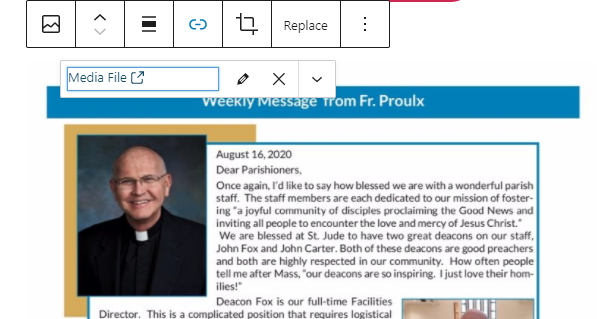
The Bulletin cover is pulled in through a plugin, so it would be hard to style it out individually for that, but I made it so that when people click on the image, it will open in a new tab and they can zoom in/out as needed and they are able to read it. Any styling that we do for that image would apply to all images on the site, so I think this would be the most versatile option. If you click on the image in the backend, you can then add a link using the link icon in the toolbar then click "Media File". In the little dropdown (the down arrow), you can have it open in a new tab if you want (see image below). I think this would be the best way going forward, that way the image will always be responsive no matter what screen is there.
Let me know if you have any further questions on this!
Thank you,
Cody Armock
The Bulletin cover is pulled in through a plugin, so it would be hard to style it out individually for that, but I made it so that when people click on the image, it will open in a new tab and they can zoom in/out as needed and they are able to read it. Any styling that we do for that image would apply to all images on the site, so I think this would be the most versatile option. If you click on the image in the backend, you can then add a link using the link icon in the toolbar then click "Media File". In the little dropdown (the down arrow), you can have it open in a new tab if you want (see image below). I think this would be the best way going forward, that way the image will always be responsive no matter what screen is there.
Let me know if you have any further questions on this!
Thank you,
Cody Armock
Web Department, Diocesan
877-923-0777
Suzanne Wright
Hi Cody,
Could we have a quick call for you to walk me through this. I am confused by the statement " Any styling that we do for that image would apply to all images on the site, so I think this would be the most versatile option."
It would be helpful to speak directly.
Thank you!
Could we have a quick call for you to walk me through this. I am confused by the statement " Any styling that we do for that image would apply to all images on the site, so I think this would be the most versatile option."
It would be helpful to speak directly.
Thank you!
Suzanne Wright
Good Morning Cody!
I tried to edit the Phone Tree Ministry Page this morning and received an error message. Please advise.
Many thanks!
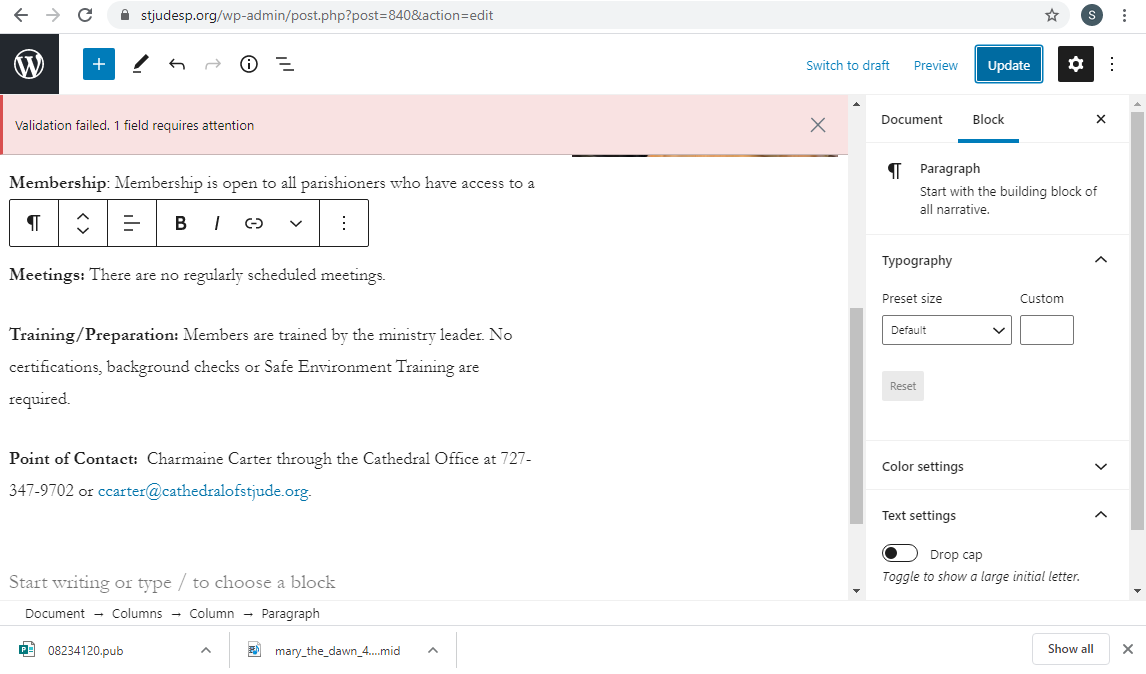
I tried to edit the Phone Tree Ministry Page this morning and received an error message. Please advise.
Many thanks!
Cody Armock
Hello Suzanne,
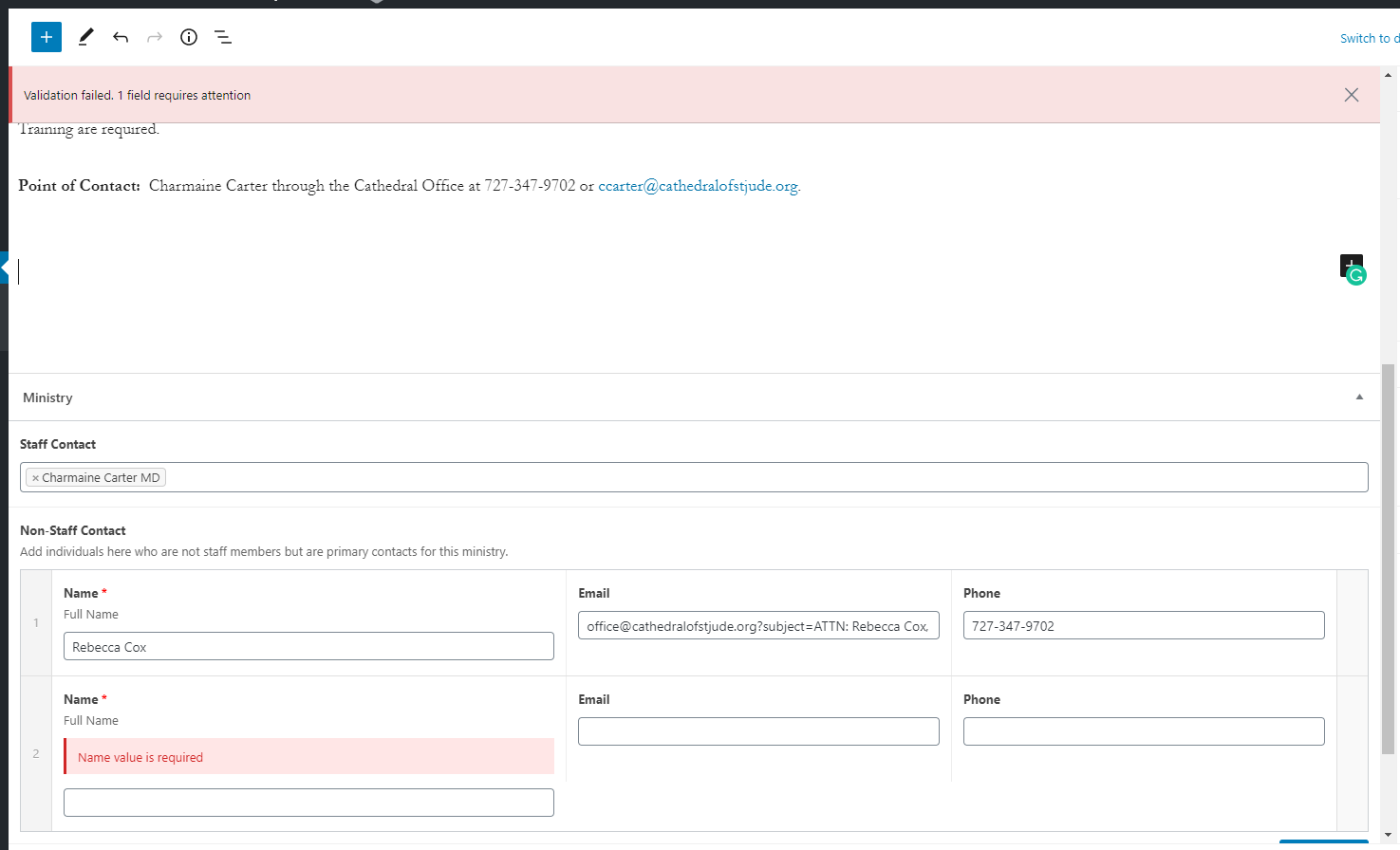
It is because there was an extra field in the Non-Staff Contact Part as you can see from the image below. I removed that and now you should be able to update the page.
I will call you around 8:30 today to talk about the Weekly Message page.
Cody Armock
It is because there was an extra field in the Non-Staff Contact Part as you can see from the image below. I removed that and now you should be able to update the page.
I will call you around 8:30 today to talk about the Weekly Message page.
Cody Armock
Web Department, Diocesan
877-923-0777
Suzanne Wright
Hi Cody,
I am at Mass this morning and will be home at 10 am ET. I will be available for a call anytime after that.
Thank you!
I am at Mass this morning and will be home at 10 am ET. I will be available for a call anytime after that.
Thank you!
Cody Armock
Hello Suzanne,
Sounds good! I will call after 10 then. What is the best number to reach you at?
Thank you,
Cody Armock
Sounds good! I will call after 10 then. What is the best number to reach you at?
Thank you,
Cody Armock
Web Department, Diocesan
877-923-0777
Suzanne Wright
My cell number is +17272444682
Thanks!
Thanks!
Cody Armock
Hello Suzanne,
here are instructions on how to clear cache on iPhone:
https://support.apple.com/en-us/HT201265
Cody Armock
here are instructions on how to clear cache on iPhone:
https://support.apple.com/en-us/HT201265
Cody Armock
Web Department, Diocesan
877-923-0777
Suzanne Wright
Good Morning, Cody!
I am in a class until 1 pm today. Would you let me know when the developers make that change for the sizing of the rector’s message? I will test it this afternoon.
Thank you!
I am in a class until 1 pm today. Would you let me know when the developers make that change for the sizing of the rector’s message? I will test it this afternoon.
Thank you!
Cody Armock
Good Morning Suzanne,
I am so sorry. The developer made the change yesterday afternoon. I am sorry about the delayed notification. Remember to try clearing your cache and then retrying it.
Thank you,
Cody Armock
I am so sorry. The developer made the change yesterday afternoon. I am sorry about the delayed notification. Remember to try clearing your cache and then retrying it.
Thank you,
Cody Armock
Web Department, Diocesan
877-923-0777
Suzanne Wright
Thank you, Cody!!