











Question about linking pages to multiple menus...
Veronica Alvarado
Web Department
Phone: 877-923-0777
Diocesan.com <http://www.diocesan.com>
<https://t.xink.io/Tracking/Index/IsQBAGWmAAC5YjAA0>
---------- Forwarded message ---------
From: Lynn Ramsey <lramsey@holyfamilyorlando.com>
Date: Fri, Oct 25, 2019 at 10:49 AM
Subject: Question about linking pages to multiple menus...
To: Blake Stapleton <bstapleton@diocesan.com>, Christine White <
cwhite@holyfamilyorlando.com>
Cc: Veronica Alvarado <valvarado@diocesan.com>
Blake,
Is it possible to set up a page with multiple parent-child relationships?
Examples of where we need this are:
- Liturgical ministries (listing in both a “Roles of the Mass” page
under “Our Catholic Faith” and under a “Celebrating Mass” subpage in “Get
Involved”)
- Linking clergy to the “Roles of the Mass” page.
Yours in Christ,
Lynn
Web Department
Phone: 877-923-0777
Diocesan.com <http://www.diocesan.com>
<https://t.xink.io/Tracking/Index/IsQBAGWmAAC5YjAA0>
---------- Forwarded message ---------
From: Lynn Ramsey <lramsey@holyfamilyorlando.com>
Date: Fri, Oct 25, 2019 at 10:49 AM
Subject: Question about linking pages to multiple menus...
To: Blake Stapleton <bstapleton@diocesan.com>, Christine White <
cwhite@holyfamilyorlando.com>
Cc: Veronica Alvarado <valvarado@diocesan.com>
Blake,
Is it possible to set up a page with multiple parent-child relationships?
Examples of where we need this are:
- Liturgical ministries (listing in both a “Roles of the Mass” page
under “Our Catholic Faith” and under a “Celebrating Mass” subpage in “Get
Involved”)
- Linking clergy to the “Roles of the Mass” page.
Yours in Christ,
Lynn
 Veronica Alvarado
Hello Lynn,
Pages are a 1:1 parent-child relationship, so if you are needed a page to appear in multiple ministries, we may want to consider using the "Plinko" block instead of the template that automates the process.
I am not finding the "Roles of the Mass" page, so I am not sure how you are intending to use them. Could you please provide a bit more clarification on what you are trying to display and how you'd like it to work?
At the very least, I'd like Cody to address this during your next training session.
Thank you,
Veronica Alvarado
Web Department, Diocesan
877-923-0777
877-923-0777
 Christine White
Still working on getting pages up and connected, etc. Getting close to setting date for next training session. In the meantime, forgive me if you’ve already sent the link but where do I find additional images to use for the site? Not the free sourcing sites that Matt shared – the ones that Diocesan.com uses for their images. I believe our contract allows us usage of images from your site, correct?
Thanks much!
C
Blessings!
Christine White
Marketing/Communications Coordinator
Holy Family Catholic Church
www.HolyFamilyOrlando.com<http://www.holyfamilyorlando.com/>
CWhite@HolyFamilyOrlando.com<mailto:CWhite@HolyFamilyOrlando.com>
W: 407.876.2211 ext. 253
M: 407.394.7444
“Nothing is impossible with God!” Luke 1:37
Thanks much!
C
Blessings!
Christine White
Marketing/Communications Coordinator
Holy Family Catholic Church
www.HolyFamilyOrlando.com<http://www.holyfamilyorlando.com/>
CWhite@HolyFamilyOrlando.com<mailto:CWhite@HolyFamilyOrlando.com>
W: 407.876.2211 ext. 253
M: 407.394.7444
“Nothing is impossible with God!” Luke 1:37
Christine White
One more request…where can I find your store of b/w line art icons that you use for buttons?
 Cody Armock
Hello Christine,
I am glad things are coming along with the site and content is being migrated. Keep me updated about when you want to set up the second training.
As for the images for the site, there are several free stock photo sites out there and there is the free clipart for the bulletins that you can use. I don't know where in the contract it says to use images from our site, but I could be wrong.
There are many free stock photo sites out there, but the ones that Diocesan uses heavily are:
- Unsplash
http://unsplash.com - Pexels
http://pexels.com - Cathopic
https://www.cathopic.com/ - Libre Stock
https://librestock.com/ - Freely
https://beta.freelyphotos.com/
As for the icons, there are tons of icons in all different colors here: https://www.flaticon.com/home, download the PNG file type, since WordPress sometimes has problems with SVG file types.
Let me know if you have any more questions or when you'd like to set up the second training.
Let me know if you have any more questions or when you'd like to set up the second training.
Cody Armock
Web Department, Diocesan
877-923-0777
877-923-0777
Christine White
Thank you , Cody - I also found an earlier Sept email where you'd referenced some of this stuff already, so my apologies for asking you to resend.
Also, are you available sometime the morning of the 14th for our next training session? Preferred time would be 9 or 9:30a, presuming it's another 2 hours. If we need a bit later, let me know and I think we can move some other stuff around. Not later than a noon start time, though, if we're going 2 hours. Dan leaves at 2p.
Lynn and I are keeping track of Qs for you, but I presume you'll have an agenda of stuff to go over as well, including plinkos, forms, envira gallery, menus, etc. correct? We hopefully will also have a resolution to the EMS/events calendaring issue. If that solution comes in before the meeting - Dan is hopefully fast-tracking it - we'll be in touch before the meeting to give a heads up.
We have a home page video banner and we're in final approval stages - will try to get that to you by end of this week so you can upload and test.
Blessings!
Christine White
Marketing/Communications Coordinator
Holy Family Catholic Community
(407) 876-2211 x253
www.HolyFamilyOrlando.com<http://www.HolyFamilyOrlando.com>
CWhite@HolyFamilyOrlando.com
Also, are you available sometime the morning of the 14th for our next training session? Preferred time would be 9 or 9:30a, presuming it's another 2 hours. If we need a bit later, let me know and I think we can move some other stuff around. Not later than a noon start time, though, if we're going 2 hours. Dan leaves at 2p.
Lynn and I are keeping track of Qs for you, but I presume you'll have an agenda of stuff to go over as well, including plinkos, forms, envira gallery, menus, etc. correct? We hopefully will also have a resolution to the EMS/events calendaring issue. If that solution comes in before the meeting - Dan is hopefully fast-tracking it - we'll be in touch before the meeting to give a heads up.
We have a home page video banner and we're in final approval stages - will try to get that to you by end of this week so you can upload and test.
Blessings!
Christine White
Marketing/Communications Coordinator
Holy Family Catholic Community
(407) 876-2211 x253
www.HolyFamilyOrlando.com<http://www.HolyFamilyOrlando.com>
CWhite@HolyFamilyOrlando.com
Cody Armock
Hello Christine,
I am available on the 14th in the morning. I have included the meeting information below. We will go over questions, but I do have an agenda (Forms & Gallery) to cover. If we need to talk about questions after and things that is fine too. Let me know if you have any updates on the video or with the calendar.
Diocesan is inviting you to a scheduled Zoom meeting.
Topic: Second Training | Holy Family (Orlando)
Time: Nov 14, 2019 09:30 AM Eastern Time (US and Canada)
Join Zoom Meeting
https://zoom.us/j/466966269
Meeting ID: 466 966 269
Call to Join Audio
+1 646 876 9923
Meeting ID: 466 966 269
Let me know if you have any questions!
Cody Armock
Web Department, Diocesan
877-923-0777
877-923-0777
Cody Armock
Hello Christine and Lynn,
Just a reminder, here is the meeting information for the training today.
Diocesan is inviting you to a scheduled Zoom meeting.
Topic: Second Training | Holy Family (Orlando)
Time: Nov 14, 2019 09:30 AM Eastern Time (US and Canada)
Join Zoom Meeting
https://zoom.us/j/466966269
Meeting ID: 466 966 269
Call to Join Audio
+1 646 876 9923
Meeting ID: 466 966 269
Let me know if you have any questions!
Cody Armock
Web Department, Diocesan
877-923-0777
877-923-0777
Cody Armock
Hello Christine and Lynn,
Media Library - Unlimited Folders
I looked into the Paid Version of the Filebird plugin, which is the media library folder plugin. It would $25 with 6 months of support and $32.50 with 12 months of support.
Form Review
I have added a way to review the form before submission. There will be a review button on the form instead of the submit. By default, it will show for a form, I have disabled it in the code for the email form on the footer since that is only one field and it breaks the form if I use the review for it. For it to be able to review with the captcha, I had to switch it to be a checkbox. This usually only requires one click, but on certain occasions, it will bring up a picture and have you select the appropriate images to pass the test. Did you still want this to be included, otherwise I could take out the review code?
Plinko Links
Unfortunately, we are unable to add the classic editor to the Plinko blocks, so if links are needed, they will have to be done with HTML. If the link is staying on the site then it will look like:
- <a href="https://holyfamilyorlando.diocesanweb.org/{insert correct url here}">Link Text Here</a>
If it is going off-site then it will look like:
- <a href="http://diocesan.com/web/" target="_blank" rel="noreferrer noopener" aria-label=" (opens in a new tab)">Link Text Goes Here</a>
I included this on the styles page in the last Plinko in order to help you as much as I can with it.
Let me know what you think about the Form Review and the Filebird Plugin,
Cody Armock
Web Department, Diocesan
877-923-0777
877-923-0777
Christine White
Team,
Dan looked into options for creating an event calendar that would tie into our EMS ministry/facility scheduler software. The contractor told him that if the Web team can have access to Dan’s EMS SQL database (and you can), they can write a simple routine to pull the fields that they want to use on the website.
Attached is a test XML file of exported data that you can use to determine if it’s workable from your end to create (we’d have to discuss formatting, of course) a calendar. I believe we’d need to coordinate it’s updating on a regular basis, unless it can be auto imported, so that the calendar stays fresh. And we’d also need to determine which events get “pulled in” to (1) the master home page calendar and (2) any individual calendars we create for the ministries.
Fields we’ve id’d as necessary are: Event Start/End, Event (aka Booking) Date, Location (aka Room Description), Event Name, Event Type, Group (that is organizing the event).
Would you be able to let us know early next week, if possible, whether this is a viable option for our site? And what our next steps would need to be to get this in development?
thx
C
Blessings!
Christine White
Marketing/Communications Coordinator
Holy Family Catholic Church
www.HolyFamilyOrlando.com<http://www.holyfamilyorlando.com/>
CWhite@HolyFamilyOrlando.com<mailto:CWhite@HolyFamilyOrlando.com>
W: 407.876.2211 ext. 253
M: 407.394.7444
“Nothing is impossible with God!” Luke 1:37
Dan looked into options for creating an event calendar that would tie into our EMS ministry/facility scheduler software. The contractor told him that if the Web team can have access to Dan’s EMS SQL database (and you can), they can write a simple routine to pull the fields that they want to use on the website.
Attached is a test XML file of exported data that you can use to determine if it’s workable from your end to create (we’d have to discuss formatting, of course) a calendar. I believe we’d need to coordinate it’s updating on a regular basis, unless it can be auto imported, so that the calendar stays fresh. And we’d also need to determine which events get “pulled in” to (1) the master home page calendar and (2) any individual calendars we create for the ministries.
Fields we’ve id’d as necessary are: Event Start/End, Event (aka Booking) Date, Location (aka Room Description), Event Name, Event Type, Group (that is organizing the event).
Would you be able to let us know early next week, if possible, whether this is a viable option for our site? And what our next steps would need to be to get this in development?
thx
C
Blessings!
Christine White
Marketing/Communications Coordinator
Holy Family Catholic Church
www.HolyFamilyOrlando.com<http://www.holyfamilyorlando.com/>
CWhite@HolyFamilyOrlando.com<mailto:CWhite@HolyFamilyOrlando.com>
W: 407.876.2211 ext. 253
M: 407.394.7444
“Nothing is impossible with God!” Luke 1:37
Christine White
Thanks Cody, for following up on the Media Library and Form Review.
The plinko links below don’t work, however.
c
The plinko links below don’t work, however.
c
Cody Armock
Hello Christine,
Can you please forward the XML file to webdepartment@diocesan.com? Can you also forward the Plinko links that did not work either? Basecamp has trouble attaching files and forwards sometimes.
Also, depending on the amount of additional development that needs to be done to connect the database to the site, there may be an additional charge incurred. Once we have the XML test file, our developers will be able to determine the additional cost, if any. I will share this information with you before moving forward.
We will do our best to test out the viability of this option as soon as possible.
Thank you,
Can you please forward the XML file to webdepartment@diocesan.com? Can you also forward the Plinko links that did not work either? Basecamp has trouble attaching files and forwards sometimes.
Also, depending on the amount of additional development that needs to be done to connect the database to the site, there may be an additional charge incurred. Once we have the XML test file, our developers will be able to determine the additional cost, if any. I will share this information with you before moving forward.
We will do our best to test out the viability of this option as soon as possible.
Thank you,
Cody Armock
Christine White
Thx, Cody.
Lynn –please send the links to Cody and I’ll forward the XML file to the developers.
C
Lynn –please send the links to Cody and I’ll forward the XML file to the developers.
C
Christine White
Never mind Lynn…
Cody, the links I referred to were the ones in your email. Can’t open them.
C
Cody, the links I referred to were the ones in your email. Can’t open them.
C
Cody Armock
Hello Christine,
Did you change the text in the href to be the correct URLs?
I did it on the Test Form Page and they both worked as links, so I am not sure what the issue would be unless the "href" is not changed.
Thank you,
Cody Armock
Did you change the text in the href to be the correct URLs?
I did it on the Test Form Page and they both worked as links, so I am not sure what the issue would be unless the "href" is not changed.
Thank you,
Cody Armock
Christine White
Sorry, Cody, not sure what that means. Let’s drop it for now
Cody Armock
Hello Christine,
On the very bottom of this page, there is an example that will show you the links in the plinko. You can go in the backend to edit the page and see how I did it for the Link titled "Link Text Here"
If the link is staying on the site then it will look like:
On the very bottom of this page, there is an example that will show you the links in the plinko. You can go in the backend to edit the page and see how I did it for the Link titled "Link Text Here"
If the link is staying on the site then it will look like:
- <a href="https://holyfamilyorlando.diocesanweb.org/{insert correct url/slug here}">Link Text Here</a>
If it is going off-site then it will look like:
- <a href="http://diocesan.com/web/" target="_blank" rel="noreferrer noopener" aria-label=" (opens in a new tab)">Find Out More About Diocesan Websites</a>
The pink highlighted section above will need to be changed to go to the right URL address, in the address bar at the top of the browser. You can go to the page on the frontend of the site and click and copy the address and then paste in between the double quotes (by itself).
The yellow highlighted section above is what the link will say on the front end. So people will see "Find Out More About Diocesan Websites" as the link on the site.
I hope that helps clarify things for the Plinko links for now.
Let me know if that is still not clear.
Cody Armock
The yellow highlighted section above is what the link will say on the front end. So people will see "Find Out More About Diocesan Websites" as the link on the site.
I hope that helps clarify things for the Plinko links for now.
Let me know if that is still not clear.
Cody Armock
Cody Armock
Hello Christine and Lynn,
Do you have an example page where the Plinko images are off or look weird? This way, I have a better idea of what the issue is and work toward a solution from there. I was looking back through the emails and did not find anything, but that does not mean that it was not sent before. I know that was talked about briefly in the meeting last week, but I don't know if Lynn was in the meeting at that point or if a particular page was brought up.
Thank you,
Cody Armock
Do you have an example page where the Plinko images are off or look weird? This way, I have a better idea of what the issue is and work toward a solution from there. I was looking back through the emails and did not find anything, but that does not mean that it was not sent before. I know that was talked about briefly in the meeting last week, but I don't know if Lynn was in the meeting at that point or if a particular page was brought up.
Thank you,
Cody Armock
Christine White
Hi Cody –
Here’s an example of a sizing issue on the backend of the Youth Ministries – Template page. On my backend view, the plinkos are different sizes and I’m not sure how to get it to view and edit so that it’s all on the page as I’m editing, if that makes sense.
[cid:image001.png@01D5AF65.5B7EEC20]
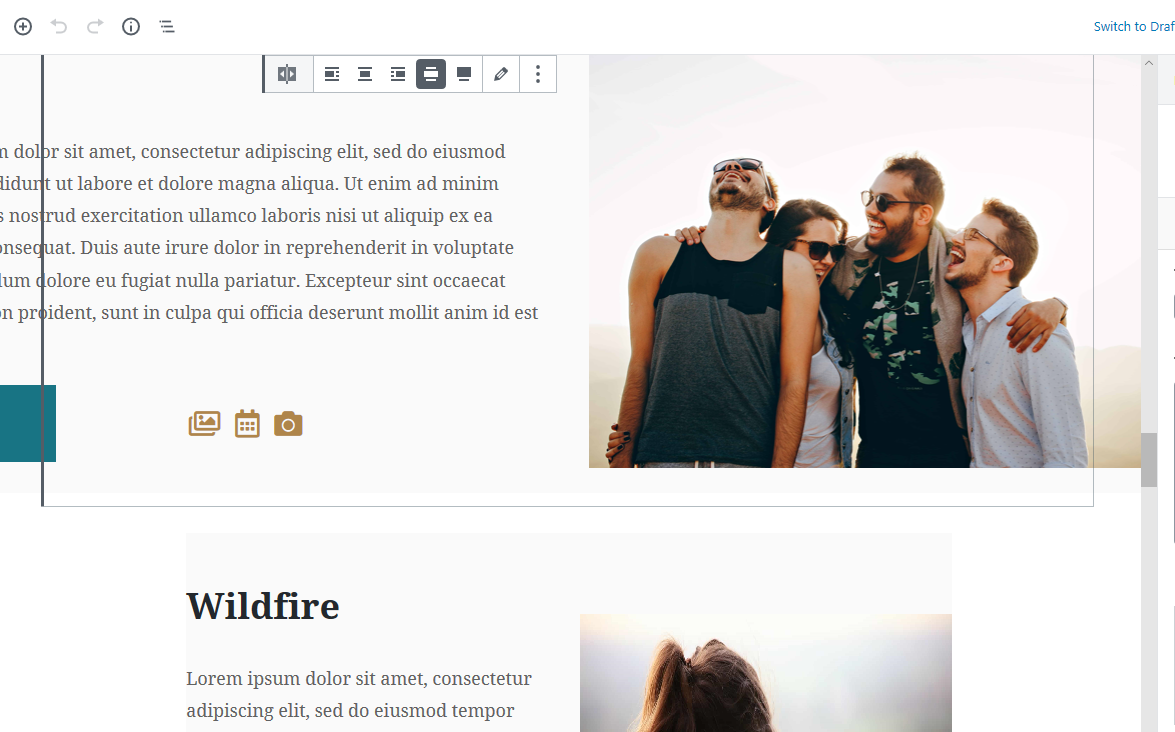
Here’s an example of a sizing issue on the backend of the Youth Ministries – Template page. On my backend view, the plinkos are different sizes and I’m not sure how to get it to view and edit so that it’s all on the page as I’m editing, if that makes sense.
[cid:image001.png@01D5AF65.5B7EEC20]
Cody Armock
Hello Christine,
Great Question! The reason why they are different sizes on the editing page is that the top one is in wide-view/mode (the red box in the picture below). The "Wildfire" plinko is not in wide-view.
The way to edit the plinkos on the editing page so that you don't have to type in the very small document pane/sidebar on the right side of the screen is to click the "Edit Pencil", which is outlined in the blue box in the picture below.
Let me know if this still doesn't fix it.
Cody Armock
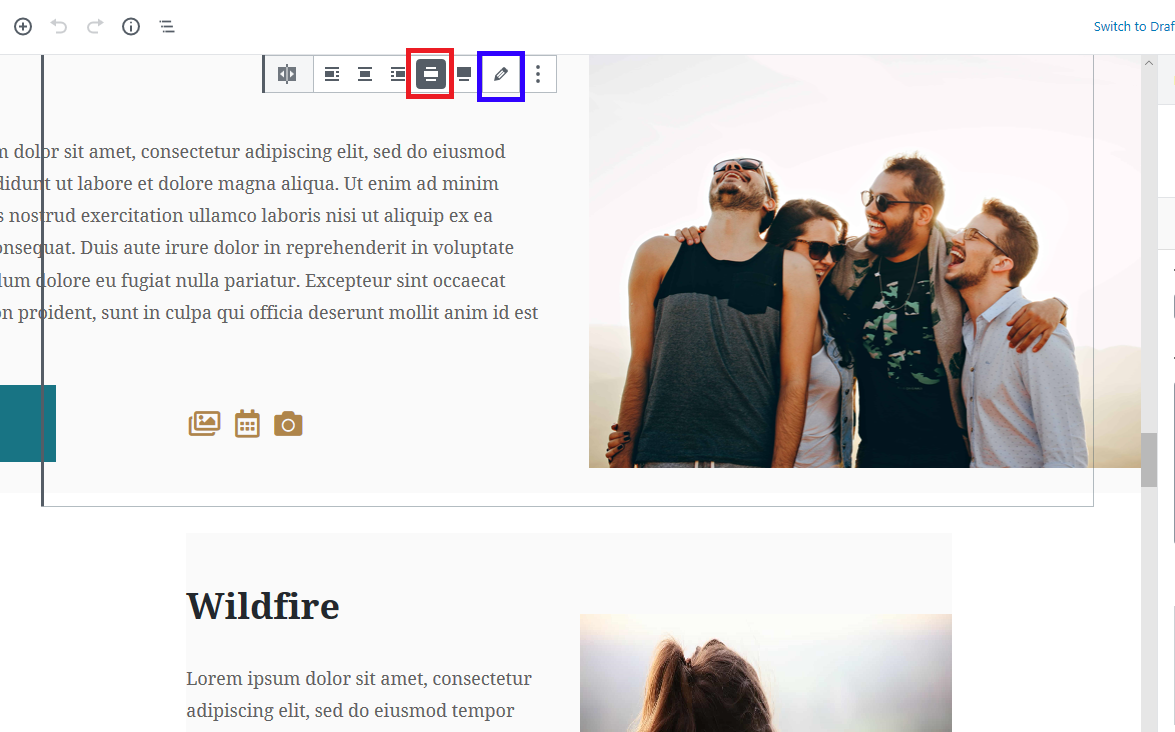
Great Question! The reason why they are different sizes on the editing page is that the top one is in wide-view/mode (the red box in the picture below). The "Wildfire" plinko is not in wide-view.
The way to edit the plinkos on the editing page so that you don't have to type in the very small document pane/sidebar on the right side of the screen is to click the "Edit Pencil", which is outlined in the blue box in the picture below.
Let me know if this still doesn't fix it.
Cody Armock
Christine White
Ah hah! Duh. Thank you!!!
Cody Armock
You're welcome, Christine!
Not a problem!
Not a problem!