To:
Christine White, Dan Roberts, Julie Kreinheder, and Lynn Ramsey
CC our team:
Cody Armock
Good morning everyone,
I have a previously scheduled training that overlaps with yours, so one of our other content specialists, Cody Armock, will be training you today. He migrated over all of your website's content so he is already familiar with how the site functions and how to edit it.
I have cc'd him in this email so that he will be aware of any schedule changes.
Veronica Alvarado
Web Department, Diocesan 877-923-0777
Christine White | 7:33 AM (37 minutes ago) | | to me, Lynn, Dan, Julie
Hi Veronica, I will be checking in with Dan and Lynn a bit later this morning to see if our schedules still allow for the 2-hour training meeting at 10. Given the week's weather situation, holiday and Parish being closed for the last couple days, there may be a backlog. Just wanted to give you a heads up.
Dan and Lynn, if possible it would be great to have the training this morning in Dan's office. Please let me know as soon as you receive this whether that's doable. Please text my mobile phone so that I get your response ASAP. 407.394.7444
To:
Dan Roberts, Julie Kreinheder, and Lynn Ramsey
CC our team:
Cody Armock and Veronica Alvarado
FROM THE CLIENTLynn Ramsey
I am in for it.
To:
Christine White, Dan Roberts, and Julie Kreinheder
CC our team:
Cody Armock and Veronica Alvarado
TO THE CLIENTCody Armock,Web Content Specialist
Hello Everyone,
I am sorry that I did not send this email out yesterday, as I meant to. I was wondering when you would like to schedule our second training on the website. Ideally, you have been able to access the site and experiment with the site: making some pages, posts, uploading media, refamiliarizing yourself with the theme settings and menu areas. That way if there are any questions we can cover them at the beginning of the training.
I know there was some discussion of tomorrow afternoon being a tentative option, does that still work? If that doesn't work or if it is too soon and you haven't had a chance to work on the website as much as you'd like, no judgment here. It can be overwhelming. Just let me know of dates and times that work best for you and we can schedule a time for our next training.
Let me know if you have any questions!
Cody Armock
Web Department, Diocesan 877-923-0777
To:
Christine White, Dan Roberts, Julie Kreinheder, and Lynn Ramsey
CC our team:
Veronica Alvarado
FROM THE CLIENTChristine White,Marketing/Communications Coordinator
Hi Cody, thanks for the reminder. No, we've (at least I've) not yet had a chance to review/revise pages, so tomorrow would not work. I'm thinking/hoping next week, but not yet sure on a date, most likely Wedn or Thurs the 25th or 26th will be likely.
One of the items we'll also want to discuss that day is what we want to use for calendaring: GSuite for Non-Profits or the EMS plugin with Google Calendaring. Dan's reviewing this and I'm hoping he'll have the options outlined for us (internally) by the end of this week or early next so that we can make a decision and get the process rolling with you and the website by next week's call. Thus, his timing will influence when our next training session will be.
As for the items you brought up in your previous email...SEE MY RESPONSES IN CAPS
Questions from Training The Welcome section of the Homepage is currently a slider, it will not slide if you hover over the section though. Would you like us to turn that off, where it will keep sliding even if you hover over it? We can keep it to where if you click one of the tabs, then it will stop the slider. UNLESS ANYONE ON MY TEAM DISAGREES, I THINK WE CAN KEEP IT AS IT IS...A SLIDER THAT STOPS ONCE YOU HOVER OVER IT OR CLICK IT.
The Parish News section is not a slider right now, but there is a to-do for the developer to make it so. GREAT, THANK YOU. SAME TREATMENT AS WHAT YOU'D DO FOR THE WELCOME SECTION.
On the Mass Times page, I have a to-do for the developer about making the Titles for the sections possible links. We will be discussing the possibility of a link within the paragraph text, but at the moment, I am not too sure on the feasibility of it.
I will have the developer add the Office Hours to the Footer.
I will have the developer change the myParish Social Media Icon so that it will only show if there is a link there.
I will be making the homilies for the last two months for the archive, but once I am caught up to this weekend, the Homilies will need to be updated by someone on your team. LYNN/JULIE, WE'LL WANT TO DISCUSS OUR OPTIONS AS TO WITH WHOM THE RESPONSIBILITY WILL GO FOR THE UPDATES, AND OUR EXPECTATIONS OF HOW QUICKLY THAT WOULD HAPPEN (E.G., SAME DAY AS MASS OR NEXT BIZ DAY?)
Lastly, the Staff Page and the format of the Priests and Deacons. Do the Deacons ever preach and if so, are their homilies going to be uploaded to the website? This is will affect how the Staff Page is organized as well as the Homilies. GENERALLY, THE PRIESTS TO THE HOMILIES FOR THEIR MASSES, BUT SOME EXCEPTIONS DO OCCUR. IF SO, WE'D TREAT THIS AS WE LIKELY WILL WITH VISITING PRIESTS AND HAVE AN "OTHER" OPTION (OR WHATEVER WE'RE GOING TO CALL IT) FOR THAT MASS' UPLOAD. ONE EXCEPTION WOULD BE FOR OUR FORMER, RETIRED PRIESTS WHO ARE STILL ACTIVE, E.G., MSGR. ENNIS. FOR NOW, PLEASE HAVE THE 3 CURRENT PRIESTS ON THE TOP LINE, FOLLOWED BY THE FIRST SPOT ON THE NEXT ROW FOR MSGR. WILLIAM ENNIS (RETIRED) AND THEN THE DEACONS. JULIE, DO WE ALSO WANT TO INCLUDE OTHER FORMER PRIESTS WHO ARE STILL ACTIVE IN SOME WAY WITH THE CHURCH? THEY'D ALL BE PART OF PASTORAL STAFF, AND TAKE PRECENDENCE OVER DEACONS.
To:
Dan Roberts, Julie Kreinheder, and Lynn Ramsey
CC our team:
Cody Armock and Veronica Alvarado
TO THE CLIENTCody Armock,Web Content Specialist
Good Afternoon Christine,
That is okay that the training is not tomorrow. There are a lot of parts to the site and it can be a little overwhelming and it does take some time to go over the different parts of it. Just let me know when you find a time/date that works for everyone.
As for the responses, thank you for getting back to me about those. It is nice to see that the solutions we have come up with will be right for the situation. An update to the Staff Page/Homily question, we will be able to make it so that you can choose between a priest or a deacon as the homilist, so it will take from the Staff lists and have a dropdown that will list them all. However, it will not have any visiting priests in the dropdown but will have the ability to add them in.
I have one question regarding the staff page though. If we add Msgr. Ennis to the Staff list, will you still want the three pastors, Pastor, and the two associates, to be on their own line or would you want Msgr. Ennis to be on the same line as the other priests. My idea of how to make the priests be three columns and the others in four was that there would be three categories for Staff: Priests, Deacons, and Administrative. The Priests category would display first, then the Deacons, both of which are under the heading of Pastoral Staff and then under the heading of Administrative Staff would display those in that category.
The reason I ask is uniformity and consistency. The rest of the staff (Deacons and Administrative) displays in four columns (on desktop and most laptops) and having the priests display as two rows of three columns (if the other retired assisting priests are added) produces inconsistency on the page. We can do it either way: having the priests be three columns and then the deacons four columns with Msgr. Ennis as the first one in the "deacon" section or having the three current pastors (Pastor and Associates) on the first row in the first three columns and then Msgr. Ennis in the fourth column. Neither way is wrong and it is up to your preference.
Just let me know what you think and I will let the developer know. I wanted to just give you some ideas to think about. Either way, it will not affect the way that the homilies are done, which is a good thing.
Let me know what you think about the formatting of the Staff Page and when you are ready for the next training.
God Bless,
Cody Armock
Web Department, Diocesan 877-923-0777
To:
Christine White, Dan Roberts, Julie Kreinheder, and Lynn Ramsey
CC our team:
Veronica Alvarado
FROM THE CLIENTChristine White,Marketing/Communications Coordinator
I’ll get back to you on your good questions below, thank you, Cody.
In the meantime, fyi, the banner test video looks great. No issue with “jerkiness”, nice and smooth.
How many of these can we string together so that the banner transitions over the course of a cycle without creating a drag on the loading, etc? Please let us know asap so that Fermin can create the full video for you to replace the test one.
Thanks! C
To:
Dan Roberts, Julie Kreinheder, and Lynn Ramsey
CC our team:
Cody Armock and Veronica Alvarado
TO THE CLIENTCody Armock,Web Content Specialist
Good Afternoon Christine,
Sorry about the delayed response. I am glad to hear that the video is not "Jerky". The banner video should be optimized to the site. It should not be over 30 seconds long and file size should be around 20-40MB. That should give you enough parameters for Fermin to put something together. The file types that are preferred are .webm, .ogg, and .mp4 or .mov for the video.
How is editing the site coming along? Do you have a date and time that would work for everyone for the second training? I am pretty open this week for the second training.
Let me know what you think about training dates and times!
Cody Armock
Web Department, Diocesan 877-923-0777
To:
Christine White, Dan Roberts, Julie Kreinheder, and Lynn Ramsey
CC our team:
Veronica Alvarado
FROM THE CLIENTChristine White,Marketing/Communications Coordinator
Hi Cody – We’re not ready for this week. I’ll be in touch at the end of the week to discuss next week’s timing. Thanks for the info for the banner – FERMIN, please see the information from Cody below…
C
To:
Dan Roberts, Julie Kreinheder, and Lynn Ramsey
CC our team:
Cody Armock and Veronica Alvarado
TO THE CLIENTCody Armock,Web Content Specialist
Hi Christine,
That's more than okay! Thank you for letting me know. I look forward to your email at the end of the week.
Cody Armock
To:
Christine White, Dan Roberts, Julie Kreinheder, and Lynn Ramsey
CC our team:
Veronica Alvarado
FROM THE CLIENTChristine White,Marketing/Communications Coordinator
Hi folks -
Sorry for the delays - we picked one of our busiest times to work on this, but it's moving along. Here's some thoughts on timing moving forward.
* Still waiting on Dan R to update us on best options for an event calendaring tool. He said he'd be doing that early this week. I'd still like to wait for our internal decision on that before next training. Training won't be this week. Hopefully next. I'll get back to you at end of this week with further timeline update. * On the plus side, Lynn and I are working on new site and copy and I'm building "placeholder" pages that I hope will expedite the migration internally. Unless you have other thoughts that would save hours/$, I'd like to try to have Lynn and I do the lion's share of other page migrations and finalize the site map priorities, with you guys handling formatting of the pages into our templates. This gives Lynn and I ample opportunity to work through variations and find best practices based on your first training, and we're keeping a running list of questions/issues that we can address when we next meet. * That said, I have a few Qs at this point and I hope either a quick, scheduled call to me (mobile: 407-394-7444) or an email response would work in the interim. You let me know how best we can address these items. I can pass along the knowledge to the others: * I noticed it's possible to manage Menus in "live preview" mode, which is a great way to see changes in real time w/o going back and forth between backend and frontend - can that be done for managing Pages as well? * I'm wondering if the color of the base copy font is a bit too light, not enough contrast. We'll discuss internally as well, but if we decide it is, can it be easily and uniformly adjusted across the site w/o going page-to-page? * I seem to be having an issue with a change in the look of the hamburger menu - check it out and let me know if you see it as well * Now that I'm adding pages and associating them with other pages as 'parent', 'child', etc. should those also be showing up in the drop-down menu? * I've created some links from copy inside pages to other pages on the site, but the URL is for the development site. Will those automatically update to the real page links once we go live? If not, should I not create links yet? * I'd like to use some of the mockup pages, starting with the CYM page, as a working template and add copy, links, etc. I tried going to it and editing, but it's not allowing me to do so (at least I'm unable to determine how). Is that something you need to do on your end? * Dcn. Spencer Silvers is both a deacon and part of the admin staff. How do we create a page for both, using the background for his deacon page, but just his title and contact info for the admin page? * The "Mass Times & Homilies" page title just says "Homilies" when I click on it. I'm not seeing how to change it - other pages were not an issue to create/change a title. Is that b/c it was from a mock-up? * On the "group ministries" template pages, the default subheading starts with "Our....ministries:" - can we remove this since it may work for other pages we want to use the template for?
To:
Dan Roberts, Julie Kreinheder, and Lynn Ramsey
CC our team:
Cody Armock and Veronica Alvarado
TO THE CLIENTCody Armock,Web Content Specialist
Hello Christine,
Not an issue with the delays. I understand how busy parish life can be.
As for the training time and calendar information, just let me know when you know more and have more of an idea about it. I appreciate the updates so far.
I am glad that you are getting practice with creating pages and jotting down notes and questions as you go. If you have any ones that pertain to many pages or anything, don't hesitate to ask them.
I will answer your questions so far via email, so that there is a written record of them and easier to keep track of my answers with my scattered brain!
Previews If you have a page in draft mode, meaning that you haven't published it yet, you can preview the page. That will open a new tab with what the page will look like on the frontend. Make sure to continue editing the page in the other tab though and not by clicking the Edit Page in the Preview tab. Otherwise, this will create disparities for the page and nobody wants that. You can keep the preview tab open while you are editing the page in the backend. Once you want to preview the page again, click Save Draft by the preview button and refresh the preview page to see your changes.
Base Copy Font Color Adjusting the Base Copy Font color can be done easily and uniformly across the site without having to go from page to page. It can be done in the code and updated across all pages relatively easily. Let me know what you decide.
Menu I checked out the Hamburger menu and have made a to-do for the developer to fix the colors. Not sure what happened to it, but they will be fixed by the end of the week.
Page Associations and Hierarchy Creating parent and child pages will affect how they will appear in the list of all pages and will affect the breadcrumbs. They will not be added to the menu in that order automatically, however. You can add them to the menu in the hierarchical order and search through them by the hierarchy, but it is not automatic.
Development Site Links Once we go live, the urls will change to be that of the live site, so continue to add links. They will be replaced once the site goes live.
Mockup Pages as Working Templates You are able to edit those pages. The first block is in "Preview Mode", but you can edit it either in the Right Sidebar in the Backend or by clicking the Edit Pencil in the Bar at the top of the block. You can toggle between Preview Mode (a screen with an eye in it) and Edit Mode (the pencil). This way, you should be able to edit it. If it is preview mode, you can edit it in the right sidebar pane.
Deacon Spencer Silvers Staff Page Can you clarify what you would like to happen here? Correct me if I am wrong, but if I am understanding you correctly, you want Deacon Spencer to just have one listing in the Staff Module, but want him to be in both the Deacon section and the Admin section? Unfortunately, there is no way to do that. The closest would be to add his Maintenance Coordinator title to his Deacon Staff box. Otherwise, keeping it the way it is now, with two separate staff entries.
Homilies Page This is a special page that is completely Dynamic and as such, its title is not editable directly through the backend. It is only editable in code. I have made a to-do for the developer to change the Page Title to "Mass Times & Homilies".
Group Ministry Template Pages Just so I make the right change, you want to remove the Heading/text "Our....Ministries:" from the Group Ministries Template, so that the Picture buttons will move up slightly. So, just getting rid of that one line of text? We can definitely do that. I just want to make sure for my own sake before I make a to-do for the developer.
I hope that answers all your current questions. If I missed something or you need more clarification, let me know.
Thank you,
Cody Armock
Web Department, Diocesan 877-923-0777
To:
Christine White, Dan Roberts, Julie Kreinheder, and Lynn Ramsey
CC our team:
Veronica Alvarado
FROM THE CLIENTChristine White,Marketing/Communications Coordinator
Hi Cody -
Thanks for the prompt responses! A couple notes below, in RED
To:
Dan Roberts, Julie Kreinheder, and Lynn Ramsey
CC our team:
Cody Armock and Veronica Alvarado
FROM THE CLIENTChristine White,Marketing/Communications Coordinator
Cody -
Your response and my response to earlier email stated:
Page Associations and Hierarchy Creating parent and child pages will affect how they will appear in the list of all pages and will affect the breadcrumbs. They will not be added to the menu in that order automatically, however. You can add them to the menu in the hierarchical order and search through them by the hierarchy, but it is not automatic. I'll ck that out and see if I can figure it out on my own. If not, we'll discuss during training #2
Unfortunately, I'm having issues with seeing my created pages (which I published) in the sidebar menu, so they're not showing up to allow me to add them to the proper hierarchy structure. Any thoughts on why? (go to pgs created by me and you'll notice a bunch that's not visible in the menu option)
To:
Dan Roberts, Julie Kreinheder, and Lynn Ramsey
CC our team:
Cody Armock and Veronica Alvarado
TO THE CLIENTCody Armock,Web Content Specialist
Hello Christine,
Have you tried searching the pages in the Menu or looking through them by View All (page 1 or 2)? Sometimes they will be out of order if there are more than a few children under one parent. Unfortunately, that is a Wordpress issue and not something that we can fix. I did take a couple of random pages and did find them in the View All section of the Menu, so you may want to try that.
Thank you, Cody Armock
To:
Christine White, Dan Roberts, Julie Kreinheder, and Lynn Ramsey
CC our team:
Veronica Alvarado
FROM THE CLIENTChristine White,Marketing/Communications Coordinator
Thanks, Cody. I think I may need some help on this, when we get to that point. There are a few items that may not be where we'd like them and I don't want to screw anything up. Looks like I already did with an "invalid" menu item for the Youth Ministries page. I reclassified the page from "design mockup" to "faith formation" as the parent and it made it invalid.
To:
Dan Roberts, Julie Kreinheder, and Lynn Ramsey
CC our team:
Cody Armock and Veronica Alvarado
TO THE CLIENTCody Armock,Web Content Specialist
Good Morning Christine,
That will happen when moving pages from one parent to the next, since it will mess with the URL, so instead of it being "holyfamilyorlando.diocesanweb.org/design-mockup/youth-ministry", it would be "holyfamilyorlando.diocesanweb.org/faith-formation/youth-ministry". The menu item is a link to that URL and since nothing is there, that is why the error occurred.
In order to fix that, just delete the invalid menu item and add the page again and put it where the other one was. Not too horrible! This is one of the reasons for the suggested sitemap; it makes it easier to make parent/child relationships without creating invalid menu items and redoing work! If things do need to change, it is a relatively simple fix.
I hope that helps! You can't break the site passed the point of being fixed. That is not an invitation or challenge to try, but simply as an affirmation to experiment a little.
Have a blessed day and let me know if you have any other questions!
Cody Armock
To:
Christine White, Dan Roberts, Julie Kreinheder, and Lynn Ramsey
CC our team:
Veronica Alvarado
FROM THE CLIENTChristine White,Marketing/Communications Coordinator
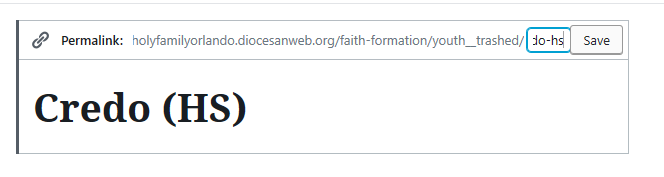
I think I understand how this works now, but still having some issues…In particular, could answer why I’m not able to adjust the permalink URL to what I need? Credo is a good example. It won’t let me remove the “youth_trashed” from the URL and resubmit it in the menu with the correct URL [cid:image001.png@01D57919.5587E3D0]
To:
Dan Roberts, Julie Kreinheder, and Lynn Ramsey
CC our team:
Cody Armock and Veronica Alvarado
TO THE CLIENTCody Armock,Web Content Specialist
Hello Christine,
Great question! The reason why you cannot change the "youth_trashed" part of the slug or URL is that that part of the URL comes from the parent page. The URL can give you glimpses into seeing the hierarchy of the site. I can tell from that URL that the Faith Formation Page is the Parent for what used to be the Youth Ministry page before it was put into the trash and I can tell that the Youth Ministry Page is the parent page for Credo (HS).
The way to change that URL would be to either switch the parent page for Credo (HS) to an active page (one that is not in the trash) or to go to the trash and restore the Youth Ministry page. Either way will fix the issue, it just depends on if you want that Youth Ministry page or not, which I would assume you didn't since it was trashed. So switching the parent page for Credo (HS) would probably be the best solution. After that, you should be able to add it to the menu without any problems.
Let me know if any of that was unclear or you need any more clarification!
Thank you,
Cody Armock
To:
Christine White, Dan Roberts, Julie Kreinheder, and Lynn Ramsey
CC our team:
Veronica Alvarado
FROM THE CLIENTChristine White,Marketing/Communications Coordinator
Thank you! As a matter of fact, I kind of thought it might be something like that so I was able to move another page into the correct area ☺ . However, Credo seems to still be an issue and I think it’s because there’s 2 Youth Ministries pages, one under Faith Formation (which should be the primary placement) and one under Get Involved>Faith Formation>… Seems that when we migrated, I was unclear where it headed, or more likely, we didn’t have a primary page set up yet to accommodate. I think I’ll want to walk thru these types of changes with you personally so I have a stronger idea on menu architecture and making sure there are no dupe pages out there that can cause issues. May I call later today or is there a better time to chat with you? Or should we just wait until we’re ready for next training? I’m ok at this point to leave as is, short-term.
To:
Dan Roberts, Julie Kreinheder, and Lynn Ramsey
CC our team:
Cody Armock and Veronica Alvarado
TO THE CLIENTCody Armock,Web Content Specialist
Hello Christine,
A call would be fine or if you want to do it during the next training, either one would be fine. I am here until 4pm EST today, so any time before that would be great. I am also available anytime tomorrow 9am-11:30am and 1pm-4pm EST, if that works better for you.
Let me know what you would prefer!
Cody Armock
Web Department, Diocesan 877-923-0777
To:
Christine White, Dan Roberts, Julie Kreinheder, and Lynn Ramsey
CC our team:
Veronica Alvarado
FROM THE CLIENTChristine White,Marketing/Communications Coordinator
Still working on page building/migration but will have an update for you next week.
In the meantime, is it possible to insert a slide show onto a page? Had the request come up and didn't know the answer. Don't need to know how just yet - save for training if it's possible.
To:
Dan Roberts, Julie Kreinheder, and Lynn Ramsey
CC our team:
Cody Armock and Veronica Alvarado
TO THE CLIENTCody Armock,Web Content Specialist
Hello Christine,
What do you mean by a slideshow exactly? Would it be of just pictures or would it need to have text as well? There is something called Envira Gallery, that we will cover in the second training.
Envira galleries have the ability to make slideshows when an image is clicked, so the user can slide through the photos. There is not a way to add text to the image without it already being on the image. The simple answer is yes, but it depends on what you want to do. I hope that makes sense.
I will go more in-depth in our next training about Envira Galleries and if desired, the possible pitfalls of sliders.
Let me know if you have any other questions! Have a blessed weekend,
Cody Armock Web Department, Diocesan 877-923-0777
To:
Christine White, Dan Roberts, Julie Kreinheder, and Lynn Ramsey
CC our team:
Veronica Alvarado
FROM THE CLIENTChristine White,Marketing/Communications Coordinator
Excellent. That's a good start to the answer and good news, even with qualifiers. Looking forward to learning more later
To:
Dan Roberts, Julie Kreinheder, and Lynn Ramsey
CC our team:
Cody Armock and Veronica Alvarado
TO THE CLIENTCody Armock,Web Content Specialist
I am glad that you understood my answer, even with all the qualifiers. It depends on what you are trying to accomplish with the slider, but Envira Gallery should do most, if not all, of what you would normally need for a slideshow while making your pictures look good. We will discuss it further in the second training.
Have a great weekend, Cody Armock
To:
Christine White, Dan Roberts, Julie Kreinheder, and Lynn Ramsey
CC our team:
Veronica Alvarado
TO THE CLIENTCody Armock,Web Content Specialist
Hello Everyone,
I was wondering if you had an idea of when would be a good time for the second training! Either next week or the week following perhaps. I just don't want things getting lost in the shuffle or to lose some of the learning from the first training session.
Let me know what days and times work for you!
Have a wonderful weekend,
Cody Armock
To:
Christine White, Dan Roberts, Julie Kreinheder, and Lynn Ramsey
CC our team:
Veronica Alvarado
FROM THE CLIENTLynn Ramsey
Week following would be best for me. I’m on vacation next week.
To:
Christine White, Dan Roberts, and Julie Kreinheder
CC our team:
Cody Armock and Veronica Alvarado
FROM THE CLIENTChristine White,Marketing/Communications Coordinator
Hi Cody – Sorry we haven’t been in touch. Trying to prepare for a big event next week and it’s been challenging. Lynn is on vaca next week but my thoughts were leaning to Thursday, Oct 24, late morning. Let us know your avails. How much time do you think we’ll need for the next training – another 2 hours?. I’ll need to check with Dan. Also, next week, Dan and Julie and I will meet on the events calendar issue and hopefully we can roll that into the training.
In the meantime, I’m figuring things out as I go for the most part – this week’s been slow to get back into it, but next week I should have lots more free time to concentrate.
To:
Dan Roberts, Julie Kreinheder, and Lynn Ramsey
CC our team:
Cody Armock and Veronica Alvarado
TO THE CLIENTCody Armock,Web Content Specialist
Hello Christine,
I have a training the 24th starting at 2pm, and it would probably be about 1.5 - 2 hours long for the second training, depending on the number of questions and things like that, but I could do 10am or 11am on the 24th if that would work for you.
Let me know, otherwise, we could do the following week if necessary.
Thank you, Cody Armock
To:
Christine White, Dan Roberts, Julie Kreinheder, and Lynn Ramsey
CC our team:
Veronica Alvarado
FROM THE CLIENTChristine White,Marketing/Communications Coordinator
Let’s try for Oct 24 from 10-12 eastern. I’ll let you know if there’s any issue requiring postponing and thanks again for your patience. C
To:
Dan Roberts, Julie Kreinheder, and Lynn Ramsey
CC our team:
Cody Armock and Veronica Alvarado
TO THE CLIENTCody Armock,Web Content Specialist
Thank you for the quick reply, Christine.
I will set it up for then and thank you for letting me know if something does arise between now and then.
Have a great weekend,
Cody Armock
To:
Christine White, Dan Roberts, Julie Kreinheder, and Lynn Ramsey
CC our team:
Veronica Alvarado
FROM THE CLIENTChristine White,Marketing/Communications Coordinator
Cody – Sorry once again to do this, but we’re not ready for a final training. So no session for Thursday the 24th. I’ll be in touch later this week or early next with more updates and hopefully a better timeline. C
To:
Dan Roberts, Julie Kreinheder, and Lynn Ramsey
CC our team:
Cody Armock and Veronica Alvarado
TO THE CLIENTCody Armock,Web Content Specialist
Hello Christine,
That is fine. Just let me know when you are ready and we can set it up for then!
Cody Armock
To:
Christine White, Dan Roberts, Julie Kreinheder, and Lynn Ramsey
CC our team:
Veronica Alvarado
FROM THE CLIENTLynn Ramsey
Cody,
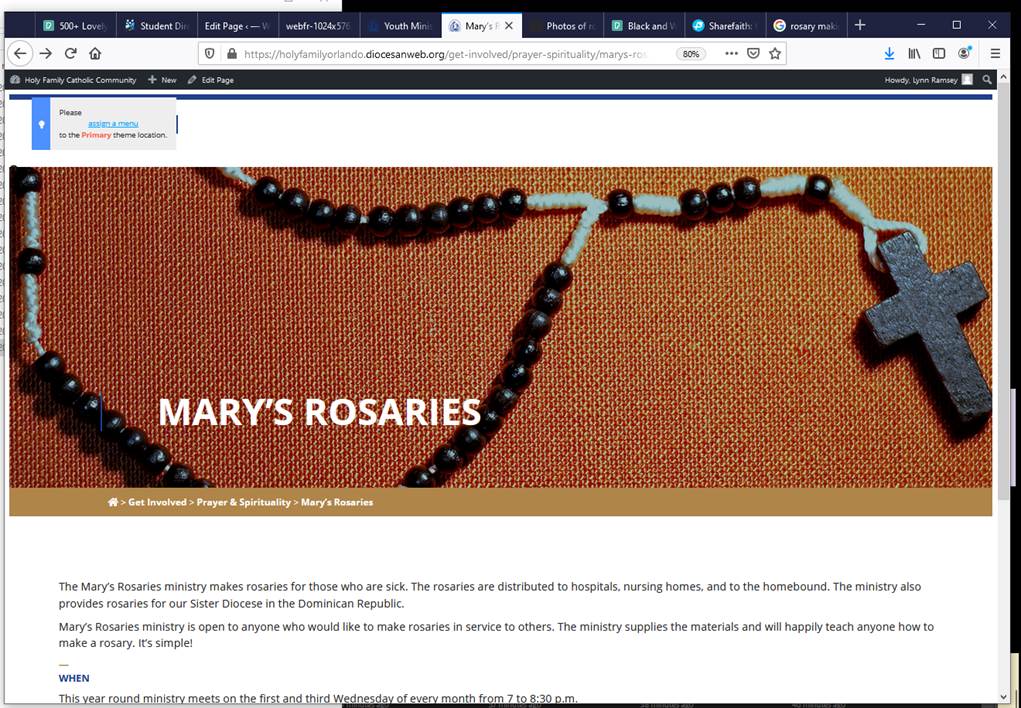
In the process of changing banner pics on my pages, I just started getting a message “Please Assign a Menu to the Primary theme location.” I’m not sure how that happened or how to fix it.
Please assist. I’d like to know what I did wrong and how to fix it.
This page was the second one I ran into with this problem. First one is Get Involved > Prayer & Spirituality > Marian Movement of Priests.
To:
Christine White, Dan Roberts, and Julie Kreinheder
CC our team:
Cody Armock and Veronica Alvarado
FROM THE CLIENTLynn Ramsey
Cody,
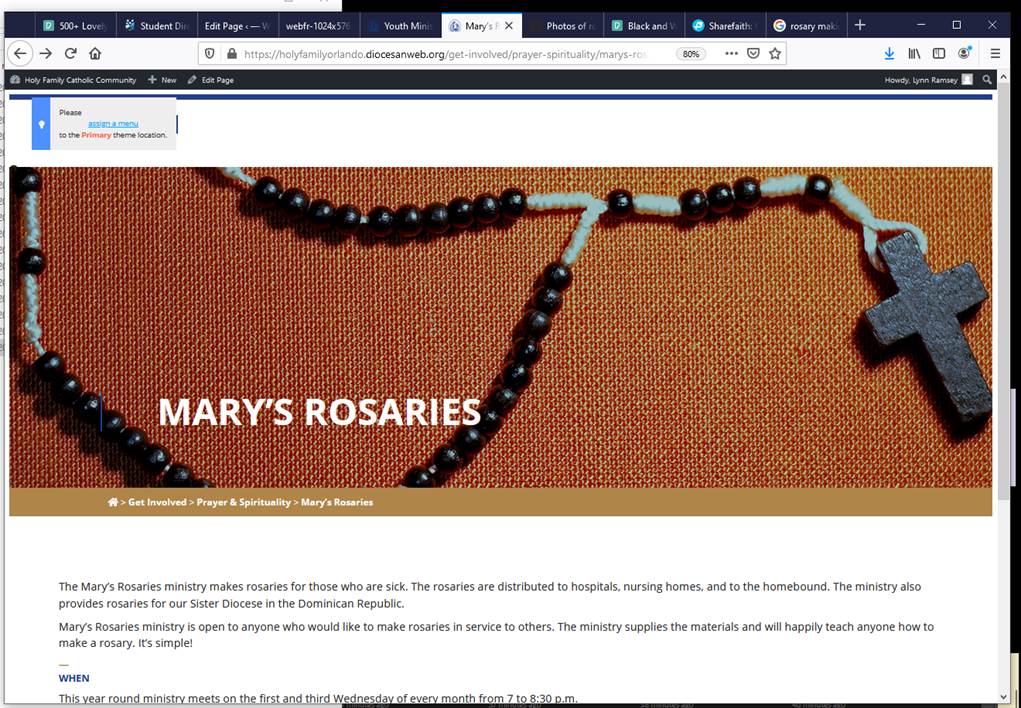
In the process of changing banner pics on my pages, I just started getting a message “Please Assign a Menu to the Primary theme location.” I’m not sure how that happened or how to fix it.
Please assist. I’d like to know what I did wrong and how to fix it.
This page was the second one I ran into with this problem. First one is Get Involved > Prayer & Spirituality > Marian Movement of Priests.
To:
Christine White, Dan Roberts, and Julie Kreinheder
CC our team:
Cody Armock and Veronica Alvarado
TO THE CLIENTCody Armock,Web Content Specialist
Hello Lynn,
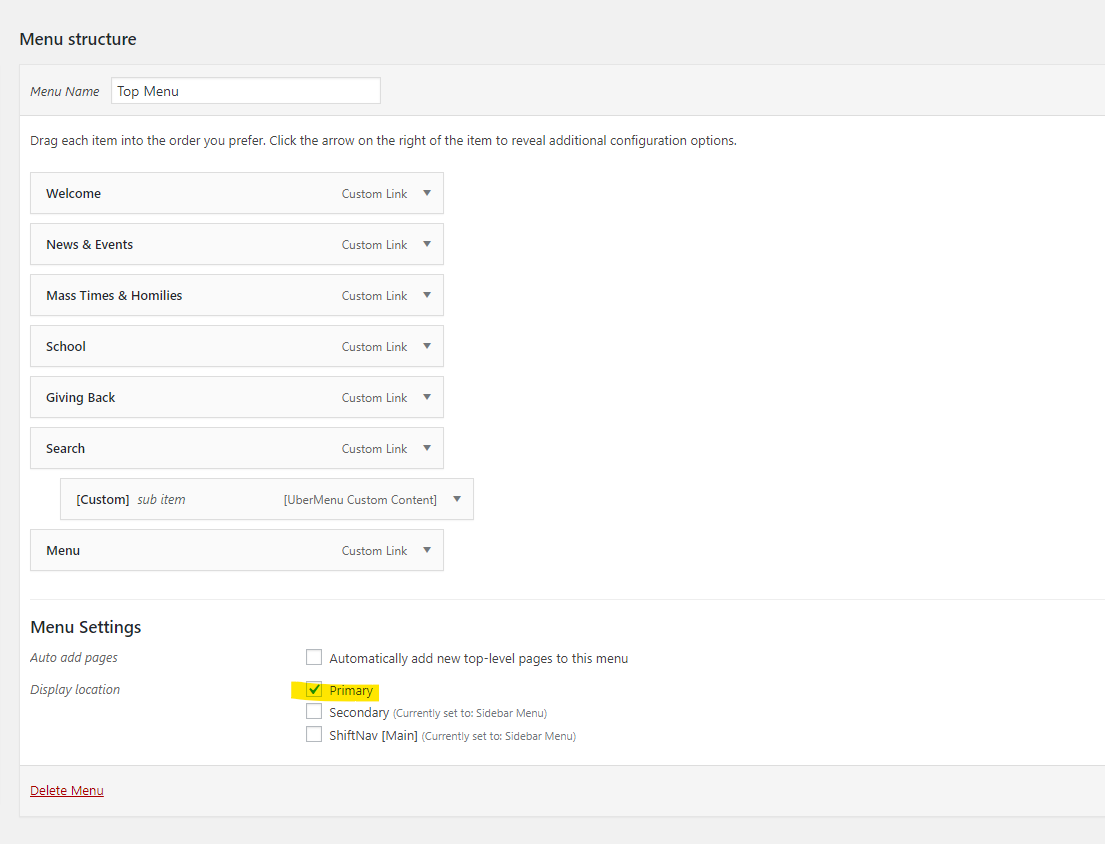
Under Appearance > Menus, I made the Top Menu Assigned to the Primary Location (Screenshot below). For whatever reason, it became unchecked, so all I had to do was check it. The Sidebar Menu is assigned to the Secondary and ShiftNav Menu Locations, so things should be set now.
I tried using the HTML editor. When I saved the page, it did not save or display. When I clicked “preview” on in the backend of the system, it said it could not find the page. I tested the link outside of WordPress, and the page is good.
What do I need to do?
Yours in Christ,
Lynn
To:
Christine White, Dan Roberts, and Julie Kreinheder
I tried using the HTML editor. When I saved the page, it did not save or display. When I clicked “preview” on in the backend of the system, it said it could not find the page. I tested the link outside of WordPress, and the page is good.
What do I need to do?
Yours in Christ,
Lynn
To:
Christine White, Dan Roberts, and Julie Kreinheder
CC our team:
Cody Armock and Veronica Alvarado
TO THE CLIENTCody Armock,Web Content Specialist
Hello Lynn,
I have looked into your issue and part of it was that your role did not have permissions to input HTML, so that has been changed. Additionally, I don't know why but the quotation marks around the source were off for some reason, so I replaced those and that worked.
Moreover, it is best practice with WordPress to put figure tags around iFrames and I added some HTML to make it responsive and make the iFrame just as big as it needs to be instead of having it as 100%, which caused it to line up in the middle and be different from the rest of the content on the page. In the end, the code looked something like this:
The figure tag is just a container for the iFrame and can be styled out, so I have the max-height it can go as 80% of the screen's (viewport) height and the max-width of the iFrame being 90% of the screen's (viewport) width, that makes it responsive. I set the iFrames dimensions as 500x600px which is just slightly bigger the image with it is getting from formed.org. This may need to change if that Pick of the Week box changes. Frameborder and border:0 just eliminate the border around the iFrame.
The problem should be fixed now and it displays correctly with the given content it is pulling.
Let me know if you have any questions!
Cody Armock
To:
Christine White, Dan Roberts, Julie Kreinheder, and Lynn Ramsey
CC our team:
Veronica Alvarado
FROM THE CLIENTLynn Ramsey
Cody,
Thank you for this fix.
Yours in Christ,
Lynn
To:
Christine White, Dan Roberts, and Julie Kreinheder












 Veronica Alvarado
 Christine White
 Lynn Ramsey
 Cody Armock