Congratulations, your new website is now live and visible to the world!
I'm still not seeing the live site. Why is that? The industry standard for launch changes to propagate is 0-72 hours. However, it's been my experience that you can usually see these changes within 2 hours. You will know it was successful when visiting https://epiphanycathedral.org/ brings up the site seen here:
If you can see the website on a computer or mobile device not using your parish's internet, it may be that your parish's internal server needs to be reset or may have the IP address of your previous host manually set up. If this is the case, you will have to talk to your IT person, as this is not something Diocesan can help with.
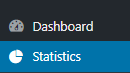
New Login Page Although you will now go to https://epiphanycathedral.org/venice to log in, your login credentials are still the same. Statistics Since your website is now live, we have also added the ability to track your website's statistics. Feel free to view the statistics by clicking Statistics. This will give you access to see what devices are being used, how people are finding your website and your top pages/link.
Support Moving Forward As you may have noticed, on your WordPress Dashboard, there is a Diocesan Web Support box with links to help articles that we have written especially for our websites, complete with step-by-step instructions and images. This should help with most of the questions that you may have.
You do also have another 2 weeks from your launch date to call and ask us any questions for free. After those 2 weeks, the paid support will go into effect. Paid support is $70/hr (prorated) and is billed monthly to the parish with each support items (date, amount of time, notes) itemized out.
If you have any issues or questions in the future, please email us at webdepartment@diocesan.com or call us at 877-923-0777.
Canceling Previous Website Host Launching your website DOES NOT cancel your previous web hosting service. Diocesan does, however, suggest that you do not cancel your previous web hosting service until at least 2 business days after your new website launches.
NOTE: Some website hosting companies may package website hosting and domain hosting/renewal together. If this is true for you, you may want to consider transferring your domain over to Diocesan. You may begin this process by emailing us at webdepartment@diocesan.com or calling 877-923-0777.
Other Resources Just in case we didn’t mention it in the training, here are some resources for free, stock images to use throughout your website:
Please let me know if you have any questions and, again, congratulations!
Mary Goeldel Support/Web Department 877-923-0777
FROM THE CLIENTColeen Curlet,Communications Director
Hi Mary,
The mobile version of the website does not have some of the items that show when you look at the website on a computer. I have left a phone message for Cody to call us as we have other questions as well.
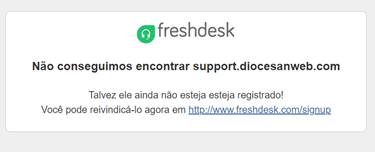
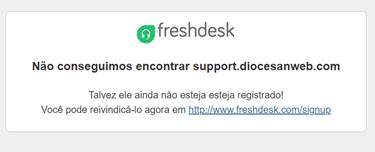
Also, the Popular Help Articles and Knowledgebase Topics are not working, so we cannot access them for help. We get the following error:
My biggest concern right now is the livestream masses button is not showing on the mobile so people cannot access the daily mass on their phones/tablets. Hopefully this can be remedied quickly.
Please advise when the help sections will be available. Thank you.
FROM THE CLIENTColeen Curlet,Communications Director
Hi Mary,
The mobile version of the website does not have some of the items that show when you look at the website on a computer. I have left a phone message for Cody to call us as we have other questions as well.
Also, the Popular Help Articles and Knowledgebase Topics are not working, so we cannot access them for help. We get the following error:
My biggest concern right now is the livestream masses button is not showing on the mobile so people cannot access the daily mass on their phones/tablets. Hopefully this can be remedied quickly.
Please advise when the help sections will be available. Thank you.
Hello, Coleen - Yes, I'm so sorry, the helpdesk area is currently not working, but we are working to rebuild it as quickly as we can. In the meantime, we can email some of the articles to you as needed, or I'm available through the support email account to help with questions: webdepartment@diocesan.com
I know Cody had a training this afternoon so he may not have listened to the message just yet - I can take a look and see where we are at with the livestream button.
Thank you,
Mary Support/Web Department 877-923-0777
To:
Coleen Curlet
CC our team:
Cody Armock
TO THE CLIENTMary Goeldel
Hello, again - I spoke with the developer and he said he'd work on adjusting some of the font sizes as his next task - it looks like the homepage text is pushing the button down into the four dots for the slides on the homepage, but it is there - it's just further down than it should be because of the larger text on the hero image. He'll get that adjusted as quickly as he can, and Cody said he'd give you a call back first thing in the morning as his training is running later than expected.
My android phone - A larger android shows this: So I think it's only affecting certain phones - I'm sure that's an easy fix, not to worry!
Thank you,
Mary
To:
Coleen Curlet
CC our team:
Cody Armock
FROM THE CLIENTColeen Curlet,Communications Director
Hi Mary
Thank you for getting back to me so quickly. Can you let the developer know my iPhone 7 still doesn’t show the button. The four dots are there but the only thing showing is the 4 blue boxes of the menu Our Parish, Our School, Youth and Ministries. Even if I turn the phone horizontally it still doesn’t show. However, when I changed the phone Display settings from Zoom to Standard then I was able to see the button. I am just concerned that our older population of parishioners might have their phones on Zoom Display settings as well in which case we will have some frustration. Now that I know the fix, I can alert the front office in case they get any calls.
I look forward to speaking with Cody today to help us with the other items.
Coleen
To: Cody Armock and Mary Goeldel
TO THE CLIENTCody Armock,Web Content Specialist
Hello Coleen,
I have been struggling to reach the office and the receptionist number keeps going to voicemail. Do you know your extension at the parish from the parish phone? Your 941-616-0292 number cannot be completed as dialed.
Cody Armock
Web Department, Diocesan
877-923-0777
To:
Coleen Curlet
CC our team:
Mary Goeldel
FROM THE CLIENTColeen Curlet,Communications Director
Hi Cody – My phone is 941-615-0292 - not 616 – Cheryl and I are both here and able to talk
To: Cody Armock and Mary Goeldel
FROM THE CLIENTColeen Curlet,Communications Director
FROM THE CLIENTColeen Curlet,Communications Director
Cody – I cant see anything in this google drive? We are looking for the second training video. Can you send that?
To: Cody Armock and Mary Goeldel
TO THE CLIENTCody Armock,Web Content Specialist
Good Morning Coleen,
Sorry about that! We went in and cleared out some of the videos to create space through Google Drive. You will be able to download it. It should be available through that link in a few moments once it is done uploading.












 Coleen Curlet
 Mary Goeldel


 Cody Armock