












Post Dates
Good Afternoon Coleen,
Turns out switching the Dates on Posts to not required breaks the ordering of the posts on the homepage and in the category archive. I didn't notice because there was only that one post. However, would you like us to fix it before or after the launch of the site?
Also, I sent an email earlier regarding the business manager's decision on that matter, but I have not heard back. We would need to know by tomorrow at 8am at the latest, otherwise, we would need to push the launch to next week Tuesday (Monday being a holiday) at the earliest, since we keep another day of us in the office after the day of launch to answer questions.
Let me know how you'd like to proceed with the Post reordering (before or after launch) and the launch of the site!
Thank you,
Cody Armock
Web Department, Diocesan
877-923-0777
 Coleen Curlet
Cody – I apologize for just getting back to you – there have been some necessary interruptions….so yes, please launch on Tuesday 2/16. We are still cleaning up a few items and also need to figure out how to add the important special collection information that is currently on our website.
 Cody Armock
Hello Coleen,
I will have the developer fix that post date issue today and then we should be ready for launch on our end. I have added the special collection page, you will have to replace the documents and pdfs and things but that shouldn't be too much trouble. Here is the link for that page: https://venicecathedral.diocesanweb.org/special-collection/
Let me know if you have any questions!
Cody Armock
I will have the developer fix that post date issue today and then we should be ready for launch on our end. I have added the special collection page, you will have to replace the documents and pdfs and things but that shouldn't be too much trouble. Here is the link for that page: https://venicecathedral.diocesanweb.org/special-collection/
Let me know if you have any questions!
Cody Armock
Web Department, Diocesan
877-923-0777
Cody Armock
Good Morning Coleen,
I got word that you tried to call! Unfortunately, when I tried calling back, the number you left with Beth as well as the rest of the numbers at the Church kept saying "Call Rejected" and the line would hang up.
I am not sure what the issue the call was about, so I am not sure how to proceed! My number to be reached for this instance only is 616-752-9550.
Cody Armock
I got word that you tried to call! Unfortunately, when I tried calling back, the number you left with Beth as well as the rest of the numbers at the Church kept saying "Call Rejected" and the line would hang up.
I am not sure what the issue the call was about, so I am not sure how to proceed! My number to be reached for this instance only is 616-752-9550.
Cody Armock
Web Department, Diocesan
877-923-0777
Coleen Curlet
Hi Cody
I left you a message and my direct line is 941-616-0292. I will be out of office 11:30-12:45 then again from 1:30-2:30 but I am here until 4:00 pm.
Here are the items I need help with.
Will website still be www.ephiphanycathedral.org<http://www.ephiphanycathedral.org>
Special collection page not showing under Donate (I tried to make Donate the parent page) but the special collection page is not showing
Calendar not right – not adding items – we tried to add an item to 2/14 (Happy Valentines day) when we were on our call the other day – it did not update
Parish News page – showing upcoming events incorrectly - it is not showing current calendar items ( can that be deleted or somehow linked to the correct calendar)
My Parish app news/messages are not ours – they are messages from another church – can this be hidden/deleted? We are not using the app very much so maybe just leave it that they can sign up for the app?
Delete Youth Calendar page under news and calendars – this youth calendar is not correct and we do not have a youth calendar at the moment so can this be deleted?
Thanks for your help! 😊
Coleen
I left you a message and my direct line is 941-616-0292. I will be out of office 11:30-12:45 then again from 1:30-2:30 but I am here until 4:00 pm.
Here are the items I need help with.
Will website still be www.ephiphanycathedral.org<http://www.ephiphanycathedral.org>
Special collection page not showing under Donate (I tried to make Donate the parent page) but the special collection page is not showing
Calendar not right – not adding items – we tried to add an item to 2/14 (Happy Valentines day) when we were on our call the other day – it did not update
Parish News page – showing upcoming events incorrectly - it is not showing current calendar items ( can that be deleted or somehow linked to the correct calendar)
My Parish app news/messages are not ours – they are messages from another church – can this be hidden/deleted? We are not using the app very much so maybe just leave it that they can sign up for the app?
Delete Youth Calendar page under news and calendars – this youth calendar is not correct and we do not have a youth calendar at the moment so can this be deleted?
Thanks for your help! 😊
Coleen
Cody Armock
Hello Coleen,
Looks like we are playing phone tag. I will try calling after 12:45 and hopefully that should work, but I will do my best to answer now.
Looks like we are playing phone tag. I will try calling after 12:45 and hopefully that should work, but I will do my best to answer now.
- Website will still be launched and active at epiphanycathedral.org and will take the place of the temp site
- Special collection page needs to be added under Donate in the Menus area of the backend. To get there go to Appearance > Menus and then add that page.
- I am looking into a fix for the calendar issue. It looks like the link that was made when the calendar was shared only shows the events that were made. (Here is a link that you could follow and if I have the Outlook ics link, we could try it again, another event would have to be added after creating that link to test it again.
- I have updated the calendar for the Upcoming Events section of the news page. I wanted to make sure that the calendar was working before updating the others, but it will look correct for now until we can find a more permanent solution.
- I have removed the messages from the MPA and have left the link to go to the main myParish App page.
- To remove the youth calendar, you can either delete the page entirely by moving it to trash or you can remove it from the menu from under the News & Events main menu item. Again Appearance > Menus then find the Youth Calendar menu item and click the dropdown arrow and click the remove. Save Menu and it will be taken off.
I hope that helps and I will keep looking into the calendar issue!
Cody Armock
Cody Armock
Web Department, Diocesan
877-923-0777
Cody Armock
Also, for the Parish Calendar, can you please make sure that the Valentine's day event was added to the correct calendar. I am not even seeing it populated for the Outlook calendar itself, which it should theoretically be done by now.
Cody Armock
Cody Armock
Web Department, Diocesan
877-923-0777
Coleen Curlet
Cody – see Cheryl response below – she added to the wrong calendar and has re-done it. As of right now not showing on webpage but I will check later after my meeting. Also a question I forgot to ask:
We have a video (large file 654 MB) that we would like to put on the Planned/Legacy Giving page but it says only 100 MB can be uploaded in the media library. Is there a way to compress the file or link it somehow? The video (Epiphany Legacy Video) is on the school website (www.ecstigers.com<http://www.ecstigers.com>) and is using Vimeo.
We have a video (large file 654 MB) that we would like to put on the Planned/Legacy Giving page but it says only 100 MB can be uploaded in the media library. Is there a way to compress the file or link it somehow? The video (Epiphany Legacy Video) is on the school website (www.ecstigers.com<http://www.ecstigers.com>) and is using Vimeo.
Cody Armock
Hello Coleen,
I cannot see Cheryl's response, Basecamp often has a hard time with forward messages and things of that nature, but I think it is working now!
I have manually refreshed the calendar on the website (normally done automatically every 2 hours) and now the Valentine's day event shows up, so I think it should be working correctly now.
There is also a Vimeo block available in the Block Editor, so I just got the link for the Vimeo video from the school and added that link to the Vimeo block and now it is showing on the Planned/Legacy Giving page. That way it does not take up any space on the website and will just pull from the Vimeo link!
Thank you,
Cody Armock
I cannot see Cheryl's response, Basecamp often has a hard time with forward messages and things of that nature, but I think it is working now!
I have manually refreshed the calendar on the website (normally done automatically every 2 hours) and now the Valentine's day event shows up, so I think it should be working correctly now.
There is also a Vimeo block available in the Block Editor, so I just got the link for the Vimeo video from the school and added that link to the Vimeo block and now it is showing on the Planned/Legacy Giving page. That way it does not take up any space on the website and will just pull from the Vimeo link!
Thank you,
Cody Armock
Web Department, Diocesan
877-923-0777
Coleen Curlet
Hi Cody,
Thank you for fixing the calendar and linking the video, much appreciated. There is one more place the calendar is pulling from the old calendar on the home page under Upcoming Events the link to see the calendar is correct, but the four boxes of this week events are incorrect as they are from old calendar link. I can’t figure out how to make them link to the new calendar.
Cheryl is going to take another look over the weekend, but we feel like we are ready to have it launched on Tuesday.
Thank you for sharing your talents and help in getting this long overdue project completed.
Coleen
[cid:image001.jpg@01D70151.B11B63E0]
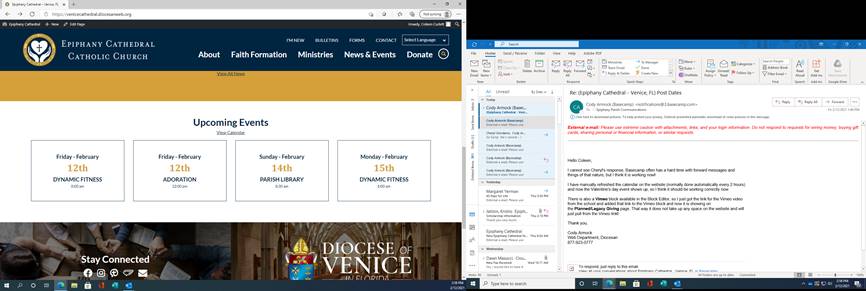
Thank you for fixing the calendar and linking the video, much appreciated. There is one more place the calendar is pulling from the old calendar on the home page under Upcoming Events the link to see the calendar is correct, but the four boxes of this week events are incorrect as they are from old calendar link. I can’t figure out how to make them link to the new calendar.
Cheryl is going to take another look over the weekend, but we feel like we are ready to have it launched on Tuesday.
Thank you for sharing your talents and help in getting this long overdue project completed.
Coleen
[cid:image001.jpg@01D70151.B11B63E0]
Cody Armock
Hello Coleen,
I have updated the homepage calendar! Everything should be good to go now.
Have a great weekend!
Cody Armock
I have updated the homepage calendar! Everything should be good to go now.
Have a great weekend!
Cody Armock
Web Department, Diocesan
877-923-0777
Cody Armock
Hello Coleen,
So as the developer has been going through and trying to fix the Post Date issue, it turns out that in this case we cannot have our cake and eat it too. Posts must either always have set dates or not. I would recommend not having a date as that can often be a point of confusion for users and for posts with a date you can just add this in the first paragraph so it appears in the excerpt.
Let me know which way you would like to go and I will have the developer change it accordingly!
Cody Armock
So as the developer has been going through and trying to fix the Post Date issue, it turns out that in this case we cannot have our cake and eat it too. Posts must either always have set dates or not. I would recommend not having a date as that can often be a point of confusion for users and for posts with a date you can just add this in the first paragraph so it appears in the excerpt.
Let me know which way you would like to go and I will have the developer change it accordingly!
Cody Armock
Web Department, Diocesan
877-923-0777