












First Training Session
Hi Joni,
I just sent over your new user account information with some resources that may be helpful as you begin to edit the websites, especially with how pages will use the Gutenberg block editor.
Here is a link to my calendar busy/free times so that you may pick a 2-hour slot for next week, Tuesday-Friday:
https://calendar.google.com/calendar/embed?src=valvarado%40diocesan.com&ctz=America%2FDetroit&mode=week
Let me know what day and time works best for you and I will add it to my calendar and send over the Zoom information.
Thank you,
Let me know what day and time works best for you and I will add it to my calendar and send over the Zoom information.
Thank you,
Veronica Alvarado
Project Manager, Web Department
877-923-0777
 Joni Scott - LEAVE OFF EMAILS
I’m in. Thank you. I need to delete two documents from the temporary page (not the development page), but it’s not allowing me. These are coming up in google searches and causing confusion. Can you help me get rid of them, please?
[cid:image001.png@01D6249E.B2876A20]
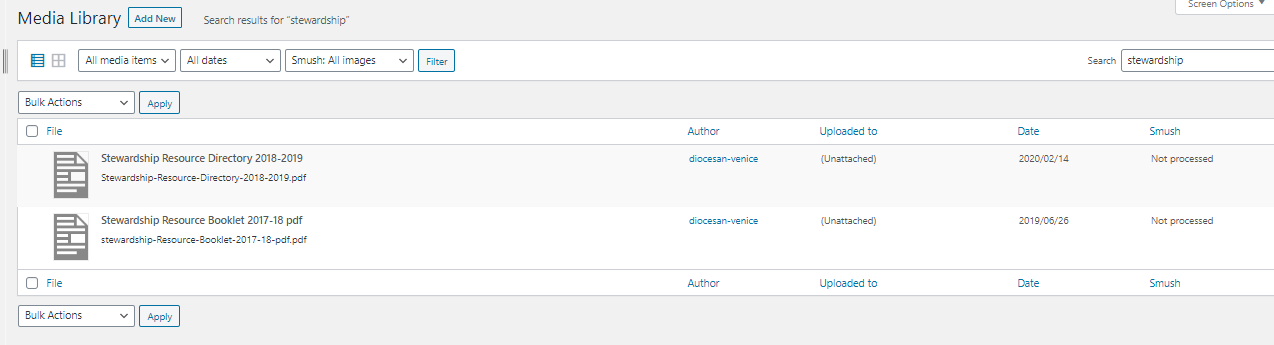
[cid:image001.png@01D6249E.B2876A20]
 Veronica Alvarado
Hi Joni,
You should be able to hover over the file and remove it or click on the file and then click the red Delete Permanently button.
I logged in and was unable to find it.
I've got a training for the next hour but can look further into this afterwards.
Thank you,
Veronica Alvarado
Project Manager, Web Department
877-923-0777
Joni Scott - LEAVE OFF EMAILS
For some reason that doesn't work. I have deleted other files so I know what you're referring to, but not this time.
There's a note to the side that says the file is unattached. I removed the button from the front page yesterday, does that have anything to do with it?
Joni Scott
Epiphany Cathedral
941.484.3505
There's a note to the side that says the file is unattached. I removed the button from the front page yesterday, does that have anything to do with it?
Joni Scott
Epiphany Cathedral
941.484.3505
Joni Scott - LEAVE OFF EMAILS
Joni Scott - LEAVE OFF EMAILS
Joni Scott - LEAVE OFF EMAILS