













Catholic Charities Central Florida - Orlando, FL

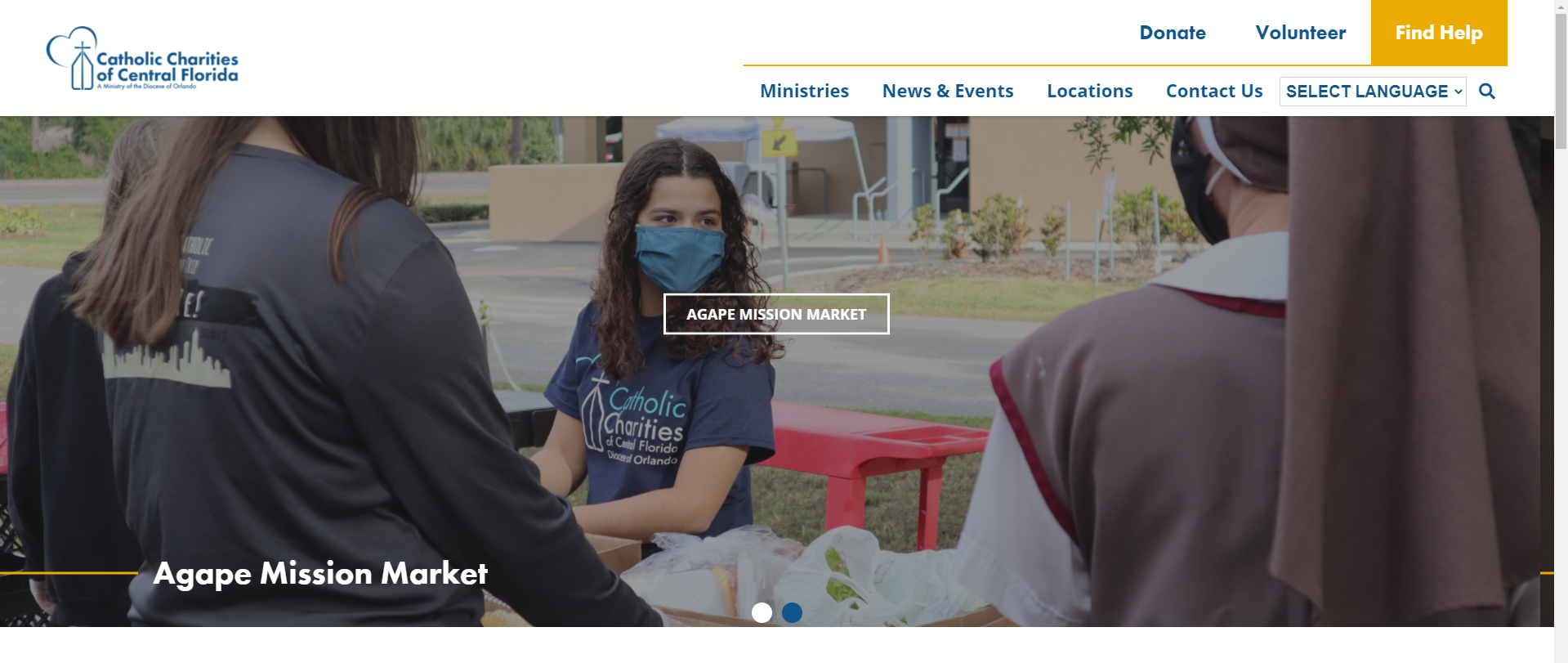
Homepage - Hero Slider image spillover

Assigned to
Ryan Ross, Developer at Diocesan Ryan R.
Notes
Part of the next slider image is showing on the current. You can even see part of the line on the right side.
Comments & Events

Ryan Ross, Developer at Diocesan
When did you take this screenshot?  I removed the button earlier this week.

Now that I check the site again, many of my adjustments aren't reflecting, like the ministries slider arrows and gradient on home page.  I checked off a handful of to-dos Monday and Tuesday.

Who is making changes to the site without first downloading the existing files?

Sam Pohlman, Web Developer at Diocesan Sam Kyle Sullivan, Web Development at Diocesan Kyle  @marcus 
Kyle Sullivan, Web Development at Diocesan
I haven't touched this site and neither has Marcus. Maybe Sam Pohlman, Web Developer at Diocesan Sam did something?
Ryan Ross, Developer at Diocesan
themes/DPI_Child_Theme/library/css/custom.css was updated this morning at 8:59am.

I haven't made any changes since Tuesday (off yesterday and today).
Kyle Sullivan, Web Development at Diocesan
I'm not sure exactly how this site is built, but it looks like it updates custom.css every time ACF fields are updated on the Options Page.
Ryan Ross, Developer at Diocesan
Well, that sure is disappointing.  No problem with writing settings/styles to a stylesheet but boy it sure adds unnecessary confusion and complexity when you don't put a comment in the file saying it's auto generated and combine that with putting it in a theme folder instead of wp-content/uploads.

I'll restore my changes tomorrow when I'm back on the clock and figure out how to save my changes and fix the things in custom.css that need to be fixed.
Kyle Sullivan, Web Development at Diocesan
You should be able to make the fixes in custom.php. That's what gets compiled into custom.css.

I like your idea of adding a comment about custom.css being generated automatically, though. And putting that in `wp-content/uploads` is probably a better approach as well.
Ryan Ross, Developer at Diocesan 👏
Ryan Ross, Developer at Diocesan
Thank you Kyle Sullivan, Web Development at Diocesan Kyle for solving the custom.css mystery, and locating where custom.php was stashed.

Just a quick summary for everyone, this theme has a custom.php file that acts as the template for the CSS file.  It's located in /library/scss/sass/variables-site/custom.php.  When Theme Options (ACF Fields) are updated/saved, the theme rebuilds the custom.css file located in /library/css/custom.css with the latest fields settings.

I've since added comments at the top of custom.php which now show in custom.css alerting the developer to this fact, and that changes cannot be made directly to the CSS file.

Side note, this is another instance where hex2rgb function is helpful as Sam Pohlman, Web Developer at Diocesan Sam  mentioned in a meeting, since the CSS needed some colors in RGBA form for IE support (like the footer overlay) and the HEX return value from ACF wouldn't work.
Kyle Sullivan, Web Development at Diocesan 👏
Ryan Ross, Developer at Diocesan
Ryan Ross completed this to-do.
