Simply let me know. Until then, I hope you enjoy your holiday!
Veronica Alvarado
Web Department, Diocesan 877-923-0777
FROM THE CLIENTMelissa Zuk
Hi Veronica,
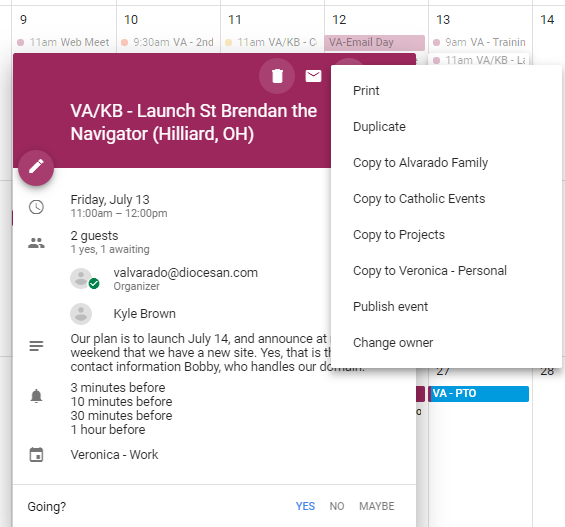
Our plan is to launch July 14, and announce at masses that weekend that we have a new site. Yes, that is the correct contact information Bobby, who handles our domain.
Where are we on finishing rolling over content? I noticed this morning that there were still a few things missing (staff page, Adult Faith Formation). Do you need help to finish moving over the last bit of content? Just let me know!
I think it would be helpful if we set up an additional training just for Tom and I (the only ones who have full access to the site) to go over just a few additional aspects. I’m thinking mostly calendars, PDS integration, social media integration, and how to add bulletins. Would next Tuesday be possible for this?
will be doing a lot of work with the site today and tomorrow to update header photos, check content, etc. Let me know if there’s anything else you need help with, or any other questions you have!
Thanks again for all of the work you’re doing. We love the site so far and I know it will serve us much better going forward. You and your team have been great!
I have finished moving over all the content. I realized that I forgot to add Adult Faith Formation to the menu, so I have added that. As for staff, I was waiting until we had finished styling the Meet Our Staff page, but I have added it to the menu as well so that we do not forget before launch.
As for the second training, I will be in a meeting from 11am-2pm and have a prior engagement at 2:45pm. Would you be available Tuesday at 8:30 or 9am?
Also I am so glad that everything is looking good. If you have any questions, please do not hesitate to ask, or write them down and we can discuss them at our second training.
I hope your Fourth of July went well,
Veronica Alvarado
Web Department, Diocesan 877-923-0777
To:
Melissa Zuk
FROM THE CLIENTMelissa Zuk
Great! I will check about 9 AM, but I could definitely do 9:30. I don’t think it should take more than an hour, hour and a half since it’s just those few things, but let me know if you think differently!
I think the only immediate need we have is that several of my staff have logged in and they don’t have access to any pages yet. Is this still in progress, or is there something I need to do to give them access to the right pages?
I think that seems like a reasonable amount of time. Just let me know what time works best for you.
The members I added should have been assigned authors of specific pages. That means that when they go to Pages, they will automatically see the list of Mine pages, or if they see all, they will only be able to edit pages they are the author of.
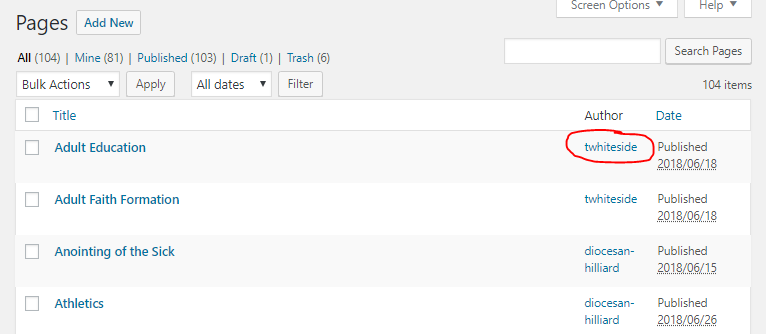
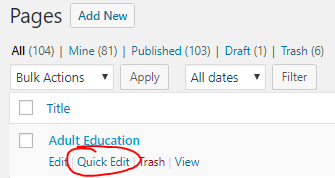
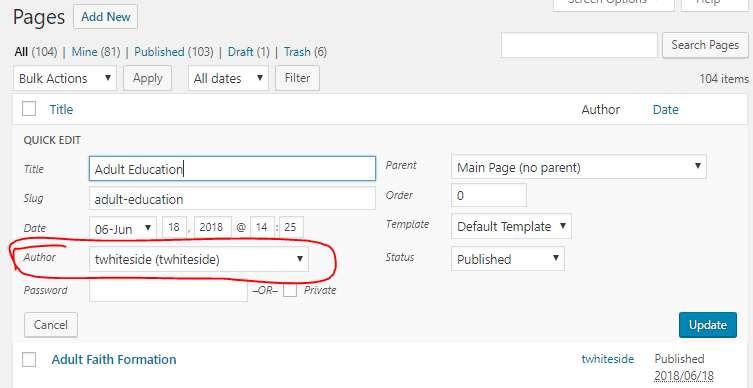
Here is how to determine who is an author of a page and how to assign pages:
Who is Author?
Each page can have one author and is denoted by visiting the list of all pages and looking under Author.
Let’s go with 9:30 then, since I know 100% that will be possible.
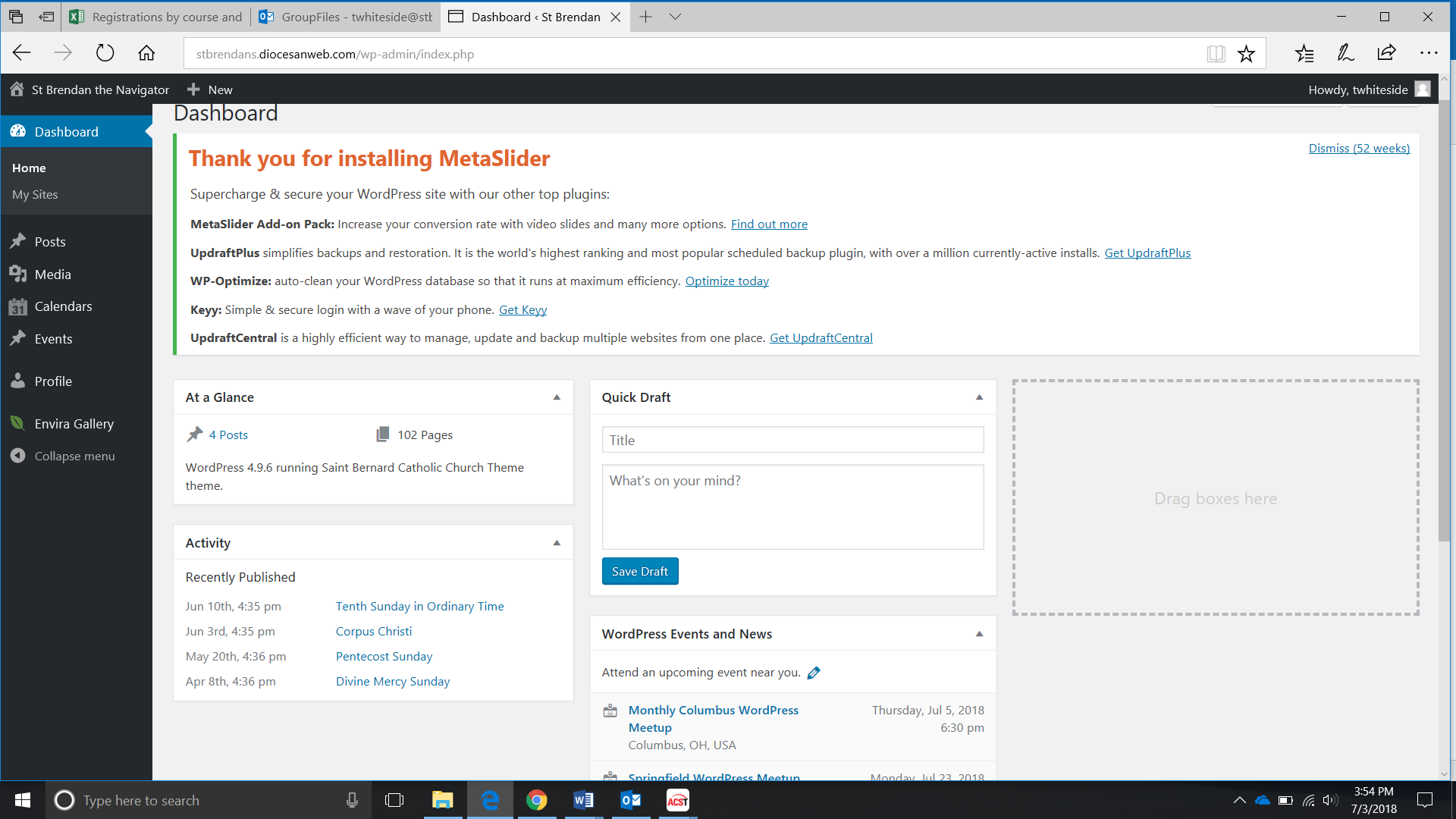
The two staff members that have emailed me about it so far don’t seem to have access to the Pages tab. One of them sent me the attached screenshot. Do I just need to assign them pages, or is that something that needs fixed elsewhere?
That time sounds perfect. I have added it to my calendar.
As for the people, could you tell me which users? My guess is that if their role is set to author, but they are not assigned to any pages, then Pages will not show up for them.
If we need to change them from Author to editor (can edit all pages), please let me know and I can quickly do so.
Thank you,
Veronica Alvarado
Web Department, Diocesan 877-923-0777
To:
Melissa Zuk
FROM THE CLIENTMelissa Zuk
Great! Tuesday at 9:30 AM it is.
The users were Teresa Whiteside and Jennifer Rice. I see that they do have pages now assigned to them (not sure if they did before today or not), so I’ll ask them to check again, then I’ll let you know if we need to change their permissions.
Unfortunately, Wordpress does not have a solution for this. I asked our other developers and the only solution we could find would take several development hours to implement and even then does not always work.
As I mentioned before, we can set either Jennifer Rice or Teresa Whiteside to editor so that they can edit all pages and save edits. For the most part, we see most parishes simply pick a single author per page (with the other person sending the author their edits, if any).
Sorry there is not a better way to handle this,
Veronica Alvarado
Web Department, Diocesan 877-923-0777
To:
Melissa Zuk
FROM THE CLIENTMelissa Zuk
Hi Veronica,
I think we can manage with only having one author. However, I checked with my team and it seems that none of them can see the pages tab, even though they are all assigned at least one page. What else might be the issue?
I have purchased and installed the Google Calendar color-coordinating add-on. In order to have the colors appear correctly, you will need to follow the steps designated below.
One important thing to understand is that the colors will correspond with the event colors that the Google account used to set up has them set as. So if it is your account, please be sure you have access to the PDS calendar, Roots, Vine & any other calendar you are using on the website. Then the website will reflect the colors you use for each separate calendar.
I realize that this may be very confusing for you, so if you would like, I can log into the appropriate account and do it for you. I have created API's for other websites/plugins, but I have simply never had to log into the corresponding account. I don't know what level of privacy you preferred.
Let me know,
Veronica Alvarado
Web Department, Diocesan 877-923-0777
To:
Melissa Zuk
TO THE CLIENTVeronica Alvarado,Project Manager
Additionally, I have downloaded and installed the Staff plugin. You may begin adding staff under "Team Members' below pages. I have activated it on both the school and the parish side of the website. Here is the documentation on how to add people & change settings: http://docs.themescode.com/tc-team-members-pro/
I am about to leave the office, but feel free to send me an email and I will get back to you as soon as I can.
Thank you,
Veronica Alvarado
Web Department, Diocesan 877-923-0777
To:
Melissa Zuk
FROM THE CLIENTMelissa Zuk
Hi Veronica,
I have added all of our team members, but I noticed the page is showing up pretty funky… It appears it is trying to do rows of 4 instead of 3. How can we fix this?
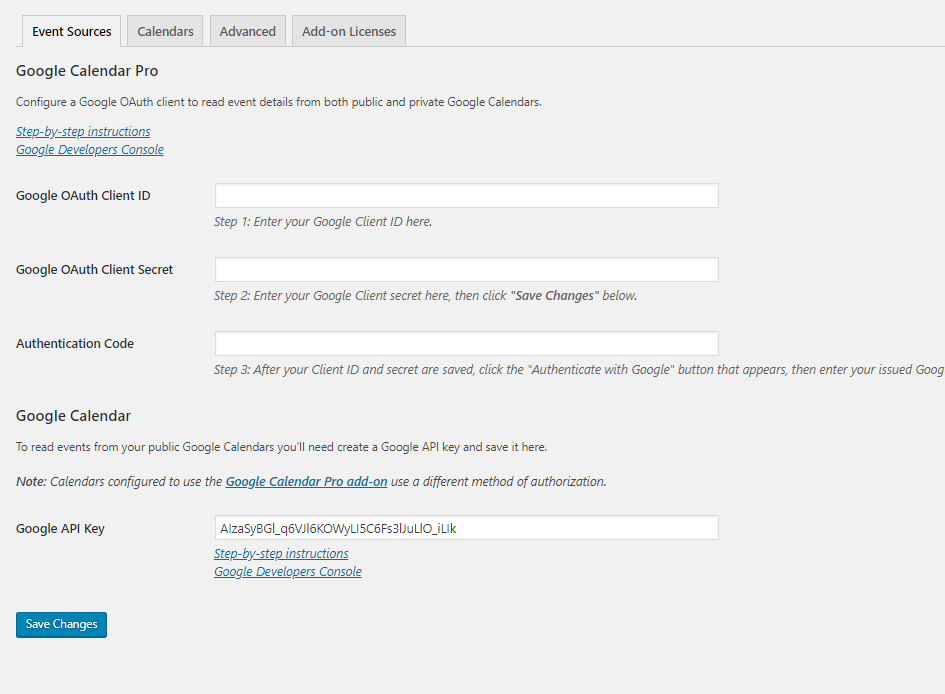
I created the OAuth client ID and secret, but I don’t see where to enter them in WordPress. Could you help me out? I can send you the codes if that’s easier.
Sorry for the delay, I just got out of back-to-back meetings.
For the calendar, you should see a place to enter them under Calendars > Settings. If not, here is the information I need you to activate the Pro version:
As for the staff, it seems to be doing this whenever the position/titles are longer than two lines. I can get Kyle to take a look at it and give each staff member's "area" more padding.
Additionally, it looks like the confession times & adoration times are going to be something that will have to wait until Monday for Kyle to implement. They turned out to be something that is a little bit more difficult than anticipated.
It will be post-launch, but it will be up and working by end of day, Monday.
Thank you,
Veronica Alvarado
Web Department, Diocesan 877-923-0777
To:
Melissa Zuk
FROM THE CLIENTMelissa Zuk
Hi Veronica,
For the Calendars, the “settings” option isn’t there. How do I activate the pro version?
Here is the info for the form: Client ID: 724904432894-ru018ja4gq3tv3qsaan697k4rbgdfue9.apps.googleusercontent.com
Client Secret: 82s4JmJTe3jJSVAaCq76oriY
I understand about the Confession & Adoration Times. Monday will be fine. Let me know if you have any other questions or issues.
There are still some tweaks I had talked about initially with Kevin and then with Kyle in the first training that I don’t see yet implemented (namely a spot for the Daily Readings, Saint of the Day to pull in). I have a document of other, small tweaks that I think need to be made on your end (spacing issues, etc.) I realize that not all of these will be fixed for the launch, but would you like me to go ahead and send you the doc? Or would you rather have a call and go over them? Just let me know what works best for you!
The settings are automatically hidden for anyone who is not a development administrator, so I am going to briefly change your role to a development administrator. You will now see settings under calendars.
As for the list of small changes, yes, please send them our way!
Thank you,
Veronica Alvarado
Web Department, Diocesan 877-923-0777
To:
Melissa Zuk
FROM THE CLIENTMelissa Zuk
Thanks! I will let you know when I am done with the calendar.
I have attached our list of tweaks here. Let me know if you need clarification on any of them! Also, I am happy to take care of any of them myself if you can tell me how.
Thank you so much for all of your hard work! I know this has been a large, fast, complicated project, and your hard work is really appreciated.
I have added the codes for Google Calendar Pro, so you should be good to remove me as a development admin now. However, I went into the Parish Calendar to click the option to include colors, and now none of the events are showing up on that page! Can you help me figure out what’s wrong? http://stbrendans.diocesanweb.com/calendar/
Sorry to be so needy on this! Thank you SO MUCH for all of your help!
As I am going through and looking at the various settings, I'm thinking that the colors show up on individual calendars, but the "grouped calendar." So the only way to display the multiple colors is to copy each event to a single calendar.
If this is not going to be helpful, we can "return" the plugin. There is a 30-day guarantee.
I'm sorry it isn't working out as planned,
Veronica Alvarado
Web Department, Diocesan 877-923-0777
To:
Melissa Zuk
TO THE CLIENTVeronica Alvarado,Project Manager
Melissa,
I went through the plugin's forums and found out that there are only two options:
Put multiple Google calendars onto one and all be same color
Have one Google calendar with different colors.
If you want a color coded calendar, you can copy events from the individual calendars to the single calendar. I feel like what we wanted to do is something common, so I'm surprised it does not work as we had hoped.
Sorry I didn't get back to you sooner. I ended up having an emergency and had to leave work at about 1 pm on Friday.
I see that you have gotten the Google Analytics code put into the website. The calendar is also set up, but there was not a way to create the color coordinated events. Did you want to return the color coded version of the plugin or do the alternative of having 1 Google calendar with everything on it (color coded) and copy the events to the individual Google calendars (so they display on individual pages)?
Let me know what you think.
Thank you,
Veronica Alvarado
Web Department, Diocesan 877-923-0777
To:
Melissa Zuk
FROM THE CLIENTMelissa Zuk
Would it work if I import the events into the google calendar twice? Once to the separate calendars and once to the main calendar? That way we could still have different events show up on different pages, but also have the events all color coded on one master calendar?
Also, one of my staff members has been having issues logging in. Teresa Whiteside couldn’t log in on Saturday, so she requested a password reset email and still hasn’t gotten it. Can you help us figure this out?
Yes, you can most definitely add it to two calendars. In fact, with Google Calendar, you can simply click on the event, click the 3 dots and "Copy to ___" in order to copy to each individual calendar.
As for resetting passwords, I believe it is her email that is stopping the message from receiving. Meaning the email server is seeing the wordpress@stbrendans.net email as spam and blocks the password reset email. One solution that has worked in the past is adding "wordpress@stbrendans.net" as a contact, so that it will not be blocked in the future.
For now, Teresa may add the email as a contact and try to reset her password again, or send me what she would like her password to be changed to.
Let me know if you'd like to quickly run through copying events to calendars.
Veronica Alvarado
Web Department, Diocesan 877-923-0777
To:
Melissa Zuk
FROM THE CLIENTMelissa Zuk
Okay, I sent the info along to Teresa. I’ll let you know if that works or not.
As for the calendars, since I’m importing most of these from PDS, I thought it would be easier to just do a bulk export twice… once to the separate calendars and once all to the master calendar. Thoughts?
From PDS, yes, I believe that would be the easiest way to do things. If they are already in their own calendars, then they should be able to come through and feed into both individual calendars, and a group calendar, assuming PDS allows for it.
Veronica Alvarado
Web Department, Diocesan 877-923-0777
To:
Melissa Zuk
FROM THE CLIENTMelissa Zuk
Hi Veronica,
I just wanted to check and see how the updates are going. I’ve noticed quite a few things have been fixed! But I also see that not all of them are. Do you need any clarity from me?
On another note, I just got word from our School principal that he now wants the school homepage to more closely mirror the parish homepage… This would involve:
* Removing the video/contact info section * Adding 3 buttons below the registration info, similar to how we have 6 buttons below Mass Times on the parish site * Adding a calendar section (they already have a school calendar set up) * Adding the school’s Instagram feed as shown on the original school mockup * Making footer links visible (we already added them in settings)
Also, they would like the staff page to function more like the parish’s, so that when you click on the photo a short bio can appear.
Is this possible?
Again, please let me know if you need any clarification or have any questions!
Kyle has been making the requested changes to your website when he gets the chance. Many parishes are trying to launch August 1, so he has been busy trying to get them ready for launch. Regardless, he has most definitely not forgotten about your changes. I know for a fact that some of them simply turned out to be more difficult that previously anticipated. Here is a link to the list of items and our changes.
Also, for your FlockNote sign up, where are you wanting to put it, exactly? Below the mission as another button, below the mission as a fillable form, etc? We have the link (https://app.flocknote.com/navigator) but will need your login information in order to embed the sign up as a fillable form.
I have added and moved the school's contacts to use Team Members. The other changes requested are most definitely doable, although removing video/contact, adding upcoming events and the 3 boxes will add development time and change the overall cost of the project. The Instagram feed and footer links will not be included in the extra cost, since they were included in the initial design and are not new changes.
Would you like us to go ahead and implement the school's changes?
Veronica Alvarado
Web Department, Diocesan 877-923-0777
To:
Melissa Zuk
CC our team:
Kyle Brown
FROM THE CLIENTMelissa Zuk
Thanks so much for the follow up, Veronica!
We would like to put the Flocknote below the mission as another button, please.
I understand about the changes to the school site. Please go ahead and proceed.
Do you want this button to go below the More About Us button or beside it (to the right)? Similar to the More About Us button, you will be able to edit the homepage to add the second button.
Also, I have added to-dos for Kyle concerning the School's site.
Thank you,
Veronica Alvarado
Web Department, Diocesan 877-923-0777
To:
Melissa Zuk
CC our team:
Kyle Brown
FROM THE CLIENTMelissa Zuk
Hi Veronica,
It should go below the mission section.
Also, I see on the doc link you sent that the daily readings and saint of the day have been added, but I’m not sure where those are populating. Would you mind pointing it out to me?
I have added the to-do for the the second Mission button. As for the Daily Readings and Saint of the Day, the pages can be found in the parish's list of All Pages. They are automatically fed into by an RSS Feed-to-Post generator that uses USCCB (Readings), Diocesan (Inspiration), and Franciscan Media (Saint). Here are the direct pages that do not currently appear anywhere in your menu, as it is up to you to decide where they belong. (For example, you may just want to link to them from your Grow Your Faith>Resources page)













 Melissa Zuk

 Veronica Alvarado