












St Brendan the Navigator Website Developer
Hello Melissa,
My name is Kyle, and I am the web developer that will be building your website! I've already begun working hard on building the site based on the designs you approved, and I will keep you updated on the progress as I go.
When the site is functional and can be shown, I will send you a link to the site in progress so you can take a look around, see how the site works, and decide if you have any quick updates or changes you would like to make. Around that time, Veronica will also reach out to schedule a training so that you can familiarize yourself with the backend of the site and learn how to add or change content.
Let me know if you have any questions about this process!
-Kyle Brown
My name is Kyle, and I am the web developer that will be building your website! I've already begun working hard on building the site based on the designs you approved, and I will keep you updated on the progress as I go.
When the site is functional and can be shown, I will send you a link to the site in progress so you can take a look around, see how the site works, and decide if you have any quick updates or changes you would like to make. Around that time, Veronica will also reach out to schedule a training so that you can familiarize yourself with the backend of the site and learn how to add or change content.
Let me know if you have any questions about this process!
-Kyle Brown
 Melissa Zuk
Hi Kyle,
This all sounds great! I’m looking forward to seeing our new site!!
Thanks for all of your hard work.
Melissa Zuk
Marketing & Communications Coordinator
p: 614.876.1272 ex 221
e: mzuk@stbrendans.net<mailto:mzuk@stbrendans.net>
[cid:image001.png@01D3CD1B.FFE75C80]

This all sounds great! I’m looking forward to seeing our new site!!
Thanks for all of your hard work.
Melissa Zuk
Marketing & Communications Coordinator
p: 614.876.1272 ex 221
e: mzuk@stbrendans.net<mailto:mzuk@stbrendans.net>
[cid:image001.png@01D3CD1B.FFE75C80]
Melissa Zuk
Hi Kyle!
Thanks so much for a great training today. All of my staff feels pretty comfortable with the site, so I think we should be good to go for them! Thanks for doing such a good job.
I have attached a list of all of the staff that will need acess to the site, and which parts they will need access to. Please also give them all the ability to create forms, because we use online forms a lot. Let me know if you have any questions about who needs access to what!
Lastly, I know we talked about setting up a time to talk about our calendars, what needs integrated and how that will all work. I’m typically in the office on Tuesdays and Wednesdays, but I can make another day work especially with the upcoming holiday next week.
Let me know if you have any other questions or concerns!
Thanks,
Melissa Zuk
Marketing & Communications Coordinator
p: 614.876.1272 ex 221
e: mzuk@stbrendans.net<mailto:mzuk@stbrendans.net>
[cid:image001.png@01D3CD1B.FFE75C80]

Thanks so much for a great training today. All of my staff feels pretty comfortable with the site, so I think we should be good to go for them! Thanks for doing such a good job.
I have attached a list of all of the staff that will need acess to the site, and which parts they will need access to. Please also give them all the ability to create forms, because we use online forms a lot. Let me know if you have any questions about who needs access to what!
Lastly, I know we talked about setting up a time to talk about our calendars, what needs integrated and how that will all work. I’m typically in the office on Tuesdays and Wednesdays, but I can make another day work especially with the upcoming holiday next week.
Let me know if you have any other questions or concerns!
Thanks,
Melissa Zuk
Marketing & Communications Coordinator
p: 614.876.1272 ex 221
e: mzuk@stbrendans.net<mailto:mzuk@stbrendans.net>
[cid:image001.png@01D3CD1B.FFE75C80]
 Melissa Zuk
Hi Kyle,
Here are the files to add the PDS registration form to our website. They should go on our “Become a Member page” in place of the Request a Packet form.
Please let me know if you have any questions!
Melissa Zuk
Marketing & Communications Coordinator
p: 614.876.1272 ex 221
e: mzuk@stbrendans.net<mailto:mzuk@stbrendans.net>
[cid:image001.png@01D3CD1B.FFE75C80]

Here are the files to add the PDS registration form to our website. They should go on our “Become a Member page” in place of the Request a Packet form.
Please let me know if you have any questions!
Melissa Zuk
Marketing & Communications Coordinator
p: 614.876.1272 ex 221
e: mzuk@stbrendans.net<mailto:mzuk@stbrendans.net>
[cid:image001.png@01D3CD1B.FFE75C80]



 Melissa Zuk
We have some formatting issues with our site, especially on mobile.
Firstly, the home page buttons (below Mass Times) appear fine on my phone, but apparently they are formatting strangely on tablets. See the attached screenshot. Maybe we need to make those stack in rows of 2 on tablets?
Secondly, on mobile devices, the 2-column format (such as on the Get Involved pages) gets too narrow and very hard to read. Can we make those stack on mobile instead of displaying side-by-side?
Thank you,
Melissa Zuk
Marketing & Communications Coordinator
p: 614.876.1272 ex 221
e: mzuk@stbrendans.net<mailto:mzuk@stbrendans.net>
[cid:image001.png@01D3CD1B.FFE75C80]


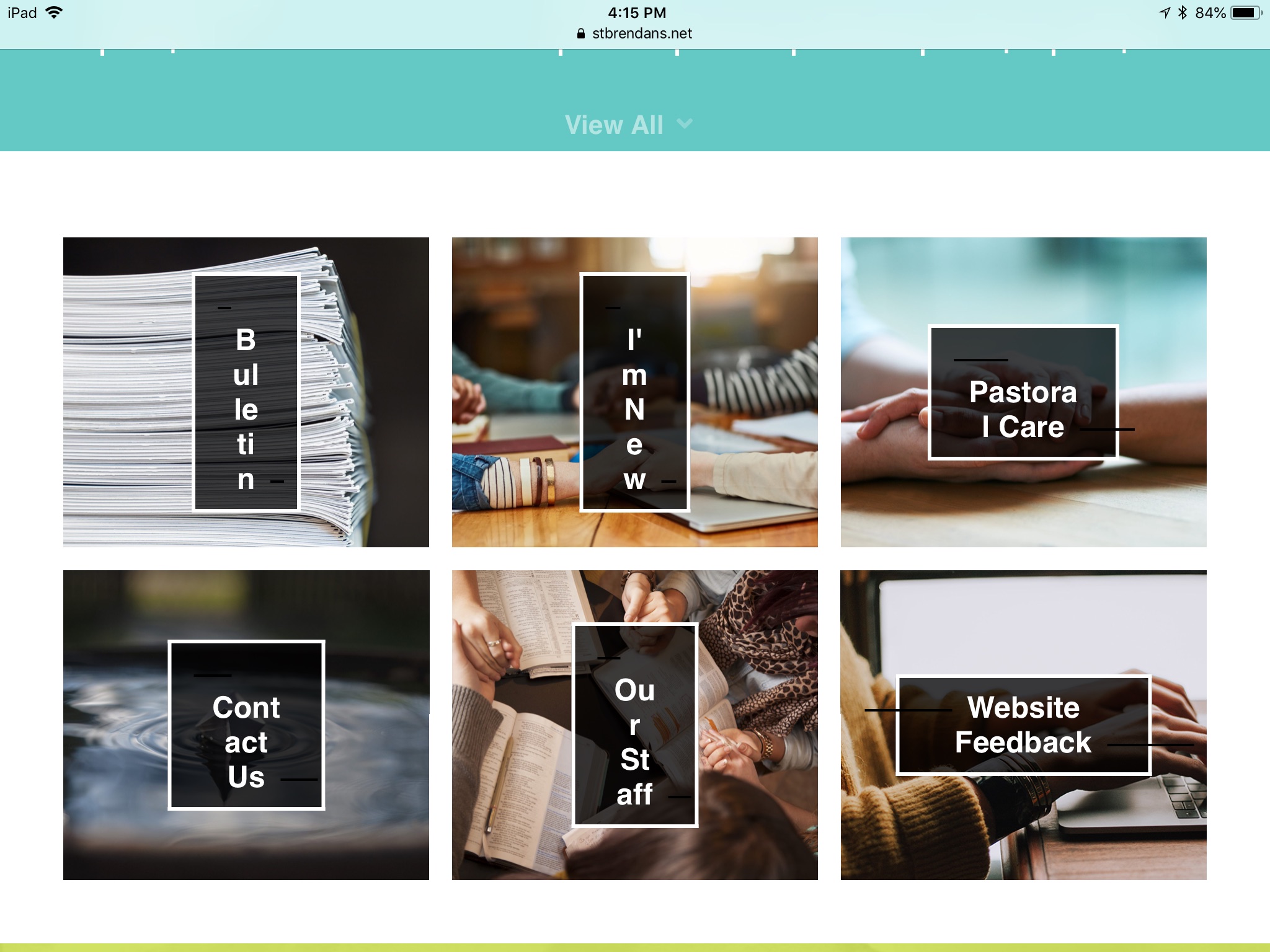
Firstly, the home page buttons (below Mass Times) appear fine on my phone, but apparently they are formatting strangely on tablets. See the attached screenshot. Maybe we need to make those stack in rows of 2 on tablets?
Secondly, on mobile devices, the 2-column format (such as on the Get Involved pages) gets too narrow and very hard to read. Can we make those stack on mobile instead of displaying side-by-side?
Thank you,
Melissa Zuk
Marketing & Communications Coordinator
p: 614.876.1272 ex 221
e: mzuk@stbrendans.net<mailto:mzuk@stbrendans.net>
[cid:image001.png@01D3CD1B.FFE75C80]
 Kyle Brown
Hi Melissa,
I apologize for the late email. I fixed the buttons on the homepage, which should wrap quicker and have no more text-squishing issues. I also fixed the page headers, which had black lines on the left and right of the text.
The two column pages should now stack if the website is on anything smaller than a tablet, and I made the menus easier to read on smaller devices.
I am still working on some of your other updates! Let me know if you have any other updates or questions!
-Kyle
I apologize for the late email. I fixed the buttons on the homepage, which should wrap quicker and have no more text-squishing issues. I also fixed the page headers, which had black lines on the left and right of the text.
The two column pages should now stack if the website is on anything smaller than a tablet, and I made the menus easier to read on smaller devices.
I am still working on some of your other updates! Let me know if you have any other updates or questions!
-Kyle
Melissa Zuk
Hi Kyle,
Thanks so much for working on this. However, it appears that the 2-column format still isn’t stacking when I bring up the site on my phone, and on mobile the headers still have the black lines you were talking about.
Thank you for adding the search function to our site! It takes up a lot of space though. I was wondering if maybe we could just add the little magnifying glass icon to the very right of our navigation (by “school”), which then when people click on it the search bar to type in would appear. Is that possible?
Thank you!
Melissa Zuk
Marketing & Communications Coordinator
p: 614.876.1272 ex 221
e: mzuk@stbrendans.net<mailto:mzuk@stbrendans.net>
[cid:image001.png@01D3CD1B.FFE75C80]

Thanks so much for working on this. However, it appears that the 2-column format still isn’t stacking when I bring up the site on my phone, and on mobile the headers still have the black lines you were talking about.
Thank you for adding the search function to our site! It takes up a lot of space though. I was wondering if maybe we could just add the little magnifying glass icon to the very right of our navigation (by “school”), which then when people click on it the search bar to type in would appear. Is that possible?
Thank you!
Melissa Zuk
Marketing & Communications Coordinator
p: 614.876.1272 ex 221
e: mzuk@stbrendans.net<mailto:mzuk@stbrendans.net>
[cid:image001.png@01D3CD1B.FFE75C80]
Kyle Brown
Hi Melissa,
The search bar should only be appearing when you click on the small hourglass icon in the corner, next to 'School'. I fixed the two column stacking and search bar yesterday, but your browser may be loading an old copy of the website. To force the website to refresh, press and hold the CTRL key and then press F5. That should hopefully fix any issues you are seeing.
Let me know if that works!
-Kyle
Melissa Zuk
Hi Kyle,
Thanks for fixing those things! The only issue is that now, when you try to type in the search bar, no text is showing up! I’m not sure if the text is just white on a white background or if there’s another issue, but I wanted to let you know.
Thanks,
Melissa Zuk
Marketing & Communications Coordinator
p: 614.876.1272 ex 221
e: mzuk@stbrendans.net<mailto:mzuk@stbrendans.net>
[cid:image001.png@01D3CD1B.FFE75C80]

Thanks for fixing those things! The only issue is that now, when you try to type in the search bar, no text is showing up! I’m not sure if the text is just white on a white background or if there’s another issue, but I wanted to let you know.
Thanks,
Melissa Zuk
Marketing & Communications Coordinator
p: 614.876.1272 ex 221
e: mzuk@stbrendans.net<mailto:mzuk@stbrendans.net>
[cid:image001.png@01D3CD1B.FFE75C80]
Kyle Brown
Hi Melissa,
You are right, the text was showing up white! I've changed the text to black, so it should be showing up properly now!
-Kyle
You are right, the text was showing up white! I've changed the text to black, so it should be showing up properly now!
-Kyle
Melissa Zuk
Hi Kyle,
I know we spoke last week about our site url going to a blank page… stbrendans.net now goes to our site, but www.stbrendans.net<http://www.stbrendans.net> still goes to a blank page. Do you know why this would be or how to fix it?
Thank you SO MUCH for all of your hard work on our website!
Melissa Zuk
Marketing & Communications Coordinator
p: 614.876.1272 ex 221
e: mzuk@stbrendans.net<mailto:mzuk@stbrendans.net>
[cid:image001.png@01D3CD1B.FFE75C80]

I know we spoke last week about our site url going to a blank page… stbrendans.net now goes to our site, but www.stbrendans.net<http://www.stbrendans.net> still goes to a blank page. Do you know why this would be or how to fix it?
Thank you SO MUCH for all of your hard work on our website!
Melissa Zuk
Marketing & Communications Coordinator
p: 614.876.1272 ex 221
e: mzuk@stbrendans.net<mailto:mzuk@stbrendans.net>
[cid:image001.png@01D3CD1B.FFE75C80]
Melissa Zuk
Hi Kyle,
I see you’ve given us the ability to add more than one button to a page, which is great! However, it seems that all of our original buttons have disappeared. Is there any way to fix this without having to got back and relink each one individually?
Melissa Zuk
Marketing & Communications Coordinator
p: 614.876.1272 ex 221
e: mzuk@stbrendans.net<mailto:mzuk@stbrendans.net>
[cid:image001.png@01D3CD1B.FFE75C80]

I see you’ve given us the ability to add more than one button to a page, which is great! However, it seems that all of our original buttons have disappeared. Is there any way to fix this without having to got back and relink each one individually?
Melissa Zuk
Marketing & Communications Coordinator
p: 614.876.1272 ex 221
e: mzuk@stbrendans.net<mailto:mzuk@stbrendans.net>
[cid:image001.png@01D3CD1B.FFE75C80]