












Development Link & Training
Good morning Everyone,
We have reached the point in the development process in which we share the link to the development site with you. First, I wanted to go over the missing content from the website and then get into the training and development site.
Things We Need From You
We do still need some information from you, if possible. Otherwise, we can simply remove these items from the main menu and website.
- Description for the "Ministerium" Accordion under the Parish Affiliated Programs Section under the "How May We Help?" Menu Dropdown. (This can be added later, but just a reminder)
- Fields for the Parish Registration Form. This can also be done later and making forms will be covered in training.
Training
The first training session typically takes ~2 hours and is done remotely via Diocesan's version of TeamViewer. At the beginning of our phone call, I will walk you through how to set up the remote access program.
During the training sessions, we go over:
- How to edit the homepage content
- How to edit the footer
- How to edit the menu
- How to create/edit inner pages
- How to create/edit posts
- How to create/edit/use image galleries
- How to create/edit/use online forms
- Any other questions that you may have
Since this can be a lot, we break the training down into two sessions:
- Editing the site basics (pages, posts, menu, homepage)
- Editing the additional site features & answering follow-up questions (forms, galleries, etc.)
This is completely up to your learning pace and how much you feel comfortable covering at once.
Development Site Link
Something to keep in mind is that the site is not quite completed yet, with the largest thing being mobile responsiveness. That said, it is best to look at the development site on a desktop computer, rather than a laptop or smaller screen. Mobile development/responsiveness is something that the developer completes after the training so that he can update any changes along with the original development!
There are some other big items that we are still working on, such as:
- Homepage Calendar Section
Other than that, if you see anything that alarms you (design or functionality), please let me know and we can address your concerns.
https://stannbb.diocesanweb.org/
Please let me know what dates and times work best for the training or if you have any other questions,
https://stannbb.diocesanweb.org/
Please let me know what dates and times work best for the training or if you have any other questions,
Cody Armock
Web Department, Diocesan
877-923-0777
877-923-0777
 Dan DiLuzio
Thanks, Cody! I looked at it briefly (on my mobile ;-) ), but will do
an in-depth on a larger screen. I've also forwarded your message to the
rest of the team, to get some additional eyes on it.
Looks good!
Dan
an in-depth on a larger screen. I've also forwarded your message to the
rest of the team, to get some additional eyes on it.
Looks good!
Dan
 Cody Armock
Hello Dan,
I'm glad you have been able to take a look at it. We have not done Mobile Responsiveness or testing yet for the site, which is one of the last things to be done before launching, so yeah, take a look at it on either a Laptop or Desktop and things should be quite a bit better.
That sounds like a good idea to have more eyes look at it. If you or they have any questions or comments on the site then let me know!
Cody Armock
Web Department, Diocesan
877-923-0777
877-923-0777
Cody Armock
Hello everyone,
Do you have an idea of when you'd like to do the first training for the website? I am looking at next week sometime Monday or Tuesday between 10am and 2pm or Friday, 9am and 11am.
As a reminder, the first training will be about two hours, so the times above would be the start times, and the training will cover:
- How to edit the homepage content
- How to edit the footer
- How to edit the menu
- How to create/edit inner pages
- How to create/edit posts
Let me know if any of those dates or times work for you and we can set up the first training.
Thank you,
Thank you,
Cody Armock
Web Department, Diocesan
877-923-0777
877-923-0777
Dan DiLuzio
Hi, Cody,
We've got a number of changes / corrections to make; they're listed on
the attachment to this note. All of the items in blue are
content-related and we will need to address those items ourselves. I
think most of the remainder are either repairing missing or incorrect
links or rearranging pages.
As far as training goes, I think we're just about ready to start. We'll
have to check everyone's schedule to make sure we match up, but that's
expected.
One thought I had was that a number of the issues on the attachment may
serve as opportunities for training. I'm pretty confident that we could
handle many of them, once we've been trained; so, we may want to discuss
that before we start. In any case, take a look at the attachment. If
it makes sense we can set up an hour or so to go over it, just to make
sure that we're communicating the correct things to you.
Thanks for your patience! I was able to present the development site to
our Pastoral Council as a preview of the completed version - they were
definitely impressed.
Dan DiLuzio
We've got a number of changes / corrections to make; they're listed on
the attachment to this note. All of the items in blue are
content-related and we will need to address those items ourselves. I
think most of the remainder are either repairing missing or incorrect
links or rearranging pages.
As far as training goes, I think we're just about ready to start. We'll
have to check everyone's schedule to make sure we match up, but that's
expected.
One thought I had was that a number of the issues on the attachment may
serve as opportunities for training. I'm pretty confident that we could
handle many of them, once we've been trained; so, we may want to discuss
that before we start. In any case, take a look at the attachment. If
it makes sense we can set up an hour or so to go over it, just to make
sure that we're communicating the correct things to you.
Thanks for your patience! I was able to present the development site to
our Pastoral Council as a preview of the completed version - they were
definitely impressed.
Dan DiLuzio
 Cody Armock
Hello Dan,
Yeah, I think setting up an hour meeting or talking about it briefly for the first part of training would be a good idea. Seeing as that your current site is through us and through WordPress, most of the things are the same or at least the same concept so it will be going over the new stuff and refreshing some of the old stuff. Did you have an idea of when you would like to set up the training? I will go through and add any notes that I have so that I can bring them up to you when we go over the document.
I am glad that Pastoral Council was impressed and I think it will continue to improve as things get hammered out and content gets more finalized and we go through and make it mobile responsive.
Let me know when you were thinking for the training and don't hesitate to ask if you have any questions.
Cody Armock
Web Department, Diocesan
877-923-0777
877-923-0777
Dan DiLuzio
Cody, do you have any slots for next week? I've been on jury duty
standby for the last two weeks, so it's been hard to plan anything
during that time. Next week should be good though. Once you give us
2-3 slots, I'll check with the others to see what's most convenient for
the most people.
Gary got in touch re a decision to either address the changes we had
sent in or to convert our forms to online interactive. We chose the
latter, with the expectation that we'd be able to make most of the other
changes ourselves once we have update access. Since we've been running
on a backlevel of WordPress (4.9 vs. 5.3?). it might be helpful to hit
some of the feature differences; for example, accordion menus, use of
tables, Gutenberg editor and blocks, etc. Whatever you feel is
pertinent.
Thanks once again, Cody!
Dan DiLuzio
standby for the last two weeks, so it's been hard to plan anything
during that time. Next week should be good though. Once you give us
2-3 slots, I'll check with the others to see what's most convenient for
the most people.
Gary got in touch re a decision to either address the changes we had
sent in or to convert our forms to online interactive. We chose the
latter, with the expectation that we'd be able to make most of the other
changes ourselves once we have update access. Since we've been running
on a backlevel of WordPress (4.9 vs. 5.3?). it might be helpful to hit
some of the feature differences; for example, accordion menus, use of
tables, Gutenberg editor and blocks, etc. Whatever you feel is
pertinent.
Thanks once again, Cody!
Dan DiLuzio
Cody Armock
Hello Dan,
Next week I am available anytime Tuesday - Thursday from 9:30 am - 2 pm for trainings, inclusive on the 2 pm, meaning we can start at that time. Training should take approximately 2 hours for the first one. I will make a note to cover the pertinent differences between the two versions of WordPress, but having that previous experience will be helpful in this transition.
I will begin making those forms, particularly the Parish Registration and the Ministry Sign-Up. I can make the Religious Education form and include that Policy and Permission Information, but you may want to ask the appropriate person at your parish about any legal issues that may come up with it being on the website before it becomes active. There can be some gray areas and some added wording for it to be correct and prevent any potential liabilities.
Let me know what day and time work for training with most people next week!
Cody Armock
Web Department, Diocesan
877-923-0777
877-923-0777
Dan DiLuzio
Cody,
How is next Wednesday 11/6, from 1-3?
Dan
How is next Wednesday 11/6, from 1-3?
Dan
Cody Armock
Hello Dan,
I have scheduled the training for next Wednesday 11/6, from 1-3PM EST.
Here is the meeting information so you can join the meeting:
Description:
Diocesan is inviting you to a scheduled Zoom meeting.
Join Zoom Meeting
https://zoom.us/j/865720892
Meeting ID: 865 720 892
Call to Join Audio for Meeting
+1 646 876 9923
Meeting ID: 865 720 892
Let me know if you have any questions!
Join Zoom Meeting
https://zoom.us/j/865720892
Meeting ID: 865 720 892
Call to Join Audio for Meeting
+1 646 876 9923
Meeting ID: 865 720 892
Let me know if you have any questions!
Cody Armock
Web Department, Diocesan
877-923-0777
877-923-0777
Cody Armock
Hello Everyone,
I have sent out the user accounts to those have requested them. I was wondering when would be a good time to do the second training. We suggest at least a week from the first training, so that you can go in and experiment and begin using the site. One week would put us on Wednesday the 13th, for which, I am free from 9:30 am - 3 pm. The training will last about 1.5 - 2 hours based on questions and other stuff.
Let me know if that works for you or I can send you some times later in the week!
Cody Armock
Web Department, Diocesan
877-923-0777
877-923-0777
Dan DiLuzio
Cody,
Did we ever set something up for today?
Dan
Did we ever set something up for today?
Dan
Cody Armock
Hello Dan,
We did not and unfortunately, my afternoon is booked. I could do tomorrow in the afternoon between 1-4 or I am free in the morning on Friday between 9:30am-12:30pm.
Let me know if either of those days works for you!
Thank you,
Cody Armock
We did not and unfortunately, my afternoon is booked. I could do tomorrow in the afternoon between 1-4 or I am free in the morning on Friday between 9:30am-12:30pm.
Let me know if either of those days works for you!
Thank you,
Cody Armock
Dan DiLuzio
Cody,
I apologize - my bad! Let me get back to you re tomorrow or Friday,
Dan
I apologize - my bad! Let me get back to you re tomorrow or Friday,
Dan
Cody Armock
Sounds good,
Thanks Dan!
Cody Armock
Thanks Dan!
Cody Armock
Dan DiLuzio
Cody,
Let's try Friday morning; what's the latest we can start?
Dan
Let's try Friday morning; what's the latest we can start?
Dan
Cody Armock
Dan,
The latest we could start would be 11:00am, does that still work for you?
Let me know,
Cody Armock
The latest we could start would be 11:00am, does that still work for you?
Let me know,
Cody Armock
Cody Armock
Hello Dan,
Does 11 AM tomorrow work you?
Cody Armock
Does 11 AM tomorrow work you?
Cody Armock
Dan DiLuzio
That's great, Cody; talk tomorrow,
Dan
Dan
Cody Armock
Hello Dan,
Here is the meeting information for tomorrow:
Diocesan is inviting you to a scheduled Zoom meeting.
Topic: Second Training | Ann (Bethany Beach, DE)
Time: Nov 15, 2019 11:00 AM Eastern Time (US and Canada)
Join Zoom Meeting
https://zoom.us/j/976160787
Meeting ID: 976 160 787
Call to Join Audio
+1 646 876 9923
Meeting ID: 976 160 787
Let me know if you have any questions!
Cody Armock
Web Department, Diocesan
877-923-0777
877-923-0777
Dan DiLuzio
Good morning, Cody, and happy Thanksgiving!
Just wanted to thank you for all you've done for us and wish you and
yours a happy and blessed day!
Dan DiLuzio and all the parishioners of St. Ann
Just wanted to thank you for all you've done for us and wish you and
yours a happy and blessed day!
Dan DiLuzio and all the parishioners of St. Ann
Cody Armock
Good morning Dan,
Thank you for thinking of us and we are glad to be helping you through this website rebuild. I hope you had a fantastic Thanksgiving with your family and friends!
Let me know if you have any questions while editing the site,
Thank you,
Cody Armock
Thank you for thinking of us and we are glad to be helping you through this website rebuild. I hope you had a fantastic Thanksgiving with your family and friends!
Let me know if you have any questions while editing the site,
Thank you,
Cody Armock
Dan DiLuzio
Hey Cody, just one thing so far. When we view
https://stannbb.diocesanweb.org/seeking-god/, we can see the initial
text blocks, but the accordion menu underneath is not visible. We can
see and edit it, though - just not visible when viewing the page.
Dan
https://stannbb.diocesanweb.org/seeking-god/, we can see the initial
text blocks, but the accordion menu underneath is not visible. We can
see and edit it, though - just not visible when viewing the page.
Dan
Cody Armock
Good morning Dan,
After looking into a bit more, there are a couple fixes that can be done, but nothing that is permanent. I have made a to-do for the developer to fix the "accordion" block. I had some trouble with it when I was migrating content and I thought it was just me, but digging into it a little more than must be something wrong with it in the code. Once the developer is done with it, I will test it to make sure it is working and see if I can break it still (I am pretty good at that :) ).
Sorry about the hassle with that block. You can make it a reusable block for the meantime and that way you can see what it looks like on the page. To edit anything in the block convert it to a regular block again by going to the Snowman Menu (three vertical dots) and click convert to regular block, which is the same menu to create the reusable block. I hope that helps. That is a temporary solution until the developer fixes the block.
Thank you,
Cody Armock
After looking into a bit more, there are a couple fixes that can be done, but nothing that is permanent. I have made a to-do for the developer to fix the "accordion" block. I had some trouble with it when I was migrating content and I thought it was just me, but digging into it a little more than must be something wrong with it in the code. Once the developer is done with it, I will test it to make sure it is working and see if I can break it still (I am pretty good at that :) ).
Sorry about the hassle with that block. You can make it a reusable block for the meantime and that way you can see what it looks like on the page. To edit anything in the block convert it to a regular block again by going to the Snowman Menu (three vertical dots) and click convert to regular block, which is the same menu to create the reusable block. I hope that helps. That is a temporary solution until the developer fixes the block.
Thank you,
Cody Armock
Dan DiLuzio
Thanks, Cody; we can work with that for the time being.
One additional thing, though, that Nancy picked up on: There are
several places on the accordion menu on the Faith Formation page
(https://stannbb.diocesanweb.org/our-faith/faith-formation/) where we
want to include an email link in people's contact information. When we
try to add a link to a text string ("email her", for example) it's not
recognized as a link in the published page. We've tried adding links
with the email only (example "f.slahetka@mchsi.com") and with the
complete link ("mailto:f.slahetka@mchsi.com"), but neither is recognized
as a link.
Now my bad: In the course of editing that page, I accidentally deleted
the entire accordion menu. Can you restore that page from the backups?
Thanks, Cody!
Dan DiLuzio

One additional thing, though, that Nancy picked up on: There are
several places on the accordion menu on the Faith Formation page
(https://stannbb.diocesanweb.org/our-faith/faith-formation/) where we
want to include an email link in people's contact information. When we
try to add a link to a text string ("email her", for example) it's not
recognized as a link in the published page. We've tried adding links
with the email only (example "f.slahetka@mchsi.com") and with the
complete link ("mailto:f.slahetka@mchsi.com"), but neither is recognized
as a link.
Now my bad: In the course of editing that page, I accidentally deleted
the entire accordion menu. Can you restore that page from the backups?
Thanks, Cody!
Dan DiLuzio
Cody Armock
Hello Dan,
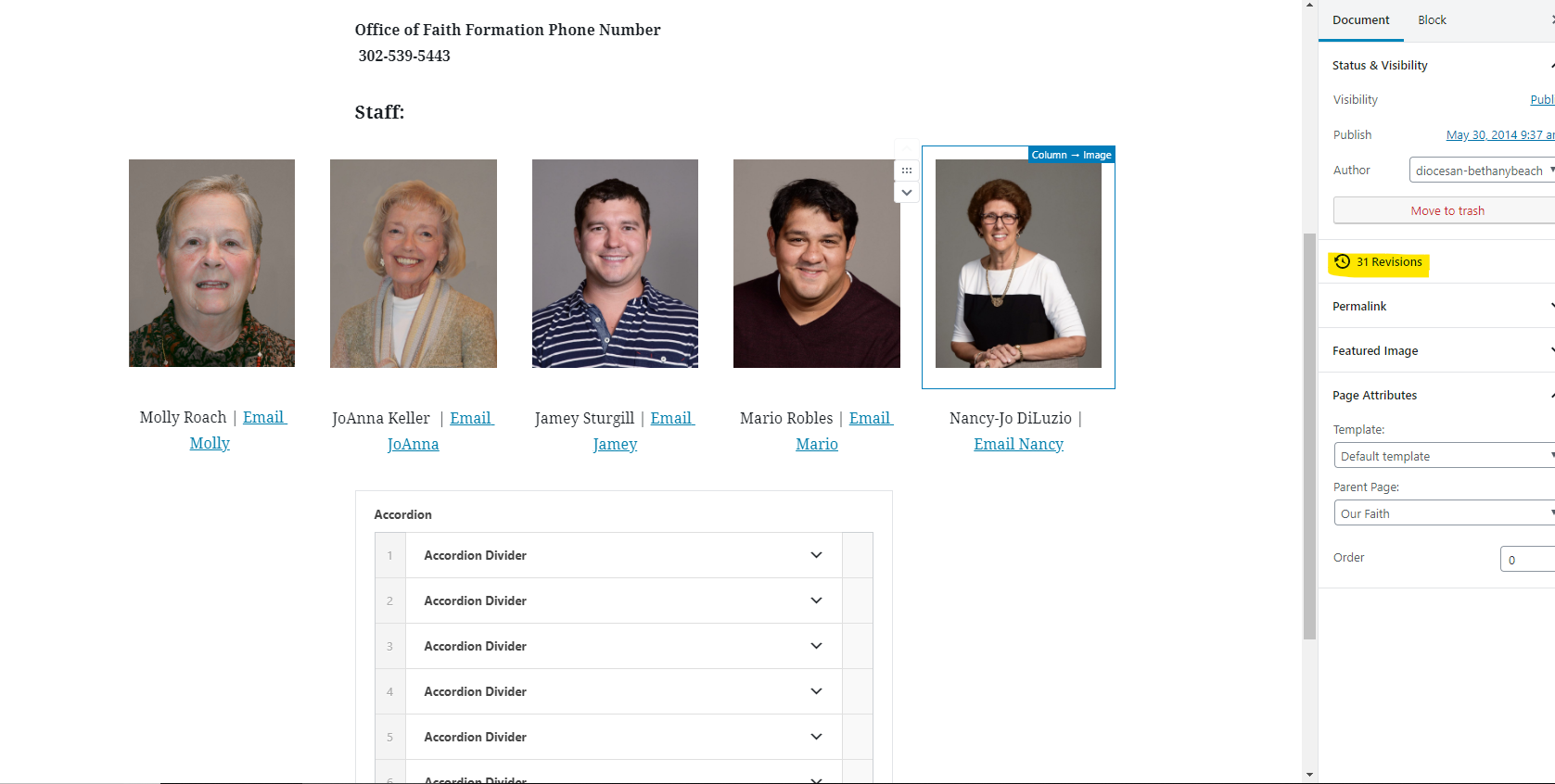
I have restored the accordion on the page using the revisions link on the right side in the Document Pane. Seen in the image below.
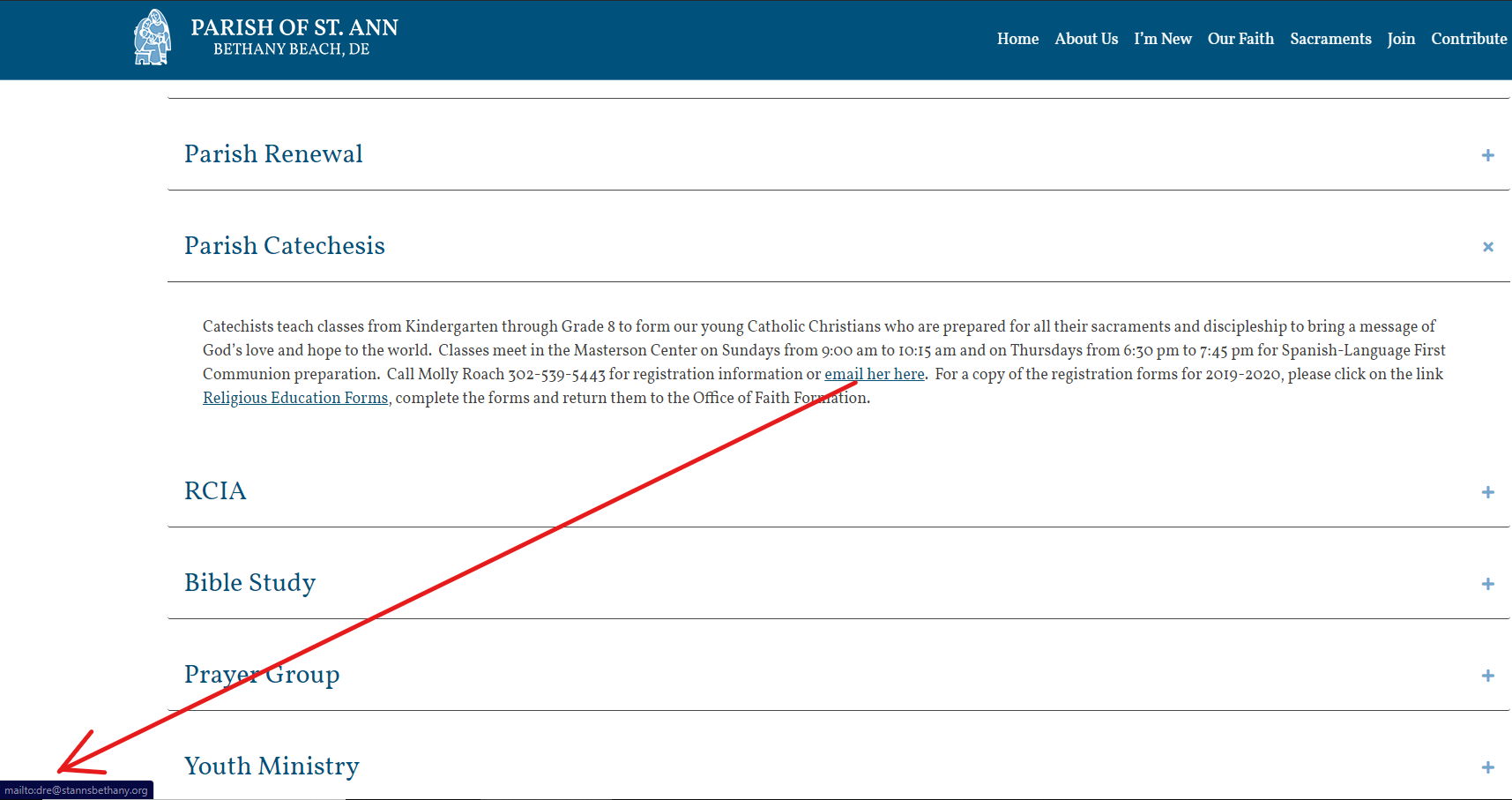
About the emails not showing up on the page, I am not sure what that is referring to since I cannot replicate the issue on my computer since I can see the emails within the accordion just fine both in the backend and the frontend, but if I am missing something, please by all means, let me know. I have included a screenshot of what I see on the frontend too. When I click on the email her here, it opens up my email client and fills in the email field with dre@stannsbethany.org
Let me know if I am missing anything here,
Thank you,
Cody Armock
I have restored the accordion on the page using the revisions link on the right side in the Document Pane. Seen in the image below.
About the emails not showing up on the page, I am not sure what that is referring to since I cannot replicate the issue on my computer since I can see the emails within the accordion just fine both in the backend and the frontend, but if I am missing something, please by all means, let me know. I have included a screenshot of what I see on the frontend too. When I click on the email her here, it opens up my email client and fills in the email field with dre@stannsbethany.org
Let me know if I am missing anything here,
Thank you,
Cody Armock
 Dan DiLuzio
Cody, the emails for the staff are ok; the problem is in the accordion
table. The emails appear to be ok, but there is no link. Check under
Bible Study in the accordion. There should be 2-3 email links there
that are not functioning.
Dan
table. The emails appear to be ok, but there is no link. Check under
Bible Study in the accordion. There should be 2-3 email links there
that are not functioning.
Dan
Cody Armock
Hello Dan,
Sorry, it took me a while to respond to this. I think I figured out the issue. I don't know if you copied the bulleted list from anywhere or something, but if you look at the revisions especially the one from "Dec 9 @ 12:02" you can see the change. I removed "<ul id=\"mce_37\" class=\"editor-rich-text__tinymce mce-content-body\" role=\"textbox\" contenteditable=\"true\" aria-label=\"Write list…\" aria-autocomplete=\"list\" aria-multiline=\"true\" data-is-placeholder-visible=\"false\" in the text editor. I am not sure why it was there, but it might have carried over from copying it from someplace else. If that occurs elsewhere on the site, look in the Text tab next to the Visual Tab in the top right of the editor and see if that highlighted section is there. If it is, try removing it and see if that fixes it. The email addresses fixed themselves after that was removed.
Let me know if you have any other questions.
Cody Armock
Sorry, it took me a while to respond to this. I think I figured out the issue. I don't know if you copied the bulleted list from anywhere or something, but if you look at the revisions especially the one from "Dec 9 @ 12:02" you can see the change. I removed "<ul id=\"mce_37\" class=\"editor-rich-text__tinymce mce-content-body\" role=\"textbox\" contenteditable=\"true\" aria-label=\"Write list…\" aria-autocomplete=\"list\" aria-multiline=\"true\" data-is-placeholder-visible=\"false\" in the text editor. I am not sure why it was there, but it might have carried over from copying it from someplace else. If that occurs elsewhere on the site, look in the Text tab next to the Visual Tab in the top right of the editor and see if that highlighted section is there. If it is, try removing it and see if that fixes it. The email addresses fixed themselves after that was removed.
Let me know if you have any other questions.
Cody Armock
Dan DiLuzio
Good afternoon, Cody,
Do you know if this has been remedied yet? The workaround you suggested
is working fine, but I was curious if there was a permanent fix pending
. . .
Thanks,
Dan Diluzio

Do you know if this has been remedied yet? The workaround you suggested
is working fine, but I was curious if there was a permanent fix pending
. . .
Thanks,
Dan Diluzio
Cody Armock
Hello Dan,
I am not sure why that code would be carried over. I would suspect that it is being copied from the text where you are getting the content from and so the only way to prevent that would be to paste the content without formatting by
I am not sure why that code would be carried over. I would suspect that it is being copied from the text where you are getting the content from and so the only way to prevent that would be to paste the content without formatting by
- Right-clicking and clicking the "Paste without Formatting Option"
- Pressing Ctrl + Shift + 'V' on Windows to paste without formatting
- Lastly to go into the Text Editor and remove "<ul id=\"mce_37\" class=\"editor-rich-text__tinymce mce-content-body\" role=\"textbox\" contenteditable=\"true\" aria-label=\"Write list…\" aria-autocomplete=\"list\" aria-multiline=\"true\" data-is-placeholder-visible=\"false\" like before,
but I don't know where it is being copied from, so it is hard to diagnose the exact issue.
I hope that helps!
Cody Armock