










Recordings
Good Morning Frank,
I had to get authorization from the parish to send you the first recording, but the parish let me use it, so here are the two links for the recordings in Google Drive:
First Training
Second Training
Also, I wanted to bring your attention to the Sports Authority Parent & Insurance Information Form, seen here. We take security of the site very seriously and haven't had issues with stolen information in the past, but with that said, having them upload their insurance on the website has a certain level of risk to it. I just wanted to bring this up to suggest maybe having a note on the page or as a confirmation of the submission of the form telling them to bring the insurance information to the first practice or sport activity, and making a note next to their name on the Excel spreadsheet that you printed off.
I just wanted to make this suggestion, since I would rather have that information as secure as possible.
Let me know if you have any questions!
Cody Armock
Web Department, Diocesan
877-923-0777
 Frank Gonzalez
Thanks Cody for letting me know about the Medical Form. I will address it with the sports authority coordinator.
I have another questions regarding webpages. I would like to know how you got a two column page on https://transfiguration.diocesanweb.org/about-us/new-to-transfiguration/
I have another questions regarding webpages. I would like to know how you got a two column page on https://transfiguration.diocesanweb.org/about-us/new-to-transfiguration/
 Cody Armock
Hello Frank,
Sounds good, depending on what the Sports Authority Coordinator wants to do, we can proceed from there, either keep it as is, or just have to remove those fields.
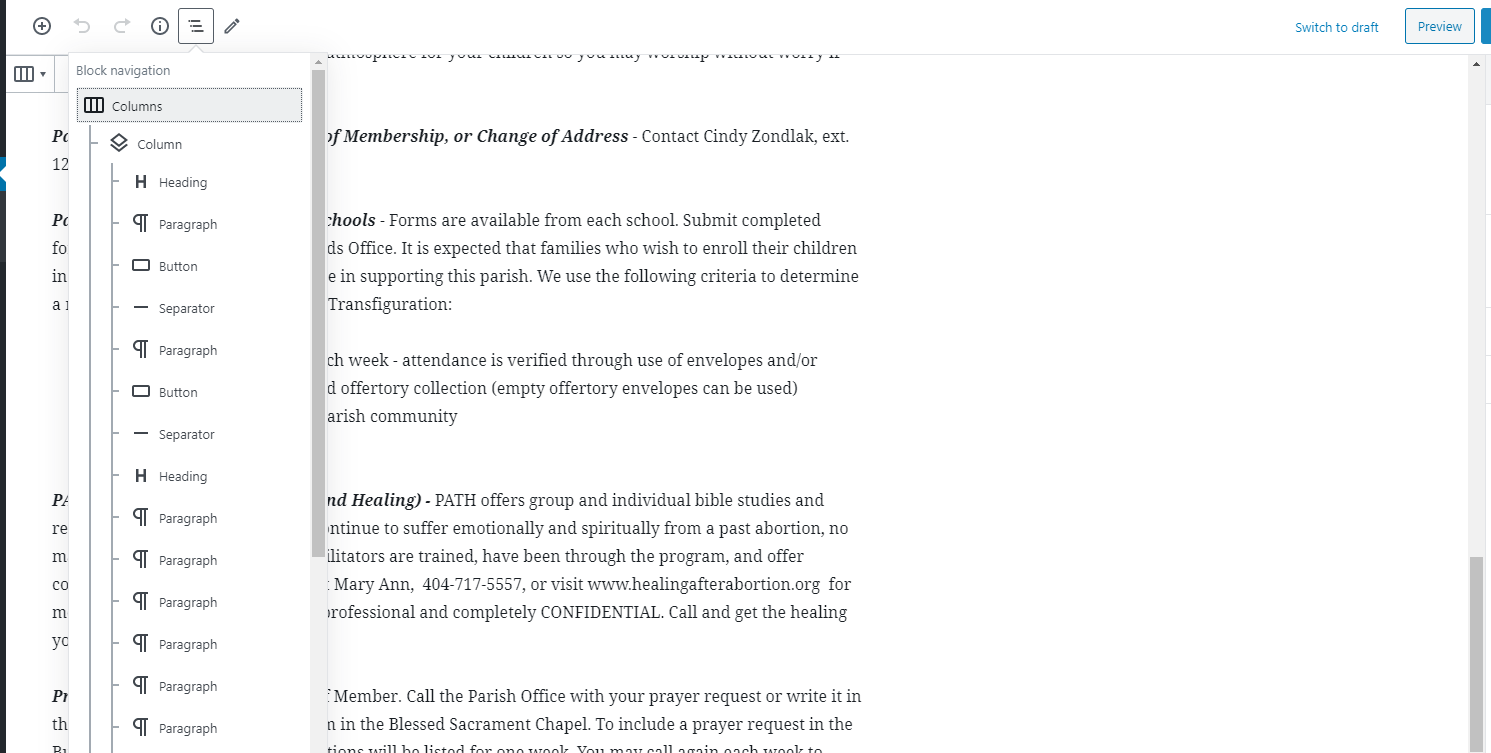
There is a block called "Columns" and when you first make it there are design layouts you can choose or you can make them your own by clicking on the block. It is a little tricky sometimes, so often times the best way is to use the Block Navigation menu, shown in the screenshot, then selecting the column you want and choose the width in the Block Pane on the right side.
Thank you,
Cody Armock
Sounds good, depending on what the Sports Authority Coordinator wants to do, we can proceed from there, either keep it as is, or just have to remove those fields.
There is a block called "Columns" and when you first make it there are design layouts you can choose or you can make them your own by clicking on the block. It is a little tricky sometimes, so often times the best way is to use the Block Navigation menu, shown in the screenshot, then selecting the column you want and choose the width in the Block Pane on the right side.
Thank you,
Cody Armock
Web Department, Diocesan
877-923-0777
Cody Armock
Hello Frank,
I just wanted some clarification, so that we do this correctly the first time for the Homepage slider.
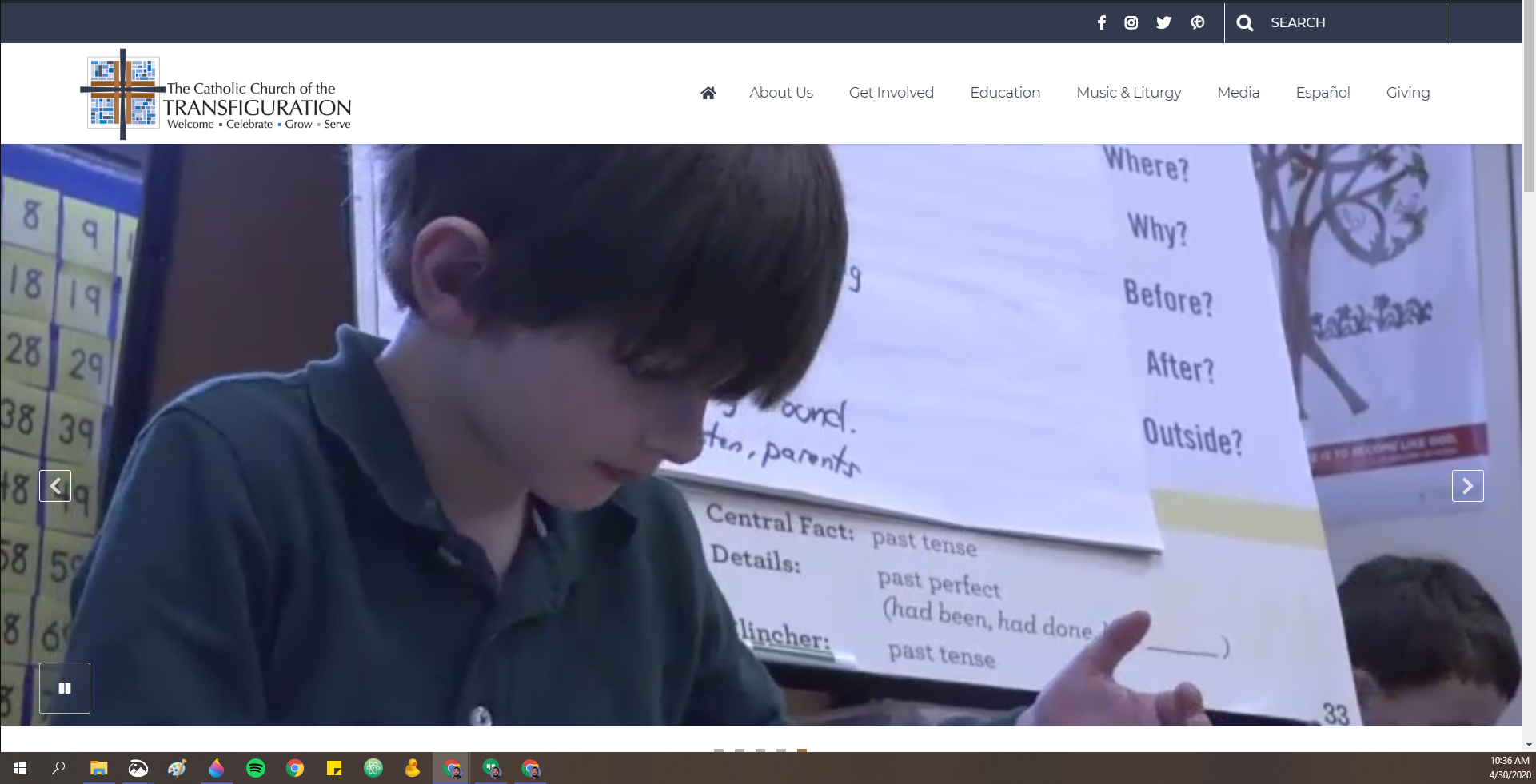
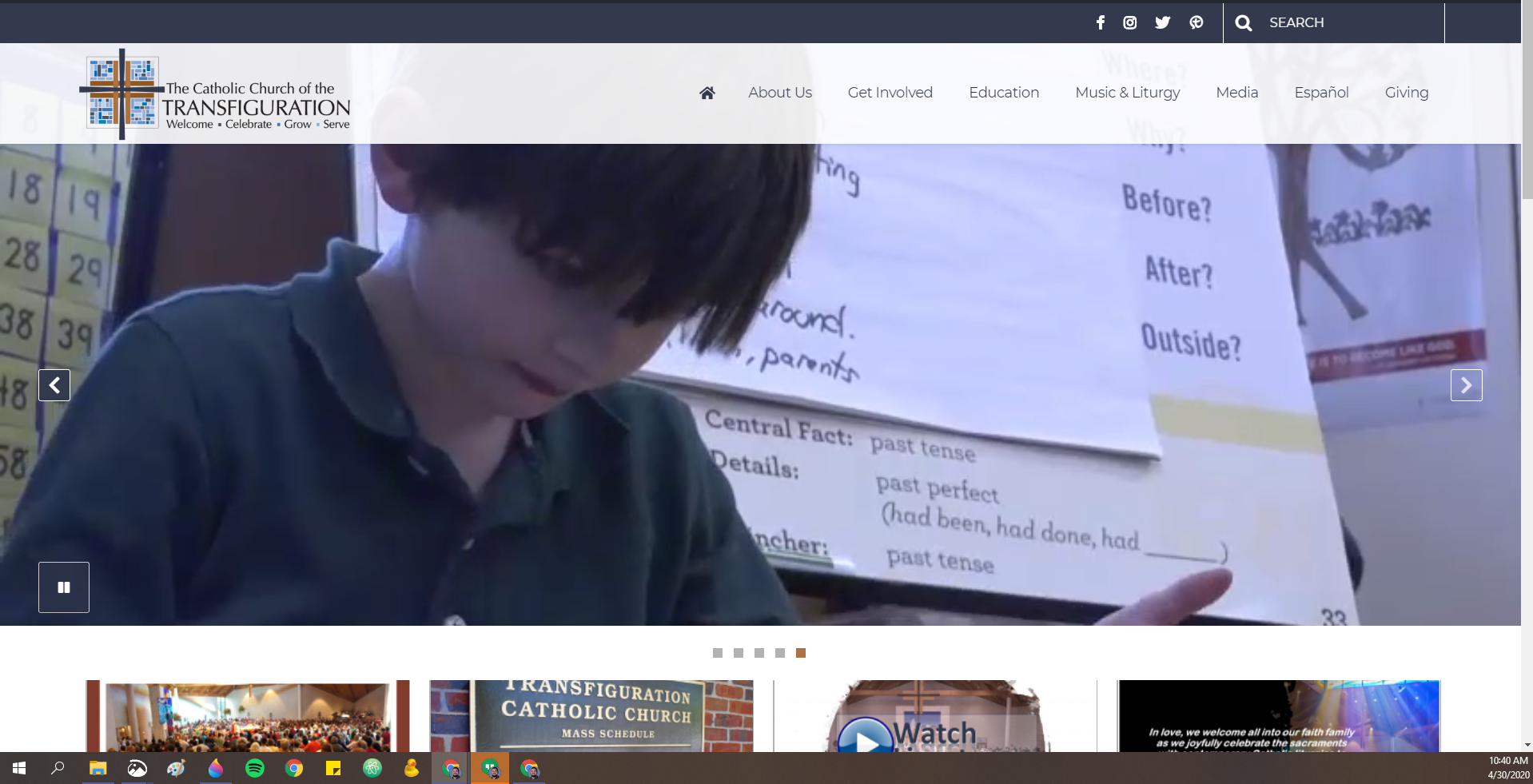
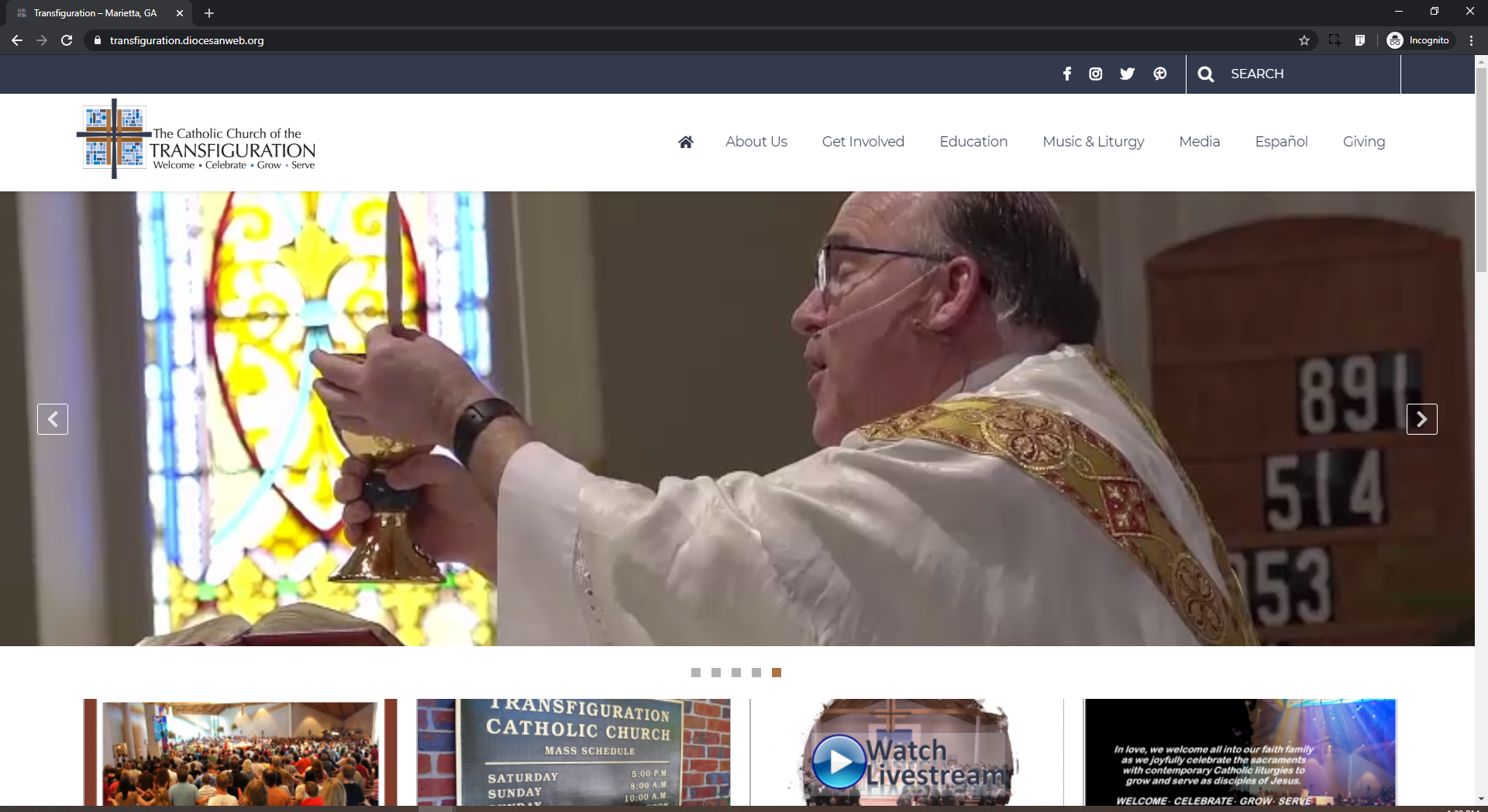
This is what you want the user to see when they first come to the homepage correct (Screenshots below)? The video/slider is the same size, but it is no longer behind the menu/header.
From my understanding, you wanted the whole video displayed rather than just making the Menu opaque and keeping the top of the video/images, cut off. Correct?
Again, I just want to make sure, so that it is the way you want it! Let me know if this correct, or provide more detail as to what you were thinking.
Thank you,
Cody Armock
I just wanted some clarification, so that we do this correctly the first time for the Homepage slider.
This is what you want the user to see when they first come to the homepage correct (Screenshots below)? The video/slider is the same size, but it is no longer behind the menu/header.
From my understanding, you wanted the whole video displayed rather than just making the Menu opaque and keeping the top of the video/images, cut off. Correct?
Again, I just want to make sure, so that it is the way you want it! Let me know if this correct, or provide more detail as to what you were thinking.
Thank you,
Cody Armock
Web Department, Diocesan
877-923-0777
Proposed Vs Current Version
 Frank Gonzalez
Yes, I want the navigation menu to stand above the images or videos on the home page. Although, it should also be the same way on those pages that have the same template as the home page (Get Involved, Education, Music & Liturgy and so on).
Thanks for asking.
Frank
Thanks for asking.
Frank
Cody Armock
Hello Frank,
That sounds good! Is the size of that slider okay or should it be smaller? The issue with the bigger size is that people won't know about the buttons underneath it immediately. If it needs to be smaller, should it be the same size as it was, so you can see the buttons, just without any of it being cropped by the menu, as it were, or slightly larger, but able to see some of the buttons?
Thank you,
Cody Armock
That sounds good! Is the size of that slider okay or should it be smaller? The issue with the bigger size is that people won't know about the buttons underneath it immediately. If it needs to be smaller, should it be the same size as it was, so you can see the buttons, just without any of it being cropped by the menu, as it were, or slightly larger, but able to see some of the buttons?
Thank you,
Cody Armock
Frank Gonzalez
What is the size of the slider area right now? I would think images of a height of 720 pixels should be fine.
Cody Armock
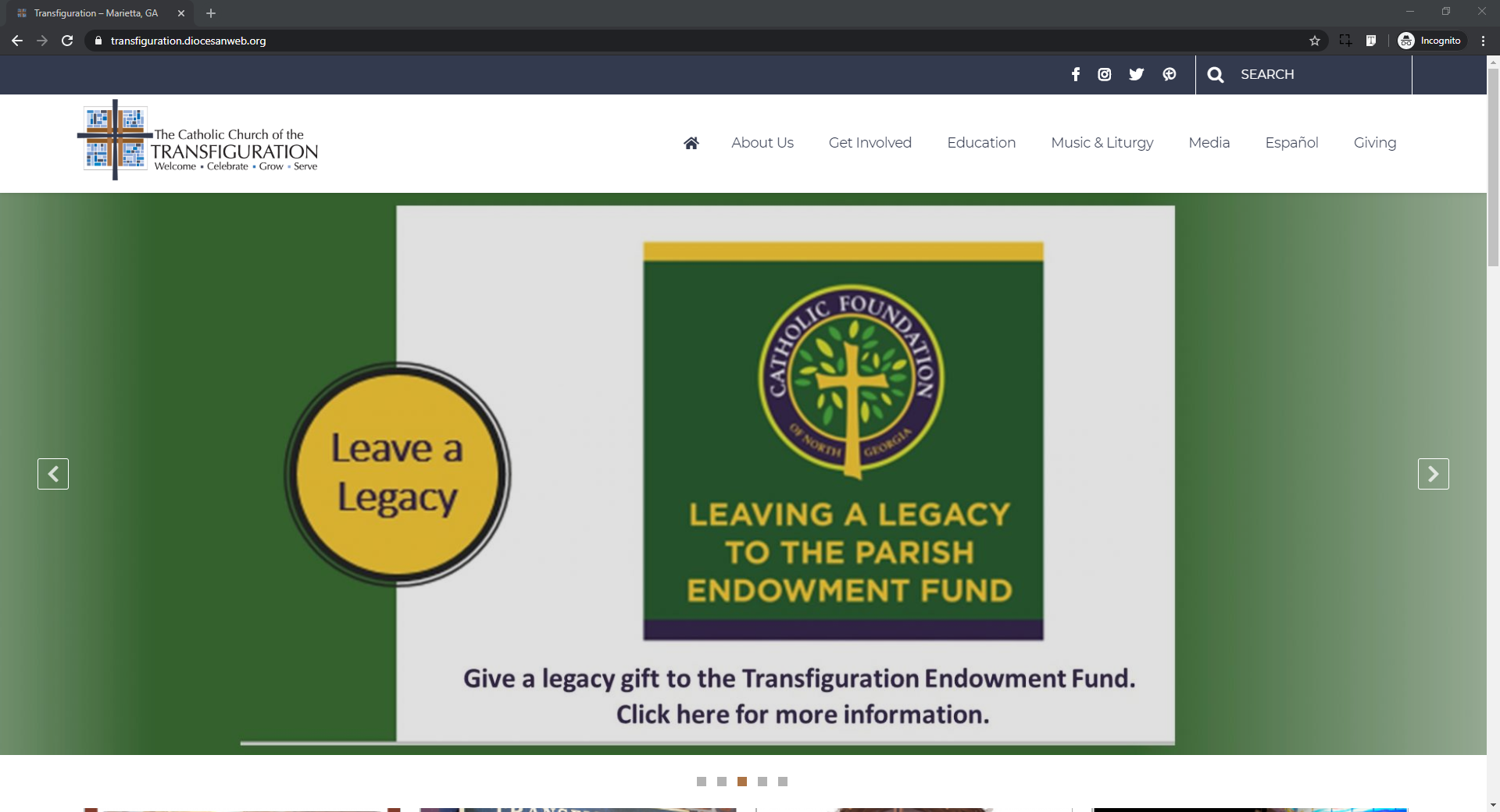
Right now, the slider area without it including the menu bar is 555px tall. We can make it 720px tall if that is what you want. Screenshot is of it as 720px tall.
Let me know if that works for you!
Thank you,
Cody Armock
Let me know if that works for you!
Thank you,
Cody Armock
Web Department, Diocesan
877-923-0777
 Frank Gonzalez
I think you are right in that we should allow visibility of the buttons below the slider. I thought that area was larger than 555px.
Can we subtract the pixels that the navigational bar takes up and subtract it from the 555px? I'm open to suggestions! I just don't want the images and video aspect to be crunched up.
Can we subtract the pixels that the navigational bar takes up and subtract it from the 555px? I'm open to suggestions! I just don't want the images and video aspect to be crunched up.
Cody Armock
Hello Frank,
This is what we can do as well. We can make the basically push the slider down so that it is not hidden behind the menu, but have it stop at the same spot on the page as it did before. That way you can still see the buttons, but the menu isn't covering anything in the images or videos. See screenshot below. I believe the site is set to this right now, so if you want to do a hard refresh, instructions here, you should be able to see that. It doesn't cut off any of the words or anything like that and you can still see the buttons, best of both worlds.
Let me know if this works!
Cody Armock
This is what we can do as well. We can make the basically push the slider down so that it is not hidden behind the menu, but have it stop at the same spot on the page as it did before. That way you can still see the buttons, but the menu isn't covering anything in the images or videos. See screenshot below. I believe the site is set to this right now, so if you want to do a hard refresh, instructions here, you should be able to see that. It doesn't cut off any of the words or anything like that and you can still see the buttons, best of both worlds.
Let me know if this works!
Cody Armock
Web Department, Diocesan
877-923-0777
 Frank Gonzalez
So I tried a hard reset on Chrome, Firefox and Edge and the only one that I'm seeing what you are seeing is Edge. Chrome and Firefox has the old way.
From what I saw on Edge and from the image below I believe that should be fine. Let's go with it.
From what I saw on Edge and from the image below I believe that should be fine. Let's go with it.
Cody Armock
Sounds good!
It might have saved a cached version and did not want to update it, so I will stick with that.
Thank you,
Cody Armock
It might have saved a cached version and did not want to update it, so I will stick with that.
Thank you,
Cody Armock
Frank Gonzalez
Cody,
When I zoom to 100% on any browser, the navigational menu bar gets bigger and takes more space. If I keep it at 80% or less it looks fine. Not sure it this will be an issue or not. That was the reason it looked fine on Edge, but not Chrome or Firefox. Once I adjusted the tab on Chrome and Firefox to be around 80% it looked fine.
Frank
When I zoom to 100% on any browser, the navigational menu bar gets bigger and takes more space. If I keep it at 80% or less it looks fine. Not sure it this will be an issue or not. That was the reason it looked fine on Edge, but not Chrome or Firefox. Once I adjusted the tab on Chrome and Firefox to be around 80% it looked fine.
Frank
Cody Armock
Hello Frank,
Can you send me screenshots so I can see what you mean by the navigational menu bar taking more space?
Also, can you tell me what screen size you are using, so that we can test it on a similarly sized screen and make sure that things are looking the right way?
Thank you,
Cody Armock
Can you send me screenshots so I can see what you mean by the navigational menu bar taking more space?
Also, can you tell me what screen size you are using, so that we can test it on a similarly sized screen and make sure that things are looking the right way?
Thank you,
Cody Armock
Web Department, Diocesan
877-923-0777
Frank Gonzalez
Cody,
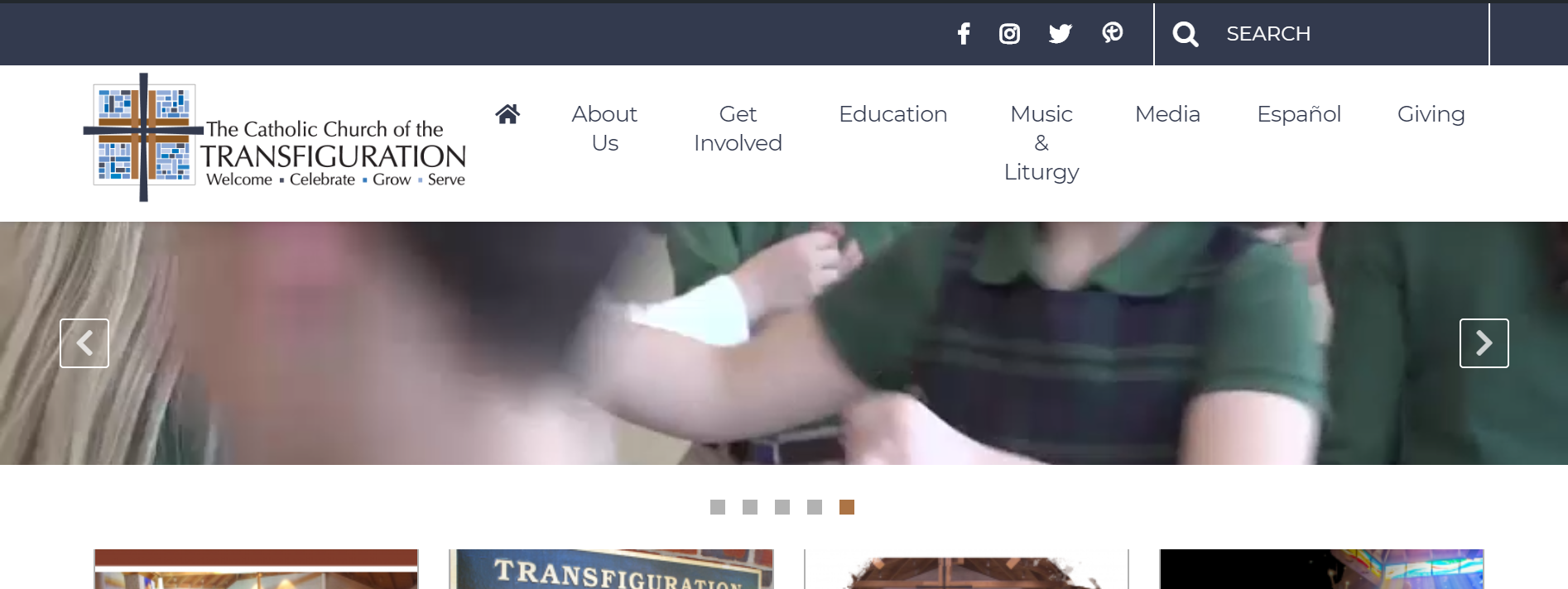
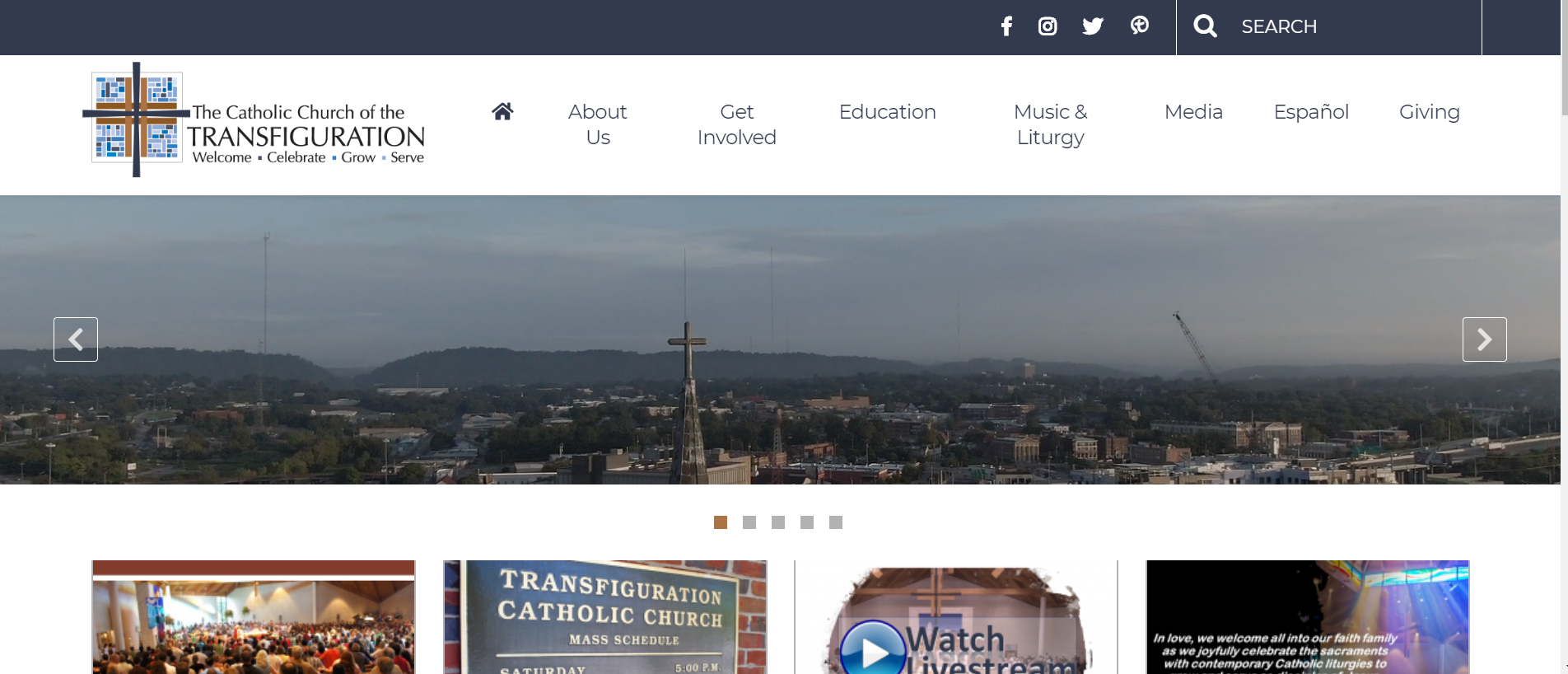
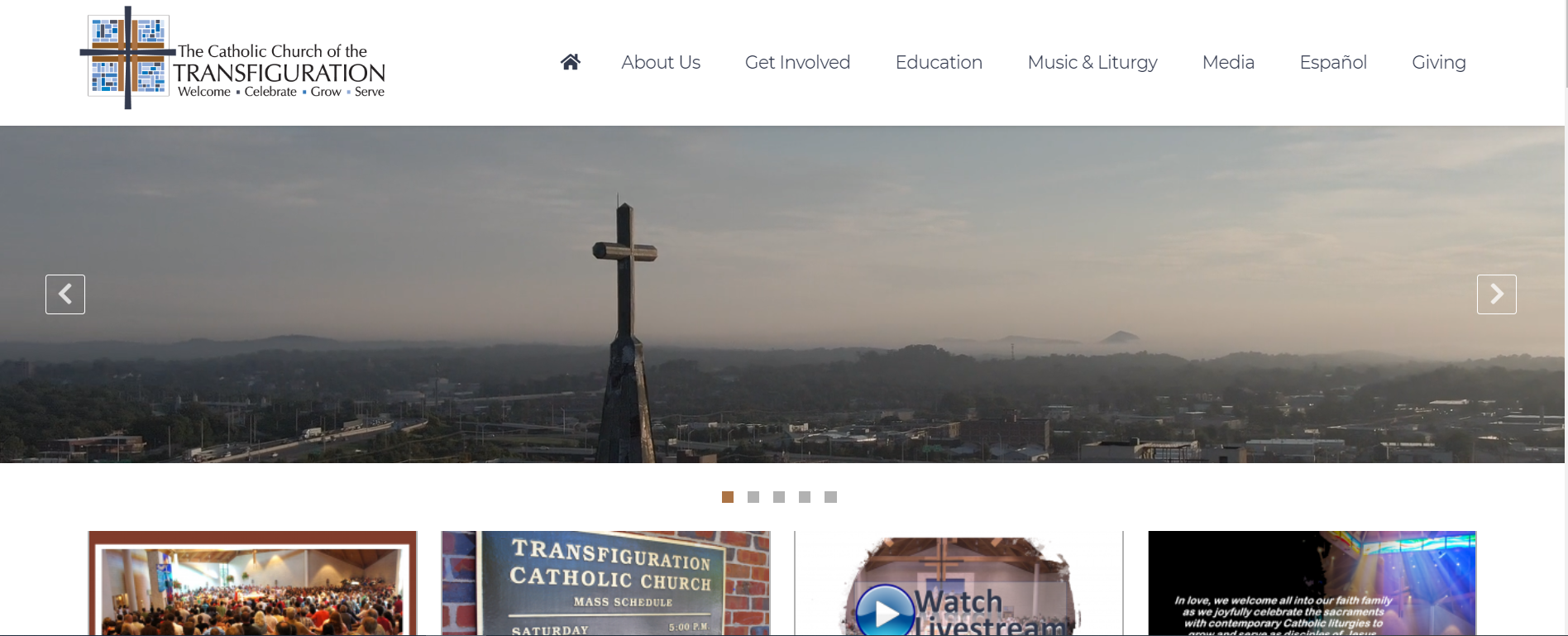
I'm using a 13.5" screen laptop. I understand it might not scale properly, but I have the browser using the full screen. It appears to me that the navigation menu bar is not scaling very well. With the 100%, 3 lines of the menu are showing. With the 90%, 2 lines of the menu are showing. With 80%, 1 line is showing. See the 3 views below:
Here is Chrome at 100%, 3 Lines on the navigational menu are showing:
[cid:1e714944-10c6-4d32-8765-91c349df4c61]
Here is Chrome at 90%, 2 Lines on the navigational menu are showing:
[cid:a07c7073-25cd-45bd-9554-0fb3c09a168d]
Here is Chrome at 80%, 1 Line on the navigational menu is showing:
[cid:1eea2983-89ad-477d-99fe-cf0e0227b75c]
I'm using a 13.5" screen laptop. I understand it might not scale properly, but I have the browser using the full screen. It appears to me that the navigation menu bar is not scaling very well. With the 100%, 3 lines of the menu are showing. With the 90%, 2 lines of the menu are showing. With 80%, 1 line is showing. See the 3 views below:
Here is Chrome at 100%, 3 Lines on the navigational menu are showing:
[cid:1e714944-10c6-4d32-8765-91c349df4c61]
Here is Chrome at 90%, 2 Lines on the navigational menu are showing:
[cid:a07c7073-25cd-45bd-9554-0fb3c09a168d]
Here is Chrome at 80%, 1 Line on the navigational menu is showing:
[cid:1eea2983-89ad-477d-99fe-cf0e0227b75c]
Cody Armock
Thank you for sending those screenshots, Frank,
Do you know what resolution your screen is running? That is what I meant by size, but I definitely did not word that correctly. Sorry about that!
Once I have the screen size, I can let the developer know and he can ameliorate the issue.
Thank you,
Cody Armock
Do you know what resolution your screen is running? That is what I meant by size, but I definitely did not word that correctly. Sorry about that!
Once I have the screen size, I can let the developer know and he can ameliorate the issue.
Thank you,
Cody Armock
Frank Gonzalez
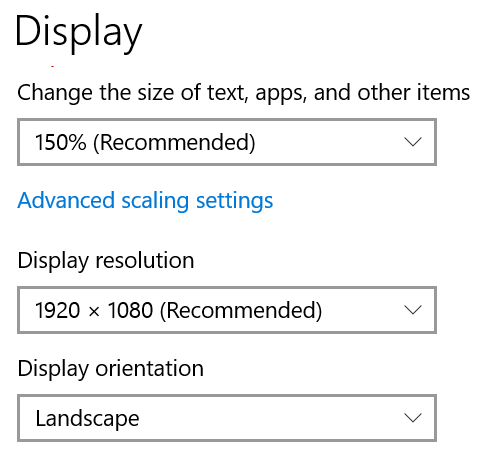
Is this what you mean?
[cid:8decfe09-2626-4303-b8fb-8e276ef10c57]
[cid:8decfe09-2626-4303-b8fb-8e276ef10c57]
Cody Armock
Yeah, that is very helpful.
If you try turning off the 150% for the size of text, apps, and other items, does that fix the issue with the menu? I just want to see if that fixes the problem, but then the developer and I can work toward a solution to making it look right.
If you try turning off the 150% for the size of text, apps, and other items, does that fix the issue with the menu? I just want to see if that fixes the problem, but then the developer and I can work toward a solution to making it look right.
Frank Gonzalez
Oh yeah! Changed it from 150% to 125% and the navigational menu bar looks much better zooming the browser to 100%.
Cody Armock
Wonderful! I am glad things are working better that way.
Frank Gonzalez
Good Morning Cody,
Hope you a good weekend. New week - new challenge. Trying to add a new ministry page, and trying to duplicate what you did but I having difficulties figuring it out.
Can you outline the steps that you took so I can add one myself.
Thanks,
Frank
Hope you a good weekend. New week - new challenge. Trying to add a new ministry page, and trying to duplicate what you did but I having difficulties figuring it out.
Can you outline the steps that you took so I can add one myself.
Thanks,
Frank
Cody Armock
Hello Frank,
So if you are just adding a new ministry page under "Group Ministries" page, for example,
So if you are just adding a new ministry page under "Group Ministries" page, for example,
- Make a new page
- Set the Template to "Ministry"
- Set the parent page to Group Ministries or Just for Men or Just for Women or whatever it may be.
- Fill out the contact person fields at the bottom of the backend page editor
- Add the content through the block editor
- Publish the page.
The way it works is through the parent-child relationship and the templates. if those two things are set then it will show correctly on the parent page.
Let me know if you have any further questions about this!
Thank you,
Cody Armock
Let me know if you have any further questions about this!
Thank you,
Cody Armock
Web Department, Diocesan
877-923-0777
Frank Gonzalez
I think that worked. When you get a change take a look at the Stephen Ministry under ministries and see if I'm missing anything.
Thanks again,
Frank
Thanks again,
Frank
Cody Armock
Hello Frank,
Looks good! Everything is there and filled out correctly!
Cody Armock
Looks good! Everything is there and filled out correctly!
Cody Armock
Frank Gonzalez
Good morning Cody,
Testing the forms submission process and not receiving e-mails. Is the send mail working on the server?
Frank
Testing the forms submission process and not receiving e-mails. Is the send mail working on the server?
Frank
Cody Armock
Hello Frank,
Try testing it again. If it still doesn't work, then make sure that the Notifications are active and that the settings are correct.
Let me know if it still isn't fixed after that and let me know which form it is, so that I may check a few things on it!
Cody Armock
Try testing it again. If it still doesn't work, then make sure that the Notifications are active and that the settings are correct.
Let me know if it still isn't fixed after that and let me know which form it is, so that I may check a few things on it!
Cody Armock
Web Department, Diocesan
877-923-0777
Frank Gonzalez
I tried a form that you created: "Media Request Form" It is still not working.
Cody Armock
Hello Frank,
Please check your Spam or Junk folder for the media@transfiguration.com email, I tested it with my email and it seemed to work fine.
Let me know if the emails were not there!
Cody Armock
Please check your Spam or Junk folder for the media@transfiguration.com email, I tested it with my email and it seemed to work fine.
Let me know if the emails were not there!
Cody Armock
Web Department, Diocesan
877-923-0777
Frank Gonzalez
I'm not seeing the e-mails in the inbox or spam folder.
I don't see an entry on the forms either. I'm seeing the ones I submitted, although I didn't receive the e-mail notifications.
I don't see an entry on the forms either. I'm seeing the ones I submitted, although I didn't receive the e-mail notifications.
Cody Armock
Hello Frank,
I changed the notification back to your email and deleted my entry from the website. Could you try setting the notification to a different email and seeing if that works?
Thank you,
Cody Armock
I changed the notification back to your email and deleted my entry from the website. Could you try setting the notification to a different email and seeing if that works?
Thank you,
Cody Armock
Frank Gonzalez
It works with our gmail account in the "Send to Email" notification. But it doesn't work with any emails with our transfiguration.com domain.
Cody Armock
Hello Frank,
Do you have an IT person at your parish? or someone who is in charge of your transfiguration.com email suite. They may be filtering those emails out and the IT person could make it so that no-reply@transfiguration.com is white-listed.
Thank you,
Cody Armock
Do you have an IT person at your parish? or someone who is in charge of your transfiguration.com email suite. They may be filtering those emails out and the IT person could make it so that no-reply@transfiguration.com is white-listed.
Thank you,
Cody Armock
Web Department, Diocesan
877-923-0777
Frank Gonzalez
Cody,
I got it to work. We have a anti spoofing rule on our exchange server. I turned it off for now. I think is rejecting the e-mail because the e-mail is being sent via diocesanweb.org. See below. Once we go live we need to figure out what to do if we continue to have the e-mails rejected.
[cid:23d1d4ce-bfa6-4c4c-9abb-4787fee3d8a3]
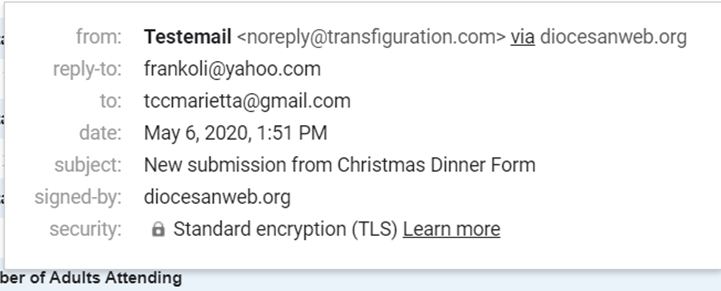
I got it to work. We have a anti spoofing rule on our exchange server. I turned it off for now. I think is rejecting the e-mail because the e-mail is being sent via diocesanweb.org. See below. Once we go live we need to figure out what to do if we continue to have the e-mails rejected.
[cid:23d1d4ce-bfa6-4c4c-9abb-4787fee3d8a3]
Cody Armock
I am glad that you got it figured out, Frank.
Alternatively, you could set up a Gmail account or another Transfiguration.com account and have that be the sender of the emails in forms, but up to you.
Thank you,
Cody Armock
Alternatively, you could set up a Gmail account or another Transfiguration.com account and have that be the sender of the emails in forms, but up to you.
Thank you,
Cody Armock
Web Department, Diocesan
877-923-0777
Frank Gonzalez
Here is another question on forms.
Can Gravity Forms send an email copy to the user that has filled out a form that contains an email field? That way they get copied as well.
We are currently doing that with our Concrete5 Forms.
Can Gravity Forms send an email copy to the user that has filled out a form that contains an email field? That way they get copied as well.
We are currently doing that with our Concrete5 Forms.
Cody Armock
Gravity Forms can do that. All you have to do is Add A New Notification called User Notification and for the Send To Options, click on the Select a Field option and find the email field and fill in the rest of the notification like usual. You can even have it conditional where if you have a radio button field asking them if they want one and basing that notification off of that.
Let me know if you need further instructions on how to do this!
Cody Armock
Let me know if you need further instructions on how to do this!
Cody Armock
Web Department, Diocesan
877-923-0777
Frank Gonzalez
That worked. Thanks!
Cody Armock
Good Morning Frank,
I have added a slider maker onto the website, it is called Metaslider and you can access it at the bottom of the Wordpress Menu on the left side of the screen in the backend of the site. It is relatively easy to use and can be used as a block on pages or posts, since Envira gallery currently does not have slider functionality.
You can go ahead and experiment with it and make different sliders and play with the settings and add them to pages.
If you have any questions, let me know!
Have a great weekend!
Thank you,
Cody Armock
I have added a slider maker onto the website, it is called Metaslider and you can access it at the bottom of the Wordpress Menu on the left side of the screen in the backend of the site. It is relatively easy to use and can be used as a block on pages or posts, since Envira gallery currently does not have slider functionality.
You can go ahead and experiment with it and make different sliders and play with the settings and add them to pages.
If you have any questions, let me know!
Have a great weekend!
Thank you,
Cody Armock
Web Department, Diocesan
877-923-0777
Frank Gonzalez
Hello Cody,
Great! We were talking about that yesterday as Envira Gallery was missing that functionality.
Question regarding the featured image on a page. We are having issues finding the right pixel size to accommodate the image in that area. Do you have the image size for that area?
See page https://transfiguration.diocesanweb.org/tcclink/fallfestival/
Also, on the Default Template, Ministry Template and other templates the menu navigational bar is over the image. Same problem we had with the Home page that was fixed last week.
Can the developer move the image below the menu navigational bar?
Thanks,
Frank
Great! We were talking about that yesterday as Envira Gallery was missing that functionality.
Question regarding the featured image on a page. We are having issues finding the right pixel size to accommodate the image in that area. Do you have the image size for that area?
See page https://transfiguration.diocesanweb.org/tcclink/fallfestival/
Also, on the Default Template, Ministry Template and other templates the menu navigational bar is over the image. Same problem we had with the Home page that was fixed last week.
Can the developer move the image below the menu navigational bar?
Thanks,
Frank
Cody Armock
Hello Frank,
The featured image is mainly there to be an aesthetic and not so much to show off content as much, just as a reference. The pixel size for the featured image is going to change based on the device viewing it, so it is not a simple answer, but the pixel size for the featured image on pages for a desktop will be 1903x304px.
I will make a note for the developer to fix that. He is out of the office today, but he should be able to get to it early next week.
Have a great weekend and be safe!
Thank you,
Cody Armock
The featured image is mainly there to be an aesthetic and not so much to show off content as much, just as a reference. The pixel size for the featured image is going to change based on the device viewing it, so it is not a simple answer, but the pixel size for the featured image on pages for a desktop will be 1903x304px.
I will make a note for the developer to fix that. He is out of the office today, but he should be able to get to it early next week.
Have a great weekend and be safe!
Thank you,
Cody Armock
Web Department, Diocesan
877-923-0777
Frank Gonzalez
Good Morning Cody,
A team member came across the following issues on the mobile version of the website - see the calendar item and mobile menu attached. Please pass along to the developer.
* On the calendar, any event name longer than 2 lines gets pushed up under the date.
* On the mobile menu, it's very hard to tell when you've tapped a main menu and revealed a submenu. The only thing that tells you this is the up or down arrow. Perhaps if the submenu items were a different color or were indented significantly it would be better.
Thanks, Frank
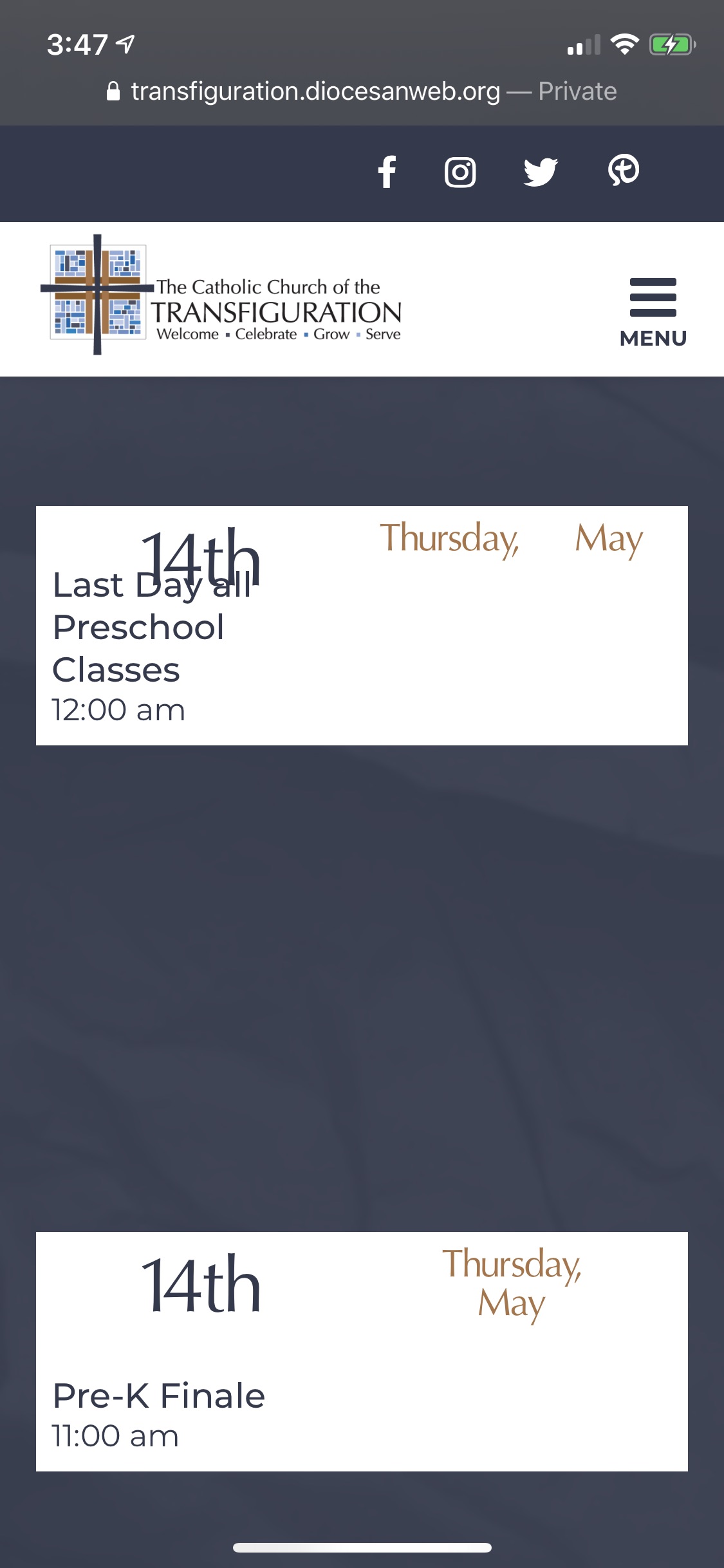
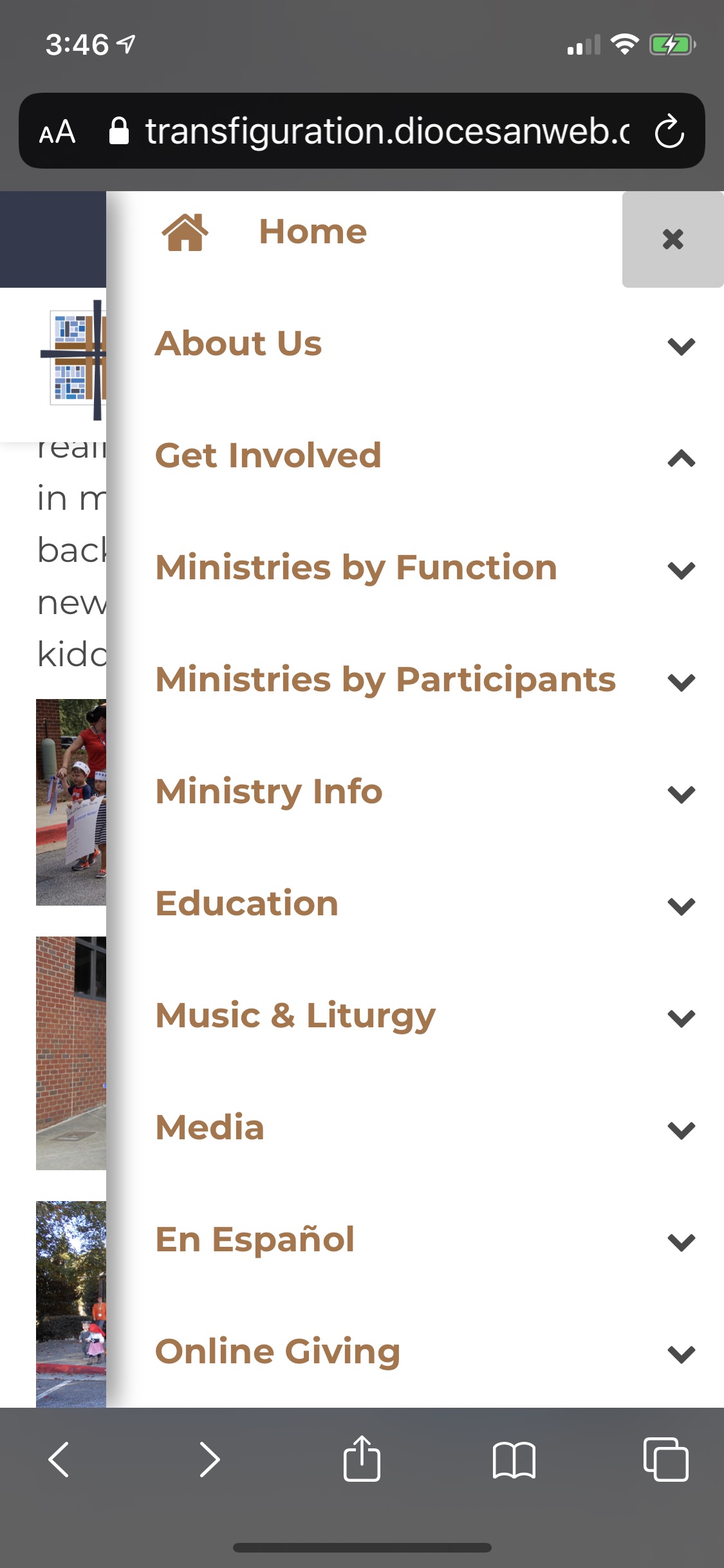
A team member came across the following issues on the mobile version of the website - see the calendar item and mobile menu attached. Please pass along to the developer.
* On the calendar, any event name longer than 2 lines gets pushed up under the date.
* On the mobile menu, it's very hard to tell when you've tapped a main menu and revealed a submenu. The only thing that tells you this is the up or down arrow. Perhaps if the submenu items were a different color or were indented significantly it would be better.
Thanks, Frank
Cody Armock
Hello Frank,
I have made the to-dos for the developer!
Thank you,
Cody Armock
I have made the to-dos for the developer!
Thank you,
Cody Armock
Web Department, Diocesan
877-923-0777
Frank Gonzalez
GM Cody,
Can you reset Gerald Smith's password or resend to him. He thought he saved it on his browser but he can't find it.
His email is Gerald.P.Smith@turner.com
Thanks,
Frank
Can you reset Gerald Smith's password or resend to him. He thought he saved it on his browser but he can't find it.
His email is Gerald.P.Smith@turner.com
Thanks,
Frank
Cody Armock
Good Morning Frank,
I have sent him the new password!
Thanks,
Cody Armock
I have sent him the new password!
Thanks,
Cody Armock
Frank Gonzalez
Hey Cody,
More questions and an update on the Live date...
1. How can we have a ministry page appear in two different sub menus under the Get Involved Menu without creating the page twice. For example, Knights of Columbus appears under the “Service” sub menu. We would also like have the same page under the “Just for Men” sub menu. Same page different sub menu ministry locations.
2. Can we have two different URLs for the same page? I guess with WordPress it would mean multiple URL Slugs. For example, we have EDUCATION also know as JOURNEY in a lot of our mailers. We don’t want to change that. Does WordPress have a redirect function that when it sees www.transfiguration.com/Journey it goes to www.transfiguration.com/Education via this redirect. We used this redirect function a lot with concrete5 to shorten our URLs as well.
3. Can I add and update users or is that something that Diocesan needs to do?
Last but not least, we had a team meeting this morning and the decision was made to go LIVE on June 1. We still have lots of work to do, but we are expecting Catholic churches here in the Atlanta Metro area to be re-opened around the same time. So the team felt it would be a good opportunity to do it then.
I need the ok from you and Diocesan that this date works for you as well. I also need to know what else you need from us to make this date happen.
Maybe you and I can do a teleconference to discuss the LIVE date and what it will take to make it happen.
Thanks,
Frank
More questions and an update on the Live date...
1. How can we have a ministry page appear in two different sub menus under the Get Involved Menu without creating the page twice. For example, Knights of Columbus appears under the “Service” sub menu. We would also like have the same page under the “Just for Men” sub menu. Same page different sub menu ministry locations.
2. Can we have two different URLs for the same page? I guess with WordPress it would mean multiple URL Slugs. For example, we have EDUCATION also know as JOURNEY in a lot of our mailers. We don’t want to change that. Does WordPress have a redirect function that when it sees www.transfiguration.com/Journey it goes to www.transfiguration.com/Education via this redirect. We used this redirect function a lot with concrete5 to shorten our URLs as well.
3. Can I add and update users or is that something that Diocesan needs to do?
Last but not least, we had a team meeting this morning and the decision was made to go LIVE on June 1. We still have lots of work to do, but we are expecting Catholic churches here in the Atlanta Metro area to be re-opened around the same time. So the team felt it would be a good opportunity to do it then.
I need the ok from you and Diocesan that this date works for you as well. I also need to know what else you need from us to make this date happen.
Maybe you and I can do a teleconference to discuss the LIVE date and what it will take to make it happen.
Thanks,
Frank
Cody Armock
Hello Frank,
1. You can just add the same page from the page list twice to the menu and then drag them to the two different places. That way they will both link to the same page, but appears in two different spots.
2. To my knowledge, there is nothing native to WordPress that does this. You can have things in the menu labeled however you want and have it go to a different page, but that is about the extent of it in WordPress. I don't think there is a URL shortener built-in though. I will discuss with some colleagues to see if they know of anything. You can also use URL shorteners like tinyURL or https://bitly.com/ among others.
I talked to the developer and he said that we can set it up where transfiguration.com/journey will take you to transfiguration.com/education as a redirect. It is not best practice to have multiple slugs for a page. Since it is in multiple places and trying to correct that would be a monumental undertaking, we can set up this redirect server-side.
3. Due to security concerns, Diocesan is the one to update and add users. Just let us know when you need to add another user or need an update to one.
June 1st is good for the launch date and I have put it on the schedule for now as tentative. I will send you an email about a week out to confirm that you are all set for the launch date and that we are all set on our end too.
For the launch, we will just need to know the contact information for the person in charge of or the login information for the domain. It looks like it is through GoDaddy, so either sending us the login information for that or letting us know the contact information for the person in charge of it and we can give them instructions for the day of the launch.
Thank you,
Cody Armock
1. You can just add the same page from the page list twice to the menu and then drag them to the two different places. That way they will both link to the same page, but appears in two different spots.
2. To my knowledge, there is nothing native to WordPress that does this. You can have things in the menu labeled however you want and have it go to a different page, but that is about the extent of it in WordPress. I don't think there is a URL shortener built-in though. I will discuss with some colleagues to see if they know of anything. You can also use URL shorteners like tinyURL or https://bitly.com/ among others.
I talked to the developer and he said that we can set it up where transfiguration.com/journey will take you to transfiguration.com/education as a redirect. It is not best practice to have multiple slugs for a page. Since it is in multiple places and trying to correct that would be a monumental undertaking, we can set up this redirect server-side.
3. Due to security concerns, Diocesan is the one to update and add users. Just let us know when you need to add another user or need an update to one.
June 1st is good for the launch date and I have put it on the schedule for now as tentative. I will send you an email about a week out to confirm that you are all set for the launch date and that we are all set on our end too.
For the launch, we will just need to know the contact information for the person in charge of or the login information for the domain. It looks like it is through GoDaddy, so either sending us the login information for that or letting us know the contact information for the person in charge of it and we can give them instructions for the day of the launch.
Thank you,
Cody Armock
Web Department, Diocesan
877-923-0777
Frank Gonzalez
Not sure if the drag and drop is what I want. I knew I could do that.
Maybe I'm not explaining myself very well.
I want to be able to duplicate the Knight of Columbus card that exist in the "Service" page into the "Just For Men" page. Not a sub menu item like I have it now.
What was your thinking when you created the "Just For Men" page? Where you planning for us to just have links similar to the "Alphabetical List"?
Maybe I'm not explaining myself very well.
I want to be able to duplicate the Knight of Columbus card that exist in the "Service" page into the "Just For Men" page. Not a sub menu item like I have it now.
What was your thinking when you created the "Just For Men" page? Where you planning for us to just have links similar to the "Alphabetical List"?
Cody Armock
Hello Frank,
There isn't a way for a page to have two parents, so, unfortunately, there is no way to Knights of Columbus under the Just for Men page and the Service Ministries page without having two pages. You could get rid of the Just for Men Ministries Parent page and just relocate the child pages to a different group of Ministries. You can usually just select all the blocks on the page and copy and then paste them on another page. Otherwise, if that doesn't work, copying the information from the frontend of the preexisting knights of Columbus page and then copying that over to the new one.
My thinking was to have different categories, so if somebody looking for all men's group or all women's group, or a mix of them, or doing volunteer than they could find those quicker.
Let me know if you have any further questions about this!
Thank you,
Cody Armock
There isn't a way for a page to have two parents, so, unfortunately, there is no way to Knights of Columbus under the Just for Men page and the Service Ministries page without having two pages. You could get rid of the Just for Men Ministries Parent page and just relocate the child pages to a different group of Ministries. You can usually just select all the blocks on the page and copy and then paste them on another page. Otherwise, if that doesn't work, copying the information from the frontend of the preexisting knights of Columbus page and then copying that over to the new one.
My thinking was to have different categories, so if somebody looking for all men's group or all women's group, or a mix of them, or doing volunteer than they could find those quicker.
Let me know if you have any further questions about this!
Thank you,
Cody Armock
Web Department, Diocesan
877-923-0777
Frank Gonzalez
So how did you populate the "Alphabetical List" ministry page. Is that done automatically or manually? Can we do something similar with the "Just for Men" page.
Cody Armock
Hello Frank,
The Alphabetical List is done automatically because of the template of "All Ministries". You could do something similar by doing it in the content. Changing the Just for Men Page to a Default Template and then using the right headings and linking them off to the right ministry pages and including an excerpt from that page if you want, but it would have to be done manually and then updated with any changes manually as well, but it can be done.
Thank you,
Cody Armock
The Alphabetical List is done automatically because of the template of "All Ministries". You could do something similar by doing it in the content. Changing the Just for Men Page to a Default Template and then using the right headings and linking them off to the right ministry pages and including an excerpt from that page if you want, but it would have to be done manually and then updated with any changes manually as well, but it can be done.
Thank you,
Cody Armock
Web Department, Diocesan
877-923-0777
Frank Gonzalez
Good Morning Cody,
We need the following users added before we go live. Only one user will need update capabilities to the whole website. The other will have limited access to their pages. Hopefully this can be done.
* Cindy Zondlak: czondlak@transfiguration.com (All Pages, similar privileges to what I have today)
* Ginger Mulligan: vmulligan@transfiguration.com (Music & Liturgy pages)
* Gloria Nolasco: gnolasco@transfiguration.com (Spanish pages)
* Kristen Smith: ksmith@transfiguration.com (Preschool pages)
* Saundra Rownd: srownd@transfiguration.com (Preschool pages)
* Theresa Brader: tbrader@transfiguration.com (Grade 6-12/Christeen Youth Ministry in Education)
We have a few more, but they can wait until we go live.
Thanks,
Frank
We need the following users added before we go live. Only one user will need update capabilities to the whole website. The other will have limited access to their pages. Hopefully this can be done.
* Cindy Zondlak: czondlak@transfiguration.com (All Pages, similar privileges to what I have today)
* Ginger Mulligan: vmulligan@transfiguration.com (Music & Liturgy pages)
* Gloria Nolasco: gnolasco@transfiguration.com (Spanish pages)
* Kristen Smith: ksmith@transfiguration.com (Preschool pages)
* Saundra Rownd: srownd@transfiguration.com (Preschool pages)
* Theresa Brader: tbrader@transfiguration.com (Grade 6-12/Christeen Youth Ministry in Education)
We have a few more, but they can wait until we go live.
Thanks,
Frank
Cody Armock
Hello Frank,
Yes, we can do that. I will make Cindy a Parish Admin like you and will make the rest an author role like Gerald, I believe and will assign those pages you listed. If I miss any, you can always do a quick update and change the author of that page to the correct person.
Unfortunately, there is only allowed one author per page, so I see a conflict with Kristen Smith and Saundra Rownd not having access to the right page. What we can do instead is have a single Preschool Account. That way, Kristen and Saundra could both log in with that account and have access to those pages, but only have one account. Would you like me to do that? I can send the login information to both of them though.
Let me know if you have any questions and how you'd like to proceed with the preschool conflict.
Thanks,
Cody Armock
Yes, we can do that. I will make Cindy a Parish Admin like you and will make the rest an author role like Gerald, I believe and will assign those pages you listed. If I miss any, you can always do a quick update and change the author of that page to the correct person.
Unfortunately, there is only allowed one author per page, so I see a conflict with Kristen Smith and Saundra Rownd not having access to the right page. What we can do instead is have a single Preschool Account. That way, Kristen and Saundra could both log in with that account and have access to those pages, but only have one account. Would you like me to do that? I can send the login information to both of them though.
Let me know if you have any questions and how you'd like to proceed with the preschool conflict.
Thanks,
Cody Armock
Web Department, Diocesan
877-923-0777
Frank Gonzalez
That sounds good. Can we have Gerald be part of that login that Kristen and Saundra will have. Gerald is Kristen's husband and he will be going away once the project is complete.
Frank Gonzalez
Hey Cody,
We have a need to sort the WordPress posts. In Googling for this need, I see there is a free plugin to re-order posts. It is called "Post Types Order" - https://wordpress.org/plugins/post-types-order/ Can you add this plug-in to our website if you think it could help us sort the posts. If not, what would you recommend?
Thanks,
Frank
We have a need to sort the WordPress posts. In Googling for this need, I see there is a free plugin to re-order posts. It is called "Post Types Order" - https://wordpress.org/plugins/post-types-order/ Can you add this plug-in to our website if you think it could help us sort the posts. If not, what would you recommend?
Thanks,
Frank
Cody Armock
Good afternoon Frank,
I will add Gerald onto that Preschool Account and will let him know to switch the author over to the Preschool account so that he can edit it from there.
It might help for me to know what you mean by ordering/sorting posts. What do you want to do with the posts exactly that cannot be done with native WordPress?
Let me know and we can go from there!
Thank you,
Cody Armock
I will add Gerald onto that Preschool Account and will let him know to switch the author over to the Preschool account so that he can edit it from there.
It might help for me to know what you mean by ordering/sorting posts. What do you want to do with the posts exactly that cannot be done with native WordPress?
Let me know and we can go from there!
Thank you,
Cody Armock
Web Department, Diocesan
877-923-0777
Frank Gonzalez
So Joyce wants posts that are most important like Religious Ed registration post to show up first when people visit the Education page.
When she posts something new, the registration post gets pushed to the back of the line. Another post and continues to be pushed back. If it gets pushed to the fourth spot, people are not going to seeing unless they click on the arrows. She wants the important posts to occupy those 3 spots.
The only way I know to keep something first is by changing the Date and Time on the Post via the Quick Edit.
We need something to keep the 3 most important post being displayed when people visit that page.
When she posts something new, the registration post gets pushed to the back of the line. Another post and continues to be pushed back. If it gets pushed to the fourth spot, people are not going to seeing unless they click on the arrows. She wants the important posts to occupy those 3 spots.
The only way I know to keep something first is by changing the Date and Time on the Post via the Quick Edit.
We need something to keep the 3 most important post being displayed when people visit that page.
Cody Armock
Hello Frank,
Thank you for explaining that issue to me. I will talk with the developer and see what we can come up with. Right now, that seems to be the only way to keep it to the front by either changing the date on those top three posts or by setting the date for the new posts farther away than the important ones.
I will let you know what we come up with or if those important items should just be placed on a page that is linked to from one of the buttons under the slider on the Education Page. Those buttons can swap out based on what is most important, whereas posts are meant to be more dynamic.
I have also sent out the user accounts and changed the authorship pages to the new ones where applicable. Keep in mind that if the parish Admins (Amy, Joyce, Gerald, etc.) were accustomed to filtering by the Mine tab at the top of the All Pages list, then these pages will no longer show up, but for the Parish Author Role to work correctly and for these people to have access to these pages, this is how it needs to be. I suggest passing this along to those Parish Administrators so that they do not change it back and thereby removing the Author's access to them.
Let me know if you have any questions!
Cody Armock
Thank you for explaining that issue to me. I will talk with the developer and see what we can come up with. Right now, that seems to be the only way to keep it to the front by either changing the date on those top three posts or by setting the date for the new posts farther away than the important ones.
I will let you know what we come up with or if those important items should just be placed on a page that is linked to from one of the buttons under the slider on the Education Page. Those buttons can swap out based on what is most important, whereas posts are meant to be more dynamic.
I have also sent out the user accounts and changed the authorship pages to the new ones where applicable. Keep in mind that if the parish Admins (Amy, Joyce, Gerald, etc.) were accustomed to filtering by the Mine tab at the top of the All Pages list, then these pages will no longer show up, but for the Parish Author Role to work correctly and for these people to have access to these pages, this is how it needs to be. I suggest passing this along to those Parish Administrators so that they do not change it back and thereby removing the Author's access to them.
Let me know if you have any questions!
Cody Armock
Web Department, Diocesan
877-923-0777
Cody Armock
Hello Frank,
After talking with the developer, we have added a Menu Order field to the Posts that will order them much as it does in the Staff Member Module. We have set the Registration Post to a Menu Order of -1 which will make the first one and then the rest can be a Menu Order of 0. You can change these in the Quick Edit option for the Post in the All Posts list. It goes Menu Order Ascending and then Date Descending, so if Post 1 has order of 0 and Post 2 has order of 0, whichever one was published most recently will display further left (first in the carousel/slider). I hope that makes sense.
I am not sure why but you cannot change the post to a menu ordering of -1 while you are in the post editor for that specific post, but you can set it to 0 or above. I recommend just always using Quick Edit to change the menu ordering for that reason. -1 will keep the post at the front of the queue.
This is a much better way to go rather than a plugin because of all the bloat that the plugin brings, plus it does not compromise the security of the site if the plugin goes outdated.
Let me know if you have any questions about this!
Cody Armock
After talking with the developer, we have added a Menu Order field to the Posts that will order them much as it does in the Staff Member Module. We have set the Registration Post to a Menu Order of -1 which will make the first one and then the rest can be a Menu Order of 0. You can change these in the Quick Edit option for the Post in the All Posts list. It goes Menu Order Ascending and then Date Descending, so if Post 1 has order of 0 and Post 2 has order of 0, whichever one was published most recently will display further left (first in the carousel/slider). I hope that makes sense.
I am not sure why but you cannot change the post to a menu ordering of -1 while you are in the post editor for that specific post, but you can set it to 0 or above. I recommend just always using Quick Edit to change the menu ordering for that reason. -1 will keep the post at the front of the queue.
This is a much better way to go rather than a plugin because of all the bloat that the plugin brings, plus it does not compromise the security of the site if the plugin goes outdated.
Let me know if you have any questions about this!
Cody Armock
Web Department, Diocesan
877-923-0777
Frank Gonzalez
Hi Cody,
I think this should work for now. I tried it and appears to do what we want. Thanks to you and the developer for providing this workaround.
Another question, how is the developer doing with the requests on the slider being moved underneath the navigation menu for all the pages that uses a slider, similar issue we had with home page. Also, the issue with the mobile version not displaying the calendar correctly.
We would like to have these fixed before we go live.
Frank
I think this should work for now. I tried it and appears to do what we want. Thanks to you and the developer for providing this workaround.
Another question, how is the developer doing with the requests on the slider being moved underneath the navigation menu for all the pages that uses a slider, similar issue we had with home page. Also, the issue with the mobile version not displaying the calendar correctly.
We would like to have these fixed before we go live.
Frank
Cody Armock
Hello Frank,
Please try a hard refresh, instructions here, on those pages and if that does not work, you may want to clear your cache. I know the developer just fixed the iOS calendar display issue yesterday and I believe the slider/navigation menu issue has been fixed, but if it has not please let me know and be as detailed as possible in what needs to be changed.
Thank you,
Cody Armock
Please try a hard refresh, instructions here, on those pages and if that does not work, you may want to clear your cache. I know the developer just fixed the iOS calendar display issue yesterday and I believe the slider/navigation menu issue has been fixed, but if it has not please let me know and be as detailed as possible in what needs to be changed.
Thank you,
Cody Armock
Web Department, Diocesan
877-923-0777
Frank Gonzalez
I did a hard refresh and it's hard to tell as it might be something to do with the size of the images on those pages.
I also can't tell with the calendar as the calendar has not been loaded into Google Calendar for this week.
I'm good if you say those issues have been fixed.
Thanks again.
I also can't tell with the calendar as the calendar has not been loaded into Google Calendar for this week.
I'm good if you say those issues have been fixed.
Thanks again.
Cody Armock
Hello Frank,
The developer used a test calendar for the iOS fix and then switched it back, so I know that the calendar issue is fixed and I believe that the developer fixed the slider issues when he fixed it on the main page too.
However, if something does come up, don't hesitate to let us know and we will do our best to fix it.
Thank you,
Cody Armock
The developer used a test calendar for the iOS fix and then switched it back, so I know that the calendar issue is fixed and I believe that the developer fixed the slider issues when he fixed it on the main page too.
However, if something does come up, don't hesitate to let us know and we will do our best to fix it.
Thank you,
Cody Armock
Web Department, Diocesan
877-923-0777
Frank Gonzalez
Cody,
Take a look at the attached images of the Home page and Education page sliders. To me they do not appear to be the same size. Specially look at the placement of the featured buttons. They are lower in the home page vs the Education page.
I used a print screen using the same browser and tab.
Frank
Take a look at the attached images of the Home page and Education page sliders. To me they do not appear to be the same size. Specially look at the placement of the featured buttons. They are lower in the home page vs the Education page.
I used a print screen using the same browser and tab.
Frank
 Cody Armock
Hello Frank,
They are of different sizes. That is because, in the slider proof that was approved, the slider is slightly shorter than the one on the homepage. That is why they are slightly different sizes.
Cody Armock
They are of different sizes. That is because, in the slider proof that was approved, the slider is slightly shorter than the one on the homepage. That is why they are slightly different sizes.
Cody Armock
Web Department, Diocesan
877-923-0777
Frank Gonzalez
I don't understand. We had asked those pages to be identical to the home page. I don't remember being told that they would need to be approved.
Frank Gonzalez
Cody,
The calendar on the home page has not been fixed. Take a look at the attached image.
Frank
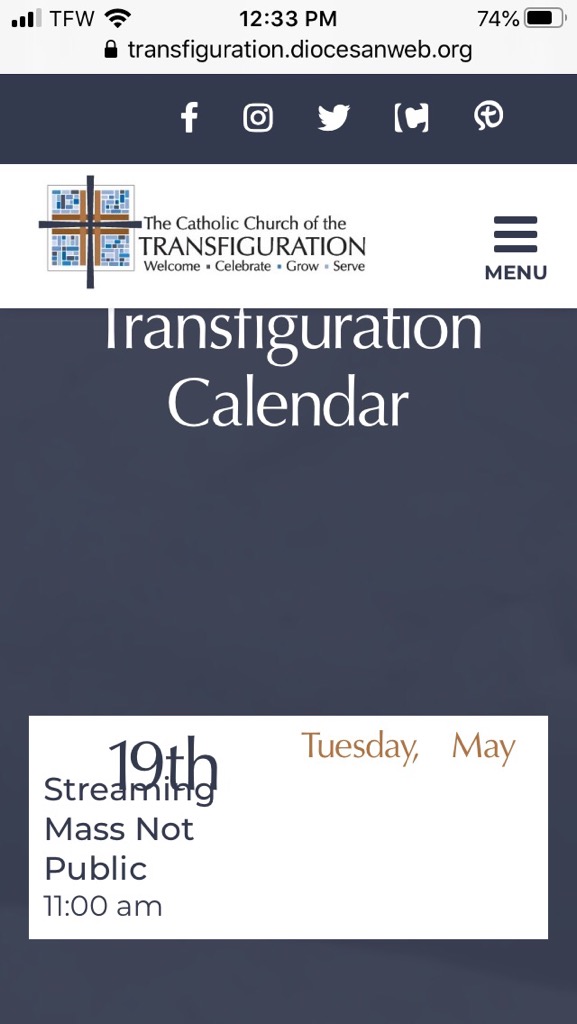
The calendar on the home page has not been fixed. Take a look at the attached image.
Frank
Cody Armock
Hello Frank,
Thank you for sending that to me! Is that a different browser on your phone or have you cleared your cache? Often times it will keep the old styling unless you clear your cache or try another browser on your phone.
Let me know if it is still broken even after those steps!
I am discussing the slider template with Veronica and the developer.
Thank you,
Cody Armock
Thank you for sending that to me! Is that a different browser on your phone or have you cleared your cache? Often times it will keep the old styling unless you clear your cache or try another browser on your phone.
Let me know if it is still broken even after those steps!
I am discussing the slider template with Veronica and the developer.
Thank you,
Cody Armock
Web Department, Diocesan
877-923-0777
Frank Gonzalez
It works. I had to clear the cache and history on my phone's Safari browser.
Sorry about that.
Sorry about that.
 Blake Stapleton
Hi Frank,
This is Blake Stapleton, the designer who worked with all of you during the design phase of the project. I hope everyone is doing well and staying healthy!
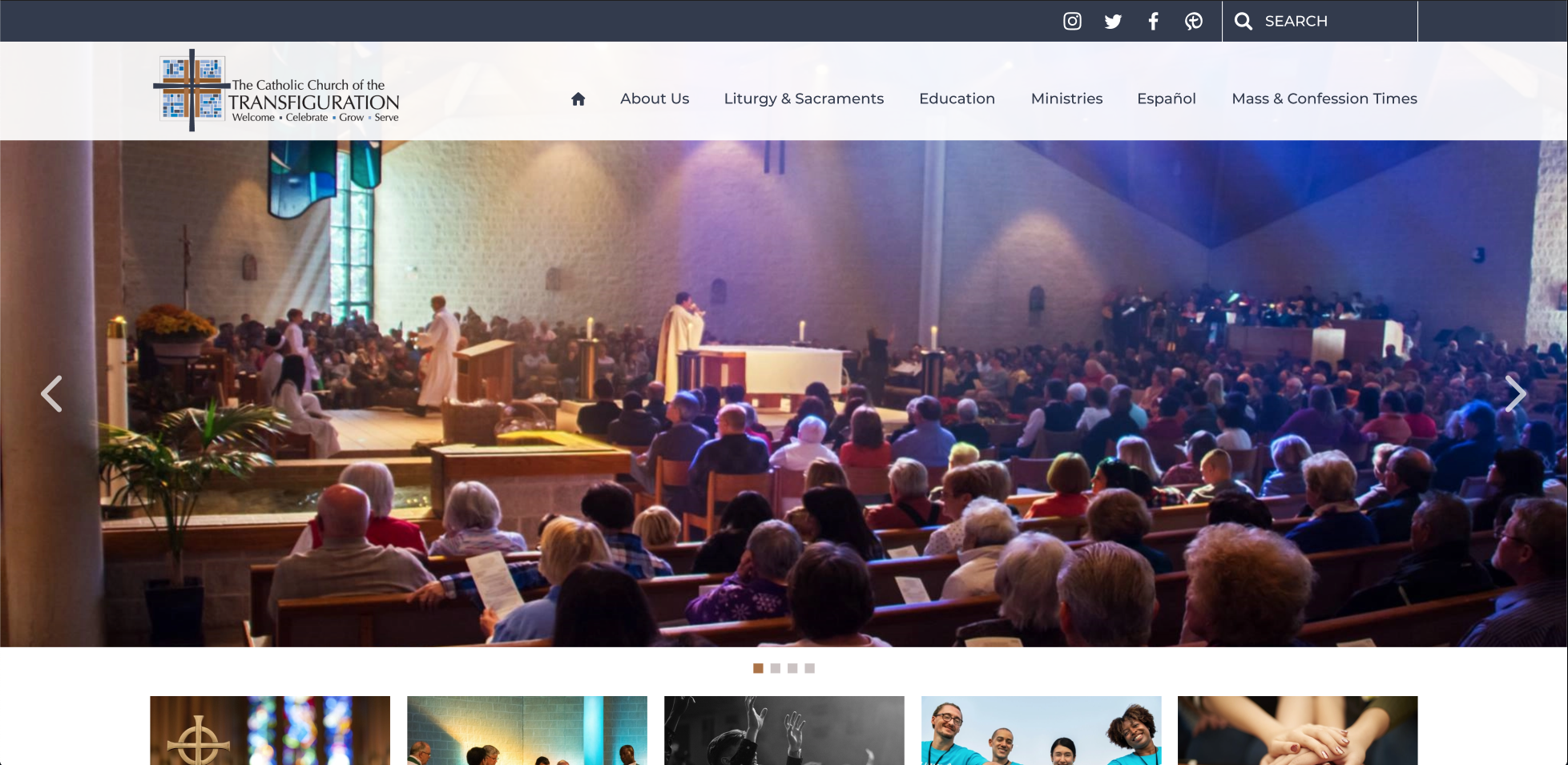
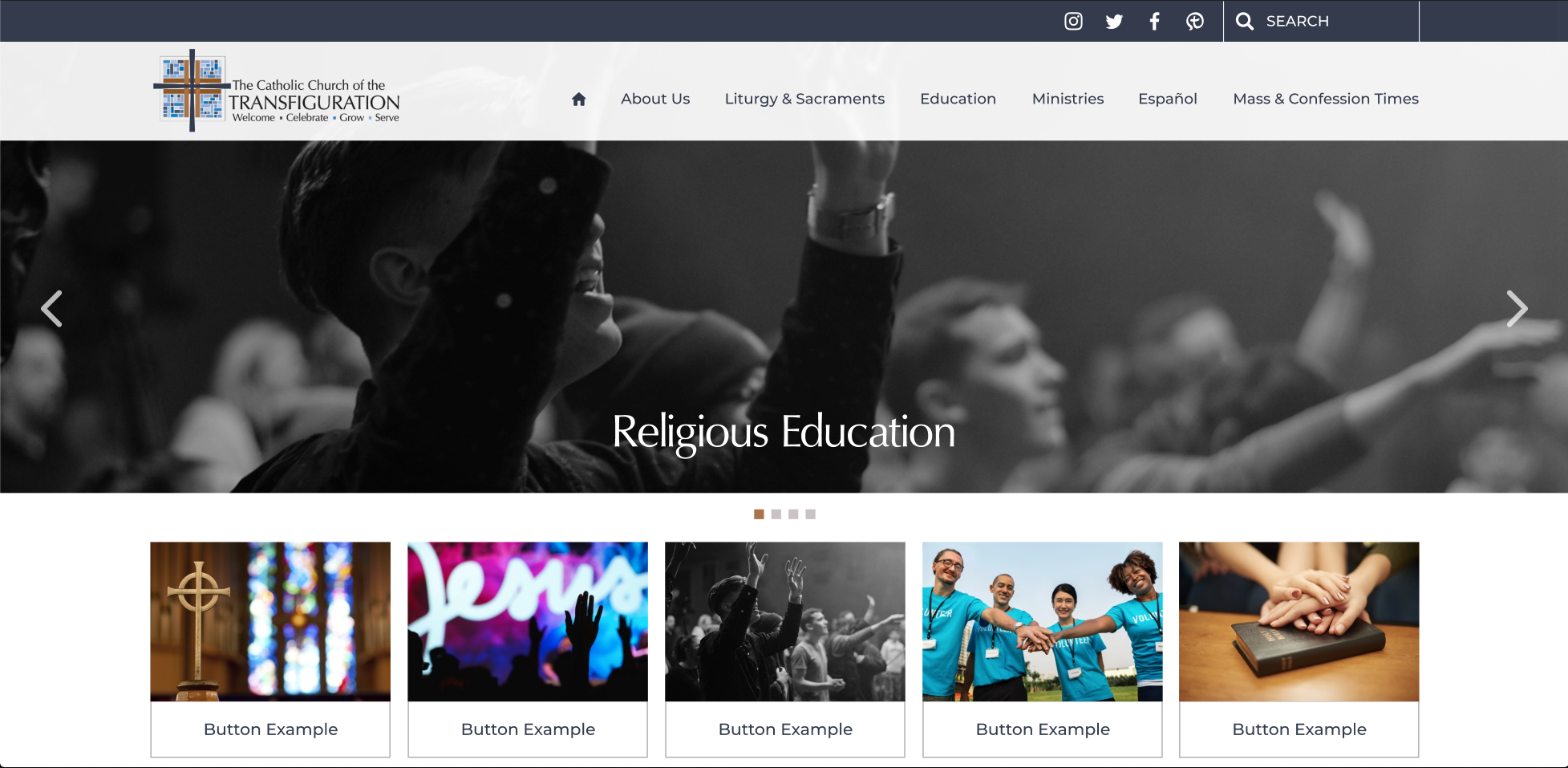
So in our meetings, we did speak about how we wanted the homepage and some of those important inner pages to look very similar. However, during our meetings together, we spoke about having the inner page sliders be a little shorter and have their page titles on them. We decided to do this so visitors to the site could differentiate between the homepage and inner pages, and not be confused as to where they were on the site. We wanted to keep the look similar but just have a slight difference to help the visitors navigate a little better. We also wanted the first row of the buttons to be fully visible when we landed on the inner page, which strengthened our reasoning for making the slider a little shorter.
I have a couple of screenshots of the original proofs below that reflect what we talked about as a group and were approved. Let us know if you have any questions about this and we will be happy to help and explain further.
Best,
This is Blake Stapleton, the designer who worked with all of you during the design phase of the project. I hope everyone is doing well and staying healthy!
So in our meetings, we did speak about how we wanted the homepage and some of those important inner pages to look very similar. However, during our meetings together, we spoke about having the inner page sliders be a little shorter and have their page titles on them. We decided to do this so visitors to the site could differentiate between the homepage and inner pages, and not be confused as to where they were on the site. We wanted to keep the look similar but just have a slight difference to help the visitors navigate a little better. We also wanted the first row of the buttons to be fully visible when we landed on the inner page, which strengthened our reasoning for making the slider a little shorter.
I have a couple of screenshots of the original proofs below that reflect what we talked about as a group and were approved. Let us know if you have any questions about this and we will be happy to help and explain further.
Best,
Blake Stapleton
Web Department, Diocesan
877.923.0777
 Frank Gonzalez
Good Morning Blake,
Good to hear from you. If you remember, have it written down, and I signed off on it then we are good. I will pass this on to our project team.
Pass this on to Cody.
Thanks for confirming this for us.
Frank
Good to hear from you. If you remember, have it written down, and I signed off on it then we are good. I will pass this on to our project team.
Pass this on to Cody.
Thanks for confirming this for us.
Frank
Blake Stapleton
Hi Frank,
Happy to help, you are very welcome. I will pass this along as well. I hope everyone is doing well and staying healthy! :)
God Bless,
Blake Stapleton
Happy to help, you are very welcome. I will pass this along as well. I hope everyone is doing well and staying healthy! :)
God Bless,
Blake Stapleton
Frank Gonzalez
Hi Cody,
One our team members brought up that we don't have the search icon on the mobile version of the website. Can you look into this?
Thanks,
Frank
One our team members brought up that we don't have the search icon on the mobile version of the website. Can you look into this?
Thanks,
Frank
Cody Armock
Hello Frank,
I will make a to-do for the developer about this. He should get to it very shortly.
Thank you,
Cody Armock
I will make a to-do for the developer about this. He should get to it very shortly.
Thank you,
Cody Armock
Web Department, Diocesan
877-923-0777
Frank Gonzalez
A couple of additional things that were brought up at our meeting today:
* Please add Sheila Murray, smurray@transfiguration.com as a user for Sunday Morning Preschool and Grades 1-5 Education.
* We have reached our limit on sub-folders for the Media Library. It says we need to Upgrade to the PRO version to have unlimited folders. The team would like to know how we create more sub-folders.
* Team is ready to go LIVE on June 1. Everyone wants to make sure all system are go on your end. I can give you access to godaddy when you are ready.
* Does Diocesan have any marketing material that you can share with us to promote our new website to the parish community?
Everyone is excited. Some of the staff that have seen the preview and like it a lot. I appreciate all the hard work you guys have done to make this happen.
Frank
* Please add Sheila Murray, smurray@transfiguration.com as a user for Sunday Morning Preschool and Grades 1-5 Education.
* We have reached our limit on sub-folders for the Media Library. It says we need to Upgrade to the PRO version to have unlimited folders. The team would like to know how we create more sub-folders.
* Team is ready to go LIVE on June 1. Everyone wants to make sure all system are go on your end. I can give you access to godaddy when you are ready.
* Does Diocesan have any marketing material that you can share with us to promote our new website to the parish community?
Everyone is excited. Some of the staff that have seen the preview and like it a lot. I appreciate all the hard work you guys have done to make this happen.
Frank
Frank Gonzalez
Cody,
There was one additional item that came up in the meeting that was asked and I thought I had an answer for. However, after investigating I don't see a way make it work.
It has to do with replacing files on the Media Library.
It appears that WordPress Media Library does not have a way to replace existing files in your Media Library by default. For example, if you upload a new version of an existing PDF, you have to also manually update all links to that PDF because the new one you upload will have a new URL.
Is there an easy way of replacing a current file or is there a plugin to make our life easier.
Thanks again!
Frank
There was one additional item that came up in the meeting that was asked and I thought I had an answer for. However, after investigating I don't see a way make it work.
It has to do with replacing files on the Media Library.
It appears that WordPress Media Library does not have a way to replace existing files in your Media Library by default. For example, if you upload a new version of an existing PDF, you have to also manually update all links to that PDF because the new one you upload will have a new URL.
Is there an easy way of replacing a current file or is there a plugin to make our life easier.
Thanks again!
Frank
Cody Armock
Hello Frank,
I have made and sent out the information for Sheila.
There is a max of 10 folders that can be made with that plugin. The pro version is $25 and that has an unlimited number of folders. Let me know if you are interested in that and I can have Veronica send over a confirmation email.
We should be all set on our end. We added the search to the mobile version of the site, so that is all set. Please send over that login info for GoDaddy so that we can make sure that we have everything for when we launch.
It doesn't seem that we have any promotional materials. I would definitely suggest putting something in the bulletin and posting on your social media about it. There is also a free online tool called canva.com, that has a lot of templates that you can use to post on social media.
I am glad that you are liking the site and that the others like it as well.
The easiest way to replace files is to delete the file from the media library and then rename the new file the same as the old and then upload it after the old one was deleted. This will keep it as the same link and then you will just need to change the text on those. I would also suggest putting in the description for the new/updated file the correct or something like UPDATED: 5/21/2020 or whatever the date is, that way you can make sure it is the correct file. That would be the easiest way to do it.
Thank you,
Cody Armock
I have made and sent out the information for Sheila.
There is a max of 10 folders that can be made with that plugin. The pro version is $25 and that has an unlimited number of folders. Let me know if you are interested in that and I can have Veronica send over a confirmation email.
We should be all set on our end. We added the search to the mobile version of the site, so that is all set. Please send over that login info for GoDaddy so that we can make sure that we have everything for when we launch.
It doesn't seem that we have any promotional materials. I would definitely suggest putting something in the bulletin and posting on your social media about it. There is also a free online tool called canva.com, that has a lot of templates that you can use to post on social media.
I am glad that you are liking the site and that the others like it as well.
The easiest way to replace files is to delete the file from the media library and then rename the new file the same as the old and then upload it after the old one was deleted. This will keep it as the same link and then you will just need to change the text on those. I would also suggest putting in the description for the new/updated file the correct or something like UPDATED: 5/21/2020 or whatever the date is, that way you can make sure it is the correct file. That would be the easiest way to do it.
Thank you,
Cody Armock
Web Department, Diocesan
877-923-0777
Frank Gonzalez
Cody,
My Manager approved the Media plugin upgrade. Let me know how you guys will charge the $25. We probably have a Diocesan credit that you can charge it to.
GD info: transfigatl / TempAtl18!
Let me know if you need anything else.
Frank
My Manager approved the Media plugin upgrade. Let me know how you guys will charge the $25. We probably have a Diocesan credit that you can charge it to.
GD info: transfigatl / TempAtl18!
Let me know if you need anything else.
Frank
Cody Armock
Hello Frank,
I will have Veronica send that confirmation email over to you about the plugin and then she will let you know how it will be charged too.
I signed into the GoDaddy account and it sent an email to Victor I believe with a 6-digit code, so if you could send that over to us as well, that would be great.
Thank you,
Cody Armock
I will have Veronica send that confirmation email over to you about the plugin and then she will let you know how it will be charged too.
I signed into the GoDaddy account and it sent an email to Victor I believe with a 6-digit code, so if you could send that over to us as well, that would be great.
Thank you,
Cody Armock
Web Department, Diocesan
877-923-0777
Frank Gonzalez
Here is the code:
Your one-time code is: 523353.
Please verify you're really you by entering this 6-digit code when you sign in. Just a heads up, this code will expire in 20 minutes for security reasons.
We noticed you signed in from a new location or device:
Location: Wyoming Michigan United States
Device: Chrome 81.0.4044 Windows 10
Your one-time code is: 523353.
Please verify you're really you by entering this 6-digit code when you sign in. Just a heads up, this code will expire in 20 minutes for security reasons.
We noticed you signed in from a new location or device:
Location: Wyoming Michigan United States
Device: Chrome 81.0.4044 Windows 10
Frank Gonzalez
Cody,
Can you replace the image with the oranges that WordPress login screen has with the one I have attached on this e-mail.
Thanks,
Frank
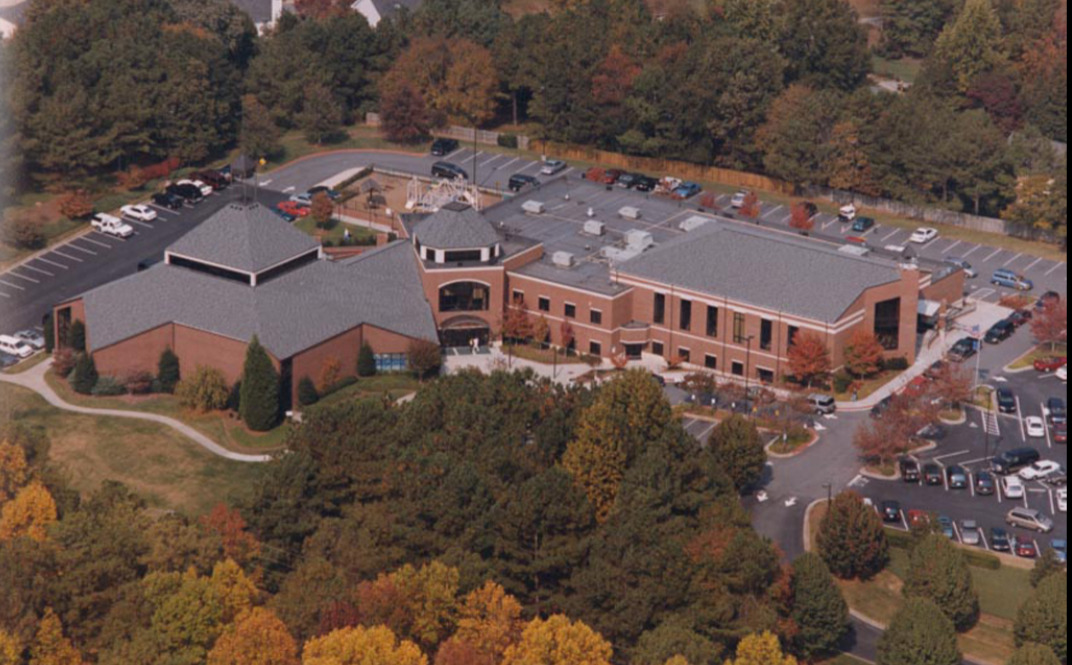
Can you replace the image with the oranges that WordPress login screen has with the one I have attached on this e-mail.
Thanks,
Frank
Cody Armock
Hello Frank,
It is has been done!
I hope you had a great memorial day weekend.
Cody Armock
It is has been done!
I hope you had a great memorial day weekend.
Cody Armock
Web Department, Diocesan
877-923-0777
Frank Gonzalez
Thanks Cody!
I finally got a day off yesterday, after working 2 straight months 7 days a week. We've be streaming our Masses everyday and I had to make sure everything worked.
We will finally open our church tomorrow. Thank God!
Frank
I finally got a day off yesterday, after working 2 straight months 7 days a week. We've be streaming our Masses everyday and I had to make sure everything worked.
We will finally open our church tomorrow. Thank God!
Frank
Cody Armock
Wow, Frank,
That sounds like absolute craziness. I am glad that you have been able to finally take a sabbath.
Good luck with your reopening tomorrow. Stay Safe!
Cody Armock
That sounds like absolute craziness. I am glad that you have been able to finally take a sabbath.
Good luck with your reopening tomorrow. Stay Safe!
Cody Armock
Frank Gonzalez
Cody,
Virginia Mulligan, vmulligan@transfiguration.com<mailto:vmulligan@transfiguration.com> (Music & Liturgy) is having issues signing in with the info you sent her last week. Can you recreate a new password and resend.
Thanks,
Frank
Virginia Mulligan, vmulligan@transfiguration.com<mailto:vmulligan@transfiguration.com> (Music & Liturgy) is having issues signing in with the info you sent her last week. Can you recreate a new password and resend.
Thanks,
Frank
Cody Armock
Hello Frank,
I have created a new password and resent it to her.
Cody Armock
I have created a new password and resent it to her.
Cody Armock
Web Department, Diocesan
877-923-0777
Frank Gonzalez
Good Morning Cody,
As we go live today, we were wondering when you expect the change over to occur. I think you had said between the hours of 10AM - 2PM. Please confirm.
We are probably going to wait until the changeover occurs before we make any additional changes.
Once the changeover occurs, do we login the same way?
Praying for everything to go well.
Frank
As we go live today, we were wondering when you expect the change over to occur. I think you had said between the hours of 10AM - 2PM. Please confirm.
We are probably going to wait until the changeover occurs before we make any additional changes.
Once the changeover occurs, do we login the same way?
Praying for everything to go well.
Frank
Cody Armock
Good Morning Frank,
Yes, we will be going live sometime between 9:30 AM and 1 PM EST today. Once the website is launched, we will send you an email with the new login instructions and how to contact us now that the website is live.
That is a good idea to wait to make changes as logging in during launch and making changes can cause issues, but more often prevents the changes from being saved.
Let me know if you have any other questions!
Cody Armock
Yes, we will be going live sometime between 9:30 AM and 1 PM EST today. Once the website is launched, we will send you an email with the new login instructions and how to contact us now that the website is live.
That is a good idea to wait to make changes as logging in during launch and making changes can cause issues, but more often prevents the changes from being saved.
Let me know if you have any other questions!
Cody Armock
Web Department, Diocesan
877-923-0777
Cody Armock
Good Morning Again Frank,
I know that when the developer tries to log in to GoDaddy to access the domain information, Victor gets a security code that expires in 20 minutes, so for the developer to get access to the domain, the security code needs to be sent over relatively quickly. I just wanted to coordinate it so that you can let Victor know that the code will be sent sometime between 9:30 and 10:00 AM today. Once he gets the code just relay it back to us as fast as possible, so that the launch process goes as smoothly as it can.
Thank you,
Cody Armock
I know that when the developer tries to log in to GoDaddy to access the domain information, Victor gets a security code that expires in 20 minutes, so for the developer to get access to the domain, the security code needs to be sent over relatively quickly. I just wanted to coordinate it so that you can let Victor know that the code will be sent sometime between 9:30 and 10:00 AM today. Once he gets the code just relay it back to us as fast as possible, so that the launch process goes as smoothly as it can.
Thank you,
Cody Armock
Web Department, Diocesan
877-923-0777
Frank Gonzalez
I will let him know.
Frank
Frank
Frank Gonzalez
Cody,
Victor just go my message. Can you redo the godaddy PIN request? If not, we'll have to wait until 11:30 AM.
Frank
Victor just go my message. Can you redo the godaddy PIN request? If not, we'll have to wait until 11:30 AM.
Frank
Frank Gonzalez
Your one-time code is: 650713.
Please verify you're really you by entering this 6-digit code when you sign in. Just a heads up, this code will expire in 20 minutes for security reasons.
Please verify you're really you by entering this 6-digit code when you sign in. Just a heads up, this code will expire in 20 minutes for security reasons.
 Kyle Sullivan
I just sent another request for the 6-digit code by email to v*****@t*****.com. Please share the code as soon as you get it.
Frank Gonzalez
Kyle - trying to get hold of Victor.
Frank Gonzalez
Your one-time code is: 008459.
Frank Gonzalez
Frank Gonzalez
Cody,
Wondering where we at with the new website. I was hoping we would be done by 2PM.
Frank
Wondering where we at with the new website. I was hoping we would be done by 2PM.
Frank