












Development Link and Training Sessions
Good morning Frank,
We have reached the point in development at which we share a link to the development site with you.
Training Sessions
The first training session typically takes ~2 hours and is done remotely via a screen share program. We will send over the meeting link and phone number in a later email.
During the training sessions, we go over:
- How to edit the homepage content
- How to edit the footer
- How to edit the menu
- How to create/edit inner pages
- How to create/edit posts
- How to create/edit image galleries
- How to create/edit online forms
Since this can be a lot, we break the training down into two sessions:
Session 1: Editing the site basics
Session 2: Editing the additional site features & answering follow-up questions
This is completely up to your learning pace and how much you feel comfortable covering at once.
Development Site Link
Something to keep in mind is that the site is not quite completed yet, with the largest thing being mobile responsiveness. That said, it is best to look at the development site on a desktop computer, rather than a laptop or smaller screen. Mobile development/responsiveness is something that the developer completes after the training so that he can update any changes along with the original development!
Other than that, if you see anything that alarms you (design or functionality), please let me know and we can address your concerns.
Development Site URL: https://transfiguration.diocesanweb.org/
Content
As discussed with Veronica, we have halted content migration until we hear otherwise from you. If you prefer to complete the migration yourself, let's schedule a training for next week. If you prefer Diocesan to complete the migration, please let us know and we can discuss that further.
Content
As discussed with Veronica, we have halted content migration until we hear otherwise from you. If you prefer to complete the migration yourself, let's schedule a training for next week. If you prefer Diocesan to complete the migration, please let us know and we can discuss that further.
Please let us know what you decide or if you have any other questions,
Thank you!
Alan Snodgrass
Web Department
877-923-0777
 Frank Gonzalez
Alan,
Right of the bat I’m not seeing “Education” on the menu navigational bar. That’s is very important to what we do here at Transfiguration. We also had ask to change some of the menu items, but we can change those later.
Still looking, but we need “Education” that before I can present to the rest of the group.
Frank
Right of the bat I’m not seeing “Education” on the menu navigational bar. That’s is very important to what we do here at Transfiguration. We also had ask to change some of the menu items, but we can change those later.
Still looking, but we need “Education” that before I can present to the rest of the group.
Frank
 Cody Armock
Hello Frank,
I am sorry that this response is belated. I have added the Education Menu Item and fleshed out the menu so that you can see what it will look like. These don't go anywhere yet, but these can be filled in after the first training. Again, I apologize for the delay in the response.
Let me know if you have any questions!
Cody Armock
I am sorry that this response is belated. I have added the Education Menu Item and fleshed out the menu so that you can see what it will look like. These don't go anywhere yet, but these can be filled in after the first training. Again, I apologize for the delay in the response.
Let me know if you have any questions!
Cody Armock
Web Department, Diocesan
877-923-0777
Frank Gonzalez
Cody,
You think you can take care of these other things I found before the training?
* Remove "Contact Us". Add “Giving” to navigational menu bar. We had asked for this as well.
* Make slider height on home page larger. It looks like the menu navigational bar is hiding part of the slider.
* It looks different in Microsoft Edge, than Google Chrome or Firefox.
Thanks,
Frank
You think you can take care of these other things I found before the training?
* Remove "Contact Us". Add “Giving” to navigational menu bar. We had asked for this as well.
* Make slider height on home page larger. It looks like the menu navigational bar is hiding part of the slider.
* It looks different in Microsoft Edge, than Google Chrome or Firefox.
Thanks,
Frank
Cody Armock
Good Morning Frank,
I have replaced Contact Us with Giving and have made a to-do for the developer to make the slider taller.
The developer will be going through after our training and making sure that the responsiveness is correct and testing the site on different browsers, we do this so that if there are any changes that come from training, the developer is only doing it once, rather than multiple times, but I will make a note to make sure that he tests it on Edge.
Do you know when you would like to set up a time for training?
Thank you,
#Cody Armock
I have replaced Contact Us with Giving and have made a to-do for the developer to make the slider taller.
The developer will be going through after our training and making sure that the responsiveness is correct and testing the site on different browsers, we do this so that if there are any changes that come from training, the developer is only doing it once, rather than multiple times, but I will make a note to make sure that he tests it on Edge.
Do you know when you would like to set up a time for training?
Thank you,
#Cody Armock
Web Department, Diocesan
877-923-0777
Frank Gonzalez
I need to talk to the team on Monday. Today is Good Friday so they are not available. I will get back to you next week.
Frank
Frank
Cody Armock
Sounds good.
Thank you and Happy Triduum and Easter.
Cody Armock
Thank you and Happy Triduum and Easter.
Cody Armock
Frank Gonzalez
Cody,
In preparation for our training I have the following questions:
How many people are allowed to attend the training? We are 4 in the team.
How much notice in advance do we need to give you to set up the training?
Thanks,
Frank
In preparation for our training I have the following questions:
How many people are allowed to attend the training? We are 4 in the team.
How much notice in advance do we need to give you to set up the training?
Thanks,
Frank
Cody Armock
Good Morning Frank,
You can have as many in the training as you want; there is no limit.
I would prefer at least a day, but it depends on your schedule as well as mine. I am pretty open this week to do trainings, so just let me know what days and times work best for you and your team and I will do my best to work around them!
Happy Easter!
Cody Armock
You can have as many in the training as you want; there is no limit.
I would prefer at least a day, but it depends on your schedule as well as mine. I am pretty open this week to do trainings, so just let me know what days and times work best for you and your team and I will do my best to work around them!
Happy Easter!
Cody Armock
Web Department, Diocesan
877-923-0777
Frank Gonzalez
Cody,
We had our team meeting this morning and we would like to have the training this Friday, 4/17, at 1:00PM if that is okay with you.
If not, we can try for Monday of next week. We will have 5 participants.
Thanks,
Frank
We had our team meeting this morning and we would like to have the training this Friday, 4/17, at 1:00PM if that is okay with you.
If not, we can try for Monday of next week. We will have 5 participants.
Thanks,
Frank
Cody Armock
Hello Frank,
I am unavailable on Friday at 1:00 PM to do the training. I can do Monday, anytime between 10:30 AM and 4 PM EST.
Let me know what time works for you and I will set up the training information for you all to join the meeting.
Thank you,
Cody Armock
I am unavailable on Friday at 1:00 PM to do the training. I can do Monday, anytime between 10:30 AM and 4 PM EST.
Let me know what time works for you and I will set up the training information for you all to join the meeting.
Thank you,
Cody Armock
Web Department, Diocesan
877-923-0777
Frank Gonzalez
Go ahead and book us for Monday at 10:30 AM.
Frank
Frank
Cody Armock
Thank you, Frank,
Here is the training information for next Monday's training:
Diocesan is inviting you to a scheduled Zoom meeting.
Topic: First Training | Transfiguration (Marietta, GA)
Time: Apr 20, 2020 10:30 AM Eastern Time (US and Canada)
Join Zoom Meeting
https://zoom.us/j/98557771303
Meeting ID: 985 5777 1303
Call to Join Audio
+1 646 876 9923
OR
+1 312 626 6799
Meeting ID: 985 5777 1303
Let me know if you have any questions!
Cody Armock
Here is the training information for next Monday's training:
Diocesan is inviting you to a scheduled Zoom meeting.
Topic: First Training | Transfiguration (Marietta, GA)
Time: Apr 20, 2020 10:30 AM Eastern Time (US and Canada)
Join Zoom Meeting
https://zoom.us/j/98557771303
Meeting ID: 985 5777 1303
Call to Join Audio
+1 646 876 9923
OR
+1 312 626 6799
Meeting ID: 985 5777 1303
Let me know if you have any questions!
Cody Armock
Web Department, Diocesan
877-923-0777
Frank Gonzalez
Cody,
Thanks for the training today. I think it went well.
Here is the info you asked for:
Frank Gonzalez fgonzalez@transfiguration.com
Victor Rodriguez: vrodriguez@transfiguration.com
Joyce Guris: jguris@transfiguration.com
Amy Krakauer: AKrakauer@transfiguration.com
Gerald Smith: Gerald.P.Smith@turner.com
Give us all Parish Admin Capabilities. Let me know if there is anything else you need.
Frank
Thanks for the training today. I think it went well.
Here is the info you asked for:
Frank Gonzalez fgonzalez@transfiguration.com
Victor Rodriguez: vrodriguez@transfiguration.com
Joyce Guris: jguris@transfiguration.com
Amy Krakauer: AKrakauer@transfiguration.com
Gerald Smith: Gerald.P.Smith@turner.com
Give us all Parish Admin Capabilities. Let me know if there is anything else you need.
Frank
Cody Armock
Good Morning Frank,
Page Updating
I have added a plugin called Revisions to the site that will let you schedule changes to pages and post content. I have tested it with the training account and it seems to work pretty well, so I hope it works for you.
Basically, if you make a change to a page and you change the publish the date to sometime in the future, it should change the "Update" button to say "Schedule Revision". It will then pop up with a screen that gives you different options and say at the top that your revision has been scheduled. If it says that it is pending or has notified an editor or something, let me know and I will fix that.
Training
Also, do you know what time next week you would like to do the training? I just want to set that as soon as possible, so my schedule is as open as possible to accommodate you.
Let me know if you have any questions!
Cody Armock
Web Department, Diocesan
877-923-0777
Frank Gonzalez
Cody,
Let's plan on Wednesday, April 29 10AM - 12PM. I also need to confirm with the team.
Not sure if you notice, but I have started updating the home page. Still trying to figure best way of doing things.
BTW - Fr. Brian is one crazy dude. People love him here.
Frank
Let's plan on Wednesday, April 29 10AM - 12PM. I also need to confirm with the team.
Not sure if you notice, but I have started updating the home page. Still trying to figure best way of doing things.
BTW - Fr. Brian is one crazy dude. People love him here.
Frank
Cody Armock
Hello Frank,
Thank you for the quick response!
I am glad that you are updating the homepage. This is a time to try things out and work out as many wrinkles as possible before launching.
Here is the meeting information for the second training:
Diocesan is inviting you to a scheduled Zoom meeting.
Topic: Second Training | Transfiguration (Marietta, GA)
Time: Apr 29, 2020 10:00 AM Eastern Time (US and Canada)
Join Zoom Meeting
https://zoom.us/j/92772100158
Meeting ID: 927 7210 0158
Call to Join Audio
+1 312 626 6799
OR
+1 646 876 9923
Meeting ID: 927 7210 0158
Let me know if anything changes!
Thank you,
Cody Armock
Thank you for the quick response!
I am glad that you are updating the homepage. This is a time to try things out and work out as many wrinkles as possible before launching.
Here is the meeting information for the second training:
Diocesan is inviting you to a scheduled Zoom meeting.
Topic: Second Training | Transfiguration (Marietta, GA)
Time: Apr 29, 2020 10:00 AM Eastern Time (US and Canada)
Join Zoom Meeting
https://zoom.us/j/92772100158
Meeting ID: 927 7210 0158
Call to Join Audio
+1 312 626 6799
OR
+1 646 876 9923
Meeting ID: 927 7210 0158
Let me know if anything changes!
Thank you,
Cody Armock
Web Department, Diocesan
877-923-0777
Frank Gonzalez
Hi Cody,
Trying to figure out why the Preview button is not working for the Home Page. I would like to preview the changes before publishing. Is that what this button does. How can I preview a page before publishing?
Frank
[cid:b2113d21-3eda-4047-841d-01fa1c00b1b6]

Trying to figure out why the Preview button is not working for the Home Page. I would like to preview the changes before publishing. Is that what this button does. How can I preview a page before publishing?
Frank
[cid:b2113d21-3eda-4047-841d-01fa1c00b1b6]
Cody Armock
Hello Frank,
What do you mean the button is not working? The preview will show the changes that you make, it is usually used for a draft to see it before publishing and having the page public, but the Homepage, with the Hybrid slider of Videos and Images, I don't think the Javascript is being run with the preview mode. Was this the issue?
Thank you,
Cody Armock
What do you mean the button is not working? The preview will show the changes that you make, it is usually used for a draft to see it before publishing and having the page public, but the Homepage, with the Hybrid slider of Videos and Images, I don't think the Javascript is being run with the preview mode. Was this the issue?
Thank you,
Cody Armock
Web Department, Diocesan
877-923-0777
Frank Gonzalez
So I updated the Mission Statement image on my home page, but when I go to Preview page is still showing the old image.
Cody Armock
Good Afternoon Frank,
Yeah, preview often doesn't work correctly when Previewing a Live or Public post or page, so that is why it is not showing the correct image. Updating the page is really the only way to see what it will look like, at least for the Homepage because of how specific it is and the elements on it.
Let me know if you have any other questions!
Cody Armock
Yeah, preview often doesn't work correctly when Previewing a Live or Public post or page, so that is why it is not showing the correct image. Updating the page is really the only way to see what it will look like, at least for the Homepage because of how specific it is and the elements on it.
Let me know if you have any other questions!
Cody Armock
Web Department, Diocesan
877-923-0777
Frank Gonzalez
Cody<
I'm trying to add a pdf file to a Post. I added the pdf to Media and it is there.
When I go to the post I want add the pdf to, there is no option to add media. Only option is to added as a link.
Is not a problem with an external website like Google Drive, but it will not allow me select from the Media folder.
What is the easiest way to that.
The post is the "St. Vincent de Paul Society Pantry Needs Your Help", and the link is at the bottom where it says "Click here..."
Thanks,
Frank
I'm trying to add a pdf file to a Post. I added the pdf to Media and it is there.
When I go to the post I want add the pdf to, there is no option to add media. Only option is to added as a link.
Is not a problem with an external website like Google Drive, but it will not allow me select from the Media folder.
What is the easiest way to that.
The post is the "St. Vincent de Paul Society Pantry Needs Your Help", and the link is at the bottom where it says "Click here..."
Thanks,
Frank
Cody Armock
Good Morning Frank,
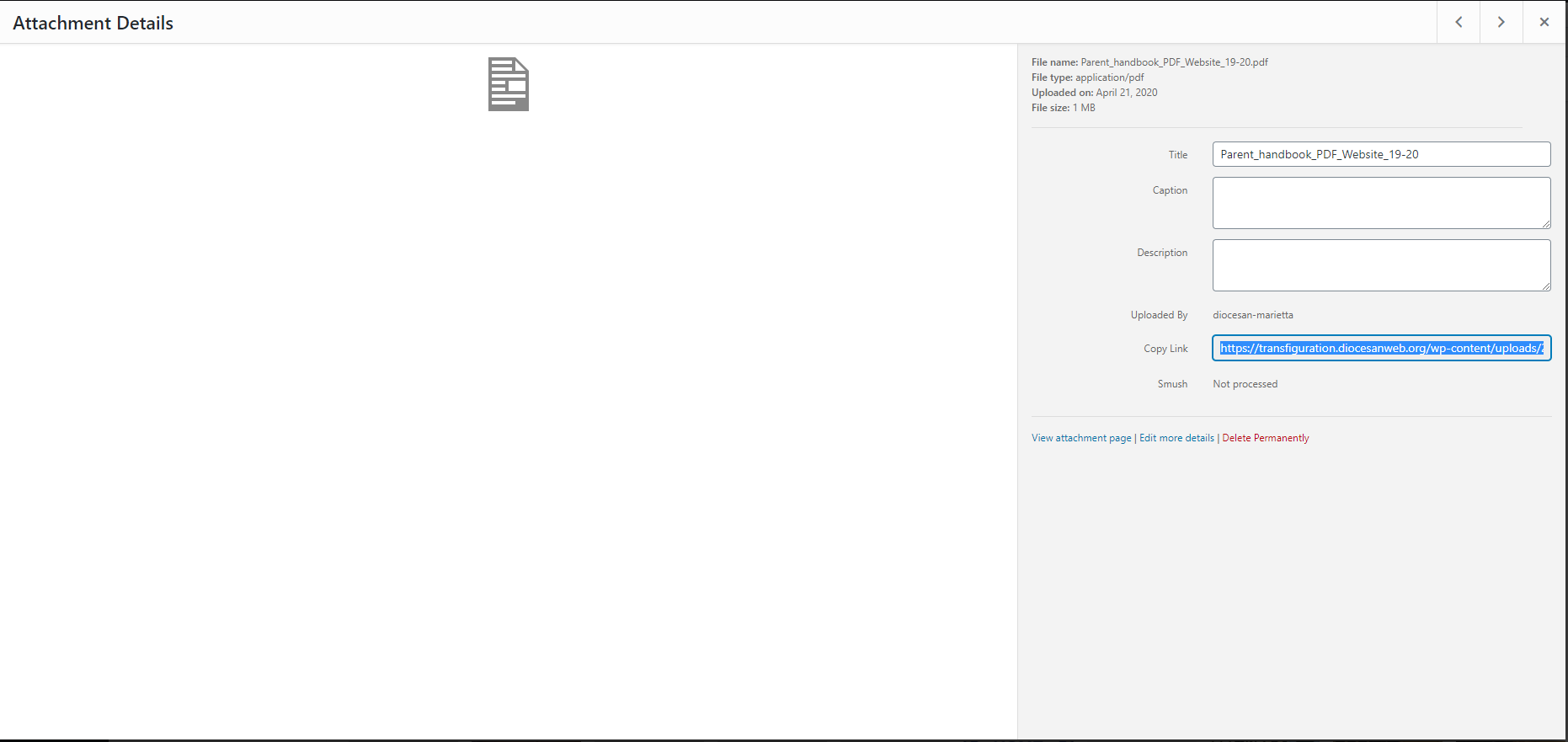
There are a couple of options to do that. There is a "File Block" that you can add where you can select a file from the media library and have a Download Button or not, or you can have it as a standard link and copy the link from the Media Library by clicking on the file and selecting the link and copying and pasting it over the text in the post (See Screenshot below, reached by going to Media Library > clicking on the file you want > copy link).
Let me know if you have any further questions about this!
Cody Armock
There are a couple of options to do that. There is a "File Block" that you can add where you can select a file from the media library and have a Download Button or not, or you can have it as a standard link and copy the link from the Media Library by clicking on the file and selecting the link and copying and pasting it over the text in the post (See Screenshot below, reached by going to Media Library > clicking on the file you want > copy link).
Let me know if you have any further questions about this!
Cody Armock
Web Department, Diocesan
877-923-0777
Frank Gonzalez
Thanks! I did that first, but I had copied the wrong link! Now that I got the right link it works.
Frank
Frank
Frank Gonzalez
Hi Cody,
Great job on the training today. Very impress with the Gravity Forms Widget. In the past the only way I could do that was by writing php or java code.
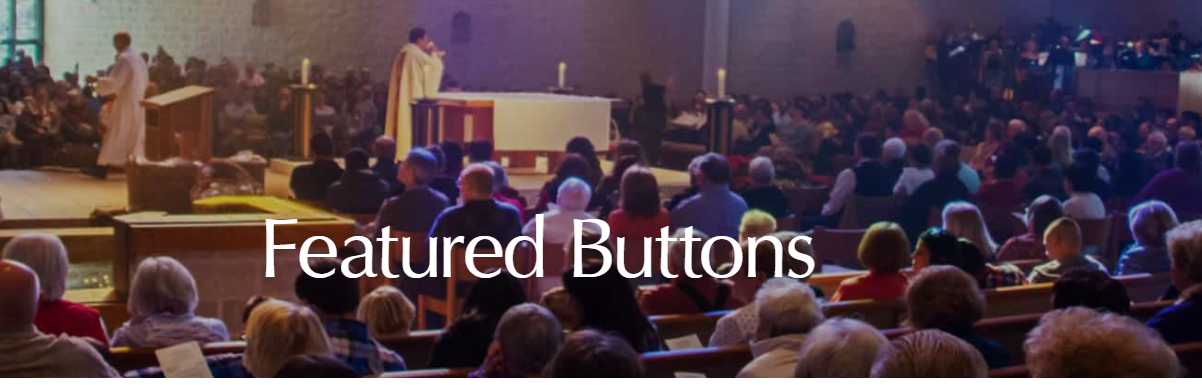
Quick question - How do I remove the words "Featured Buttons" from the featured image on a page? See image:
[cid:03a179ba-64c5-4260-8f36-c30512d7dd7c]
Frank
Great job on the training today. Very impress with the Gravity Forms Widget. In the past the only way I could do that was by writing php or java code.
Quick question - How do I remove the words "Featured Buttons" from the featured image on a page? See image:
[cid:03a179ba-64c5-4260-8f36-c30512d7dd7c]
Frank
Cody Armock
Hello Frank,
"Featured buttons" is the page title. What are you trying to do, so I can answer your question more accurately?
Thank you,
Cody Armock
"Featured buttons" is the page title. What are you trying to do, so I can answer your question more accurately?
Thank you,
Cody Armock
Web Department, Diocesan
877-923-0777
Frank Gonzalez
Take a look at this page: https://transfiguration.diocesanweb.org/featured-buttons/fr-fernado-reflections-reflexiones/
I want to either remove the words "Featured Buttons" or change the header line (Fr. Fernado Reflections / Reflexiones" that the page has to occupy that area.
I want to either remove the words "Featured Buttons" or change the header line (Fr. Fernado Reflections / Reflexiones" that the page has to occupy that area.
Cody Armock
Hello Frank,
The reason why "Featured Buttons" appears there is because the Page Title is taking the Category name. So, to change that, you can go to Posts>Categories and edit the Featured Buttons category to be named "Fr. Fernando Reflections / Reflexiones", changing the slug for the category will change the permalink.
I am still researching the best plugin to use to keep the pages consistent throughout URL changes, so that is not quite in place, but you can always replace that permalink on the Homepage.
That will fix it by replacing the Page Title of "Featured Buttons" and will instead say "Fr. Fernando Reflections / Reflexiones".
Let me know if you need more instructions on how to do this!
Thank you,
Cody Armock
The reason why "Featured Buttons" appears there is because the Page Title is taking the Category name. So, to change that, you can go to Posts>Categories and edit the Featured Buttons category to be named "Fr. Fernando Reflections / Reflexiones", changing the slug for the category will change the permalink.
I am still researching the best plugin to use to keep the pages consistent throughout URL changes, so that is not quite in place, but you can always replace that permalink on the Homepage.
That will fix it by replacing the Page Title of "Featured Buttons" and will instead say "Fr. Fernando Reflections / Reflexiones".
Let me know if you need more instructions on how to do this!
Thank you,
Cody Armock
Web Department, Diocesan
877-923-0777
Frank Gonzalez
Thanks! That worked.
Cody Armock
Glad to hear it!