












Development Link & First Training Session
Good afternoon you two,
We have reached the point in the development process in which we share the link to the development site with you! Alleluia, indeed. I know that you and your staff are still working on the new content for the ministries, but we have already added pages to your website.
Training
The training typically takes ~2 hours and is done remotely via Diocesan's version of TeamViewer. At the beginning of our phone call, I will walk you through how to set up the remote access program.
During the training, we go over:
- How to edit the homepage content
- How to edit the footer
- How to edit the menu
- How to create/edit inner pages
- How to create/edit posts
- How to create/edit/use image galleries
- How to create/edit/use online forms
- Any other questions that you may have
If this seems like a lot, something we have done in the past is breaking the training down into two pieces:
- Editing the site basics (pages, posts, menu, homepage)
- Editing the additional site features & answering follow-up questions (forms, galleries, etc.)
This is completely up to your learning pace and how much you feel comfortable covering at once.
Development Site Link
Something to keep in mind is that the site is not quite completed yet, with the largest thing being mobile responsiveness. That said, it is best to look at the development site on a desktop computer, rather than a laptop or smaller screen. Mobile development/responsiveness is something that the developer completes after the training so that he can update any changes along with the original development!
Things we are still working on:
- Contact Us page buttons
- Homilies styling
Other than that, if you see anything that alarms you (design or functionality), please let me know and we can address you concerns.
https://mothersetonparish.diocesanweb.org
Please let me know what dates and times work best for the training or if you have any other questions,
https://mothersetonparish.diocesanweb.org
Please let me know what dates and times work best for the training or if you have any other questions,
Veronica Alvarado
Web Department, Diocesan
877-923-0777
877-923-0777
 Emily Moldiz
Great!!! I am really excited to look this over. Can I set the time to take the training on Monday, April 29 around 10:00 am??
After I look this through Im sure I'll have more questions.
Thank you Veronica!
Emily
After I look this through Im sure I'll have more questions.
Thank you Veronica!
Emily
 Veronica Alvarado
I am actually unavailable on Monday, but am completely open all day Tuesday, Wednesday afternoon, Thursday afternoon, and Friday morning. Is there a time that works for you?
Veronica Alvarado
Web Department, Diocesan
877-923-0777
877-923-0777
Emily Moldiz
I can do Tuesday morning. Is 10:00 ok? Thanks Veronica!
Enily
Enily
Veronica Alvarado
That works!
Is everyone in the training going to be in one location or will I need to set up a conference call?
Is everyone in the training going to be in one location or will I need to set up a conference call?
Veronica Alvarado
Web Department, Diocesan
877-923-0777
877-923-0777
Emily Moldiz
Hi Veronica,
I think it will only be me today. Thanks. I talk with you in less than an hour.
~Emily
I think it will only be me today. Thanks. I talk with you in less than an hour.
~Emily
Veronica Alvarado
Diocesan is inviting you to a scheduled Zoom meeting.
Topic: Mother Seton Training (Germantown, MD)
Time: Apr 30, 2019 10:00 AM Eastern Time (US and Canada)
Join Zoom Meeting
https://zoom.us/j/718827770
Dial by your location
+1 646 876 9923 US (New York)
Meeting ID: 718 827 770
Topic: Mother Seton Training (Germantown, MD)
Time: Apr 30, 2019 10:00 AM Eastern Time (US and Canada)
Join Zoom Meeting
https://zoom.us/j/718827770
Dial by your location
+1 646 876 9923 US (New York)
Meeting ID: 718 827 770
Veronica Alvarado
Hi Emily,
We had some technical issues this morning, but you can now access the training session :
Diocesan is inviting you to a scheduled Zoom meeting.
Topic: Mother Seton Training (Germantown, MD)
Time: Apr 30, 2019 10:00 AM Eastern Time (US and Canada)
Join Zoom Meeting
https://zoom.us/j/718827770
Dial by your location
+1 646 876 9923 US (New York)
Meeting ID: 718 827 770
We had some technical issues this morning, but you can now access the training session :
Diocesan is inviting you to a scheduled Zoom meeting.
Topic: Mother Seton Training (Germantown, MD)
Time: Apr 30, 2019 10:00 AM Eastern Time (US and Canada)
Join Zoom Meeting
https://zoom.us/j/718827770
Dial by your location
+1 646 876 9923 US (New York)
Meeting ID: 718 827 770
Emily Moldiz
Hi Veronica,
Cody sent me everything I need to access the site. Thanks again for the training. I added Father's new welcome letter he wrote for the parish on I'm New page I think I did it right. Looking through the site in a little more detail I did have a few requests.
1. For the the Our Parish Tab, could we have it go to a main sub page that would have all the drop down tabs as buttons? Similar to the Sacraments Page. Hope that makes sense. If not let me know.
2. Create an online form to go under the Sacraments page for the Sacremental Records request. The form would include
Full Name:
DOB
Sacrament (s) and Date of Sacrament: Baptism First Communion Confirmation Marriage
Mailing Address:
Email:
3. Do you have everything you need to start the ministries page I could'nt remember what I sent you.
4. Could we make this page an event page?
http://www.mothersetonparish.org/education/vacation-bible-school
5. Will you be able to add the parish calendar to the events page?
6. Can we create the parish registration form the same as the current form on http://www.mothersetonparish.org/node/191#overlay-context=user/1
7. Next Tuesday we are going to take Staff photos for each person so I would include an image for each person.
I am sure I will have more:) But for right now I will start with this.
Let me know if you have any questions. Thanks for all you do!
~Emily
Cody sent me everything I need to access the site. Thanks again for the training. I added Father's new welcome letter he wrote for the parish on I'm New page I think I did it right. Looking through the site in a little more detail I did have a few requests.
1. For the the Our Parish Tab, could we have it go to a main sub page that would have all the drop down tabs as buttons? Similar to the Sacraments Page. Hope that makes sense. If not let me know.
2. Create an online form to go under the Sacraments page for the Sacremental Records request. The form would include
Full Name:
DOB
Sacrament (s) and Date of Sacrament: Baptism First Communion Confirmation Marriage
Mailing Address:
Email:
3. Do you have everything you need to start the ministries page I could'nt remember what I sent you.
4. Could we make this page an event page?
http://www.mothersetonparish.org/education/vacation-bible-school
5. Will you be able to add the parish calendar to the events page?
6. Can we create the parish registration form the same as the current form on http://www.mothersetonparish.org/node/191#overlay-context=user/1
7. Next Tuesday we are going to take Staff photos for each person so I would include an image for each person.
I am sure I will have more:) But for right now I will start with this.
Let me know if you have any questions. Thanks for all you do!
~Emily
Veronica Alvarado
Good morning Emily,
I'm so glad you've gotten the chance to begin going through the website. I've taken a look at your questions, and here's what I've got:
- You can most definitely switch out the Our Parish dropdown for a page. First, create an Our Parish page with all the content/buttons you'd like on it. Then go to the menu (Appearances > Menus), add the Our Parish page, reorder the menu, and remove all of the other ones that you're replacing. I've linked a few words in the previous sentence with links to our help articles on where and how to do this.
- I have created the form and put it on a page, but you will still need to go in and update the email address of where you would like the form to send to. Click here for instructions on how to update the send to email.
https://mothersetonparish.diocesanweb.org/sacramental-records-request/
ALSO, the Gravity Forms block has been added to the editor, so if you search for "Form" you will see "Gravity Forms" under Embeds.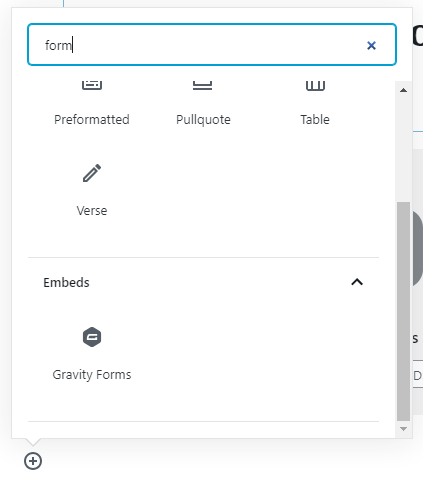
- Cody will be creating the ministry pages and crossing out the information that we were able to pull over. Click here to see our working sitemap of what we have/have not migrated. We will be updating it in real time so you can track the progress on the ministry pages.
- To clarify, you can create an event PAGE or you can create an event POST. The difference between these two is that a page is typically something that is more static and will show in the menu, whereas a post will only remain until a certain date and shows in the posts area of the homepage and on the News page (in progress). I suggest creating a post, so that it displays under Parish News on the homepage and on the News & Events page.
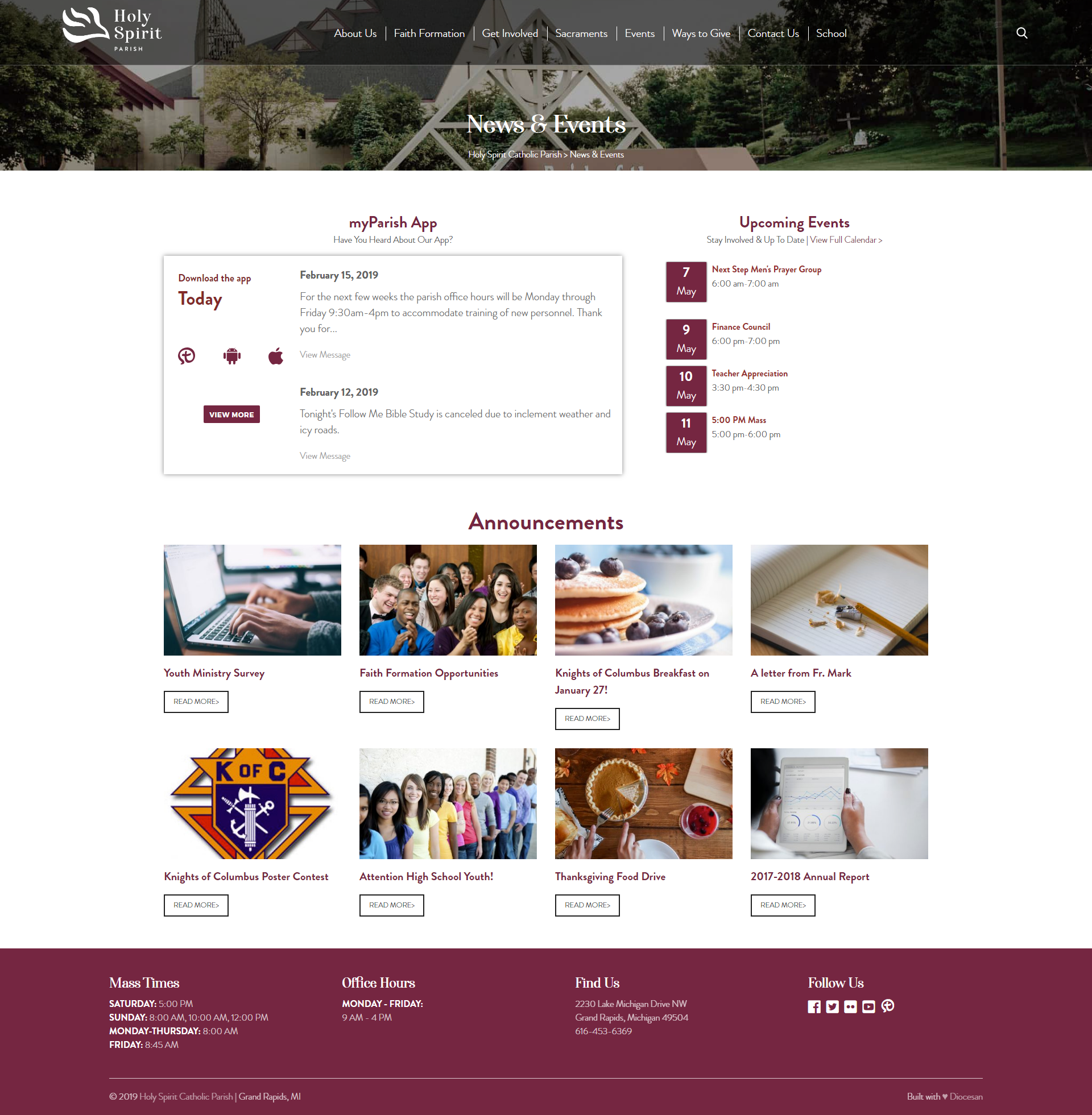
- Your Google calendar will display on the News & Events page, as well as on its own page (seen here). Below is an image of what your News & Events page will look like:
- Since we do still have a remaining 6 hours of content migration, we can recreate your parish registration form (this one). What email would you like us to send it to?
- Sounds good! You should be able to upload the images yourself, but let us know if you need any help getting them in and looking good.
Just shoot me a message if you have any other questions!
Veronica Alvarado
Web Department, Diocesan
877-923-0777
877-923-0777
Veronica Alvarado
Hi Emily,
We have actually already recreated your parish registration form. You can find it on this page: https://mothersetonparish.diocesanweb.org/parish-registration-form/
Let me know if you need any clarification,
Veronica Alvarado
Web Department, Diocesan
877-923-0777
877-923-0777