











Development Link & Training
Good afternoon Jennifer,
We have reached the point in the development process in which we share the link to the development site with you. First, I wanted to go over the missing content from the website and then get into the training and development site.
Things We Need From You
We do still need some information from you, if possible. Otherwise, we can simply remove these items from the main menu and website.
We have the one for the old site as this: f1kc3vnagljuqbqphocjje1ptc@group.calendar.google.com but it does look like it has been updated at all. Just wanted to make sure that this would be updated or to see if there was a newer one.
- Calendar - Are you using Google Calendar? If so, we need for it to be made public (Instructions Here) and need the Calendar ID for it.
- On a computer, open Google Calendar. You can only get the code to embed in your website from a computer, not the Google Calendar app.
- In the top right, click the Gear Icon then Settings
- On the left side of the screen, click the name of the calendar you want to embed.
- In the "Integrate calendar" section, copy the "Calendar ID ******@gmail.com or ******@group.calendar.google.com
- Send us the Calendar ID
Training
The first training session typically takes ~2 hours and is done remotely via Diocesan's version of TeamViewer. At the beginning of our phone call, I will walk you through how to set up the remote access program.
During the training sessions, we go over:
- How to edit the homepage content
- How to edit the footer
- How to edit the menu
- How to create/edit inner pages
- How to create/edit posts
- How to create/edit/use image galleries
- How to create/edit/use online forms
- Any other questions that you may have
Since this can be a lot, we break the training down into two sessions:
- Editing the site basics (pages, posts, menu, homepage)
- Editing the additional site features & answering follow-up questions (forms, galleries, etc.)
This is completely up to your learning pace and how much you feel comfortable covering at once.
Development Site Link
Something to keep in mind is that the site is not quite completed yet, with the largest thing being mobile responsiveness. That said, it is best to look at the development site on a desktop computer, rather than a laptop or smaller screen. Mobile development/responsiveness is something that the developer completes after the training so that he can update any changes along with the original development!
There are some other big items that we are still working on, such as:
- Colors, Logo, & Other Design Elements, we will be discussing those after the logo redesign.
- Parallax on the homepage. That is still in development.
Other than that, if you see anything that alarms you (design or functionality), please let me know and we can address your concerns.
https://stmctk.diocesanweb.org/
Please let me know what dates and times work best for the training or if you have any other questions,
https://stmctk.diocesanweb.org/
Please let me know what dates and times work best for the training or if you have any other questions,
Cody Armock
Web Department, Diocesan
877-923-0777
877-923-0777
 Cody Armock
Good Morning Jennifer,
Here is the meeting information for today:
Diocesan is inviting you to a scheduled Zoom meeting.
Topic: First Training | Michael (Fremont, MI)
Time: Dec 5, 2019 09:30 AM Eastern Time (US and Canada)
Join Zoom Meeting
https://zoom.us/j/743586760
Meeting ID: 743 586 760
Call to Join Audio
+1 646 876 9923
Meeting ID: 743 586 760
Thank you,
Cody Armock
Web Department, Diocesan
877-923-0777
Here is the meeting information for today:
Diocesan is inviting you to a scheduled Zoom meeting.
Topic: First Training | Michael (Fremont, MI)
Time: Dec 5, 2019 09:30 AM Eastern Time (US and Canada)
Join Zoom Meeting
https://zoom.us/j/743586760
Meeting ID: 743 586 760
Call to Join Audio
+1 646 876 9923
Meeting ID: 743 586 760
Thank you,
Cody Armock
Web Department, Diocesan
877-923-0777
Cody Armock
Good Morning Jennifer,
Not sure if I sent this out already, but here is the meeting information for today:
Diocesan is inviting you to a scheduled Zoom meeting.
Topic: Second Training | Michael (Fremont, MI)
Time: Dec 19, 2019 10:00 AM Eastern Time (US and Canada)
Join Zoom Meeting
https://zoom.us/j/589517206
Meeting ID: 589 517 206
Call to Join Audio
+1 646 876 9923
Meeting ID: 589 517 206
Cody Armock
Web Department, Diocesan
877-923-0777
877-923-0777
 Jennifer
Thank You!
I am running behind today...how long will this training be?
I am running behind today...how long will this training be?
Cody Armock
The training should run about 1.5 hours or so. Depending on questions and things like that, but should be right about that length. We will be covering forms and galleries today and any questions you may have.
Thank you,
Cody Armock
Thank you,
Cody Armock
Jennifer
Ok... Sounds good. I haven't had much time to play with the information that was covered in the last training.
Thank you. Talk to you soon.
Thank you. Talk to you soon.
Cody Armock
Jennifer,
If you need more time to play with it, we can reschedule the training. That way in the second training we can cover any questions that you had going through the site. That is partly what the second training is for.
Let me know, otherwise, plan on talking to you soon.
Thank you,
Cody Armock
If you need more time to play with it, we can reschedule the training. That way in the second training we can cover any questions that you had going through the site. That is partly what the second training is for.
Let me know, otherwise, plan on talking to you soon.
Thank you,
Cody Armock
Jennifer
It doesn't matter. There's never a good time.
Cody Armock
Hello Jennifer,
I am linking the Google Drive folder where the Second Training recording is, so that you have it, if necessary. There is an audio file, if you want the audio (.m4a) or an .mp4 file for the video and audio.
https://drive.google.com/open?id=1O_VP_Yowa9wlI4o-O7H7bv3VeWGWcVwZ
Let me know if you have any questions with the site!
Have a Merry Christmas!
Cody Armock
I am linking the Google Drive folder where the Second Training recording is, so that you have it, if necessary. There is an audio file, if you want the audio (.m4a) or an .mp4 file for the video and audio.
https://drive.google.com/open?id=1O_VP_Yowa9wlI4o-O7H7bv3VeWGWcVwZ
Let me know if you have any questions with the site!
Have a Merry Christmas!
Cody Armock
Jennifer
Cody,
Thank you for your time and training today. I'm sure once I get the time to navigate and set up the site, I will have questions.
God Bless!
Thank you for your time and training today. I'm sure once I get the time to navigate and set up the site, I will have questions.
God Bless!
Cody Armock
Hello Jennifer,
I did some digging and some asking around and this may be the solution to the calendar not being able to share all event details. Follow Step 1: Set sharing options for users. https://support.google.com/a/answer/60765?hl=en. The External Sharing options are the ones to focus on.
Let me know if you have any questions regarding this!
Cody Armock
I did some digging and some asking around and this may be the solution to the calendar not being able to share all event details. Follow Step 1: Set sharing options for users. https://support.google.com/a/answer/60765?hl=en. The External Sharing options are the ones to focus on.
Let me know if you have any questions regarding this!
Cody Armock
Jennifer
I can't even find where "external options" are
Cody Armock
Hello Jennifer,
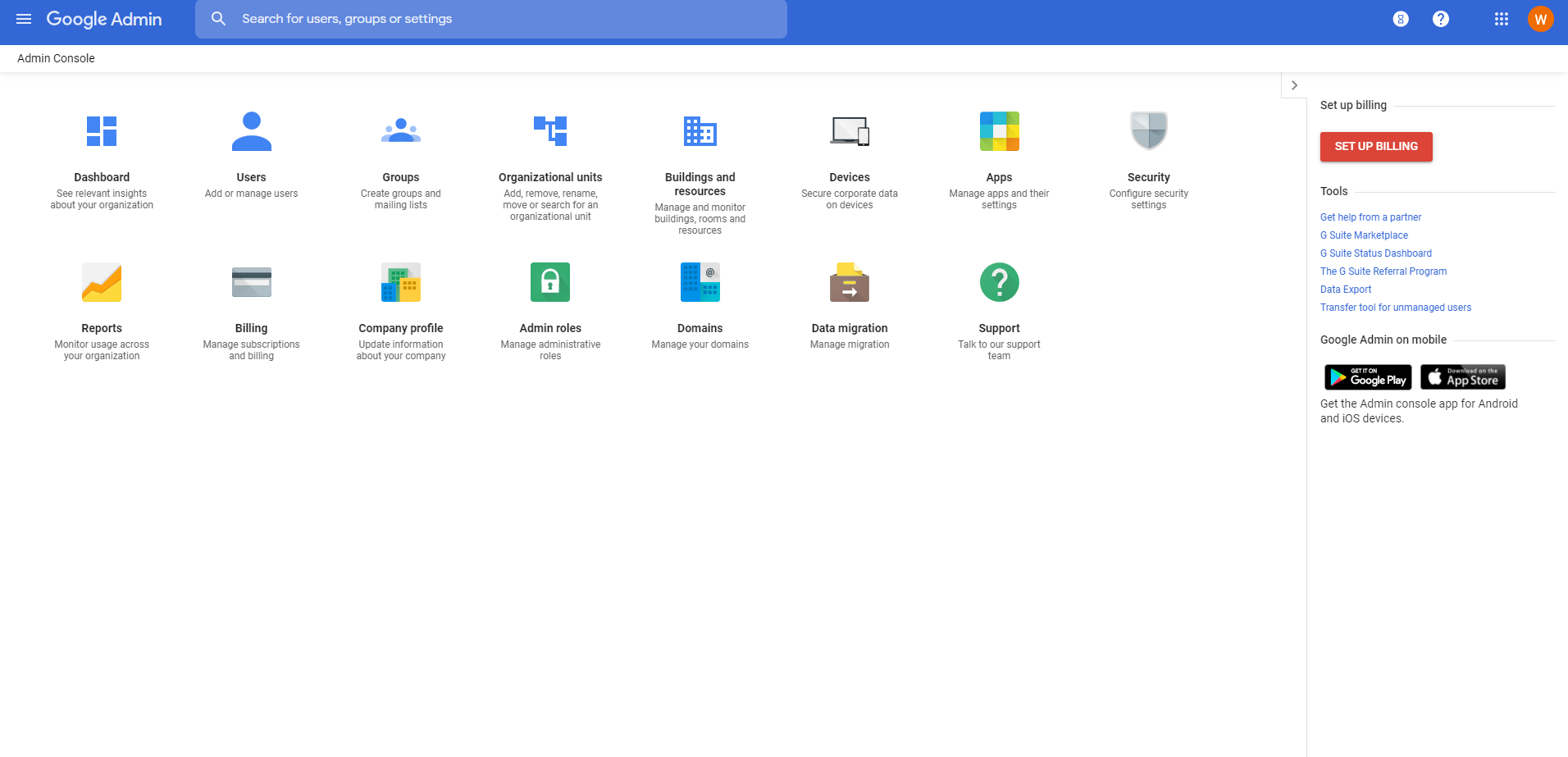
The first thing we should try is making sure that you are the admin for the G-suite. So when you try logging into this page, do you see the image below?
If not, then we need to find who the administrator is for the G Suite account and go from there.
If so, then we can set up a time to screen share, and we can walk you through it to make sure that the correct calendar settings are set and then make sure by trying to view the calendar and see if it is still free/busy or if we can see all event details.
Thank you,
Cody Armock
Jennifer
Hello Cody,
No this is not the screen I see when I login to G-suite. Although, I am not entirely sure I am logging into the G-suite. I logged into our St. Michael Gmail account.
The only person that would be the administrator would be St. Michael Church or me. I've been the only person with access to any of this for the last 7 years.
No this is not the screen I see when I login to G-suite. Although, I am not entirely sure I am logging into the G-suite. I logged into our St. Michael Gmail account.
The only person that would be the administrator would be St. Michael Church or me. I've been the only person with access to any of this for the last 7 years.
 Veronica Alvarado
Hi Jennifer,
Veronica here. Since you are most likely the administrator, how about you and Cody set up a screenshare so we can update and check the settings for you? I've always found that this is the easiest way to get to the bottom of things.
Plus, that way, we'll know right away if the updates are working or not.
Veronica Alvarado
Web Department, Diocesan
877-923-0777
877-923-0777
Jennifer
Sounds good to me! I am very computer basic (or sometimes less-than-basic).
I just need it to work. And I don't have time or the knowledge to make it work.
Thanks,
I just need it to work. And I don't have time or the knowledge to make it work.
Thanks,
Jennifer
Sounds good to me! I am very computer basic (or sometimes less-than-basic).
I just need it to work. And I don't have time or the knowledge to make it work.
Thanks,
I just need it to work. And I don't have time or the knowledge to make it work.
Thanks,
Cody Armock
Hello Jennifer,
Do you have time Monday morning sometime to go through this to see if we can work together to figure this out?
Thank you,
Cody Armock
Do you have time Monday morning sometime to go through this to see if we can work together to figure this out?
Thank you,
Cody Armock
Jennifer
Hello Cody,
Can we schedule this for Tues, Dec. 31st? 10am work for you?
Next week is too busy for me.
Thank You,
Can we schedule this for Tues, Dec. 31st? 10am work for you?
Next week is too busy for me.
Thank You,
Cody Armock
Hello Jennifer,
That works for me! I will call you then to give you instructions on how to share your screen.
Have a Merry Christmas,
Cody Armock
That works for me! I will call you then to give you instructions on how to share your screen.
Have a Merry Christmas,
Cody Armock
Jennifer
Sounds good! I have you on my calendar.
Thank you ~ Have a Merry Christmas!
Thank you ~ Have a Merry Christmas!
Cody Armock
Hello Jennifer,
I just wanted to make sure that our call for 10 am was still on for today to go over the G-Suite and make sure that the calendar permissions were set?
Let me know if something has changed!
Thank you and Happy New Year!
Cody Armock
I just wanted to make sure that our call for 10 am was still on for today to go over the G-Suite and make sure that the calendar permissions were set?
Let me know if something has changed!
Thank you and Happy New Year!
Cody Armock
Jennifer
Hello Cody,
I forgot all about it. But, yes we can go through it.
NCATS may be the administrator of the St. MIchael google account. I have no way of telling.
I also have a personal google account that I switch back n forth with here a the STM office. I think last week when I was trying to log into the St. Michael's google account, I messed up the password to my personal google account. I don't know how any of this works. I'm very computer basic.
Talk to you soon.
I forgot all about it. But, yes we can go through it.
NCATS may be the administrator of the St. MIchael google account. I have no way of telling.
I also have a personal google account that I switch back n forth with here a the STM office. I think last week when I was trying to log into the St. Michael's google account, I messed up the password to my personal google account. I don't know how any of this works. I'm very computer basic.
Talk to you soon.
Cody Armock
Not a problem, Jennifer!
That is what we are here for and we will work together to figure out this G Suite Calendar problem.
Talk to you soon,
Cody Armock
That is what we are here for and we will work together to figure out this G Suite Calendar problem.
Talk to you soon,
Cody Armock
Cody Armock
Hello Jennifer,
Here is the Zoom meeting information:
Diocesan is inviting you to a scheduled Zoom meeting.
Topic: G-Suite - Michael Fremont, MI
Time: Dec 31, 2019 10:00 AM Eastern Time (US and Canada)
Join Zoom Meeting
https://zoom.us/j/614075731
Meeting ID: 614 075 731
Call to Join Audio
+1 646 876 9923
Meeting ID: 614 075 731
Cody Armock
Here is the Zoom meeting information:
Diocesan is inviting you to a scheduled Zoom meeting.
Topic: G-Suite - Michael Fremont, MI
Time: Dec 31, 2019 10:00 AM Eastern Time (US and Canada)
Join Zoom Meeting
https://zoom.us/j/614075731
Meeting ID: 614 075 731
Call to Join Audio
+1 646 876 9923
Meeting ID: 614 075 731
Cody Armock
Cody Armock
Good Morning Jennifer,
NCATS should have changed the permissions to allow you to set your access permissions to "See All Event Details". Would you please try switching the stmctk@ncats.net calendar to that? You can follow the instructions here if you forgot how to do that.
Let me know if you are able to do this and I will check to make sure the website is feeding correctly!
Thank you,
Cody Armock
NCATS should have changed the permissions to allow you to set your access permissions to "See All Event Details". Would you please try switching the stmctk@ncats.net calendar to that? You can follow the instructions here if you forgot how to do that.
Let me know if you are able to do this and I will check to make sure the website is feeding correctly!
Thank you,
Cody Armock
Jennifer
Hello Cody,
I got done!
Thanks for looking into this for me and following up.
I got done!
Thanks for looking into this for me and following up.
Cody Armock
Hello Jennifer,
I have attached a screenshot of the website calendar. It seems to be working. Glad we figured this out. Thank you for all your help.
Have a great weekend,
Cody Armock
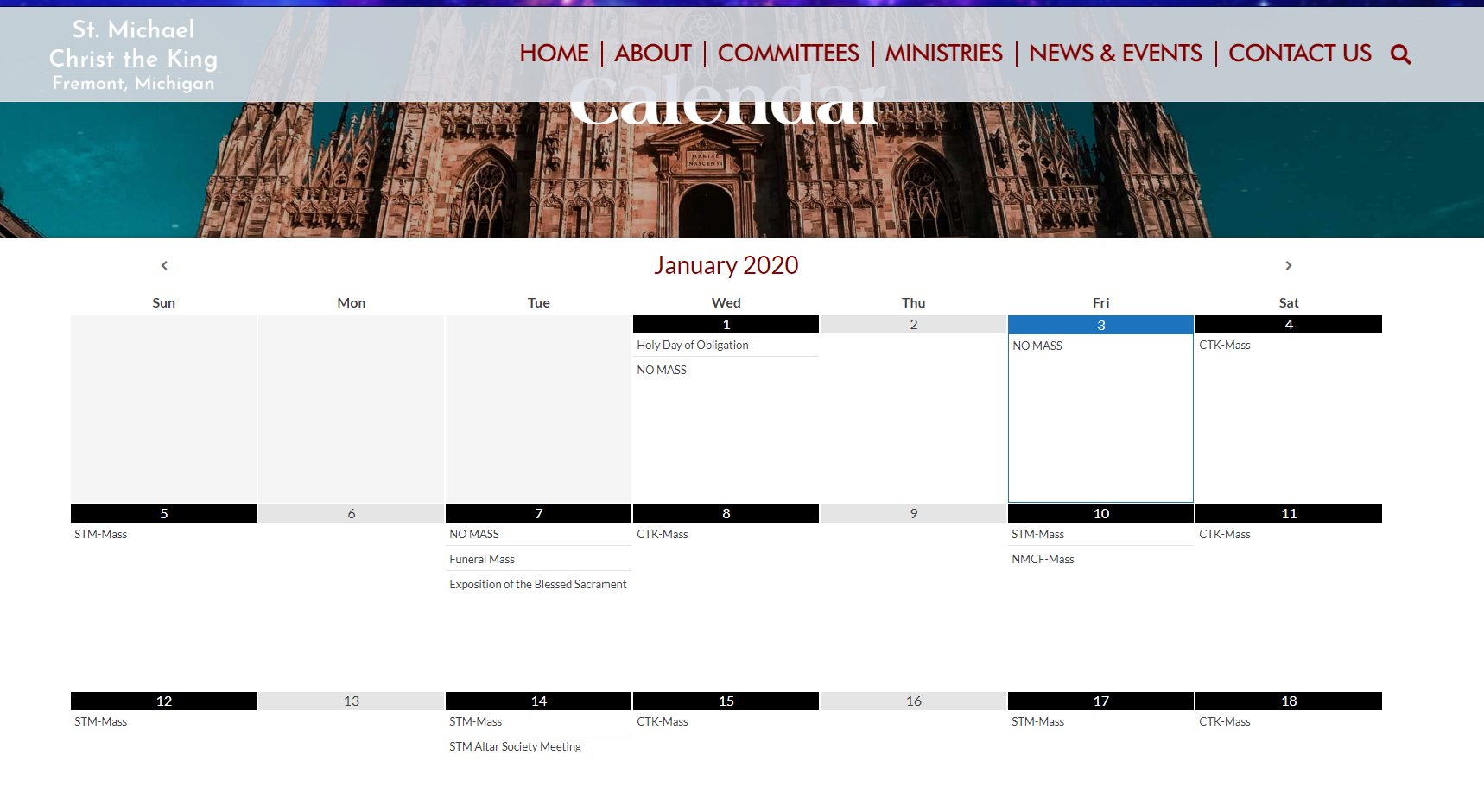
I have attached a screenshot of the website calendar. It seems to be working. Glad we figured this out. Thank you for all your help.
Have a great weekend,
Cody Armock
Jennifer
Wonderful!
Thanks again ~ Happy Friday!
Thanks again ~ Happy Friday!
Jennifer
Hello Cody,
I am just touching base regarding the launch of our site. I haven't too much time to go through all of it to update to the current descriptions, pictures, etc.
When is the expected launch date? I'm assuming I should have all my information up to date prior to the launch.
Are you waiting on any information from me?
Thanks for your help!
I am just touching base regarding the launch of our site. I haven't too much time to go through all of it to update to the current descriptions, pictures, etc.
When is the expected launch date? I'm assuming I should have all my information up to date prior to the launch.
Are you waiting on any information from me?
Thanks for your help!
Veronica Alvarado
Good morning Jennifer,
Cody is out of the office today so I hope I have not missed anything, but your launch date is almost entirely up to you. We simply ask that we are given at least 2 weeks prior notice and that the launch date is a Monday-Thursday date.
We always like to make sure that you are comfortable editing your site and have completed any necessary updates. When Cody is back in the office, I will make sure there is nothing else that we need from you, but looking at our notes we are simply waiting on your approval and tentative launch date.
Let me know if you have a date in mind and we can tentatively add it to our calendar!
Thank you,
Veronica Alvarado
Web Department, Diocesan
877-923-0777
877-923-0777
Jennifer
Veronica,
Wonderful news! I will spend some time over the next few days updating the important information and let you know when I think I can have it completed for a launch date.
Ideally, I would LOVE to have it ready prior to Ash Wed, Feb. 26th. If not, we can push it into March.
Let me know if this works. Thanks!
Wonderful news! I will spend some time over the next few days updating the important information and let you know when I think I can have it completed for a launch date.
Ideally, I would LOVE to have it ready prior to Ash Wed, Feb. 26th. If not, we can push it into March.
Let me know if this works. Thanks!
Veronica Alvarado
That should work perfectly!
Cody and I will review everything to make sure we're launch ready and will reach out to you a week before the launch to make sure you're all set and officially ready to launch on Wednesday, February 26.
Let us know if you have any questions in the meantime,
Cody and I will review everything to make sure we're launch ready and will reach out to you a week before the launch to make sure you're all set and officially ready to launch on Wednesday, February 26.
Let us know if you have any questions in the meantime,
Veronica Alvarado
Web Department, Diocesan
877-923-0777
877-923-0777
Jennifer
Hello Veronica!
I believe I have everything ready to go on my end with the website. I'm sure I will be updating as I go after the launch. However, I think it is ready to go!
There are only a couple issues I was wondering about:
When on the home page, if you click on the "bulletin" button, it goes to en error. However if you go to the top "About Us" drop down menu and click bulletin, then it directs to the bulletins. It should work in both spots.
Same thing, only opposite with EGiving. If you click the button on the homepage, you are brought to our WeShare website. However, when you go to the 'about us' drop down menu to Online Giving, it doesn't go anywhere.
I'm still messing with updating background heading pictures. But, let's LAUNCH IT!!
Thanks so much for all your help ~ God Bless!
I believe I have everything ready to go on my end with the website. I'm sure I will be updating as I go after the launch. However, I think it is ready to go!
There are only a couple issues I was wondering about:
When on the home page, if you click on the "bulletin" button, it goes to en error. However if you go to the top "About Us" drop down menu and click bulletin, then it directs to the bulletins. It should work in both spots.
Same thing, only opposite with EGiving. If you click the button on the homepage, you are brought to our WeShare website. However, when you go to the 'about us' drop down menu to Online Giving, it doesn't go anywhere.
I'm still messing with updating background heading pictures. But, let's LAUNCH IT!!
Thanks so much for all your help ~ God Bless!
Veronica Alvarado
Hello Jennifer,
Glad to hear! I'll remove "tentative" from your launch date now.
We've still got a couple of mobile responsive items that we'll be looking at early next week then we are all set for your launch on Ash Wednesday!
You'll receive an email next week with further instructions.
- Bulletins Button
The menu is using the link: https://stmctk.diocesanweb.org/bulletin/
The homepage button was using the link: https://stmctk.diocesanweb.org/news-events/bulletin/ (broken)
I have updated the homepage button to use the correct link. (Done by editing homepage) - eGiving
The menu is using a placeholder # (no link)
The homepage button is using the link: http://stmctk.weshareonline.org/
I have updated the menu item to use the correct link. (Done by editing the menu in Appearances > Menu)
Let me know if there's anything else until then,
Veronica Alvarado
Web Department, Diocesan
877-923-0777
877-923-0777
Jennifer
Sounds great!
Thanks very much.
Have a wonderful day ~ God Bless!
Thanks very much.
Have a wonderful day ~ God Bless!
Veronica Alvarado
Thank you, Jennifer. I pray you have a wonderfully blessed day as well!
Veronica Alvarado
Web Department, Diocesan
877-923-0777
877-923-0777