











G Suite Information
Good afternoon Cathy,
As a part of your website package, you requested Diocesan set up G Suite for you.
To begin this, there are a couple of things that we need before creating your new G Suite:
- St Michael's Tax EIN - FEDERAL ONLY
- St Michael's 501(c)(3) Group Exemption Letter - FEDERAL ONLY
- The IRS Determination letter to the USCCB referencing the group exemption
- The cover page of the Official Catholic Directory
- The page in the directory on which St Michael appears.
- List of Accounts to be Moved/Created (please complete and return attached spreadsheet)

If you have any questions, please do not hesitate to email or call.
Thank you!
- Alan Snodgrass
Web Consultant
877-923-0777
 Cathy Asbury
Dear Alan,
I’m afraid this will have to wait until after Thanksgiving. We have a funeral today and, of course, a shortened work week this week. I will begin tracking down the required documentation. (I think the 501©(3) Group Exemption Letter is with the Diocese of Scranton). Our copy of the USCCB is fairly old, so that might take some doing as well, but I did just update our information with them.
We only have one parish email address, and I’m quite unfamiliar with the capabilities of GSuite. Is there someplace online you can recommend that might help us decide what accounts we would like moved/created?
Peace,
Cathy

I’m afraid this will have to wait until after Thanksgiving. We have a funeral today and, of course, a shortened work week this week. I will begin tracking down the required documentation. (I think the 501©(3) Group Exemption Letter is with the Diocese of Scranton). Our copy of the USCCB is fairly old, so that might take some doing as well, but I did just update our information with them.
We only have one parish email address, and I’m quite unfamiliar with the capabilities of GSuite. Is there someplace online you can recommend that might help us decide what accounts we would like moved/created?
Peace,
Cathy
 Alan Snodgrass
Good afternoon Cathy,
I completely understand about waiting after the holiday.
You are correct about the 501c3 Group Exemption Letter being with your diocese, so you are on the right track!
Here is a link to what all Google Workspace (formerly G Suite) offers: https://workspace.google.com/
So all your email accounts could have their own calendars to keep personal or share on the website, a cloud-based storage drive, a YouTube account, Google Meet online meeting capabilities, Google document sharing & live editing, and much more!
For accounts, we suggest moving all accounts currently using the @stmichaelscanton.com or .org domain so no emails are lost and all email accounts end with .com.
As for creating new accounts, some are fairly standard:
- pastor@domain.com or fathername@domain.com
- Office@domain.com or secretary@domain.com
- RE@domain.com or religiouseducation@domain.com or faithformation@domain.com
If you have other staff members that are using personal email accounts to conduct business, we suggest creating accounts for them as well. That way, when someone leaves, you will still be able to access their contacts and email history for any record keeping. Additionally, the website can send online forms directly to specific email addresses, if you wish.
Let me know if you have any other questions and have a happy Thanksgiving!
Thank you!
- Alan Snodgrass
Web Consultant
877-923-0777
Alan Snodgrass
Good afternoon Cathy,
I hope all has been well.
Back in the winter, you told us to wait on moving forward with the G Suite process. I wanted to reach back out and see what you were thinking about at this point. Were you wanting to move forward, or have you decided to not move forward with G Suite?
Let me know if you have any questions.
Thank you!
I hope all has been well.
Back in the winter, you told us to wait on moving forward with the G Suite process. I wanted to reach back out and see what you were thinking about at this point. Were you wanting to move forward, or have you decided to not move forward with G Suite?
Let me know if you have any questions.
Thank you!
- Alan Snodgrass
Web Consultant
877-923-0777
Cathy Asbury
Dear Alan,
My apologies for taking so long to reply. We are still interested in the G Suite process, and the email issues we’ve had this week with Frontier have been a catalyst to finally get moving!
I guess the biggest question is about email addresses. How easy is it to add email addresses later? For example, if we just start with the parish email, and the DRE decides later that she really would like one dedicated to the CCD program (or the Grand Knight or Altar & Rosary officers, etc.), is it something I could do or would we need to send it through you?
I know nothing about what I will be able to do with G Suite, so that will be interesting to learn as well.
Peace,
Cathy

My apologies for taking so long to reply. We are still interested in the G Suite process, and the email issues we’ve had this week with Frontier have been a catalyst to finally get moving!
I guess the biggest question is about email addresses. How easy is it to add email addresses later? For example, if we just start with the parish email, and the DRE decides later that she really would like one dedicated to the CCD program (or the Grand Knight or Altar & Rosary officers, etc.), is it something I could do or would we need to send it through you?
I know nothing about what I will be able to do with G Suite, so that will be interesting to learn as well.
Peace,
Cathy
 Cody Armock
Good Morning Cathy,
I will be the one helping you through this process and once the switch has taken place, we will have a training to go through different things like setting up new emails, resetting passwords, using Google Calendar, etc.
So, to answer your question about setting up new email addresses, it is pretty easy, probably even easier than making a brand new email address through Gmail or something in some respects, but we cover that in a training too and that is something you will be able to do if those things come up.
There is a lot that is possible with G Suite. Too much to cover in one training, but there are resources out there that are able to help you. G Suite has some pretty thorough documentation.
Documents & Information
Here are the documents and information we need to start the process:
I will be the one helping you through this process and once the switch has taken place, we will have a training to go through different things like setting up new emails, resetting passwords, using Google Calendar, etc.
So, to answer your question about setting up new email addresses, it is pretty easy, probably even easier than making a brand new email address through Gmail or something in some respects, but we cover that in a training too and that is something you will be able to do if those things come up.
There is a lot that is possible with G Suite. Too much to cover in one training, but there are resources out there that are able to help you. G Suite has some pretty thorough documentation.
Documents & Information
Here are the documents and information we need to start the process:
- St Michael's Tax EIN - FEDERAL ONLY
- St Michael's 501(c)(3) Group Exemption Letter - FEDERAL ONLY
- The IRS Determination letter to the USCCB referencing the group exemption
- The cover page of the Official Catholic Directory
- The page in the directory on which St Michael appears.
- List of Accounts to be Moved/Created (please complete and return attached spreadsheet)
Web Department, Diocesan
877-923-0777
Cathy Asbury
Dear Cody,
Attached is the documentation from item #2 on your list, courtesy of the Diocese of Scranton Finance Office in less than an hour! (Eileen is a rock star!) I added our EIN to the spreadsheet you sent.
The only email account we’re setting up for now is the one I’m using now, but I’m not married to it. It’s long and confusing and we should probably start fresh, hopefully with something that makes sense with our website address. There is an existing Google account with this email. As you are well aware, I’m not the most tech-savvy person, so it doesn’t get much use.
Peace,
Cathy

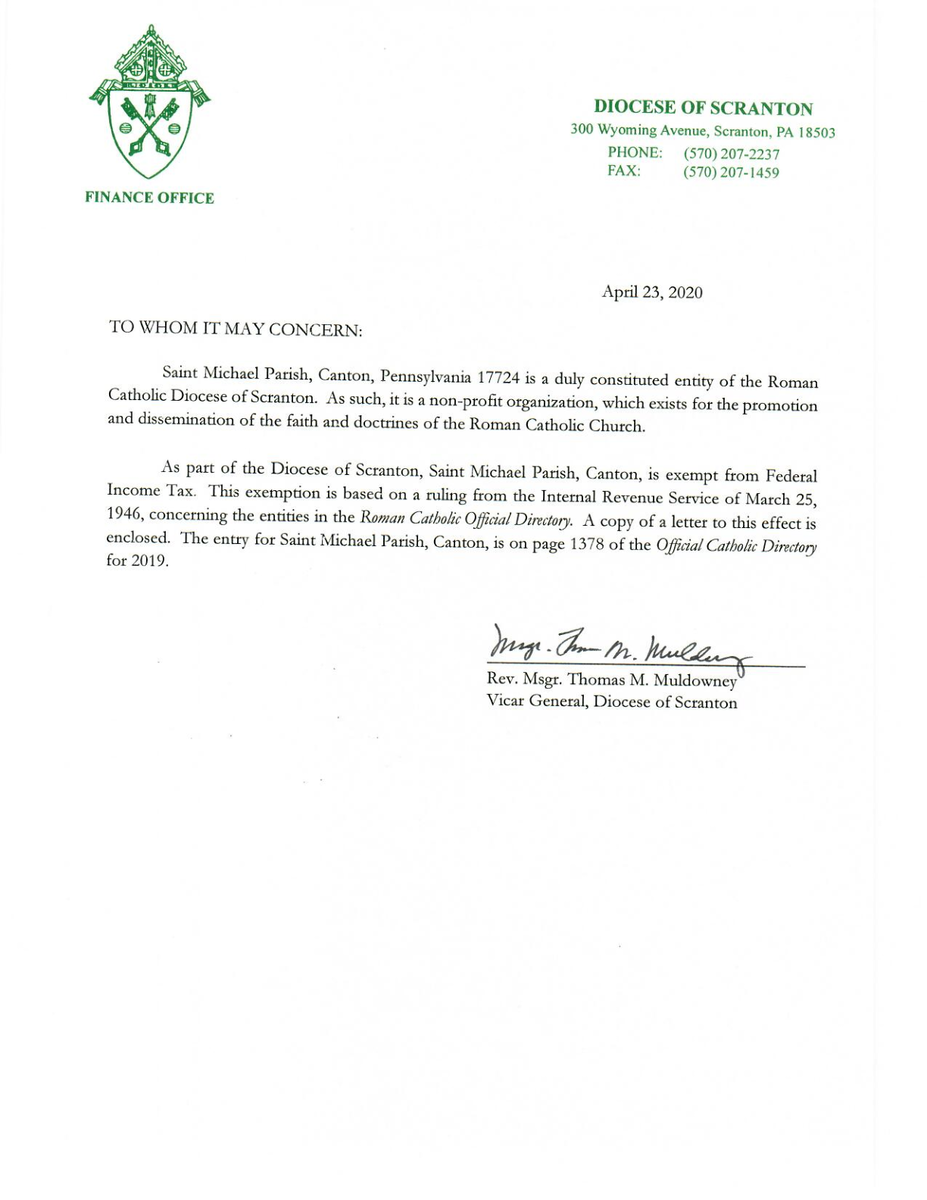
Attached is the documentation from item #2 on your list, courtesy of the Diocese of Scranton Finance Office in less than an hour! (Eileen is a rock star!) I added our EIN to the spreadsheet you sent.
The only email account we’re setting up for now is the one I’m using now, but I’m not married to it. It’s long and confusing and we should probably start fresh, hopefully with something that makes sense with our website address. There is an existing Google account with this email. As you are well aware, I’m not the most tech-savvy person, so it doesn’t get much use.
Peace,
Cathy
Cody Armock
Hello Cathy,
Sorry about the delayed response! You can fill in the Spreadsheet for Account with the address of the email, whether you want it to be office@stmichaelscanton.com or info@stmichaelscanton.com or casbury@stmichaelscanton.com as the G Suite address, then we will have enough to get going on it next Tuesday.
The process usually takes around 14 days to get finished because of the non-profit verification and things like that, so starting it earlier in the week is more helpful.
Let me know if you have any questions, otherwise, I will schedule to start the process on Tuesday!
Have a great memorial weekend,
Cody Armock
Sorry about the delayed response! You can fill in the Spreadsheet for Account with the address of the email, whether you want it to be office@stmichaelscanton.com or info@stmichaelscanton.com or casbury@stmichaelscanton.com as the G Suite address, then we will have enough to get going on it next Tuesday.
The process usually takes around 14 days to get finished because of the non-profit verification and things like that, so starting it earlier in the week is more helpful.
Let me know if you have any questions, otherwise, I will schedule to start the process on Tuesday!
Have a great memorial weekend,
Cody Armock
Web Department, Diocesan
877-923-0777
Cody Armock
Good Afternoon Cathy,
I am going through the GSuite process and trying to verify the techsoup non-profit verification for it, but I need the Association Code for it and it looks like it was set up by Connie Wisdo from what the TechSoup records say.
Once I have the Association code, I can continue the process.
Thank you,
Cody Armock
I am going through the GSuite process and trying to verify the techsoup non-profit verification for it, but I need the Association Code for it and it looks like it was set up by Connie Wisdo from what the TechSoup records say.
Once I have the Association code, I can continue the process.
Thank you,
Cody Armock
Web Department, Diocesan
877-923-0777
Cathy Asbury
Dear Cody,
I’m guessing that’s why I got a notification from Google Workspace that our password has been reset?
No worries. I know you’re on it!
😊
Cathy

I’m guessing that’s why I got a notification from Google Workspace that our password has been reset?
No worries. I know you’re on it!
😊
Cathy
Cody Armock
Hello Cathy,
That notification from Google Workspace is for you to set up your new account with the new stmichaelscanton.com domain. The process has not been completed, but feel free to use it and get familiar with it and the different featured such as Google Calendar, Documents, Sheets, etc.
The rest of the process is working on shifting it from a trial version to the Google Workspace for Non-Profits, which is through Techsoup. The Association Code should have been sent to Connie some time ago when Connie set it up. It will usually look like ####-####-#### (with the pound signs replaced with numbers or letters), but may look different than that.
Let me know when you find the association code!
Thank you,
Cody Armock
That notification from Google Workspace is for you to set up your new account with the new stmichaelscanton.com domain. The process has not been completed, but feel free to use it and get familiar with it and the different featured such as Google Calendar, Documents, Sheets, etc.
The rest of the process is working on shifting it from a trial version to the Google Workspace for Non-Profits, which is through Techsoup. The Association Code should have been sent to Connie some time ago when Connie set it up. It will usually look like ####-####-#### (with the pound signs replaced with numbers or letters), but may look different than that.
Let me know when you find the association code!
Thank you,
Cody Armock
Web Department, Diocesan
877-923-0777
Cody Armock
Good Morning Cathy,
I just wanted to follow up with you to see if you were able to find the Association Code that Connie Wisdo set up. I am not sure if she still works at the parish is reachable at all, but we have about a week left for the free trial of GSuite, so we would need to get that Association Code before then.
It looks like Connie is the IT Manager for the Diocese. (Link to her info)
Let me know if you have any questions!
Thank you,
Cody Armock
I just wanted to follow up with you to see if you were able to find the Association Code that Connie Wisdo set up. I am not sure if she still works at the parish is reachable at all, but we have about a week left for the free trial of GSuite, so we would need to get that Association Code before then.
It looks like Connie is the IT Manager for the Diocese. (Link to her info)
Let me know if you have any questions!
Thank you,
Cody Armock
Web Department, Diocesan
877-923-0777
Cathy Asbury
From: TechSoup <customerservice@techsoup.org>
Sent: Monday, June 07, 2021 11:47 AM
To: St. Michael Church <stmichaelparish@frontiernet.net>
Subject: You've been invited to TechSoup
Connie Wisdo at St. Michael Church has invited you to join TechSoup to act on the organization's behalf. Please use the information below to add the organization to a new or existing TechSoup account.
* EIN or FSCS ID: 53-0196617
* Status: 501(c)(3) Nonprofit
* Association code: cathscran005
New to TechSoup?
Join TechSoup <https://www.techsoup.org/joining-techsoup/registration> and add the organization to your account during the signup process by entering the organization information above.
Already Have a TechSoup Login?
Just follow these steps to add the organization to your existing TechSoup account.
1. Log in <https://www.techsoup.org/login> to TechSoup.
2. Click on the user icon in the upper right corner of the browser window and click MY ACCOUNT. The user icon is a circle that contains either your initials or an uploaded picture. In a narrow browser window that does not show the user icon, you can open the menu in the upper left corner of the window and click MY ACCOUNT there.
3. Click ADD AN ORGANIZATION.
4. Select the appropriate status for your organization and enter your EIN or FSCS ID.
5. Select your organization. If there are more than 30 results, filter options will appear.
6. Enter your association code, listed above, and then select your role within your organization.
7. Click CONTINUE.
TechSoup confirms that you can now act on behalf of the organization and sends an email to your member email address.
To View and Edit Your Organization's Account
1. Log in <https://www.techsoup.org/login> to TechSoup.
2. Click on the user icon in the upper right corner of the browser window and click MY ACCOUNT. The user icon is a circle that contains either your initials or an uploaded picture. In a narrow browser window that does not show the user icon, you can open the menu in the upper left corner of the window and click MY ACCOUNT there.
3. Click the organization’s name.
4. Click EDIT DETAILS on your organization's profile.
5. Update as needed and click SAVE at the bottom of the page.
6. Verify the information and click SUBMIT THESE CHANGES at the bottom of the page.
If you need more help, you can check our FAQ <http://www.techsoup.org/support/product-donation-faq> , find answers in our forums <http://forums.techsoup.org/cs/community/f/> , or reply to this email.
TechSoup - Power up your social impact.
_____
TechSoup is a 501(c) (3) nonprofit organization. Our mission is to build a dynamic bridge that enables design and implementation of technology solutions for a more equitable planet.
TechSoup, 435 Brannan Street, Suite 100, San Francisco, CA 94107
Copyright © 2021 TechSoup Global. All rights reserved.
This message has been scanned for malware by Websense. <http://www.websense.com/> www.websense.com
Sent: Monday, June 07, 2021 11:47 AM
To: St. Michael Church <stmichaelparish@frontiernet.net>
Subject: You've been invited to TechSoup
Connie Wisdo at St. Michael Church has invited you to join TechSoup to act on the organization's behalf. Please use the information below to add the organization to a new or existing TechSoup account.
* EIN or FSCS ID: 53-0196617
* Status: 501(c)(3) Nonprofit
* Association code: cathscran005
New to TechSoup?
Join TechSoup <https://www.techsoup.org/joining-techsoup/registration> and add the organization to your account during the signup process by entering the organization information above.
Already Have a TechSoup Login?
Just follow these steps to add the organization to your existing TechSoup account.
1. Log in <https://www.techsoup.org/login> to TechSoup.
2. Click on the user icon in the upper right corner of the browser window and click MY ACCOUNT. The user icon is a circle that contains either your initials or an uploaded picture. In a narrow browser window that does not show the user icon, you can open the menu in the upper left corner of the window and click MY ACCOUNT there.
3. Click ADD AN ORGANIZATION.
4. Select the appropriate status for your organization and enter your EIN or FSCS ID.
5. Select your organization. If there are more than 30 results, filter options will appear.
6. Enter your association code, listed above, and then select your role within your organization.
7. Click CONTINUE.
TechSoup confirms that you can now act on behalf of the organization and sends an email to your member email address.
To View and Edit Your Organization's Account
1. Log in <https://www.techsoup.org/login> to TechSoup.
2. Click on the user icon in the upper right corner of the browser window and click MY ACCOUNT. The user icon is a circle that contains either your initials or an uploaded picture. In a narrow browser window that does not show the user icon, you can open the menu in the upper left corner of the window and click MY ACCOUNT there.
3. Click the organization’s name.
4. Click EDIT DETAILS on your organization's profile.
5. Update as needed and click SAVE at the bottom of the page.
6. Verify the information and click SUBMIT THESE CHANGES at the bottom of the page.
If you need more help, you can check our FAQ <http://www.techsoup.org/support/product-donation-faq> , find answers in our forums <http://forums.techsoup.org/cs/community/f/> , or reply to this email.
TechSoup - Power up your social impact.
_____
TechSoup is a 501(c) (3) nonprofit organization. Our mission is to build a dynamic bridge that enables design and implementation of technology solutions for a more equitable planet.
TechSoup, 435 Brannan Street, Suite 100, San Francisco, CA 94107
Copyright © 2021 TechSoup Global. All rights reserved.
This message has been scanned for malware by Websense. <http://www.websense.com/> www.websense.com
Cody Armock
Good Morning Cathy,
Thank you for sending that over! I will continue the process with that code.
Thanks again!
Cody Armock
Thank you for sending that over! I will continue the process with that code.
Thanks again!
Cody Armock
Web Department, Diocesan
877-923-0777
Cathy Asbury
Dear Cody,
I’m afraid I missed the window to set up my password.
I am sorry for being a pain in the rear.
Peace,
Cathy

I’m afraid I missed the window to set up my password.
I am sorry for being a pain in the rear.
Peace,
Cathy
Cody Armock
Good Afternoon Cathy,
Not a problem! I just sent another one. The G Suite (now Google Workspace) for Nonprofits has officially been set up, finalized, and approved, so you are good to go. Let me know when you would like to schedule a training to go over some of the more common features of the Google System.
Thank you,
Cody Armock
Not a problem! I just sent another one. The G Suite (now Google Workspace) for Nonprofits has officially been set up, finalized, and approved, so you are good to go. Let me know when you would like to schedule a training to go over some of the more common features of the Google System.
Thank you,
Cody Armock
Web Department, Diocesan
877-923-0777
Cathy Asbury
Dear Cody,
First, thank you. Second – WOW! That is a LOT of stuff! Next Wednesday, June 16th is the best day I have in the near future. Any time after 8:15 am. I’d like to be done by 1:30 pm. If that doesn’t work for you, Thursday the 17th is totally open and I’m in the office 8 am – 1 pm.
Peace,
Cathy

First, thank you. Second – WOW! That is a LOT of stuff! Next Wednesday, June 16th is the best day I have in the near future. Any time after 8:15 am. I’d like to be done by 1:30 pm. If that doesn’t work for you, Thursday the 17th is totally open and I’m in the office 8 am – 1 pm.
Peace,
Cathy
Cody Armock
Hello Cathy,
Next Thursday will have to be the day since I am booked on Wednesday. Does 8:30 next Thursday work for you? If so, I will send out the information next week.
Thank you,
Cody Armock
Next Thursday will have to be the day since I am booked on Wednesday. Does 8:30 next Thursday work for you? If so, I will send out the information next week.
Thank you,
Cody Armock
Web Department, Diocesan
877-923-0777
Cathy Asbury
That will be great. Probably best since it’s Father’s day off so the office is usually quiet.
😊
Cathy

😊
Cathy
Cody Armock
Good Morning Cathy,
Here is the meeting information for Thursday:
Diocesan is inviting you to a scheduled Zoom meeting.
Topic: GSuite Training | Michael (Canton, PA)
Time: Jun 17, 2021 08:30 AM Eastern Time (US and Canada)
Join Zoom Meeting
https://us02web.zoom.us/j/87508120617
Meeting ID: 875 0812 0617
Let me know if you have any questions!
Cody Armock
Here is the meeting information for Thursday:
Diocesan is inviting you to a scheduled Zoom meeting.
Topic: GSuite Training | Michael (Canton, PA)
Time: Jun 17, 2021 08:30 AM Eastern Time (US and Canada)
Join Zoom Meeting
https://us02web.zoom.us/j/87508120617
Meeting ID: 875 0812 0617
Let me know if you have any questions!
Cody Armock
Web Department, Diocesan
877-923-0777