












Launch Confirmation
Good afternoon Char,
I just wanted to check in with you and make sure that we are still set to launch your new website on Tuesday, 1/26/2021, between the hours of 9:30 am - 2:00 pm EST.
If so, please click the "Approve" button. If not, please let us know and we will reschedule your launch date.
Thank you,
Cody Armock
Web Content Specialist, Web Department
877-923-0777
 Cody Armock
Hello Char,
With the footer changed/fixed, are you ready to launch next Tuesday?
Thank you,
Cody Armock
With the footer changed/fixed, are you ready to launch next Tuesday?
Thank you,
Cody Armock
Web Department, Diocesan
877-923-0777
 Char
Char
As long as I have access to someone to help me if I need help after it launches.
Cody Armock
Hello Char,
Of course, there will be someone to help you after it launches, if you have any questions!
If I have not said it already, you have 2 weeks from your launch date to call and ask us any questions for free. After those 2 weeks, the paid support will go into effect. Paid support is $70/hr (prorated) and is billed monthly to the parish with each support items (date, amount of time, notes) itemized out.
Cody Armock
Of course, there will be someone to help you after it launches, if you have any questions!
If I have not said it already, you have 2 weeks from your launch date to call and ask us any questions for free. After those 2 weeks, the paid support will go into effect. Paid support is $70/hr (prorated) and is billed monthly to the parish with each support items (date, amount of time, notes) itemized out.
Cody Armock
Web Department, Diocesan
877-923-0777
Char
Can you tell me what happens to our old site when this new one launches?
If there is something I need to take off of the old one to use, will I have access to it?
If there is something I need to take off of the old one to use, will I have access to it?
Cody Armock
Hello Char,
Once the new one launches, the old one will not be easily accessible. It looks like the current site is hosted through GoDaddy, so once the new one launches, the hosting through GoDaddy can be cancelled, since it cannot be accessed anyway. There is a tool called web.archive.org where you can look up the domain (stmarytampa.org) and find things that used to be on the old website, but it is not always perfect and does not perfectly archive everything on the website (misses most documents/pdfs).
With that said, it is preferred to make sure that everything that you want migrated to the new site is before the launch, so that you can still get it from the old site.
Have a great weekend!
Cody Armock
Once the new one launches, the old one will not be easily accessible. It looks like the current site is hosted through GoDaddy, so once the new one launches, the hosting through GoDaddy can be cancelled, since it cannot be accessed anyway. There is a tool called web.archive.org where you can look up the domain (stmarytampa.org) and find things that used to be on the old website, but it is not always perfect and does not perfectly archive everything on the website (misses most documents/pdfs).
With that said, it is preferred to make sure that everything that you want migrated to the new site is before the launch, so that you can still get it from the old site.
Have a great weekend!
Cody Armock
Web Department, Diocesan
877-923-0777
Char
Am I supposed to cancel it with GoDaddy or does it do it automatically?
Cody Armock
Good Morning Char,
You will have to cancel the hosting service with GoDaddy, but this is to be done after launch!
Cody Armock
You will have to cancel the hosting service with GoDaddy, but this is to be done after launch!
Cody Armock
Web Department, Diocesan
877-923-0777
Char
Cody,
I don’t think I’m going to have everything in place to launch tomorrow.
I’d like to push back the launch to February 1 or 2. Is that alright?
Char
I don’t think I’m going to have everything in place to launch tomorrow.
I’d like to push back the launch to February 1 or 2. Is that alright?
Char
Cody Armock
Hello Char,
That is fine! I'll push it to next Monday, the 1st.
Thank you,
Cody Armock
That is fine! I'll push it to next Monday, the 1st.
Thank you,
Cody Armock
Web Department, Diocesan
877-923-0777
Char
I’m trying to change a post, however, there’s a photo of altar server vestments, that I can’t find to remove. Where do I find this?
The post is called Fr. Tim’s Weekly Flocknote Message
The post is called Fr. Tim’s Weekly Flocknote Message
Char
Nevermind. I just found it on the far right.
Cody Armock
Hello Char,
Sorry! I was in a training, but I am glad that you found the featured image of the post.
Cody Armock
Sorry! I was in a training, but I am glad that you found the featured image of the post.
Cody Armock
Web Department, Diocesan
877-923-0777
Char
Some images I placed in Envira Gallery are horizontal on the thumbnail, but show up vertical when you click on it. How do I rotate the image?
Memorial Paver gallery
Memorial Paver gallery
Cody Armock
Hello Char,
You can do that by editing the image through the media library:
You can do that by editing the image through the media library:
- Go to the media library or the "Media" tab in the menu
- Click the image that you want to change the orientation.
- Click the "Edit Image" button below the image
- Click the appropriate "Rotate" button
- Click "Save"
- Go back to the gallery and click "Update" in the top-right and that should fix the images.
Let me know if there are any issues with that!
Cody Armock
Cody Armock
Web Department, Diocesan
877-923-0777
Char
Hi Cody,
I cannot find the News & Events page.
Is there a way that I can change the order of the posts that appear on the News & Events page?
I cannot find the News & Events page.
Is there a way that I can change the order of the posts that appear on the News & Events page?
Char
Hi Cody,
2 Questions:
I cannot find the News & Events page.
1) Is there a way that I can change the order of the posts that appear on the News & Events page?
Also
2) Is there anyway that the Staff Fonts be smaller? Our names are way too big and then the title is too big as well.
2 Questions:
I cannot find the News & Events page.
1) Is there a way that I can change the order of the posts that appear on the News & Events page?
Also
2) Is there anyway that the Staff Fonts be smaller? Our names are way too big and then the title is too big as well.
Cody Armock
Good afternoon Char,
Thank you for your patience!
The News & Events "page" is generated based on the Posts that are in the "News & Events" category. What kind of order would you like? Currently, it is descending based on published date, meaning that the most recently published events are at the top and the older events are near the bottom. We could flip that to ascending, if you prefer.
We can change the staff fonts to be a little smaller. I have made them a bit smaller. Please try doing a hard refresh on the staff page and see if those changes work.
Thank you,
Cody Armock
Thank you for your patience!
The News & Events "page" is generated based on the Posts that are in the "News & Events" category. What kind of order would you like? Currently, it is descending based on published date, meaning that the most recently published events are at the top and the older events are near the bottom. We could flip that to ascending, if you prefer.
We can change the staff fonts to be a little smaller. I have made them a bit smaller. Please try doing a hard refresh on the staff page and see if those changes work.
Thank you,
Cody Armock
Web Department, Diocesan
877-923-0777
Char
Also, the Staff Names are not lining up with the title, email, etc.
Cody Armock
Hello Char,
The staff Name and position are both center-aligned, but the email is offset because usually there is a phone number that would move it over to the right side, with the phone on the right-side. If you don't plan on using phone numbers, the email can moved to center align, but you could not add phone numbers in the future.
Let me know how you'd like to proceed!
Cody Armock
The staff Name and position are both center-aligned, but the email is offset because usually there is a phone number that would move it over to the right side, with the phone on the right-side. If you don't plan on using phone numbers, the email can moved to center align, but you could not add phone numbers in the future.
Let me know how you'd like to proceed!
Cody Armock
Web Department, Diocesan
877-923-0777
Char
We’ll keep the phone numbers.
Also, can you make the image box the same size for the pastor and the priest in residence?
For the staff grid, do we have the option to do photos if we choose to?
Also, can you make the image box the same size for the pastor and the priest in residence?
For the staff grid, do we have the option to do photos if we choose to?
Char
How is the final look of the Staff page going to look like?
Is it going to be a table like I see it now? Or is it individual names like the Pastor, priests, and deacons?
Is it going to be a table like I see it now? Or is it individual names like the Pastor, priests, and deacons?
Cody Armock
Hello Char,
I added the office email to Fr. Chito's staff box and that made both boxes the same size.
Unfortunately, with it being a template site, I do not believe there is an option to do photos for the staff grid.
Cody Armock
I added the office email to Fr. Chito's staff box and that made both boxes the same size.
Unfortunately, with it being a template site, I do not believe there is an option to do photos for the staff grid.
Cody Armock
Web Department, Diocesan
877-923-0777
Char
On the ministries page, is there a way where the Staff Member can taken off?
Most of our ministry leaders are volunteers, so it doesn’t make sense to have Staff Member at the top of each Ministry page.
Most of our ministry leaders are volunteers, so it doesn’t make sense to have Staff Member at the top of each Ministry page.
Char
I really don’t like that none of this is lining up.
Look at Staff Member is offset to Rosemary’s name and email
Then the description is off set from name and email.
I would prefer that they all line up.
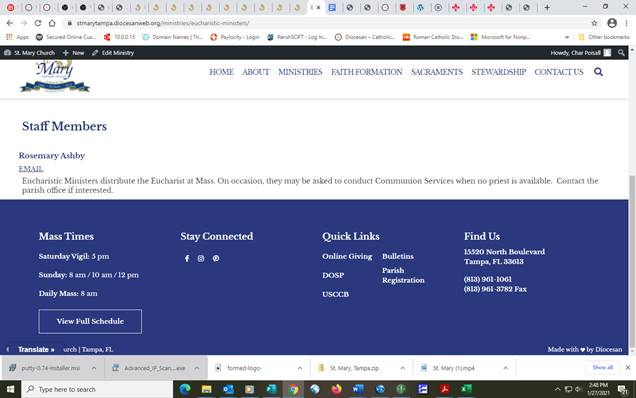
Look at Staff Member is offset to Rosemary’s name and email
Then the description is off set from name and email.
I would prefer that they all line up.
Cody Armock
Hello Char,
I have made a to-do for the developer to go in and change this to say "Ministry Contact" instead of "Staff Members". Is that okay, or do you just want it hidden?
Cody Armock
I have made a to-do for the developer to go in and change this to say "Ministry Contact" instead of "Staff Members". Is that okay, or do you just want it hidden?
Cody Armock
Web Department, Diocesan
877-923-0777
Cody Armock
I have also made a to-do for the alignment issue on the Individual ministry page. I think that was an issue that did not occur on our desktop monitors, so it was not caught, but the developer will fix it.
Thank you,
Cody Armock
Thank you,
Cody Armock
Web Department, Diocesan
877-923-0777
Char
Ministry Contact is fine.
Thank you.
Thank you.
Char
Cody,
I just went over the website with our pastor and he’s made a lot of changes to it. Most of them I can do, but some I may have to ask for your help.
With these changes in mind, he does not want to launch the new site just yet. He wants to review the site after the changes and then I can let you know when we’re ready to launch. Is that alright?
Char
I just went over the website with our pastor and he’s made a lot of changes to it. Most of them I can do, but some I may have to ask for your help.
With these changes in mind, he does not want to launch the new site just yet. He wants to review the site after the changes and then I can let you know when we’re ready to launch. Is that alright?
Char
Cody Armock
Hello Char,
That is ok! I will cancel the launch for Monday then.
Cody Armock
That is ok! I will cancel the launch for Monday then.
Cody Armock
Web Department, Diocesan
877-923-0777
Char
Cody,
This is what I get when I click on any of the links on the Dashboard under Popular Help Articles and Knowledgebase Topics. Please advise.
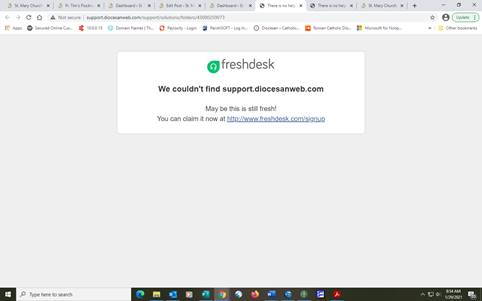
This is what I get when I click on any of the links on the Dashboard under Popular Help Articles and Knowledgebase Topics. Please advise.
Cody Armock
Hello Char,
It is not you, Char! The knowledgebase has been down for a little bit now, but we are working on a fix for it. Is there something that I can help you with?
Cody Armock
It is not you, Char! The knowledgebase has been down for a little bit now, but we are working on a fix for it. Is there something that I can help you with?
Cody Armock
Web Department, Diocesan
877-923-0777
Char
Yes,
There are a couple of menu items that I need changed.
Under Faith Formation:
Add:
Sub items: Adults
Adult Bible Study
Adult Faith Formation
Marriage Preparation
RCIA
Youth
Children’s Faith Formation (K-5th)
Youth Ministry (6th-12th)
I moved Sacraments under the Faith Formation heading
Under Contact Us:
Please remove Our Facebook, I’d like to do something different with social media
Somehow, I accidently deleted the map, which Fr. Tim wanted moved somewhere else.
See contact page on ctk-tampa.org website. I want to do something along the lines of this, without the structural part of it. Just the info.
There are a couple of menu items that I need changed.
Under Faith Formation:
Add:
Sub items: Adults
Adult Bible Study
Adult Faith Formation
Marriage Preparation
RCIA
Youth
Children’s Faith Formation (K-5th)
Youth Ministry (6th-12th)
I moved Sacraments under the Faith Formation heading
Under Contact Us:
Please remove Our Facebook, I’d like to do something different with social media
Somehow, I accidently deleted the map, which Fr. Tim wanted moved somewhere else.
See contact page on ctk-tampa.org website. I want to do something along the lines of this, without the structural part of it. Just the info.
Cody Armock
Hello Char,
I do not see those items in pages or ministries, so I could not add them to the menu.
We also covered menus in the later part of the first training, about 1:33:50 mark, you can click the arrow on the menu item and click remove to take it off the menu. I removed the Our Facebook item though.
I used the revisions on the Contact Us page to bring the map back. You can now just drag the block around the page and put it in the columns (that I added back in).
I hope that helps!
Cody Armock
I do not see those items in pages or ministries, so I could not add them to the menu.
We also covered menus in the later part of the first training, about 1:33:50 mark, you can click the arrow on the menu item and click remove to take it off the menu. I removed the Our Facebook item though.
I used the revisions on the Contact Us page to bring the map back. You can now just drag the block around the page and put it in the columns (that I added back in).
I hope that helps!
Cody Armock
Web Department, Diocesan
877-923-0777
Char
Cody,
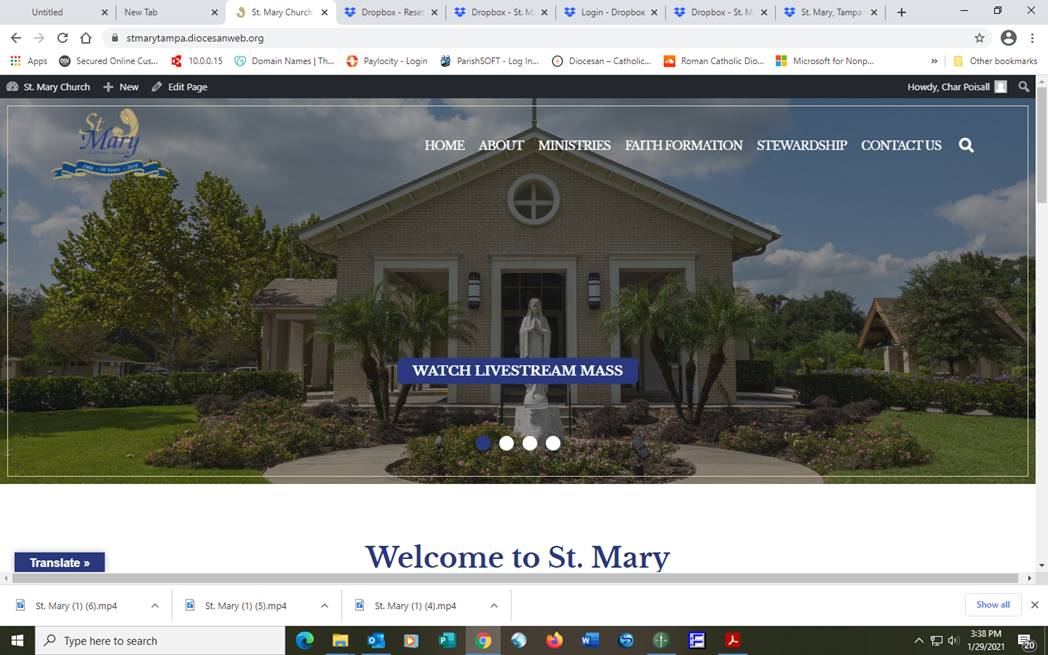
Can you please check my home page? The menu seems a little lower than before and now there’s a box around the slider images which I would like removed.
Thank you,
Char
Can you please check my home page? The menu seems a little lower than before and now there’s a box around the slider images which I would like removed.
Thank you,
Char
Cody Armock
Hello Char,
The menu does not seem to have moved on mine, you may want to try a hard refresh for it. It looks accurate with the proof. I removed the border from the slider.
Cody Armock
The menu does not seem to have moved on mine, you may want to try a hard refresh for it. It looks accurate with the proof. I removed the border from the slider.
Cody Armock
Web Department, Diocesan
877-923-0777
Char
I’m still seeing the border on the slider.
Cody Armock
Web Department, Diocesan
877-923-0777
Char
I’ve done a hard refresh at least 4 times. Border still there and menu looks low.
Cody Armock
Hello Char,
I just added the fix again. Please try pressing Ctrl+F5 once again. If that doesn't fix it, I will have the developer look at it on Monday.
Thank you,
Cody Armock
I just added the fix again. Please try pressing Ctrl+F5 once again. If that doesn't fix it, I will have the developer look at it on Monday.
Thank you,
Cody Armock
Web Department, Diocesan
877-923-0777
Char
Hi Cody,
Hope this finds you well.
On the New/Events page, none of the links are working. However, if you go to the posts, the links work.
Please advise.
Char
Hope this finds you well.
On the New/Events page, none of the links are working. However, if you go to the posts, the links work.
Please advise.
Char
Char
Cody,
Another question. On our Online Masses page, I was hoping I could put a button link like the way the welcome sliders have on it. If that is not possible, can the button be centered instead of on the left side of the page.
The other option is to have the menu item Online Masses go directly to the link instead of going to a page (if that is possible)
Thank you,
Char
Another question. On our Online Masses page, I was hoping I could put a button link like the way the welcome sliders have on it. If that is not possible, can the button be centered instead of on the left side of the page.
The other option is to have the menu item Online Masses go directly to the link instead of going to a page (if that is possible)
Thank you,
Char
Cody Armock
Hello Char,
I have fixed the links on the News & Events page, sorry about that!
As for the Online Masses page/menu item. There is not a way to have the button be in the featured image section under the page title like the Welcome Slider. If select the "Buttons" block (with an 's') rather than the "Button" (singular) block, you can align it center. However, an easier way, is to just have the Online Masses menu item go directly to that link from the Menu. Instructions are as follows:
I have fixed the links on the News & Events page, sorry about that!
As for the Online Masses page/menu item. There is not a way to have the button be in the featured image section under the page title like the Welcome Slider. If select the "Buttons" block (with an 's') rather than the "Button" (singular) block, you can align it center. However, an easier way, is to just have the Online Masses menu item go directly to that link from the Menu. Instructions are as follows:
- Go to Appearance > Menus
- Remove the Online Masses Page from the Menu
- On the left side, add a custom link with the URL to go to the Online Mass Option, with the link text as "Online Masses"
- Add to Menu
- Drag the item to the correct spot
- Click the Dropdown for the "Online Masses" item and check "Open link in a new tab" option.
- If you do not see the "Open link in a new tab" option, click the Screen Options box in the top right of the screen and check the "Link Target" option. Then you should be able to click the "Open link in a new tab" option.
Let me know if anything was unclear!
Cody Armock
Cody Armock
Web Department, Diocesan
877-923-0777
Char
Cody,
I followed your directions which were very clear, but when I went to view the home page the menu has disappeared. I hard refreshed, but the menu is still missing at the top of the page.
Help!
I followed your directions which were very clear, but when I went to view the home page the menu has disappeared. I hard refreshed, but the menu is still missing at the top of the page.
Help!
Char
Cody,
Can you please change the footer under Mass Times: can you make the See Full Schedule be one line
and also have it line up with the above times?
Thank you.
Char
Can you please change the footer under Mass Times: can you make the See Full Schedule be one line
and also have it line up with the above times?
Thank you.
Char
Cody Armock
Hello Char,
I think I fixed the menu issue. I moved the Social Media Menu item under Contact Us because it made the menu too wide so that it went to Mobile Menu, but the website did not have it rendering it at that width of the screen.
I believe I fixed the button issue in the footer too to line up with the Mass Times as it does on Desktop.
Cody Armock
I think I fixed the menu issue. I moved the Social Media Menu item under Contact Us because it made the menu too wide so that it went to Mobile Menu, but the website did not have it rendering it at that width of the screen.
I believe I fixed the button issue in the footer too to line up with the Mass Times as it does on Desktop.
Cody Armock
Web Department, Diocesan
877-923-0777
Char
Cody,
Just checked, and hard refreshed, no changes are showing up.
Just checked, and hard refreshed, no changes are showing up.
Cody Armock
Hello Char,
What screen size are you using (the resolution of the screen)? Knowing that, I can make sure to fix it for that particular screen size.
Cody Armock
What screen size are you using (the resolution of the screen)? Knowing that, I can make sure to fix it for that particular screen size.
Cody Armock
Web Department, Diocesan
877-923-0777
Char
1440 x 900
I want to make sure it is fixed for all screen sizes.
I want to make sure it is fixed for all screen sizes.
Char
I’m seeing it now.
However, I don’t like the social media under the contact us.
Now the contact us stuff is gone. Asking how can we help you?
Maybe I’ll just delete the social media and leave it down in the footer.
However, I don’t like the social media under the contact us.
Now the contact us stuff is gone. Asking how can we help you?
Maybe I’ll just delete the social media and leave it down in the footer.
Char
Can you move the Mission Mass time to be directly after where it says Mass Time
Santa Maria Mission Spanish
Sunday Mass: 10:45am
Santa Maria Mission Spanish
Sunday Mass: 10:45am
Cody Armock
Hello Char,
I will make a to-do for the developer to look into those disparities for the footer button and the menu issue.
As for the ordering of the mass times, if you go to mass times in the theme settings you can reorder those times by clicking on the number on the left of the title and drag it up or down to reorder them.
Cody Armock
I will make a to-do for the developer to look into those disparities for the footer button and the menu issue.
As for the ordering of the mass times, if you go to mass times in the theme settings you can reorder those times by clicking on the number on the left of the title and drag it up or down to reorder them.
Cody Armock
Web Department, Diocesan
877-923-0777