












Audio Homilies
Hi John,
We just got off the phone and I just wanted to quickly recap what we discussed:
- Updating the Full Schedule and Join Our Parish links on homepage
- Putting in SMIP's myParish App code to display messages
- Audio Homilies will be posts (embedded from gDrive)
- John or IT guy will share folder with me (December, January, February)
- Share RSS feed link for the Audio Homilies to be pushed to App
I did quickly take some screenshots as to what I meant about sharing the folder:
- Go to the folder in your Google Drive
- Hover over the folder title at the top and click the small down arrow
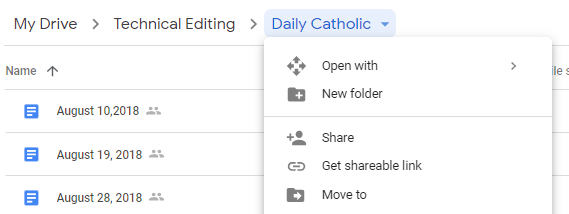
- Click Share.
- Type in valvarado@diocesan.com and click done.
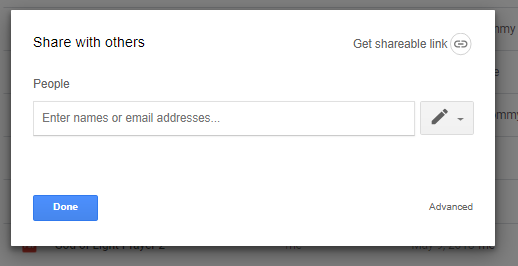
As I said before, it may be that you don't have access to share with others, so your IT person may have to do it for you.
Either way, I look forward to getting those homilies in there and seeing them within the app!
Thanks, John.
Veronica Alvarado
Web Department, Diocesan
877-923-0777
877-923-0777
 John West
Hi Veronica,
Thanks for the screen shots. I don't have the ability to share those with you, so I sent Jackson, our IT guy, an email so he can send those to you. That makes me feel better that I wasn't going crazy!
Thanks,
John
Thanks for the screen shots. I don't have the ability to share those with you, so I sent Jackson, our IT guy, an email so he can send those to you. That makes me feel better that I wasn't going crazy!
Thanks,
John
 Veronica Alvarado
No problem, haha!
Thanks again, John.
Thanks again, John.
Veronica Alvarado
Web Department, Diocesan
877-923-0777
877-923-0777
Veronica Alvarado
Hi John,
Here is the RSS feed link to add to the App:
https://smip.diocesanweb.org/category/homily-podcast/feed/
As for the homilies, I have done them two different ways. Some homilies are with Google embeds (January 26) and others are with the actual uploaded audio file (February 9).
See Here: https://smip.diocesanweb.org/audio-homilies/
The nice thing about the Google embeds is that they don't slow down your website as a whole. Plus, the way I have created the page is so that there are never more than 10 on a page.
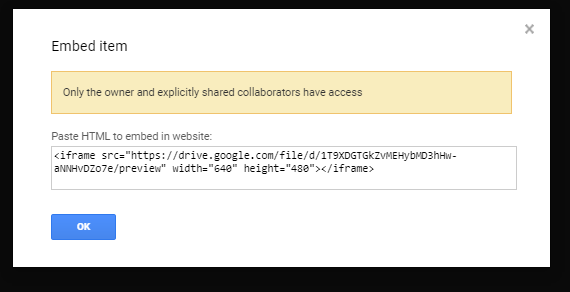
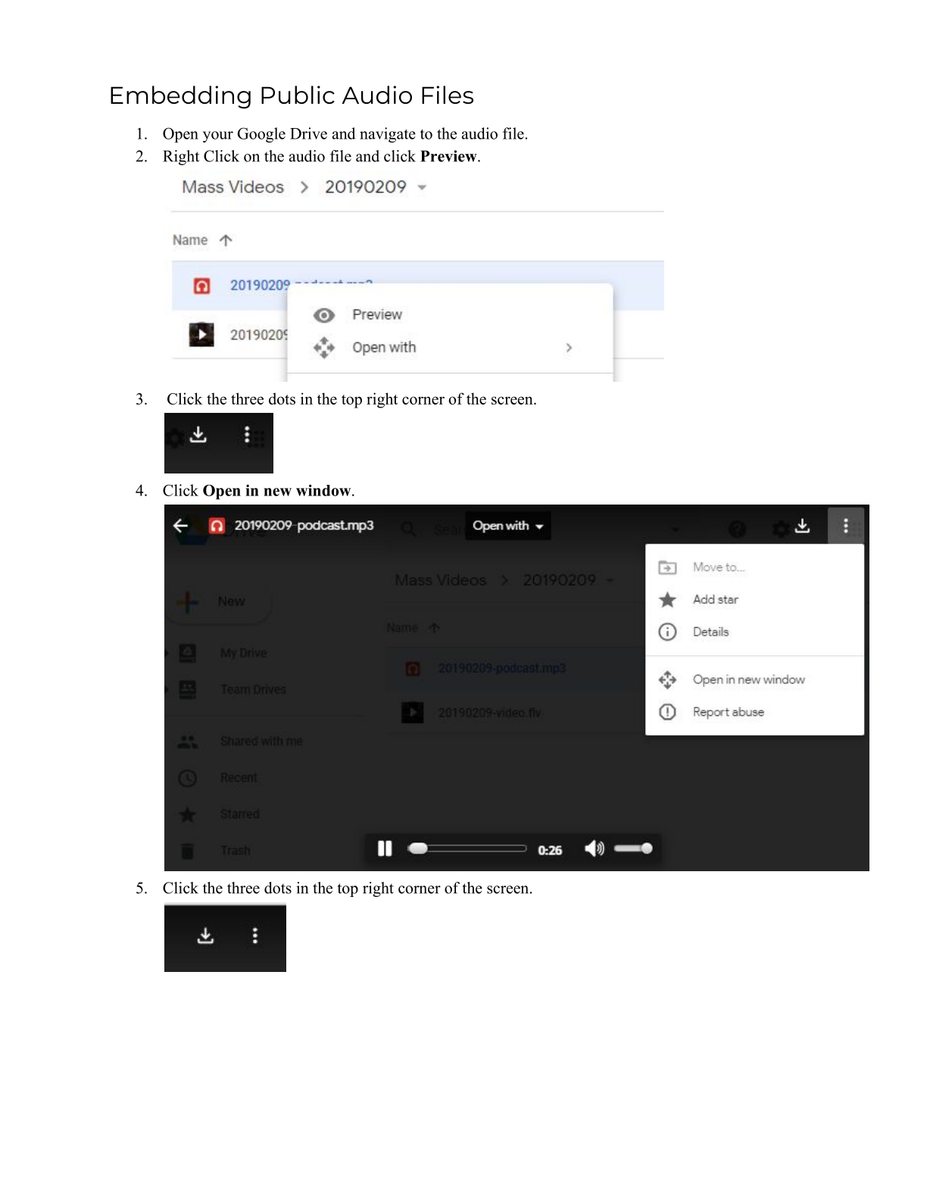
Unfortunately, the Google embeds are only visible for public files and require the copying of an iFrame code each time (see attached instructions).
The nice thing about uploading the audio files directly is the ease.
Unfortunately, they have the potential of slowing down the page's load times (even if only 10 are showing per page) and taking up the majority of your 5GB of space (5120 MB). So far, I have been using mp3smaller.com to shrink your audio files even smaller (down to 9-12 MB) and have resized all of your website's images to a maximum of 2048x2048 (as large as we ever practically need images within the website). That brought us down to 1002/5120 MB.
Even a year's worth of audio homilies (~32 MB each, before reshrinking) is only an additional 1664 MB, so you would be able to house ~ 3 years of audio homilies within your website at a time.
If, in a year, you found that you needed more space, we do have the option of upgrading you to larger online storage and bandwidth capacities.
If this is confusing in any way, please let me know and we can talk through it together. Otherwise, it is up to you to decide which way you'd prefer to display your audio files in the future.
Thank you,
Here is the RSS feed link to add to the App:
https://smip.diocesanweb.org/category/homily-podcast/feed/
As for the homilies, I have done them two different ways. Some homilies are with Google embeds (January 26) and others are with the actual uploaded audio file (February 9).
See Here: https://smip.diocesanweb.org/audio-homilies/
The nice thing about the Google embeds is that they don't slow down your website as a whole. Plus, the way I have created the page is so that there are never more than 10 on a page.
Unfortunately, the Google embeds are only visible for public files and require the copying of an iFrame code each time (see attached instructions).
The nice thing about uploading the audio files directly is the ease.
Unfortunately, they have the potential of slowing down the page's load times (even if only 10 are showing per page) and taking up the majority of your 5GB of space (5120 MB). So far, I have been using mp3smaller.com to shrink your audio files even smaller (down to 9-12 MB) and have resized all of your website's images to a maximum of 2048x2048 (as large as we ever practically need images within the website). That brought us down to 1002/5120 MB.
Even a year's worth of audio homilies (~32 MB each, before reshrinking) is only an additional 1664 MB, so you would be able to house ~ 3 years of audio homilies within your website at a time.
If, in a year, you found that you needed more space, we do have the option of upgrading you to larger online storage and bandwidth capacities.
If this is confusing in any way, please let me know and we can talk through it together. Otherwise, it is up to you to decide which way you'd prefer to display your audio files in the future.
Thank you,
Veronica Alvarado
Web Department, Diocesan
877-923-0777
877-923-0777
John West
Hi Veronica,
Thank you for the info. I think it would be fine to just do the Google Drive version, even if there is an extra step. It looks simple enough.
For the RSS Feed, I put that into the Homilies section of the App, but it hasn't transferred over yet. I'll let you know tomorrow if it isn't working.
Thanks,
John
Thank you for the info. I think it would be fine to just do the Google Drive version, even if there is an extra step. It looks simple enough.
For the RSS Feed, I put that into the Homilies section of the App, but it hasn't transferred over yet. I'll let you know tomorrow if it isn't working.
Thanks,
John
Veronica Alvarado
John,
If you have issues with the RSS feed within the app, you can call the App Department. They would know more about it than I would.
1-800-997-8805
Another thing to mention is that since Father Mulcahy's website is a blog, he too has an RSS feed: http://father.mulcahy.net/feed/
So, if you wanted to add his blog posts to the app, that's another option.
Veronica Alvarado
Web Department, Diocesan
877-923-0777
877-923-0777