











Website Content
Good afternoon Jan,
Thank you for choosing Diocesan!
I wanted to introduce myself before diving into your content. I am Veronica Alvarado and I am the content specialist here at Diocesan. In addition to moving over all of your content (as requested in the initial consultation), I aim to create content that will be easy for you to update and simple for your parishioners to read and understand.
In the consultation notes, I saw that you had planned on creating a Google email for your calendars. Moving your calendars over from eCatholic to Google should be fairly easy and I would love to help you set this up.
Please let me know when/if you have the time to do this. I think it will definitely help speed the website process along and save you some time.
Now, as we move forward with the project, I want you to feel free to reach out to me with any questions, comments, or concerns that you may have.
Again, thank you for choosing Diocesan and I hope that we can make your transition to your new websites as smooth as possible.
Veronica Alvarado
Web Department, Diocesan
877-923-0777
877-923-0777
 Jan O'Donnell
Veronica,
I am ready to move forward on this now. Do I need to call you? What is the best way to do this?
Thank you,
Jan O’Donnell
St. Louis Catholic Church
(901) 255-1954
I am ready to move forward on this now. Do I need to call you? What is the best way to do this?
Thank you,
Jan O’Donnell
St. Louis Catholic Church
(901) 255-1954
 Veronica Alvarado
You can give us a call now, if you'd like.
Or, if you prefer, you can simply email us a list of items.
Also, if your comments are mostly design/functionality, it is probably best that you speak with Daniel, the developer.
If it is content related, I can help you with it.
Either way, simply call the number below and we can go over it with you.
Or, if you prefer, you can simply email us a list of items.
Also, if your comments are mostly design/functionality, it is probably best that you speak with Daniel, the developer.
If it is content related, I can help you with it.
Either way, simply call the number below and we can go over it with you.
Veronica Alvarado
Web Department, Diocesan
877-923-0777
877-923-0777
Jan O'Donnell
I will give you a call in the morning. Thanks!
Thank you,
Jan O’Donnell
St. Louis Catholic Church
(901) 255-1954
Thank you,
Jan O’Donnell
St. Louis Catholic Church
(901) 255-1954
Veronica Alvarado
Sounds good and I look forward to talking to you then!
Veronica Alvarado
Web Department, Diocesan
877-923-0777
877-923-0777
Veronica Alvarado
Good morning Jan,
I see that you have been updating the website! I hope everything has been going smoothly and has been easy to work with.
I did want to mention and stress the fact that the images you use in your MetaSlider should be "good" images. While the images you have chosen are perfect for showcasing your lively parish, they may not be perfect for the homepage.
Here are some things I would like you to keep in mind so that your website stays welcoming, updated, and high quality:
- Types of Slider Images
- Low-resolution images (less than 2040px by 2040 px) will appear grainy and/or blurry.
- Any pictures taken with a DSLR camera or iPhone 7 or newer, will be high resolution/quality images that are perfect for the website's use.
- Pictures should be taken in well-lit areas and taken sideways so that they fit the website's slider.
- Number of Slider Images
- No more than 5 or 6 images
- More images means longer load time
- Distracts visitors from the information on your website
- Suggestion: Have a dedicated page for photos (which I have already made for you)
- Text on Slider Images
- Limited in text, or best with no text
- If images are used to promote events, only add Events title, date, and a "Click for more information" text. Then you can use MetaSlider to add a link to a page/post with more information
- When there is too much text, parishioners will not bother to look through the rest of your website
Has everything else been going smoothly since we last spoke?
Also, do you and Father have a date in mind for when you would like to launch the website to take it live?
Thank you,
Veronica Alvarado
Web Department, Diocesan
877-923-0777
877-923-0777
Jan O'Donnell
Thank you Veronica,
I was playing with pictures to try and get a feel for what Fr. Jolly wants to highlight when we launch. I am aware that some of those pictures are not high enough quality! He has been out of town and I hope to go over it with him tomorrow and set a launch date. Also I was wondering how many was a good number—thanks for that information!
I looked at the website on my phone and Ipad—how does making it mobile-friendly work?
Thank you,
Jan O’Donnell
St. Louis Catholic Church
(901) 255-1954
I was playing with pictures to try and get a feel for what Fr. Jolly wants to highlight when we launch. I am aware that some of those pictures are not high enough quality! He has been out of town and I hope to go over it with him tomorrow and set a launch date. Also I was wondering how many was a good number—thanks for that information!
I looked at the website on my phone and Ipad—how does making it mobile-friendly work?
Thank you,
Jan O’Donnell
St. Louis Catholic Church
(901) 255-1954
Veronica Alvarado
Jan,
Good to hear that these will not be your final images. Don't get me wrong, they really are a wonderful representation of your parish, I just want to make sure we put our best foot forward since the homepage will be the first thing visitors see.
No need to worry about making the website mobile friendly. Diocesan takes care of this for you. Daniel, the web developer on your project, will make sure that all pages are mobile responsive for all screen sizes (TV/large desktop, average desktop, laptop, tablet, phone) before launching the website. This is normally one of the last things we do, just in case there are any changes to the website design or anything else. This way, we are making every element of the website mobile responsive all at once, rather than going through every single change we make and making it mobile responsive as we go.
It looks like you are making great progress, so I will just wait to hear back from you once Fr. Jolly is back in town!
Thank you and I hope you have a wonderful week,
Veronica Alvarado
Web Department, Diocesan
877-923-0777
877-923-0777
Jan O'Donnell
Veronica,
How do I know what the resolution of an image is? They are listed as different file sizes but not pixels in my finder. Is it by dpi or file size?
Thank you,
Jan O’Donnell
St. Louis Catholic Church
(901) 255-1954
How do I know what the resolution of an image is? They are listed as different file sizes but not pixels in my finder. Is it by dpi or file size?
Thank you,
Jan O’Donnell
St. Louis Catholic Church
(901) 255-1954
Veronica Alvarado
Good Morning Jan,
I have made you a quick how-to for both images on your computer and images that have already been uploaded to the website.
Images on Your Computer
- In your computer's File Explorer, right click on the desired image file
- Select Properties
- Once the box is open, click on the Details tab.
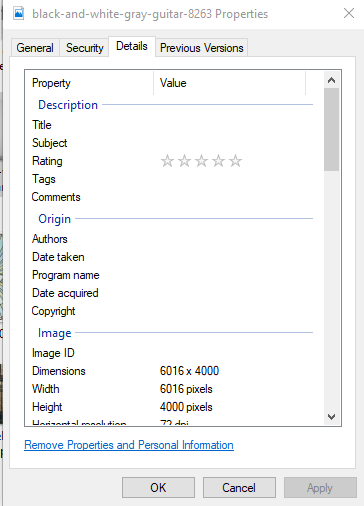
This will allow you to see the pixel size.
Images Uploaded to Your Media Library
If you are trying to find the pixel size of images you have already uploaded to your website's Media Gallery:
- Go to your Media Library
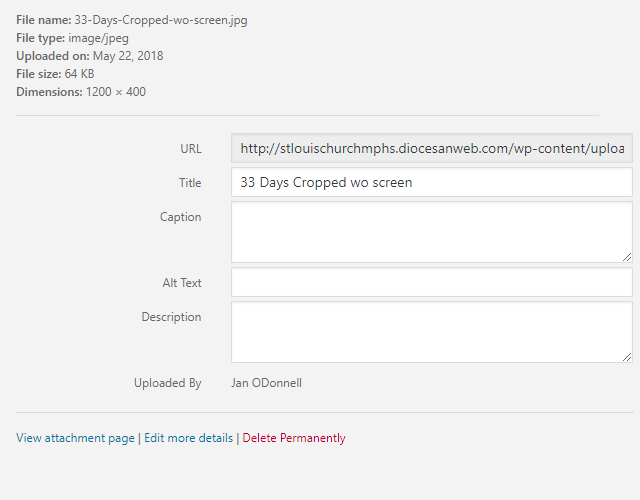
- Click on the desired image
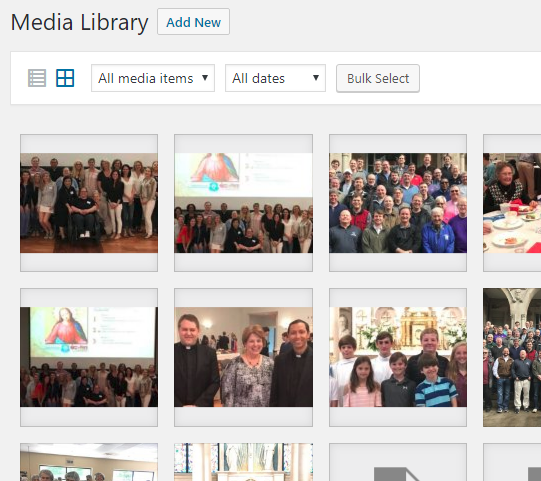
- On the right side of the screen is the Dimensions. Although not stated, these numbers are in pixels.
Thank you,
Veronica Alvarado
Web Department, Diocesan
877-923-0777
877-923-0777
Jan O'Donnell
Veronica,
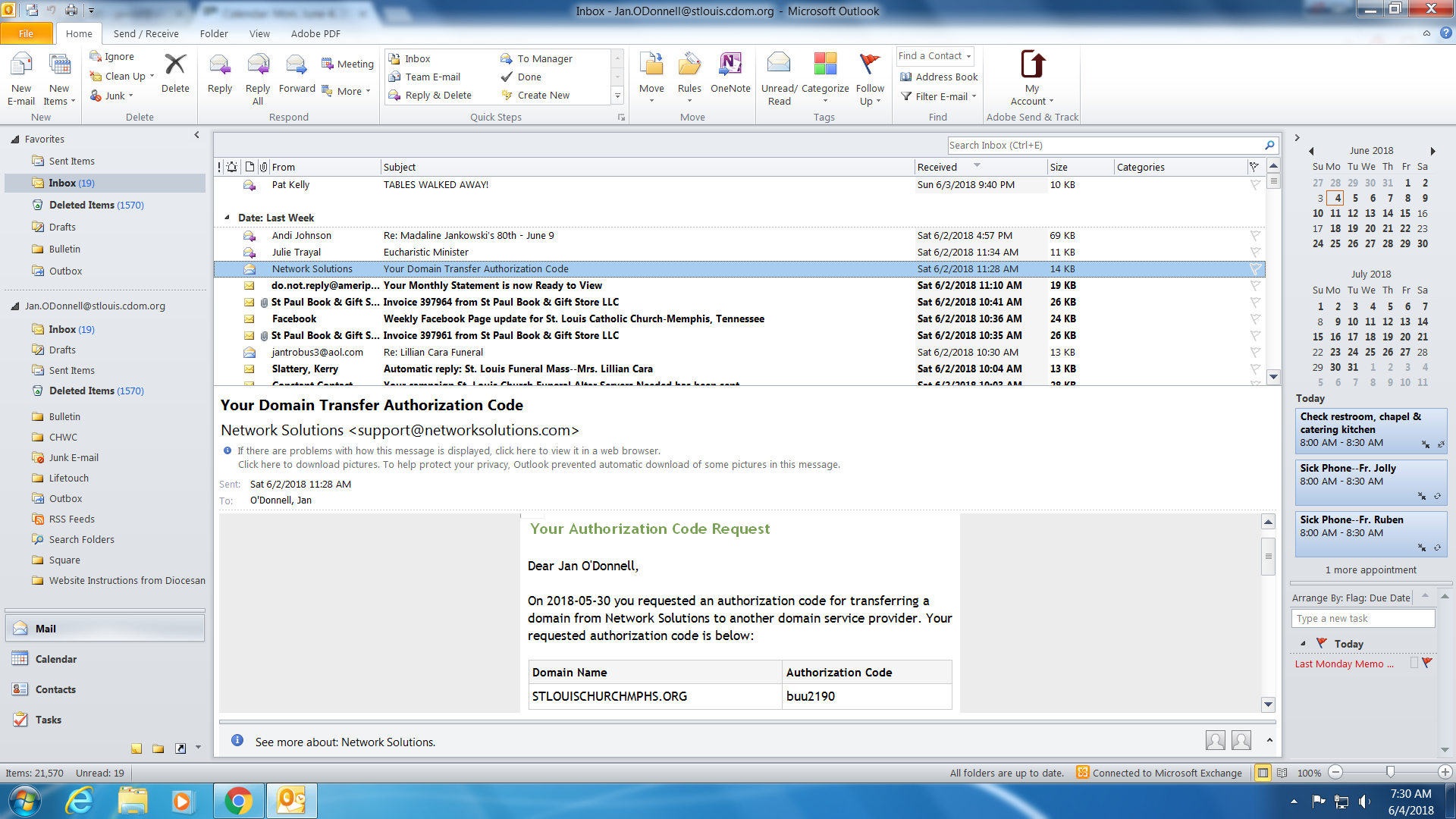
I am still receiving notices from Network Solutions that we are in danger of losing our website name. Do I need to do anything about that?
Thank you,
Jan O’Donnell
St. Louis Catholic Church
(901) 255-1954
I am still receiving notices from Network Solutions that we are in danger of losing our website name. Do I need to do anything about that?
Thank you,
Jan O’Donnell
St. Louis Catholic Church
(901) 255-1954
 Daniel Shamburger
Hi Jan,
Veronica forwarded your message to me, so I'm just replying to the same thread. I've gone ahead and initiated the transfer of your domain to our management. You should receive an automated email with an "Auth Code" within 3 days. If you could just send us that code, we can register the domain in our account and we'll be all set!
Thank you,
Daniel Shamburger
(877) 923-0777
Veronica forwarded your message to me, so I'm just replying to the same thread. I've gone ahead and initiated the transfer of your domain to our management. You should receive an automated email with an "Auth Code" within 3 days. If you could just send us that code, we can register the domain in our account and we'll be all set!
Thank you,
Daniel Shamburger
(877) 923-0777
Jan O'Donnell
 Jan O'Donnell
Veronica,
We are ready to go live with the website. I will be out of the office tomorrow but will be in all day on Monday.
Thank you,
Jan O’Donnell
St. Louis Catholic Church
(901) 255-1954
We are ready to go live with the website. I will be out of the office tomorrow but will be in all day on Monday.
Thank you,
Jan O’Donnell
St. Louis Catholic Church
(901) 255-1954
Daniel Shamburger
Hi Jan,
Great! The domain transfer is in progress. This can take 7-14 days, but often closer to 7. It was initiated Monday, 7/4/2018. Once this is finalized, we can change the host records to point to our server and launch the site.
Let us know if you have any questions or concerns in the mean time.
Thanks!
Daniel Shamburger
Great! The domain transfer is in progress. This can take 7-14 days, but often closer to 7. It was initiated Monday, 7/4/2018. Once this is finalized, we can change the host records to point to our server and launch the site.
Let us know if you have any questions or concerns in the mean time.
Thanks!
Daniel Shamburger
Jan O'Donnell
Daniel,
Not sure if this will be seen today but our website is down? I am hoping this is just for a couple of hours?
Thanks, Jan
Not sure if this will be seen today but our website is down? I am hoping this is just for a couple of hours?
Thanks, Jan
Daniel Shamburger
Hi Jan,
The domain transfer went through successfully. The name servers have not been changed, however, so I'm not sure why it is not showing the old site still. I can go ahead and point the name to our server and show the new site, if that's ok.
Thanks,
Daniel
The domain transfer went through successfully. The name servers have not been changed, however, so I'm not sure why it is not showing the old site still. I can go ahead and point the name to our server and show the new site, if that's ok.
Thanks,
Daniel
Jan O'Donnell
Perfect! Thanks!
Jan O'Donnell
Daniel,
What is the timeline to make the website mobile friendly? Not trying to rush you—just anticipating that the pastor will ask me!
Thank you,
Jan O’Donnell
St. Louis Catholic Church
(901) 255-1954
What is the timeline to make the website mobile friendly? Not trying to rush you—just anticipating that the pastor will ask me!
Thank you,
Jan O’Donnell
St. Louis Catholic Church
(901) 255-1954
Daniel Shamburger
Hi Jan,
Generally we try to have that ready before launch, but this one took us a bit by surprise, as I wasn't planning on launching over the weekend. I'm working on mobile friendliness today.
Now that the site is launched at stlouischurchmphs.org, you can log in at stlouischurchmphs.org/memphis with your same credentials as before for any content updates.
Let us know if you have any questions or concerns! Thanks,
Daniel Shamburger
Generally we try to have that ready before launch, but this one took us a bit by surprise, as I wasn't planning on launching over the weekend. I'm working on mobile friendliness today.
Now that the site is launched at stlouischurchmphs.org, you can log in at stlouischurchmphs.org/memphis with your same credentials as before for any content updates.
Let us know if you have any questions or concerns! Thanks,
Daniel Shamburger
Jan O'Donnell
Daniel,
My pastor is asking when the mobile friendly website will be uploaded?
Thank you,
Jan O’Donnell
St. Louis Catholic Church
(901) 255-1954
My pastor is asking when the mobile friendly website will be uploaded?
Thank you,
Jan O’Donnell
St. Louis Catholic Church
(901) 255-1954
Daniel Shamburger
Hi Jan,
The site should be mobile friendly now.
Let me know if there's any area in particular that doesn't look right.
Thanks!
Daniel
The site should be mobile friendly now.
Let me know if there's any area in particular that doesn't look right.
Thanks!
Daniel
Jan O'Donnell
Thanks! It looks awesome!
Thank you,
Jan O’Donnell
St. Louis Catholic Church
(901) 255-1954
Thank you,
Jan O’Donnell
St. Louis Catholic Church
(901) 255-1954
Jan O'Donnell
Daniel and Veronica,
I have some questions!
I have updated the google calendar but it has not updated on the website. Am I missing a step?
On posts, how do I change the order of the posts so that I can control which 3 show up on the home page.
Also on posts, how do I navigate to them if they are news items?
Thank you,
Jan O’Donnell
St. Louis Catholic Church
(901) 255-1954
I have some questions!
I have updated the google calendar but it has not updated on the website. Am I missing a step?
On posts, how do I change the order of the posts so that I can control which 3 show up on the home page.
Also on posts, how do I navigate to them if they are news items?
Thank you,
Jan O’Donnell
St. Louis Catholic Church
(901) 255-1954
Veronica Alvarado
Hello Jan,
To answer your question, no, you are not missing any steps. The Google Calendar on the website will update every 2 hours. If you wish us to change this, we can set it up to update ever hour instead. Simply let me know.
The homepage posts will be shown in the order that they were published. This date may be found while editing the post under Publish and Published On.
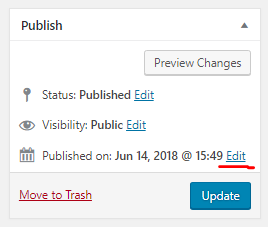
I am not quite sure I understand your last question. Could you please clarify a bit? I am not sure if you are talking about the homepage, in the menu, or perhaps in the editing side of the website.
Thank you,
Veronica Alvarado
Web Department, Diocesan
877-923-0777
877-923-0777
Jan O'Donnell
Daniel and Veronica,
I have some questions!
I have updated the google calendar but it has not updated on the website. Am I missing a step?
On posts, how do I change the order of the posts so that I can control which 3 show up on the home page.
Also on posts, how do I navigate to them if they are news items?
Thank you,
Jan O’Donnell
St. Louis Catholic Church
(901) 255-1954
I have some questions!
I have updated the google calendar but it has not updated on the website. Am I missing a step?
On posts, how do I change the order of the posts so that I can control which 3 show up on the home page.
Also on posts, how do I navigate to them if they are news items?
Thank you,
Jan O’Donnell
St. Louis Catholic Church
(901) 255-1954
Veronica Alvarado
Hello Jan,
To answer your question, no, you are not missing any steps. The Google Calendar on the website will update every 2 hours. If you wish us to change this, we can set it up to update ever hour instead. Simply let me know.
The homepage posts will be shown in the order that they were published. This date may be found while editing the post under Publish and Published On.
I am not quite sure I understand your last question. Could you please clarify a bit? I am not sure if you are talking about the homepage, in the menu, or perhaps in the editing side of the website.
Thank you,
Veronica Alvarado
Web Department, Diocesan
877-923-0777
877-923-0777
Jan O'Donnell
On my last question, I was asking if I can change the order of the posts. Do I have to delete them and re-post if I want something to be first? How can someone navigate to all the posts? Are we limited to 3?
As far as the calendar, there are items I added in the Google calendar last week which have not updated to the website. For instance, the Hole-in-One Summer Festival is going on now and it is not showing up on the website calendar.
Thank you,
Jan O’Donnell
St. Louis Catholic Church
(901) 255-1954
As far as the calendar, there are items I added in the Google calendar last week which have not updated to the website. For instance, the Hole-in-One Summer Festival is going on now and it is not showing up on the website calendar.
Thank you,
Jan O’Donnell
St. Louis Catholic Church
(901) 255-1954
Veronica Alvarado
To change the order of the posts, you would have to change the dates. Yes, you are limited to three, with the archive of News posts available under Resources > News & Events > Parish News.
For the calendar, I am not too sure why it would not pull in the Summer Festival. Could you tell me which calendar you added the Hole-in-One Summer Festival should be on?
The Parish Calendar groups events from the following calendars:
For the calendar, I am not too sure why it would not pull in the Summer Festival. Could you tell me which calendar you added the Hole-in-One Summer Festival should be on?
The Parish Calendar groups events from the following calendars:
- Sacramental
- Children Faith Formation
- Youth Groups
- Sacraments
- Retreats
- Ministries
- Liturgy
- In the Diocese
- Adult Faith Formation
Thank you,
Veronica Alvarado
Web Department, Diocesan
877-923-0777
877-923-0777
Jan O'Donnell
I moved it to General Parish Events and it shows up. Then I moved “Sound System Installation” to Liturgy but it is not showing up.
Thank you,
Jan O’Donnell
St. Louis Catholic Church
(901) 255-1954
Thank you,
Jan O’Donnell
St. Louis Catholic Church
(901) 255-1954
Veronica Alvarado
Jan,
I looked at the Parish Calendar and saw that Liturgy events were not previously connected to the main parish calendar. If you now view the parish calendar (click here), then you will see all Masses, P&W, Adoration, etc.
So sorry about that.
Let me know if there is anything else that I can help with.
Veronica Alvarado
Web Department, Diocesan
877-923-0777
877-923-0777
Jan O'Donnell
Veronica,
Now a lot of things are showing up twice?
Thank you,
Jan O’Donnell
St. Louis Catholic Church
(901) 255-1954
Now a lot of things are showing up twice?
Thank you,
Jan O’Donnell
St. Louis Catholic Church
(901) 255-1954
Veronica Alvarado
Hello Jan,
I have fixed the issue of repeating faith formation events. Does everything look good now?
Thank you,
Veronica Alvarado
Web Department, Diocesan
877-923-0777
877-923-0777
Jan O'Donnell
Yes! It looks great!
We are getting great feedback from the parish—everyone loves the website!
Thank you,
Jan O’Donnell
St. Louis Catholic Church
(901) 255-1954
We are getting great feedback from the parish—everyone loves the website!
Thank you,
Jan O’Donnell
St. Louis Catholic Church
(901) 255-1954
Jan O'Donnell
Veronica,
I am creating a form for our PRE Registration and cannot figure out how to include a button that will take parents to the online giving button on our website so that they may pay online. Can you help?
Thank you,
Jan O’Donnell
St. Louis Catholic Church
(901) 255-1954
I am creating a form for our PRE Registration and cannot figure out how to include a button that will take parents to the online giving button on our website so that they may pay online. Can you help?
Thank you,
Jan O’Donnell
St. Louis Catholic Church
(901) 255-1954
Jan O'Donnell
Veronica,
We are not getting forms in our emails just for the last few days. Do you know why that would happen?
Thank you,
Jan O’Donnell
St. Louis Catholic Church
901-255-1954
We are not getting forms in our emails just for the last few days. Do you know why that would happen?
Thank you,
Jan O’Donnell
St. Louis Catholic Church
901-255-1954
Daniel Shamburger
Hi Jan,
I checked the "Contact Us" form notification settings and noticed the Send To email was sample.email@gmail.com.
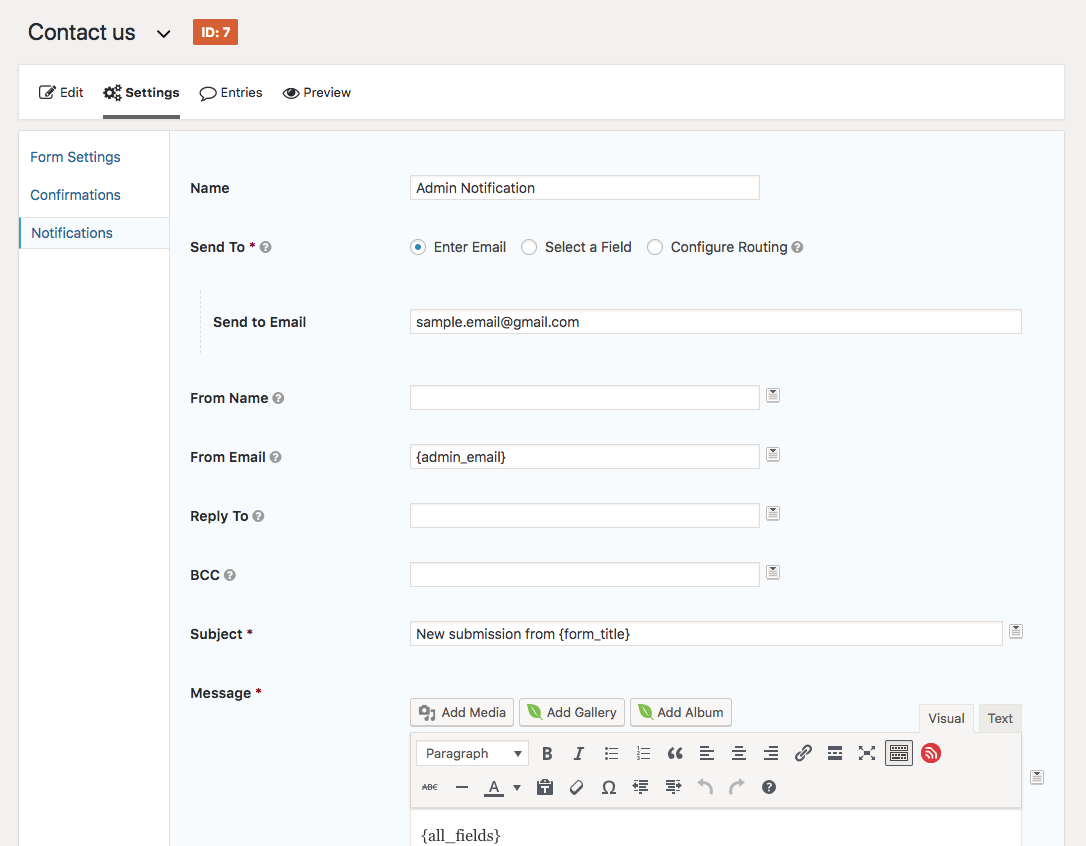
I'm not sure why or when that may have been set, but I changed it to StLouis.Info@stlouis.cdom.org. Entries for a particular form are saved on the site, and can be found by opening the list of forms, and clicking Entries. (Appears on hover)
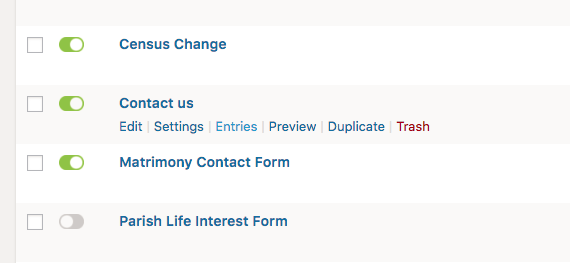
Let us know if there seem to be any other issues!
Daniel Shamburger
(800) 923-0777
I checked the "Contact Us" form notification settings and noticed the Send To email was sample.email@gmail.com.
I'm not sure why or when that may have been set, but I changed it to StLouis.Info@stlouis.cdom.org. Entries for a particular form are saved on the site, and can be found by opening the list of forms, and clicking Entries. (Appears on hover)
Let us know if there seem to be any other issues!
Daniel Shamburger
(800) 923-0777
Jan O'Donnell
Is it possible to make staff names on homepage links to their email addresses?
Thank you,
Jan O’Donnell
St. Louis Catholic Church
901-255-1954
Thank you,
Jan O’Donnell
St. Louis Catholic Church
901-255-1954
Daniel Shamburger
Hi Jan,
Sure! I've gone ahead and added a field labeled "email" alongside each staff member on the homepage. If you enter an email address, their name will automatically turn into a "mailto:" link on the homepage.
Daniel Shamburger
Sure! I've gone ahead and added a field labeled "email" alongside each staff member on the homepage. If you enter an email address, their name will automatically turn into a "mailto:" link on the homepage.
Daniel Shamburger
Veronica Alvarado
Hello Jan,
I just wanted to let you know that any email sent to this email address is actually sent to an archived project!
For any future emails, please send them to webdepartment@diocesan.com so that we can quickly and properly assist you. Plus, if Daniel or I are out of town, someone will help you out.
Thank you and I hope you have been doing well :)
Veronica Alvarado
Web Department, Diocesan
877-923-0777
877-923-0777