










Calendar Instructions & Second Training
Good Afternoon Everyone,
Calendar Instructions
Here is what we need to integrate the Google Calendar onto the website:
Make your Google Calendar public:
- In the Google Calendar interface, locate the "My calendars" area on the left.
- Hover over the calendar you need and click the downward arrow.
- A menu will appear. Click "Share this Calendar".
- Check "Make this calendar public".
- Make sure "Share only my free/busy information" is unchecked.
- Click "Save".
Obtain your Google Calendar's ID:
- In the Google Calendar interface, locate the "My calendars" area on the left.
- Hover over the calendar you need and click the downward arrow.
- A menu will appear. Click "Calendar settings".
- In the "Calendar Address" section of the screen, you will see your Calendar ID. It will look something like "abcd1234@group.calendar.google.com" or "example@domain.com".
Once you have the Calendar ID and the calendar is public, just send it to me and I can add it to the website.
Second Training
Everyone should have been sent their user accounts yesterday and you can use them to begin editing the site and practicing. We can go over any questions or review things in the second training. Normally, we like to have a week in between the first and second training to give you more time to practice on the site and run into issues that we can discuss in the second training. I have next Monday and Wednesday pretty wide open. I am only open from 10-12 on Tuesday, so if that works, we could do that too. If any of those don't work, just let me know your availability and we can work something out!
Let me know if you have any questions and let me know about the second training and the calendar ID.
Thank you,
Second Training
Everyone should have been sent their user accounts yesterday and you can use them to begin editing the site and practicing. We can go over any questions or review things in the second training. Normally, we like to have a week in between the first and second training to give you more time to practice on the site and run into issues that we can discuss in the second training. I have next Monday and Wednesday pretty wide open. I am only open from 10-12 on Tuesday, so if that works, we could do that too. If any of those don't work, just let me know your availability and we can work something out!
Let me know if you have any questions and let me know about the second training and the calendar ID.
Thank you,
Cody Armock
Web Department, Diocesan
877-923-0777
 Michael
Hi Cody
For our next training can we look at the Tuesday after Thanksgiving? December 1. Early morning?
Thanks
Mike
For our next training can we look at the Tuesday after Thanksgiving? December 1. Early morning?
Thanks
Mike
 Cody Armock
Good Afternoon Michael, Joyce, and Fr. Bill,
We can do that! How about 10am on December 1st? Here is the meeting info for next week, I can move the time if need be, but the earliest I can do is 10am on that Tuesday:
Diocesan is inviting you to a scheduled Zoom meeting.
Topic: Second Training | Lawrence (Louisville, KY)
Time: Dec 1, 2020 10:00 AM Eastern Time (US and Canada)
Join Zoom Meeting
https://us02web.zoom.us/j/88563044866
Meeting ID: 885 6304 4866
Call to Join Audio by Phone
+1 312 626 6799
OR
+1 301 715 8592
Meeting ID: 885 6304 4866
Let me know if you have any questions!
Cody Armock
We can do that! How about 10am on December 1st? Here is the meeting info for next week, I can move the time if need be, but the earliest I can do is 10am on that Tuesday:
Diocesan is inviting you to a scheduled Zoom meeting.
Topic: Second Training | Lawrence (Louisville, KY)
Time: Dec 1, 2020 10:00 AM Eastern Time (US and Canada)
Join Zoom Meeting
https://us02web.zoom.us/j/88563044866
Meeting ID: 885 6304 4866
Call to Join Audio by Phone
+1 312 626 6799
OR
+1 301 715 8592
Meeting ID: 885 6304 4866
Let me know if you have any questions!
Cody Armock
Web Department, Diocesan
877-923-0777
 Rev Bill Burks
That works for me!
Fr. Bill
Sent from Mail (https://go.microsoft.com/fwlink/?LinkId=550986) for Windows 10
Fr. Bill
Sent from Mail (https://go.microsoft.com/fwlink/?LinkId=550986) for Windows 10
 Joyce Nelson
Thank you Cody -
I have it on my calendar.
Happy Thanksgiving!!
Joyce
I have it on my calendar.
Happy Thanksgiving!!
Joyce
Michael
Hi Cody,
Suzanne, says she did not receive the email about website access information.
She has access to the Child Enrichment Center/ Daycare pages.
Suzanne Stewart
s.stewart@ndasaints.org (mailto:s.stewart@ndasaints.org)
Thanks
Mike
Suzanne, says she did not receive the email about website access information.
She has access to the Child Enrichment Center/ Daycare pages.
Suzanne Stewart
s.stewart@ndasaints.org (mailto:s.stewart@ndasaints.org)
Thanks
Mike
Cody Armock
Hello Michael,
I resent the email and CC'd you on it, just in case she does not get it this time as well.
Cody Armock
I resent the email and CC'd you on it, just in case she does not get it this time as well.
Cody Armock
Web Department, Diocesan
877-923-0777
Cody Armock
Good Morning Everyone,
Here is the Meeting Information for today's training:
Diocesan is inviting you to a scheduled Zoom meeting.
Topic: Second Training | Lawrence (Louisville, KY)
Time: Dec 1, 2020 10:00 AM Eastern Time (US and Canada)
Join Zoom Meeting
https://us02web.zoom.us/j/88563044866
Meeting ID: 885 6304 4866
Call to Join Audio by Phone
+1 312 626 6799
OR
+1 301 715 8592
Meeting ID: 885 6304 4866
Let me know if you have any questions!
Cody Armock
Here is the Meeting Information for today's training:
Diocesan is inviting you to a scheduled Zoom meeting.
Topic: Second Training | Lawrence (Louisville, KY)
Time: Dec 1, 2020 10:00 AM Eastern Time (US and Canada)
Join Zoom Meeting
https://us02web.zoom.us/j/88563044866
Meeting ID: 885 6304 4866
Call to Join Audio by Phone
+1 312 626 6799
OR
+1 301 715 8592
Meeting ID: 885 6304 4866
Let me know if you have any questions!
Cody Armock
Web Department, Diocesan
877-923-0777
Michael
Hi Cody, I believe we are ready to go live we just have a couple of things to edit, so I'm assuming once it goes live we can still go in and make those changes.
I have a question about calendars and an issue with the Youth Ministry Page:
We have a total parish campus calendar, and then I have a separate google calendar for youth ministry.
Is it possible to have the total campus calendar on our site as the calendar page and then on my youth ministry page have just the youth ministry google calendar on that page? (Similiar to what I did at St Michael's - St Michael Catholic Church (stmichaelchurch.org) (http://stmichaelchurch.org/youth-ministry)
Also is there a way to remove the featured image on the youth ministry page, I was unable to get the image for youth ministry to look right - it kept cropping it out incorrectly, so I just added it as a separate image and then made a blank featured image that was really small.
Thanks
Mike
I have a question about calendars and an issue with the Youth Ministry Page:
We have a total parish campus calendar, and then I have a separate google calendar for youth ministry.
Is it possible to have the total campus calendar on our site as the calendar page and then on my youth ministry page have just the youth ministry google calendar on that page? (Similiar to what I did at St Michael's - St Michael Catholic Church (stmichaelchurch.org) (http://stmichaelchurch.org/youth-ministry)
Also is there a way to remove the featured image on the youth ministry page, I was unable to get the image for youth ministry to look right - it kept cropping it out incorrectly, so I just added it as a separate image and then made a blank featured image that was really small.
Thanks
Mike
Cody Armock
Hello Michael,
After launch, your credentials will stay the same (the link will change, we will send that when it is launched though) and you will be able to edit the site as you can now.
We can have separate calendars in different places. We would just need those calendars to be made public and the Calendar ID for each of the calendars (Instructions Here).
I have made a to-do for the developer, that if a page does not have a featured image, then nothing will show there, and then removed the featured image from that page.
Lastly, when would you like to launch the site. The launch site would be between Monday - Thursday (to give us another day in the office to answer questions you may have) and give us at least a week's notice before the requested launch date.
Thank you,
Cody Armock
After launch, your credentials will stay the same (the link will change, we will send that when it is launched though) and you will be able to edit the site as you can now.
We can have separate calendars in different places. We would just need those calendars to be made public and the Calendar ID for each of the calendars (Instructions Here).
I have made a to-do for the developer, that if a page does not have a featured image, then nothing will show there, and then removed the featured image from that page.
Lastly, when would you like to launch the site. The launch site would be between Monday - Thursday (to give us another day in the office to answer questions you may have) and give us at least a week's notice before the requested launch date.
Thank you,
Cody Armock
Web Department, Diocesan
877-923-0777
Michael
Church Calendar:
Integrate calendar
Calendar ID
calendarstlawrence@gmail.com (mailto:calendarstlawrence@gmail.com)
https://calendar.google.com/calendar/u/1?cid=Y2FsZW5kYXJzdGxhd3JlbmNlQGdtYWlsLmNvbQ
<iframe src="https://calendar.google.com/calendar/embed?height=600&wkst=1&bgcolor=%23ffffff&ctz=America%2FNew_York&src=Y2FsZW5kYXJzdGxhd3JlbmNlQGdtYWlsLmNvbQ&src=YWRkcmVzc2Jvb2sjY29udGFjdHNAZ3JvdXAudi5jYWxlbmRhci5nb29nbGUuY29t&src=ZW4udXNhI2hvbGlkYXlAZ3JvdXAudi5jYWxlbmRhci5nb29nbGUuY29t&color=%23039BE5&color=%2333B679&color=%230B8043" style="border:solid 1px #777" width="800" height="600" frameborder="0" scrolling="no"></iframe>
_____________________________________________________________________
Youth Ministry Calendar
n9kbghfr5js3frd56ddug0s8d4@group.calendar.google.com (mailto:n9kbghfr5js3frd56ddug0s8d4@group.calendar.google.com)
Integrate calendar
Calendar ID
calendarstlawrence@gmail.com (mailto:calendarstlawrence@gmail.com)
https://calendar.google.com/calendar/u/1?cid=Y2FsZW5kYXJzdGxhd3JlbmNlQGdtYWlsLmNvbQ
<iframe src="https://calendar.google.com/calendar/embed?height=600&wkst=1&bgcolor=%23ffffff&ctz=America%2FNew_York&src=Y2FsZW5kYXJzdGxhd3JlbmNlQGdtYWlsLmNvbQ&src=YWRkcmVzc2Jvb2sjY29udGFjdHNAZ3JvdXAudi5jYWxlbmRhci5nb29nbGUuY29t&src=ZW4udXNhI2hvbGlkYXlAZ3JvdXAudi5jYWxlbmRhci5nb29nbGUuY29t&color=%23039BE5&color=%2333B679&color=%230B8043" style="border:solid 1px #777" width="800" height="600" frameborder="0" scrolling="no"></iframe>
_____________________________________________________________________
Youth Ministry Calendar
n9kbghfr5js3frd56ddug0s8d4@group.calendar.google.com (mailto:n9kbghfr5js3frd56ddug0s8d4@group.calendar.google.com)
Cody Armock
Hello Michael,
I have added both of these calendars to the website. I added the Parish Calendar to that page and I added the Youth Ministry Calendar to the Youth Ministry page. I also changed the title of the Youth Ministry page in the menu since it was set to "&93;" because the page did not have a title, but it now says "Youth Formation" in the menu.
Lastly, to add the youth ministry calendar to the page, I added a 2/3rd, 1/3rd column split and added most of the content to the 2/3rd column and added the calendar to the 1/3rd column. You can view that page here: https://st-lawrence.diocesanweb.org/formation/youth-formation/ and adjust the shortcode block for where you want the calendar located.
Let me know if you have any questions,
Cody Armock
I have added both of these calendars to the website. I added the Parish Calendar to that page and I added the Youth Ministry Calendar to the Youth Ministry page. I also changed the title of the Youth Ministry page in the menu since it was set to "&93;" because the page did not have a title, but it now says "Youth Formation" in the menu.
Lastly, to add the youth ministry calendar to the page, I added a 2/3rd, 1/3rd column split and added most of the content to the 2/3rd column and added the calendar to the 1/3rd column. You can view that page here: https://st-lawrence.diocesanweb.org/formation/youth-formation/ and adjust the shortcode block for where you want the calendar located.
Let me know if you have any questions,
Cody Armock
Web Department, Diocesan
877-923-0777
Michael
Cody,
Do you know when the new site will go live. I think we've been done with most of the edits for a few weeks now.
Thanks
Mike
Do you know when the new site will go live. I think we've been done with most of the edits for a few weeks now.
Thanks
Mike
Cody Armock
Good Afternoon Mike,
The soonest we can launch the site is next Monday, 2/1. Would that be okay with you?
Let me know and I will get that scheduled!
Thank you,
Cody Armock
The soonest we can launch the site is next Monday, 2/1. Would that be okay with you?
Let me know and I will get that scheduled!
Thank you,
Cody Armock
Web Department, Diocesan
877-923-0777
Michael
I will ask in staff meeting in about 5 minutes and let you know afterwards
Cody Armock
Sounds good,
Thank you, Mike!
Cody Armock
Thank you, Mike!
Cody Armock
Web Department, Diocesan
877-923-0777
Michael
Yes if we can go live then that will be great!
Thanks
Mike
Thanks
Mike
Cody Armock
Thank you, Mike!
I have it scheduled for then.
Cody Armock
I have it scheduled for then.
Cody Armock
Web Department, Diocesan
877-923-0777
Michael
 Cody Armock
Hello Michael,
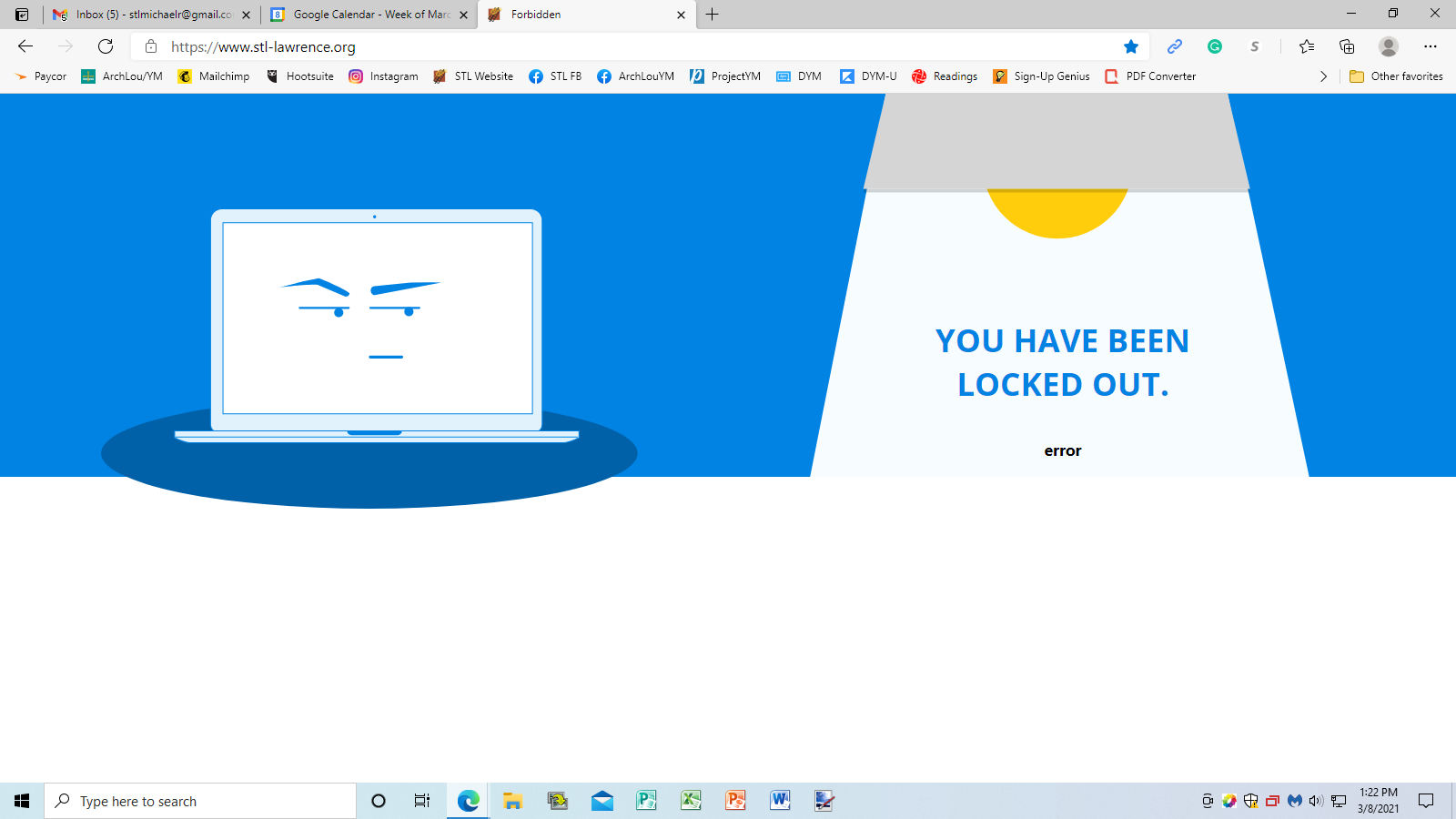
You should be able to log in again now! After too many failed attempts (15) at logging the site will lock the user (kkuenzig) and IP address. To prevent this from happening, you can use the reset password link instead.
Cody Armock
You should be able to log in again now! After too many failed attempts (15) at logging the site will lock the user (kkuenzig) and IP address. To prevent this from happening, you can use the reset password link instead.
Cody Armock
Web Department, Diocesan
877-923-0777
Michael
Cody,
Do you know if we can tie a google workspace account to our web domain?
So I could have a google admin and we could create emails with @stl-lawrence.org (http://stl-lawrence.org) and then have the other Google features as well?
I believe we can get workspace free for a non-profit.
Thanks
Mike
Do you know if we can tie a google workspace account to our web domain?
So I could have a google admin and we could create emails with @stl-lawrence.org (http://stl-lawrence.org) and then have the other Google features as well?
I believe we can get workspace free for a non-profit.
Thanks
Mike
Cody Armock
Hello Michael,
This is definitely possible and we have done it with several other parishes. It is a one-time fee of $350 for Diocesan to set this up for your parish and free through Google Workspace for Non-Profits thereafter.
It is a rather convoluted and complicated process requiring a couple of different systems working together to get the non-profit status verified so that you are able to apply for and use Google Workspace for Non-Profits.
The process would typically take up to 14 days once started and after everything is set up, we would schedule a training to go over how to create users, remove users, reset passwords, etc.
Let me know if you would like further information about this and we can send a proposal over to you to get the process started!
Cody Armock
This is definitely possible and we have done it with several other parishes. It is a one-time fee of $350 for Diocesan to set this up for your parish and free through Google Workspace for Non-Profits thereafter.
It is a rather convoluted and complicated process requiring a couple of different systems working together to get the non-profit status verified so that you are able to apply for and use Google Workspace for Non-Profits.
The process would typically take up to 14 days once started and after everything is set up, we would schedule a training to go over how to create users, remove users, reset passwords, etc.
Let me know if you would like further information about this and we can send a proposal over to you to get the process started!
Cody Armock
Web Department, Diocesan
877-923-0777