











Development Site Link
Good afternoon Gloria,
We have reached the point in the development process in which we share the link to the development site with you.
Training
Your first training session is scheduled for tomorrow, Thursday, January 17, at 2:00 pm ET (1:00 pm CT). Please let us know if you need us to resend the meeting information.
Development Site Link
Something to keep in mind is that the site is not quite completed yet, with the largest thing being mobile responsiveness. That said, it is best to look at the development site on a desktop computer, rather than a laptop or smaller screen. Mobile development/responsiveness is something that the developer completes after the training so that he can update any changes along with the original development!
Other than that, if you see anything that alarms you (design or functionality), please let me know and we can address your concerns.
Viewing Site
Since your website currently has a "Coming Soon" page, you will need to log into the site to view
Login Link: https://josephrd.diocesanweb.org/rockdale
Username: viewonly
Password: #SJCC@rockfordtx
Once logged in, please click the house icon in the top left corner to view the website.
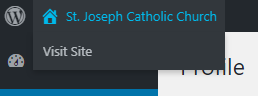
Please let me know if you need any assistance getting into or viewing the website
Viewing Site
Since your website currently has a "Coming Soon" page, you will need to log into the site to view
Login Link: https://josephrd.diocesanweb.org/rockdale
Username: viewonly
Password: #SJCC@rockfordtx
Once logged in, please click the house icon in the top left corner to view the website.
Please let me know if you need any assistance getting into or viewing the website
Veronica Alvarado
Web Department, Diocesan
877-923-0777
877-923-0777
 Veronica Alvarado
Hi Gloria,
I wanted to make a correction to your training date. It is scheduled for next Wednesday, January 22, at 11:00 am CT (noon ET).
Sorry about that!
Veronica Alvarado
Web Department, Diocesan
877-923-0777
877-923-0777
 Cody Armock
Hello Gloria,
Here is the second training information for next week Tuesday:
Diocesan is inviting you to a scheduled Zoom meeting.
Topic: Second Training | Joseph (Rockdale, TX)
Time: Jan 28, 2020 11:00 AM Central Time (US and Canada)
Join Zoom Meeting
https://zoom.us/j/387062970
Meeting ID: 387 062 970
Call to Join Audio
+1 646 876 9923
Meeting ID: 387 062 970
Thank you and have a great weekend,
Cody Armock
Here is the second training information for next week Tuesday:
Diocesan is inviting you to a scheduled Zoom meeting.
Topic: Second Training | Joseph (Rockdale, TX)
Time: Jan 28, 2020 11:00 AM Central Time (US and Canada)
Join Zoom Meeting
https://zoom.us/j/387062970
Meeting ID: 387 062 970
Call to Join Audio
+1 646 876 9923
Meeting ID: 387 062 970
Thank you and have a great weekend,
Cody Armock
 Gloria Pedroza
Thank you!
Cody Armock
Hello Gloria,
I hope editing the site has been going well for you and your team at St. Joseph's. I wanted to follow up with you to see if you had a time/date in mind that you wanted to launch the site. We do ask for at least 2 weeks' notice prior to the desired launch date so that we can make sure everything is set and prepped for launch and that the site is ready to go live. We also would be launching it Monday-Thursday, so that it gives us another day in the office if anything does go wrong with the launch. So, given those two stipulations, the soonest we would be launching would be February 19th.
Of course, that is just our timeline, but there is also how things are coming on your side, whether you need more time for tweaks and content edits and things like that.
Let us know when you think you would be ready and we can at least put that date on our calendars as the tentative launch date.
Thank you,
Cody Armock
I hope editing the site has been going well for you and your team at St. Joseph's. I wanted to follow up with you to see if you had a time/date in mind that you wanted to launch the site. We do ask for at least 2 weeks' notice prior to the desired launch date so that we can make sure everything is set and prepped for launch and that the site is ready to go live. We also would be launching it Monday-Thursday, so that it gives us another day in the office if anything does go wrong with the launch. So, given those two stipulations, the soonest we would be launching would be February 19th.
Of course, that is just our timeline, but there is also how things are coming on your side, whether you need more time for tweaks and content edits and things like that.
Let us know when you think you would be ready and we can at least put that date on our calendars as the tentative launch date.
Thank you,
Cody Armock
Gloria Pedroza
Hi Cody,
We would like to launch on February 24, 2020 if possible.
Also, we updated our address on our printer, but are unable to scan at this time because administrator has to enable less secure app so that our printer tech person can update this info in GSuite. Can you handle this for us? Until then, we cannot scan, so would appreciate your help on this as soon as possible.
Thanks,
We would like to launch on February 24, 2020 if possible.
Also, we updated our address on our printer, but are unable to scan at this time because administrator has to enable less secure app so that our printer tech person can update this info in GSuite. Can you handle this for us? Until then, we cannot scan, so would appreciate your help on this as soon as possible.
Thanks,
Cody Armock
Hello Gloria,
I will let the developer and Veronica know and see if that is doable! I would think it is, but I want to double-check before I set anything in stone.
As for the Less Secure App Access, I have switched that in the settings so that users are able to manage their access to less secure apps. This setting makes the account more vulnerable, but it should propagate to all users within 24 hours. So if you are still not able to scan by tomorrow around 8:00 AM, let us know. I will be out of the office, but Veronica will be in and she will help you.
Let me know if you have any questions!
Cody Armock
I will let the developer and Veronica know and see if that is doable! I would think it is, but I want to double-check before I set anything in stone.
As for the Less Secure App Access, I have switched that in the settings so that users are able to manage their access to less secure apps. This setting makes the account more vulnerable, but it should propagate to all users within 24 hours. So if you are still not able to scan by tomorrow around 8:00 AM, let us know. I will be out of the office, but Veronica will be in and she will help you.
Let me know if you have any questions!
Cody Armock
Gloria Pedroza
Cody/Veronica,
I tried scanning today but was unsuccessful. I will try again tomorrow, since you stated that it should propagate to all users within 24 hours, since you just did it this morning. If I still have trouble then, I will get with Veronica. Today the printer tech stated that administrator may have to input my email and password into printer info for it to be able to scan. So first, I will wait the 24 hours and if still unable to scan will get with Veronica tomorrow.
Thanks,
I tried scanning today but was unsuccessful. I will try again tomorrow, since you stated that it should propagate to all users within 24 hours, since you just did it this morning. If I still have trouble then, I will get with Veronica. Today the printer tech stated that administrator may have to input my email and password into printer info for it to be able to scan. So first, I will wait the 24 hours and if still unable to scan will get with Veronica tomorrow.
Thanks,
Gloria Pedroza
Hi Veronica,
I spoke with Cody yesterday and he stated he would be out of the office today, but that you would be able to help me. I just left you a voice mail as well.
Cody enabled less secure apps on our account so that we could update the email address on our printer to my new GSuite email of parishadmin@stjosephrockdale.org. He told me it would take 24 hours for this to promulgate on our system. It's been 24 hours since he did that and still I am not able to scan.
I spoke to printer technician yesterday and he stated that if it still did not scan after the 24 hours that our administrator may have to do that in our printer system. I will await your response and help.
Thanks,
Gloria Pedroza
Secretary/Bookkeeper
St. Joseph Catholic Church
234 San Gabriel St.
P. O. Box 548
Rockdale, TX 76567
Phone - 512-446-2049
Fax - 512-446-0411
Email - stjosephroc@yahoo.com
I spoke with Cody yesterday and he stated he would be out of the office today, but that you would be able to help me. I just left you a voice mail as well.
Cody enabled less secure apps on our account so that we could update the email address on our printer to my new GSuite email of parishadmin@stjosephrockdale.org. He told me it would take 24 hours for this to promulgate on our system. It's been 24 hours since he did that and still I am not able to scan.
I spoke to printer technician yesterday and he stated that if it still did not scan after the 24 hours that our administrator may have to do that in our printer system. I will await your response and help.
Thanks,
Gloria Pedroza
Secretary/Bookkeeper
St. Joseph Catholic Church
234 San Gabriel St.
P. O. Box 548
Rockdale, TX 76567
Phone - 512-446-2049
Fax - 512-446-0411
Email - stjosephroc@yahoo.com
Veronica Alvarado
Hi Gloria,
I just gave you a call but it went to voicemail. No worries, I'll be here at my desk until 4:00pm, Texas time.
I was able to find an article that will help Diocesan set up the scan/email settings.
For me to complete the setup on our end, I do need the parish IP address. Click here to find your IP address.
It should look something like this: 66.232.99:2013
Once I have this, I will put that in and hopefully get this resolved!
Thank you,
Veronica Alvarado
Web Department, Diocesan
877-923-777
877-923-777
Gloria Pedroza
Hi Veronica,
Sorry just got out of mass. Our IP address is 8.2.195.92
Let me know if you need anything else
Gloria
Sorry just got out of mass. Our IP address is 8.2.195.92
Let me know if you need anything else
Gloria
Veronica Alvarado
I heard on the voicemail that there was a Mass at lunchtime and figured that was the case. Thank you for sending that over.
Step 2 of the scanner setup will need to be done on the printer, something your technician should be able to set up. If he is unable to set this up to
Step 2 of the scanner setup will need to be done on the printer, something your technician should be able to set up. If he is unable to set this up to
Step 2: On your device or in your app, on port 587, connect to smtp-relay.gmail.com.
Configure your on-premise outbound email server to point to smtp-relay.gmail.com. Click your server below for instructions.
Configuration notes
- Configure your on-premise mail server to point to smtp-relay.gmail.com on port 587.
- Note: Your G Suite email address and password (SMTP AUTH) are always required for authentication when relaying through port 587 or 465. Without TLS encryption, you can't use SMTP authentication and must use IP address authentication.
(Diocesan has set up TLS encryption.) - We recommend that you configure your mail server to present a unique identifier (such as your domain name or the name of your mail server) in the HELO or EHLO command in the SMTP relay connections your server makes to Google. Avoid using generic names such as "localhost" or "smtp-relay.gmail.com," which can occasionally result in issues with DoS limits.
- The SMTP Relay service doesn't support multiple envelope recipients (RCPT TO) when specifying a null envelope sender (MAIL FROM: <>).
If this does not work, please let us know,
Veronica Alvarado
Web Department, Diocesan
877-923-777
877-923-777