












Launch Date
Good Morning Everyone,
I just wanted to check in to see if you had a better idea of when you would like to launch the site. It has been a couple weeks since the second training so I hope the editing of the site has gotten a little easier by now. Just let me know when you would like to launch the site.
Again a couple conditions on that, the first is that it should be between Monday and Thursday, so that we have another day "in the office" to answer any questions that you may have. The second is that we should have at least a week of notice, if not more, before you would like to launch the site in order to make sure that the domain is ready to go and other launch things can be prepped.
Thank you,
Cody Armock
Web Department, Diocesan
877-923-0777
 Laura McKenzie
Hi Cody!
Gail and I have been working to update pages and clean up some pages. We have stumbled a few times, but picked ourselves up!
We would like to aim for Wednesday, December 2 as our launch date. This will allow us to announce it in our weekly Wednesday email.
A few questions we have come up with in our little stumbles:
* Is it possible to hide a button? We thought we had it figured out, but what we were doing was not working.
* We thought in the first training you directed us to a page with all our links, but we can't seem to find such a page nor can we find anything in the video about it. Is there a page with links?
Thank you!
Laura
Gail and I have been working to update pages and clean up some pages. We have stumbled a few times, but picked ourselves up!
We would like to aim for Wednesday, December 2 as our launch date. This will allow us to announce it in our weekly Wednesday email.
A few questions we have come up with in our little stumbles:
* Is it possible to hide a button? We thought we had it figured out, but what we were doing was not working.
* We thought in the first training you directed us to a page with all our links, but we can't seem to find such a page nor can we find anything in the video about it. Is there a page with links?
Thank you!
Laura
 Cody Armock
Good Morning Laura,
December 2nd should work just fine for us!
1. Which button are you trying to hide? A screenshot or Link would help me find it and then I can possibly give instructions based on that.
2. In the backend of the site, if you go to Pages in the Menu on the left that will show the list of all pages on the site, although it may only show 20 pages at a time. (You can go to Screen Options in the top right and choose to show more). Was this what you referring to for listing all the links?
Let me know if I missed something or it needs more clarity!
Cody Armock
December 2nd should work just fine for us!
1. Which button are you trying to hide? A screenshot or Link would help me find it and then I can possibly give instructions based on that.
2. In the backend of the site, if you go to Pages in the Menu on the left that will show the list of all pages on the site, although it may only show 20 pages at a time. (You can go to Screen Options in the top right and choose to show more). Was this what you referring to for listing all the links?
Let me know if I missed something or it needs more clarity!
Cody Armock
Web Department, Diocesan
877-923-0777
Laura McKenzie
Hi Cody,
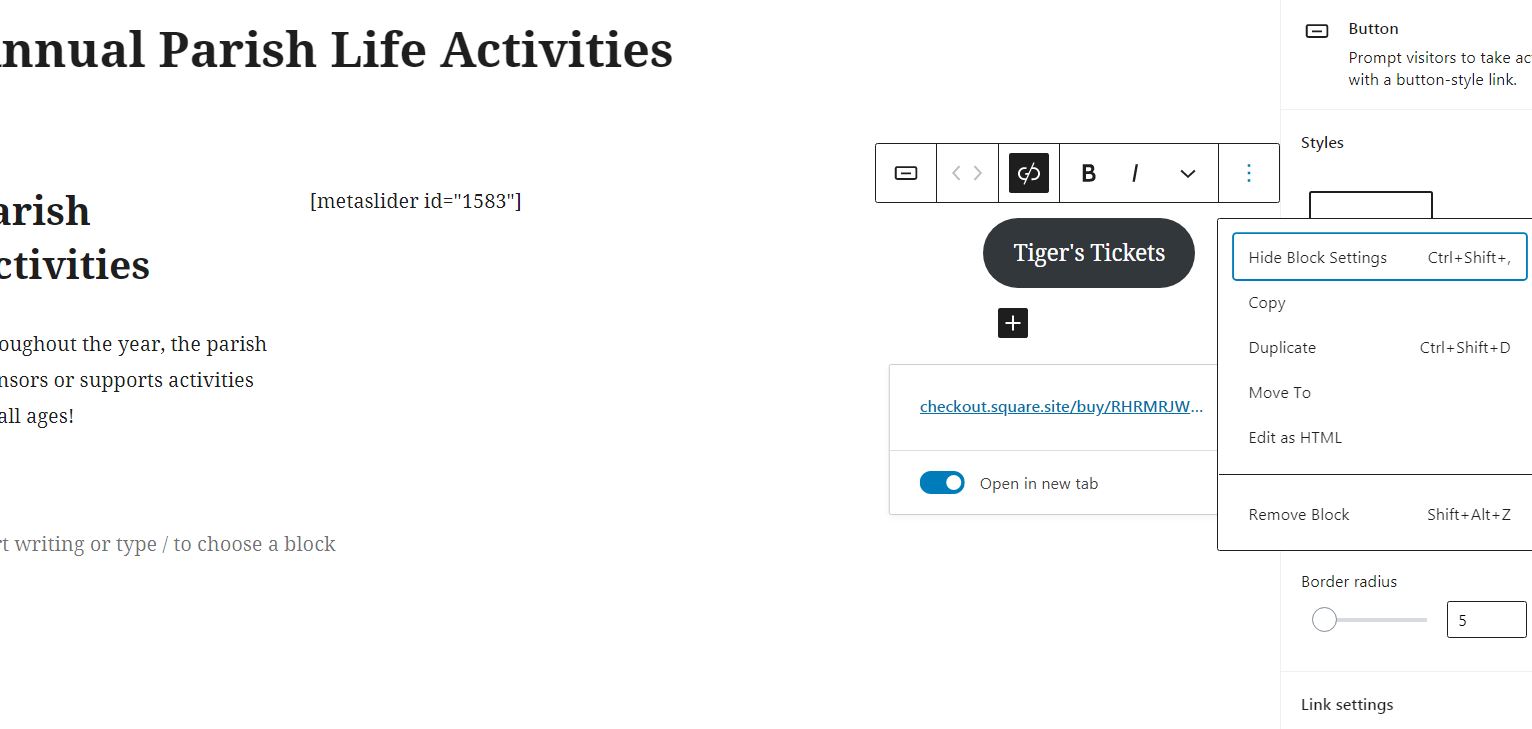
I have attached two photos -
one of the page and button we are trying to hide
one on the edit page - it says hide block, but that doesn't seem to do what we think it should.
We want to hide the button for future use, saving the link for the online payment.
The link we have been searching for or hoping is saved somewhere is the link for online payments.
Hopefully you understand what we are trying to do.
Thanks,
Laura

I have attached two photos -
one of the page and button we are trying to hide
one on the edit page - it says hide block, but that doesn't seem to do what we think it should.
We want to hide the button for future use, saving the link for the online payment.
The link we have been searching for or hoping is saved somewhere is the link for online payments.
Hopefully you understand what we are trying to do.
Thanks,
Laura
Cody Armock
Hello Laura,
For the button, that will just hide the block settings, which will just hide the pane on the right, in this case, you can just "Copy" the button from that same menu and then post it on another "Private" or drafted page, so it can't be seen. That way you have it for future use, and then you can just remove the button block there. You will also have the link and button saved in the revisions for the page.
For the link, there is a giving link as well as several other links on this page: https://stjos.diocesanweb.org/resources/links/. This may be what you are looking for, at least it has the online giving link on it.
Cody Armock
For the button, that will just hide the block settings, which will just hide the pane on the right, in this case, you can just "Copy" the button from that same menu and then post it on another "Private" or drafted page, so it can't be seen. That way you have it for future use, and then you can just remove the button block there. You will also have the link and button saved in the revisions for the page.
For the link, there is a giving link as well as several other links on this page: https://stjos.diocesanweb.org/resources/links/. This may be what you are looking for, at least it has the online giving link on it.
Cody Armock
Web Department, Diocesan
877-923-0777
Laura McKenzie
technical difficulties... we are coming