We have reached the point in the development process in which we share the link to the development site with you. First, I wanted to go over the missing content from the website and then get into the training and development site.
Things We Need From You We do still need some information from you, if possible. Otherwise, we can simply remove these items from the main menu and website.
Altar Server Manual PDF. We could not migrate this from the old site. If you could send us the PDF or Document, we will add that to the Altar Server page.
Training The first training session typically takes ~2 hours and is done remotely via Diocesan's version of TeamViewer. At the beginning of our phone call, I will walk you through how to set up the remote access program.
During the training sessions, we go over:
How to edit the homepage content
How to edit the footer
How to edit the menu
How to create/edit inner pages
How to create/edit posts
How to create/edit/use image galleries
How to create/edit/use online forms
Any other questions that you may have
Since this can be a lot, we break the training down into two sessions:
Editing the site basics (pages, posts, menu, homepage)
Editing the additional site features & answering follow-up questions (forms, galleries, etc.)
This is completely up to your learning pace and how much you feel comfortable covering at once.
Development Site Link Something to keep in mind is that the site is not quite completed yet, with the largest thing being mobile responsiveness. That said, it is best to look at the development site on a desktop computer, rather than a laptop or smaller screen. Mobile development/responsiveness is something that the developer completes after the training so that he can update any changes along with the original development! There are some other big items that we are still working on, such as:
Staff Page Styling
Homepage and Inner page styling
Styling on the Ministries Page and Accordions
Post styling.
Other than that, if you see anything that alarms you (design or functionality), please let me know and we can address your concerns. https://stjosephathens.org/home/
Please let me know what dates and times work best for the training or if you have any other questions,
Cody Armock
Web Department, Diocesan 877-923-0777
TO THE CLIENTCody Armock,Web Content Specialist
Hello Jane,
What days next week are you available for the training?
Monday, Tuesday, and Thursday, I am available between 9 am and 4 pm. Wednesday, I have a training from 9am-11am, but any time after that works.
Let me know if any of those times work!
Cody Armock
Web Department, Diocesan 877-923-0777
To:
Jane Sullivan
CC our team:
Veronica Alvarado
FROM THE CLIENTJane Sullivan
Morning Cody, Thanks for all the info. I’m looking forward to learning more! let’s set Tuesday, July 23 at 10 am for the training session with Thursday July 24 at 10 as a secondary time, if needed. I should be able to determine that based on the first session.
I will review the link and make some notes between now and then on any edits. I have also sent out a request for the Altar Server Manual, so hope to have that soon too.
Jane
To: Cody Armock and Veronica Alvarado
TO THE CLIENTCody Armock,Web Content Specialist
Good Morning Jane,
I have scheduled next Tuesday (7/23) at 10 am for the first training, which covers the basic editing of the site (Posts, Pages, Media, and Theme Settings). In the second training, we cover creating forms and making galleries.
We schedule the second training at least one week after the first training. We do that because it gives you time to go through the site, edit it, and if any questions arise then I can answer those in the second training.
If you'd like, I can schedule a tentative second training for the 30th at 10 am now and if you need more time based on the first training then we can move it. Would you like me to do that?
Will there be anyone else in the meeting? If so, will they need to be conferenced in?
I will send you the meeting information/directions on Monday so that it is easily accessible.
Please let me know if that works for you.
Cody Armock
Web Department, Diocesan 877-923-0777
To:
Jane Sullivan
CC our team:
Veronica Alvarado
FROM THE CLIENTJane Sullivan
The 30th is fine. Right now the training will just be me.
Dial by your location +1 646 876 9923 US (New York)
Meeting ID: 301 972 841
Let me know if you have any questions.
Cody Armock
Web Department, Diocesan 877-923-0777
To:
Jane Sullivan
CC our team:
Veronica Alvarado
FROM THE CLIENTJane Sullivan
Hi Cody, I have reviewed all and begun tweeking. I need to get more photos, especially for the 'hero pix' on the various pages. Any suggestions there would be appreciated as we don't have many reality photos to choose from.
The highlighted items are ones I am having some problems with ...can you help correct?
Looking forward to Tuesday's training!
Home Page: Buttons: Mass Times-ok Register-ok Bulletin-need hero pix changed Calendar-need hero pix changed Online Giving-need hero pix changed Mass Streaming-ok
About Us: Welcome Safe Environment Menu Drop Downs Mass times-ok Clergy/Staff-need hero pix changed.Change "non clergy staff" heading to say "Staff" Parish Council- need hero pix changed Finance Council- need hero pix changed Stewardship- need hero pix changed History- need hero pix changed Patron Saint- need hero pix changed
Sacraments: need hero pix changed Buttons: all ok Menu Drop Downs Baptism- adjust Parish Office phone/email; need hero pix changed; Reconciliation- adjust Parish Office phone/email Communion- adjust Religious Ed office link Confirmation- adjust Parish Office phone/email Marriage-change hero pix...perhaps hands and rings, not couple? Holy Orders- Anointing of the Sick-
Faith Formation: need hero pix changed Buttons: ok Menu Drop Downs Elementary-delete column to one; adjust RE office phone/email Middle High Young Adult Adult- add an Adult button Christian Initiation-Lets change to Becoming Catholic
Ministries: Can you add a Menu drop down in addition to photo buttons? Liturgical ok Spiritual ok Parish Life ok Social Concerns ok
News/Events: need hero pix changed Parish News- need hero pix changed Parish Calendar- need hero pix changed Bulletins- need hero pix changed ? Can you sign up to have bulletins emailed to you as stated? Photos- Need hero pix changed
FAQ: How Do I...? I have list to insert. Is there a way to set up a search by question and then click to see full answer? Contact Us-ok
To: Cody Armock and Veronica Alvarado
TO THE CLIENTCody Armock,Web Content Specialist
Hello Jane,
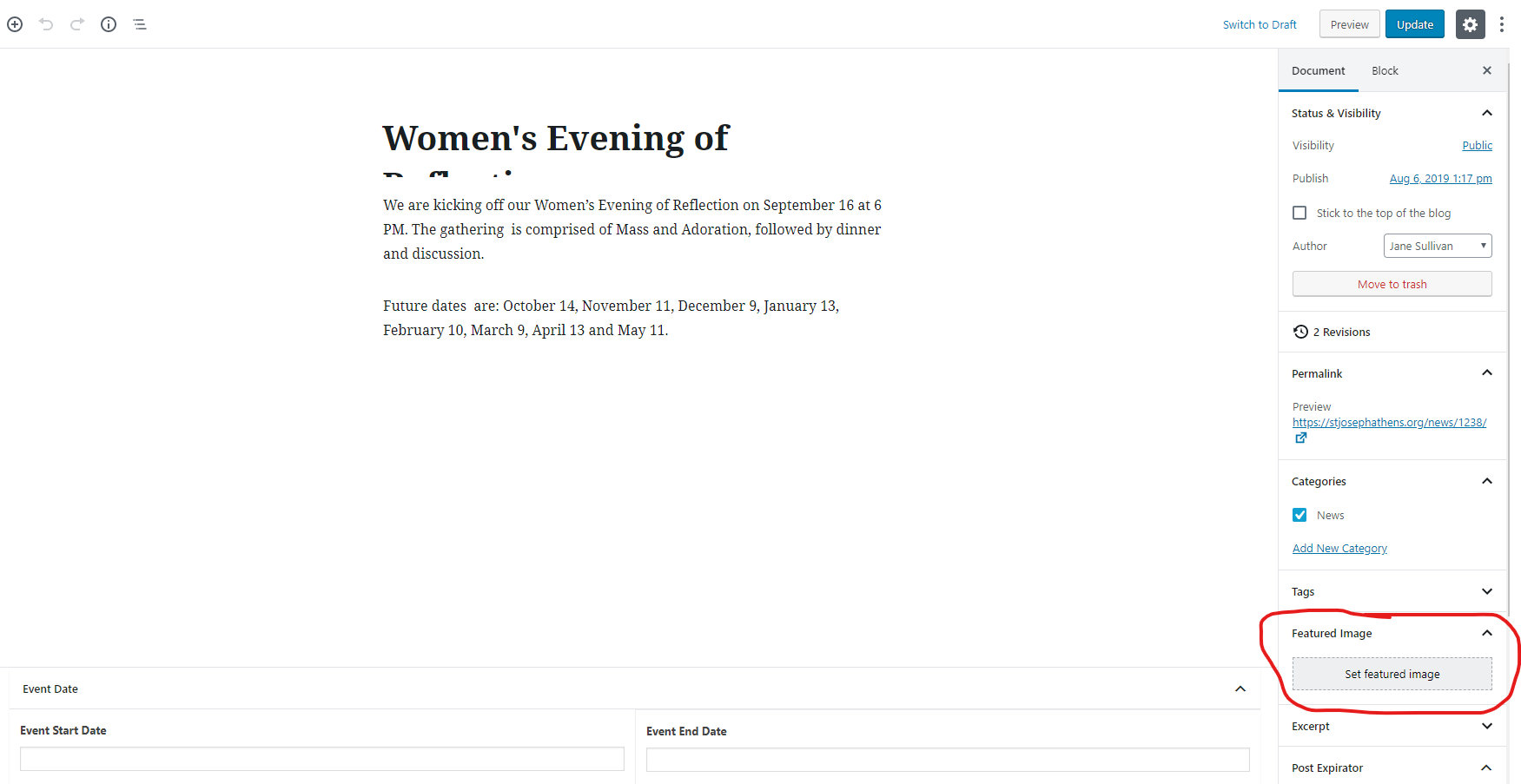
That’s a lot to go through and I hope to not miss anything. So let me know if I do. When you use the term “hero pix”, I believe you are referring to the “Featured Image” of the page, so I will answer based on that assumption. When I sent the login information, I attached some links to various free stock photo sites as well. You can use some of those sites to find photos to put as the featured image just remember that the site will take the center of the image and fill in around that, so part of the image may be cut off. You can crop the image if needed. Here are two links that may help in this situation: How to add the featured image to a page and how to crop images in WordPress both of these articles come from the Diocesan Knowledgebase and walk you through it with screenshots.
As for the Sacraments pages and the Parish Office phone/email adjustments, I am not sure what you mean by those. You can move those around as you see fit, make them bold/unbold, italicized/unitalicized, bigger/smaller. You can move those to where you want them and change them however you’d like.
Elementary: Delete column to one. I have gone ahead and done this for you but would like to explain how I did it so that you’ll be able to do it in the future. I clicked on each of the blocks in the column, the Heading and the first paragraph. Two rows of three dots came up on the left side of the block and by clicking and holding on that icon, I dragged it down under the columns and above the rest of the content. I did the same with the paragraph block. The “For more information….” block did not let me click and drag it, so I copied the content and pasted it in a paragraph block under the other moved content. I, then, clicked on a blank part of the column block (can also be found by clicking the Block Navigation icon below the “View Page” Menu item in the Black Admin Bar, see image). Then you can click the vertical three dots and click remove the block. Then the column block will be removed.
With the image buttons, to add an “Adult” button you can either click the “Add Button” at the bottom or hover over one of the buttons and click the little ‘+’ sign that appears on the right side (to delete, click the ‘-’ sign and then confirm it by clicking “remove”). Then add the image for the button, the link — where the button will go to — and the link text — the Title/Text that will display on the Button. The text, if any, will appear underneath the button. If you want to reorder the buttons, you can do so by hovering over the button and clicking and holding the number of the left side and dragging it higher or lower in the list. The link that you added for the “Adult” button does not go to a page right now. I will be sure to cover this in training tomorrow. That way i can walk you through it.
“Christian Initiation” can be changed in the Menu by going to Appearance on the left Menu and going to “Menus”. You can then click on the little triangle by the Menu Item that you’d like to edit, in this case, “Christian Initiation Classes” and change the Navigation Label to be “Becoming Catholic”. Here is another helpful article from the knowledge base on how to edit Menu Items.
Unfortunately, I cannot add menu dropdowns, in addition, to photo buttons because all of those “photo buttons” are part of that page and Menu items are meant to go to different pages or posts. All the ministry info is part of the Ministries page.
One can sign up to have bulletins emailed to you if they click on that link that takes them to discovermass.com and they click the yellow “Sign Up Today” button under the “Email Notification” Section.
Unfortunately, there is not a way to set up a search by a question and then be able to click to see the full answer currently on the site. As this was not in the original scope of the site, this would have to be quoted out to the designer and developer to see how much time it would take to design and implement this and could push the launch date further. That being said, there is an accordion block that can be used on the site. It is not styled yet, but it will look like the accordions on the ministry page. You could use these instead of the search by putting the question in the ‘Section Title’ and then the answer in the content area.
I hope that answers all your questions. If you want anything covered specifically in our training tomorrow, let me know either now or tomorrow.
Cody Armock
Web Department, Diocesan
877-923-0777
To:
Jane Sullivan
CC our team:
Veronica Alvarado
FROM THE CLIENTJane Sullivan
Morning Cody, I will keep working on feature images…one thing is, what ratio should I put it in or the pixel size? I am having a hard time making image fit.
* The Name, Phone Number, Email blocks need some adjusting. The font sizes are all different from the paragraph text and the phone numbers seem to be underlined as if linked, and the emails are not linked. I have tried to correct, but it doesn’t seem to ‘Take’ * Change the Non Clergy Staff heading to Staff…I cannot locate a box on the page to edit. * The calendar is not showing recent changes…is this because we are not live yet?
To: Cody Armock and Veronica Alvarado
FROM THE CLIENTJane Sullivan
One more item… Is there a way to make the image buttons on the home page have some space between them instead of being jammed up to one another. We like the look of the ones on the Faith formation page.
To: Cody Armock and Veronica Alvarado
TO THE CLIENTCody Armock,Web Content Specialist
Good morning Jane,
The ratio changes based on the screen size. We are working on the mobile versions now, so the images won't be nearly as big on the phone as it is now. You could have an image fit one device, but not the others based on how the devices are laid out. A Desktop monitor or laptop screen is more landscape (horizontal) whereas a phone or tablet are usually portrait mode (vertical). So it is hard to pick image dimensions based off that so that it is perfect for each device. For desktop it is 1873px wide by 471px tall whereas on a phone it could be all sorts of forms are ~384px wide by 230px tall, it could be wider or narrower depending on the phone too.
What I recommend is to choose an image or crop an image so that the part you want to see is in the very center of the image and make it landscape or horizontal so that it is wider than it is tall. About a 3:2 or 4:2 ratio is good so that it displays the part you want to show on desktop and will show nearly the whole image on tablets and phones.
As for the Contact Information on the Baptism Pages, I have made a to-do to make the links the same size as the text. This must-have slipped through as I was making to-dos or was not completed successfully, so thank you for bringing it to my attention. However, I have not seen any phone numbers underlined to indicate that they are linked. Some are bold, which can be undone by highlighting the text and clicking the Bold icon in the paragraph menu options.
Here is how to make emails links in WordPress. You can make the Phone Numbers links too if you really wanted so that if a person is on a Phone they can call right from the website by following the same steps in the link above and replacing "mailto:name@domain" with "tel:1-###-###-####". Since this affects only where the link goes you could have text that says "Click here to call the Parish Office" and have tel:1-706-548-6332 be the link address and that way someone could call the office right from there.
We can go over these questions tomorrow in training. It shouldn't take much time.
The staff page is a template, so the page is done all through code, which pulls the information from the Staff Members module. I have made a to-do for the developer to fix the heading from Non-Clergy Staff to just "Staff".
I am not sure why the calendar would not be updating. It refreshes every two hours, so if the changes were made within that time, that could be it. Also, are the events being updated through Google Calendar directly or through another source like Outlook or another app that is being imported through Google Calendar? We have had issues in the past where Google Calendar will import a calendar from somewhere else (e.g. Outlook) and someone will delete an event from the Outlook calendar and it will not delete it from the website. So, that could be it. I am not exactly sure why that would happen without further testing.
The reason why the images on the homepage are touching is because of what was on the approved design. I will have to talk with the project manager and developer to see how much time this would take and if it would cost anything to do it. I will let you know what they say.
Let me know if you have any other questions,
Cody Armock
Web Department, Diocesan
877-923-0777
To:
Jane Sullivan
CC our team:
Veronica Alvarado
TO THE CLIENTCody Armock,Web Content Specialist
Hello Jane,
Here is the meeting information for tomorrow:
Diocesan is inviting you to a scheduled Zoom meeting.
Topic: Second Training with Joseph - Athens, GA Time: Jul 30, 2019 10:00 AM Eastern Time (US and Canada)
Dial by your location +1 646 876 9923 US (New York)
Meeting ID: 317 731 479
Let me know if you have any other questions,
Cody Armock
Web Department, Diocesan
877-923-0777
To:
Jane Sullivan
CC our team:
Veronica Alvarado
FROM THE CLIENTJane Sullivan
Having a few problems I need help with... ---Not sure what I did, but messed up header navigation bar (about us, sacraments, etc) Can you correct?
---I discussed the Forms with several staff members and the general consensus is that they prefer our Spanish version of forms instead of having Google translate online.
1. I have created a Spanish version of the Parish Registration Form, but have a few issues:
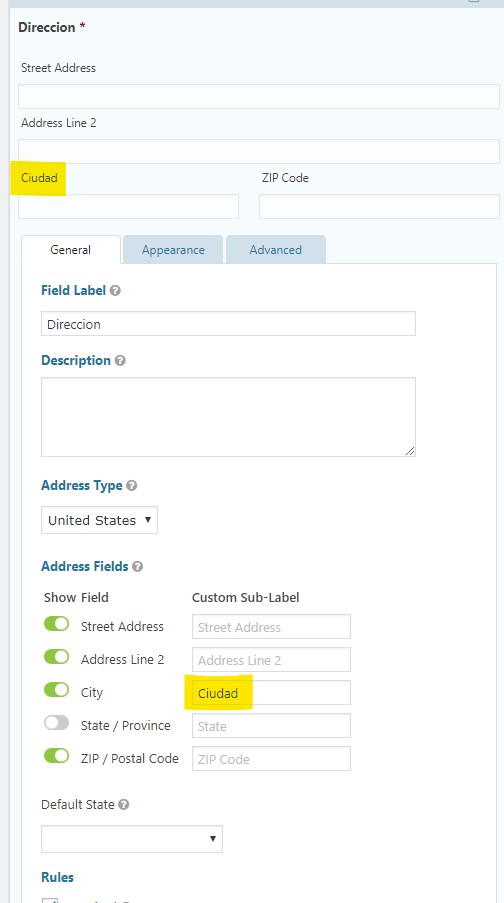
* Since the Registration button automatically opens the English version, what do you recommend for Spanish? Should we add a button for Spanish Version somewhere? * It does not let me put in accent marks in the text * I am unable to change the sub label fields of First, Last, City, etc. into Spanish.
--- I was told that the RE Registration form needed to look like the paper version, as they would need to print and file those in a binder for record keeping. The current form is crammed, to get it all on a front/back sheet (I have attached a copy) Is there a way to make an online form look like the paper form? Is this something a designer would need to create (waaaaay beyond my capabilities!)
* Would need a Spanish version too ( I have attached a copy)
If we can't do online forms in Spanish as indicated, I guess our only option would be to just have them posted to click, print/fill out, and return manually, which is what we do now. Thoughts?
You added the very long title of "Frequently Asked Questions" to the menu and that can adjust the styling of it. I shortened it to FAQ. The Menu bar can only hold so many characters before it goes to another line or goes a little crazy.
I am not sure what Parish Registration Button you are referring to, but yes, you can add the Spanish Registration Form onto a page and link to that page from a button.
Unfortunately, to get the online form to look like the paper copy would be a very intensive process and would be more on the developer to style rather than a designer. The time that it would take to style the form, both English and Spanish, to be able to fit it on a single sheet, double-sided, would be very difficult and tedious, which would fall outside of the original quote.
However, you could create the form (like the others) and then export the entries as a CSV (Microsoft Excel) file that could be filed, but that would depend on the policies and procedures in place at the parish. Moreover, looking at the form, I would suggest keeping it as the paper copy because of liability issues, security issues that can arise, and the Photo Release Consent, not to mention the Payment Process.
Let me know if you have any other questions or I need to clarify something,
Cody Armock
Web Department, Diocesan
877-923-0777
To:
Jane Sullivan
CC our team:
Veronica Alvarado
FROM THE CLIENTJane Sullivan
Thanks Cody— After talking to the folks that process these these things, I think we are just going to make all Spanish forms click and print. Certainly easier to create the way they want them!
To: Cody Armock and Veronica Alvarado
FROM THE CLIENTJane Sullivan
I have created a form and the owner of it would like to have a payment link on it that would take them to the OSV online payment page. The ssue is that they want the OSV page to already be filled in with RE High School Youth Retreats under the fund tab (as there are several to choose from) Is that possible?
The reasoning is that they don't want a form without any payment, as retreats are done first come, first served. Just submitting a form will not hold a spot. Jane
To: Cody Armock and Veronica Alvarado
TO THE CLIENTCody Armock,Web Content Specialist
Hello Jane,
I am not sure if you can set that to the default fund. There may be a specific url for giving to just that fund (but I cannot find it at least from Quick Give option), however looking at the online giving link it does not seem like there is a way to have that specific Fund on default. That would be more of an OSV question, they may know a way to do it since it is their website. However, you can set the form to redirect to that address in the confirmation settings under the settings tab and set it to redirect them to the giving portal rather than the text confirmation.
Other than that, I don't see a way to set the dropdown for the Fund to a specific value right away, but it may be worth contacting OSV.
Cody Armock
Web Department, Diocesan
877-923-0777
To:
Jane Sullivan
FROM THE CLIENTJane Sullivan
So if they will fill out the form and then click to go to OSV page and pay. Is there a way to make sure they pay before sending the form to actually register? Owner does not want to receive forms until payment has been made.
To: Cody Armock
TO THE CLIENTCody Armock,Web Content Specialist
What would happen with the redirect is that they fill out the form and once they hit submit, it would redirect them to the online giving page to fill it out and pay. Unfortunately, to my knowledge, there is no way in order to make sure they have paid before filling out the form.
You could have a radio button to ask if they have paid or not and hide the submit button if they put "No" for it, by doing adding conditional logic for the button in the Form Settings under the Settings Tab. I would suggest including a little description on the radio buttons field to give them the link to go to fill it out or putting it elsewhere on the page. This isn't the perfect solution since they could just lie and put "yes" for the radio buttons but it may help.
To:
Jane Sullivan
FROM THE CLIENTJane Sullivan
When I go to export a form, it only gives it in the online format...is there a way to export and save as a word doc?
To: Cody Armock
TO THE CLIENTCody Armock,Web Content Specialist
Good Morning, Jane,
Did you want to export the form itself or the entries of the form? Exporting the form is used to bring the form into another site through Gravity Forms, the plugin that we use. Exporting the entries will download a CSV file that you can open in Microsoft Excel.
To understand the question better, and therefore, help better, what are you trying to accomplish by making the form a Word doc?
Cody Armock
To:
Jane Sullivan
FROM THE CLIENTJane Sullivan
The folks who get the RE registration form wants to be able to print each form out on paper (not sure why)
Unfortunately, the only way for that to happen would be either the person filling out the form would print it and send it in or the person in charge of the form would fill in those entries. Both of these are rather implausible and unnecessary.
The Export > Export Entries Tool would be the best bet. It won't be as pretty as the filled out form for each applicant, but it will put each entry into an Excel doc with the Fields that you select at the top of each column and the data below each of the corresponding columns. It has the capability of selecting a date range so that you can grab just the summer ones or all of them from 2019 instead of all the entries or anything in between.
As I see it, this would cut down the number of paper expended and would be rather helpful for registration. The Excel Sheet can be edited after it is downloaded if formatting needed to be changed or anything. For instance, they could add dates to see if the child attends or if they have paid, etc. I think this is the better way to go, overall. It does not have the functionality to be put into a Word Doc as of this moment, but I believe the Excel route is the way to go in this particular instance.
To:
Jane Sullivan
FROM THE CLIENTJane Sullivan
Just asking...i am getting some pushback as this is making people change to a more paperless environment. Everyone is used to forms in folders. Let’s just launch and see how it goes!
No worries, Jane. I understand completely. The Church is very calculated and slow to move forward (that's why it's been around so long) and the parish, being an extension of that, has to be cautious moving forward too. I think it will be beneficial and positive in the end, but the transition can be a difficult time. The spreadsheet offers a lot of advantages like the ability to sort and search quickly, the adaptability of it (being able to change things quickly and easily), as well as the organizational aspect amongst many other things.
Are you ready for launch tomorrow? Have you updated the posts and pages that you wanted? Just wanted to offer the reminder. I will be going through and checking the site one last time later today to make sure that there aren't any broken links or any other issues that I have not caught earlier, prior to the launch tomorrow. Also, we will be launching around 9 am EST tomorrow and we should be done around 1 pm (if all goes well, you'll get an email when it is done), so just remember to refrain from editing content during that time.
Let me know if you have any other questions.
To:
Jane Sullivan
FROM THE CLIENTJane Sullivan
I’m going to review all today. There’s still some small things to tweak but most is ready to go. I’m sure once launched I will discover errors but will deal with them later.
On the sacramental inquiry forms is there a way to make them direct to different people depending on selected sacrament.? The Communion and confirmation inquiry goes to RE, the rest to our secretary
Absolutely, in the Notification Settings area for the Sacrament Inquiry Form, there is a radio button for the Send To area called Configure Routing, click that and then use the "Which Sacrament are you Inquiring about?" as the field for the conditional logic and put in the correct email address for each one.
So it will look something like this Send To (Secretary's Email) if Which Sacrament are you inquiring about? IS Baptism and then keep going for the rest of them.
To:
Jane Sullivan
FROM THE CLIENTJane Sullivan
I just put in a bunch of posts for our parish news. Question: The ones on the home page show the event date. Since I have several with today's date, is there a way to pick which one shows up on the home page? I'd like to put the most important on the home page
To: Cody Armock
TO THE CLIENTCody Armock,Web Content Specialist
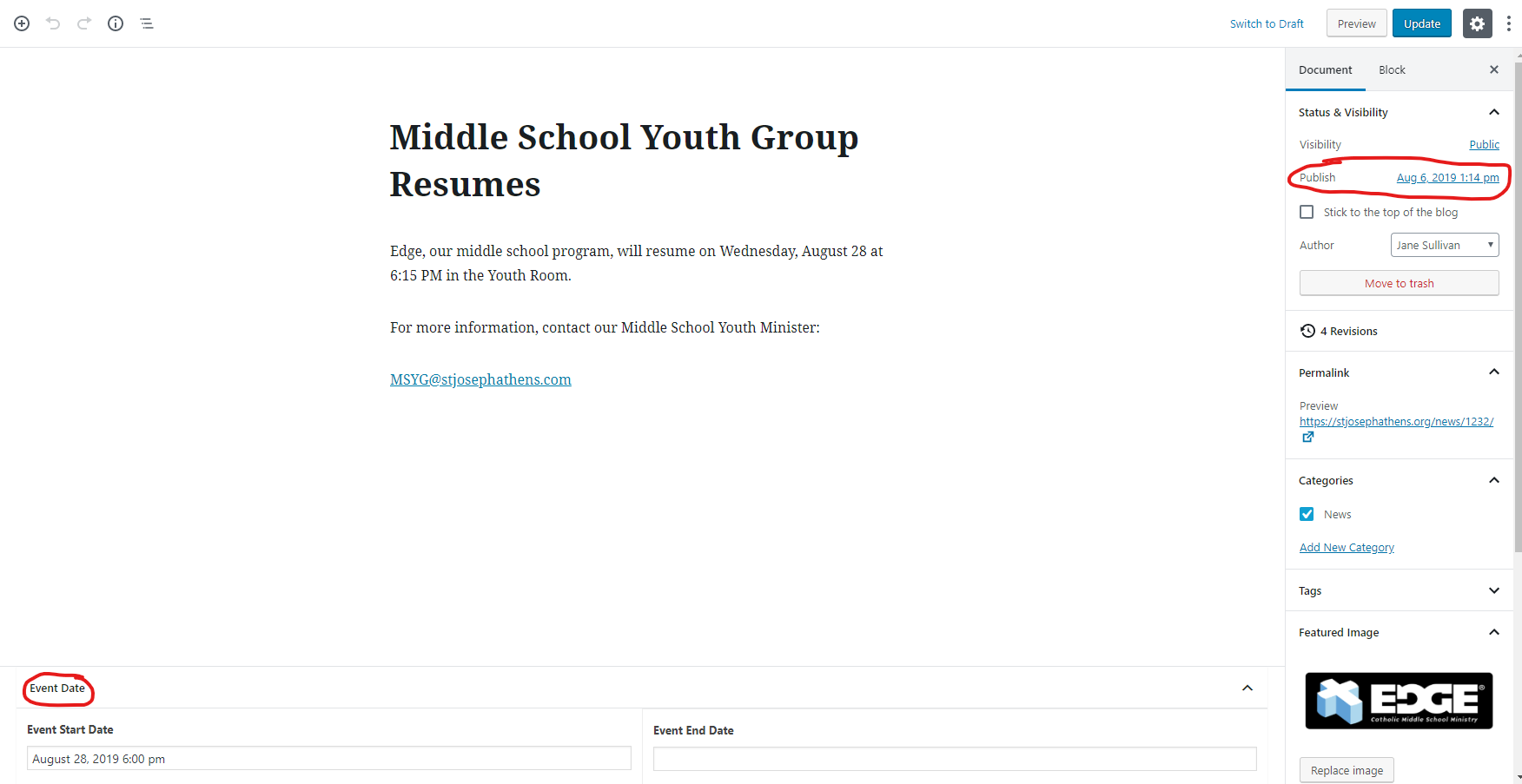
You can change the publish date of the post. The homepage will take the most recent ones. You can change the publish date either within the post while making it and on the right document pane or edit in the quick edit viewing all the posts. You can set the posts you don't want showing on the homepage to be yesterday or published before the posts you want to show.
Just a note too to set the Featured Image for the posts. This ensures that the homepage is looking the best it possibly can and that the Date appears on the image and does not cover the text. It also attracts the eye more and can be a quick summary of what it is. I can send you the free stock photo list if needed.
Publish date is different from Event Date. The event date will be what shows on the homepage and the Archive page (Bottom of the post). The Publish date will be when the post will be able to be seen. Immediately, back-dated, or scheduled for the future (on the right pane). Hope that helps clarify.
The post about registering for RE was posted in May. It should be first on the home page, but it isn’t. It is last on the News page.
To: Cody Armock
TO THE CLIENTCody Armock,Web Content Specialist
The most recently published was first, so that the newest posts, usually are the ones put on the homepage. You can change the RE post's Publish Date to be August 8th, 2019, 2:35pm that would be the newest post and would show up on the homepage.
To:
Jane Sullivan
FROM THE CLIENTJane Sullivan
So excited to see it all together!
Need help on one thing: I have created a form for each type of ministry (liturgical, spiritual, parish life, social concerns) and would like to have each on their designated home page. Because of the formatting with menu, etc. I could not get it in place. Can you do this for me? Just create a button after the main description on each and insert appropriate form.
Spiritual Ministry
The life of a Catholic makes no sense unless it is a life of constant spiritual growth. To cease to grow in our spiritual lives is to become indifferent to God, deaf to Christ's constant loving call to us. It is our duty - and it should be our joy - to strive to grow toward Christ in the way that a flower grows toward the sun.
These ministries give us the opportunity to not only serve the Lord but to also grow our faith beyond our Confirmation into the Church. (Insert Spiritual Inquiry Form button HERE)
Accordion Menu: Adoration Bible Study.....etc
To: Cody Armock
TO THE CLIENTCody Armock,Web Content Specialist
Hello Jane,
I have added those buttons. There was some styling that had to take place. It should be good now. We are working on Mobile Responsiveness for the buttons so that they shrink instead of breaking. The buttons are there and I created the Individual Forms Pages.
Cody Armock
To:
Jane Sullivan
TO THE CLIENTCody Armock,Web Content Specialist
Hi Jane,
I forgot to add something to the last email. Moving forward, please send emails to webdepartment@diocesan.com. We will be archiving the Basecamp project soon, as such, emails sent through it do not have a guarantee of being read, which would be very unfortunate. Just wanted to let you know that so that if you have any future questions they will be answered via that email.













 Cody Armock
 Jane Sullivan