












Website Launched
Hello Adriana,
Congratulations, your new website is now live and visible to the world!
I'm still not seeing the live site. Why is that?
The industry standard for launch changes to propagate is 0-72 hours. However, it's been my experience that you can usually see these changes within 2 hours. You will know it was successful when visiting https://stjohnpauliicatholicchurch.org/ brings up the site seen here: https://stjohnpauliicatholicchurch.diocesanweb.org/.
If you can see the website on a computer or mobile device not using your parish's internet, it may be that your parish's internal server needs to be reset or may have the IP address of your previous host manually set up. If this is the case, you will have to talk to your IT person, as this is not something Diocesan can help with.
New Login Page
Although you will now go to https://stjohnpauliicatholicchurch.org/gainesville to log in, your login credentials are still the same.
Statistics
Since your website is now live, we have also added the ability to track your website's statistics.
Feel free to view the statistics by clicking Statistics. This will give you access to see what devices are being used, how people are finding your website and your top pages/link.
Support Moving Forward
As you may have noticed, on your WordPress Dashboard, there is a Diocesan Web Support box with links to help articles that we have written especially for our websites, complete with step-by-step instructions and images. This should help with most of the questions that you may have.
You do also have another 2 weeks from your launch date to call and ask us any questions for free. After those 2 weeks, the paid support will go into effect. Paid support is $50/hr (prorated) and is billed monthly to the parish with each support items (date, amount of time, notes) itemized out.
If you have any issues or questions in the future, please email us at webdepartment@diocesan.com or call us at 877-923-0777.
Canceling Previous Website Host
Launching your website DOES NOT cancel your previous web hosting service. Diocesan does, however, suggest that you do not cancel your previous web hosting service until at least 2 business days after your new website launches.
NOTE: Some website hosting companies may package website hosting and domain hosting/renewal together. If this is true for you, you may want to consider transferring your domain over to Diocesan. You may begin this process by emailing us at webdepartment@diocesan.com or calling 877-923-0777.
Other Resources
Just in case we didn’t mention it in the training, here are some resources for free, stock images to use throughout your website:
- Unsplash
http://unsplash.com - Pexels
http://pexels.com - Cathopic
https://www.cathopic.com/
Please let me know if you have any questions and, again, congratulations!
Cody Armock
Web Department, Diocesan
877-923-0777
877-923-0777
 Adriana Sargent
Thanks for the information, Cody.
I am not being redirected to stjohnpauliicatholicchurch.diocesanweb.org (http://stjohnpauliicatholicchurch.diocesanweb.org)
Should we wait the whole 72 hrs? or should it be working now?
in the meantime, I've contacted our IT company.
Thanks,
Adriana
I am not being redirected to stjohnpauliicatholicchurch.diocesanweb.org (http://stjohnpauliicatholicchurch.diocesanweb.org)
Should we wait the whole 72 hrs? or should it be working now?
in the meantime, I've contacted our IT company.
Thanks,
Adriana
 Cody Armock
Hello Adriana,
http://stjohnpauliicatholicchurch.diocesanweb.org should not be the end URL, but rather when you visit https://stjohnpauliicatholicchurch.org/, it should show the website that you were/are used to seeing at https://stjohnpauliicatholicchurch.diocesanweb.org/. I suspect that it is working as intended if going to https://stjohnpauliicatholicchurch.diocesanweb.org/ redirects you to https://stjohnpauliicatholicchurch.org.
Let me know if you have any questions about this, but ultimately, it is working correctly if there is no "diocesanweb" in the URL/address bar.
Thank you,
Cody Armock
http://stjohnpauliicatholicchurch.diocesanweb.org should not be the end URL, but rather when you visit https://stjohnpauliicatholicchurch.org/, it should show the website that you were/are used to seeing at https://stjohnpauliicatholicchurch.diocesanweb.org/. I suspect that it is working as intended if going to https://stjohnpauliicatholicchurch.diocesanweb.org/ redirects you to https://stjohnpauliicatholicchurch.org.
Let me know if you have any questions about this, but ultimately, it is working correctly if there is no "diocesanweb" in the URL/address bar.
Thank you,
Cody Armock
Adriana Sargent
thank you,
Then we are good. Thanks for your help and patience.
Then we are good. Thanks for your help and patience.
Adriana Sargent
now that we know that, Is there a reason the staff pictures do not show up?
We have to go under clergy a few times before all of the pictures are displayed.
We have to go under clergy a few times before all of the pictures are displayed.
Cody Armock
Hello Adriana,
I updated the staff members, which they should show up now if you do a hard refresh (Instructions Here). I think something happened with the linking between the staff module and the media library and updating the staff members seemed to take care of the issue.
Let me know if it is still not fixed!
Thank you,
Cody Armock
I updated the staff members, which they should show up now if you do a hard refresh (Instructions Here). I think something happened with the linking between the staff module and the media library and updating the staff members seemed to take care of the issue.
Let me know if it is still not fixed!
Thank you,
Cody Armock
Adriana Sargent
I've done the hard refresh and there is still an issue...
(the one way we can bring up all the pictures is if we click on clergy 3 or 4 times...)
(the one way we can bring up all the pictures is if we click on clergy 3 or 4 times...)
Cody Armock
Hello Adriana,
I made a to-do for the developer. I noticed that issue too after refreshing a few times. The developer will be looking into it and will fix it either by today or Monday.
Thank you,
Cody Armock
I made a to-do for the developer. I noticed that issue too after refreshing a few times. The developer will be looking into it and will fix it either by today or Monday.
Thank you,
Cody Armock
Cody Armock
Hello Adriana,
Sorry for the back-to-back emails, but the developer seems to have fixed it earlier than I thought. Please try refreshing it again and let me know if it is still not fixed, but I have tried it on multiple browsers and multiple refreshes on each and have not encountered the issue.
Thank you,
Cody Armock
Sorry for the back-to-back emails, but the developer seems to have fixed it earlier than I thought. Please try refreshing it again and let me know if it is still not fixed, but I have tried it on multiple browsers and multiple refreshes on each and have not encountered the issue.
Thank you,
Cody Armock
Adriana Sargent
Hi Cody,
Question for you: the webpage on the phones does not display sacraments or ministries in the Spanish area.
Question for you: the webpage on the phones does not display sacraments or ministries in the Spanish area.
Cody Armock
Hello Adriana,
I have fixed it to where the dropdown will show up on Mobile. I have no idea why that wasn't working before, but it is now after a relatively easy fix.
Sorry about that, but it is fixed now.
Thank you,
Cody Armock
I have fixed it to where the dropdown will show up on Mobile. I have no idea why that wasn't working before, but it is now after a relatively easy fix.
Sorry about that, but it is fixed now.
Thank you,
Cody Armock
Adriana Sargent
Good morning,
Thank you... I am looking at the home page and is there a way I can modify the size of the Archdiocese of Atlanta logo? (under what's happening) -I've gone to edit page and I dont see that particular logo however, I do see the logo that says "promise to protect pledge to heal-
Can you help me with this please?
Thanks,
Adriana
Thank you... I am looking at the home page and is there a way I can modify the size of the Archdiocese of Atlanta logo? (under what's happening) -I've gone to edit page and I dont see that particular logo however, I do see the logo that says "promise to protect pledge to heal-
Can you help me with this please?
Thanks,
Adriana
Cody Armock
Hello Adriana,
The Archdiocese logo is pulling in as the featured image of that particular post, so if you click on the post from the Homepage and then go to "Edit Post" in the black Admin Bar (if you are logged in), then you can change the "Featured Image" in the Document Pane (on the right sidebar) to be the Promise to Protect - Pledge to Heal image. The image will automatically resize on the homepage, so it is best to use a landscape image.
Let me know if you need more clarification on this!
Cody Armock
The Archdiocese logo is pulling in as the featured image of that particular post, so if you click on the post from the Homepage and then go to "Edit Post" in the black Admin Bar (if you are logged in), then you can change the "Featured Image" in the Document Pane (on the right sidebar) to be the Promise to Protect - Pledge to Heal image. The image will automatically resize on the homepage, so it is best to use a landscape image.
Let me know if you need more clarification on this!
Cody Armock
Adriana Sargent
Thank you, I was able to update, and now one more question: each of the "buttons" on the bottom have a date: The Archdiocese Image has Oct. 31st. How do I get rid of that?, please.
Cody Armock
Hello Adriana,
You can change the date down at the bottom of the post edit page highlighted in the screenshot below. You can remove the date by just highlighting the text and pressing delete or backspace.
Let me know if you have any issues with this!
Cody Armock
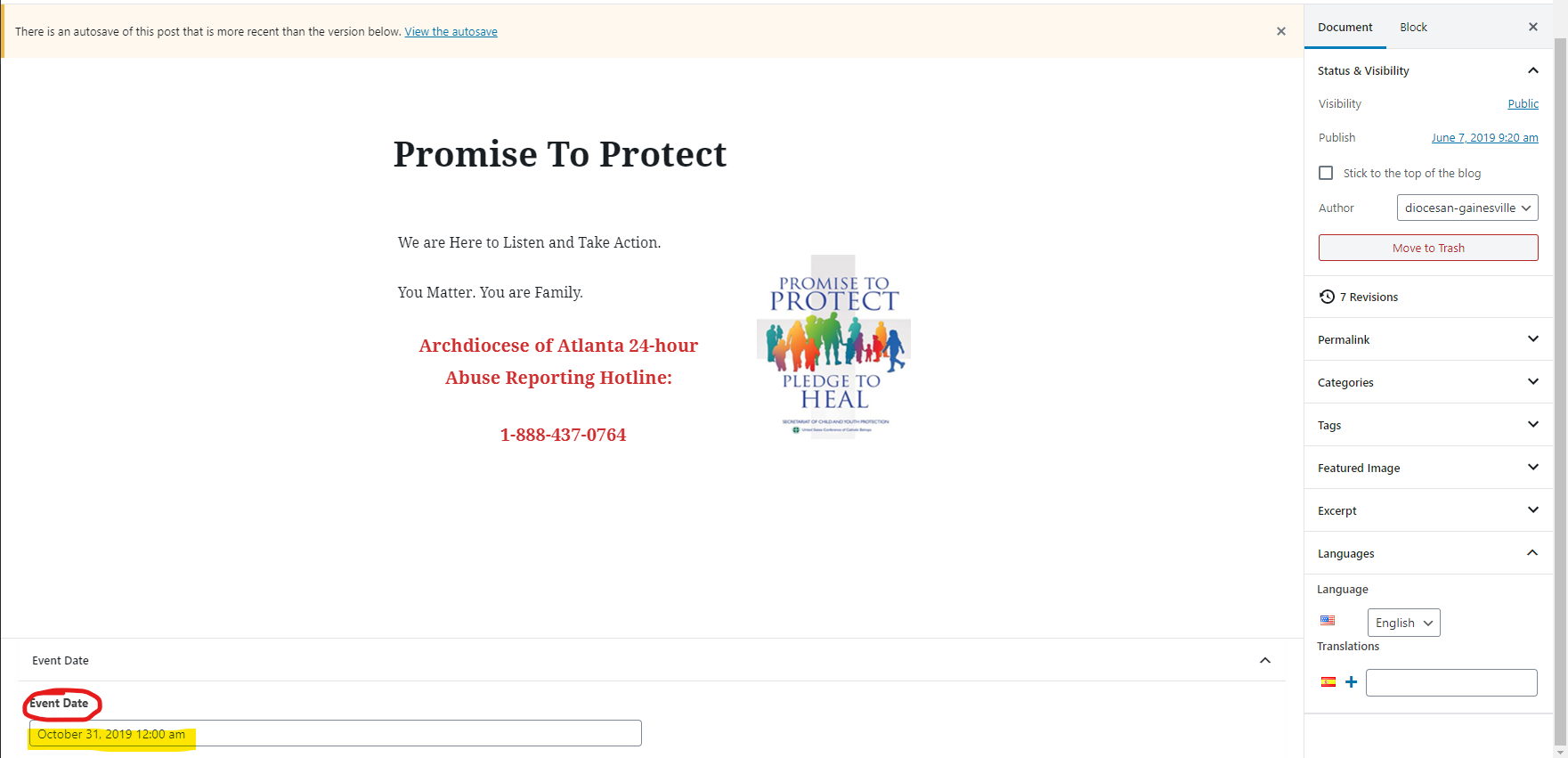
You can change the date down at the bottom of the post edit page highlighted in the screenshot below. You can remove the date by just highlighting the text and pressing delete or backspace.
Let me know if you have any issues with this!
Cody Armock
Adriana Sargent
Thank you,
I did remove it from the field, however, now the button under What's happening has today's date.
I did remove it from the field, however, now the button under What's happening has today's date.
Cody Armock
Hello Adriana,
I will make a to-do for the developer to have those dates not show if no date is set.
Thank you,
Cody Armock
I will make a to-do for the developer to have those dates not show if no date is set.
Thank you,
Cody Armock
Adriana Sargent
Good morning Cody,
I hope you are doing well.
I have been trying to add a link to the Sacrament area, and have not been able to since I can't find the "link" option. Could you please tell me where to find it? (i have been following the instructions shown on dashboard, but the option "link" is not there to use. -am i missing something?
Thanks for your help.
I hope you are doing well.
I have been trying to add a link to the Sacrament area, and have not been able to since I can't find the "link" option. Could you please tell me where to find it? (i have been following the instructions shown on dashboard, but the option "link" is not there to use. -am i missing something?
Thanks for your help.
Cody Armock
Good Adriana,
Just to make sure that I am understanding everything correctly, adding a link to the Sacrament area, meaning the sacrament page found here? Do you want to add another "button" with the image? Or are you talking about adding a link in the menu under "Sacraments"?
Let me know so I can best answer your question!
Thank you,
Cody
Just to make sure that I am understanding everything correctly, adding a link to the Sacrament area, meaning the sacrament page found here? Do you want to add another "button" with the image? Or are you talking about adding a link in the menu under "Sacraments"?
Let me know so I can best answer your question!
Thank you,
Cody
Adriana Sargent
Yes, trying to add the sacrament of confession (spanish)
but I need to link the info re. the sacrament? correct? I have never done this before, and looking at the info Ceci added to the other sacraments, there is a link to each one of them. How do I go about doing that?
Thanks for your patience (Ceci is out of the office and I need to add it)
but I need to link the info re. the sacrament? correct? I have never done this before, and looking at the info Ceci added to the other sacraments, there is a link to each one of them. How do I go about doing that?
Thanks for your patience (Ceci is out of the office and I need to add it)
Cody Armock
Hello Adriana,
To add a link to the button, you need a page that you want the link to go to, so create a new page for that. Then click the "Select Link" button below the image and then choose the page that you want to link to or copy and paste the URL for the page (from viewing it on the Frontend of the site) and then type in the Link Text area what you want the button link to say, e.g. "Matrimonio".
Let me know if you need more clarification!
Thank you,
Cody
To add a link to the button, you need a page that you want the link to go to, so create a new page for that. Then click the "Select Link" button below the image and then choose the page that you want to link to or copy and paste the URL for the page (from viewing it on the Frontend of the site) and then type in the Link Text area what you want the button link to say, e.g. "Matrimonio".
Let me know if you need more clarification!
Thank you,
Cody