












Second Training Session
Good morning,
As a reminder, we have set our second training session for Tuesday, January 28, at 2:00 pm at JP2's Parish Office.
If you have any updates to this meeting, please let me know.
Veronica Alvarado
Web Department, Diocesan
877-923-0777
877-923-0777
 Katie Mendenhall
Hi Veronica,
Is there any way you could put this video on the home page of St. John Paul II. I figured this would work out well until we get a drone to do the other.
https://drive.google.com/file/d/190nmIjCE5lEBJMicVS1FD0jevOjymxj4/view?fbclid=IwAR1KIdZ2aalOuCkFRX3TQZXk6wwomdnQVaa5j3f51AqT3ehISIE3hamfhMI
Is there any way you could put this video on the home page of St. John Paul II. I figured this would work out well until we get a drone to do the other.
https://drive.google.com/file/d/190nmIjCE5lEBJMicVS1FD0jevOjymxj4/view?fbclid=IwAR1KIdZ2aalOuCkFRX3TQZXk6wwomdnQVaa5j3f51AqT3ehISIE3hamfhMI
 Veronica Alvarado
Good morning Katie,
Of course! I have let the developer know to use this video once he has completed the video option.
Thanks for sending this over!
Veronica Alvarado
Web Department, Diocesan
877-923-0777
877-923-0777
Katie Mendenhall
Hi Veronica,
Can you remind me how to change a picture. I am having difficulty figuring out how I change the pictures on the Sacrament page.
If you could give me instructions, I would greatly appreciate it!
Thank you!
Can you remind me how to change a picture. I am having difficulty figuring out how I change the pictures on the Sacrament page.
If you could give me instructions, I would greatly appreciate it!
Thank you!
Katie Mendenhall
Can you also help me with two other issues:
1. When you click on our Staff Page, it says "Page not found"
2. If I wanted to add another ministry under Men's Ministry--how do I do that. When I go to edit that page, it comes up blank and I can't see what's already there to make sure it matches!
1. When you click on our Staff Page, it says "Page not found"
2. If I wanted to add another ministry under Men's Ministry--how do I do that. When I go to edit that page, it comes up blank and I can't see what's already there to make sure it matches!
Katie Mendenhall
Also, another question--how do I change the photo on the homily page (the header) photo. It just copies whatever I use for the last photo in the homily, and I don't want that!
Veronica Alvarado
Good morning Katie,
I went through your list and here's what I've got for you:
- Changing Heading Photo
This may be done by editing the page you are on and adding a Featured Image, found in the Document Settings bar on the right.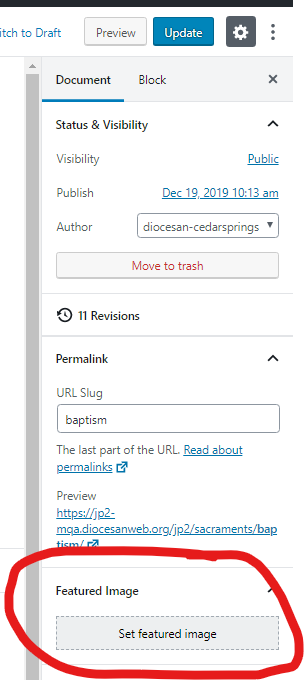
- Changing Images for Each Sacrament
You will have to edit the individual Sacrament page and scroll down to the very bottom. There you will find the Inner Child Template images.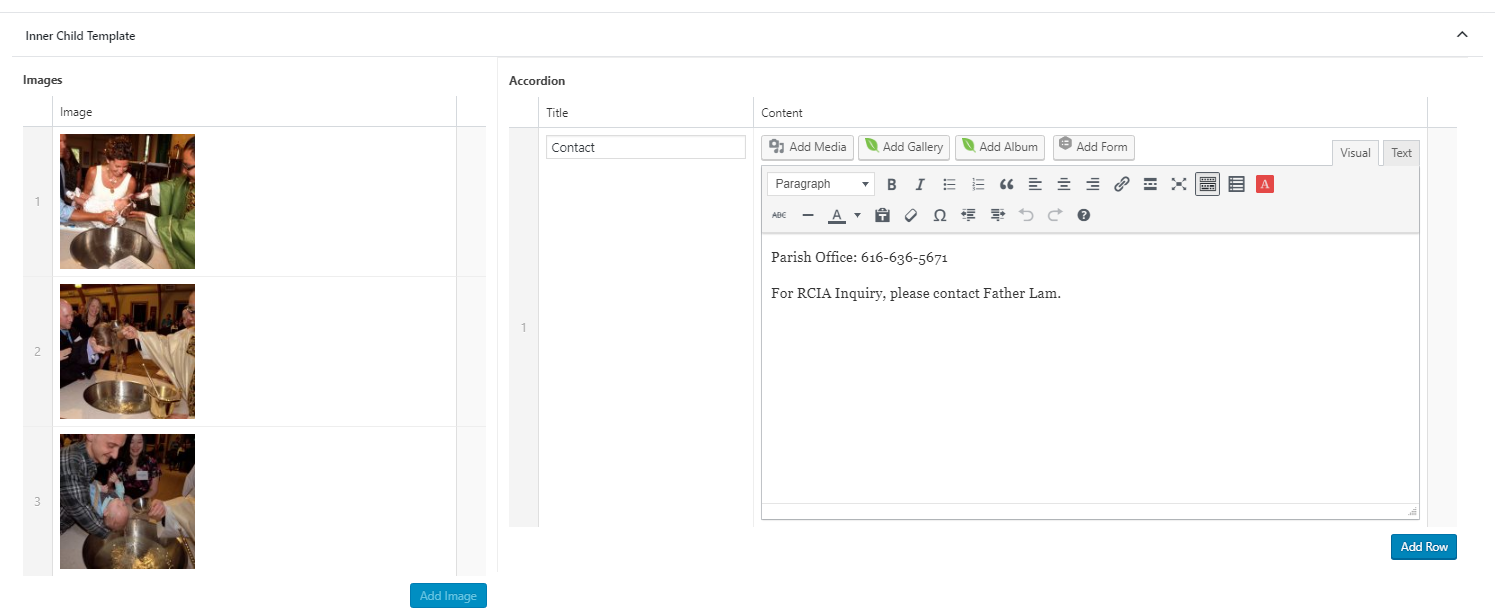
- Staff Page Link
When we updated the website's URLs to be /jp2 instead of /st-john-paul-ii this link wasn't updated. I've updated this link in the menu and it is good to go! - Viewing List of Sub Ministries
Remember that the Men's Ministry page is actually just set to show its CHILD pages. If you'd like to see the pages that are currently nested under Men's Ministries, I suggest going to your All Pages, click Screen Options in the top right corner and changing the view to 200 pages and click Apply. This will allow you to see ALL pages at once.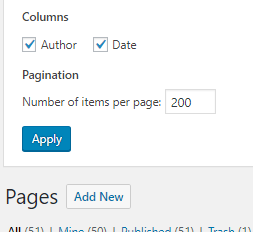
Once you have done this, scroll down to see Men's Ministries. Here you should see that only Knights of Columbus is beneath it. - Adding New Sub Ministry
If you want to add a new page, click Add New under Pages.
The first thing you will need to do is add the page title, Update the Page Attributes Template to Inner Ministries and Parent Page to the ministry section. (In this case, Men's Ministries.)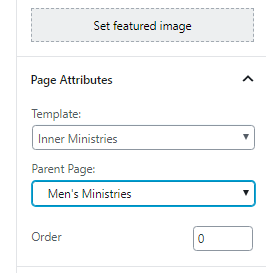
Once you have done this, click Save Draft up at the top and then refresh the page.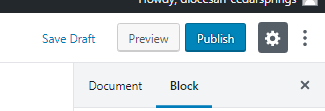
Once you reload the page, you should see the Inner Child Template areas appear below. This is where you may add the images that will display on the slider and the accordion content. This information will display on the Men's Ministry page, along with the first couple of lines of whatever content you add to the actual page.
Once you have updated all of the content, click Publish to save your changes. - Homilies Main Image
I've let the developer know to add a spot for you to update this image. It will be found on the Default Featured Image tab of your Theme Settings.
I'll send you an update once this has been completed!
Let me know if you have any other questions or would like to go over anything on the phone,
Veronica Alvarado
Web Department, Diocesan
877-923-0777
877-923-0777
Veronica Alvarado
Hi Katie,
I just realized that the developer is out of the office today.
However, since this is a quick item, I can have him work on this Monday morning before the launch.
Thank you,
Veronica Alvarado
Web Department, Diocesan
877-923-0777
877-923-0777
Katie Mendenhall
Hi Veronica,
How do I log in to change something on the website. I went to that link that was originally sent, and it take me to the website, but doesn't let me log in anywhere.
How do I log in to change something on the website. I went to that link that was originally sent, and it take me to the website, but doesn't let me log in anywhere.
Veronica Alvarado
Hi Katie,
You will now go to https://jp2-mqa.org/cedarsprings to log in, but your login credentials are still the same.
Veronica Alvarado
Web Department, Diocesan
877-923-0777
877-923-0777
Katie Mendenhall
Hi Veronica,
I am having a hard time designing a page and wanted to know if you could help, or how I go about doing that.
On the St. John Paul II page at the top it has About, Worship, Sacraments, etc. etc.
I need Committees to be up there, too.
I know how to make a page, but I forgot how you make the boxes. For example: When you click on Ministries, it says "Ministries" and it has all of them listed in boxes.
I need those boxes to be on the Committees page. The boxes needed are: Pastoral Council, Finance Council, Stewardship Commission, St. Margaret Cemetery Commission.
Can you help me figure this out?
I am having a hard time designing a page and wanted to know if you could help, or how I go about doing that.
On the St. John Paul II page at the top it has About, Worship, Sacraments, etc. etc.
I need Committees to be up there, too.
I know how to make a page, but I forgot how you make the boxes. For example: When you click on Ministries, it says "Ministries" and it has all of them listed in boxes.
I need those boxes to be on the Committees page. The boxes needed are: Pastoral Council, Finance Council, Stewardship Commission, St. Margaret Cemetery Commission.
Can you help me figure this out?
Veronica Alvarado
Hi Katie,
Of course I can help!
My first question is this:
Do you want Committees to look like the
This will determine which route we want to go.
Veronica Alvarado
Web Department, Diocesan
877-923-0777
877-923-0777
Katie Mendenhall
The Ministries page would be great!
Veronica Alvarado
Sure thing!
So to explain, the Ministries page is using the Ministries Page Template, which means it will display all of the child pages as boxes!
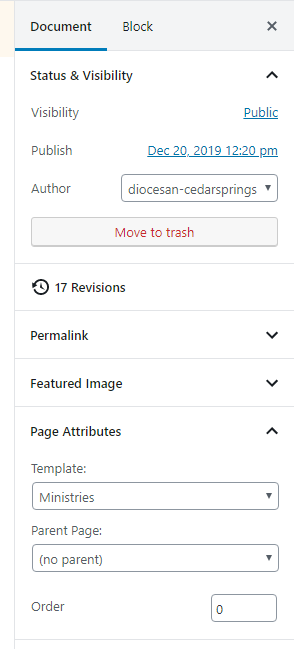
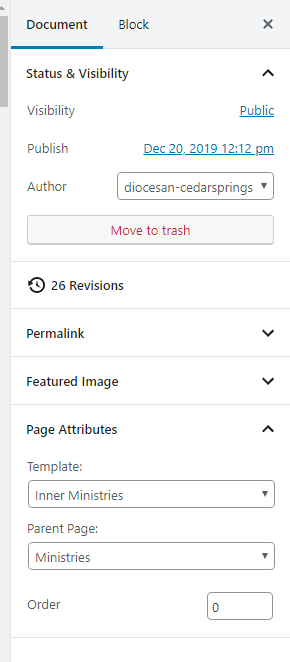
Each of the child pages (sub-pages of Ministries) will automatically display but ONLY IF THEY ARE CHILD PAGES. This is set up by setting the sub-pages to have a Page Template of Inner Ministries and the Parent Page as Ministries.
In your case, we will be using the Page Template of Default and the Parent Page as Committees.
So the steps to create your Committees page this are:
So to explain, the Ministries page is using the Ministries Page Template, which means it will display all of the child pages as boxes!
Each of the child pages (sub-pages of Ministries) will automatically display but ONLY IF THEY ARE CHILD PAGES. This is set up by setting the sub-pages to have a Page Template of Inner Ministries and the Parent Page as Ministries.
In your case, we will be using the Page Template of Default and the Parent Page as Committees.
So the steps to create your Committees page this are:
Create Committees Page
- Add page title
- Set Template as Ministries
- No content needed (it will automatically populate)
- Publish
Create subpages of Committees
- Add page title
- Add page content
- Leave Template as Default
- Set Parent Page as Committees
- Set Featured Image (if any)
- Publish
Add Committees to Main Menu
- Go to Appearance > Menus
- Add Committees from the boxes on the left "Pages"
- Move Committees where you'd like it to display
- Save Menu
Let me know if you have any questions or need any help!
Veronica Alvarado
Web Department, Diocesan
877-923-0777
877-923-0777