











Weekly Update
Good morning everyone,
Another week of progress has been made in the website creation. Initially, we had estimated a price of $3920 (56 hours x $70hr) for website creation.
We arrived at that price by breaking the web project down as follows:
- Design: 12 hours budgeted/17.2 hours used
- Build: 22 hours budgeted/17.8 hours used
- Content Migration: 22 hours budgeted/0 hours used
This brings our current cost to $2450.
If you have any questions please feel free to reach out at any time.
Thank you!
Alan Snodgrass
Consultation Specialist
Phone: 877-923-0777
 Sam Pohlman
Rita,
Will the parish and school be in a multisite or will they be two separate sites?
If you want a multisite (two homepages - one for the parish and one for the school), then we will need to convert your temporary single site into a multisite. In order to do so, I will need access to your FTP (File Transfer Protocol) that I can connect to via an FTP client in order to transfer files from our server to your server. This requires a username, password, and hostname.
If they are going to be two separate sites then I need admin access to the second site.
I also need to know what the URL for each site will be.
Thank you!
Sam Pohlman
Web Developer
Will the parish and school be in a multisite or will they be two separate sites?
If you want a multisite (two homepages - one for the parish and one for the school), then we will need to convert your temporary single site into a multisite. In order to do so, I will need access to your FTP (File Transfer Protocol) that I can connect to via an FTP client in order to transfer files from our server to your server. This requires a username, password, and hostname.
If they are going to be two separate sites then I need admin access to the second site.
I also need to know what the URL for each site will be.
Thank you!
Sam Pohlman
Web Developer
 Rita Carter
Sam,
Let me check into this – I don’t remember what the decision was. Everyone I would ask is off today but I’ll get back to you tomorrow.
Thanks,
Rita
Let me check into this – I don’t remember what the decision was. Everyone I would ask is off today but I’ll get back to you tomorrow.
Thanks,
Rita
Rita Carter
Hi Sam,
I checked with Tom Norton and we will not be using two separate sites. The school site will be a folder in the parish site.
Let me know if you need anything else.
Best,
Rita Carter
I checked with Tom Norton and we will not be using two separate sites. The school site will be a folder in the parish site.
Let me know if you need anything else.
Best,
Rita Carter
Sam Pohlman
Rita,
Thank you for getting back to us. I just need some clarification on what you mean by, "The school site will be a folder in the parish site." How do you want the single site structured (subdirectory vs no subdirectory)?
Will it be set up as a multisite with subdirectories? Here is an example of what that might look like:
https://stisidoreparish.org/ (parish site)
https://stisidoreparish.org/school (school site)
If you go with this option I will need FTP access in order to convert the single site into a multisite.
Or do you need both parish and school content on one site with no subdirectories? And if so, do you want the school content to be a parent page and have its own child pages?
Please let me know if I am not being clear on anything, thanks!
Sam Pohlman
Web Developer
Thank you for getting back to us. I just need some clarification on what you mean by, "The school site will be a folder in the parish site." How do you want the single site structured (subdirectory vs no subdirectory)?
Will it be set up as a multisite with subdirectories? Here is an example of what that might look like:
https://stisidoreparish.org/ (parish site)
https://stisidoreparish.org/school (school site)
If you go with this option I will need FTP access in order to convert the single site into a multisite.
Or do you need both parish and school content on one site with no subdirectories? And if so, do you want the school content to be a parent page and have its own child pages?
Please let me know if I am not being clear on anything, thanks!
Sam Pohlman
Web Developer
Sam Pohlman
Hi Rita,
Were you able to take a look at the message I sent last week concerning FTP access and how the site would be structured? I still need some direction on how to move forward.
Thank you and I hope you had a great holiday over the weekend!
Sam Pohlman
Web Developer
Were you able to take a look at the message I sent last week concerning FTP access and how the site would be structured? I still need some direction on how to move forward.
Thank you and I hope you had a great holiday over the weekend!
Sam Pohlman
Web Developer
Rita Carter
Hi Sam,
Sorry for the delay – I’m officially off the month of July so I don’t check my email daily 😊 I’ll look into this and get back to you.
Cheers!
Rita
Sorry for the delay – I’m officially off the month of July so I don’t check my email daily 😊 I’ll look into this and get back to you.
Cheers!
Rita
Rita Carter
Hi Sam,
I’m not sure how having a subdirectory called school is different from what you are calling “multisite.” An explanation would be appreciated.
In the mean time I have created an ftp account for diocesan and attached config files. Let me know if you have questions.
Rita Carter
FTP Username: diocesan@stisidoreparish.org
FTP server: ftp.stisidoreparish.org
FTP & explicit FTPS port: 21
Instructions you may need:
FTP Accounts
Core FTP Instructions
_____
1
Step One
Download and install <https://go.cpanel.net/coreftp> Core FTP.
2
Step Two
Select either the FTP Configuration File or the SFTP Configuration File option and save it to your desktop. Whenever possible, we recommend using SFTP, as it is more secure.
3
Step Three
To import Core FTP configuration settings, click Sites⇀Site Manager. Next, right click the main window and click Import⇀Core FTP. Select the saved configuration file to import the data.
Note: Third party products are subject to change due to circumstances beyond cPanel’s control, potentially rendering these instructions invalid. If this occurs, you can always consult the product manual for the correct procedure.
FTP Accounts
Cyberduck Instructions
1
Step One
If you haven’t installed Cyberduck, you can download it <https://go.cpanel.net/cyberduck> here. If you have Cyberduck, skip to step 2.
2
Step Two
Download the FTP configuration or SFTP configuration and save it onto your desktop.
3
Step Three
Double-click on the download file.
4
Step Four
Cyberduck will open the download file and log you into your FTP account.
Note: Third party products are subject to change due to circumstances beyond cPanel’s control, potentially rendering these instructions invalid. If this occurs, please consult the product manual for the correct procedure.
I’m not sure how having a subdirectory called school is different from what you are calling “multisite.” An explanation would be appreciated.
In the mean time I have created an ftp account for diocesan and attached config files. Let me know if you have questions.
Rita Carter
FTP Username: diocesan@stisidoreparish.org
FTP server: ftp.stisidoreparish.org
FTP & explicit FTPS port: 21
Instructions you may need:
FTP Accounts
Core FTP Instructions
_____
1
Step One
Download and install <https://go.cpanel.net/coreftp> Core FTP.
2
Step Two
Select either the FTP Configuration File or the SFTP Configuration File option and save it to your desktop. Whenever possible, we recommend using SFTP, as it is more secure.
3
Step Three
To import Core FTP configuration settings, click Sites⇀Site Manager. Next, right click the main window and click Import⇀Core FTP. Select the saved configuration file to import the data.
Note: Third party products are subject to change due to circumstances beyond cPanel’s control, potentially rendering these instructions invalid. If this occurs, you can always consult the product manual for the correct procedure.
FTP Accounts
Cyberduck Instructions
1
Step One
If you haven’t installed Cyberduck, you can download it <https://go.cpanel.net/cyberduck> here. If you have Cyberduck, skip to step 2.
2
Step Two
Download the FTP configuration or SFTP configuration and save it onto your desktop.
3
Step Three
Double-click on the download file.
4
Step Four
Cyberduck will open the download file and log you into your FTP account.
Note: Third party products are subject to change due to circumstances beyond cPanel’s control, potentially rendering these instructions invalid. If this occurs, please consult the product manual for the correct procedure.

 Sam Pohlman
Good morning Rita,
Great question! A Wordpress multisite is a feature of WP that allows you to create a network of subsites within a single instance of a site on Wordpress. So by making a multisite I would be able to make a /school subdirectory.
I tried to login to the ftp using both CoreFTP and Cyberduck methods. In both cases I loaded in the configuration files, which had the same FTP server name, username and port number you provided, but I still need a password in order to get in.
Thank you for all your help,
Sam Pohlman
Web Developer
Great question! A Wordpress multisite is a feature of WP that allows you to create a network of subsites within a single instance of a site on Wordpress. So by making a multisite I would be able to make a /school subdirectory.
I tried to login to the ftp using both CoreFTP and Cyberduck methods. In both cases I loaded in the configuration files, which had the same FTP server name, username and port number you provided, but I still need a password in order to get in.
Thank you for all your help,
Sam Pohlman
Web Developer
Rita Carter
StisidoreParish100!
Sam Pohlman
Hello Rita,
Thank you for the quick response! Unfortunately, I am still having trouble logging in. I am getting a connection timeout using the credentials you provided. Here is what I've tried on Cyberduck with FTP-SSL:
Server: ftp.stisidoreparish.org
Username: diocesan@stisidoreparish.org
Password: StisidoreParish100!
Port: 21
I have also tried using 'diocesan' with no quotes as the username, and I have tried both credentials with regular FTP(not SSL). If possible, could you double-check the credentials you sent me? Thanks!
Sam Pohlman
Web Developer
Thank you for the quick response! Unfortunately, I am still having trouble logging in. I am getting a connection timeout using the credentials you provided. Here is what I've tried on Cyberduck with FTP-SSL:
Server: ftp.stisidoreparish.org
Username: diocesan@stisidoreparish.org
Password: StisidoreParish100!
Port: 21
I have also tried using 'diocesan' with no quotes as the username, and I have tried both credentials with regular FTP(not SSL). If possible, could you double-check the credentials you sent me? Thanks!
Sam Pohlman
Web Developer
Rita Carter
Sam,
This is a screen capture relative to your ftp account. I have already sent you the configuration files and instructions.
I’ve changed the password again – and copied and pasted below.
StisidoreParish100!
Additionally Bluehost has resources that may help you.
Bluehost Knowledge Base <https://www.bluehost.com/help/results/ftp>
Rita
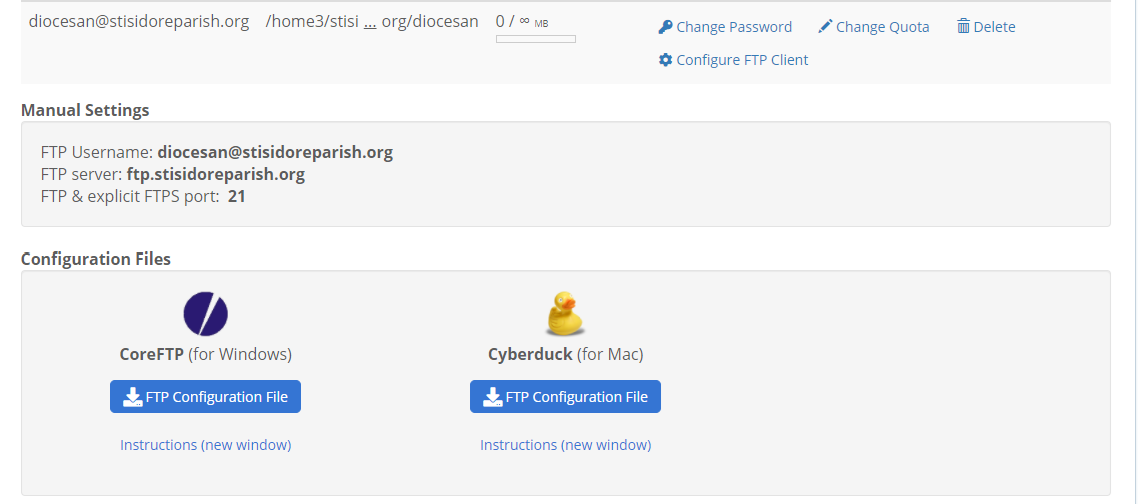
This is a screen capture relative to your ftp account. I have already sent you the configuration files and instructions.
I’ve changed the password again – and copied and pasted below.
StisidoreParish100!
Additionally Bluehost has resources that may help you.
Bluehost Knowledge Base <https://www.bluehost.com/help/results/ftp>
Rita
Sam Pohlman
Rita,
I still wasn't able to log in. Since I can no longer ping ftp.stisidoreparish.org, I believe I've been blacklisted from your server due to multiple login attempts. I had another developer here at Diocesan confirm that they were not able to login, either.
Here are a few options on what we can do next...
1. I can ask Bluehost why I can't get into your FTP account. However, they must validate the account by sending a security token to the email associated with it. I will need you to send me that token so that Bluehost can continue to assist me.
2. If you provide the credentials for your CPanel account, then I can make the changes directly there and won't need FTP access. You may reset to a temporary password if you wish.
3. We can use Team Viewer so that I can see your screen while you login. This will allow you to show us what's on your Cpanel without accessing it ourselves.
If we cannot find a solution then, then we may need to get Bluehost on the call.
Please let me know how you'd like to proceed, and I apologize for the inconvenience this is causing.
Sam Pohlman
Web Developer
I still wasn't able to log in. Since I can no longer ping ftp.stisidoreparish.org, I believe I've been blacklisted from your server due to multiple login attempts. I had another developer here at Diocesan confirm that they were not able to login, either.
Here are a few options on what we can do next...
1. I can ask Bluehost why I can't get into your FTP account. However, they must validate the account by sending a security token to the email associated with it. I will need you to send me that token so that Bluehost can continue to assist me.
2. If you provide the credentials for your CPanel account, then I can make the changes directly there and won't need FTP access. You may reset to a temporary password if you wish.
3. We can use Team Viewer so that I can see your screen while you login. This will allow you to show us what's on your Cpanel without accessing it ourselves.
If we cannot find a solution then, then we may need to get Bluehost on the call.
Please let me know how you'd like to proceed, and I apologize for the inconvenience this is causing.
Sam Pohlman
Web Developer
Rita Carter
Sam,
How about you tell me exactly what you need to do and I’ll do it.
I still don’t understand why you can’t create the ‘school’ site from within Wordpress so this might be a good option.
Send me any instructions and files you need to transfer.
Rita
How about you tell me exactly what you need to do and I’ll do it.
I still don’t understand why you can’t create the ‘school’ site from within Wordpress so this might be a good option.
Send me any instructions and files you need to transfer.
Rita
 Gary Smith
Rita,
I have been following this thread and believe there is some confusion here. My developer needs to access the files directly. The changes that he needs to perform cannot be performed in WordPress. They are changes to the code directly.
In order to accomplish the above tasks, we need to be able to connect to your website via FTP so that we can modify the files and upload the new files. We are unable to access your site, via FTP, with the credentials and information that you've provided. If you can provide us with FTP credentials that allow us to login we can make the necessary changes.
OR
We need to have cPanel access and we can make the changes there.
These are the only two ways possible to accomplish what we need to do on our end to set your website as a multisite and to upload the school files.
Gary Smith
Web Department Director
I have been following this thread and believe there is some confusion here. My developer needs to access the files directly. The changes that he needs to perform cannot be performed in WordPress. They are changes to the code directly.
In order to accomplish the above tasks, we need to be able to connect to your website via FTP so that we can modify the files and upload the new files. We are unable to access your site, via FTP, with the credentials and information that you've provided. If you can provide us with FTP credentials that allow us to login we can make the necessary changes.
OR
We need to have cPanel access and we can make the changes there.
These are the only two ways possible to accomplish what we need to do on our end to set your website as a multisite and to upload the school files.
Gary Smith
Web Department Director
 Arthur Richardson
Hello Rita!
I hope your week is going well!
Did you get a chance to see the prior email from our Web Department Director?
If you have any questions on how we should proceed, please let me know!
Thanks and God bless,
Arthur Richardson
Diocesan Publications
Web Project Manager
877-923-0777
I hope your week is going well!
Did you get a chance to see the prior email from our Web Department Director?
If you have any questions on how we should proceed, please let me know!
Thanks and God bless,
Arthur Richardson
Diocesan Publications
Web Project Manager
877-923-0777
Rita Carter
Hi Arthur,
This is the time of year when my life is not my own so I have not had a chance to look into your problem. I should be able to soon.
I am a little concerned that whatever you are trying to do can’t be accomplished through Wordpress. This worries me for the purpose of future maintenance. Please look for solutions using WordPress.
Regards,
Rita Carter
This is the time of year when my life is not my own so I have not had a chance to look into your problem. I should be able to soon.
I am a little concerned that whatever you are trying to do can’t be accomplished through Wordpress. This worries me for the purpose of future maintenance. Please look for solutions using WordPress.
Regards,
Rita Carter
Arthur Richardson
Hello Rita!
I hope the start of the school year is going smoothly! I know it can be a crazy time of year with everything starting up again.
Have you had a chance to look further into Bluehost server login information? To continue our conversation, we need access to your server in order to change your single site to a multisite. This will make it possible to have both a church and a school site.
Once this change has been made, we can do everything else through WordPress. Once this is done, you can change your password and we will not need access to your server while we work on your multisite.
Our developer sent me a link to an article that might help clear things up. Click here to view it.
Let me know if you have any more questions!
Thanks and God bless,
Arthur Richardson
Diocesan Publications
Web Project Manager
877-923-0777
I hope the start of the school year is going smoothly! I know it can be a crazy time of year with everything starting up again.
Have you had a chance to look further into Bluehost server login information? To continue our conversation, we need access to your server in order to change your single site to a multisite. This will make it possible to have both a church and a school site.
Once this change has been made, we can do everything else through WordPress. Once this is done, you can change your password and we will not need access to your server while we work on your multisite.
Our developer sent me a link to an article that might help clear things up. Click here to view it.
Let me know if you have any more questions!
Thanks and God bless,
Arthur Richardson
Diocesan Publications
Web Project Manager
877-923-0777