












Second Training
Fr. Bautista and Team,
As mentioned in the first training session there is additional training on Gravity Forms. We have streamlined the training process by sending those trainings out in a pre-recorded format. Next week I will reach out to schedule a final Pre-Launch Q/A session that will last approx. 30 minutes to discuss any questions you have from either training as well as set up a plan to have your site launched. Look for an email from me in a week or so.
Second Training
Ryan Hoch
Web Specialist, Diocesan.com
1 (800) 994-9817
As mentioned in the first training session there is additional training on Gravity Forms. We have streamlined the training process by sending those trainings out in a pre-recorded format. Next week I will reach out to schedule a final Pre-Launch Q/A session that will last approx. 30 minutes to discuss any questions you have from either training as well as set up a plan to have your site launched. Look for an email from me in a week or so.
Second Training
Ryan Hoch
Web Specialist, Diocesan.com
1 (800) 994-9817
 Adriana Esguerra
Good afternoon, Ryan:
We need another user for the website, he is the Director of Faith Formation. Mike Baker his email is:
mbaker@st-isaac.org
Thank you so much for everything.
Adriana
We need another user for the website, he is the Director of Faith Formation. Mike Baker his email is:
mbaker@st-isaac.org
Thank you so much for everything.
Adriana
 Ryan Hoch
Adriana,
I went ahead and resent your login info. This will come from a WordPress Email, please check you spam folder on your web email client if you don't see it in your inbox.
I also created Mike Baker an account, he will be receiving his login credentials from webdepartment@diocesan.com. I will also include in his email the links to the two training recordings.
Let me know if there is anything else.
Ryan Hoch
Web Specialist, Diocesan.com
1 (800) 994-9817
I went ahead and resent your login info. This will come from a WordPress Email, please check you spam folder on your web email client if you don't see it in your inbox.
I also created Mike Baker an account, he will be receiving his login credentials from webdepartment@diocesan.com. I will also include in his email the links to the two training recordings.
Let me know if there is anything else.
Ryan Hoch
Web Specialist, Diocesan.com
1 (800) 994-9817
Adriana Esguerra
Good morning, Ryan:
Thank you very much.
Adriana
Thank you very much.
Adriana
Adriana Esguerra
Good morning, Ryan:
I have 2 questions:
Why the web shows the titles in "ministries and groups" in defferent size font? We would like to have it same size.
Where can I edit the groups? I was trying to find the pages but I don't see them.
Thank you,
Adriana
I have 2 questions:
Why the web shows the titles in "ministries and groups" in defferent size font? We would like to have it same size.
Where can I edit the groups? I was trying to find the pages but I don't see them.
Thank you,
Adriana
Ryan Hoch
Good Morning,
I submitted a work order with a developer to fix the menu drop down displaying the wrong font size. He will fix that for you.
Attached is the training recording and if you go to approx. 1 hour: 27min mark this is where I talk about changing out and editing the ministry groups. But put simply, you click on the Ministries tab on the left side of the screen from the dashboard and select all ministries and then click the one you want and make changes there.
Let me know if you need more help with this section. I think if you watch the training video you should be able to figure it out, that said; please do not hesitate to reach out.
Ryan Hoch
Web Specialist, Diocesan.com
1 (800) 994-9817
I submitted a work order with a developer to fix the menu drop down displaying the wrong font size. He will fix that for you.
Attached is the training recording and if you go to approx. 1 hour: 27min mark this is where I talk about changing out and editing the ministry groups. But put simply, you click on the Ministries tab on the left side of the screen from the dashboard and select all ministries and then click the one you want and make changes there.
Let me know if you need more help with this section. I think if you watch the training video you should be able to figure it out, that said; please do not hesitate to reach out.
Ryan Hoch
Web Specialist, Diocesan.com
1 (800) 994-9817
Ryan Hoch
My developer fixed the issue for you with the font size.
Thank you,
Ryan Hoch
Web Specialist, Diocesan.com
1 (800) 994-9817
Thank you,
Ryan Hoch
Web Specialist, Diocesan.com
1 (800) 994-9817
Adriana Esguerra
Good afternoon Ryan:
How can I change the order of the groups? For example I would like to have Knights of Columbus first instead of Boys Scouts in Community Service Groups.
Thank you,
Adriana
How can I change the order of the groups? For example I would like to have Knights of Columbus first instead of Boys Scouts in Community Service Groups.
Thank you,
Adriana
Ryan Hoch
Adriana,
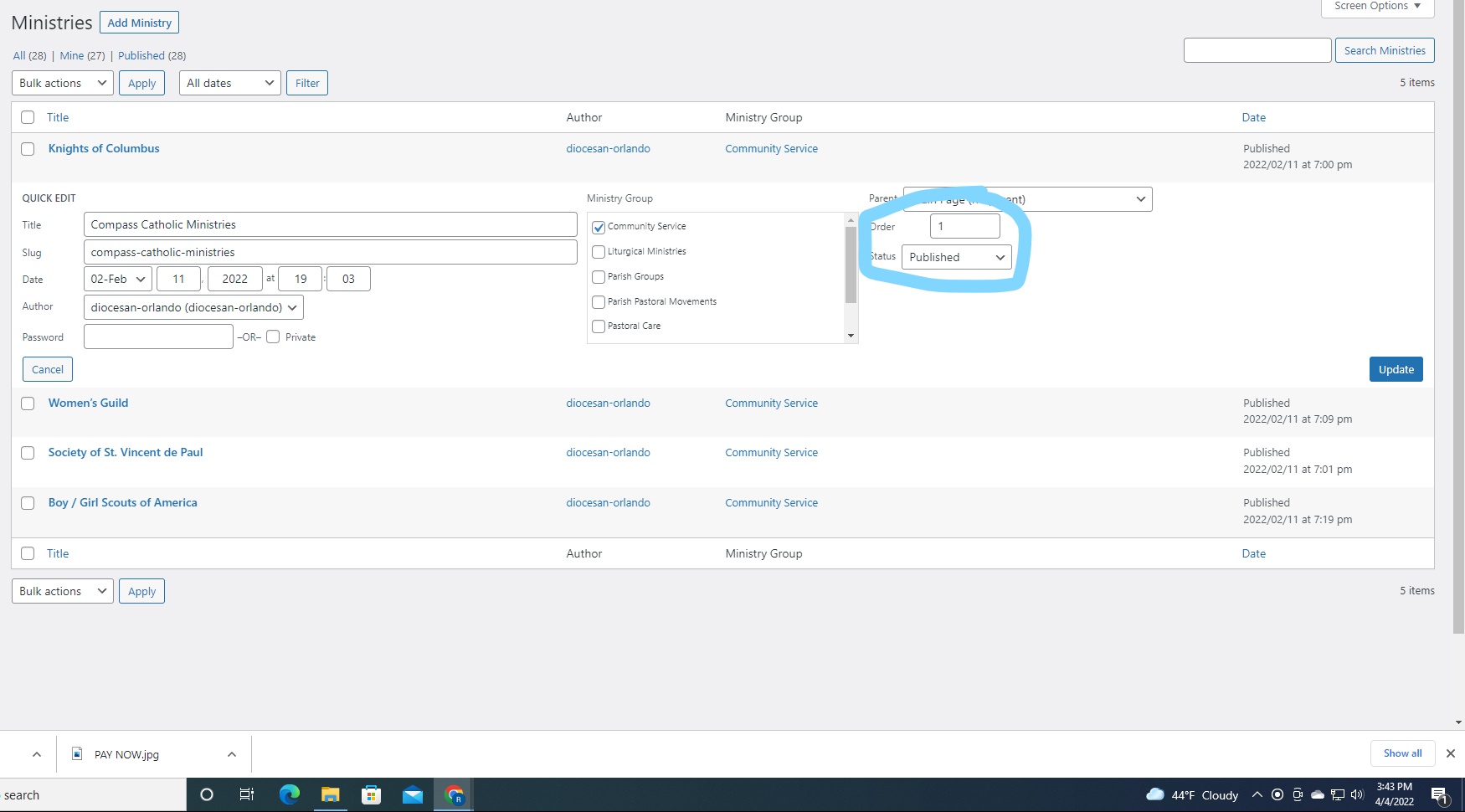
From the dashboard, click on ministry groups under Ministries. From here click on the group you'd like to view. You will see the page appear that I used in the attached screenshot. From there, edit the order with 0 being first and sequentially under the quick edit area, click update.
Same idea as assigning order in the staff page.
Ryan Hoch
Web Specialist, Diocesan.com
1 (800) 994-9817
From the dashboard, click on ministry groups under Ministries. From here click on the group you'd like to view. You will see the page appear that I used in the attached screenshot. From there, edit the order with 0 being first and sequentially under the quick edit area, click update.
Same idea as assigning order in the staff page.
Ryan Hoch
Web Specialist, Diocesan.com
1 (800) 994-9817
Adriana Esguerra
Thank you so much.
Ryan there is photo that I want to delete but I don't find it how.
On the homepage this is the second picture , the first one is the first picture we see when we open the page, and it says contact us.
The one that I want to delete is the cross with green background, and I see the same picture like featured image of some pages. It looks like a default image.
Ryan there is photo that I want to delete but I don't find it how.
On the homepage this is the second picture , the first one is the first picture we see when we open the page, and it says contact us.
The one that I want to delete is the cross with green background, and I see the same picture like featured image of some pages. It looks like a default image.
Ryan Hoch
Adriana,
You had a second blank slide on the homepage slider. I removed it and it removed the default featured image you mentioned. If you go to the dashboard and select Theme Settings and then Header Settings you'll see the screenshot I attached. From here you can change this image by clicking the small x in the corner. Select a new photo. This will be the new site-wide default featured image that will appear when you don't assign an image. Let me know if you need any further assistance.
Thank you,
Ryan Hoch
Web Specialist, Diocesan.com
1 (800) 994-9817
You had a second blank slide on the homepage slider. I removed it and it removed the default featured image you mentioned. If you go to the dashboard and select Theme Settings and then Header Settings you'll see the screenshot I attached. From here you can change this image by clicking the small x in the corner. Select a new photo. This will be the new site-wide default featured image that will appear when you don't assign an image. Let me know if you need any further assistance.
Thank you,
Ryan Hoch
Web Specialist, Diocesan.com
1 (800) 994-9817
Adriana Esguerra
Hi Ryan:
I downloaded a video on homepage but I don't know how to publish it on the slider.
Adriana
I downloaded a video on homepage but I don't know how to publish it on the slider.
Adriana
Ryan Hoch
Adriana,
See attached screenshot.
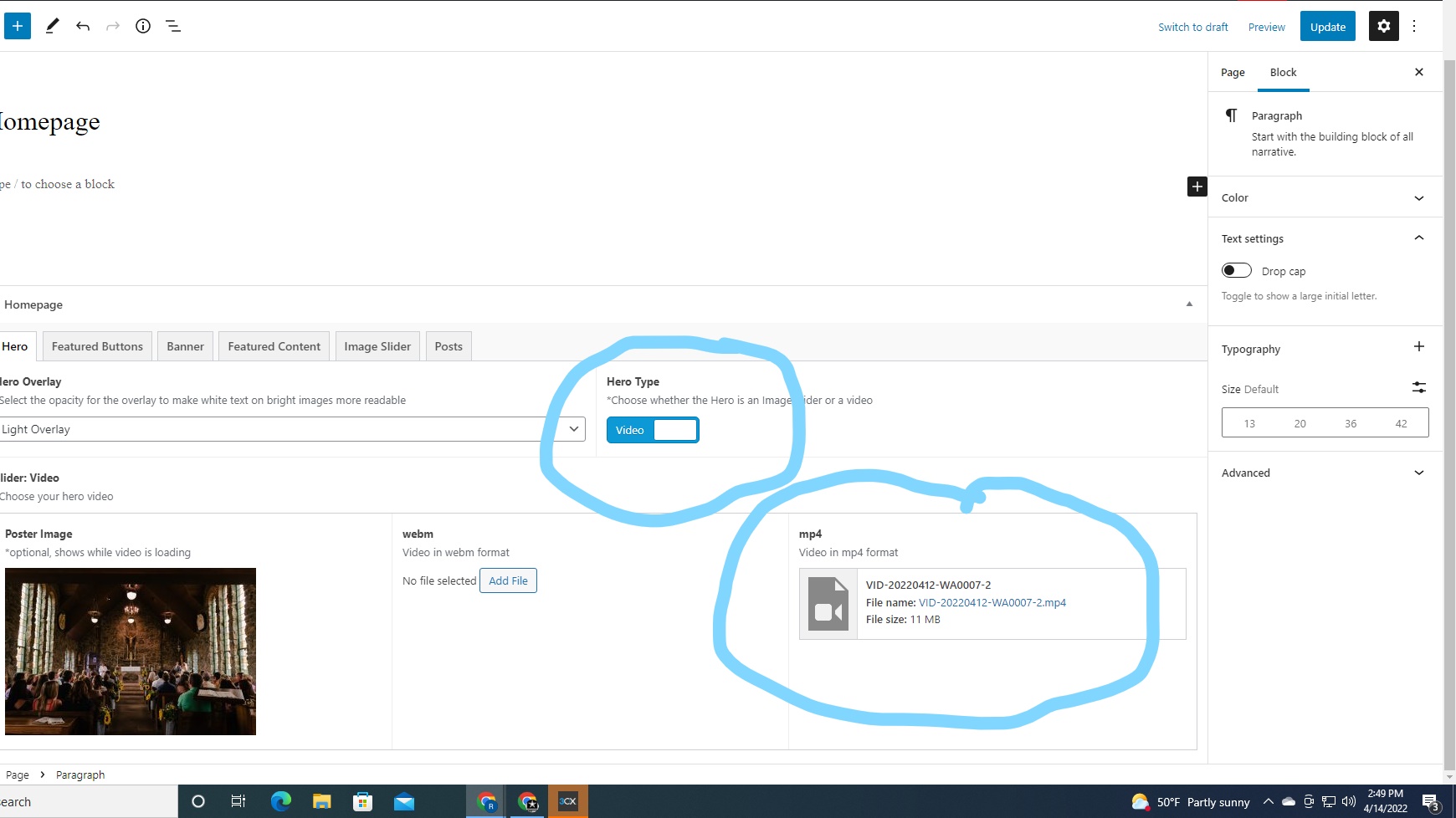
You want to upload the mp4 video file to the area circled on the screenshot. To get that option you click the toggle that says slider and it turns to say video in the hero area of the edit homepage area.
From the homepage, click edit page at the top and click hero tab and then you will see what I sent in the screenshot.
Give me a call if you have any questions.
Ryan Hoch
Web Specialist, Diocesan.com
1 (800) 994-9817
See attached screenshot.
You want to upload the mp4 video file to the area circled on the screenshot. To get that option you click the toggle that says slider and it turns to say video in the hero area of the edit homepage area.
From the homepage, click edit page at the top and click hero tab and then you will see what I sent in the screenshot.
Give me a call if you have any questions.
Ryan Hoch
Web Specialist, Diocesan.com
1 (800) 994-9817
Adriana Esguerra
Thank you, Ryan.
I will try another video tomorrow, and I'll let you know.
In Christ,
Adriana
I will try another video tomorrow, and I'll let you know.
In Christ,
Adriana
Adriana Esguerra
Good morning Ryan:
How are you?
If I use your email in a new conversation it doesn't work.
That's why I'm sending this message from here.
Ryan: I was trying to update information on the website this morning but it was extremely slow and he screen froze. Then it went blank and then I can't access any more.
Can you please help me.
Adriana
How are you?
If I use your email in a new conversation it doesn't work.
That's why I'm sending this message from here.
Ryan: I was trying to update information on the website this morning but it was extremely slow and he screen froze. Then it went blank and then I can't access any more.
Can you please help me.
Adriana
Ryan Hoch
I will have Karl Evans our support specialist reach out today and assist. He can be reached directly at websupport@diocesan.com.
Hope all is well, need not worry we will get things fixed for you.
Ryan Hoch
Hope all is well, need not worry we will get things fixed for you.
Ryan Hoch
Web Content and Support Lead
Diocesan.com
1 (800) 994-9817
Adriana Esguerra
Thank you, Ryan, I will wait for his call or email.
I would like to mention that yesterday we had hackers attack on our YouTube channel, our filters worked very good and the channel automatically delete the comments, however I accessed the channel from this computer, I don't know if it has any relation.
A few minutes ago I was able to access our website and I saw the Homepage in the trash bin, I restore and publish it, but it doesn't work.
Regards,
Adriana
I would like to mention that yesterday we had hackers attack on our YouTube channel, our filters worked very good and the channel automatically delete the comments, however I accessed the channel from this computer, I don't know if it has any relation.
A few minutes ago I was able to access our website and I saw the Homepage in the trash bin, I restore and publish it, but it doesn't work.
Regards,
Adriana