














Refreshing a page after a content update
Good morning!
We discussed today the need to do a "hard refresh" occasionally if you make a change to a page and it doesn't show up.
For PC's, it's usually a CTRL + F5 - hit both keys and your page will reload.
For a Mac, this is how you hard-refresh in Chrome:
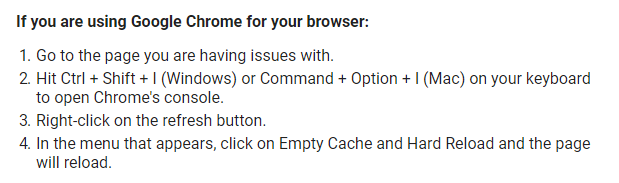
If that doesn't work, especially using Firefox, try this:

You may notice things changing as Kyle continues to work on building the theme, so we won't be too concerned yet on image spacing and that type of thing until we get a little further along in completing content - much of that will be adjusted as he works on the mobile responsiveness for the entire site.
Thank you!
--Mary
We discussed today the need to do a "hard refresh" occasionally if you make a change to a page and it doesn't show up.
For PC's, it's usually a CTRL + F5 - hit both keys and your page will reload.
For a Mac, this is how you hard-refresh in Chrome:
If that doesn't work, especially using Firefox, try this:
You may notice things changing as Kyle continues to work on building the theme, so we won't be too concerned yet on image spacing and that type of thing until we get a little further along in completing content - much of that will be adjusted as he works on the mobile responsiveness for the entire site.
Thank you!
--Mary