














How to edit images for a sidebar

For Sidebar photos, set them at 400px - 450px wide on most pages.
How to set the width:
- Insert the image into the sidebar using the “add media” button - don’t worry about the size.

2.) Once the picture is inserted, click on the picture until you see the edit bar with the edit pencil on it:

3.) Click on the pencil.
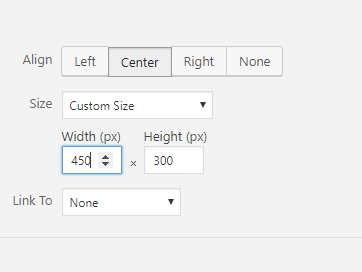
4.) On the Image Details page, change alignment to Center.
5.) Change Size to “Custom”

6.) Change Width to 450px. Don’t worry about the height, it will auto set the height to match the original aspect ratio.
7.) Click “Update”
8.) Click “Update” again on the page to save the changes you’ve just made.