










Websites Launched
Hello all -
Congratulations, your new websites are now live and visible to the world!
I'm still not seeing the live site. Why is that?
The industry standard for launch changes to propagate is 0-72 hours. However, it's been my experience that you can usually see these changes within 2 hours. You will know it was successful when visiting the site URL brings up the site seen as the "dev" site:
https://holytrinitybucyrus.org/ gives you https://htb.diocesanweb.org
or https://saintjosephgalion.org/ gives you https://sjg.diocesanweb.org
or https://saintjosephgalion.org/ gives you https://sjg.diocesanweb.org
If you can see the website on a computer or mobile device not using your parish's internet, it may be that your parish's internal server needs to be reset or may have the IP address of your previous host manually set up. If this is the case, you will have to talk to your IT person, as this is not something Diocesan can help with.
New Login Page
Although you will now go to either
to log in, your login credentials are still the same.
Statistics
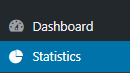
Since your website is now live, we have also added the ability to track your website's statistics. Feel free to view the statistics by clicking Statistics. This will give you access to see what devices are being used, how people are finding your website, and your top pages/link.
Support Moving Forward
As you may have noticed, on your WordPress Dashboard, there is a Diocesan Web Support box with links to help articles that we have written especially for our websites, complete with step-by-step instructions and images. This should help with most of the questions that you may have.
You do also have another 2 weeks from your launch date to call and ask us any questions for free. After those 2 weeks, the paid support will go into effect. Paid support is $70/hr (prorated) and is billed monthly to the parish with each support items (date, amount of time, notes) itemized out.
If you have any issues or questions in the future, please email us at webdepartment@diocesan.com or call us at 877-923-0777.
Canceling Previous Website Host
Launching your website DOES NOT cancel your previous web hosting service. Diocesan does, however, suggest that you do not cancel your previous web hosting service until at least 2 business days after your new website launches.
NOTE: Some website hosting companies may package website hosting and domain hosting/renewal together. If this is true for you, you may want to consider transferring your domain over to Diocesan. You may begin this process by emailing us at webdepartment@diocesan.com or calling 877-923-0777.
Other Resources
Just in case we didn’t mention it in the training, here are some resources for free, stock images to use throughout your website:
Statistics
Since your website is now live, we have also added the ability to track your website's statistics. Feel free to view the statistics by clicking Statistics. This will give you access to see what devices are being used, how people are finding your website, and your top pages/link.
Support Moving Forward
As you may have noticed, on your WordPress Dashboard, there is a Diocesan Web Support box with links to help articles that we have written especially for our websites, complete with step-by-step instructions and images. This should help with most of the questions that you may have.
You do also have another 2 weeks from your launch date to call and ask us any questions for free. After those 2 weeks, the paid support will go into effect. Paid support is $70/hr (prorated) and is billed monthly to the parish with each support items (date, amount of time, notes) itemized out.
If you have any issues or questions in the future, please email us at webdepartment@diocesan.com or call us at 877-923-0777.
Canceling Previous Website Host
Launching your website DOES NOT cancel your previous web hosting service. Diocesan does, however, suggest that you do not cancel your previous web hosting service until at least 2 business days after your new website launches.
NOTE: Some website hosting companies may package website hosting and domain hosting/renewal together. If this is true for you, you may want to consider transferring your domain over to Diocesan. You may begin this process by emailing us at webdepartment@diocesan.com or calling 877-923-0777.
Other Resources
Just in case we didn’t mention it in the training, here are some resources for free, stock images to use throughout your website:
- Unsplash
http://unsplash.com - Pexels
http://pexels.com - Cathopic
https://www.cathopic.com/
Please let me know if you have any questions and, again, congratulations!
Thank you,
Mary
Support/Web Department
877-923-0777
 Marlene Fox
It looks awesome! One thing that I noticed is that I can't find the parish calendar. Can that be added to the banner that has Contact us, Staff, Bulletin, and Online giving? It can replace Staff.
 Mary Goeldel
Good morning, Marlene -
On the St. Joseph site, the calendar is linked in the main navigation menu, under "About Us" - we can do the same on the Holy Trinity site if you'd like? I can send you screenshots from our webdepartment email on how to do that, or I can give you a call and walk you through how to make menu changes if you'd prefer.
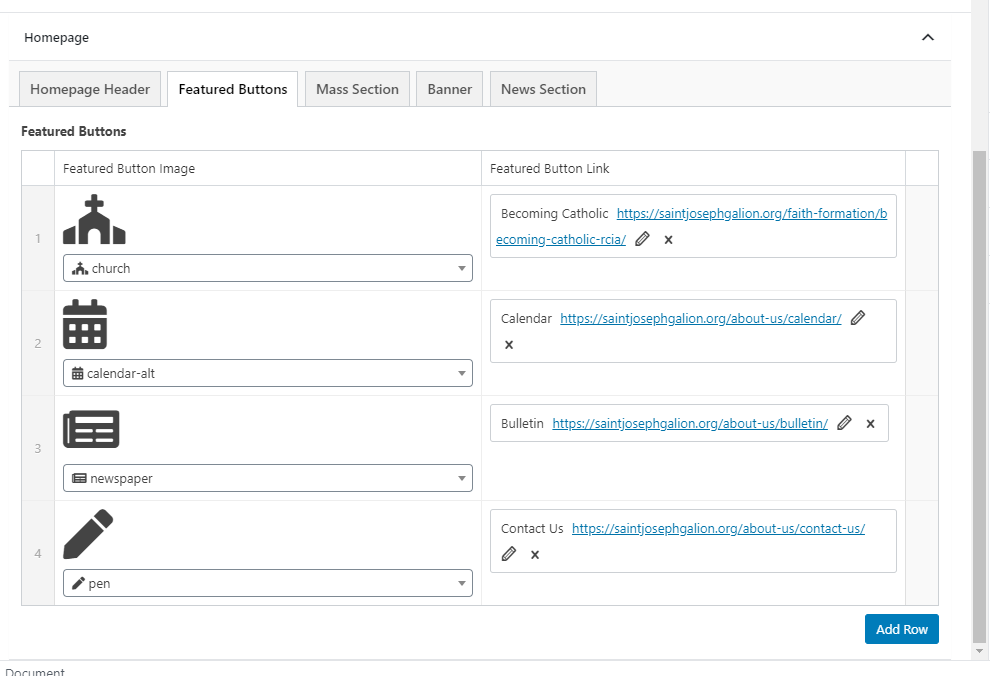
To change what's in the red banner area, the four "buttons", you'll need to go to the "backside" of the homepage and go to the Featured Buttons tab- you can then change out any of the four buttons to whatever you'd like. Here's a screenshot from St. Joseph, as I see you are currently editing the homepage and can't access it, but your site should look similar:
If you have questions about how to change the buttons, just let me know - we can connect with our TeamViewer software and I can walk you through it.
Your sites are beautiful!
Thank you,
Mary
On the St. Joseph site, the calendar is linked in the main navigation menu, under "About Us" - we can do the same on the Holy Trinity site if you'd like? I can send you screenshots from our webdepartment email on how to do that, or I can give you a call and walk you through how to make menu changes if you'd prefer.
To change what's in the red banner area, the four "buttons", you'll need to go to the "backside" of the homepage and go to the Featured Buttons tab- you can then change out any of the four buttons to whatever you'd like. Here's a screenshot from St. Joseph, as I see you are currently editing the homepage and can't access it, but your site should look similar:
If you have questions about how to change the buttons, just let me know - we can connect with our TeamViewer software and I can walk you through it.
Your sites are beautiful!
Thank you,
Mary
Marlene Fox
Yes, I definitely would like to have it added to the site. I can add it to the banner area once you add it to the pulldown menu. Also, in the news section, I have recycling information, how do I make it so that it does not show the dates until you click on "read more"?
Thank you!
Thank you!
Mary Goeldel
For the dates on the post - your site is set to show an excerpt on all of your posts of about 15 words. Do you have some other text you can add ahead of the dates, a short paragraph, that would push the dates past the 15 words of the excerpt? Something like, "It's time to plan ahead for our recycling at Holy Trinity - mark your calendars so you remember!" or something like that?
That would push the date information down the line far enough that it wouldn't show on the homepage - you'll just need to keep in mind when posting that the first 15 words do show on the homepage. :)
I'll go ahead and add "Calendar" to your navigation menu and I'll send you screenshots as I do it, so that you'll have that information for future reference.
Thank you,
Mary
That would push the date information down the line far enough that it wouldn't show on the homepage - you'll just need to keep in mind when posting that the first 15 words do show on the homepage. :)
I'll go ahead and add "Calendar" to your navigation menu and I'll send you screenshots as I do it, so that you'll have that information for future reference.
Thank you,
Mary
Mary Goeldel
Marlene,
It doesn't look as though the new site has a calendar installed on it.
If it did, we'd see "Calendar" in the sidebar on the dashboard. Do you use a Google/Gmail calendar for the church?
If you let me know the calendar ID that you use, I can get it set up for you. If you need instructions on how to find your calendar ID in the Gmail account, let me know and I can send instructions.
Thank you!
--Mary
Thank you!
--Mary
Marlene Fox
This is the link to our parish calendar: https://calendar.google.com/calendar?cid=aHRjYnVjeXJ1c0BnbWFpbC5jb20
Also, I am trying to send Brittany a form I created. When I "Export" the form, it pulls it up as a PDF and Brittany receives the message that it is the wrong format. What am I doing wrong?
Also, I am trying to send Brittany a form I created. When I "Export" the form, it pulls it up as a PDF and Brittany receives the message that it is the wrong format. What am I doing wrong?
Mary Goeldel
I'll get that calendar set up for you this morning.
Are you trying to send Brittany the form so that she can use it on her site?
Make sure you are chosing "Export Form" and not "Export Entries" -
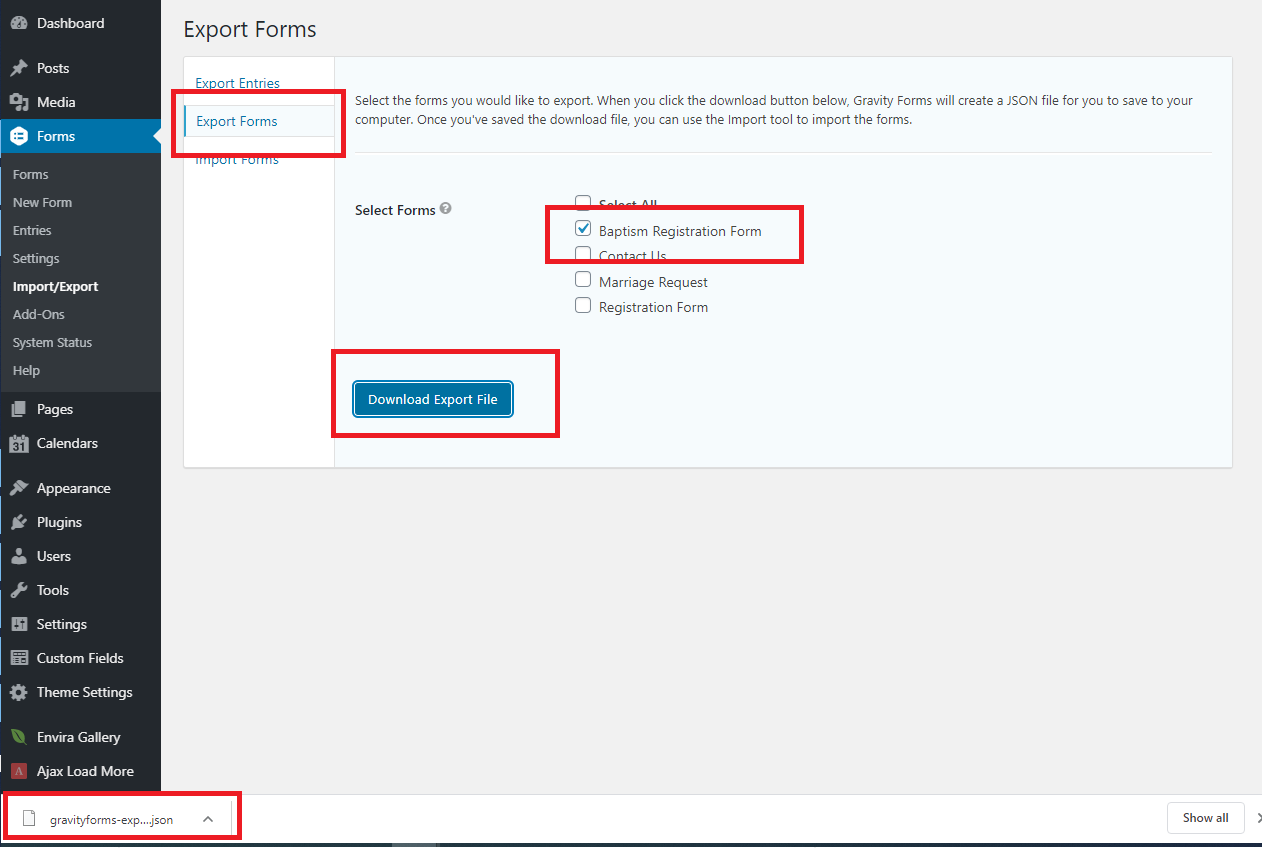
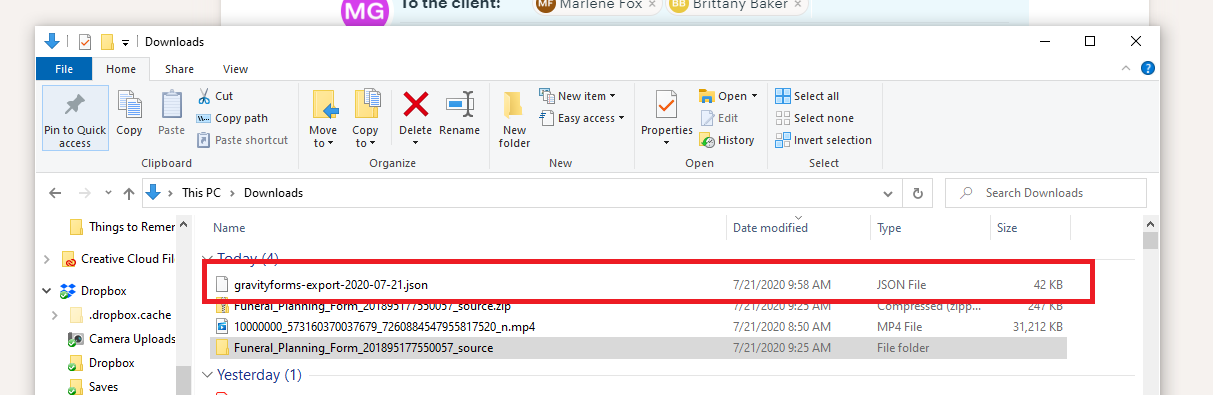
If you choose "Export Forms" and then put a checkbox next to the form you want to export, then click the blue button, you should see a file appear in the lower-left corner if using Chrome as your browser - that file will be a .json file and that's what you will find in your Downloads when you go to File Explorer - it'll show up as a JSON File entry:
If it's a PDF, it's likely that you're exporting Entries, rather than Forms?
-Mary
Are you trying to send Brittany the form so that she can use it on her site?
Make sure you are chosing "Export Form" and not "Export Entries" -
If you choose "Export Forms" and then put a checkbox next to the form you want to export, then click the blue button, you should see a file appear in the lower-left corner if using Chrome as your browser - that file will be a .json file and that's what you will find in your Downloads when you go to File Explorer - it'll show up as a JSON File entry:
If it's a PDF, it's likely that you're exporting Entries, rather than Forms?
-Mary
Marlene Fox
I created a registration form and shared it with her so she could use it on her site. The file saves as a JSON file, but opens as a PDF. I sent it to her again so she might contact you to get help.
Mary Goeldel
Oh, you don't actually open the .json file - you have to import it to another WordPress site. If she does the same process in reverse, choosing Import Form, and then choosing that .json file, it will add that form to her website.
Let me know if you have questions about that - we can connect and I can walk you through the process if you'd like.
I'm at 616-256-4374 today if you need to call.
Thank you,
Mary
Let me know if you have questions about that - we can connect and I can walk you through the process if you'd like.
I'm at 616-256-4374 today if you need to call.
Thank you,
Mary
Marlene Fox
I have another question....on my forms page, how do I get rid of the space that is between two different links?
 Brittany Baker
Did you mean to send this to me or to them? I was actually wondering the same thing because mine is like that too.
 Cody Armock
Hello Marlene & Brittany,
The space on the forms page on both sites was because the first few links were all in the same column whereas the one that had the large space between it was not in the same column but in the main body of the editor. I added both links to the column and that eliminated the space.
Let me know if you have any other questions!
Cody Armock
The space on the forms page on both sites was because the first few links were all in the same column whereas the one that had the large space between it was not in the same column but in the main body of the editor. I added both links to the column and that eliminated the space.
Let me know if you have any other questions!
Cody Armock
Web Department, Diocesan
877-923-0777
Brittany Baker
Thank you!
Brittany Baker
Hi Mary,
I'm not seeing the statistics tab under my dashboard. Am I missing something?
I'm not seeing the statistics tab under my dashboard. Am I missing something?
Mary Goeldel
Hi, Brittany -
It's possible it didn't get turned "on" at launch - I'll take a look and get it going for you now. Thank you so much for bringing that to our attention! We have a checklist but occasionally things do get overlooked.
--Mary
It's possible it didn't get turned "on" at launch - I'll take a look and get it going for you now. Thank you so much for bringing that to our attention! We have a checklist but occasionally things do get overlooked.
--Mary
Brittany Baker
Okay, thank you very much!
Marlene Fox
Question...When I added a new item to the parish news on Friday, it pushed an item off the main page of the website but didn't move it to the "view all news" page. How do I make that happen? It was Eucharistic Adoration that I would like to have on the "view all news". Also, how do I add the statistics tab?
Marlene Fox
Office Manager
Holy Trinity Catholic Church
419-562-1346 (tel:419-562-1346) Office
419-569-1976 (tel:419-569-1976) Cell
Marlene Fox
Office Manager
Holy Trinity Catholic Church
419-562-1346 (tel:419-562-1346) Office
419-569-1976 (tel:419-569-1976) Cell
Mary Goeldel
Good afternoon, Marlene -
I'm sorry, your Statistics plugin didn't get activated at launch, so I went ahead and did that just now. You should see the widget now on the dashboard, and also the "Statistics" on the top of the black sidebar on your dashboard.
I'll take a look at the news post archive page to see why posts aren't being added to it - I believe they should be, but there may be a filter that needs to be adjusted, or something along those lines. If I can't figure it out I will ask the developer to take a quick look! Thanks for letting me know of that issue.
--Mary
I'm sorry, your Statistics plugin didn't get activated at launch, so I went ahead and did that just now. You should see the widget now on the dashboard, and also the "Statistics" on the top of the black sidebar on your dashboard.
I'll take a look at the news post archive page to see why posts aren't being added to it - I believe they should be, but there may be a filter that needs to be adjusted, or something along those lines. If I can't figure it out I will ask the developer to take a quick look! Thanks for letting me know of that issue.
--Mary
Mary Goeldel
Marlene,
There was an HTML block on the page that was pulling in the news posts for you - it somehow got deleted but I was able to find it using the page revisions.
It's that last block on the page, and it looks like this:
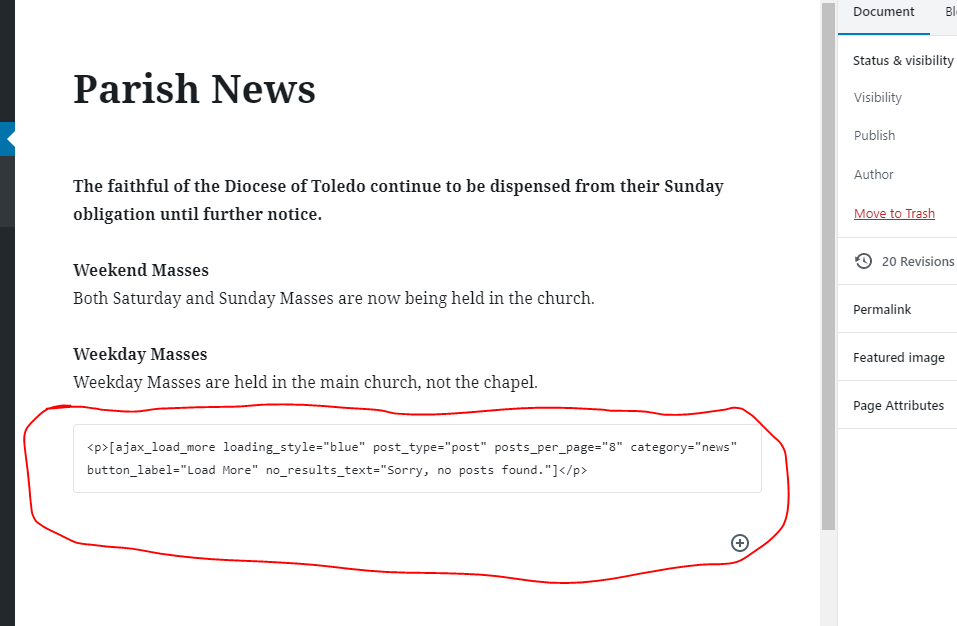
Make sure you don't delete that block because that's what is pulling in the news Posts for this page.
Thank you,
Mary
There was an HTML block on the page that was pulling in the news posts for you - it somehow got deleted but I was able to find it using the page revisions.
It's that last block on the page, and it looks like this:
Make sure you don't delete that block because that's what is pulling in the news Posts for this page.
Thank you,
Mary
Marlene Fox
Thank you!!
Mary Goeldel
You're very welcome, happy to help! Since I don't do much content migration anymore I'm a little rusty on the new "blocks"! :)
Let me know if you find any other issues on the site, or if you have any questions - we'll get it figured out!
Thank you,
Mary
Let me know if you find any other issues on the site, or if you have any questions - we'll get it figured out!
Thank you,
Mary