











First Training Session
Hello everyone,
As we approach the beginning of the school year, I wanted to check in with you again and see if we are ready to move forward with scheduling the first training session. The sooner we schedule these training sessions, the sooner we can launch the website since there is a minimum of 2 weeks between the first training session and a scheduled launch date.
Training
The first training session typically takes ~2 hours and is done remotely via Diocesan's version of TeamViewer. At the beginning of our phone call, I will walk you through how to set up the remote access program.
During the training sessions, we go over:
- How to edit the homepage content
- How to edit the footer
- How to edit the menu
- How to create/edit inner pages
- How to create/edit posts
- How to create/edit/use image galleries
- How to create/edit/use online forms
- Any other questions that you may have
Since this can be a lot, we break the training down into two sessions:
- Editing the site basics (media, pages, posts, menu, homepage)
- Editing the additional site features & answering follow-up questions (forms, galleries, etc.)
This is completely up to your learning pace and how much you feel comfortable covering at once.
I am currently available all day Wednesday and on Thursday after 11:00 am.
Please let me know if there is a time on either of these two days that you would like to schedule your training for or if you have any questions.
Thank you,
Veronica Alvarado
Web Department, Diocesan
877-923-0777
877-923-0777
 Veronica Alvarado
As a reminder, here are the links to the development sites:
School
https://hsparish.diocesanweb.org/school/
Parish
https://hsparish.diocesanweb.org/
School
https://hsparish.diocesanweb.org/school/
Parish
https://hsparish.diocesanweb.org/
Veronica Alvarado
Web Department, Diocesan
877-923-0777
877-923-0777
 Vicki Bouwkamp
Hi Veronica,
Thanks so much for reaching out and for your patience. We have had some things come up last spring and over the summer that required us to move this to the back burner for a bit. We are ready to move ahead now. I would like to review the site again and be sure everything looks okay. Can you send me the link again to do that? We will review and go from there.
Also, since we already have a site through Diocesan are familiar with how to make edits and such, do we still go through training? Is this a different platform that we will need training on, or are there new things we will need to know? Just want to be sure I know what the process will be moving forward.
We look forward to working with you to transition to our new site!
Thank you!
Vicki
Thanks so much for reaching out and for your patience. We have had some things come up last spring and over the summer that required us to move this to the back burner for a bit. We are ready to move ahead now. I would like to review the site again and be sure everything looks okay. Can you send me the link again to do that? We will review and go from there.
Also, since we already have a site through Diocesan are familiar with how to make edits and such, do we still go through training? Is this a different platform that we will need training on, or are there new things we will need to know? Just want to be sure I know what the process will be moving forward.
We look forward to working with you to transition to our new site!
Thank you!
Vicki
Veronica Alvarado
Good morning Vicki,
While this website is also built on WordPress, we are using the newest version, which uses a Gutenberg Editor instead of your standard Classic Editor. Click here to see an example of the Gutenberg editor. Diocesan has created some custom Gutenberg blocks, so we like to go over these with you as well.
We will also go over your new homepage template and staff module. So while the training may not be the usual 1.5-2 hours long, you can still expect the training to last 1-1.5 hours. If you think it would be more efficient, we can do the training remotely, screen-to-screen instead.
Additionally, we still have the issue of your font adding the ~ symbol anytime there is an empty space left. The good news is that with WordPress' newest update, instead of using a non-breaking space (empty line), the new Gutenberg editor has a "Spacer" block that you can use instead. Next week, we will be updating your site to the newest version and correcting the content in any pages where the ~ issue was occurring.
https://hsparish.diocesanweb.org/
https://hsparish.diocesanweb.org/school/
Thank you,
Veronica Alvarado
Web Department, Diocesan
877-923-0777
877-923-0777
Vicki Bouwkamp
Hi Veronica,
Thanks so much for the clarification and the update! Should we wait to review the site until next week to review the site? Or would it be okay for us to look through now and be sure all looks okay, knowing that those symbols will go away next week? What would you suggest?
I do think a remote training would be fine, we just need to make sure all that need the training can be present. Let me check schedules and get back with you on this, okay?
Once we are set with training and are okay with everything, can we go live? Can you tell me what that process looks like?
Thanks!
Thanks so much for the clarification and the update! Should we wait to review the site until next week to review the site? Or would it be okay for us to look through now and be sure all looks okay, knowing that those symbols will go away next week? What would you suggest?
I do think a remote training would be fine, we just need to make sure all that need the training can be present. Let me check schedules and get back with you on this, okay?
Once we are set with training and are okay with everything, can we go live? Can you tell me what that process looks like?
Thanks!
Veronica Alvarado
Good morning Vicki,
Since we'll be switching your site over to Gutenberg, I'm actually going to ask that you hold off on reviewing the website. I'd rather have you going through the site as it will be, rather than what it currently is.
Here is how the process will go from here on out:
- Diocesan switches site over to Gutenberg
- Diocesan goes through content & makes updates
- Once completed, Diocesan will let you know when you may begin reviewing. Please keep in mind that any changes will be made either during training or by HS once you have been trained.
- First Training Session
- Diocesan covers editing, menu, header, footer
- HS gets editing access
- HS begins editing content
- Second Training Session
- HS asks questions
- Diocesan covers online fillable forms, Envira Gallery
- Launch Date Scheduled
- Confirm Launch Date 1 Week Before
- Launch New Site
- HS no longer has access to current site
- 2 weeks of free support after training
- Diocesan Billing sends bill
- Paid Support Begins 2 Weeks After Launch Date
Let me know if you have any other questions about any specific part of the process.
Veronica Alvarado
Web Department, Diocesan
877-923-0777
877-923-0777
Vicki Bouwkamp
This is very helpful, Veronica, thank you!
It might be easier if you could give me 3-4 different times that would work for training for you, then I can reach out to our team here and see what works best, is that possible? We will have 5/6 people that will need the new training.
Thanks,
Vicki
It might be easier if you could give me 3-4 different times that would work for training for you, then I can reach out to our team here and see what works best, is that possible? We will have 5/6 people that will need the new training.
Thanks,
Vicki
Veronica Alvarado
Sure thing!
Here are some days and times that are open for me, currently:
Here are some days and times that are open for me, currently:
- Friday, August 30
- 2:30-4:30 pm
- Wednesday, September 4
- 9:30-11:30 am
- 10:00 am -12:00 pm
- 10:30 am - 12:30 pm
- Thursday, September 5
- Any Time (2 hrs) between 9:30 and 5:00 pm
- Friday, September 6
- Any Time (2 hrs) except 1-2 pm
- 9:30-11:30 am
- 10:00 am -12:00 pm
- 10:30 am - 12:30 pm
- 2:00-4:00 pm
- 2:30-4:30 pm
Let me know what day and time works best for you and I will schedule it now.
Thank you,
Thank you,
Veronica Alvarado
Web Department, Diocesan
877-923-0777
877-923-0777
Vicki Bouwkamp
Awesome, thanks! I will get back to you after I have found a time that works for all/most of us!
Vicki
Vicki
Veronica Alvarado
Sounds good!
Veronica Alvarado
Web Department, Diocesan
877-923-0777
877-923-0777
Vicki Bouwkamp
Veronica,
September 6 10:30-12:30 is the time that will (amazingly) work for all of us! Please let me know how we can prepare for this and if there is anything else you need from me at this point.
Thanks so much! Have a great Friday!
Vicki
September 6 10:30-12:30 is the time that will (amazingly) work for all of us! Please let me know how we can prepare for this and if there is anything else you need from me at this point.
Thanks so much! Have a great Friday!
Vicki
Veronica Alvarado
Hi Vicki,
Are you wanting to do the training in person or via conference call/screen share? Since we would be training both school and parish staff, I wasn't sure which would be easier for you.
If it will be conference call, I can send you the meeting information now. If it will be in person, then I can tell you the room requirements.
Let me know,
Veronica Alvarado
Web Department, Diocesan
877-923-0777
877-923-0777
Vicki Bouwkamp
Hi Veronica,
At this point, what do you feel would be easiest? I think we would be fine to do a conference call, but with the number of people we have if you feel an in person meeting would be easier that would work for us as well!
Thanks,
Vicki
At this point, what do you feel would be easiest? I think we would be fine to do a conference call, but with the number of people we have if you feel an in person meeting would be easier that would work for us as well!
Thanks,
Vicki
Veronica Alvarado
Good morning Vicki,
I've found that people are more likely to ask questions and involved when I am able to train in person. Would that work for you?
If so, we'll need a room that allows for the seating of everyone and a computer that I can use and project so everyone can see the screen.
Thank you,
Veronica Alvarado
Web Department, Diocesan
877-923-0777
877-923-0777
Vicki Bouwkamp
That sounds great, Veronica! Let's plan to do it in person. We will plan to have you here on September 6 from 10:30-12:30. Does it matter what type of computer you have?
Thanks!
Thanks!
Veronica Alvarado
The type of computer does not make a difference, as long as I am able to connect to a larger screen for everyone to see. I currently work on both Windows (new and old) and Mac, so either of those operating systems are fine. As for desktop versus laptops, we've seen laptops used more often since they're portable and easily plugged into screens, but whichever works best for your setup is totally fine.
Veronica Alvarado
Web Department, Diocesan
877-923-0777
877-923-0777
Vicki Bouwkamp
Great! Thanks Veronica!
Vicki
Vicki
Vicki Bouwkamp
Good morning Veronica,
Thanks so much for coming out last Friday for training! We are grateful for your time!
Just wanted to check in and make sure I didn't miss an email from you. Did you send the list with permissions and such yet? If not, no problem, just wanted to double check.
Thanks,
Vicki
Thanks so much for coming out last Friday for training! We are grateful for your time!
Just wanted to check in and make sure I didn't miss an email from you. Did you send the list with permissions and such yet? If not, no problem, just wanted to double check.
Thanks,
Vicki
Veronica Alvarado
Good morning Vicki,
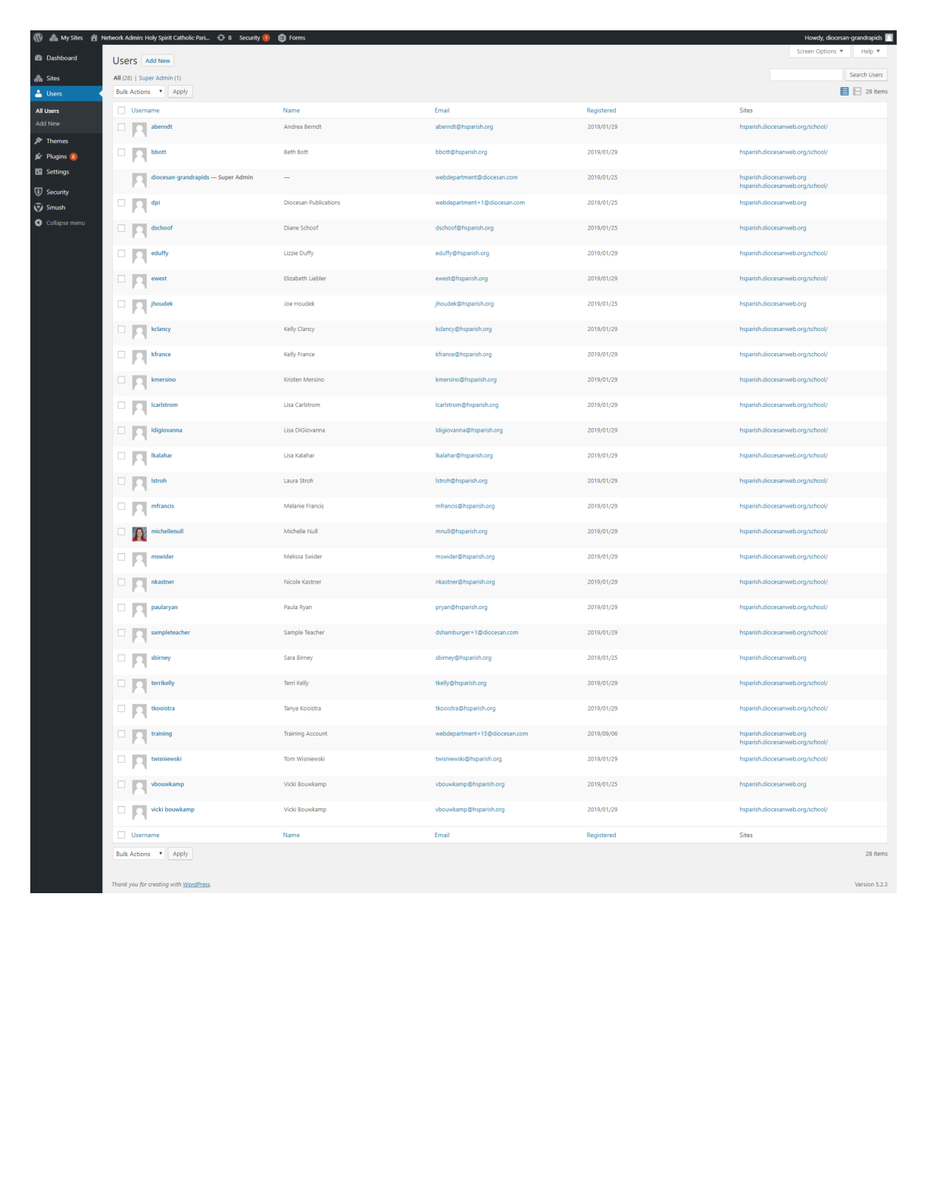
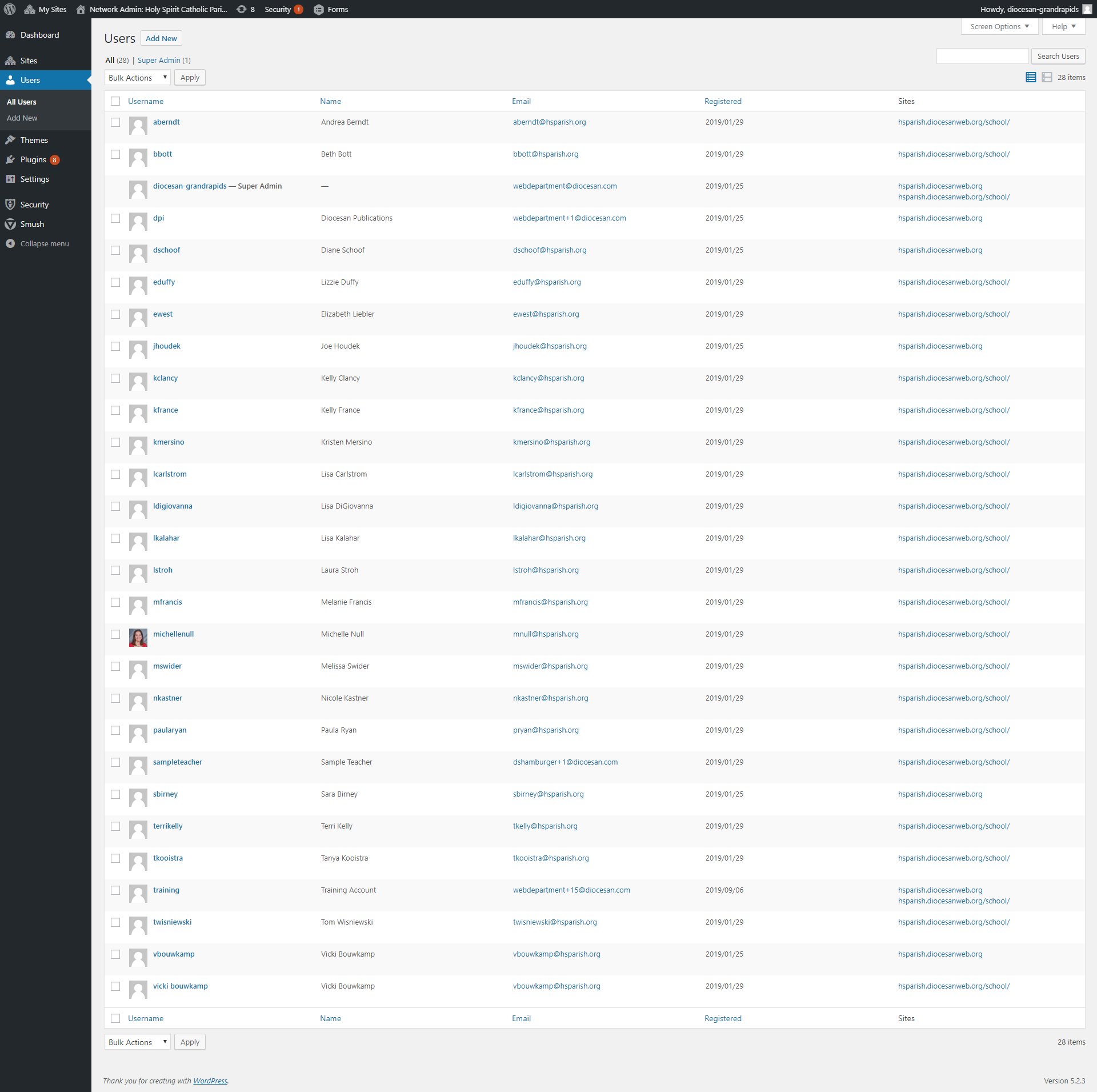
I'm so sorry about that. I have attached an image and PDF of the list of current users.
While they were migrated to your new website, they have not been given any access to the sites.
We have the following roles created and ready for use:
- Parish Administrator
- Parish Editor (no access to menu & theme settings)
- Parish Author (can create new, but only edit own pages)
- School Administrator
- School Editor (no access to menu & theme settings)
- School Author (typically used for teachers)
Users may be added to one or both site (school and/or parish).
Also, any additional limitations or new user roles may be requested.
Also, any additional limitations or new user roles may be requested.
Let me know which users you'd like for us to remove, who you'd like to be added (names, username, email address), and if you'd like us to begin sending out login information.
Let me know if you have any questions,
Veronica Alvarado
Web Department, Diocesan
877-923-0777
877-923-0777
Vicki Bouwkamp
No problem, Veronica! I will take a look and get back to you!
Vicki
Vicki
Vicki Bouwkamp
Good morning Veronica!
Thanks so much for sending this information on. I know of one user that needs to be removed, Beth Bott. She no longer needs access. Also, I am unable to make this list any bigger so it is difficult to read, did you include the current roles of each of the users in this list? Or do I need to supply you with the role for each user?
We need to keep this moving, so after we are done with this list, what are the next steps?
Thanks,
Vicki
Thanks so much for sending this information on. I know of one user that needs to be removed, Beth Bott. She no longer needs access. Also, I am unable to make this list any bigger so it is difficult to read, did you include the current roles of each of the users in this list? Or do I need to supply you with the role for each user?
We need to keep this moving, so after we are done with this list, what are the next steps?
Thanks,
Vicki
Veronica Alvarado
Good morning Vicki,
I have removed Beth Bott from the website.
I have also attached a spreadsheet with the users, which site they have access to, and their roles. Most of the users on the school side are currently blank, meaning they do not currently have access to any content.
The roles we have available are:
- Parish Administrator
- School Administrator (access to edit all pages/posts/Teachers (staff)/menu/theme settings)
- School Editor (access to edit all pages/posts/teachers (staff) but no menu or theme settings)
- Teacher (access to edit only their assigned pages, own posts, and no teachers(staff)/menu/theme settings)
Feel free to complete the spreadsheet and return it back to me. From there, I will update the users.
Also, if you think we need to have some additional roles set up, let's set up a time to go over what we do/don't want the new role(s) to have access to.
As for what's next, we would want to schedule a second training (if needed) and determine a launch date. Then, we launch!
Let me know if you have any questions,

Also, if you think we need to have some additional roles set up, let's set up a time to go over what we do/don't want the new role(s) to have access to.
As for what's next, we would want to schedule a second training (if needed) and determine a launch date. Then, we launch!
Let me know if you have any questions,
Veronica Alvarado
Web Department, Diocesan
877-923-0777
877-923-0777
Vicki Bouwkamp
Thanks, Veronica. I will go ahead and make the assignments and get this back to you. Wondering if you could make Sara and I "live" as administrators right now so we can go in and review and make any edits necessary at this point? From there, we will want to add a Michelle and Paula from the school early as well, but Sara and I would like to go in first and get the lay of the land before we open it up further. Does that make sense?
Thanks!
Thanks!
Veronica Alvarado
That does make sense.
As of right now, the username vbouwkamp already has admin access to both the parish and the school. Username sbirney has access to the parish.
I will send over the login information for you two, shortly.
Thank you,
As of right now, the username vbouwkamp already has admin access to both the parish and the school. Username sbirney has access to the parish.
I will send over the login information for you two, shortly.
Thank you,
Veronica Alvarado
Web Department, Diocesan
877-923-0777
877-923-0777
Veronica Alvarado
I have just sent the login information for users vbouwkamp and sbirney.
Let me know if you have any questions or concerns!
Let me know if you have any questions or concerns!
Veronica Alvarado
Web Department, Diocesan
877-923-0777
877-923-0777
Vicki Bouwkamp
Hi Veronica,
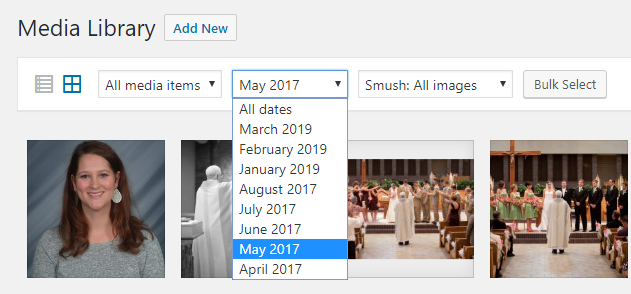
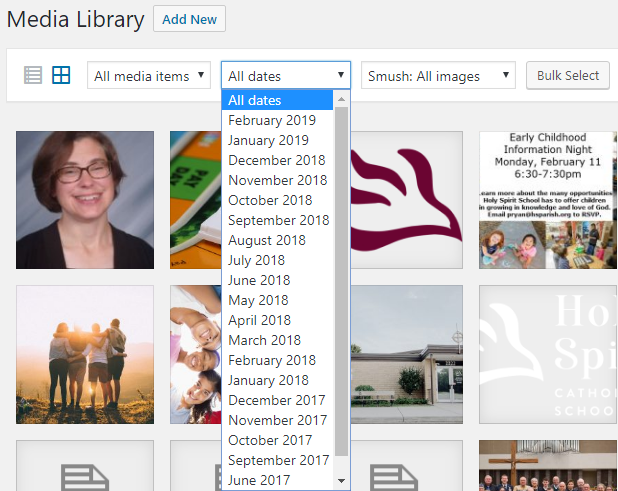
I am looking around in the new site trying to be sure everything is as it should be. I noticed our media library doesn't have everything in it that we currently have. Is there any way to bring all of that over, or do we have to add that all again?
Thank you!
Vicki
I am looking around in the new site trying to be sure everything is as it should be. I noticed our media library doesn't have everything in it that we currently have. Is there any way to bring all of that over, or do we have to add that all again?
Thank you!
Vicki
Veronica Alvarado
Hi Vicki,
The development site should have all of the current website's media up until January 2019. (see images below) If you'd like, we could run an export/import, but it would duplicate all of the images that we had already imported into the new website. Otherwise, you would have to manually add those more recent items manually.
Let me know,
Veronica Alvarado
Web Department, Diocesan
877-923-0777
877-923-0777
Vicki Bouwkamp
Me again! As I am working my way through reviewing the site I have some other questions that have come up. Instead of emailing you several times separately, I compiled a list. My apologies for all the questions!
* If I clean out a lot of the older images from the media library, they would not import again, correct? I don't want to duplicate all those images, but also would like to find a way to import all the new images. We have added quite a few images over the last year. Any suggestions?
* I am noticing that some of the links link to pages that look like the old site, can you tell me why that is happening?
* Also, a lot of this content is old. I thought when you were here for training you mentioned that you could refresh that so we would have our most current content from the site transfer over? Is that correct? If so, when could you do that?
Thanks so much, Veronica, for your help!
Vicki
* If I clean out a lot of the older images from the media library, they would not import again, correct? I don't want to duplicate all those images, but also would like to find a way to import all the new images. We have added quite a few images over the last year. Any suggestions?
* I am noticing that some of the links link to pages that look like the old site, can you tell me why that is happening?
* Also, a lot of this content is old. I thought when you were here for training you mentioned that you could refresh that so we would have our most current content from the site transfer over? Is that correct? If so, when could you do that?
Thanks so much, Veronica, for your help!
Vicki
 Mary Goeldel
Good morning, Vicki -
Not trying to be nosy, but I noticed this email chain while reading through my daily update email. :)
If it would be easier for you, I can batch pull a copy of the images from the media library off the server using FTP and put them in a folder in a Google drive for you to retrieve - that way, you'd have a copy of all of them on your own computer and you could upload only what you want back to the new site much more easily.
Let me know if you'd like me to do that - it would take just a few minutes for me to start the download.
Thank you,
Mary Goeldel
Support/Web Department
Not trying to be nosy, but I noticed this email chain while reading through my daily update email. :)
If it would be easier for you, I can batch pull a copy of the images from the media library off the server using FTP and put them in a folder in a Google drive for you to retrieve - that way, you'd have a copy of all of them on your own computer and you could upload only what you want back to the new site much more easily.
Let me know if you'd like me to do that - it would take just a few minutes for me to start the download.
Thank you,
Mary Goeldel
Support/Web Department
Vicki Bouwkamp
Thanks, Mary! That would be really helpful! Let me know if you need anything from me in order to do that!
Vicki
Vicki
Mary Goeldel
Hi, Vicki -
Could you create a folder in your Google Drive, and share a link to it with me? Then I'd be able to upload directly to your drive as I retrieve the monthly image folders.
Here's a quick explanation of how to share a folder - and let me know if you have any issues with it. You can share either to my email, mgoeldel@diocesan.com, or you can copy/paste the shareable link here or in an email.
Could you create a folder in your Google Drive, and share a link to it with me? Then I'd be able to upload directly to your drive as I retrieve the monthly image folders.
Here's a quick explanation of how to share a folder - and let me know if you have any issues with it. You can share either to my email, mgoeldel@diocesan.com, or you can copy/paste the shareable link here or in an email.
- On your computer, go to drive.google.com.
- Click the folder you want to share.
- Click Share.
- At the top right, click Get shareable link.
- Next to "Anyone with the link," click the Down arrow.
- Choose whether people can edit or view.
- Copy and paste the link in an email or any place you want to share it.
Thank you!
--Mary
--Mary
Vicki Bouwkamp
Thanks, Mary. I just created a folder names Website images and shared it with you! Let me know if you don't get it, or if I should do something else!
Thanks,
Vicki
Thanks,
Vicki
Mary Goeldel
Yes, perfect - I got it. I'll drop the folders in there as I pull them. Is it ok if I leave them in the folders by year and then by month?
--Mary
--Mary
Vicki Bouwkamp
That is great, thank you!
Vicki
Vicki
Mary Goeldel
I pulled everything in the media library from 2017 - 2019. It should all be there!
Let me know if I can be of any further help. :)
--Mary
Let me know if I can be of any further help. :)
--Mary
Vicki Bouwkamp
Thank you Mary!!
Vicki
Vicki
Vicki Bouwkamp
Happy Monday!
I was able to work my way through the entire parish site last week and am working on making updates. I did have some questions as I went through, they are listed below! Please let me know if something doesn't make sense to you!
* Do we need to repost all the homilies? It looks like nothing is in there since you did the conversion earlier this year.
* Home>About Us>Staff
* Why don't the staff titles show on the landing page? They show on our current site and we would like them to continue to show.
* Can we link our email addresses like we currently do?
* Faith Formation Landing Page
* All the links from the adult formation page go to the current live site. Do you need to relink all of this, or will you be doing that?
* Faith Formation>Religious Education - all these links go to the old site as well. Are you updating or are we supposed to be updating?
* Get Involved>Ministries>Worship Ministries
* In the carrot trail if you click on ministries it takes you to a blank page.
* Also in the carrot trail here doesn't make sense should HSCP>Get Involved>Worship Ministries instead of HSCP>Ministries>Worship Ministries?
* the same happens in the carrot trail on the outreach ministries page
* Ministries>Outreach Ministries - everything from God's Kitchen to the end is not formatted correctly, should we be correcting that, or will you be?
* Sacraments
* The links all go to the old pages
* News & Events
* MyParish app - what is this feed? do we have to have a myparish app feed? We don't have a lot of activity on it.
* How many announcements will show on this page? Can we set that or will it always be the same?
* News & Events>Evening of Worship - This links to the old site, do we need to create a new page?
Any help of guidance you can give on these items would be greatly appreciated.
Thanks,
Vicki
I was able to work my way through the entire parish site last week and am working on making updates. I did have some questions as I went through, they are listed below! Please let me know if something doesn't make sense to you!
* Do we need to repost all the homilies? It looks like nothing is in there since you did the conversion earlier this year.
* Home>About Us>Staff
* Why don't the staff titles show on the landing page? They show on our current site and we would like them to continue to show.
* Can we link our email addresses like we currently do?
* Faith Formation Landing Page
* All the links from the adult formation page go to the current live site. Do you need to relink all of this, or will you be doing that?
* Faith Formation>Religious Education - all these links go to the old site as well. Are you updating or are we supposed to be updating?
* Get Involved>Ministries>Worship Ministries
* In the carrot trail if you click on ministries it takes you to a blank page.
* Also in the carrot trail here doesn't make sense should HSCP>Get Involved>Worship Ministries instead of HSCP>Ministries>Worship Ministries?
* the same happens in the carrot trail on the outreach ministries page
* Ministries>Outreach Ministries - everything from God's Kitchen to the end is not formatted correctly, should we be correcting that, or will you be?
* Sacraments
* The links all go to the old pages
* News & Events
* MyParish app - what is this feed? do we have to have a myparish app feed? We don't have a lot of activity on it.
* How many announcements will show on this page? Can we set that or will it always be the same?
* News & Events>Evening of Worship - This links to the old site, do we need to create a new page?
Any help of guidance you can give on these items would be greatly appreciated.
Thanks,
Vicki
Veronica Alvarado
Good morning Vicki,
I have pasted all of your questions with the answers below. Let me know if I have misinterpreted any of these questions or if you would like some more clarification.
- Homilies
- * Do we need to repost all the homilies? It looks like nothing is in there since you did the conversion earlier this year.
Since this page is created using iFrames, you can actually just copy and paste the whole page's content over from the current site to the new website then convert it to blocks. I have done it now, but you will need to do it again just before launch.
https://hsparish.diocesanweb.org/homilies/
- * Do we need to repost all the homilies? It looks like nothing is in there since you did the conversion earlier this year.
- * Home>About Us>Staff
- * Why don't the staff titles show on the landing page? They show on our current site and we would like them to continue to show.
I have made a to-do for the developer to ensure the title displays on the staff page. - * Can we link our email addresses like we currently do?
I have made a to-do for the developer to ensure the emails are automatically mailto links as they are on your current site.
- * Why don't the staff titles show on the landing page? They show on our current site and we would like them to continue to show.
- * Faith Formation Landing Page
- * All the links from the adult formation page go to the current live site. Do you need to relink all of this, or will you be doing that?
Since you still have ample hours in your content budget, I have updated all of the links on the page except for "Evening of Worship" since I was not sure where this needed to link to.
https://hsparish.diocesanweb.org/faith-formation/adult-faith-formation/ - * Faith Formation>Religious Education - all these links go to the old site as well. Are you updating or are we supposed to be updating?
Since you still have ample hours in your content budget, I have updated these links.
https://hsparish.diocesanweb.org/faith-formation/religious-education/
- * All the links from the adult formation page go to the current live site. Do you need to relink all of this, or will you be doing that?
- * Get Involved>Ministries>Worship Ministries
- * In the carrot trail if you click on ministries it takes you to a blank page.
When we had first talked, this page was going to have a list of all ministries with links. Since we have long since changed how the ministries will work, this page is no longer needed. I have removed the Ministries page and updated Outreach Ministries and Worship Ministries to not have any parent page (therefore affecting the carrot trail/breadcrumbs)
https://hsparish.diocesanweb.org/worship-ministries/
https://hsparish.diocesanweb.org/outreach-ministries/ - * Also in the carrot trail here doesn't make sense should HSCP>Get Involved>Worship Ministries instead of HSCP>Ministries>Worship Ministries?
Get Involved is not an actual page, but only a placeholder for the menu. - * the same happens in the carrot trail on the outreach ministries page
Updated. - * Ministries>Outreach Ministries - everything from God's Kitchen to the end is not formatted correctly, should we be correcting that, or will you be?
I went through the site briefly the other day and noticed this. Looking at the revisions it seems as though you deleting a piece of code that threw the rest of the page off. No worries, I had Mary go through and recreate the page on Thursday. Please hard refresh the page and let me know if you still see an issue.
https://hsparish.diocesanweb.org/outreach-ministries/
- * In the carrot trail if you click on ministries it takes you to a blank page.
- * Sacraments
- * The links all go to the old pages
I have updated all sacrament links on the Weddings page. I did not see any other old links on other sacraments, but please let me know if I have missed any. If you see any links that are wrong, feel free to update them yourself by editing the page, clicking on the link to edit, and begin typing to search the new website's list of pages. Or just let me know. We've got quite a bit of hours quoted out that have not been used yet.
- * The links all go to the old pages
- * News & Events
- * MyParish app - what is this feed? do we have to have a myparish app feed? We don't have a lot of activity on it.
The myParish App is through Diocesan and does not seem to be set up. If you would like more information on how your parish can utilize this app for ministries, calendars, links, and push notifications, please visit https://myparishapp.com/faq/features-myparish/.
We do not need to display it but will need to discuss what to display/how to display the events if we plan to remove it. - * How many announcements will show on this page? Can we set that or will it always be the same?
By default, 8 announcements will display, but a Load More button will display at the bottom so people can continue loading another 8 each time they click it. This is set by Diocesan's developers, but we can update the number to any multiple of 4. - * News & Events>Evening of Worship - This links to the old site, do we need to create a new page?
I could only find the link in the menu, which went to https://hsparish.diocesanweb.org/news-events/evening-of-worship/. Is there another page it should be going to? If we need torecreate any page on the new site, please send me the link of the page so we know which page to recreate.
- * MyParish app - what is this feed? do we have to have a myparish app feed? We don't have a lot of activity on it.
Let me know if you have any questions or would like to discuss any of these further.
Also, do you have any particular date in mind for the tentative launch? Diocesan would need to know at least 2 weeks in advance to ensure all mobile development has been completed and reviewed, plus time to get everything settled from the domain management side.
Thank you,
Veronica Alvarado
Web Department, Diocesan
877-923-0777
877-923-0777