











Launch Confirmation
Good morning Lori,
I just wanted to check in with you and make sure that we are still set to launch your new website on Tuesday, April 20th, between the hours of 9:30 am - 2:00 pm EST.
If so, please click the "Approve" button. If not, please let us know and we will reschedule your launch date.
Thank you,
Cody Armock
Web Content Specialist, Web Department
877-923-0777
 Cody Armock
Good Morning Lori,
I hope your weekend was good. I just wanted to check in and see if we were still a go for the launch tomorrow. If we are, please click the approve button somewhere in this email.
Thank you,
Cody Armock
I hope your weekend was good. I just wanted to check in and see if we were still a go for the launch tomorrow. If we are, please click the approve button somewhere in this email.
Thank you,
Cody Armock
Web Department, Diocesan
877-923-0777
 Lori Lynch
I think I approved it, did Meredith Lauer get in touch with you. I believe she was not a big fan of the font.
Cody Armock
Good Morning Lori,
Meredith did not get in touch with us, but if need be we can change the font after launch or if you let us know which font to change and which one to change it to, we can change it before launch.
Thank you,
Cody Armock
Meredith did not get in touch with us, but if need be we can change the font after launch or if you let us know which font to change and which one to change it to, we can change it before launch.
Thank you,
Cody Armock
Web Department, Diocesan
877-923-0777
Lori Lynch
How do we know what our font choices are?
Thanks
Thanks
Cody Armock
Hello Lori,
What I mean by which font to change, I mean the placement of it. Whether the normal paragraph font (Segoe UI is the font there) needs to be changed or whether the heading font (Segoe UI is the font there too) needs to be changed or if the script font (Great Vibes is the font) on the homepage image needs to be changed.
Knowing that and the font we need to change it to, we can make that switch.
Thank you,
Cody Armock
What I mean by which font to change, I mean the placement of it. Whether the normal paragraph font (Segoe UI is the font there) needs to be changed or whether the heading font (Segoe UI is the font there too) needs to be changed or if the script font (Great Vibes is the font) on the homepage image needs to be changed.
Knowing that and the font we need to change it to, we can make that switch.
Thank you,
Cody Armock
Web Department, Diocesan
877-923-0777
Lori Lynch
This is feedback from Meredith:
I think we should change the script font on the homepage image. I just think it's really difficult to read, and the reality is that the people we want to use our website (like anyone under 40) doesn't read cursive.
She is suggesting a font called: Cinzel
I am not familiar with that one, do you have the capability and what are your thoughts?
Thanks
Lori
I think we should change the script font on the homepage image. I just think it's really difficult to read, and the reality is that the people we want to use our website (like anyone under 40) doesn't read cursive.
She is suggesting a font called: Cinzel
I am not familiar with that one, do you have the capability and what are your thoughts?
Thanks
Lori
Cody Armock
Hello Lori,
We have used Cinzel quite a bit actually and I think it would look pretty good there and make it more legible. I will have the developer change the font there.
However, the logo uses Great Vibes which is why the site font uses that one. Does that need to be changed then too?
Cody Armock
We have used Cinzel quite a bit actually and I think it would look pretty good there and make it more legible. I will have the developer change the font there.
However, the logo uses Great Vibes which is why the site font uses that one. Does that need to be changed then too?
Cody Armock
Web Department, Diocesan
877-923-0777
Lori Lynch
Yes, please.
 Arthur Richardson
Hello Lori!
Congratulations on your new site! My name is Arthur Richardson, and I am the new project manager here at Diocesan. As we continue to move forward, we were wondering if we could get some information from you that will help us better serve you in the future.
We would like:
1. Your parish's bulletin number
2. (If you are okay with it) Your cell number in case of an emergency. We understand wanting to keep your privacy. Therefore, there is no pressure to give us this information.
Congratulations again and God bless,
Arthur Richardson
Web Project Manager
Congratulations on your new site! My name is Arthur Richardson, and I am the new project manager here at Diocesan. As we continue to move forward, we were wondering if we could get some information from you that will help us better serve you in the future.
We would like:
1. Your parish's bulletin number
2. (If you are okay with it) Your cell number in case of an emergency. We understand wanting to keep your privacy. Therefore, there is no pressure to give us this information.
Congratulations again and God bless,
Arthur Richardson
Web Project Manager
Lori Lynch
Please see below 😊
Arthur Richardson
Hello Lori,
Our Project Management does not allow attachments, so I cannot see what is below.
I was able to locate your bulletin number so the only thing we need from you is if you are giving us permission to call in case of an emergency, your cell number.
Thanks,
Arthur Richardson
Web Project Manager
Our Project Management does not allow attachments, so I cannot see what is below.
I was able to locate your bulletin number so the only thing we need from you is if you are giving us permission to call in case of an emergency, your cell number.
Thanks,
Arthur Richardson
Web Project Manager
Lori Lynch
920-213-8502
Lori Lynch
It doesn't appear our website is working right now. What do we do in these situations?
Thanks
Lori
Thanks
Lori
Cody Armock
Hello Lori,
There was an issue on the server and we believe that we have fixed it to where it should not happen again.
Just a reminder that this project will soon be archived and emails often are delayed or don't come through at all with basecamp, so please email any future issues or questions to webdepartment@diocesan.com.
Thank you for your patience,
Cody Armock
There was an issue on the server and we believe that we have fixed it to where it should not happen again.
Just a reminder that this project will soon be archived and emails often are delayed or don't come through at all with basecamp, so please email any future issues or questions to webdepartment@diocesan.com.
Thank you for your patience,
Cody Armock
Web Department, Diocesan
877-923-0777
Lori Lynch
Thanks Cody, I just want to make sure that it was not something that I did. Also, it appears that the font on the homepage got bigger. It does not look good on my phone, it covers the logo at the top, can it be made smaller again?
Thanks so much.
Lori
Thanks so much.
Lori
Cody Armock
Hello Lori,
I can have the developer look into that and fix it.
Thank you,
Cody Armock
I can have the developer look into that and fix it.
Thank you,
Cody Armock
Web Department, Diocesan
877-923-0777
Lori Lynch
Hi Cody, how do I attach a pdf to the website.
Thank you
Thank you
Cody Armock
Hello Lori,
Here is a helpful resource for how to attach and upload PDFs to the Website. Instructions found here
Cody Armock
Here is a helpful resource for how to attach and upload PDFs to the Website. Instructions found here
Cody Armock
Web Department, Diocesan
877-923-0777
Cody Armock
Hello Lori,
Here are instructions for the Calendar setup:
Make your Google Calendar public:
Here are instructions for the Calendar setup:
Make your Google Calendar public:
- In the Google Calendar interface, locate the "My calendars" area on the left.
- Hover over the calendar you need and click the downward arrow.
- A menu will appear. Click "Share this Calendar".
- Check "Make this calendar public".
- Make sure "Share only my free/busy information" is unchecked.
- Click "Save".
Obtain your Google Calendar's ID:
- In the Google Calendar interface, locate the "My calendars" area on the left.
- Hover over the calendar you need and click the downward arrow.
- A menu will appear. Click "Calendar settings".
- In the "Calendar Address" section of the screen, you will see your Calendar ID. It will look something like "abcd1234@group.calendar.google.com" or email@smcatholicschools.org
Then just send us the Calendar ID and we can set that up!
Cody Armock
Cody Armock
Web Department, Diocesan
877-923-0777
Lori Lynch
Cody Armock
Hello Lori,
The calendar has been added to this page: https://stgabrielparish.com/about-us/parish-calendar/. You can add it to the menu wherever you'd like, but I would probably recommend under the About Us Title.
Cody Armock
The calendar has been added to this page: https://stgabrielparish.com/about-us/parish-calendar/. You can add it to the menu wherever you'd like, but I would probably recommend under the About Us Title.
Cody Armock
Web Department, Diocesan
877-923-0777
Lori Lynch
Thanks, you are the best 😊
Lori Lynch
Hi Cody, does it sync automatically? Do I just add new items in the google calendar?
Thanks
Thanks
Cody Armock
Hello Lori,
It will sync automatically about every 2 hours. To add items, you can just add them to the Google Calendar and they will propagate to the calendar within a couple of hours.
Cody Armock
It will sync automatically about every 2 hours. To add items, you can just add them to the Google Calendar and they will propagate to the calendar within a couple of hours.
Cody Armock
Web Department, Diocesan
877-923-0777
Lori Lynch
Good morning Cody, quick question. Looks like I got the calendar to work on the website, but I am wondering why when you click on "see more details" it takes you to your personal google calendar. What did I do incorrectly?
Cody Armock
Hello Lori,
It will take them to their google calendar if they are logged in and have one since they can then duplicate that event or add it to one of their calendars through the three vertical dots, otherwise, if they are not logged in, then it will bring them to a page that will show them something like the picture below.
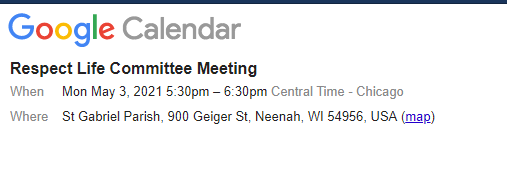
Either way, that is out of our control since that is what Google Calendar does. I hope that helps though.
Cody Armock
It will take them to their google calendar if they are logged in and have one since they can then duplicate that event or add it to one of their calendars through the three vertical dots, otherwise, if they are not logged in, then it will bring them to a page that will show them something like the picture below.
Either way, that is out of our control since that is what Google Calendar does. I hope that helps though.
Cody Armock
Web Department, Diocesan
877-923-0777
Lori Lynch
Hi Cody do I take off the little date box that appears in the upper right hand corner of the posts. When I switch to "No" under Dates* and hit update I get an error message that says validation failed field requires attention.
Thanks
Lori
Thanks
Lori
Cody Armock
Hello Lori,
Unfortunately, with those dates, all posts need them in order to show since that is how they are ordered from first to last.
To have them show on the homepage, you need to set the start date to today or whenever you want it to show and then the end date is when it will no longer show on the homepage but in the archive i.e. More News page, if I recall how it is built correctly.
I hope that helps!
Cody Armock
Unfortunately, with those dates, all posts need them in order to show since that is how they are ordered from first to last.
To have them show on the homepage, you need to set the start date to today or whenever you want it to show and then the end date is when it will no longer show on the homepage but in the archive i.e. More News page, if I recall how it is built correctly.
I hope that helps!
Cody Armock
Web Department, Diocesan
877-923-0777