











To-Dos and Additional Costs
Hi Ed and Helen,
I have attached the list of items that we discussed yesterday and laid out which ones are beyond the scope of the original design that you approved. Some of the items were not in the original design, but are small enough that we did not feel it was necessary to charge you for the change.
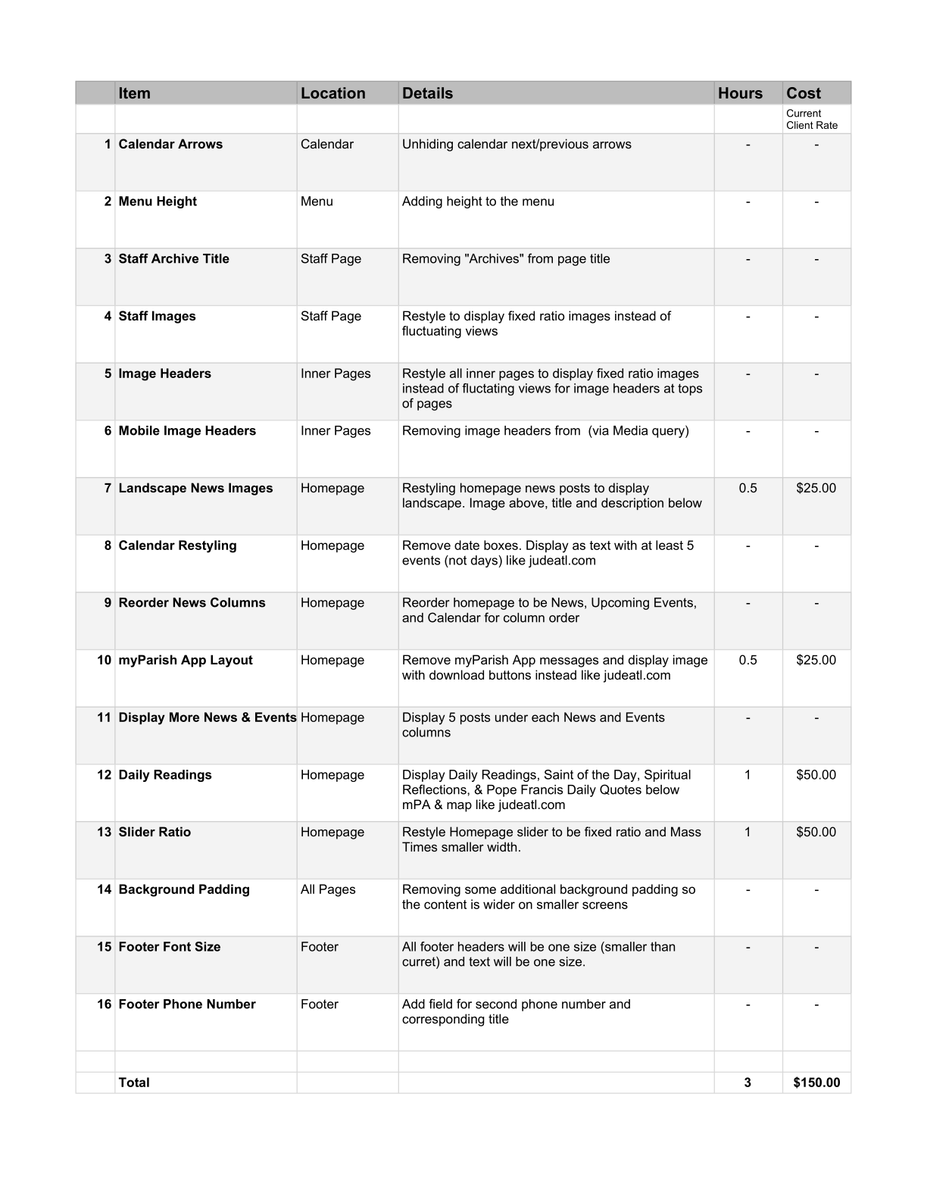
I am about to leave the office, but if you'd like to go over any questions regarding the updates or any of the pricing before moving forward, please let me know.
Thank you,
Veronica Alvarado
Web Department, Diocesan
877-923-0777
877-923-0777
 Ed Scotts
Veronica,
After adding a post and reviewing the site in more detail, I'd like to suggest one more change. The images on the inner pages (examples include news, mass schedule, giving, ...) take up a lot of space and force the user the scroll before they can view any content - even on my larger desktop computer. I had already requested we remove them for mobile displays (or when the window size is narrow), and I'd like to extend that to all window sizes. Ideally, we would prefer to remove the default image if no feature image is selected. However, if that is not possible based on the theme being used, just removing the image (via css or whatever is the preferred method) would work.
I'll want to verify this is okay with Helen on Monday morning, but wanted to give you a heads up that I would be making that request.
Thanks,
Ed.
After adding a post and reviewing the site in more detail, I'd like to suggest one more change. The images on the inner pages (examples include news, mass schedule, giving, ...) take up a lot of space and force the user the scroll before they can view any content - even on my larger desktop computer. I had already requested we remove them for mobile displays (or when the window size is narrow), and I'd like to extend that to all window sizes. Ideally, we would prefer to remove the default image if no feature image is selected. However, if that is not possible based on the theme being used, just removing the image (via css or whatever is the preferred method) would work.
I'll want to verify this is okay with Helen on Monday morning, but wanted to give you a heads up that I would be making that request.
Thanks,
Ed.
Ed Scotts
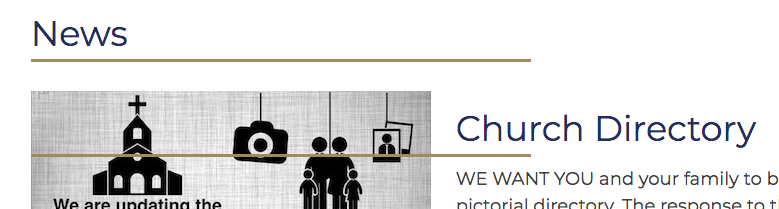
I noticed another issue when posting a few news items today. When you click on a news item, there is an extra gold bar that cuts through the image. I've attached a screenshot so you can see it. This is happening for all news items.
Related to this, I just noticed that the images in a list of news items (on the home page or on the news page) are not clickable. A user has to click on the title to get to the news item. Can we make the images clickable as well? (I think that is common user behavior - for them to click on the image and assuming that will link them to the article.)
Thanks,
Ed.
Related to this, I just noticed that the images in a list of news items (on the home page or on the news page) are not clickable. A user has to click on the title to get to the news item. Can we make the images clickable as well? (I think that is common user behavior - for them to click on the image and assuming that will link them to the article.)
Thanks,
Ed.
 Helen Hagan
Veronica,
I talked w/ Helen and we do want to remove the images at the top of the inner pages - both desktop and mobile views (all window sizes). I also verified with Helen that we are good to move forward with the list of changes for $150. If you need any additional information from us, please let us know.
Thanks,
Ed.
I talked w/ Helen and we do want to remove the images at the top of the inner pages - both desktop and mobile views (all window sizes). I also verified with Helen that we are good to move forward with the list of changes for $150. If you need any additional information from us, please let us know.
Thanks,
Ed.
 Veronica Alvarado
Good morning Ed,
I talked to the developer and have attached the new quote that includes the 3 items you mentioned in your emails.
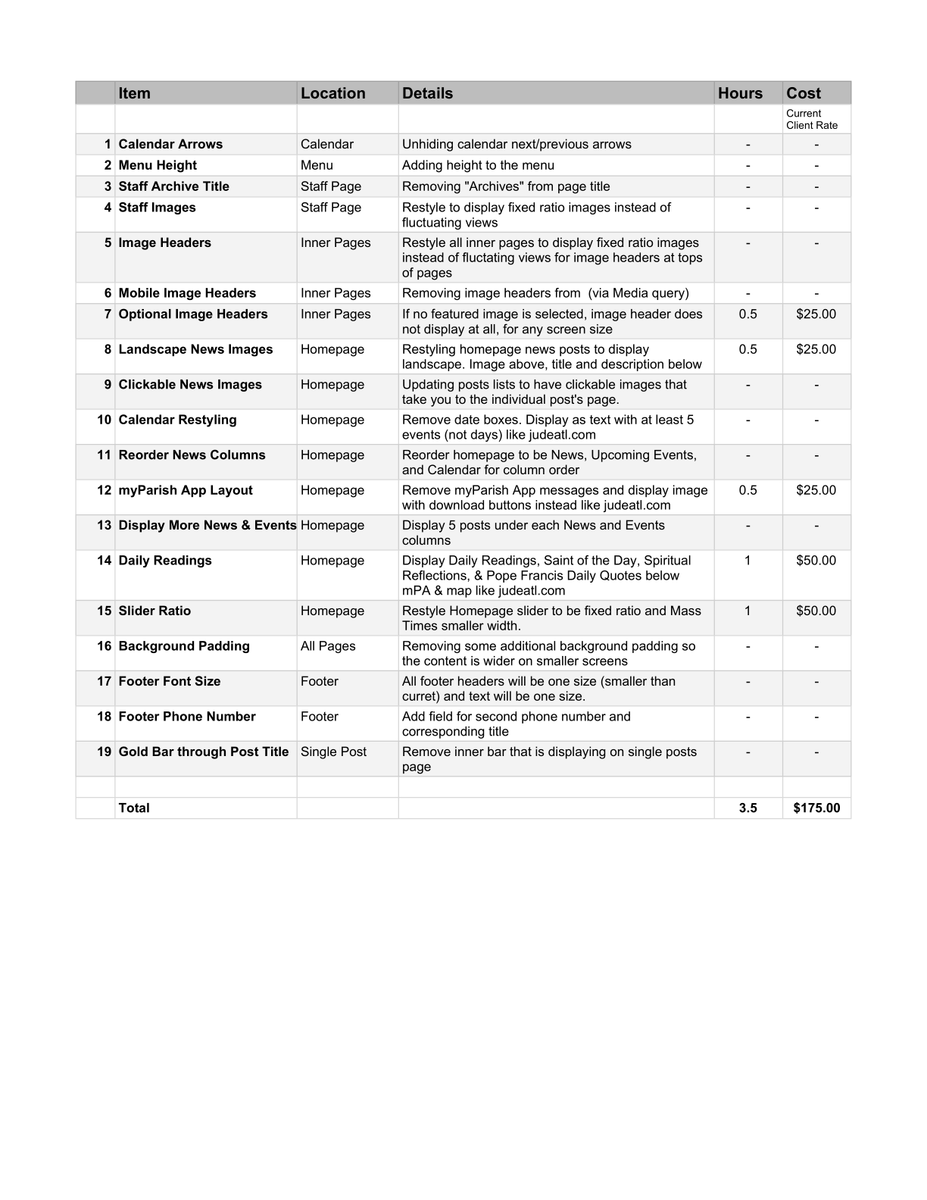
To clarify, we can still display no image header on mobile phones even if a featured image is chosen, or we can leave it entirely up to if a featured image is chosen only.
Please let me know if you'd like to do both, or only one.
Thank you,
Veronica Alvarado
Web Department, Diocesan
877-923-0777
877-923-0777
Ed Scotts
Veronica,
I think it gives us more flexibility to make the change where a default image is not displayed when a featured image is not chosen, and that would work the same regardless of screen size (desktop or mobile). With that approach, we can still add an image to a page in the future if we want.
Let's move forward with that approach.
Thanks,
Ed
I think it gives us more flexibility to make the change where a default image is not displayed when a featured image is not chosen, and that would work the same regardless of screen size (desktop or mobile). With that approach, we can still add an image to a page in the future if we want.
Let's move forward with that approach.
Thanks,
Ed
Veronica Alvarado
Sounds good, Ed.
To reiterate, we will be omiting #6 (Mobile Image Headers) in favor of #7 (Optional Image Headers).
Is there anything else you would like to edit before I send over the official quote?
To reiterate, we will be omiting #6 (Mobile Image Headers) in favor of #7 (Optional Image Headers).
Is there anything else you would like to edit before I send over the official quote?
Veronica Alvarado
Web Department, Diocesan
877-923-0777
877-923-0777
Ed Scotts
No - I think we are ready to move forward.
Thanks,
Ed
Thanks,
Ed
Veronica Alvarado
Hi Ed,
Here is a link to the sitemap that I mentioned the other day during training:
https://sfxmw.diocesanweb.org/sitemap/
This map will show all pages that are published to your site. When logged in, it will show private pages as well (such as Styles), but outside visitors would not see private pages.
Drafted pages will now display in this list.
Thank you,
Veronica Alvarado
Web Department, Diocesan
877-923-0777
877-923-0777
Veronica Alvarado
Good morning Ed,
I went over the items left to do with the developer today and am worried that we may need an additional day to complete the last of the mobile responsiveness to-dos.
Is it possible to change the launch date to Friday, August 9?
Additionally, I did not hear back from John at Computer Spectrum when I tried coordinating the original launch date with him. Have you also been in contact with him regarding the launch?
Thank you,
Veronica Alvarado
Web Department, Diocesan
877-923-0777
877-923-0777
Ed Scotts
Veronica,
The 9th will be fine. We have decided to push the announcement of the release to the following weekend (Aug 17/18), and would like to do the actual release early next week (Aug 13/14). That will give us time to do a final review of everything and complete a few updates we need to make on our side.
I talked w/ John a week or two ago, but have not heard from him since. I'll follow up with him and make sure he is ready.
Thanks,
Ed.
The 9th will be fine. We have decided to push the announcement of the release to the following weekend (Aug 17/18), and would like to do the actual release early next week (Aug 13/14). That will give us time to do a final review of everything and complete a few updates we need to make on our side.
I talked w/ John a week or two ago, but have not heard from him since. I'll follow up with him and make sure he is ready.
Thanks,
Ed.
Veronica Alvarado
Good morning Ed,
Thank you for understanding.
You mentioned doing the "actual release" early next week. Does this mean that we are launching Aug13/14 or should we still anticipate John making the DNS changes tomorrow? I want to make sure that we are on the same page since once you launch, anyone going to your sfxmw.org website will see the new site.
If you would prefer to wait until Tuesday or Wednesday of next week, that is completely fine. Just let me know and I will let the developer know when to expect the DNS changes.
Thank you,
Veronica Alvarado
Web Department, Diocesan
877-923-0777
877-923-0777
Ed Scotts
We expect DNS changes next Tuesday or Wednesday.
Thanks,
Ed
Thanks,
Ed
Veronica Alvarado
Okay, perfect. We will have the developer finish the to-dos by tomorrow so that you have a couple of days to look at them and see if there is anything else we need to update.
Thank you,
Thank you,
Veronica Alvarado
Web Department, Diocesan
877-923-0777
877-923-0777
Ed Scotts
Veronica,
Are the website changes complete yet? I was having trouble getting to the site, but that may be because my bookmark is not pointing to the correct place. I'm also seeing a Not Secure message when I visit the site.
Can you provide me with the correct URL and advise about the Not Secure message. Also, can you provide the image sizes or proportions we should use for the home page, featured image on other pages, and the news/calendar events?
Thanks,
Ed
Are the website changes complete yet? I was having trouble getting to the site, but that may be because my bookmark is not pointing to the correct place. I'm also seeing a Not Secure message when I visit the site.
Can you provide me with the correct URL and advise about the Not Secure message. Also, can you provide the image sizes or proportions we should use for the home page, featured image on other pages, and the news/calendar events?
Thanks,
Ed
Veronica Alvarado
Hi Ed,
The security issue is just because we have set up the site for launch, which means the SSL (security certificate) gets removed. When you update your DNS changes to launch and move to the official domain, we will have a new SSL in place for the new domain.
For now, please visit http://sfxmw.diocesanweb.org (no "s" after http) as this is something will be completed during launch.
I will send a followup email with all of the changes we have made.
The last thing I believe we need to take a look at is the myParish App section. I am not sure if I can get a custom image of the app as St. Jude has on their website and we do not have a full line, but instead 2/3 of the width for the app. I'm going to see what we can do and get back to you
I have a meeting at 11:30 am, but feel free to call me until then.
Thank you,
Veronica Alvarado
Web Department, Diocesan
877-923-0777
877-923-0777
Veronica Alvarado
Ed,
All of the updates have been completed, with the exception of the styling of the new myParish App section.
Here is the list of items that we have updated:
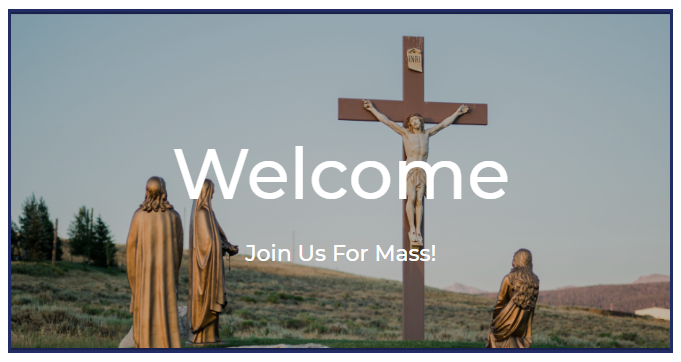
- Homepage Main Image is now as close as we could get it to ratio (ranges from 660 by 340 px to 750 by 450 px. It is best to use the larger dimensions with the understanding that the main visible content should be within the smaller dimensions taken from center, center. See examples below.)
- Inner Page Header Image is now ratio (about 1600 by 400 px)
- Inner Page Header does not use default featured image. Option has been left in Theme Settings for if we need to reverse this change.
- Staff images are now ratio instead of accounting for screen width (280 by 300 px)
- Renamed Staff Page from "Archives: Staff" to "Staff"
- Added padding to top & bottom of menu (taller menu)
- Added area for second phone number + title in Theme Settings > Contact Info
- Added Daily Readings area below app/map section in Theme Settings > Daily Readings
- Homepage Upcoming Events & News posts are:
- landscape rectangles (300 by 170 px)
- image above text
- set to display 5
- clickable via image, title, and Read More >
- Homepage Calendar is now list format & displays 10 events
- Full calendar displays arrows to scroll through months
- Remove myParish App Messages from Homepage
- Link myParish App to myParish App page, not myParishApp.com
- Reorder Homepage columns to News, Upcoming Events, Calendar
- Update View All button for Events (now links correctly)
- Add the correct sitemap link to footer
- Removed 40% of maximum background padding so content screen is wider
- Footer font size updated
- Removed underline of post title (was overlapping with images)
Main Homepage Image Range
750 by 450 px
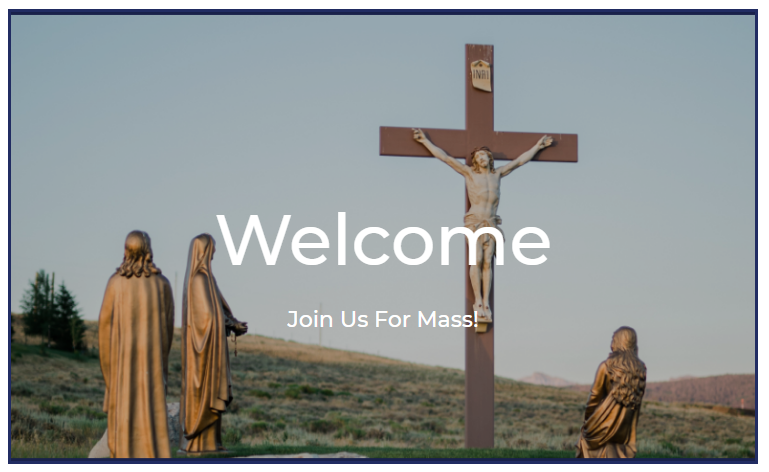
660 by 340 px
Let me know if you have any questions,
Veronica Alvarado
Web Department, Diocesan
877-923-0777
877-923-0777