












Congratulations on Launching!
Hello everyone,
Congratulations, your new website is now live and visible to the world!
I'm still not seeing the live site. Why is that?
The industry standard for launch changes to propagate is 0-72 hours. However, it's been my experience that you can usually see these changes within 2 hours. You will know it was successful when visiting https://sfxmw.com/ brings up the site seen here: http://sfxmw.diocesanweb.org.
Our developer will add the SSL certificate for sfxmw.net on Monday.
If you can see the website on a computer or mobile device not using your parish's internet, it may be that your parish's internal server needs to be reset or may have the IP address of your previous host manually set up. If this is the case, you will have to talk to your IT person, as this is not something Diocesan can help with.
New Login Page
Although you will now go to https://sfxmw.com/mtwashington to log in, your login credentials are still the same.
Statistics
Since your website is now live, we have also added the ability to track your website's statistics.
Feel free to view the statistics by clicking Statistics. This will give you access to see what devices are being used, how people are finding your website and your top pages/link.
Support Moving Forward
As you may have noticed, on your WordPress Dashboard, there is a Diocesan Web Support box with links to help articles that we have written especially for our websites, complete with step-by-step instructions and images. This should help with most of the questions that you may have.
You do also have another 2 weeks from your launch date to call and ask us any questions for free. After those 2 weeks, the paid support will go into effect. Paid support is $50/hr (prorated) and is billed monthly to the parish with each support items (date, amount of time, notes) itemized out.
If you have any issues or questions in the future, please email us at webdepartment@diocesan.com or call us at 877-923-0777.
Canceling Previous Website Host
Launching your website DOES NOT cancel your previous web hosting service. Diocesan does, however, suggest that you do not cancel your previous web hosting service until at least 2 business days after your new website launches.
NOTE: Some website hosting companies may package website hosting and domain hosting/renewal together. If this is true for you, you may want to consider transferring your domain over to Diocesan. You may begin this process by emailing us at webdepartment@diocesan.com or calling 877-923-0777.
Other Resources
Just in case we didn’t mention it in the training, here are some resources for free, stock images to use throughout your website:
- Unsplash
http://unsplash.com - Pexels
http://pexels.com - Cathopic
https://www.cathopic.com/
Please let us know if you have any questions and, again, congratulations from everyone here at Diocesan!
Web Department, Diocesan
webdepartment@diocesan.com
877-923-0777
877-923-0777
 Ed Scotts
Veronica,
First, thanks again for all or your help in getting our website up and running.
One more issue I'd like to resolve...
Did the changes get made to auto-publish posts to facebook and twitter? We were having a discussion on this via email/basecamp, but I don't think we ever completed the conversation. As I understand it, you can set this up, but I'll have a task to perfrom with facebook every 60 days to maintain it - is that correct? There was another option presented - to post to facebook and then it would propagate to twitter and the website. However, I would rather post directly to the website.
For some reason, I thought there might be a plugin we could purchase that would get around the 60 day issue. I searched my email, but could not find anything about this. I'm not sure if that was part of a conversation we had or not.
In any case, we would like to get a solution implemented to auto-post to facebook and twitter. Let me know what we need to do to get this setup and working.
Thanks,
Ed.
First, thanks again for all or your help in getting our website up and running.
One more issue I'd like to resolve...
Did the changes get made to auto-publish posts to facebook and twitter? We were having a discussion on this via email/basecamp, but I don't think we ever completed the conversation. As I understand it, you can set this up, but I'll have a task to perfrom with facebook every 60 days to maintain it - is that correct? There was another option presented - to post to facebook and then it would propagate to twitter and the website. However, I would rather post directly to the website.
For some reason, I thought there might be a plugin we could purchase that would get around the 60 day issue. I searched my email, but could not find anything about this. I'm not sure if that was part of a conversation we had or not.
In any case, we would like to get a solution implemented to auto-post to facebook and twitter. Let me know what we need to do to get this setup and working.
Thanks,
Ed.
 Veronica Alvarado
Hi Ed,
I'm so glad you held off on going through the plugin's setup because Diocesan has actually just announced a new product that will be exactly what you're looking for! I couldn't talk about it since it was under wraps, but now I can!
It's called Evangelus and will be officially launching this Fall.
It's one place to create the message to send information to all of your social media accounts.
Evangelus organizes parishioner preferences as well as communication channels. Parishes send unlimited email, text, app, social media, and website messages through Evangelus simultaneously. It's easy to do and saves you time. This way, instead of posting in multiple places individually or displaying feeds within your website, you can post it once and have the same message show up everywhere you need it to go, thus reaching more people the way they prefer.
For example, you'd create a post and have the option to push it to:
- Website (as posts)
- myParish App Messages
- Text Message
Would you like me to add you to the list of people to reach out to with more information?
Veronica Alvarado
Web Department, Diocesan
877-923-0777
877-923-0777
Veronica Alvarado
Here is the information I sent previously:
Auto-Publishing of Posts
We also discussed automated Facebook & Twitter posts.
Auto-publishing from your website would mean that you would have to update your Facebook API Access Token every 60 days via Facebook's developer console & API application form. Diocesan could set up the initial API Access Token, but every 60 days after that, it would be up to you to complete or pay the $50/hr support rate for one of our support team members to do it for you.
This is something that Facebook changed in April 2018 for security reasons so only Facebook-approved "Apps" can publish to Facebook.
An alternative solution that we have used for other parishes to post to Facebook and set up Facebook so that it would automatically send the same post to Twitter (something Facebook already supports) and automatically send to the website in the format you see below. This way, you are still only posting in one place and you won't have to renew any API access tokens.
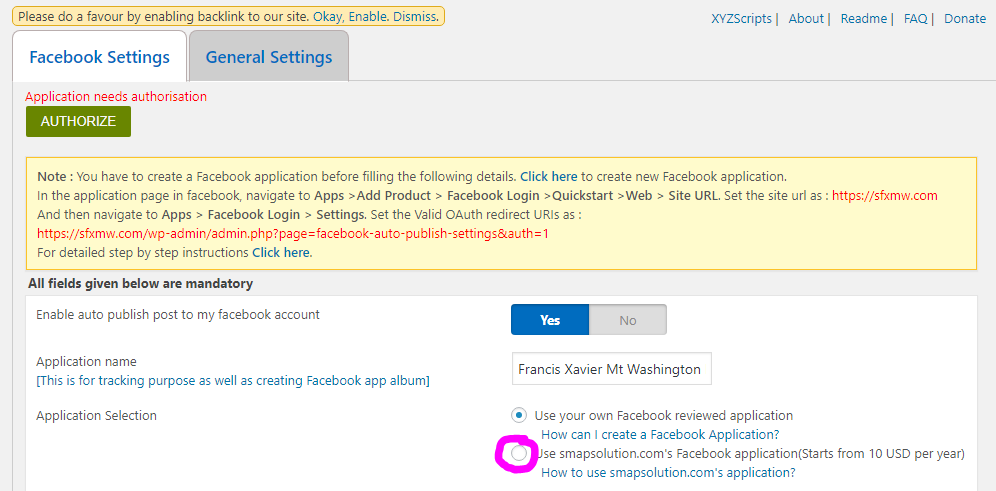
In addition, we discussed the WP2Social Auto Publish that is currently on your website. Here, they have the option to purchase SMAPsolution.com's Facebook application found in WP2Social Auto Publish > Settings:
Veronica Alvarado
Web Department, Diocesan
877-923-0777
877-923-0777
Ed Scotts
Veronica,
I would like to be on the list to receive more information about Evangelus.
As for the WP2Social Auto Publish plugin, I have a few questions:
1. The plugin is installed, but I'm assuming it is not active yet. Do I just need to authorize it so it becomes active?
2. I don't see any configuration for Twitter, does it auto-publish to twitter as well?
Thanks,
Ed.
I would like to be on the list to receive more information about Evangelus.
As for the WP2Social Auto Publish plugin, I have a few questions:
1. The plugin is installed, but I'm assuming it is not active yet. Do I just need to authorize it so it becomes active?
2. I don't see any configuration for Twitter, does it auto-publish to twitter as well?
Thanks,
Ed.
Veronica Alvarado
Good morning Ed,
While installing the Twitter version of the WP2Social Auto Publish, I received a warning since the same plugin author has a plugin that does the job of both posting to Twitter and Facebook in a single plugin.
I have installed this new plugin (Social Media Auto Publish) and provided you with access. As previously mentioned, you will have to create an application for Facebook, and now one for Twitter as well. Thankfully, the Twitter application is much easier to create.
The instructions for creating the Facebook application are within the Social Media Auto Publish > Settings > Facebook Settings in the yellow box at the top of the page. Since it requires a person's Facebook account that has access to edit the SFX official Facebook page and requires an additional application about every 3 months, this is something you must set up on your own.
The instructions for creating the Twitter application are within the Social Media Auto Publish > Settings > Twitter Settings in the yellow box at the top of the page. If you provide us with SFX's Twitter login, we can get this API Key, API Secret, Access Token, and Access Token Secret for you.
Please keep in mind that you will need login access to both social media accounts to create these items.
Once all fields have been completed for both the Facebook Settings and the Twitter Settings tabs, and saved the changes, each post that you send out will automatically post to the social media accounts.
I know this can be quite confusing since there are so many steps involved, so let's set up a time to talk this through. I am available until 10:30 am today, then will be available between 8:30 and 9:30 tomorrow morning.
Thank you,
Veronica Alvarado
Web Department, Diocesan
877-923-0777
877-923-0777
Ed Scotts
Veronica,
It will probably be the weekend before I can really take a look at this. I think I'll be okay, but if I need a call for more information, it may be Monday before I'm available.
One other issue that still needs to be resolved is the sfxmw.net (http://sfxmw.net) address. I'm seeing a security warning when I access the website from that address. Is that something that needs to be corrected on your end, or do I need to have the firm that redirected the DNS to your IP to take care of that?
Thanks,
Ed.
It will probably be the weekend before I can really take a look at this. I think I'll be okay, but if I need a call for more information, it may be Monday before I'm available.
One other issue that still needs to be resolved is the sfxmw.net (http://sfxmw.net) address. I'm seeing a security warning when I access the website from that address. Is that something that needs to be corrected on your end, or do I need to have the firm that redirected the DNS to your IP to take care of that?
Thanks,
Ed.
Ed Scotts
Veronica,
We would like to submit a request for another plugin to be added. The URL-Params plugin defined at this site: https://wordpress.org/plugins/url-params/
Alternatively, if there is another plugin you would recommend, please let us know.
Here is an example of the use case:
We are adding the option for someone to purchase a raffle ticket from our website. A third party site will redirect the user to the following link after a ticket is purchased, something like this: https://sfxmw.com/raffle-thank-you/?ti=190002
We want to grab that "ti" value, so on the page we can have something like
<p>Your ticket purchase has been received. Receipt Number: 190002 </p>
Thanks,
Ed
We would like to submit a request for another plugin to be added. The URL-Params plugin defined at this site: https://wordpress.org/plugins/url-params/
Alternatively, if there is another plugin you would recommend, please let us know.
Here is an example of the use case:
We are adding the option for someone to purchase a raffle ticket from our website. A third party site will redirect the user to the following link after a ticket is purchased, something like this: https://sfxmw.com/raffle-thank-you/?ti=190002
We want to grab that "ti" value, so on the page we can have something like
<p>Your ticket purchase has been received. Receipt Number: 190002 </p>
Thanks,
Ed
Veronica Alvarado
Good morning Ed,
We took a look at the .net domain and at this moment, the domain is not pointing to our servers which means that the SSL certificate would be something managed by Computer Spectrum.
Alternatively, if the sfxmw.net domain was pointing to our servers directly (104.156.48.29) then the redirect and SSL certificate would be managed by Diocesan.
As for the URL Params plugin, our support specialist looked over the plugin and approved it. We have added it to your site at no cost since you are within the 2-week, post-launch time period but will not be doing any kind of training over it since it is not a Diocesan-standard plugin. There were not any settings upon installation and activation, so you may begin using the URL parameters at any time.
If you begin experiencing any issues, please call or email our support specialist at 877-923-0777 or webdepartment@diocesan.com.
Veronica Alvarado
Web Department, Diocesan
877-923-0777
877-923-0777