












Website Launched
Hello and congratulations!
Congratulations, your new website is now live and visible to the world! This email is a little bit delayed since I was in a training session and meeting this afternoon, but you are all set!
I'm still not seeing the live site. Why is that?
The industry standard for launch changes to propagate is 0-72 hours. However, it's been my experience that you can usually see these changes within 2 hours. You will know it was successful when visiting https://epiphanyofthelord.org/ brings up the site seen here: https://epiphanyofthelord.diocesanweb.org.
If you can see the website on a computer or mobile device not using your parish's internet, it may be that your parish's internal server needs to be reset or may have the IP address of your previous host manually set up. If this is the case, you will have to talk to your IT person, as this is not something Diocesan can help with.
New Login Page
Although you will now go to https://epiphanyofthelord.org/toledoto log in, your login credentials are still the same.
Statistics
Since your website is now live, we have also added the ability to track your website's statistics.
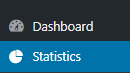
Feel free to view the statistics by clicking Statistics. This will give you access to see what devices are being used, how people are finding your website and your top pages/link.
Support Moving Forward
As you may have noticed, on your WordPress Dashboard, there is a Diocesan Web Support box with links to help articles that we have written especially for our websites, complete with step-by-step instructions and images. This should help with most of the questions that you may have.
You do also have another 2 weeks from your launch date to call and ask us any questions for free. After those 2 weeks, the paid support will go into effect. Paid support is $50/hr (prorated) and is billed monthly to the parish with each support items (date, amount of time, notes) itemized out.
If you have any issues or questions in the future, please email us at webdepartment@diocesan.com or call us at 877-923-0777.
Canceling Previous Website Host
Launching your website DOES NOT cancel your previous web hosting service. Diocesan does, however, suggest that you do not cancel your previous web hosting service until at least 2 business days after your new website launches.
NOTE: Some website hosting companies may package website hosting and domain hosting/renewal together. If this is true for you, you may want to consider transferring your domain over to Diocesan. You may begin this process by emailing us at webdepartment@diocesan.com or calling 877-923-0777.
Other Resources
Just in case we didn’t mention it in the training, here are some resources for free, stock images to use throughout your website:
- Unsplash
http://unsplash.com - Pexels
http://pexels.com - Cathopic
https://www.cathopic.com/
Please let me know if you have any questions and, again, congratulations!
Veronica Alvarado
Web Department, Diocesan
877-923-0777
877-923-0777
 Irene Bland
Thanks Veronica
We will check it out.
Quick glance, the Google map comes up and gets covered up with a grey opps box on the Mass Times page.
This is true on a computer and mobile device.
We will check it out.
Quick glance, the Google map comes up and gets covered up with a grey opps box on the Mass Times page.
This is true on a computer and mobile device.
 Veronica Alvarado
Good morning Irene,
Thank you for bringing this to our attention. We are working on it this morning and will keep you updated.
Veronica Alvarado
Web Department, Diocesan
877-923-0777
877-923-0777
Irene Bland
ANOTHER issue:
The view calendar goes to our Public Web Calendar - good!
*
Epiphany Of The Lord
*
PROBLEM, when I click on the quick calendar individual calendar boxes they link to the Parish Internal Calendar
*
EOL_Parish internal calendar
*
- it needs to link to the Public Web Calendar
*
Epiphany Of The Lord
*
The view calendar goes to our Public Web Calendar - good!
*
Epiphany Of The Lord
*
PROBLEM, when I click on the quick calendar individual calendar boxes they link to the Parish Internal Calendar
*
EOL_Parish internal calendar
*
- it needs to link to the Public Web Calendar
*
Epiphany Of The Lord
*
Irene Bland
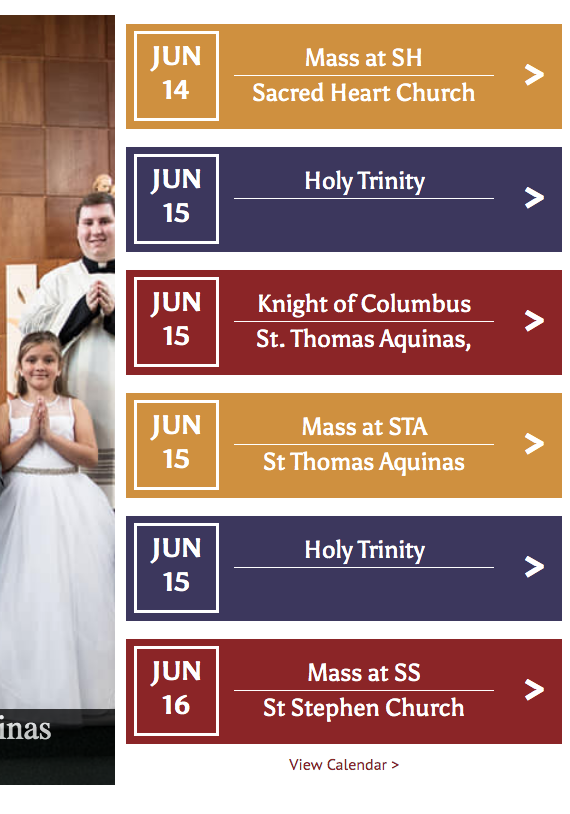
I don't know if this is related but why is there 2 HOLY TRINITY boxes - it would make sense if the second one said June 16, but why two that read June 15? see attached
Irene Bland
Hi Veronica
ITEM 3a:
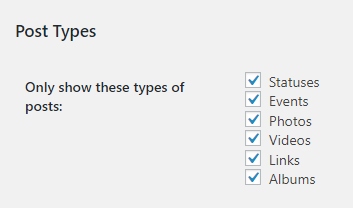
On June 3 you indicated that "..our homepage Facebook feed would include 3 posts...We currently have it set to display Statuses, Events, Photos, your Videos, Facebook Links, and Album updates to your Facebook Feed by the adminstrators of the Facebook page."
I created 1 event on Facebook this morning "Senior Prom". By 11:00 it had not shown up in our website homepage Facebook feed, so I shared the event as a post at 11:00. That post has not shown up on the feed and it is 8 hours later. I thought you said that it updated about every hour - can you check to see if something is wrong?
ITEM 3b:
I also created a second Facebook event "2nd Saturday Game Night" at 1 pm, and it is not showing up either on the homepage - should always follow do a post of any new Facebook events
ITEM 3c:
Nothing has updated on the full Facebook page on the website either.
ITEM 4: I also created new Website News & Events posts for each of the 2 above events. In the description of the event I ended with a link to our Facebook Event, so they could connect promote it on Facebook. The link works correctly, but it is not opening a new tab to display it, even though it shows the symbol for the link to open in a separate page.
ITEM 3a:
On June 3 you indicated that "..our homepage Facebook feed would include 3 posts...We currently have it set to display Statuses, Events, Photos, your Videos, Facebook Links, and Album updates to your Facebook Feed by the adminstrators of the Facebook page."
I created 1 event on Facebook this morning "Senior Prom". By 11:00 it had not shown up in our website homepage Facebook feed, so I shared the event as a post at 11:00. That post has not shown up on the feed and it is 8 hours later. I thought you said that it updated about every hour - can you check to see if something is wrong?
ITEM 3b:
I also created a second Facebook event "2nd Saturday Game Night" at 1 pm, and it is not showing up either on the homepage - should always follow do a post of any new Facebook events
ITEM 3c:
Nothing has updated on the full Facebook page on the website either.
ITEM 4: I also created new Website News & Events posts for each of the 2 above events. In the description of the event I ended with a link to our Facebook Event, so they could connect promote it on Facebook. The link works correctly, but it is not opening a new tab to display it, even though it shows the symbol for the link to open in a separate page.
Veronica Alvarado
Good morning Irene,
1. Both the homepage calendar and the full calendar are set to pull from Calendar ID: eoltoledooh@gmail.com . Is this the correct Calendar ID to be using or is there another for the website calendar? (Each of your calendars within a single account has a different ID. For instructions on how to find them, click here.)
2. My guess is that the Holy Trinity item was duplicated because it reading it as an event that starts on June 15 and lasts two days, meaning there are two days of events that both start June 15. I will double check with the plugin's settings & options to see if we can update this.
3a & 3b. Yes, we do have the Facebook feed displaying all of those items. I have sent out a support email to the plugin creators so see why the events are not displaying or if their plugin only allows the option events to be used by itself. I will keep you updated.
3c. The plugin is, in fact, set to check your Facebook feed every hour. Again, it may be that events can only be used separately from statuses, photos, videos, links & albums.

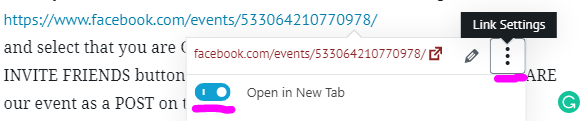
4. We have solved the link opening in a new tab. It seems to be a WordPress Gutenburg flaw. Although the links displays the icon next to it, you have to actually click the three dots, click the Open in New Tab button to turn it blue, then update to save your changes.

Since you would like all external links to open in a new tab, would you like us to make this automatic/standard? That way you wouldn't ever have to worry about manually marking each and every external link to open in a new tab.
Thank you,
Veronica Alvarado
Web Department, Diocesan
877-923-0777
877-923-0777
Irene Bland
1. Yes that is the correct account, but there are two calendars that are created, one is private (Internal) and one is public (web calendar)
Public: Web calendar named "Epiphany Of The Lord"
https://calendar.google.com/calendar/b/4?cid=ZW9sdG9sZWRvb2hAZ21haWwuY29t
Private: Internal Calendar named "EOL_Parish internal calendar"
https://calendar.google.com/calendar/b/4?cid=amcycmMxNnN0dGNya3RoZWNoOXVqbjF2NWNAZ3JvdXAuY2FsZW5kYXIuZ29vZ2xlLmNvbQ
I could not see anywhere to edit this to correct it. The correction is only needed on the 6-box Calendar events link - for them to open their event - but on the Public Web calendar, not the private Internal calendar.
It is correct on the View Calendar and our on our Calendar page
4. Yes - make it standard
Since you would like all external links to open in a new tab, would you like us to make this automatic/standard? That way you wouldn't ever have to worry about manually marking each and every external link to open in a new tab.
Public: Web calendar named "Epiphany Of The Lord"
https://calendar.google.com/calendar/b/4?cid=ZW9sdG9sZWRvb2hAZ21haWwuY29t
Private: Internal Calendar named "EOL_Parish internal calendar"
https://calendar.google.com/calendar/b/4?cid=amcycmMxNnN0dGNya3RoZWNoOXVqbjF2NWNAZ3JvdXAuY2FsZW5kYXIuZ29vZ2xlLmNvbQ
I could not see anywhere to edit this to correct it. The correction is only needed on the 6-box Calendar events link - for them to open their event - but on the Public Web calendar, not the private Internal calendar.
It is correct on the View Calendar and our on our Calendar page
4. Yes - make it standard
Since you would like all external links to open in a new tab, would you like us to make this automatic/standard? That way you wouldn't ever have to worry about manually marking each and every external link to open in a new tab.
Veronica Alvarado
Hi Irene,
Although they are on the same account, they will have different Calendar IDs. The calendar ID we have is only for the main calendar, Epiphany of the Lord (web).
Additionally, since the EOL_Parish Internal Calendar is private, and not set to public, it is actually impossible to show the internal calendar on the website. My guess is that when you clicked on the event, it opened up your own Google Calendar, which DOES have access to the private calendar. To test this, trying going to the website and clicking on an event in a Google Chrome Incognito window. Click here for instructions on how to open a Google Chrome Incognito window.
For the external links, we will add this plugin to your website and set it up. Typically, any plugins added after launch are flat-rate $35 for us to install, set up, and test, but I will be able to do this one for free, for you.
As a quick reminder, you do receive free support for two weeks after your website's launch. On Friday, June 28, paid support ($50/hr, prorated) will be activated.
I will let you know once we have set up all external links to open in a new tab.
Veronica Alvarado
Web Department, Diocesan
877-923-0777
877-923-0777
Irene Bland
thanks for the explanation on the Google calendar.
I thought it was odd that it was showing a private calendar.
Yes, I tested on the Incognito and also my husband's phone, it is working.
Thanks on the other fix of external links.
I thought it was odd that it was showing a private calendar.
Yes, I tested on the Incognito and also my husband's phone, it is working.
Thanks on the other fix of external links.
Veronica Alvarado
No worries! I'm glad we could get that sorted out.
Veronica Alvarado
Web Department, Diocesan
877-923-0777
877-923-0777