












Some issues/edits before we go live on Thursday?
Veronica Alvarado
Web Department
Phone: 877-923-0777
Diocesan.com <http://www.diocesan.com>
<https://t.xink.io/Tracking/Index/adABAGWmAAC5YjAA0>
---------- Forwarded message ---------
From: Irene Bland <irenebcreative@gmail.com>
Date: Tue, Jun 11, 2019 at 12:25 PM
Subject: Some issues/edits before we go live on Thursday?
To: Veronica Alvarado <valvarado@diocesan.com>, Cody Armock <
carmock@diocesan.com>
Cc: Fr. Gilbert <frgilbert@epiphanyofthelord.org>
Hello Veronica and Cody
I am still working on my edits that I can do from my list. I still need to
approve/finalize the App too. (Right now the App link on the bottom of the
page just goes to a Generic myParish app page.)
*Issues that I see still that I believe you need to fix are:*
*N1: *Homepage: The 6 calendar buttons, still need the arrow on the right
to link to the event on the main calendar, or whatever link you usually set
up for the individual events on calendar list function.
*N2: *Homepage: the Featured Story needs to link to the latest letter from
Fr. Gilbert - it still reads the 5th Sunday of Easter
*N3: *Homepage: the Facebook Feed "pop up" view - for those with more than
one photo - you can only see the first photo. *Veronica said it was fixed,
but I don't see it on my end. * (It works on the full Facebook page - if it
can't be resolved in the code on the 3-part Facebook feed on homepage - can
the link be to what we see in the pop-up review on the full Facebook page?)
*N4: *Our Legacy of Faith photo galleries: You indicated that you need to
see why we can not view the photos - only the first featured photo of each
church
*N5: *Our Catholic Schools: You have a page created, but on the pull down
menu when you click on the Our Catholic Schools - it goes directly to the
school's website - it should go to the page created (which does include a
link to the school's website.)
*N6: *I'm New page: We have updated text which I can update - but we wanted
to have a *"hide & reveal" function* with Questions only showing and then a
reveal of the answers. *Do you want me to add the new text and then you can
show us at our training on the 18th how to do something like I indicated?*
Web Department
Phone: 877-923-0777
Diocesan.com <http://www.diocesan.com>
<https://t.xink.io/Tracking/Index/adABAGWmAAC5YjAA0>
---------- Forwarded message ---------
From: Irene Bland <irenebcreative@gmail.com>
Date: Tue, Jun 11, 2019 at 12:25 PM
Subject: Some issues/edits before we go live on Thursday?
To: Veronica Alvarado <valvarado@diocesan.com>, Cody Armock <
carmock@diocesan.com>
Cc: Fr. Gilbert <frgilbert@epiphanyofthelord.org>
Hello Veronica and Cody
I am still working on my edits that I can do from my list. I still need to
approve/finalize the App too. (Right now the App link on the bottom of the
page just goes to a Generic myParish app page.)
*Issues that I see still that I believe you need to fix are:*
*N1: *Homepage: The 6 calendar buttons, still need the arrow on the right
to link to the event on the main calendar, or whatever link you usually set
up for the individual events on calendar list function.
*N2: *Homepage: the Featured Story needs to link to the latest letter from
Fr. Gilbert - it still reads the 5th Sunday of Easter
*N3: *Homepage: the Facebook Feed "pop up" view - for those with more than
one photo - you can only see the first photo. *Veronica said it was fixed,
but I don't see it on my end. * (It works on the full Facebook page - if it
can't be resolved in the code on the 3-part Facebook feed on homepage - can
the link be to what we see in the pop-up review on the full Facebook page?)
*N4: *Our Legacy of Faith photo galleries: You indicated that you need to
see why we can not view the photos - only the first featured photo of each
church
*N5: *Our Catholic Schools: You have a page created, but on the pull down
menu when you click on the Our Catholic Schools - it goes directly to the
school's website - it should go to the page created (which does include a
link to the school's website.)
*N6: *I'm New page: We have updated text which I can update - but we wanted
to have a *"hide & reveal" function* with Questions only showing and then a
reveal of the answers. *Do you want me to add the new text and then you can
show us at our training on the 18th how to do something like I indicated?*
 Veronica Alvarado
Hi Irene,
I went through the items you had on your list and here is what I have come up with:
N1: Homepage: Calendar Link
We have already added this to our to-do list. The developer is going through this list today and tomorrow to finish everything off.
N2: Homepage: Featured Story = Latest Letter
We have already added this to our to-do list.
N3: Homepage: FB Feed Multiple Photos
I updated the setting that should display them, but it is not doing what it should. I contacted the plugin creator's support staff to see if there is anything else that we can do. I will keep you updated.
N4: Our Legacy of Faith Photo Galleries
We have already added this to our to-do list.
N5: Out Catholic Schools Menu Update
This is a menu change and may be updated by you at any time, but we have updated it for you this time. See our help articles on how to delete a menu item and how to add a page to your menu.
N6: I'm New Accordion
Go ahead and add the new content. I will turn the I'm New page into an accordion page (open & close content) before launch and then we can go over it together during our training on the 18th.
myParish App
We have a to-do for the footer icon to link to https://mypari.sh/nj6y. This is a personalized, direct link to your parish within the app. That way, if they are on their phone, they will be redirected to myParish App and if they do not have the app, then it will redirect to myParish App in the Apple App/Google Play store.
Below is a photo of what is currently on your App.
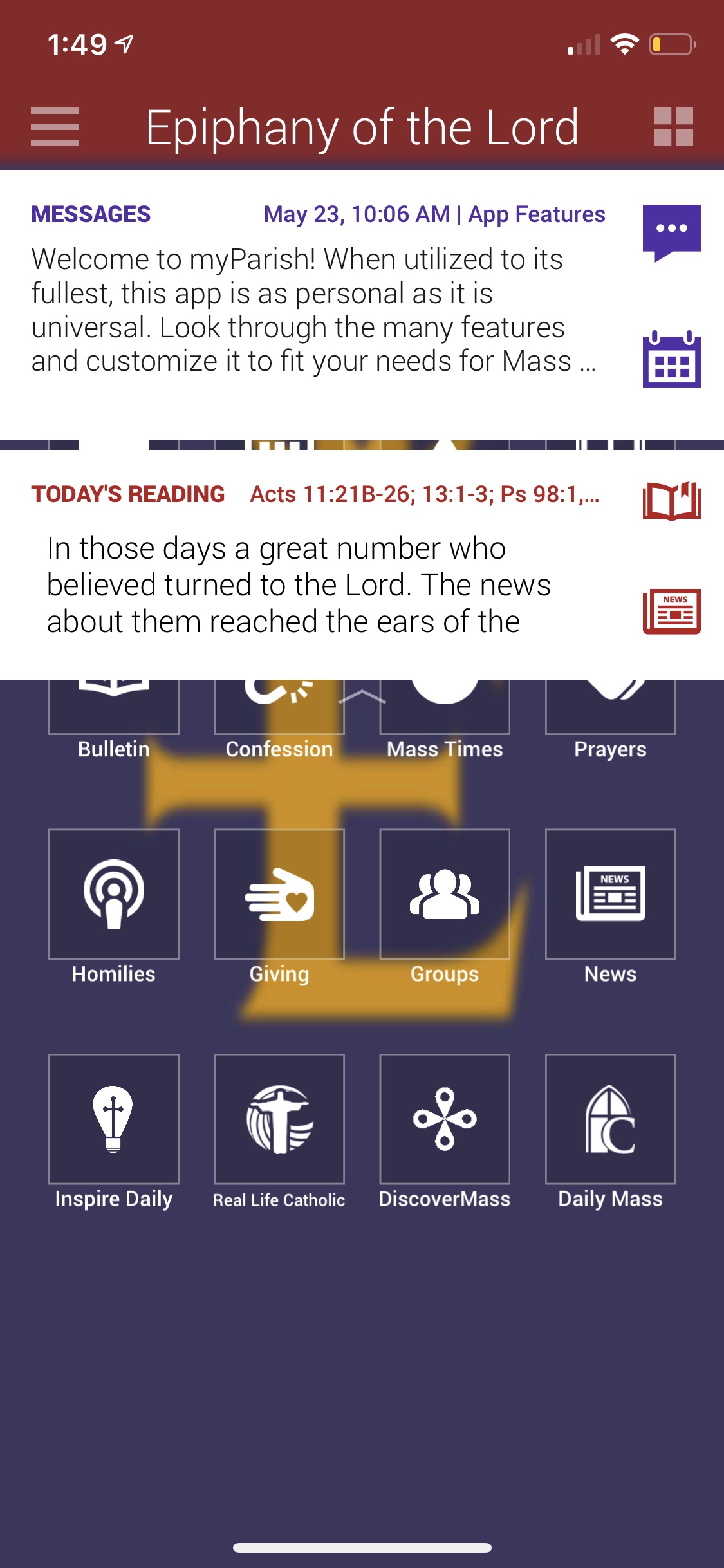
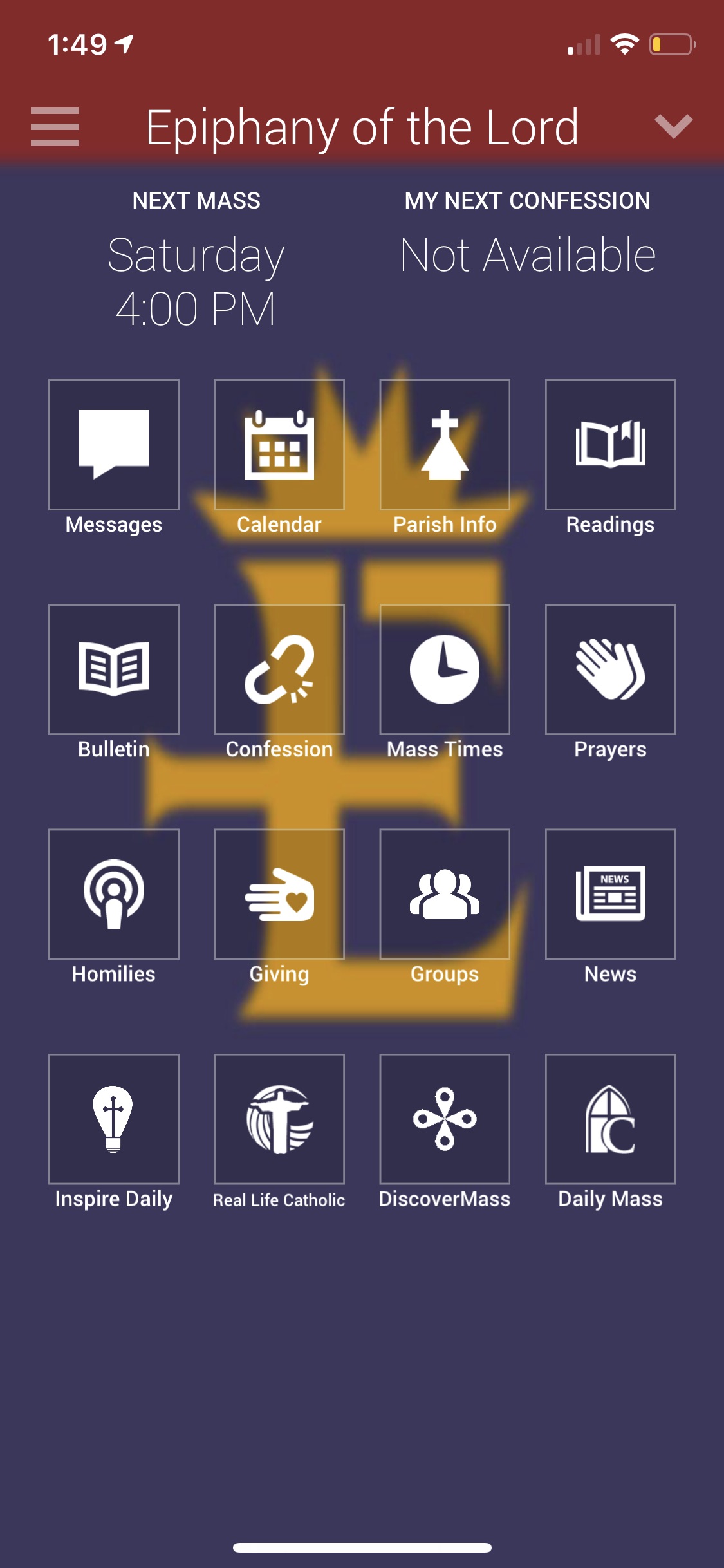
Something to keep in mind is that you can add an RSS feed of your post categories to your App. So News & Events can be a button on your app. Father's letters could be a button on your app. You may want to do this now or wait until your new website has launched. Here are the RSS links for each of those:
- https://epiphanyofthelord.diocesanweb.org/category/from-the-pastors-desk/feed/
- https://epiphanyofthelord.diocesanweb.org/category/news/feed/
You can log into your App dashboard and make any necessary edits. Here is the phone number to the myParish App department for any questions regarding the App: 1-800-997-8805 or myparishapp@diocesan.com.
I will keep you updated on when we solve each of these issues.
Let me know if you had any questions or needed any clarification.
Thank you,
I will keep you updated on when we solve each of these issues.
Let me know if you had any questions or needed any clarification.
Thank you,
Veronica Alvarado
Web Department, Diocesan
877-923-0777
877-923-0777
 Irene Bland
Thanks Veronica for the answers and the app graphics and information.
here are a couple more:
N7a: On all the Events, when you click on SEE MORE, it brings you to a separate page, but on those pages it still truncates the end of the paragraph with no way to view the rest. See the Diocese Annual Catholic Appeal.
N7b: This is true for my edits to the Summer Youth Program event. - I can't see the rest of my additions which included email and phone links as well as a linked flyer/registration document.
N8: On all the Events, on the New to the EOL Parish event. There is a link when you go to the Edit of this page, but when we view it, the link is not there to take us to the Registration page. (https://epiphanyofthelord.diocesanweb.org/new-to-the-parish/)
https://epiphanyofthelord.diocesanweb.org/new-to-the-parish/
here are a couple more:
N7a: On all the Events, when you click on SEE MORE, it brings you to a separate page, but on those pages it still truncates the end of the paragraph with no way to view the rest. See the Diocese Annual Catholic Appeal.
N7b: This is true for my edits to the Summer Youth Program event. - I can't see the rest of my additions which included email and phone links as well as a linked flyer/registration document.
N8: On all the Events, on the New to the EOL Parish event. There is a link when you go to the Edit of this page, but when we view it, the link is not there to take us to the Registration page. (https://epiphanyofthelord.diocesanweb.org/new-to-the-parish/)
https://epiphanyofthelord.diocesanweb.org/new-to-the-parish/
Irene Bland
I had the I'm New page half-way edited, but it reverted before I had time to update it.
If the programmer is changing something, I can wait to edit that page.
If the programmer is changing something, I can wait to edit that page.
Irene Bland
OK, that page - "I'm New" has the updated copy.
(I use a lot of key commands when I am working - I may have triggered something previously to have it revert :)
(I use a lot of key commands when I am working - I may have triggered something previously to have it revert :)
Veronica Alvarado
Good morning Irene,
Here are the updates to yesterday's list:
N1: Homepage: Calendar Link
Completed. Each event on the homepage now links to the corresponding Google Calendar event.
N2: Homepage: Featured Story = Latest Letter
Completed. Would you like us to add a Read More link below it?
N3: Homepage: FB Feed Multiple Photos
Still in progress. We were able to get a hold of the plugin creator and they have pointed us in the right direction. The developer will be working on it today.
N4: Our Legacy of Faith Photo Galleries
Still in progress.
N5: Catholic Schools Menu Update
Completed.
N6: I'm New Accordion
We don't currently have anything on the site that does this, but the developer said that he can most definitely add it in. However, with the launch quickly approaching, it may have to wait until after tomorrow's launch.
We are hoping to have it completed before the training so we can go over it together at that point.
N7a: See More Events
It may have been something that the developer just added, but there are See More links below the truncated paragraphs.
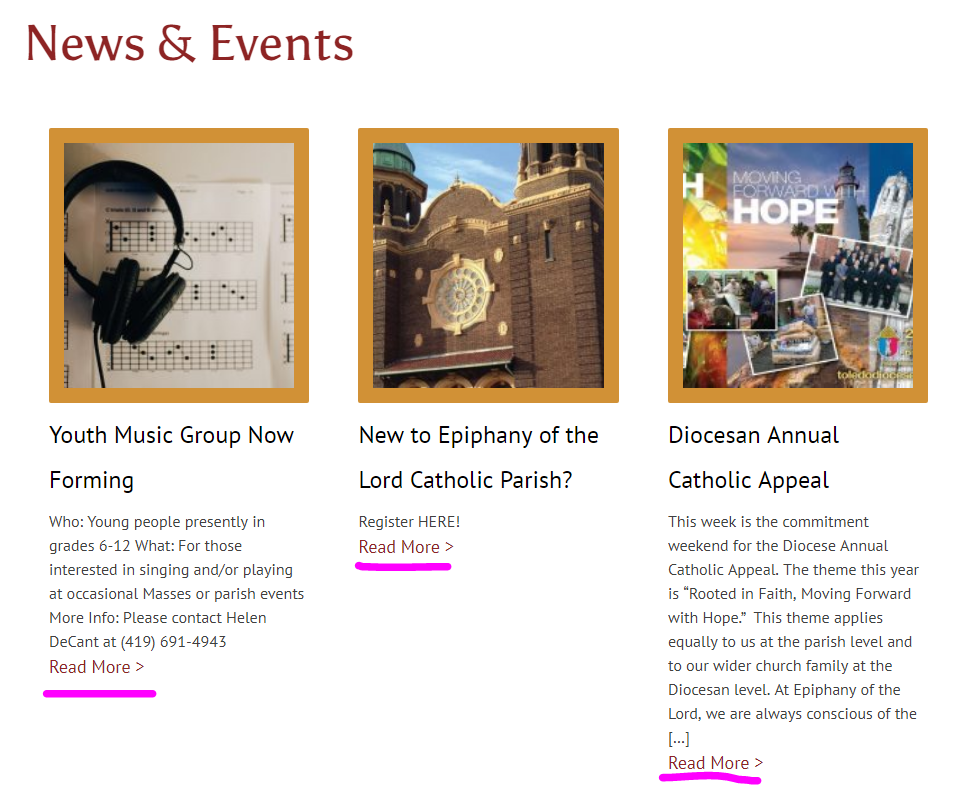
N8: News & Events Text Only Previews
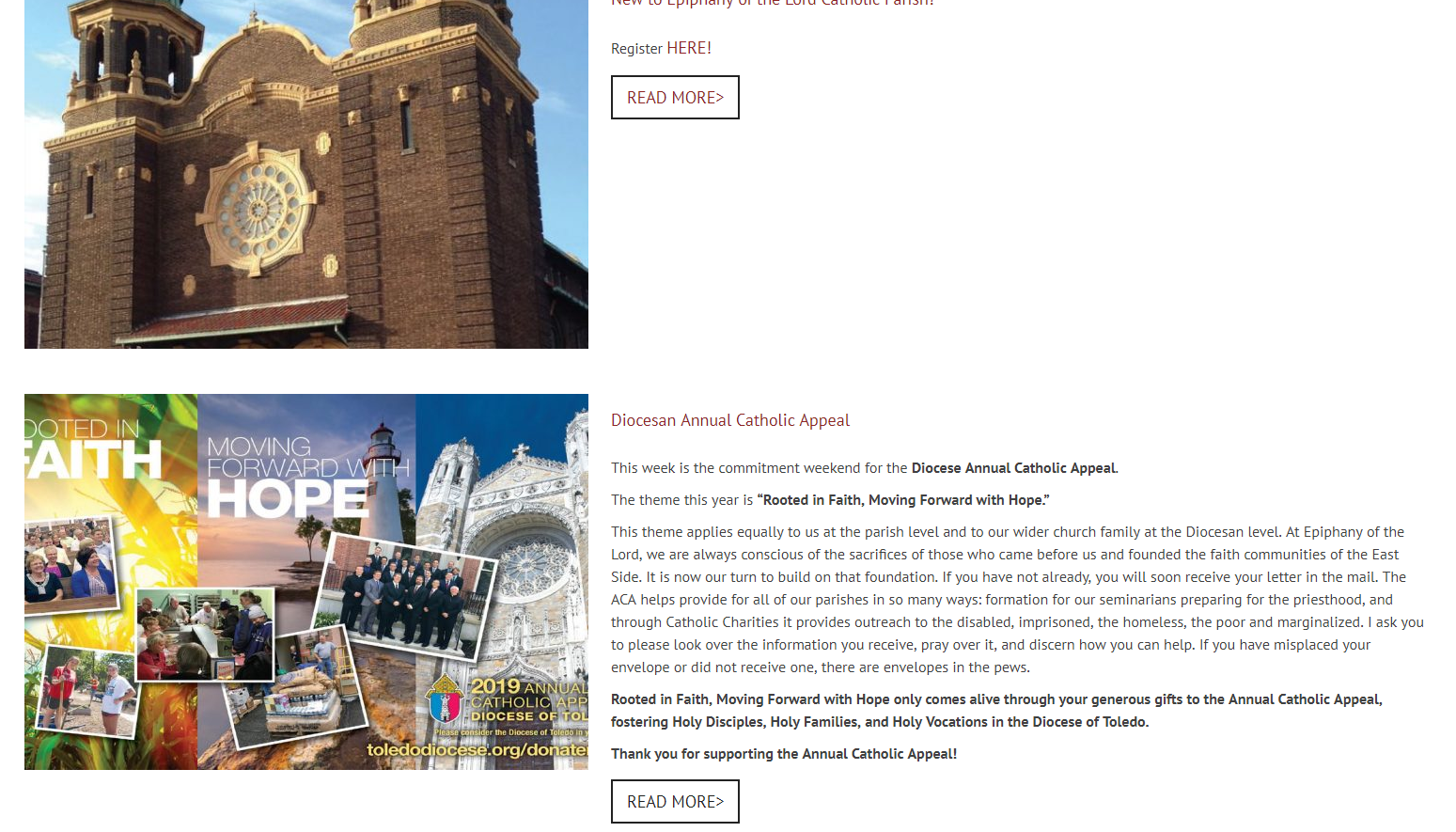
The News & Events page is an archive and will simply show the text of the post. This means that the New to EOL Catholic Parish post would have to be clicked on to actually click on the link. Alternatively, we can display the full text and display it as one column rather than 3. That way we don't have one really long column and the one next to it short (compare Diocesan Annual Catholic Appeal length to the length of the New to Epiphany of the Lord Parish? post).
I've created a quick mockup here: https://epiphanyofthelord.diocesanweb.org/test/
Thank you,
Veronica Alvarado
Web Department, Diocesan
877-923-0777
877-923-0777
Irene Bland
thanks Veronica, see my comments in RED
N1: Homepage: Calendar Link
Completed. Each event on the homepage now links to the corresponding Google Calendar event. - Thanks the link works good.
NEW ISSUE: something changed and now instead of just listing the church name it is putting the whole address following the name. We don't need the address showing in this quick look list. It looks like this:
N2: Homepage: Featured Story = Latest Letter
Completed. Would you like us to add a Read More link below it? Yes, add Read More
N8: News & Events Text Only Previews the issue I was seeing is resolved. So it is good to keep it as you have it now.
Thanks on all the other fixes and those still in progress.
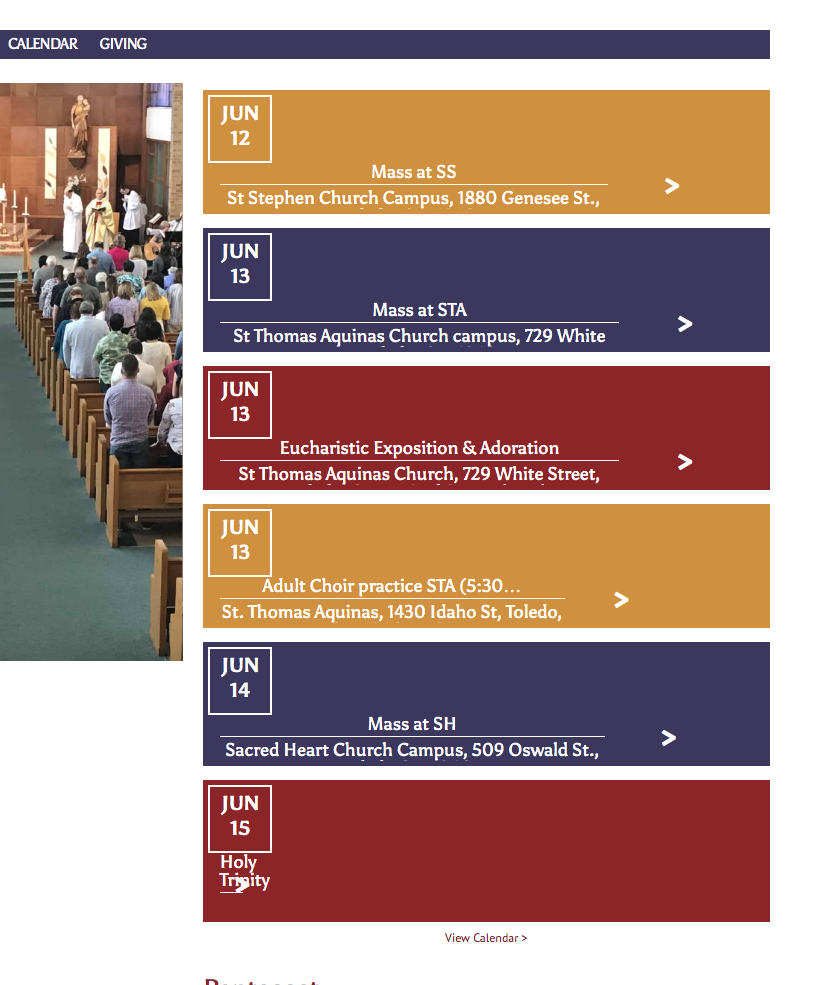
N1: Homepage: Calendar Link
Completed. Each event on the homepage now links to the corresponding Google Calendar event. - Thanks the link works good.
NEW ISSUE: something changed and now instead of just listing the church name it is putting the whole address following the name. We don't need the address showing in this quick look list. It looks like this:
N2: Homepage: Featured Story = Latest Letter
Completed. Would you like us to add a Read More link below it? Yes, add Read More
N8: News & Events Text Only Previews the issue I was seeing is resolved. So it is good to keep it as you have it now.
Thanks on all the other fixes and those still in progress.
Veronica Alvarado
Good morning Irene,
We are about to launch your website and are just finishing up some last updates. Whew!
N1: Homepage Calendar Link
When we updated them to open in new tabs, we changed an earlier fix to only show the location names, not the address. The developer will be updating this today.
N2: Homepage - Featured Story
The developer will be adding the Read More link today.
Veronica Alvarado
Web Department, Diocesan
877-923-0777
877-923-0777
Irene Bland
Thanks.
I want to add some events and change a few featured photos, but I will wait until it launches.
I’m in a meeting, so I will check it out later.
I want to add some events and change a few featured photos, but I will wait until it launches.
I’m in a meeting, so I will check it out later.
Veronica Alvarado
Hi Irene,
I also wanted to let you know that the Facebook issue with multiple images has been solved! Now when you click on the images, the lightbox will allow you to click the images from below.
Veronica Alvarado
Web Department, Diocesan
877-923-0777
877-923-0777
Irene Bland
thank you