










Homepage Updates
Hello Jillian,
You spoke to Nathalie about wanting to change some things on your homepage.
Were you thinking of making small changes, such as colors, fonts, sizes of boxes, etc. OR were you considering changing up the layout of the site?
Thank you,
Veronica Alvarado
Web Department, Diocesan
877-923-0777
Sent through Basecamp
877-923-0777
Sent through Basecamp
 Jillian
Hi Veronica, good morning!
Our Pastor was wanting us to revamp the website and he asked me to tinker with it. I have 0 permissions to adjust most things on our website. I used to be able to edit things, but as of this past year it seems like those privileges have been taken away. Firstly, I need to be able to add people as users. Also, would any cosmetic changes at all need to be made through y'all? It would be helpful if I was able to get CSS privileges. Just let me know! Thank you so much for your time and help. It is truly appreciated.
Our Pastor was wanting us to revamp the website and he asked me to tinker with it. I have 0 permissions to adjust most things on our website. I used to be able to edit things, but as of this past year it seems like those privileges have been taken away. Firstly, I need to be able to add people as users. Also, would any cosmetic changes at all need to be made through y'all? It would be helpful if I was able to get CSS privileges. Just let me know! Thank you so much for your time and help. It is truly appreciated.
 Veronica Alvarado
Good morning Jillian,
New users and theme editing are restricted due to security reason, but Diocesan will new users free of charge if you request via email either here, or by emailing our webdepartment@diocesan.com email. We simply need the following information for each user:
- First & Last Name
- Username
- Role/Access (Administrator or specific limited)
While we allow Parish Administrators of access the editing of pages, menu, plugins, and more, we do not allow them to edit the theme files since any one site being vulnerable puts all of our other Catholic churches at risk as well.
That said, Diocesan can most definitely make changes to your website, although some may require a developer quote. Were there specific things you were looking to change or were you looking to redesign the site?
If you're looking to redesign, I'd love to have a talk with you and figure out what your updated parish community goals are and see if we can get a design that fits your new needs.
That said, Diocesan can most definitely make changes to your website, although some may require a developer quote. Were there specific things you were looking to change or were you looking to redesign the site?
If you're looking to redesign, I'd love to have a talk with you and figure out what your updated parish community goals are and see if we can get a design that fits your new needs.
Veronica Alvarado
Web Department, Diocesan
877-923-0777
877-923-0777
Jillian
Thank you for your response, Veronica. Father Shane is off today so I am unable to get any direct info on what direction he wants to go with for the website. I do have another question off topic. The Parish secretary has asked if we can take off the old updates from the parish news tab. I would like to have it with just the current months notices. How can I go about deleting the old notices. Thank you for your help.
Veronica Alvarado
Hi Jillian,
No rush on figuring it out. We can definitely wait until Father Shane is in the office.
As for the Parish News page, we do have a roundabout solution. Since it is a feed pulling from Flocknote, we cannot remove specific posts through the website, but we CAN limit the number of posts that it will pull in.
To do this, I have updated this code:
[hungryfeed url="https://new.flocknote.com/group/66763/rss" feed_fields="description" item_fields="title,content,author,date"]
to now be
[hungryfeed url="https://new.flocknote.com/group/66763/rss" feed_fields="description" item_fields="title,content,author,date" max_items="5"]
This highlighted code max_items="5" will limit it to only the most recent 5 items. You can change this number if you'd like by editing the Parish News page.
If you'd like to actually remove the posts, you must delete them in Flocknote.
Veronica Alvarado
Web Department, Diocesan
877-923-0777
877-923-0777
Jillian
Thank you so much for limiting the number of flocknotes! That helps out a ton!
Veronica Alvarado
Sure thing!
Plus, now you know how to pull in more/less Flocknote messages, depending on your needs.
Plus, now you know how to pull in more/less Flocknote messages, depending on your needs.
Veronica Alvarado
Web Department, Diocesan
877-923-0777
877-923-0777
Jillian
Hi Veronica! Is there any way you can add Fr. Shiju and Derick Drummond's pictures to the staff page? I have there spots ready but it will not let me add their pictures. I have them saved in the media files, but I am unsure whether you can see those of not. I will attach their pictures just in case. Thank you so much.
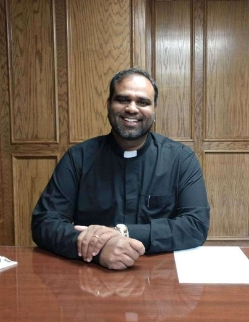
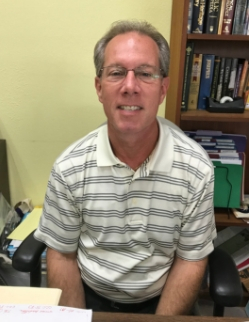
Jillian
Hey Veronica. I hope you have a nice relaxing Memorial Day weekend. I wanted to check back to see if you are going to be able to add the pictures I mentioned to our staff page. Just let me know. Thank you so much for your time and effort. I truly appreciate it.
Veronica Alvarado
Good morning Jillian,
I have been out of the office since Thursday but will get one of my coworkers to work on this and see if there is an issue with the site.
In the future, please send any support issues to webdepartment@diocesan.com. This way, even if I am out of town, our support specialists can help you out.
Thank you,
In the future, please send any support issues to webdepartment@diocesan.com. This way, even if I am out of town, our support specialists can help you out.
Thank you,
Veronica Alvarado
Web Department, Diocesan
Veronica Alvarado
Please take care of this.
Thank you!
Thank you!
 Cody Armock
Does that need billing?
That is a crazy Staff Module!! Glad we don't use it anymore. Hahaha
You're welcome!
Cody
That is a crazy Staff Module!! Glad we don't use it anymore. Hahaha
You're welcome!
Cody
Cody Armock
Hi Jillian,
I added those two Staff Pictures to your website. Something that may help in the future is that when modifying the Staff Members Widget changing one of the text fields, even just backspacing one of the characters and adding it again will enable the "Save" button that adding the Picture does not. Just a note.
The photos are on the Staff Page now and I was able to use the ones that were in the Media Library.
Thank you,