










Link to Development Site
Hello All,
As promised, here is the link to the development site.
There are some pages that will be re-arranged once you have been trained. Most importantly, we are still working on the mobile responsiveness of the website. This is something we do not focus on until after you have seen the website and gotten into how it all functions. That way, if we are making changes, it is easier to make everything mobile responsive all at once so we do not miss anything.
Let us know what you think and have a wonderful weekend!
http://setonlakeridge.diocesanweb.org/
Veronica Alvarado
Web Department, Diocesan
877-923-0777
877-923-0777
 Patrick Suess
Veronica,
I understand the link between www.setonlakeridge.org (http://www.setonlakeridge.org) and seas1.org (http://seas1.org) is not working. I believe it is because seas1.org (http://seas1.org) is an alias for seaslakeridge.wordpress.com (http://seaslakeridge.wordpress.com).
You may need to point www.setonlakeridge.org (http://www.setonlakeridge.org) directly to seaslakeridge.wordpress.com (http://seaslakeridge.wordpress.com). Please try to do this as soon as possible. Thank you.
Patrick Suess
I understand the link between www.setonlakeridge.org (http://www.setonlakeridge.org) and seas1.org (http://seas1.org) is not working. I believe it is because seas1.org (http://seas1.org) is an alias for seaslakeridge.wordpress.com (http://seaslakeridge.wordpress.com).
You may need to point www.setonlakeridge.org (http://www.setonlakeridge.org) directly to seaslakeridge.wordpress.com (http://seaslakeridge.wordpress.com). Please try to do this as soon as possible. Thank you.
Patrick Suess
 Veronica Alvarado
We have re-pointed the setonlakeridge.org domain this morning and are simply waiting for it to propogate.
I will send you a message once we see it working on our end.
Thank you for letting us know. Additionally, let me know if you'd like to set up a time to go over the development site.
Thank you again,
I will send you a message once we see it working on our end.
Thank you for letting us know. Additionally, let me know if you'd like to set up a time to go over the development site.
Thank you again,
Veronica Alvarado
Web Department, Diocesan
877-923-0777
877-923-0777
Patrick Suess
Yes. It seems to work now. Thank you, Veronica!
Patrick
Patrick
Veronica Alvarado
I had Mary call Donna earlier to let her know, but I suppose I should have sent out an email as well.
Glad it is working well for this weekend. Have a great one!
Glad it is working well for this weekend. Have a great one!
Veronica Alvarado
Web Department, Diocesan
877-923-0777
877-923-0777
 Violet LaVille
Hello Veronica,
Our new website is looking great! Thank you for all the hard work.
Currently reviewing the details and have noted a few updates below.
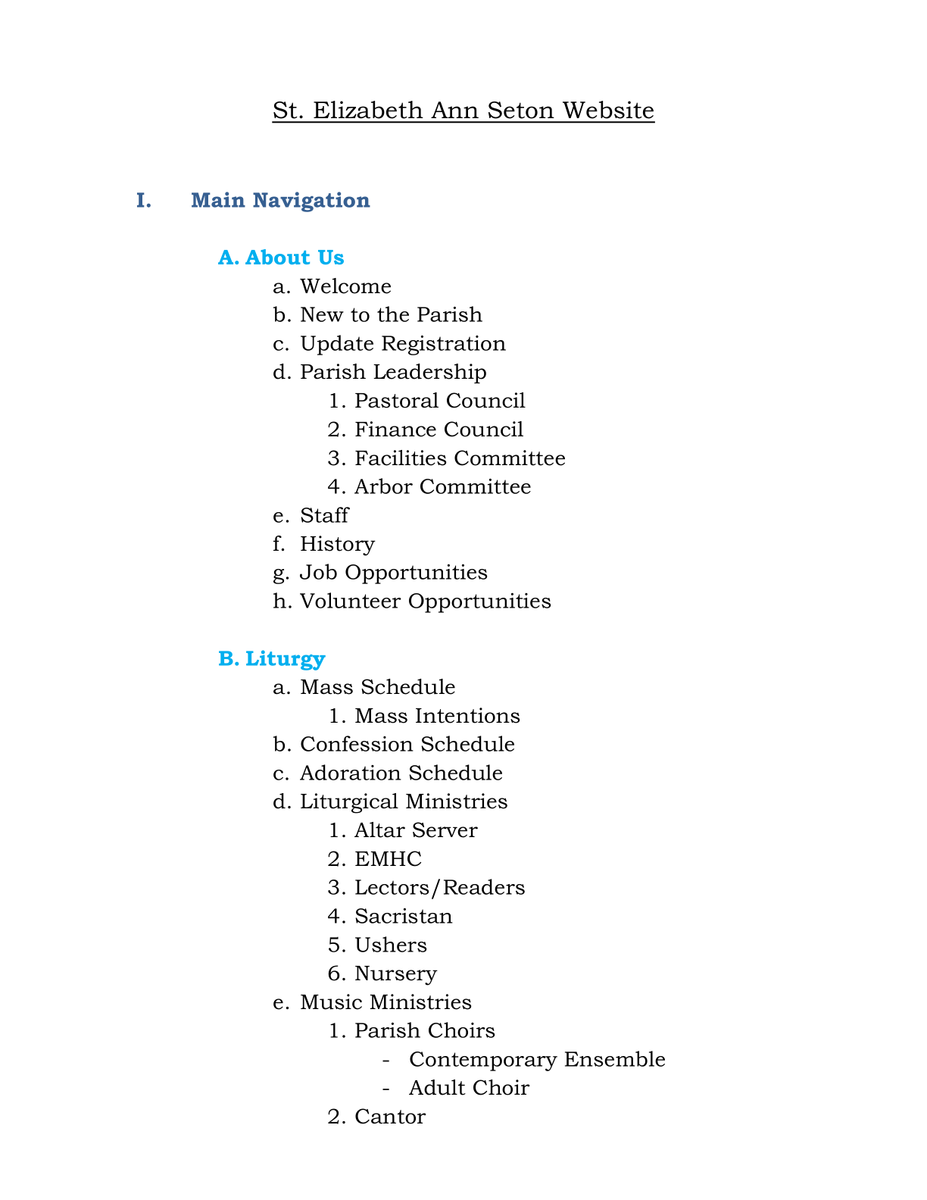
1. I sent Sam a list of our Main Nav and Featured Buttons menu items awhile back; but I have attached an updated version for you.
2. Also, is there a gallery/library of photos that Diocesan has that we can access and select from to use on our website?
3. We requested to have 5 scrolling photos (or a video) on the Main page with dots to navigate the photos instead of arrows – please reference the Arlington Diocese Website https://www.arlingtondiocese.org/. Is it possible to add 5 photos so we can see what it will looks like?
4. Please update the “Registration” featured button to “Parish Registration”
5. We requested that the Main Navigation Menu Items along with the logo be a “sticky nav” – please reference Parish of the Holy Spirit https://www.hsparish.org/
6. On the Home page, we would like the featured buttons bar to show when viewing at 100%. Right now, we see just the top portion of it. Please reference the Diocese of Venice https://dioceseofvenice.org/.
7. For the Staff Directory, we requested 1 column instead of 3.
As soon as the Main Nav & Featured Buttons menu items are all up, we will go over them as well.
Thanks again! Hope you have a wonderful Thanksgiving Holiday!
Blessings,
Violet
Our new website is looking great! Thank you for all the hard work.
Currently reviewing the details and have noted a few updates below.
1. I sent Sam a list of our Main Nav and Featured Buttons menu items awhile back; but I have attached an updated version for you.
2. Also, is there a gallery/library of photos that Diocesan has that we can access and select from to use on our website?
3. We requested to have 5 scrolling photos (or a video) on the Main page with dots to navigate the photos instead of arrows – please reference the Arlington Diocese Website https://www.arlingtondiocese.org/. Is it possible to add 5 photos so we can see what it will looks like?
4. Please update the “Registration” featured button to “Parish Registration”
5. We requested that the Main Navigation Menu Items along with the logo be a “sticky nav” – please reference Parish of the Holy Spirit https://www.hsparish.org/
6. On the Home page, we would like the featured buttons bar to show when viewing at 100%. Right now, we see just the top portion of it. Please reference the Diocese of Venice https://dioceseofvenice.org/.
7. For the Staff Directory, we requested 1 column instead of 3.
As soon as the Main Nav & Featured Buttons menu items are all up, we will go over them as well.
Thanks again! Hope you have a wonderful Thanksgiving Holiday!
Blessings,
Violet
Violet LaVille
Hello Veronica,
Hope you had a wonderful Thanksgiving Holiday. Just got off the phone with Mary and heard you are currently out of the office and will be back tomorrow.
We have a meeting with our IT Committee this Saturday, Dec 3 and we would really like to go over the website with ALL the Main Navigation items and Featured Button items in place along with the other updates noted below.
1. The Main Navigation bar is supposed to have 7 items (can you space these items out along the bar accordingly)
1. About US
2. Liturgy
3. Sacraments
4. Faith Formation
5. Vocation Discernment
6. Service & Outreach
7. Parish Groups
1. In the Featured Buttons bar, could you please change the ‘News & Events’ icon to a different clipart. Do you have either a newspaper/megaphone clipart?
2. Also, in the ‘News & Events’. Could you please add a link to the calendar? And also add an ‘Archived News & Events’ folder by categorized by year then broken down by months.
3. For the ‘Bulletin’, could you also add an ‘Archived Bulletins’ categorized by year then broken down by months.
4. Please change the ‘UPCOMING EVENTS’ text to ‘SEAS SPOTLIGHTS’
5. Under Parish Media, please change:
1. Radio to ‘SEAS Audio/Homilies’
2. Photo gallery to ‘ SEAS Photo Gallery’
3. Youtube to ‘SEAS YouTube’
If you have any questions, please call me anytime at 703-494-4008. Truly appreciate your assistance with all this.
Thank you,
Violet
Hope you had a wonderful Thanksgiving Holiday. Just got off the phone with Mary and heard you are currently out of the office and will be back tomorrow.
We have a meeting with our IT Committee this Saturday, Dec 3 and we would really like to go over the website with ALL the Main Navigation items and Featured Button items in place along with the other updates noted below.
1. The Main Navigation bar is supposed to have 7 items (can you space these items out along the bar accordingly)
1. About US
2. Liturgy
3. Sacraments
4. Faith Formation
5. Vocation Discernment
6. Service & Outreach
7. Parish Groups
1. In the Featured Buttons bar, could you please change the ‘News & Events’ icon to a different clipart. Do you have either a newspaper/megaphone clipart?
2. Also, in the ‘News & Events’. Could you please add a link to the calendar? And also add an ‘Archived News & Events’ folder by categorized by year then broken down by months.
3. For the ‘Bulletin’, could you also add an ‘Archived Bulletins’ categorized by year then broken down by months.
4. Please change the ‘UPCOMING EVENTS’ text to ‘SEAS SPOTLIGHTS’
5. Under Parish Media, please change:
1. Radio to ‘SEAS Audio/Homilies’
2. Photo gallery to ‘ SEAS Photo Gallery’
3. Youtube to ‘SEAS YouTube’
If you have any questions, please call me anytime at 703-494-4008. Truly appreciate your assistance with all this.
Thank you,
Violet
Veronica Alvarado
Good morning Violet,
I just wanted to let you know that I am back in the office and will be going over your updates today.
Here is a list of all your updates so that you can see which ones we have completed, in real time.
https://public.3.basecamp.com/p/JZK5HKJdhx28Kb9yJgjioxCH
Thank you,
Veronica Alvarado
Web Department, Diocesan
877-923-0777
877-923-0777
Violet LaVille
Hello Veronica,
Thanks for the email. Is there anyway we can look at the changes? Also, can we have access to your photo library? Beth mentioned that we would be able to access it on the web via a link. Is this something we can access today?
Thanks again,
Violet
Thanks for the email. Is there anyway we can look at the changes? Also, can we have access to your photo library? Beth mentioned that we would be able to access it on the web via a link. Is this something we can access today?
Thanks again,
Violet
Veronica Alvarado
All the changes we check off will be made immediately on the development site that I linked you to the other day. You may need to do a hard refresh to see the changes (hold down Control and click F5).
As for the photo library, it is on our internal server, so we upload it all to your site so that you have access to it.
If you'd like, you can log in here to view the images that we have already uploaded: http://setonlakeridge.diocesanweb.org/lakeridge
username: media
password: #SEAS@lakeridge
After you log in, click Media in the left, black bar. Next, you can filter by media categories and filter through the images and files we have uploaded so far.
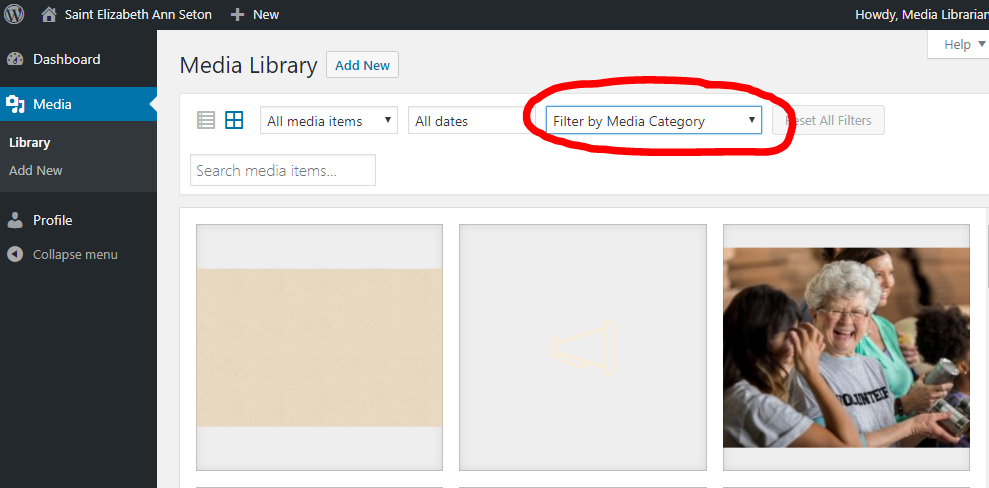
Once you have been trained, you will have access to upload your own images and create your own media categories, as needed.
If you are worried about not being able to find stock photos later, there are two sites that are free to use: unsplash.com and pexels.com.
Let me know if you have any questions,
As for the photo library, it is on our internal server, so we upload it all to your site so that you have access to it.
If you'd like, you can log in here to view the images that we have already uploaded: http://setonlakeridge.diocesanweb.org/lakeridge
username: media
password: #SEAS@lakeridge
After you log in, click Media in the left, black bar. Next, you can filter by media categories and filter through the images and files we have uploaded so far.
Once you have been trained, you will have access to upload your own images and create your own media categories, as needed.
If you are worried about not being able to find stock photos later, there are two sites that are free to use: unsplash.com and pexels.com.
Let me know if you have any questions,
Veronica Alvarado
Web Department, Diocesan
877-923-0777
877-923-0777
Violet LaVille
Veronica,
Thanks for the links. Can we see what other photos you have that we can use?
Violet
Thanks for the links. Can we see what other photos you have that we can use?
Violet
Veronica Alvarado
The 250+ stock photos that we have uploaded are all we have in terms of stock photos. Was there any images in particular that you were looking for? I could see if our marketing team has something close to what you have in mind.
Thank you,
Thank you,
Veronica Alvarado
Web Department, Diocesan
877-923-0777
877-923-0777
Violet LaVille
Thanks Veronica. Was just checking to see what was available.
Violet
Violet
Veronica Alvarado
Of course, I completely understand. We do our best to provide Catholic images since we know those are the hardest to find.
As for the updates to your website, we have run into some issues. I know you have begun talking with Sam about the sticky header, but it is only once we figure out whether or not to do it (as well as how) that we can make sure the featured buttons bar displays when viewing at 100%.
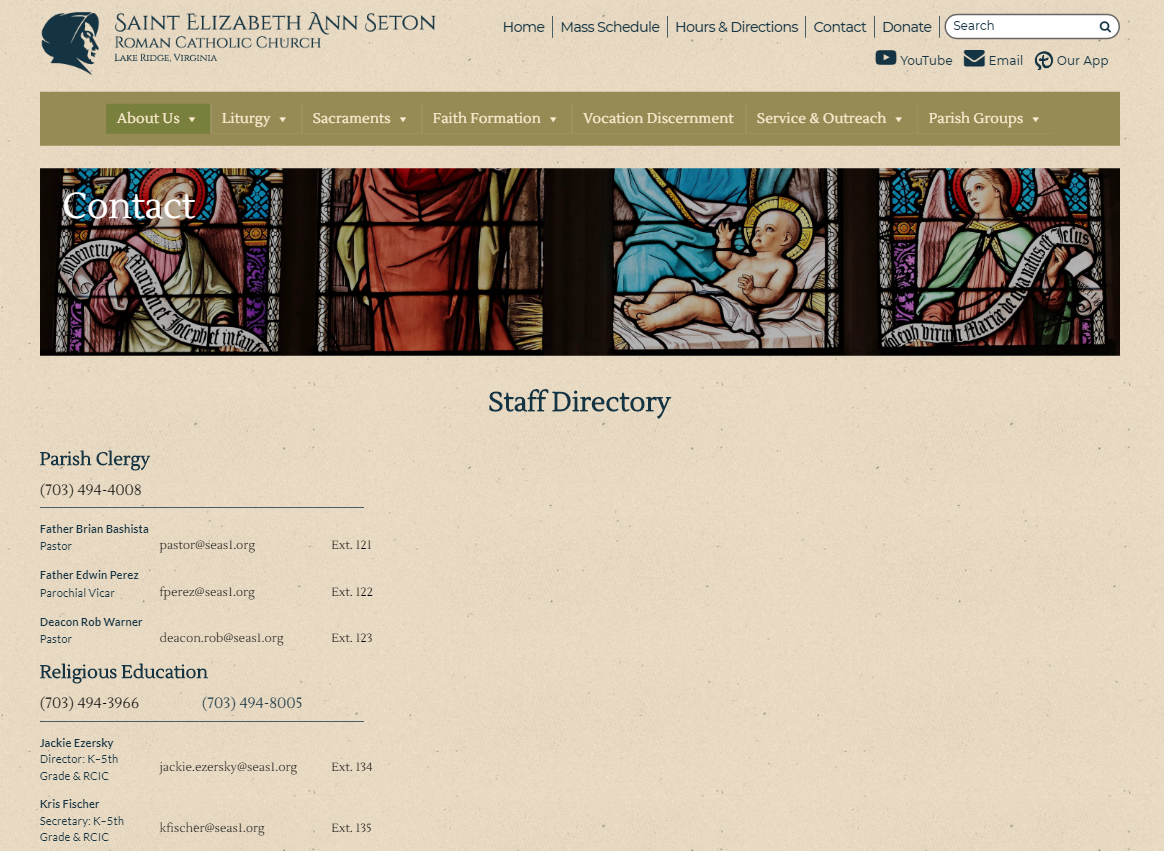
The last item we wanted to ask about is the staff page. You said you wanted 1 column instead of 3. Does that mean that that everything will look the same, just in one column? Or are you thinking that each section would be spread out across the page? If that is what you are thinking, I think we may have to look into a new design for this page since the information would look extremely spaced out and confusing. I can have Sam get in touch with you about a quote for a new design if you'd like to see something tangible before having the developer put it into action.
As for the rest of those changes, it is our priority to have them done by tomorrow afternoon.
Thank you and have a wonderful afternoon,
As for the updates to your website, we have run into some issues. I know you have begun talking with Sam about the sticky header, but it is only once we figure out whether or not to do it (as well as how) that we can make sure the featured buttons bar displays when viewing at 100%.
The last item we wanted to ask about is the staff page. You said you wanted 1 column instead of 3. Does that mean that that everything will look the same, just in one column? Or are you thinking that each section would be spread out across the page? If that is what you are thinking, I think we may have to look into a new design for this page since the information would look extremely spaced out and confusing. I can have Sam get in touch with you about a quote for a new design if you'd like to see something tangible before having the developer put it into action.
As for the rest of those changes, it is our priority to have them done by tomorrow afternoon.
Thank you and have a wonderful afternoon,
Veronica Alvarado
Web Department, Diocesan
877-923-0777
877-923-0777
Violet LaVille
Hello Veronica,
Spoke with Sam earlier about the sticky nav. Our IT committee meets this Saturday and we should have a decision for you by then.
Additionally, I understand your still working on the nav/featured items; when I was going over the site, I noticed a few missing categories. I’ve attached the Main Nav/Featured items document. Items highlighted in yellow are missing or are updates.
Also, just a couple of other items to note:
1. Under Liturgy > Liturgical Ministries > it should read “ Lectors/Readers” .
2. Under Liturgy > Liturgical Ministries > Remove Mass Intentions
3. Under Liturgy, remove Audio Homilies, Text homilies
Here are the links for the following to be added to the Human Concerns Category under Service and Outreach: Perhaps could we also add their Logo images as well.
1. ACTS https://www.actspwc.org/
2. Catholic Charities https://www.catholiccharitiesusa.org/
In the Parish Media section:
1. The SEAS Youtube is currently linked to the homilies. It should be linked to our SEAS Channel https://www.youtube.com/channel/UCgnQkmq_oRgiMqVxH8qaXIQ
2. The SEAS Audio/Homilies is not linked to anything it just returns to the home page.
Regarding the Staff page, In the design phase, we spoke with Sam about making it a single column versus 3. In our discussion, I referenced our current contact us page https://seaslakeridge.wordpress.com/about/contact-us/ ; but to make it look better. Quick question, if we decide to add photos of the staff members in the future, can we do this?
Thanks again for all your hard work and to the Team at Diocesan.
Blessings,
Violet
Spoke with Sam earlier about the sticky nav. Our IT committee meets this Saturday and we should have a decision for you by then.
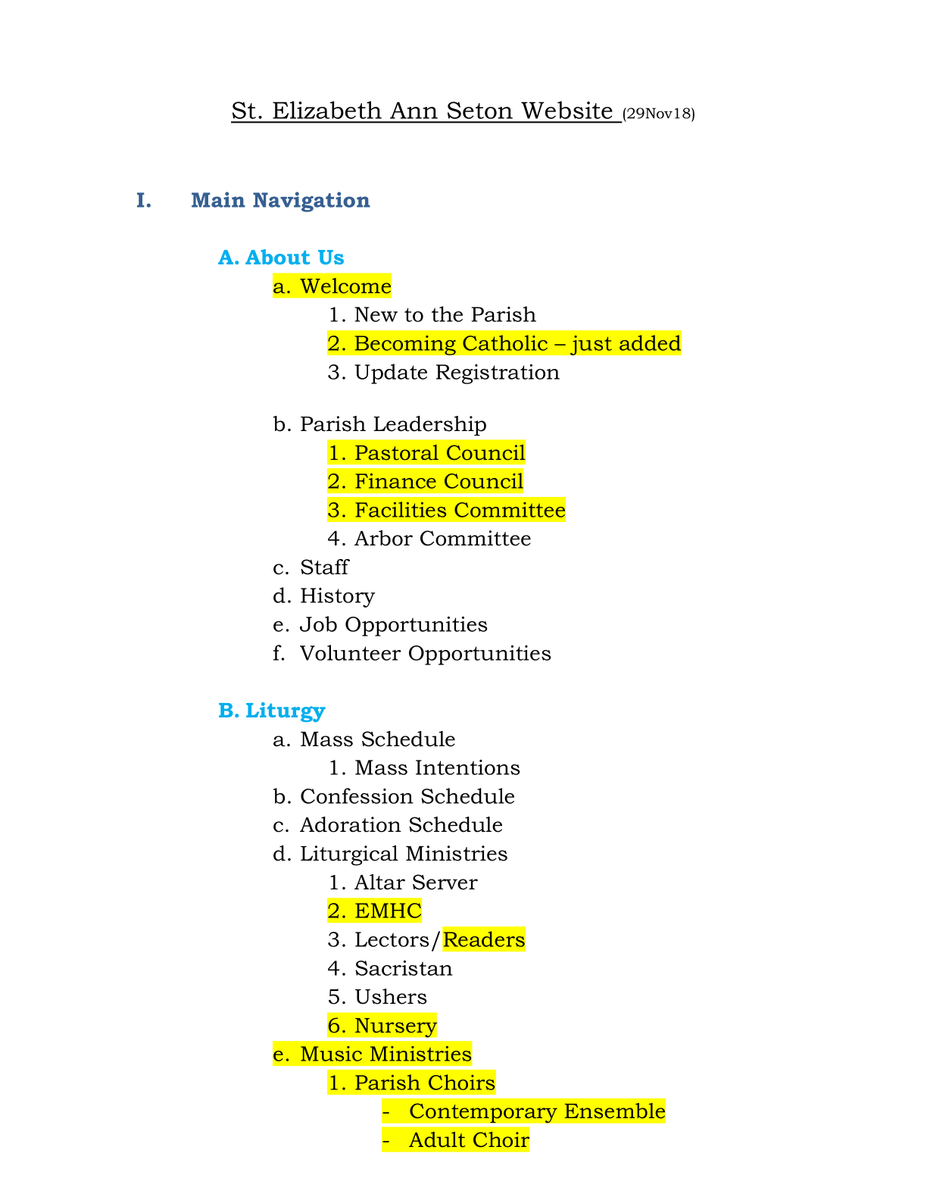
Additionally, I understand your still working on the nav/featured items; when I was going over the site, I noticed a few missing categories. I’ve attached the Main Nav/Featured items document. Items highlighted in yellow are missing or are updates.
Also, just a couple of other items to note:
1. Under Liturgy > Liturgical Ministries > it should read “ Lectors/Readers” .
2. Under Liturgy > Liturgical Ministries > Remove Mass Intentions
3. Under Liturgy, remove Audio Homilies, Text homilies
Here are the links for the following to be added to the Human Concerns Category under Service and Outreach: Perhaps could we also add their Logo images as well.
1. ACTS https://www.actspwc.org/
2. Catholic Charities https://www.catholiccharitiesusa.org/
In the Parish Media section:
1. The SEAS Youtube is currently linked to the homilies. It should be linked to our SEAS Channel https://www.youtube.com/channel/UCgnQkmq_oRgiMqVxH8qaXIQ
2. The SEAS Audio/Homilies is not linked to anything it just returns to the home page.
Regarding the Staff page, In the design phase, we spoke with Sam about making it a single column versus 3. In our discussion, I referenced our current contact us page https://seaslakeridge.wordpress.com/about/contact-us/ ; but to make it look better. Quick question, if we decide to add photos of the staff members in the future, can we do this?
Thanks again for all your hard work and to the Team at Diocesan.
Blessings,
Violet
Veronica Alvarado
Good morning Violet,
I have added to-dos for the specific items and am still working on the menu, so I will mark that off the to-do list when I complete it.
Thank you!
Veronica Alvarado
Web Department, Diocesan
877-923-0777
877-923-0777
Veronica Alvarado
I wanted to get a bit more information from the developer before answering the question about images on the staff page. It seems that the way it is built and designed right now are not set up to support images.
If you did want to take a look at adding the ability to add images, we would have to restructure the way we built the Staff Directory page. If that is something you would like done, please let me know and we can set up a time to talk about your expectations and how we can meet those.
Thank you,
If you did want to take a look at adding the ability to add images, we would have to restructure the way we built the Staff Directory page. If that is something you would like done, please let me know and we can set up a time to talk about your expectations and how we can meet those.
Thank you,
Veronica Alvarado
Web Department, Diocesan
877-923-0777
877-923-0777
Veronica Alvarado
Violet,
I have updated the menu navigation items accordingly. If you click the link below, you can see that the pages highlighted in yellow are all of the pages that did not formerly exist on your current site. I created an empty page for them so that they are already in the menu for when you begin editing them.
https://docs.google.com/document/d/1NGMBt-49GeXjFq_Yqe8_oRYDn2X2jyjrJgzMom0OMTI/edit?usp=sharing
Since many of your changes are content and you have reached your quoted hours for content migration, did we want to schedule a training? That way, any content changes may be done by you or your staff instead of by me at $70/hr.
The training is done remotely and will typically take 2 hours. We will go over how to edit pages, posts, menu navigation, and much more. If you are worried about editing pages while development changes are occurring, there should not be any conflict with anything other than perhaps the staff directory page (as there may be a re-development).
Next week, I am currently available Tuesday morning for a training starting at 8, 9, or 10 am, and Wednesday any time after 12:00, noon.
Let me know if you'd like to schedule your first training.
Thank you,
Veronica Alvarado
Web Department, Diocesan
877-923-0777
877-923-0777
Violet LaVille
Good Morning Veronica,
The IT Committee has approved the sticky Nav; but I need to discuss this with Sam so we are on the same page on the design. Couple of questions for you:
1. Can you please change the font for the ALL Navigation Items to San Serif. Is this something we can also change on our own after the training?
2. Can you please equally space out the 7 rectangles of the navigation items on the Navigation bar? Please call me if you need further explanation.
3. How many templates are currently on the site? Can we have a template where we can add both text, photos, or links where we need them?
4. Could you explain the details of how the user hierarchy will work?
5. What CMS system are we using? Droople?
6. At our meeting, we decided we would like to have our staff page similar to that of Holy Spirit – here is their link https://www.hsparish.org/about-us/our-staff/. Since we do not have photos yet, could we use silhouettes and insert the photos later?
7. If we want to add or remove any Navigation/Featured items, do we go through you to make the updates or is this something we can do ourselves?
8. If we want to change the color highlighting the navigation menu items, can we also do this ourselves? Reason I’m asking is we would like to have the MAIN NAVIGATION BAR ITEMS (only) highlighted in the same color of blue as the logo. Everything else stays the same.
Regarding the training, are you available this Thursday 12/6 in the morning? 10am? Additionally, I know in the bottom of this email it states that “This message was sent to Donna….”. Unfortunately, she has not been getting the emails. Can you check on this, please? She checked her ‘Junk’ box already.
Thank you,
Violet
The IT Committee has approved the sticky Nav; but I need to discuss this with Sam so we are on the same page on the design. Couple of questions for you:
1. Can you please change the font for the ALL Navigation Items to San Serif. Is this something we can also change on our own after the training?
2. Can you please equally space out the 7 rectangles of the navigation items on the Navigation bar? Please call me if you need further explanation.
3. How many templates are currently on the site? Can we have a template where we can add both text, photos, or links where we need them?
4. Could you explain the details of how the user hierarchy will work?
5. What CMS system are we using? Droople?
6. At our meeting, we decided we would like to have our staff page similar to that of Holy Spirit – here is their link https://www.hsparish.org/about-us/our-staff/. Since we do not have photos yet, could we use silhouettes and insert the photos later?
7. If we want to add or remove any Navigation/Featured items, do we go through you to make the updates or is this something we can do ourselves?
8. If we want to change the color highlighting the navigation menu items, can we also do this ourselves? Reason I’m asking is we would like to have the MAIN NAVIGATION BAR ITEMS (only) highlighted in the same color of blue as the logo. Everything else stays the same.
Regarding the training, are you available this Thursday 12/6 in the morning? 10am? Additionally, I know in the bottom of this email it states that “This message was sent to Donna….”. Unfortunately, she has not been getting the emails. Can you check on this, please? She checked her ‘Junk’ box already.
Thank you,
Violet
Violet LaVille
Hello Veronica,
We discussed this at our IT meeting and yes, we would like to have photos. In fact, we would like to have a similar layout as Holy Spirit. Here is their link. https://www.hsparish.org/about-us/our-staff/
Thanks,
Violet
We discussed this at our IT meeting and yes, we would like to have photos. In fact, we would like to have a similar layout as Holy Spirit. Here is their link. https://www.hsparish.org/about-us/our-staff/
Thanks,
Violet
Violet LaVille
Veronica,
Just following up on the email below. Did not see this on the site.
Thanks,
Violet
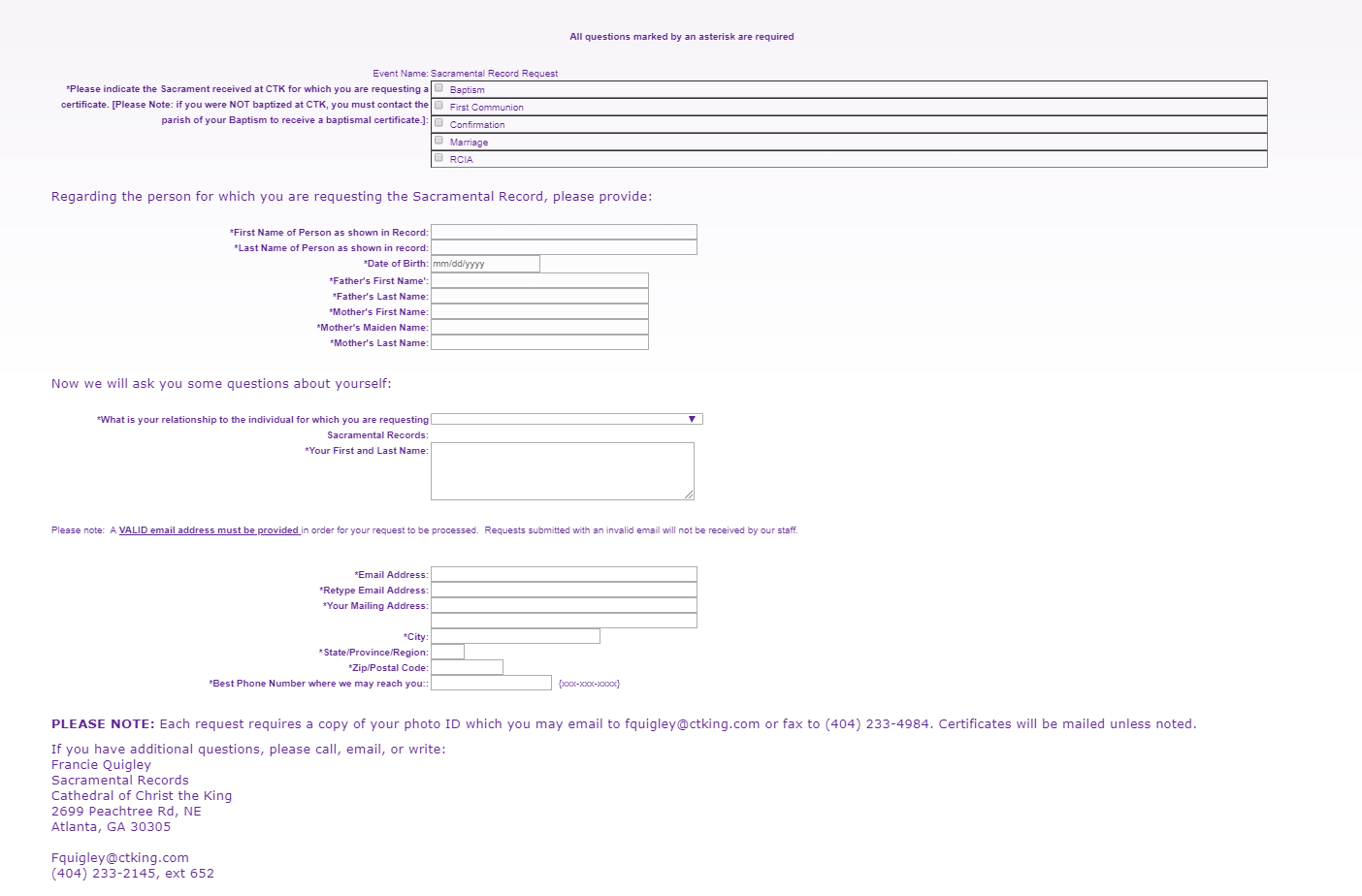
Just following up on the email below. Did not see this on the site.
Thanks,
Violet
Violet LaVille
Veronica,
Following up on this as well.
Thanks,
Violet
Following up on this as well.
Thanks,
Violet
Violet LaVille
Following on this too.
Veronica Alvarado
Hello Violet,
- We will change the font text to sans serif (same font as burgundy button bar). No, you will not have the ability to change fonts later on your own. At any point, you can let Diocesan know and we can change it for you.
- I will have our developer equally space out the 7 navigation items. I know as of right now, they are centered in the menu bar, but it should be feasible.
- There is the homepage template, the Sacraments template, and the Contact template, but the only one you will be using for pages other than those three, respectively, will be the default template. To anticipate your needs, we have created a Default Template page with multiple column options and buttons. Each of the column options is fully equipped to add links, images, documents, and text. (http://setonlakeridge.diocesanweb.org/default-template/)
- For user hierarchy, here is a link to an example of our most common user roles: https://docs.google.com/spreadsheets/d/1T3qOMCjC6wZT4Qy5qLBB4cJ0_trto8GPzy0BT8jLXlE/edit?usp=sharing
If you have specific user roles in mind after the training, we can create user roles unique to your website. - Diocesan's CMS of choice is WordPress. Its complex functionality allows us to design to your specifications while also allowing us to create a clean and simple-to-use editing ability.
- We will copy and style the Holy Spirit staff page to your website and use a placeholder image for now.
- Navigation items (menu) and homepage featured links may be edited by you or your staff at any time.
- Navigation items (menu) hover color is not editable by you or your staff, but I have changed the hover color to be the same as your logo.
- The email we are using for Donna is dengborg@seas1.org. If this is the incorrect email, please send me the correct one and we can correct this.
- I will be out of the office both Thursday and Friday of this week, but am currently available Monday-Thursday after 12:15 pm of next week.
- I have created the Sacramental Record Request form, but I did not see anywhere on the Site Navigation map for me to add it to the menu or a specification to add a link to any of the Sacrament pages. So for now, it exists, but is not readily available to visitors. I figured we could find a place for it during the training.
Link to Sacramental Record Request form: http://setonlakeridge.diocesanweb.org/sacramental-record-request/
I look forward to hearing back from you,
Veronica Alvarado
Web Department, Diocesan
877-923-0777
877-923-0777
Violet LaVille
Good Morning Veronica,
Thank you for making all the updates and for all the information noted below. Just spoke with Sam this morning to discuss the sticky nav design. He took notes and will pass the information on to Kyle Sullivan.
Are you available on Thursday, Dec 13 to do the training? 12:30pm (east coast time)?
Lastly, donna’s email is d.engborg@seas1.org<mailto:d.engborg@seas1.org>.
Thanks again….and have a wonderful weekend!
Violet LaVille
Database Manager & Financial Assistant
St. Elizabeth Ann Seton Catholic Church
12807 Valleywood Drive
Lake Ridge, VA 22192
Tel: 703-494-4008 ext. 133
Fax: 703-494-1995
Thank you for making all the updates and for all the information noted below. Just spoke with Sam this morning to discuss the sticky nav design. He took notes and will pass the information on to Kyle Sullivan.
Are you available on Thursday, Dec 13 to do the training? 12:30pm (east coast time)?
Lastly, donna’s email is d.engborg@seas1.org<mailto:d.engborg@seas1.org>.
Thanks again….and have a wonderful weekend!
Violet LaVille
Database Manager & Financial Assistant
St. Elizabeth Ann Seton Catholic Church
12807 Valleywood Drive
Lake Ridge, VA 22192
Tel: 703-494-4008 ext. 133
Fax: 703-494-1995
Veronica Alvarado
Good morning Violet,
I was out of the office Thursday and Friday, so I just barely missed your message!
I AM available Thursday to do a training. I have put you on my calendar for 12:30 - 2:30 pm. Is there a specific number that I should call, or does the parish office number suffice?
Thank you,
Veronica Alvarado
Web Department, Diocesan
877-923-0777
877-923-0777
Violet LaVille
Veronica,
Great! Thank you!
Yes, you can call us via the parish office number (703.494.4008).
Looking forward to the training on Thursday, December 13.
Blessings,
Violet LaVille
Database Manager & Financial Assistant
St. Elizabeth Ann Seton Catholic Church
12807 Valleywood Drive
Lake Ridge, VA 22192
Tel: 703-494-4008 ext. 133
Fax: 703-494-1995
Great! Thank you!
Yes, you can call us via the parish office number (703.494.4008).
Looking forward to the training on Thursday, December 13.
Blessings,
Violet LaVille
Database Manager & Financial Assistant
St. Elizabeth Ann Seton Catholic Church
12807 Valleywood Drive
Lake Ridge, VA 22192
Tel: 703-494-4008 ext. 133
Fax: 703-494-1995
Patrick Suess
Veronica,
How do we change the registrar of the 'seas1.org (http://seas1.org)' domain to you? This link contains the current registrar and server information:
https://www.name.com/whois-lookup/seas1.org
Patrick
How do we change the registrar of the 'seas1.org (http://seas1.org)' domain to you? This link contains the current registrar and server information:
https://www.name.com/whois-lookup/seas1.org
Patrick
Veronica Alvarado
Hello Patrick,
I have included Kyle, the developer on your site, in this email so that he can better answer your question.
What domain are the current emails at and do you know when SEAS would like to move to GSuite?
Thank you,
Veronica Alvarado
Web Department
877-923-0777
877-923-0777
 Kyle Sullivan
Good afternoon:
In addition to Veronica's question, can you please send us the authorization code from your registrar (they may call it an EPP Code)?
Alternatively—if you'd rather—you may send us your current registrar credentials, and we can facilitate the transfer.
Let us know if you have any other questions, and we'd be happy to assist you.
In addition to Veronica's question, can you please send us the authorization code from your registrar (they may call it an EPP Code)?
Alternatively—if you'd rather—you may send us your current registrar credentials, and we can facilitate the transfer.
Let us know if you have any other questions, and we'd be happy to assist you.
Violet LaVille
Veronica,
Thank you for the training today. Truly appreciate your time and patience.
I’d like to share the training with our staff soon. Is it possible to create an ‘author user’ TRAINING account we can work off of? Ideally, my hope is that they would have access to use this training account so that they can be familiar with wordpress and be comfortable using it too.
Thanks again…and have a wonderful weekend!
Blessings,
Violet LaVille
Database Manager & Financial Assistant
St. Elizabeth Ann Seton Catholic Church
12807 Valleywood Drive
Lake Ridge, VA 22192
Tel: 703-494-4008 ext. 133
Fax: 703-494-1995
Thank you for the training today. Truly appreciate your time and patience.
I’d like to share the training with our staff soon. Is it possible to create an ‘author user’ TRAINING account we can work off of? Ideally, my hope is that they would have access to use this training account so that they can be familiar with wordpress and be comfortable using it too.
Thanks again…and have a wonderful weekend!
Blessings,
Violet LaVille
Database Manager & Financial Assistant
St. Elizabeth Ann Seton Catholic Church
12807 Valleywood Drive
Lake Ridge, VA 22192
Tel: 703-494-4008 ext. 133
Fax: 703-494-1995
Patrick Suess
Veronica,
Please do not misunderstand. We have NOT decided to move to the GSuite.
We just wondered if the emails created in iPower were actually being used. I found out that they are not.
Patrick
Please do not misunderstand. We have NOT decided to move to the GSuite.
We just wondered if the emails created in iPower were actually being used. I found out that they are not.
Patrick
Patrick Suess
Kyle,
I have requested the EPP code from www.tucows.com (http://www.tucows.com) via email. I will let you know when I receive the information.
Patrick
I have requested the EPP code from www.tucows.com (http://www.tucows.com) via email. I will let you know when I receive the information.
Patrick
Patrick Suess
Kyle, Veronica, and Violet:
I have verified that the remaining email addresses on iPower have not been used since 2012. Also, the current site is completely independent of any files (PDFs, JPGs, etc.) stored on iPower. I have downloaded what files were there for safe keeping.
Now, I am just waiting for the authorization/EPP code needed to transfer the seas1.org (http://seas1.org) URL. It expires in February but we may want to keep it another year while we transition current email addresses.
I will update you when I receive the EPP code. Tucows is the current registrar but they referred me to iPower as the "reseller" to send the code.
Patrick
I have verified that the remaining email addresses on iPower have not been used since 2012. Also, the current site is completely independent of any files (PDFs, JPGs, etc.) stored on iPower. I have downloaded what files were there for safe keeping.
Now, I am just waiting for the authorization/EPP code needed to transfer the seas1.org (http://seas1.org) URL. It expires in February but we may want to keep it another year while we transition current email addresses.
I will update you when I receive the EPP code. Tucows is the current registrar but they referred me to iPower as the "reseller" to send the code.
Patrick
Patrick Suess
Kyle, Veronica, and Violet:
I have verified that the remaining email addresses on iPower have not been used since 2012. Also, the current site is completely independent of any files (PDFs, JPGs, etc.) stored on iPower. I have downloaded what files were there for safe keeping.
Now, I am just waiting for the authorization/EPP code needed to transfer the seas1.org (http://seas1.org) URL. It expires in February but we may want to keep it another year while we transition current email addresses.
I will update you when I receive the EPP code. Tucows is the current registrar but they referred me to iPower as the "reseller" to send the code.
Patrick
I have verified that the remaining email addresses on iPower have not been used since 2012. Also, the current site is completely independent of any files (PDFs, JPGs, etc.) stored on iPower. I have downloaded what files were there for safe keeping.
Now, I am just waiting for the authorization/EPP code needed to transfer the seas1.org (http://seas1.org) URL. It expires in February but we may want to keep it another year while we transition current email addresses.
I will update you when I receive the EPP code. Tucows is the current registrar but they referred me to iPower as the "reseller" to send the code.
Patrick
Violet LaVille
Thanks for the information Patrick!
Blessings,
Violet
Blessings,
Violet
Veronica Alvarado
Thank you so much for looking into that, Patrick.
I agree that you should keep the domain for another year, especially if parishioners are used to going to seas1.org. The year will give them time to re-acclimate themselves to the new domain.
We look forward to receiving the EPP code.
Thank you,
I agree that you should keep the domain for another year, especially if parishioners are used to going to seas1.org. The year will give them time to re-acclimate themselves to the new domain.
We look forward to receiving the EPP code.
Thank you,
Veronica Alvarado
Web Department, Diocesan
877-923-0777
877-923-0777
Patrick Suess
Veronica and Kyle,
I finally got the authorization/EPP code. See below. The domain is unlocked.
Let me know if there is anything else you need.
Patrick
I finally got the authorization/EPP code. See below. The domain is unlocked.
Let me know if there is anything else you need.
Patrick
Patrick Suess
Veronica and Kyle,
I finally got the authorization/EPP code. See below. The domain is unlocked.
Let me know if there is anything else you need.
Patrick
I finally got the authorization/EPP code. See below. The domain is unlocked.
Let me know if there is anything else you need.
Patrick
Veronica Alvarado
Hi Patrick,
Could you please forward the authorization/EPP code email to webdepartment@diocesan.com?
Basecamp doesn't allow forwarded messages to come through correctly.
Thank you,
Veronica Alvarado
Web Department, Diocesan
877-923-0777
877-923-0777
Patrick Suess
Diocesan,
Since you are developing our new web site, we would like to transfer registration of the existing domain to you.
The domain (seas1.org (http://seas1.org)) has been unlocked by iPower/Tucows and this is the authorization code: L0MZANyRG2GmMjMb
The iPower account will expire January 3, 2019, and the domain will need to be renewed for one year in February 2019.
Let me know if you have any questions.
Patrick
Patrick Suess
Webmaster
St. Elizabeth Ann Seton Catholic Church
(703) 380-6426
patrick.suess@gmail.com (mailto:patrick.suess@gmail.com)
Since you are developing our new web site, we would like to transfer registration of the existing domain to you.
The domain (seas1.org (http://seas1.org)) has been unlocked by iPower/Tucows and this is the authorization code: L0MZANyRG2GmMjMb
The iPower account will expire January 3, 2019, and the domain will need to be renewed for one year in February 2019.
Let me know if you have any questions.
Patrick
Patrick Suess
Webmaster
St. Elizabeth Ann Seton Catholic Church
(703) 380-6426
patrick.suess@gmail.com (mailto:patrick.suess@gmail.com)
Patrick Suess
Done, Veronica.
Patrick
Patrick
Patrick Suess
Patrick,
We've initiated the domain transfer. The contact person on the domain should be receiving a transfer authorization email shortly. They will need to approve the transfer via said email.
We've initiated the domain transfer. The contact person on the domain should be receiving a transfer authorization email shortly. They will need to approve the transfer via said email.
Kyle Sullivan
Good morning:
We've initiated your transfer. You should receive an email from eNom within the next few days asking you to accept this transfer request. Once you've accepted it, the transfer should be complete within a few days.
Let me know if you have any other questions. Thank you.
We've initiated your transfer. You should receive an email from eNom within the next few days asking you to accept this transfer request. Once you've accepted it, the transfer should be complete within a few days.
Let me know if you have any other questions. Thank you.