












Giving page on dov.org
Roger,
I have changed the menu Giving to point to the correct page now.
If something like this happens again in the future, we have left the top
menu as something that you can change. The menu can be found and changed
in the Dashboard's "Appearance" and "Menu."
If there are any other changes to be made, we can go over them at today's
meeting.
Also, I'm very excited to hear what Chancellor Smeryk has to say about the
new site!
Veronica Alvarado
Web Department
On Tue, Jan 2, 2018 at 6:03 PM, Navarro, Roger <navarro@dioceseofvenice.org>
wrote:
> Veronica,
>
>
>
> It seems like the Giving page is missing. Not sure how to modify the
> ‘Giving’ top menu item to point anywhere else, like Stewardship &
> Development for now.
>
>
>
> We plan on doing a demo of the site for the Chancellor on Thursday of this
> week and this is one that we’d like to have set for that meeting for sure.
>
>
>
> Roger
>
I have changed the menu Giving to point to the correct page now.
If something like this happens again in the future, we have left the top
menu as something that you can change. The menu can be found and changed
in the Dashboard's "Appearance" and "Menu."
If there are any other changes to be made, we can go over them at today's
meeting.
Also, I'm very excited to hear what Chancellor Smeryk has to say about the
new site!
Veronica Alvarado
Web Department
On Tue, Jan 2, 2018 at 6:03 PM, Navarro, Roger <navarro@dioceseofvenice.org>
wrote:
> Veronica,
>
>
>
> It seems like the Giving page is missing. Not sure how to modify the
> ‘Giving’ top menu item to point anywhere else, like Stewardship &
> Development for now.
>
>
>
> We plan on doing a demo of the site for the Chancellor on Thursday of this
> week and this is one that we’d like to have set for that meeting for sure.
>
>
>
> Roger
>
 Veronica Alvarado
Roger,
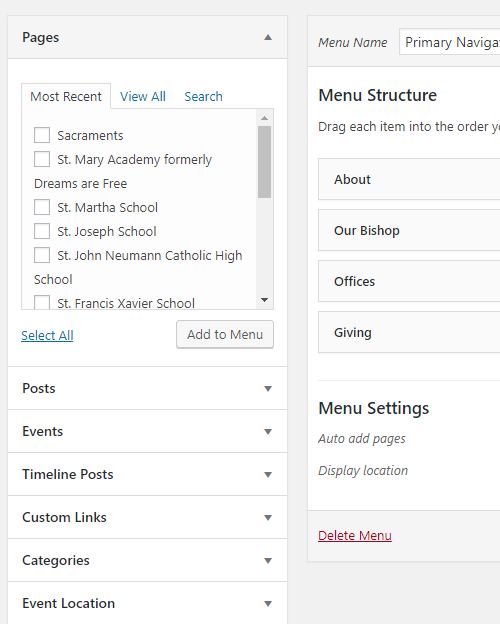
I'm glad you were able to find the menu page in the dashboard. Adding to the menu is done from the left side of the page (see image). You can remove the current one and add another from the Pages section. Simply search for the page, check it, and "Add to Menu." Additionally, if you want to add a page, but change the name, click on the added menu item and change it in the text box.
If you wish to add a link instead, use "Custom Links" on the left side.
Veronica Alvarado
Web Department
877-923-0777
877-923-0777
 Roger Navarro
What if we just want to change the link for an existing menu item? Is that possible, or should we just remove the menu item and add new one with the same name?
Thanks!
Roger
Thanks!
Roger
Veronica Alvarado
With WordPress, you simply remove the old and add the new menu item. It should be fairly simply but I know there are a lot of pages to look through.
Let me know if you need any more help!
Let me know if you need any more help!
Roger Navarro
Sounds good and it’s not a problem. Good to know.