













DOV Document Library How To
Hi Roger and Susan,
Here's a quick overview of how the dynamic document library works for your reference.
All documents are managed directly within the WordPress Media library normally.
As we saw yesterday, there are now two new Taxonomies under "Media" in the left sidebar - "Type" and "Audience". They can be managed similar to a Categories or Tags when working with typical Posts.
When adding or editing items (working from list view works better than grid view), you'll see metaboxes for Type and Audience.
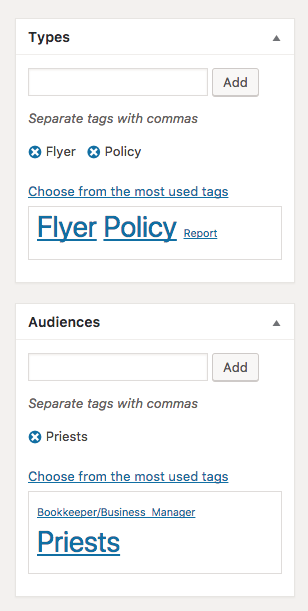
Typing in the "Add" input, will show a list of matching items, or you can add a new term directly from this view.
On a page, to display a list of documents, you'll use the following shortcode format:
Here's a quick overview of how the dynamic document library works for your reference.
All documents are managed directly within the WordPress Media library normally.
As we saw yesterday, there are now two new Taxonomies under "Media" in the left sidebar - "Type" and "Audience". They can be managed similar to a Categories or Tags when working with typical Posts.
When adding or editing items (working from list view works better than grid view), you'll see metaboxes for Type and Audience.
Typing in the "Add" input, will show a list of matching items, or you can add a new term directly from this view.
On a page, to display a list of documents, you'll use the following shortcode format:
[display-documents type="form" audience="priests"]
This will output a list of documents that have the type "form" AND audience "priests". Type and Audience taxonomies use their respective "slug". You can use several at once, separated by a comma and space:
[display-documents type="form, flyer" audience="priests, teachers"]
This will output the list of documents has (type "form" OR "flyer") AND (audience "priests" OR "teachers").
Other optional arguments include order, which accepts "asc" or "dsc" (default), and orderby (default), which accepts "date" (default), "name", "modified" (orders by date modified). For example:
Other optional arguments include order, which accepts "asc" or "dsc" (default), and orderby (default), which accepts "date" (default), "name", "modified" (orders by date modified). For example:
[display-documents type="form, flyer" audience="priests, teachers"
order="asc" orderby="name"]
The link text is the document title, links automatically open in new tab.
If you'd like any particular styling for these lists, we can add that. You can make multiple lists on a page, in any type of content area (multi column page, etc).
Let me know if you have any questions. Thanks!
-Daniel
 Roger Navarro
Daniel,
This is great. Thanks for the how-to details, which we’ve added to our internal documentation for the new www.dioceseofvenice.org<http://www.dioceseofvenice.org> site.
Roger
This is great. Thanks for the how-to details, which we’ve added to our internal documentation for the new www.dioceseofvenice.org<http://www.dioceseofvenice.org> site.
Roger