











Catholic News Service RSS Feed
Brandon,
I've identified the Catholic News Service RSS Feed, but it does not include images.
https://www.catholicnews.com/feed/
If we use it, it simply will be without images. Here's a quick example:
Original on catholicnews.com: As pandemic devastates Latin America, pope prays to St. Juan Diego - Catholic News Service
Imported: As pandemic devastates Latin America, pope prays to St. Juan Diego - Diocese of St. Augustine (diocesanweb.org)
Based on observation, I'd guess that they are intentionally stripping out or omitting images from the feed. They also append to each post in the feed a line at the end that reads "The post {{ title }} appeared first on Catholic News Service.", which doesn't appear in the original post.
We can use a default generic image if you'd like. It would be the same image for all CNS posts, both on the Home page feed, and the single news posts.
I've identified the Catholic News Service RSS Feed, but it does not include images.
https://www.catholicnews.com/feed/
If we use it, it simply will be without images. Here's a quick example:
Original on catholicnews.com: As pandemic devastates Latin America, pope prays to St. Juan Diego - Catholic News Service
Imported: As pandemic devastates Latin America, pope prays to St. Juan Diego - Diocese of St. Augustine (diocesanweb.org)
Based on observation, I'd guess that they are intentionally stripping out or omitting images from the feed. They also append to each post in the feed a line at the end that reads "The post {{ title }} appeared first on Catholic News Service.", which doesn't appear in the original post.
We can use a default generic image if you'd like. It would be the same image for all CNS posts, both on the Home page feed, and the single news posts.
 Brandon Duncan
Good observation, Ryan. I will need to talk this over with Kathleen, as to whether she wants to still go with CNS sans images, or use the Catholic News Agency feed instead. It will certainly disrupt the symmetry of the news section.
Brandon Duncan
Coordinator for Creative and Digital Services
Diocese of St. Augustine
11625 Old St. Augustine Road
Jacksonville, FL 32258
(904) 562-6911/direct
(239) 288-3744/cell
Brandon Duncan
Coordinator for Creative and Digital Services
Diocese of St. Augustine
11625 Old St. Augustine Road
Jacksonville, FL 32258
(904) 562-6911/direct
(239) 288-3744/cell
 Kathleen Bagg
Brandon,
Can you contact CNS and tell them what we are trying to do with the images for the news feed and see if they have any options for us?
Kathleen
Can you contact CNS and tell them what we are trying to do with the images for the news feed and see if they have any options for us?
Kathleen
Brandon Duncan
Hi, Ryan:
Happy New Year!
I am combing through the site and jotting down more notes of any issues I notice as I go through the site. Mostly minor, but I am including the list of what I have found thus far down below:
1. Buttons
* The Gutenberg button block is not working. When I attempt to embed a link inside the block and click the button from the front-end it does not redirect.
* However, the Stackable plugin button block is working fine.
* See example: https://www.dosafl.com/bishop-felipe-j-estevez/official-photos/
1. In This Section sidebar links not working in certain instances.
* To replicate issue, go to Diocese > Our Bishop
i. The issue is triggered when you click Pastoral Letters link in sidebar.
ii. Once on the Pastoral Letters page, the sidebar menu links are dead, even though the links do exist.
iii. Seems the links stop working on the Pastoral Letters page only. I have tried replicating on other pages and the links work just fine so I am not sure if the issue will repeat itself in the future (?)
1. Mobile
* I noticed on the mobile version of the site, there is an extra top menu section that is turned on. Is this supposed to be the Top Menu or should all menu items fold in under the main hamburger menu?
* Since we don't really have Top Menus on our subdomain sites, perhaps we can shut it off at the tablet/mobile breakpoint?
Also, what are your recommendations for updating to the latest versions of Wordpress in the near and distant future to ensure we are taking proper measures to secure our site from potential vulnerabilities? I understand there is always the chance that an update could have an effect on some of the changes we have made in the re-launch, so I would like your feedback on the best way to ensure we keep things running smoothly and secure?
Thanks,
Brandon Duncan
Coordinator for Creative and Digital Services
Diocese of St. Augustine
11625 Old St. Augustine Road
Jacksonville, FL 32258
(904) 562-6911/direct
(239) 288-3744/cell
Happy New Year!
I am combing through the site and jotting down more notes of any issues I notice as I go through the site. Mostly minor, but I am including the list of what I have found thus far down below:
1. Buttons
* The Gutenberg button block is not working. When I attempt to embed a link inside the block and click the button from the front-end it does not redirect.
* However, the Stackable plugin button block is working fine.
* See example: https://www.dosafl.com/bishop-felipe-j-estevez/official-photos/
1. In This Section sidebar links not working in certain instances.
* To replicate issue, go to Diocese > Our Bishop
i. The issue is triggered when you click Pastoral Letters link in sidebar.
ii. Once on the Pastoral Letters page, the sidebar menu links are dead, even though the links do exist.
iii. Seems the links stop working on the Pastoral Letters page only. I have tried replicating on other pages and the links work just fine so I am not sure if the issue will repeat itself in the future (?)
1. Mobile
* I noticed on the mobile version of the site, there is an extra top menu section that is turned on. Is this supposed to be the Top Menu or should all menu items fold in under the main hamburger menu?
* Since we don't really have Top Menus on our subdomain sites, perhaps we can shut it off at the tablet/mobile breakpoint?
Also, what are your recommendations for updating to the latest versions of Wordpress in the near and distant future to ensure we are taking proper measures to secure our site from potential vulnerabilities? I understand there is always the chance that an update could have an effect on some of the changes we have made in the re-launch, so I would like your feedback on the best way to ensure we keep things running smoothly and secure?
Thanks,
Brandon Duncan
Coordinator for Creative and Digital Services
Diocese of St. Augustine
11625 Old St. Augustine Road
Jacksonville, FL 32258
(904) 562-6911/direct
(239) 288-3744/cell
Brandon Duncan
Hi, Ryan:
Happy New Year!
I am combing through the site and jotting down more notes of any issues I notice as I go through the site. Mostly minor, but I am including the list of what I have found thus far down below:
1. Buttons
* The Gutenberg button block is not working. When I attempt to embed a link inside the block and click the button from the front-end it does not redirect.
* However, the Stackable plugin button block is working fine.
* See example: https://www.dosafl.com/bishop-felipe-j-estevez/official-photos/
1. In This Section sidebar links not working in certain instances.
* To replicate issue, go to Diocese > Our Bishop
i. The issue is triggered when you click Pastoral Letters link in sidebar.
ii. Once on the Pastoral Letters page, the sidebar menu links are dead, even though the links do exist.
iii. Seems the links stop working on the Pastoral Letters page only. I have tried replicating on other pages and the links work just fine so I am not sure if the issue will repeat itself in the future (?)
1. Mobile
* I noticed on the mobile version of the site, there is an extra top menu section that is turned on. Is this supposed to be the Top Menu or should all menu items fold in under the main hamburger menu?
* Since we don't really have Top Menus on our subdomain sites, perhaps we can shut it off at the tablet/mobile breakpoint?
Also, what are your recommendations for updating to the latest versions of Wordpress in the near and distant future to ensure we are taking proper measures to secure our site from potential vulnerabilities? I understand there is always the chance that an update could have an effect on some of the changes we have made in the re-launch, so I would like your feedback on the best way to ensure we keep things running smoothly and secure?
Thanks,
Brandon Duncan
Coordinator for Creative and Digital Services
Diocese of St. Augustine
11625 Old St. Augustine Road
Jacksonville, FL 32258
(904) 562-6911/direct
(239) 288-3744/cell
Happy New Year!
I am combing through the site and jotting down more notes of any issues I notice as I go through the site. Mostly minor, but I am including the list of what I have found thus far down below:
1. Buttons
* The Gutenberg button block is not working. When I attempt to embed a link inside the block and click the button from the front-end it does not redirect.
* However, the Stackable plugin button block is working fine.
* See example: https://www.dosafl.com/bishop-felipe-j-estevez/official-photos/
1. In This Section sidebar links not working in certain instances.
* To replicate issue, go to Diocese > Our Bishop
i. The issue is triggered when you click Pastoral Letters link in sidebar.
ii. Once on the Pastoral Letters page, the sidebar menu links are dead, even though the links do exist.
iii. Seems the links stop working on the Pastoral Letters page only. I have tried replicating on other pages and the links work just fine so I am not sure if the issue will repeat itself in the future (?)
1. Mobile
* I noticed on the mobile version of the site, there is an extra top menu section that is turned on. Is this supposed to be the Top Menu or should all menu items fold in under the main hamburger menu?
* Since we don't really have Top Menus on our subdomain sites, perhaps we can shut it off at the tablet/mobile breakpoint?
Also, what are your recommendations for updating to the latest versions of Wordpress in the near and distant future to ensure we are taking proper measures to secure our site from potential vulnerabilities? I understand there is always the chance that an update could have an effect on some of the changes we have made in the re-launch, so I would like your feedback on the best way to ensure we keep things running smoothly and secure?
Thanks,
Brandon Duncan
Coordinator for Creative and Digital Services
Diocese of St. Augustine
11625 Old St. Augustine Road
Jacksonville, FL 32258
(904) 562-6911/direct
(239) 288-3744/cell
 Ryan Ross
Hi Brandon!
I have a partial reply at this time.
* The Gutenberg button block is not working.
For clarification purposes, I would add that this applies to the Gutenberg "linked" button. These buttons appear to be styled correctly, but the link end of things clearly isn't working. I expected a Javascript error given the structure of the button with link, but there were no apparent javascript conflicts.
This issue is still outstanding as I need to keep looking.
In This Section sidebar links not working in certain instances.
This instance turned out to be a case where the sidebar was present, and blocks in the content were set to "Align Full". Effectively the align full took partial effect, albeit not visible, and the browser had to guess which element was "on top" or higher most, and chose the content. We can fix this easily by setting a z-index on the In This Section area. This is fixed and will prevent it from happening again.
Mobile * I noticed on the mobile version of the site, there is an extra top menu section that is turned on. Is this supposed to be the Top Menu or should all menu items fold in under the main hamburger menu?
The mobile bar was not supposed to show, and the main menu items are supposed to be in the menu section after activating the hamburger menu. This was a bit of an oversight on the launch on my part, as I needed to copy over some settings.
I've done this for the communications site, and I'll need to sweep through and apply to all other sites.
Mobile * Since we don't really have Top Menus on our subdomain sites, perhaps we can shut it off at the tablet/mobile breakpoint?
That is an option, we can turn it off. I interpreted this section as inheriting from the main site top menu, since child sites don't feature a top menu anyway. This helps fill out subsites where menus are typically much smaller. I've gone ahead and fixed that aspect of things (see Communications site). Moving forward, we can keep it like this, or remove it. Either way is fine with me.
There were a few other bugs I fixed along the way.
- Fixed issue where the last main menu item wasn't shown on mobile for subsites (because they don't have Search in the main menu)
- Fixed an issue causing an email to compose when clicking the mobile close button
- Fixed a styling issue that would block out the menu close button red on hover.
I have a partial reply at this time.
* The Gutenberg button block is not working.
For clarification purposes, I would add that this applies to the Gutenberg "linked" button. These buttons appear to be styled correctly, but the link end of things clearly isn't working. I expected a Javascript error given the structure of the button with link, but there were no apparent javascript conflicts.
This issue is still outstanding as I need to keep looking.
In This Section sidebar links not working in certain instances.
This instance turned out to be a case where the sidebar was present, and blocks in the content were set to "Align Full". Effectively the align full took partial effect, albeit not visible, and the browser had to guess which element was "on top" or higher most, and chose the content. We can fix this easily by setting a z-index on the In This Section area. This is fixed and will prevent it from happening again.
Mobile * I noticed on the mobile version of the site, there is an extra top menu section that is turned on. Is this supposed to be the Top Menu or should all menu items fold in under the main hamburger menu?
The mobile bar was not supposed to show, and the main menu items are supposed to be in the menu section after activating the hamburger menu. This was a bit of an oversight on the launch on my part, as I needed to copy over some settings.
I've done this for the communications site, and I'll need to sweep through and apply to all other sites.
Mobile * Since we don't really have Top Menus on our subdomain sites, perhaps we can shut it off at the tablet/mobile breakpoint?
That is an option, we can turn it off. I interpreted this section as inheriting from the main site top menu, since child sites don't feature a top menu anyway. This helps fill out subsites where menus are typically much smaller. I've gone ahead and fixed that aspect of things (see Communications site). Moving forward, we can keep it like this, or remove it. Either way is fine with me.
There were a few other bugs I fixed along the way.
- Fixed issue where the last main menu item wasn't shown on mobile for subsites (because they don't have Search in the main menu)
- Fixed an issue causing an email to compose when clicking the mobile close button
- Fixed a styling issue that would block out the menu close button red on hover.
Brandon Duncan
Thanks for the updates, Ryan. All make sense.
One other issues I noticed regarding mobile is the absence of a CLOSE button to close the menu if the user wants to go back to whatever page they were viewing.
Here’s a couple more items as I’m about to walk out the door:
1. List/Bullets
* Seems listed items are not indenting as they should. See here: https://prnt.sc/wg69gk
* The screenshot is from https://family.dosafl.com/foccus/
1. Padding
* The padding above/below content is still apparently an issue, particularly on our subdomain sites.
* See here: https://tribunal.dosafl.com/annulment-process/
Overall, the site is looking really good! Thanks for all your hard work.
Thanks,
Brandon Duncan
Coordinator for Creative and Digital Services
Diocese of St. Augustine
11625 Old St. Augustine Road
Jacksonville, FL 32258
(904) 562-6911/direct
(239) 288-3744/cell
One other issues I noticed regarding mobile is the absence of a CLOSE button to close the menu if the user wants to go back to whatever page they were viewing.
Here’s a couple more items as I’m about to walk out the door:
1. List/Bullets
* Seems listed items are not indenting as they should. See here: https://prnt.sc/wg69gk
* The screenshot is from https://family.dosafl.com/foccus/
1. Padding
* The padding above/below content is still apparently an issue, particularly on our subdomain sites.
* See here: https://tribunal.dosafl.com/annulment-process/
Overall, the site is looking really good! Thanks for all your hard work.
Thanks,
Brandon Duncan
Coordinator for Creative and Digital Services
Diocese of St. Augustine
11625 Old St. Augustine Road
Jacksonville, FL 32258
(904) 562-6911/direct
(239) 288-3744/cell
Ryan Ross
Brandon,
List/Bullets * Seems listed items are not indenting as they should.
Ordered lists to be specific (we previously addressed unordered listes), but simple enough to fix. This is done.
Padding * The padding above/below content is still apparently an issue, particularly on our subdomain sites.
In this case, you've identified an internal page, which does get handled a bit differently than Home pages. So, the most logical approach seems to be we add auto padding beneath the header on regular pages, and zero it out on Home pages. This way you can still accommodate items sitting flush with the header on Home pages, while eliminating the need for spacing blocks on internal pages.
The obvious drawback will be that you won't be able to accomplish blocks sitting flush beneath header on internal pages. I figured that was a fair trade off. One other side effect would be that pages that already have a spacer block will now have extra space, and spacer blocks at the top of pages can be removed.
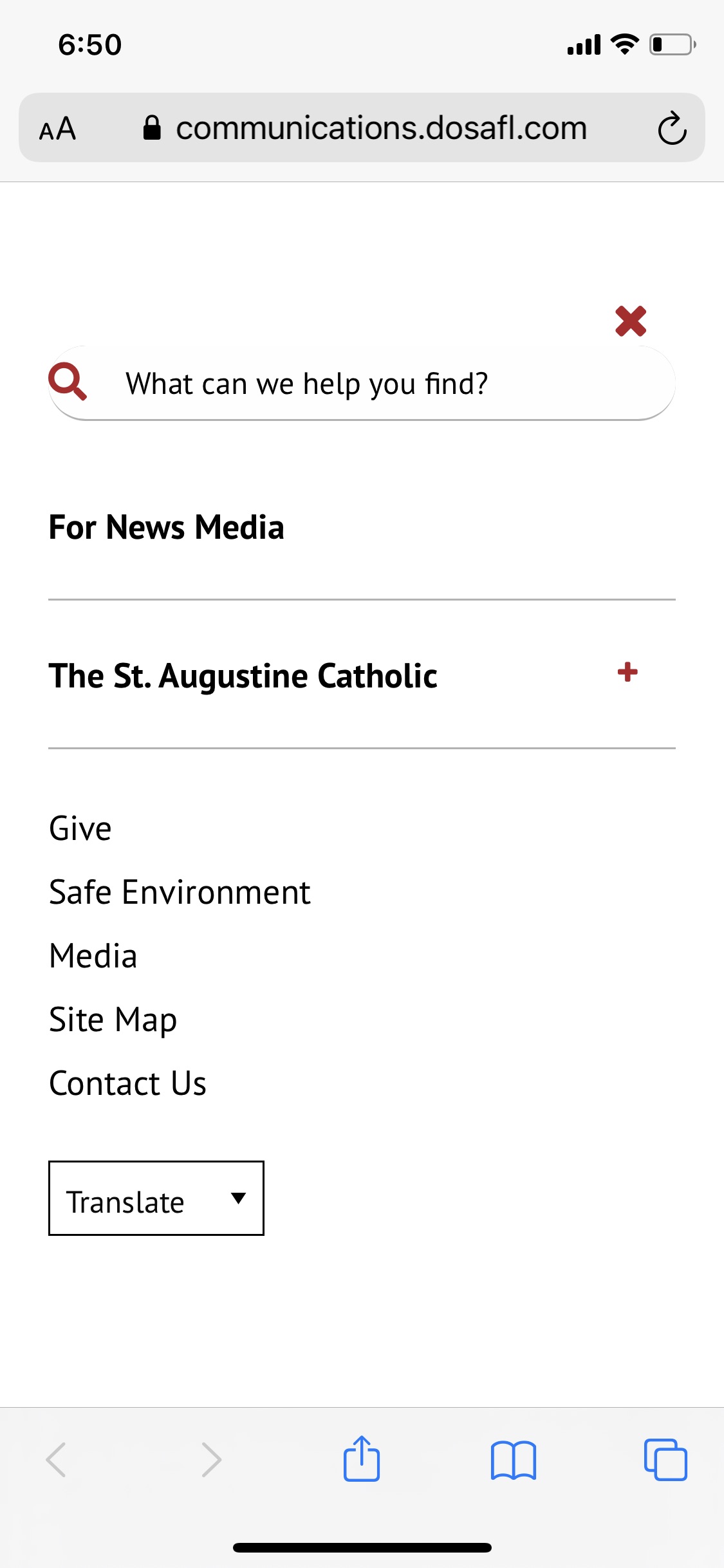
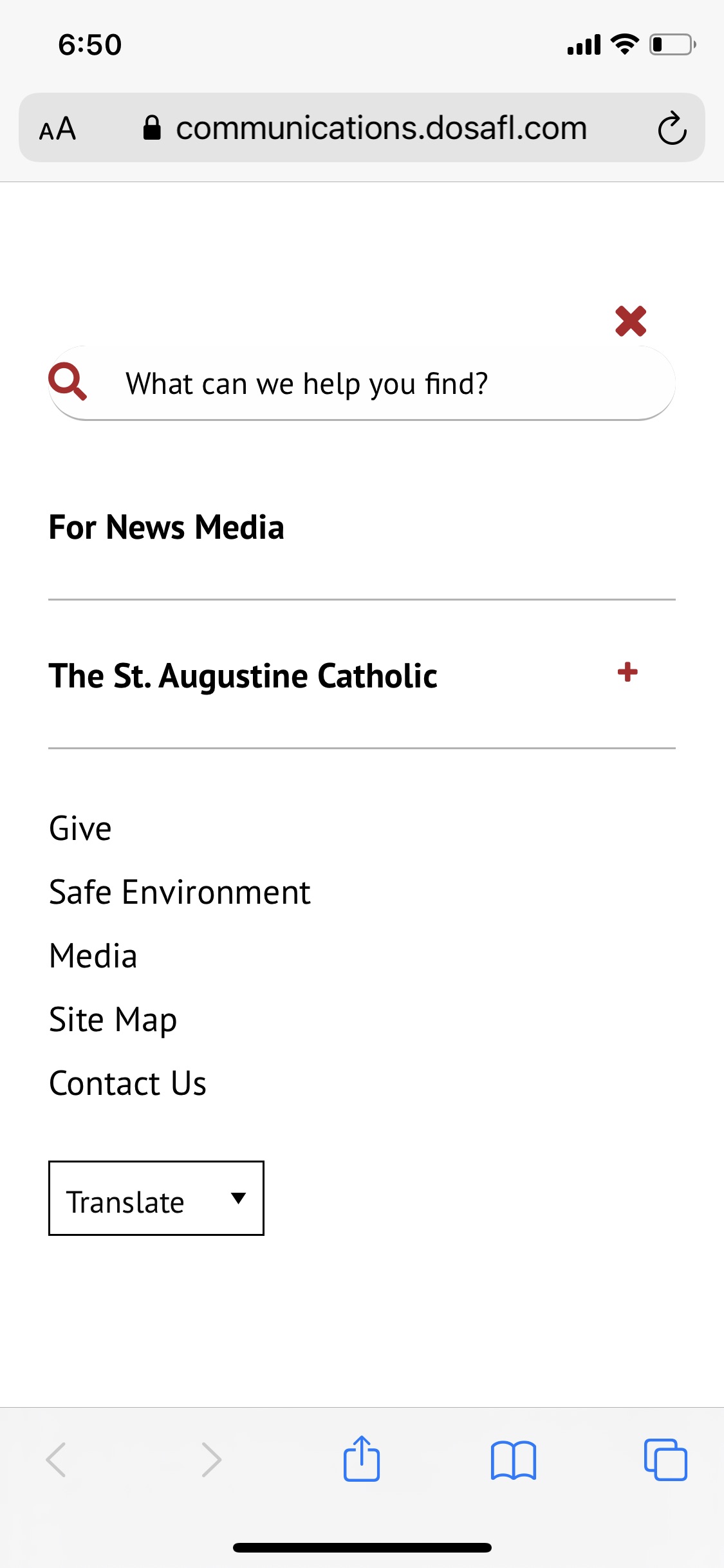
regarding mobile is the absence of a CLOSE button to close the menu
That was actually a result of the launch issue we identified earlier. After sweeping through all sites and applying the necessary configuration settings, sites will show a X to close the mobile menu now. Here's a screenshot of what that should look like; I used the Communications site for demonstration:
Ryan Ross
Web Department
Mobile: 616-856-8110
Phone: 877-923-0777
Diocesan.com (http://www.diocesan.com)
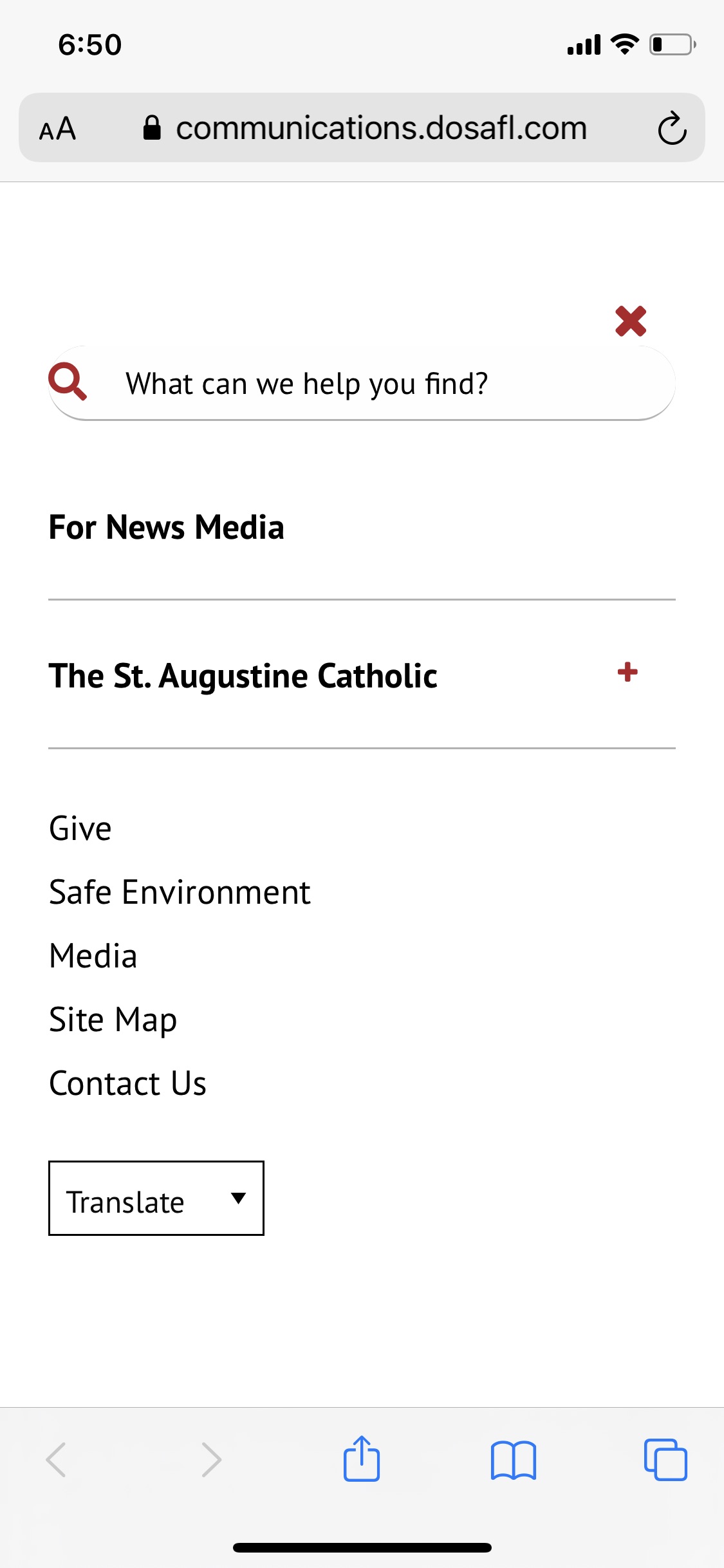
List/Bullets * Seems listed items are not indenting as they should.
Ordered lists to be specific (we previously addressed unordered listes), but simple enough to fix. This is done.
Padding * The padding above/below content is still apparently an issue, particularly on our subdomain sites.
In this case, you've identified an internal page, which does get handled a bit differently than Home pages. So, the most logical approach seems to be we add auto padding beneath the header on regular pages, and zero it out on Home pages. This way you can still accommodate items sitting flush with the header on Home pages, while eliminating the need for spacing blocks on internal pages.
The obvious drawback will be that you won't be able to accomplish blocks sitting flush beneath header on internal pages. I figured that was a fair trade off. One other side effect would be that pages that already have a spacer block will now have extra space, and spacer blocks at the top of pages can be removed.
regarding mobile is the absence of a CLOSE button to close the menu
That was actually a result of the launch issue we identified earlier. After sweeping through all sites and applying the necessary configuration settings, sites will show a X to close the mobile menu now. Here's a screenshot of what that should look like; I used the Communications site for demonstration:
Ryan Ross
Web Department
Mobile: 616-856-8110
Phone: 877-923-0777
Diocesan.com (http://www.diocesan.com)
Ryan Ross
Circling back to this one...
Also, what are your recommendations for updating to the latest versions of Wordpress in the near and distant future to ensure we are taking proper measures to secure our site from potential vulnerabilities?
Most Wordpress updates are harmless in terms of breaking things content wise. Rarely will it mess up content. Wordpress does a good job keeping up with vulnerabilities, so I'd say most Wordpress updates are safe to go ahead with. From experience, I would say that most issues are a result of a combination of major changes, PHP version issues, or lack of developer plugin support (not keeping up with PHP and Wordpress). Generally speaking, the smaller plugins aren't much of an issue, and the only things to really keep an eye on are bigger engines like WooCommerce, Timber, and Events Calendar. I mentioned WooCommerce from experience, but that's not an issue for you.
I don't recommend updating right away, as if there was going to be any sort of complication, it's better to let someone else find it and then take advantage of the update a little later after it's been smoothed over.
Also, what are your recommendations for updating to the latest versions of Wordpress in the near and distant future to ensure we are taking proper measures to secure our site from potential vulnerabilities?
Most Wordpress updates are harmless in terms of breaking things content wise. Rarely will it mess up content. Wordpress does a good job keeping up with vulnerabilities, so I'd say most Wordpress updates are safe to go ahead with. From experience, I would say that most issues are a result of a combination of major changes, PHP version issues, or lack of developer plugin support (not keeping up with PHP and Wordpress). Generally speaking, the smaller plugins aren't much of an issue, and the only things to really keep an eye on are bigger engines like WooCommerce, Timber, and Events Calendar. I mentioned WooCommerce from experience, but that's not an issue for you.
I don't recommend updating right away, as if there was going to be any sort of complication, it's better to let someone else find it and then take advantage of the update a little later after it's been smoothed over.
Ryan Ross
Buttons * The Gutenberg button block is not working. When I attempt to embed a link inside the block and click the button from the front-end it does not redirect.
This one turned out to be a usage issue, which explains why I didn't see any javascript issues based on what was there before.
First, I looked at the documentation (https://gogutenberg.com/blocks/button/) on how the block is intended to be used. Halfway down the page, it mentions the link end of things, specifying the chain link on the button itself:
Your button's text & URL can be customized right within the editor. Just type your text within the button, and include your URL next to the chain link icon directly below the button.
I saw you had put the URL in the link "Rel" section, which on the surface looks like it might work despite no "href" attribute present. I needed a refresher on the "rel" attribute, so I found the documentation for rel (https://www.w3schools.com/TAGS/att_a_rel.asp), which confirmed the attribute is supposed to be a relationship identifier, and not the link itself. Further, it's used in conjunction with a link/href.
Just so you know why this wasn't blatantly obvious to me yesterday, there are ways to link things using javascript without an href. Gutenberg is very heavy on javascript, and I actually used such a strategy for the Diocesan Initiatives block. If you happen to look at the HTML structure, you won't find the traditional <a> "href", instead, I wove it into the initiatives block, named it "data-href", and use javascript to follow the link.
With all of that said, you'll simply want to use the chain-link icon option on the button to apply a link to it. You can use the rel attribute in the side panel for things like "nofollow", "noopener", and "noreferrer". I tested and confirmed this resolves the issue you were experiencing with Gutenberg Blocks with Links on the Official Photos (https://www.dosafl.com/bishop-felipe-j-estevez/official-photos/) page.
Here's what that looks like on the backend:
Ryan Ross
Web Department
Mobile: 616-856-8110
Phone: 877-923-0777
Diocesan.com (http://www.diocesan.com)
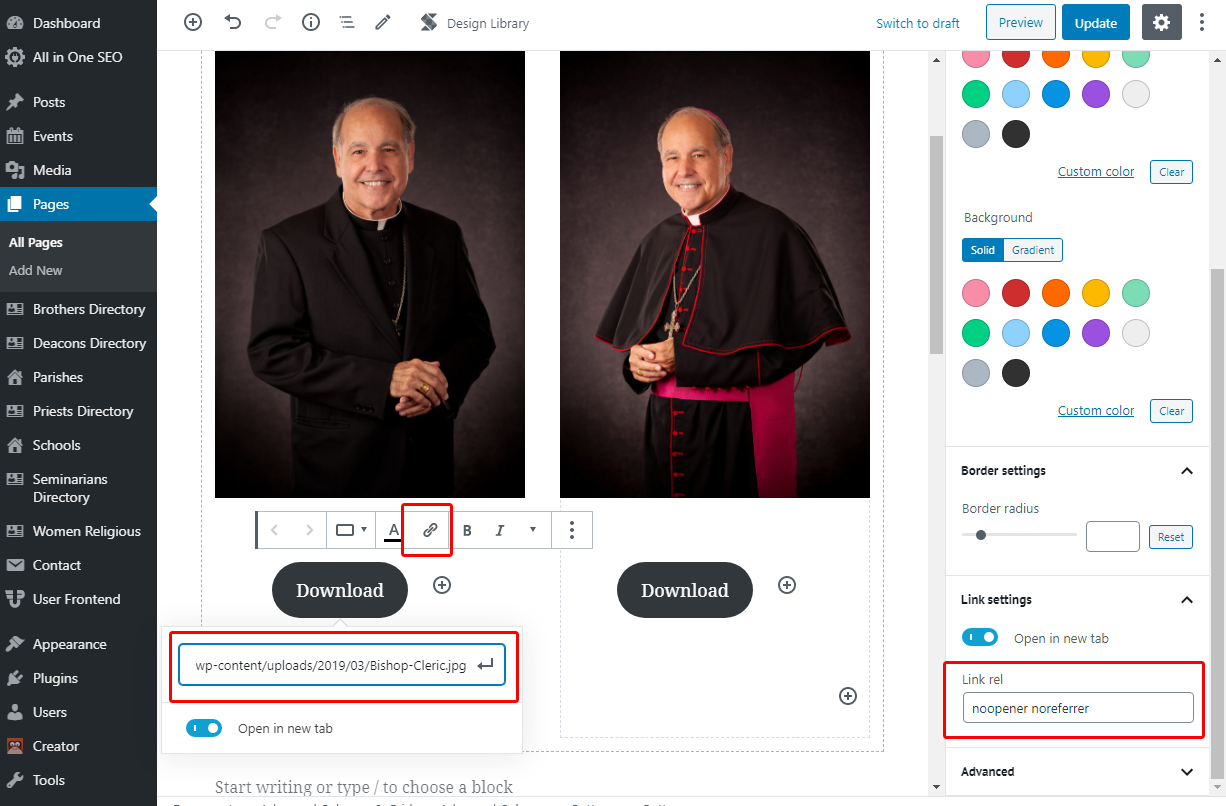
This one turned out to be a usage issue, which explains why I didn't see any javascript issues based on what was there before.
First, I looked at the documentation (https://gogutenberg.com/blocks/button/) on how the block is intended to be used. Halfway down the page, it mentions the link end of things, specifying the chain link on the button itself:
Your button's text & URL can be customized right within the editor. Just type your text within the button, and include your URL next to the chain link icon directly below the button.
I saw you had put the URL in the link "Rel" section, which on the surface looks like it might work despite no "href" attribute present. I needed a refresher on the "rel" attribute, so I found the documentation for rel (https://www.w3schools.com/TAGS/att_a_rel.asp), which confirmed the attribute is supposed to be a relationship identifier, and not the link itself. Further, it's used in conjunction with a link/href.
Just so you know why this wasn't blatantly obvious to me yesterday, there are ways to link things using javascript without an href. Gutenberg is very heavy on javascript, and I actually used such a strategy for the Diocesan Initiatives block. If you happen to look at the HTML structure, you won't find the traditional <a> "href", instead, I wove it into the initiatives block, named it "data-href", and use javascript to follow the link.
With all of that said, you'll simply want to use the chain-link icon option on the button to apply a link to it. You can use the rel attribute in the side panel for things like "nofollow", "noopener", and "noreferrer". I tested and confirmed this resolves the issue you were experiencing with Gutenberg Blocks with Links on the Official Photos (https://www.dosafl.com/bishop-felipe-j-estevez/official-photos/) page.
Here's what that looks like on the backend:
Ryan Ross
Web Department
Mobile: 616-856-8110
Phone: 877-923-0777
Diocesan.com (http://www.diocesan.com)
Brandon Duncan
Ryan,
Now that I think of it. I think we will just need to be mindful of adding a space block when needed. I would prefer content lay flush against the header image, especially if we decide to place a full width container on the page with a background image. I am seeing now how this could cause a styling issue by adding unnecessary padding when I am trying to add a Staff Member block to an internal page as opposed to a landing page. So, let’s go ahead and leave out the padding above/below content on internal pages.
See example here: https://www.dosafl.com/vicar-general/
Brandon Duncan
Coordinator for Creative and Digital Services
Diocese of St. Augustine
11625 Old St. Augustine Road
Jacksonville, FL 32258
(904) 562-6911/direct
(239) 288-3744/cell
Now that I think of it. I think we will just need to be mindful of adding a space block when needed. I would prefer content lay flush against the header image, especially if we decide to place a full width container on the page with a background image. I am seeing now how this could cause a styling issue by adding unnecessary padding when I am trying to add a Staff Member block to an internal page as opposed to a landing page. So, let’s go ahead and leave out the padding above/below content on internal pages.
See example here: https://www.dosafl.com/vicar-general/
Brandon Duncan
Coordinator for Creative and Digital Services
Diocese of St. Augustine
11625 Old St. Augustine Road
Jacksonville, FL 32258
(904) 562-6911/direct
(239) 288-3744/cell
Ryan Ross
I reverted back the CSS adjustment to add padding to all inner pages, allowing for blocks/content to sit flush with the header. As you acknowledged, spacing will be a content consideration moving forward.
Brandon Duncan
Hi, Ryan,
Thankfully, from what I am seeing, the content on every page seems to not have been tampered with, with the exception of a few that I just noticed. Any ideas? See list of pages below:
* https://www.dosafl.com/timeline/1500s/
* https://www.dosafl.com/timeline/1600s/
* https://www.dosafl.com/timeline/1700s/
* https://www.dosafl.com/timeline/1800s/
* https://www.dosafl.com/timeline/1900s/
* https://www.dosafl.com/timeline/2000s/
Also, for some reason the full calendar page (https://www.dosafl.com/calendar/) always shows the name of the upcoming event. For instance, it currently shows "Confirmation" as the page name. Not sure why it is not simply showing just "Calendar" or "Event Calendar"?
I'm still combing through the site, but I think we're really starting to look good.
Brandon Duncan
Coordinator for Creative and Digital Services
Diocese of St. Augustine
11625 Old St. Augustine Road
Jacksonville, FL 32258
(904) 562-6911/direct
(239) 288-3744/cell
Thankfully, from what I am seeing, the content on every page seems to not have been tampered with, with the exception of a few that I just noticed. Any ideas? See list of pages below:
* https://www.dosafl.com/timeline/1500s/
* https://www.dosafl.com/timeline/1600s/
* https://www.dosafl.com/timeline/1700s/
* https://www.dosafl.com/timeline/1800s/
* https://www.dosafl.com/timeline/1900s/
* https://www.dosafl.com/timeline/2000s/
Also, for some reason the full calendar page (https://www.dosafl.com/calendar/) always shows the name of the upcoming event. For instance, it currently shows "Confirmation" as the page name. Not sure why it is not simply showing just "Calendar" or "Event Calendar"?
I'm still combing through the site, but I think we're really starting to look good.
Brandon Duncan
Coordinator for Creative and Digital Services
Diocese of St. Augustine
11625 Old St. Augustine Road
Jacksonville, FL 32258
(904) 562-6911/direct
(239) 288-3744/cell
Brandon Duncan
Hi, Ryan,
Thankfully, from what I am seeing, the content on every page seems to not have been tampered with, with the exception of a few that I just noticed. Any ideas? See list of pages below:
* https://www.dosafl.com/timeline/1500s/
* https://www.dosafl.com/timeline/1600s/
* https://www.dosafl.com/timeline/1700s/
* https://www.dosafl.com/timeline/1800s/
* https://www.dosafl.com/timeline/1900s/
* https://www.dosafl.com/timeline/2000s/
Also, for some reason the full calendar page (https://www.dosafl.com/calendar/) always shows the name of the upcoming event. For instance, it currently shows "Confirmation" as the page name. Not sure why it is not simply showing just "Calendar" or "Event Calendar"?
I'm still combing through the site, but I think we're really starting to look good.
Brandon Duncan
Coordinator for Creative and Digital Services
Diocese of St. Augustine
11625 Old St. Augustine Road
Jacksonville, FL 32258
(904) 562-6911/direct
(239) 288-3744/cell
Thankfully, from what I am seeing, the content on every page seems to not have been tampered with, with the exception of a few that I just noticed. Any ideas? See list of pages below:
* https://www.dosafl.com/timeline/1500s/
* https://www.dosafl.com/timeline/1600s/
* https://www.dosafl.com/timeline/1700s/
* https://www.dosafl.com/timeline/1800s/
* https://www.dosafl.com/timeline/1900s/
* https://www.dosafl.com/timeline/2000s/
Also, for some reason the full calendar page (https://www.dosafl.com/calendar/) always shows the name of the upcoming event. For instance, it currently shows "Confirmation" as the page name. Not sure why it is not simply showing just "Calendar" or "Event Calendar"?
I'm still combing through the site, but I think we're really starting to look good.
Brandon Duncan
Coordinator for Creative and Digital Services
Diocese of St. Augustine
11625 Old St. Augustine Road
Jacksonville, FL 32258
(904) 562-6911/direct
(239) 288-3744/cell
Brandon Duncan
Sounds great. Thank you, Ryan. Sorry for the trouble, but I think that will be the best based on how we prefer to design page layout in the future.
Besides the decision from Kathleen on the homepage slider, is there anything else you are working on, and could I ask Veronica for a status update for where we are with hours, etc.?
Thanks,
Brandon Duncan
Coordinator for Creative and Digital Services
Diocese of St. Augustine
11625 Old St. Augustine Road
Jacksonville, FL 32258
(904) 562-6911/direct
(239) 288-3744/cell
Besides the decision from Kathleen on the homepage slider, is there anything else you are working on, and could I ask Veronica for a status update for where we are with hours, etc.?
Thanks,
Brandon Duncan
Coordinator for Creative and Digital Services
Diocese of St. Augustine
11625 Old St. Augustine Road
Jacksonville, FL 32258
(904) 562-6911/direct
(239) 288-3744/cell
Brandon Duncan
Sounds great. Thank you, Ryan. Sorry for the trouble, but I think that will be the best based on how we prefer to design page layout in the future.
Besides the decision from Kathleen on the homepage slider, is there anything else you are working on, and could I ask Veronica for a status update for where we are with hours, etc.?
Thanks,
Brandon Duncan
Coordinator for Creative and Digital Services
Diocese of St. Augustine
11625 Old St. Augustine Road
Jacksonville, FL 32258
(904) 562-6911/direct
(239) 288-3744/cell
Besides the decision from Kathleen on the homepage slider, is there anything else you are working on, and could I ask Veronica for a status update for where we are with hours, etc.?
Thanks,
Brandon Duncan
Coordinator for Creative and Digital Services
Diocese of St. Augustine
11625 Old St. Augustine Road
Jacksonville, FL 32258
(904) 562-6911/direct
(239) 288-3744/cell
Ryan Ross
Brandon,
Timeline pages content missing
Result of missing ACF fields for the Timeline Block. Basically same thing we found with the Upcoming Events category dropdown that was missing ACF fields. Restoring the Timeline Fields json file resolved the Timeline functionality and display issue.
for some reason the full calendar page (https://www.dosafl.com/calendar/) always shows the name of the upcoming event
Well, the title is coming from the functions file, specifically the part where we add to the Timber context.
$context['title'] = $post->post_title;
My understanding is that this Calendar page is an Archive page for the custom post type Events. You can't edit the page like a page or post. So Wordpress would use archive.php by default, which has in it rules to rewrite the title for the page accordingly. First sets a default, and then calculates a more specific title if available.
$context['title'] = 'Archive';
I'm not quite sure why that isn't happening. I must be missing something in the chain of command.
Timeline pages content missing
Result of missing ACF fields for the Timeline Block. Basically same thing we found with the Upcoming Events category dropdown that was missing ACF fields. Restoring the Timeline Fields json file resolved the Timeline functionality and display issue.
for some reason the full calendar page (https://www.dosafl.com/calendar/) always shows the name of the upcoming event
Well, the title is coming from the functions file, specifically the part where we add to the Timber context.
$context['title'] = $post->post_title;
My understanding is that this Calendar page is an Archive page for the custom post type Events. You can't edit the page like a page or post. So Wordpress would use archive.php by default, which has in it rules to rewrite the title for the page accordingly. First sets a default, and then calculates a more specific title if available.
$context['title'] = 'Archive';
I'm not quite sure why that isn't happening. I must be missing something in the chain of command.
Brandon Duncan
Also, Ryan, I noticed we have content missing from our Former Bishops page: https://www.dosafl.com/historical-overview/former-bishops/
Brandon Duncan
Coordinator for Creative and Digital Services
Diocese of St. Augustine
11625 Old St. Augustine Road
Jacksonville, FL 32258
(904) 562-6911/direct
(239) 288-3744/cell
Brandon Duncan
Coordinator for Creative and Digital Services
Diocese of St. Augustine
11625 Old St. Augustine Road
Jacksonville, FL 32258
(904) 562-6911/direct
(239) 288-3744/cell
Ryan Ross
Brandon,
In this particular case, the content was deleted by staff at the Diocese, albeit not intentionally. Using Revision History, we can see that Savanna edited the page on December 23, but since the Timeline ACF fields weren't present at the time of save, that data was washed out, No way she would have known that, but it is a little odd that it wasn't reported as a problem.
In any case, we restored the Timeline ACF fields earlier today, and the Timelime pages you mentioned were instantly fixed since the content hadn't changed. That's really the only difference between these two cases.
In addition to Revision History, Google Cache is often our friend for visual references. Here, Google happened to cache the page Dec 15 (http://webcache.googleusercontent.com/search?q=cache:https://www.dosafl.com/historical-overview/former-bishops/), prior to our launch. We can see that data was present at that time, so we can safely say any revision Dec 15 or older would be reasonable.
Fortunately, Revision History (https://www.elegantthemes.com/blog/tips-tricks/how-to-use-the-wordpress-revision-history-feature) is there for situations like this, so I simply restored a revision prior to the December 23 change.
In this particular case, the content was deleted by staff at the Diocese, albeit not intentionally. Using Revision History, we can see that Savanna edited the page on December 23, but since the Timeline ACF fields weren't present at the time of save, that data was washed out, No way she would have known that, but it is a little odd that it wasn't reported as a problem.
In any case, we restored the Timeline ACF fields earlier today, and the Timelime pages you mentioned were instantly fixed since the content hadn't changed. That's really the only difference between these two cases.
In addition to Revision History, Google Cache is often our friend for visual references. Here, Google happened to cache the page Dec 15 (http://webcache.googleusercontent.com/search?q=cache:https://www.dosafl.com/historical-overview/former-bishops/), prior to our launch. We can see that data was present at that time, so we can safely say any revision Dec 15 or older would be reasonable.
Fortunately, Revision History (https://www.elegantthemes.com/blog/tips-tricks/how-to-use-the-wordpress-revision-history-feature) is there for situations like this, so I simply restored a revision prior to the December 23 change.
Ryan Ross
for some reason the full calendar page (https://www.dosafl.com/calendar/) always shows the name of the upcoming event
My hunch was right. It is an archive page, however, Tribe Events specifies a special Archive template that it uses named "Default Events Template". It's specified in Events -> Settings (https://www.dosafl.com/wp-admin/edit.php?page=tribe-common&tab=display&post_type=tribe_events) -> Display [tab]. The file itself is just a shell for the calendar components, and it doesn't do anything special with the title. Takes what the context gave it by default.
Fortunately, it's a simple matter of adding this line to /tribe-events/default-template.php that fixes the issue:
$context['title'] = 'Event Calendar';
Override this template in your own theme by creating a file at [your-theme]/tribe-events/default-template.php
My hunch was right. It is an archive page, however, Tribe Events specifies a special Archive template that it uses named "Default Events Template". It's specified in Events -> Settings (https://www.dosafl.com/wp-admin/edit.php?page=tribe-common&tab=display&post_type=tribe_events) -> Display [tab]. The file itself is just a shell for the calendar components, and it doesn't do anything special with the title. Takes what the context gave it by default.
Fortunately, it's a simple matter of adding this line to /tribe-events/default-template.php that fixes the issue:
$context['title'] = 'Event Calendar';
Override this template in your own theme by creating a file at [your-theme]/tribe-events/default-template.php
Brandon Duncan
Awesome! Thank you, Ryan.
Brandon Duncan
Coordinator for Creative and Digital Services
Diocese of St. Augustine
11625 Old St. Augustine Road
Jacksonville, FL 32258
(904) 562-6911/direct
(239) 288-3744/cell
Brandon Duncan
Coordinator for Creative and Digital Services
Diocese of St. Augustine
11625 Old St. Augustine Road
Jacksonville, FL 32258
(904) 562-6911/direct
(239) 288-3744/cell
Ryan Ross
One quick addition to round this out, I did change it to this:
if ( is_post_type_archive() ) {
$context['title'] = 'Event Calendar';
}
This way the archive page will get "Event Calendar" as the title, while individual events will get their full title instead of "Event Calendar", like this: 2021 Diocese of St. Augustine Women’s Conference -Diocese of St. Augustine (dosafl.com) (https://www.dosafl.com/event/2021-diocese-of-st-augustine-womens-conference/)
if ( is_post_type_archive() ) {
$context['title'] = 'Event Calendar';
}
This way the archive page will get "Event Calendar" as the title, while individual events will get their full title instead of "Event Calendar", like this: 2021 Diocese of St. Augustine Women’s Conference -Diocese of St. Augustine (dosafl.com) (https://www.dosafl.com/event/2021-diocese-of-st-augustine-womens-conference/)
Brandon Duncan
Good thinking! This is perfect.
By the way, I just tried testing the Newsletter Signup section and the input fields are showing white font, so you are unable to see what you are typing.
Brandon Duncan
Coordinator for Creative and Digital Services
Diocese of St. Augustine
11625 Old St. Augustine Road
Jacksonville, FL 32258
(904) 562-6911/direct
(239) 288-3744/cell
By the way, I just tried testing the Newsletter Signup section and the input fields are showing white font, so you are unable to see what you are typing.
Brandon Duncan
Coordinator for Creative and Digital Services
Diocese of St. Augustine
11625 Old St. Augustine Road
Jacksonville, FL 32258
(904) 562-6911/direct
(239) 288-3744/cell
Ryan Ross
Eliminated the white background on focus so the white is legible.
Brandon Duncan
Hi, Ryan,
I was attempting to update the header image on the Florida Eucharistic Congress subdomain site (flec.dosafl.com) but it continues to show the image for "Reflections on the Eucharist." Also, it seems the Page Attribute feature works in the inverse. The Default setting stretches the height of the header section whereas the Landing Page setting shortens it. It should be the other way around.
One thing I have to test is whether all these changes remain in place when I create a new subdomain site. At the moment I don't have the need to but imagine everything should just copy over, am I right?
Thanks,
Brandon Duncan
Coordinator for Creative and Digital Services
Diocese of St. Augustine
11625 Old St. Augustine Road
Jacksonville, FL 32258
(904) 562-6911/direct
(239) 288-3744/cell
I was attempting to update the header image on the Florida Eucharistic Congress subdomain site (flec.dosafl.com) but it continues to show the image for "Reflections on the Eucharist." Also, it seems the Page Attribute feature works in the inverse. The Default setting stretches the height of the header section whereas the Landing Page setting shortens it. It should be the other way around.
One thing I have to test is whether all these changes remain in place when I create a new subdomain site. At the moment I don't have the need to but imagine everything should just copy over, am I right?
Thanks,
Brandon Duncan
Coordinator for Creative and Digital Services
Diocese of St. Augustine
11625 Old St. Augustine Road
Jacksonville, FL 32258
(904) 562-6911/direct
(239) 288-3744/cell
Ryan Ross
Brandon,
Let me explain what's happening, and we can make adjustments if need be. Here I believe once you're fully informed on how these parts work together, you'll find this works quite well.
Templates - As you are familiar, there's "Default" and "Landing Page". One not listed but does apply is "Front Page", which automatically applies to the page set as "Front Page" in the settings. In Wordpress template hierarchy, Front Page will supersede any template setting on the page itself. I'd point out that's how I configured the News Stories / Photo Gallery option. Those are tied to the page set as Front Page, and you'll notice those options are not available for inner pages set to Landing page. The Front page is the cornerstone of any site, and by harnessing the Front Page option/setting/template, we can ensure that Front page will be consistent.
If you'd rather control the Front page template manually, I can convert it to a selectable template, I just don't recommend it.
Front Page Header Area - Now that we've established the Front Page gets the New Stories / Photo Gallery option, let's break down the conditional logic for what image shows:
1. If News Stories or Photo Gallery is selected:
1. If News Stories - Show News Stories as defined
2. If Photo Gallery - Show Photo Gallery as defined
2. If News Stories or Photo Gallery is selected, BUT no News Stories or Photo Gallery defined, then use Featured Image
In this case of the Florida Eucharistic Congress site, we have Photo Gallery selected and an image defined. This effectively makes the Featured Image irrelevant, and we'll use the Photo Gallery since that's selected and provided.
Sizes of images are automatically 80% of the viewable height on the Front Page, very similar to Landing Page.
Inner Pages Header Area - This does work how you expect. The default page shows them shorter, but if you were to make an inner page have "Landing Page" template, the featured image height is increased accordingly.
New Subdomain Site - Depends on how you go about it. If you're like me and Copy/Duplicate an existing sub-domain site, then yes, settings and whatnot will carry over. If instead, you clicked "New Site", settings would not carry over and a small handful of things would need to be added like Shift Nav configuration & settings, and ACF fields.
When building a Multi-site from scratch that has a theme using moving parts such as this, I would typically build a "Template" sub-domain site that has all desired starting point settings in it, and simply use that template site as the one I copy from. This particular project was a theme update and all sites already existed.
Let me explain what's happening, and we can make adjustments if need be. Here I believe once you're fully informed on how these parts work together, you'll find this works quite well.
Templates - As you are familiar, there's "Default" and "Landing Page". One not listed but does apply is "Front Page", which automatically applies to the page set as "Front Page" in the settings. In Wordpress template hierarchy, Front Page will supersede any template setting on the page itself. I'd point out that's how I configured the News Stories / Photo Gallery option. Those are tied to the page set as Front Page, and you'll notice those options are not available for inner pages set to Landing page. The Front page is the cornerstone of any site, and by harnessing the Front Page option/setting/template, we can ensure that Front page will be consistent.
If you'd rather control the Front page template manually, I can convert it to a selectable template, I just don't recommend it.
Front Page Header Area - Now that we've established the Front Page gets the New Stories / Photo Gallery option, let's break down the conditional logic for what image shows:
1. If News Stories or Photo Gallery is selected:
1. If News Stories - Show News Stories as defined
2. If Photo Gallery - Show Photo Gallery as defined
2. If News Stories or Photo Gallery is selected, BUT no News Stories or Photo Gallery defined, then use Featured Image
In this case of the Florida Eucharistic Congress site, we have Photo Gallery selected and an image defined. This effectively makes the Featured Image irrelevant, and we'll use the Photo Gallery since that's selected and provided.
Sizes of images are automatically 80% of the viewable height on the Front Page, very similar to Landing Page.
Inner Pages Header Area - This does work how you expect. The default page shows them shorter, but if you were to make an inner page have "Landing Page" template, the featured image height is increased accordingly.
New Subdomain Site - Depends on how you go about it. If you're like me and Copy/Duplicate an existing sub-domain site, then yes, settings and whatnot will carry over. If instead, you clicked "New Site", settings would not carry over and a small handful of things would need to be added like Shift Nav configuration & settings, and ACF fields.
When building a Multi-site from scratch that has a theme using moving parts such as this, I would typically build a "Template" sub-domain site that has all desired starting point settings in it, and simply use that template site as the one I copy from. This particular project was a theme update and all sites already existed.
Brandon Duncan
Hi, Ryan,
Thank you for that explanation. I am very familiar with the Default/Landing Page/Front Page settings. However, what I am not familiar with is how you established the header image for pages set as Front Page to pull from the Media Gallery as opposed to the Featured Image. This is not how the site worked previously and I would prefer not to change this particular option. For instance, looking at some of the Front Pages of the subdomain sites I can see the header images have changed per the structure you have explained. However, in the event we do not want that particular header image to appear, what is our option to change it? In other words, what setting determines which image is used in the header?
If there is a way to more easily determine the header image using your method, I am certainly open to the idea. Otherwise, I would prefer we keep the settings as they were.
Regarding the process for setting up new subdomains sites, when I would create a new subdomain site prior to our re-launch, I would click “New Site”, switch the theme on the new site to the Strattherick theme and all necessary plugins would be automatically activated. I would also make a couple adjustments to the settings, one of which was to set the Front Page, and that was about it. If I went the same route, are you saying I would have to do the same?
On the flipside, how would I go about copying/duplicating an existing subdomain site as opposed to simply clicking “New Site”? Perhaps this may merit a quick call to discuss and go over?
Thanks,
Brandon Duncan
Coordinator for Creative and Digital Services
Diocese of St. Augustine
11625 Old St. Augustine Road
Jacksonville, FL 32258
(904) 562-6911/direct
(239) 288-3744/cell
Thank you for that explanation. I am very familiar with the Default/Landing Page/Front Page settings. However, what I am not familiar with is how you established the header image for pages set as Front Page to pull from the Media Gallery as opposed to the Featured Image. This is not how the site worked previously and I would prefer not to change this particular option. For instance, looking at some of the Front Pages of the subdomain sites I can see the header images have changed per the structure you have explained. However, in the event we do not want that particular header image to appear, what is our option to change it? In other words, what setting determines which image is used in the header?
If there is a way to more easily determine the header image using your method, I am certainly open to the idea. Otherwise, I would prefer we keep the settings as they were.
Regarding the process for setting up new subdomains sites, when I would create a new subdomain site prior to our re-launch, I would click “New Site”, switch the theme on the new site to the Strattherick theme and all necessary plugins would be automatically activated. I would also make a couple adjustments to the settings, one of which was to set the Front Page, and that was about it. If I went the same route, are you saying I would have to do the same?
On the flipside, how would I go about copying/duplicating an existing subdomain site as opposed to simply clicking “New Site”? Perhaps this may merit a quick call to discuss and go over?
Thanks,
Brandon Duncan
Coordinator for Creative and Digital Services
Diocese of St. Augustine
11625 Old St. Augustine Road
Jacksonville, FL 32258
(904) 562-6911/direct
(239) 288-3744/cell
Ryan Ross
Brandon,
I built the new functionality according to the specifications I was given.
Homepage
Video background. Change video background to a rotating banner/news section. Would like the option of being able to use this space to showcase featured news stories with anchor image, headline, article excerpt, and an editable "Read More" button.
* In instances where we don't have any featured stories we wouldl ike this section to act simply as a rotating banner of catchy photos that we can upload from around the diocese.
So yes, one way or the other, this will function differently than the previous version of the theme, since all of this is new.
To accommodate this feature request, I added the Home Page Video/News section, which has a radio button for New Stories or Photo Gallery. Simply put, that's where you would select which route you wanted to go.
As an afterthought, at launch, there were subsites with white header images (or lacking images to be more accurate) because no images were specified in this section. It was at that time I added the conditional check for news/images, and if none, default to the Featured Image.
So let's say you wanted to use the featured image specifically (like Florida Eucharistic Congress), you would want to remove/delete any photos or news specified in Home Page Video/News. Now given there are no photos/news, theme will default to Featured Image. From there you can use or changed the Featured Image as desired.
Changing News or Photos in the gallery would be similar, just a matter of replacement.
Does that help and make sense?
If not, or if you still want some functionality change like make Featured Image the priority, and then check for Home Page Video/News, we can certainly do that, I just need to know.
As for new sites, the "New Site" route would generally stay the same, however, you would have a few extra settings to tackle in addition to the things you already would have to do like setting Front page, creating Main Menu, etc. Plugins would automatically be there since they are Network Activated. ACF fields would be something new to import unless I replicated the hard-coding theme strategy of the previous developer. This certainly works, but is much more of a "Final, not going to change" style than one that can be updated on the fly like the case of developing new features boat I was in.
The duplicate/clone site route would just require a Duplicate/Clone site plugin to enable that option.
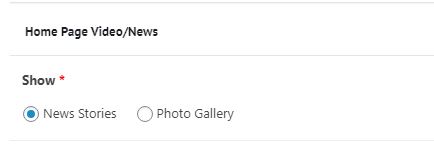
I built the new functionality according to the specifications I was given.
Homepage
Video background. Change video background to a rotating banner/news section. Would like the option of being able to use this space to showcase featured news stories with anchor image, headline, article excerpt, and an editable "Read More" button.
* In instances where we don't have any featured stories we wouldl ike this section to act simply as a rotating banner of catchy photos that we can upload from around the diocese.
So yes, one way or the other, this will function differently than the previous version of the theme, since all of this is new.
To accommodate this feature request, I added the Home Page Video/News section, which has a radio button for New Stories or Photo Gallery. Simply put, that's where you would select which route you wanted to go.
As an afterthought, at launch, there were subsites with white header images (or lacking images to be more accurate) because no images were specified in this section. It was at that time I added the conditional check for news/images, and if none, default to the Featured Image.
So let's say you wanted to use the featured image specifically (like Florida Eucharistic Congress), you would want to remove/delete any photos or news specified in Home Page Video/News. Now given there are no photos/news, theme will default to Featured Image. From there you can use or changed the Featured Image as desired.
Changing News or Photos in the gallery would be similar, just a matter of replacement.
Does that help and make sense?
If not, or if you still want some functionality change like make Featured Image the priority, and then check for Home Page Video/News, we can certainly do that, I just need to know.
As for new sites, the "New Site" route would generally stay the same, however, you would have a few extra settings to tackle in addition to the things you already would have to do like setting Front page, creating Main Menu, etc. Plugins would automatically be there since they are Network Activated. ACF fields would be something new to import unless I replicated the hard-coding theme strategy of the previous developer. This certainly works, but is much more of a "Final, not going to change" style than one that can be updated on the fly like the case of developing new features boat I was in.
The duplicate/clone site route would just require a Duplicate/Clone site plugin to enable that option.
Brandon Duncan
Okay, I see what you’re talking about. I was under the impression that the Home Page Video/News section was only a solution for the main site’s homepage. I did not know that section would be available for the homepage of subdomain sites as well. This makes sense now. So, for every subdomain site with a designated Front Page, you can select either a rotating news banner, photo gallery or just a single image.
Totally makes sense.
Regarding the subdomain creation process, I understand what you’re saying up to when you say “Final, not going to change style.” Could we schedule a quick call to discuss this particular detail if we have any more time available in the budget? 😊
Thanks,
Brandon Duncan
Coordinator for Creative and Digital Services
Diocese of St. Augustine
11625 Old St. Augustine Road
Jacksonville, FL 32258
(904) 562-6911/direct
(239) 288-3744/cell
Totally makes sense.
Regarding the subdomain creation process, I understand what you’re saying up to when you say “Final, not going to change style.” Could we schedule a quick call to discuss this particular detail if we have any more time available in the budget? 😊
Thanks,
Brandon Duncan
Coordinator for Creative and Digital Services
Diocese of St. Augustine
11625 Old St. Augustine Road
Jacksonville, FL 32258
(904) 562-6911/direct
(239) 288-3744/cell
Ryan Ross
Brandon,
Sure, we can chat. On the phone or zoom. If it's zoom I'll have Veronica set it up. Anytime works except 3:30-4.
Sure, we can chat. On the phone or zoom. If it's zoom I'll have Veronica set it up. Anytime works except 3:30-4.
Brandon Duncan
We can do phone. No need for Zoom. I’ll give you a call some time after lunch.
Thanks,
Brandon Duncan
Coordinator for Creative and Digital Services
Diocese of St. Augustine
11625 Old St. Augustine Road
Jacksonville, FL 32258
(904) 562-6911/direct
(239) 288-3744/cell
Thanks,
Brandon Duncan
Coordinator for Creative and Digital Services
Diocese of St. Augustine
11625 Old St. Augustine Road
Jacksonville, FL 32258
(904) 562-6911/direct
(239) 288-3744/cell
Brandon Duncan
Ryan,
What is the best number to reach you?
Brandon Duncan
Coordinator for Creative and Digital Services
Diocese of St. Augustine
11625 Old St. Augustine Road
Jacksonville, FL 32258
(904) 562-6911/direct
(239) 288-3744/cell
What is the best number to reach you?
Brandon Duncan
Coordinator for Creative and Digital Services
Diocese of St. Augustine
11625 Old St. Augustine Road
Jacksonville, FL 32258
(904) 562-6911/direct
(239) 288-3744/cell
Ryan Ross
My cell is 616-856-8110
Brandon Duncan
Hi, Ryan,
Here are some of the things Kathleen noticed while we went through the site this morning. I understand if some of these requests may not be feasible.
1. One single event pages can we remove the links for the Previous/Next events (screenshot: https://prnt.sc/wlaf5w (top) and https://prnt.sc/wlahw6 (bottom))?
1. Now, I told Kathleen this might not be possible, as it is her personal formatting preference, but is it possible to change how the time shows for each event? For example, she doesn't like for the time to show as 12:00 pm to 1:00 pm. She would prefer it show as 12:00 to 1:00 p.m. without the redundancy of the "pm." I know this is totally unrelated to this project scope, but I told her I would ask you.
1. In the footer under VISION, can you make the "(Jn" break to the next line to it is in line with the rest of the scriptural citation? Is there a way for me to access the content in the sub-footer so I can edit in the future? Not sure where to find this or if it is hard-coded.
* Also, can you remove the comma after "FL" in the address? There shouldn't be a comma before the zip code.
1. Font styling for body text does not appear to be behaving properly throughout the site. We noticed copy on certain pages was larger than others. I can't figure out if it has something to do with screen resolutions as on my screens it looks fine. On my colleague's monitor I can see they're off slightly, and then on Kathleen's monitor you can really notice a difference. Any ideas?
* Regarding font sizes, could we reduce the font size of the IN THIS SECTION links? Kathleen thinks they are still too big and should not be the same font size as the font size used for the sidebar title (i.e., IN THIS SECTION).
If you have any questions or need further clarification, please let me know.
Thanks,
Brandon Duncan
Coordinator for Creative and Digital Services
Diocese of St. Augustine
11625 Old St. Augustine Road
Jacksonville, FL 32258
(904) 562-6911/direct
(239) 288-3744/cell
Here are some of the things Kathleen noticed while we went through the site this morning. I understand if some of these requests may not be feasible.
1. One single event pages can we remove the links for the Previous/Next events (screenshot: https://prnt.sc/wlaf5w (top) and https://prnt.sc/wlahw6 (bottom))?
1. Now, I told Kathleen this might not be possible, as it is her personal formatting preference, but is it possible to change how the time shows for each event? For example, she doesn't like for the time to show as 12:00 pm to 1:00 pm. She would prefer it show as 12:00 to 1:00 p.m. without the redundancy of the "pm." I know this is totally unrelated to this project scope, but I told her I would ask you.
1. In the footer under VISION, can you make the "(Jn" break to the next line to it is in line with the rest of the scriptural citation? Is there a way for me to access the content in the sub-footer so I can edit in the future? Not sure where to find this or if it is hard-coded.
* Also, can you remove the comma after "FL" in the address? There shouldn't be a comma before the zip code.
1. Font styling for body text does not appear to be behaving properly throughout the site. We noticed copy on certain pages was larger than others. I can't figure out if it has something to do with screen resolutions as on my screens it looks fine. On my colleague's monitor I can see they're off slightly, and then on Kathleen's monitor you can really notice a difference. Any ideas?
* Regarding font sizes, could we reduce the font size of the IN THIS SECTION links? Kathleen thinks they are still too big and should not be the same font size as the font size used for the sidebar title (i.e., IN THIS SECTION).
If you have any questions or need further clarification, please let me know.
Thanks,
Brandon Duncan
Coordinator for Creative and Digital Services
Diocese of St. Augustine
11625 Old St. Augustine Road
Jacksonville, FL 32258
(904) 562-6911/direct
(239) 288-3744/cell
Ryan Ross
Brandon,
One single event pages can we remove the links for the Previous/Next events
Done.
is it possible to change how the time shows for each event? ... would prefer it show as 12:00 to 1:00 p.m. without the redundancy of the "pm."
You are in [some] luck. I dug into the plugin template files and found the function it uses to calculate the event time string (tribe_events_event_schedule_details() (https://docs.theeventscalendar.com/reference/functions/tribe_events_event_schedule_details/)) and identified a filter (tribe_events_event_schedule_details_inner) we can hook into to manipulate the event time string as desired. This works on the event date below the title on a single event (https://www.dosafl.com/event/rebuilding-when-your-relationship-ends-information-session/), as well as the event summary box during hover on the main calendar (https://www.dosafl.com/calendar/).
I did get stuck on the meta details box on a recurring event, however. It appears the plugin uses some different calculations for that box, and I wasn't able to identify where that was coming from. See here a traditional single event (https://www.dosafl.com/event/rebuilding-when-your-relationship-ends-information-session/) that works, and a single event (https://www.dosafl.com/event/adoration-for-vocations/2021-01-22/) in a set of recurring events which shows the initial "pm" in this case.
There very well may be a filter I'm missing, but they sure made it difficult to find. I had to table it for the time being.
In the footer under VISION, can you make the "(Jn" break to the next line to it is in line with the rest of the scriptural citation?
Fixed. I added " " where the space was to force it to stay together. FYI you won't see the "$nbsp;" on the backend, but you'll know it's there if the (Jn doesn't get split on the front end.
Is there a way for me to access the content in the sub-footer so I can edit in the future?
Yes! I put all of that info in the "Options" section of the main site dashboard. You can edit as you see fit under Options (https://www.dosafl.com/wp-admin/admin.php?page=acf-options) on the left hand side.
can you remove the comma after "FL" in the address?
Done (This was actually fixed weeks ago, but somehow reverted, not quite sure how that happened)
Font styling for body text does not appear to be behaving properly throughout the site. We noticed copy on certain pages was larger than others.
This one I really need to see some examples. Odds are the font is being manipulated directly it the content blocks, or some scenario makes it so. Like if the previous developer made a rule that any time a <p> paragraph follows a <button>, that paraph gets a specific font size. Not a great example, I'm just saying there is likely an explanation, and much easier to identify if we can get an example or two of what you're referring to.
Regarding font sizes, could we reduce the font size of the IN THIS SECTION links? Kathleen thinks they are still too big and should not be the same font size as the font size used for the sidebar title (i.e., IN THIS SECTION).
Technically, they weren't the same size. The title was 28px while links were 24px. Font family and weight were identical. The only real difference was the title was white on dark, and links are dark on light. Perhaps eyes playing tricks on you, but I can tell you with 100% certainty that the font sizes were not the same
In any case, I've adjusted links to be 20px instead of 24px. Let me know if that looks better.
One single event pages can we remove the links for the Previous/Next events
Done.
is it possible to change how the time shows for each event? ... would prefer it show as 12:00 to 1:00 p.m. without the redundancy of the "pm."
You are in [some] luck. I dug into the plugin template files and found the function it uses to calculate the event time string (tribe_events_event_schedule_details() (https://docs.theeventscalendar.com/reference/functions/tribe_events_event_schedule_details/)) and identified a filter (tribe_events_event_schedule_details_inner) we can hook into to manipulate the event time string as desired. This works on the event date below the title on a single event (https://www.dosafl.com/event/rebuilding-when-your-relationship-ends-information-session/), as well as the event summary box during hover on the main calendar (https://www.dosafl.com/calendar/).
I did get stuck on the meta details box on a recurring event, however. It appears the plugin uses some different calculations for that box, and I wasn't able to identify where that was coming from. See here a traditional single event (https://www.dosafl.com/event/rebuilding-when-your-relationship-ends-information-session/) that works, and a single event (https://www.dosafl.com/event/adoration-for-vocations/2021-01-22/) in a set of recurring events which shows the initial "pm" in this case.
There very well may be a filter I'm missing, but they sure made it difficult to find. I had to table it for the time being.
In the footer under VISION, can you make the "(Jn" break to the next line to it is in line with the rest of the scriptural citation?
Fixed. I added " " where the space was to force it to stay together. FYI you won't see the "$nbsp;" on the backend, but you'll know it's there if the (Jn doesn't get split on the front end.
Is there a way for me to access the content in the sub-footer so I can edit in the future?
Yes! I put all of that info in the "Options" section of the main site dashboard. You can edit as you see fit under Options (https://www.dosafl.com/wp-admin/admin.php?page=acf-options) on the left hand side.
can you remove the comma after "FL" in the address?
Done (This was actually fixed weeks ago, but somehow reverted, not quite sure how that happened)
Font styling for body text does not appear to be behaving properly throughout the site. We noticed copy on certain pages was larger than others.
This one I really need to see some examples. Odds are the font is being manipulated directly it the content blocks, or some scenario makes it so. Like if the previous developer made a rule that any time a <p> paragraph follows a <button>, that paraph gets a specific font size. Not a great example, I'm just saying there is likely an explanation, and much easier to identify if we can get an example or two of what you're referring to.
Regarding font sizes, could we reduce the font size of the IN THIS SECTION links? Kathleen thinks they are still too big and should not be the same font size as the font size used for the sidebar title (i.e., IN THIS SECTION).
Technically, they weren't the same size. The title was 28px while links were 24px. Font family and weight were identical. The only real difference was the title was white on dark, and links are dark on light. Perhaps eyes playing tricks on you, but I can tell you with 100% certainty that the font sizes were not the same
In any case, I've adjusted links to be 20px instead of 24px. Let me know if that looks better.
Brandon Duncan
Thanks, Ryan:
One more thing: could we make the Staff Member block keep each row to no more than 5 across? Right now, our Fiscal office which has the most staff fills the full width of the screen and is showing 7 across right now. See here: https://fiscal.dosafl.com/
Please see my responses in red below:
Brandon Duncan
Coordinator for Creative and Digital Services
Diocese of St. Augustine
11625 Old St. Augustine Road
Jacksonville, FL 32258
(904) 562-6911/direct
(239) 288-3744/cell
One more thing: could we make the Staff Member block keep each row to no more than 5 across? Right now, our Fiscal office which has the most staff fills the full width of the screen and is showing 7 across right now. See here: https://fiscal.dosafl.com/
Please see my responses in red below:
Brandon Duncan
Coordinator for Creative and Digital Services
Diocese of St. Augustine
11625 Old St. Augustine Road
Jacksonville, FL 32258
(904) 562-6911/direct
(239) 288-3744/cell
Ryan Ross
Brandon,
I didn't see any responses in red below that you indicated.
As for staff member block, I can look into that. I'm wondering if this was a result of adjusting from the 4 across I had to equadistant if less than 4 earlier.
I didn't see any responses in red below that you indicated.
As for staff member block, I can look into that. I'm wondering if this was a result of adjusting from the 4 across I had to equadistant if less than 4 earlier.
Ryan Ross
Brandon,
I figured out why you were seeing so many across and others weren't. Your monitor. I've updated the staff block and set a max width so that it won't stretch beyond common monitors. They will always be at most 4 across now, for all monitors and zooms.
I still don't know the comments in red you mentioned. They didn't come through that email.
I figured out why you were seeing so many across and others weren't. Your monitor. I've updated the staff block and set a max width so that it won't stretch beyond common monitors. They will always be at most 4 across now, for all monitors and zooms.
I still don't know the comments in red you mentioned. They didn't come through that email.
Brandon Duncan
Thank you, Ryan. Again, thank you for your great work!
The red font in which I typed my comment probably didn’t carry over to Basecamp, but perhaps you can see them in black under your initial comments? Not sure.
Brandon Duncan
Coordinator for Creative and Digital Services
Diocese of St. Augustine
11625 Old St. Augustine Road
Jacksonville, FL 32258
(904) 562-6911/direct
(239) 288-3744/cell
The red font in which I typed my comment probably didn’t carry over to Basecamp, but perhaps you can see them in black under your initial comments? Not sure.
Brandon Duncan
Coordinator for Creative and Digital Services
Diocese of St. Augustine
11625 Old St. Augustine Road
Jacksonville, FL 32258
(904) 562-6911/direct
(239) 288-3744/cell
Ryan Ross
Brandon,
Basecamp will truncate messages in replies and only show the new parts. Think of Instant Messenger. In terms of the email you receive outside of basecamp, same thing, only the new parts are shown otherwise the email bouncing back and fourth would get quite lengthy and confusing to follow after a while.
What I usually do is copy the question/comment/concernt, quote it to show it came from previous email, and note my findings or conclusions underneath.
Should just be a matter of copying the parts you wanted me to read and sending in a new message.
Basecamp will truncate messages in replies and only show the new parts. Think of Instant Messenger. In terms of the email you receive outside of basecamp, same thing, only the new parts are shown otherwise the email bouncing back and fourth would get quite lengthy and confusing to follow after a while.
What I usually do is copy the question/comment/concernt, quote it to show it came from previous email, and note my findings or conclusions underneath.
Should just be a matter of copying the parts you wanted me to read and sending in a new message.
Brandon Duncan
Duly noted for next time. I was not requesting any further changes so you can disregard.
Thanks,
Brandon Duncan
Coordinator for Creative and Digital Services
Diocese of St. Augustine
11625 Old St. Augustine Road
Jacksonville, FL 32258
(904) 562-6911/direct
(239) 288-3744/cell
Thanks,
Brandon Duncan
Coordinator for Creative and Digital Services
Diocese of St. Augustine
11625 Old St. Augustine Road
Jacksonville, FL 32258
(904) 562-6911/direct
(239) 288-3744/cell