












Calendars
Good Morning Randy,
We are nearing the completion of the Content Migration stage and the only content left to migrate are the calendars. As we talked about before, you are using a paid service called Keep & Share for them now, but the homepage calendar as it is currently developed only works with Google Calendars. Now we talked about porting over the Keep & Share calendar via iCal to a Google Calendar. Here are instructions on how to do that. You can do this for all calendars and we can have them all styled the same on the website with Grid Views or we can just do it for the main calendar that you want on the homepage and have that one displayed elsewhere as the grid view too and just migrate the rest of them as iFrames with links to their Mobile-Friendly views.
Either way, we would need at least the main calendar you want to be displayed on the homepage as a google calendar and need the Calendar to be made Public (done when adding the iCal link to Google, just check the box to make it publicly accessible) and the Calendar ID, which can be obtained by following these instructions:
- In the Google Calendar interface, locate the "My calendars" area on the left.
- Hover over the calendar you need and click the downward arrow.
- A menu will appear. Click "Calendar settings".
- In the "Calendar Address" section of the screen, you will see your Calendar ID. It will look something like "abcd1234@group.calendar.google.com" or the name of the email account.
Which option would you like to go with, all calendars as google calendar or just the main one? If you go with the all, we will need their Calendar ID's and for them to be made public as well.
Please send the Calendar ID(s) whenever you get the chance and we will put that on the website.
Let me know if you have any questions!
Thank you,
Please send the Calendar ID(s) whenever you get the chance and we will put that on the website.
Let me know if you have any questions!
Thank you,
Cody Armock
Web Department, Diocesan
877-923-0777
877-923-0777
 Cody Armock
Good Morning Randy,
As it currently stands, the calendar on the homepage of your website is just a default Catholic Liturgical calendar, which is not entirely helpful to the viewers of the site or at least won't be when this COVID-19 situation is done with. With that in mind, I was wondering if you were able to import your calendar into Google and then able to get the Calendar ID for it.
Let me know if you need me to send the instructions on how to do that again and I would be more than happy to do that!
Thank you,
Cody Armock
As it currently stands, the calendar on the homepage of your website is just a default Catholic Liturgical calendar, which is not entirely helpful to the viewers of the site or at least won't be when this COVID-19 situation is done with. With that in mind, I was wondering if you were able to import your calendar into Google and then able to get the Calendar ID for it.
Let me know if you need me to send the instructions on how to do that again and I would be more than happy to do that!
Thank you,
Cody Armock
Web Department, Diocesan
877-923-0777
 Randy Rivers
Please send instructions, so much is going on Right now.
Thank you,
Randy Rivers
Thank you,
Randy Rivers
Cody Armock
Good Morning Randy,
Now we talked about porting over the Keep & Share calendar via iCal to a Google Calendar. Here are instructions on how to do that.
We need the Google Calendar to be made Public (done when adding the iCal link to Google, just check the box to make it publicly accessible) and the Calendar ID, which can be obtained by following these instructions:
- In the Google Calendar interface, locate the "My calendars" area on the left.
- Hover over the calendar you need and click the downward arrow.
- A menu will appear. Click "Calendar settings".
- In the "Calendar Address" section of the screen, you will see your Calendar ID. It will look something like "abcd1234@group.calendar.google.com" or the name of the email account.
Please send the Calendar ID whenever you get the chance and we will put that on the website.
Let me know if you have any questions!
Thank you,
Cody Armock
Web Department, Diocesan
877-923-0777
877-923-0777
Randy Rivers
Hi Cody,
Do I have full access to the site. I’m trying to make some changes in the menu titles and I’m also trying to add a new one. I tried but could not so I looked at the instructions and but I don’t have the drop down arrow on step 3. I am going to remove the google calendar from the site. I have a group of people that are not employees wanting me to edit the website. Wish they had given me their thoughts sooner.
Do I have full access to the site. I’m trying to make some changes in the menu titles and I’m also trying to add a new one. I tried but could not so I looked at the instructions and but I don’t have the drop down arrow on step 3. I am going to remove the google calendar from the site. I have a group of people that are not employees wanting me to edit the website. Wish they had given me their thoughts sooner.
Cody Armock
Good Morning Randy,
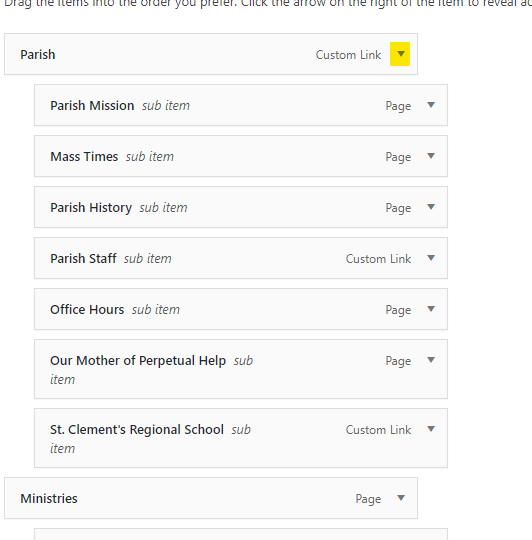
I am not sure what is causing you to not see the menu dropdowns because the training account, with the same Parish Administrator role, can see it as seen in the screenshot below. I am not sure. You may want to do a hard refresh by holding Ctrl+R or Ctrl+F5 or logging out and back in.
Can you clarify what you mean by removing the calendar from the website? Do you mean the Keep & Share calendars in the iFrames or do you mean the homepage calendar?
Let me know your thoughts!
Thank you,
Cody Armock
I am not sure what is causing you to not see the menu dropdowns because the training account, with the same Parish Administrator role, can see it as seen in the screenshot below. I am not sure. You may want to do a hard refresh by holding Ctrl+R or Ctrl+F5 or logging out and back in.
Can you clarify what you mean by removing the calendar from the website? Do you mean the Keep & Share calendars in the iFrames or do you mean the homepage calendar?
Let me know your thoughts!
Thank you,
Cody Armock
Web Department, Diocesan
877-923-0777
Randy Rivers
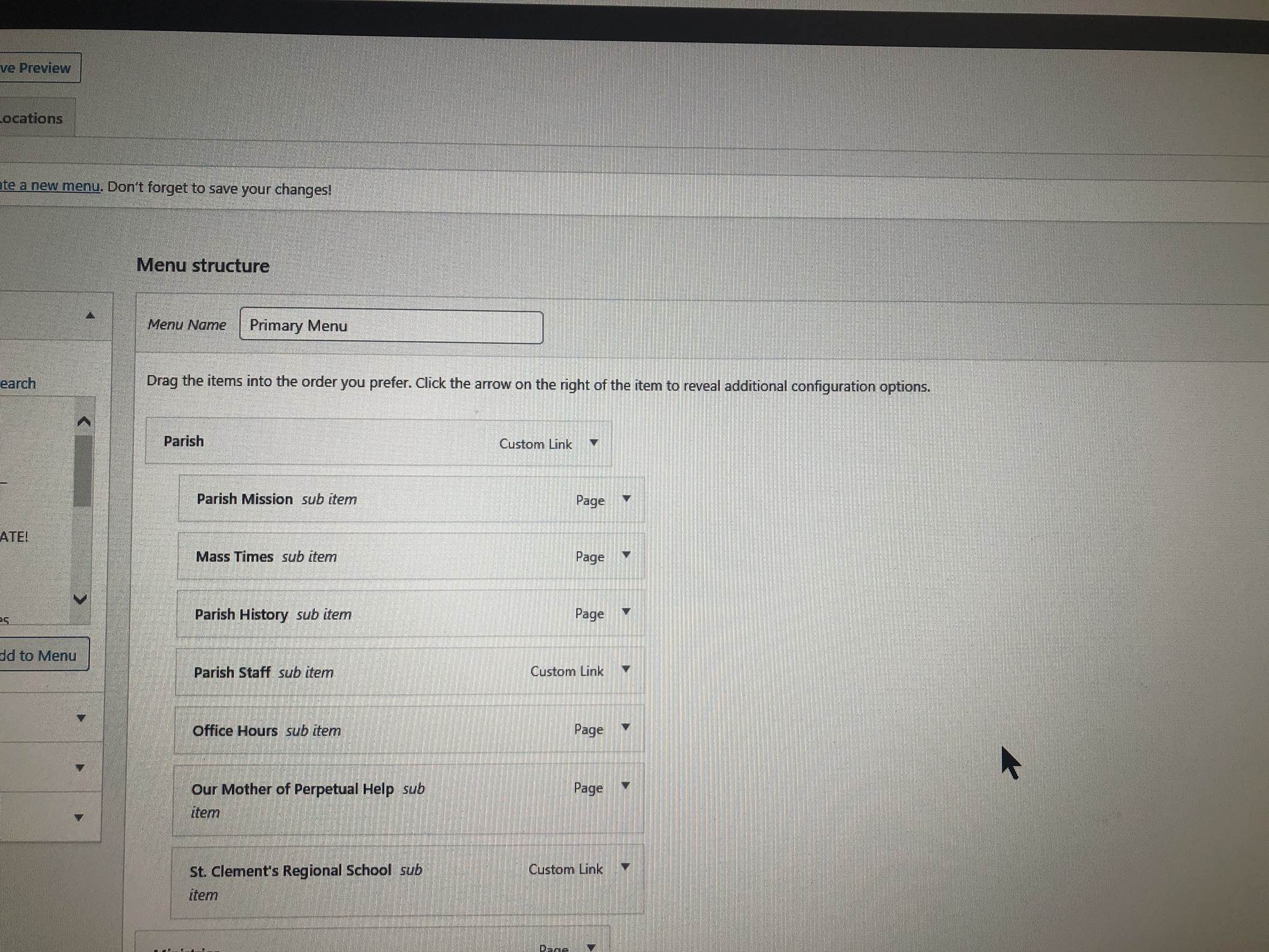
I did what you said to do, this is what my page looks like still. We need to keep the keep and share it’s the one on the main page that needs to go
Cody Armock
Hello Randy,
If you are trying to edit the menu titles, then you can click that little down arrow on the right side of the bar after the description of what the item is e.g. "Page", "Custom Link" for the menu item and edit it from there. Is this what you are trying to do, or are you trying to do something else that I may have missed in your correspondence.
Let me know,
Cody Armock
If you are trying to edit the menu titles, then you can click that little down arrow on the right side of the bar after the description of what the item is e.g. "Page", "Custom Link" for the menu item and edit it from there. Is this what you are trying to do, or are you trying to do something else that I may have missed in your correspondence.
Let me know,
Cody Armock
Randy Rivers
Im trying to add one that says newcomer
Cody Armock
Okay, that helps. Will that be going to a page or a special link?
If it is going to a page, then you can pick from the pages list or View All to see all the pages. If it is going to a special link, you can make it a Custom Link by pasting the URL to the place you want the user to go and typing what you want the Menu label to be in the spot where it says "Link Text". Once you add the item to the menu, it will be added to the bottom, but from there you can drag it up to where you want it to be.
Thank you,
Cody
If it is going to a page, then you can pick from the pages list or View All to see all the pages. If it is going to a special link, you can make it a Custom Link by pasting the URL to the place you want the user to go and typing what you want the Menu label to be in the spot where it says "Link Text". Once you add the item to the menu, it will be added to the bottom, but from there you can drag it up to where you want it to be.
Thank you,
Cody
Randy Rivers
I’m going to move some of the items from parish into that tab. The parish application, history and maybe add a link or page to attract someone visiting the site
Cody Armock
If it is just going to be a label and not going anywhere specifically, you can make it a custom link with the Link Text as "Newcomer" and for the URL just put "#", that is a blank link. Once you add it to the menu, you can click the dropdown and delete the "#" and then save the menu and it will just act as a label and not a link.
Let me know if you have any other questions,
Thank you,
Cody
Let me know if you have any other questions,
Thank you,
Cody
Randy Rivers
Thank you and got it.
Thank you,
Randy Rivers
Thank you,
Randy Rivers
Randy Rivers
Hi Cody it’s me Randy at St Clement’s. Just wondering why I can’t get into the site anymore. I have the link saved in my favorites that’s how I got to the site to edit now it only brings me to the site and I can no longer edit?
Cody Armock
Hello Randy,
I am not sure. You are going to https://stclementschurch.com/saratogasprings, correct? I can try resetting your password and seeing if that fixes it. Would you like me to do that? I can't see any reason why it would not let you log in.
Cody Armock
I am not sure. You are going to https://stclementschurch.com/saratogasprings, correct? I can try resetting your password and seeing if that fixes it. Would you like me to do that? I can't see any reason why it would not let you log in.
Cody Armock
Web Department, Diocesan
877-923-0777
Randy Rivers
I’m back in now. I got a message saying oopps this site is not available before now all is good
Cody Armock
Interesting!
I am glad that it is fixed now. It might have been a lockout or something.
In the future, please direct all questions or concerns to webdepartment@diocesan.com as this project is archived and the chances that we will see emails is not guaranteed, but we will see them there.
Thank you,
Cody Armock
I am glad that it is fixed now. It might have been a lockout or something.
In the future, please direct all questions or concerns to webdepartment@diocesan.com as this project is archived and the chances that we will see emails is not guaranteed, but we will see them there.
Thank you,
Cody Armock