











Desired Launch Date?
Good Morning Courtney & Erin,
I wanted to check in to see when you would like to launch the website!
Right now, for the earliest, we would be looking at somewhere in the first week of June, like June 3rd or 4th, but anytime after that would work too. Again, to reiterate, we just need it to be Monday-Thursday so that we have another day of working if anything goes wrong.
Let me know what you are thinking and we will go from there!
Thank you,
Cody Armock
Web Department, Diocesan
877-923-0777
 Erin Burgess
Thanks for checking in Cody. We had a large mailing this week, so that took up most of my time. I did contact our computer tech people adn she was supposed to send me the C-panel info, but I have not received that yet. We are still debating the launch timing. I will let you know when we come to a conclusion. have a gret Memorial weekend!!
 Cody Armock
Thank you,
I just wanted to make sure that the project keeps moving forward!
Let me know when they send you the CPanel info.
I hope you have a great Memorial Weekend too.
Cody Armock
I just wanted to make sure that the project keeps moving forward!
Let me know when they send you the CPanel info.
I hope you have a great Memorial Weekend too.
Cody Armock
Web Department, Diocesan
877-923-0777
Erin Burgess
Here you go Cody. We are thinking July 1, if that is ok with you?
Cody Armock
Hello Erin,
Sounds good! I will double-check with Veronica, but I think that should be perfect.
Thank you,
Cody Armock
Sounds good! I will double-check with Veronica, but I think that should be perfect.
Thank you,
Cody Armock
Web Department, Diocesan
877-923-0777
 Veronica Alvarado
Good morning Erin,
July 1 will work!
We've added it to our calendars and let the developer know.
Have a blessed day,
Veronica Alvarado
Project Manager, Web Department
877-923-0777
Erin Burgess
Good morning Cody!
Can you give Zach Everett access to the website? He is the new Director of Evangelization and Discipleship. He will need access to LifeTeen, Alpha (I think he will make a new page). I think after he is added I can assign him to pages. I just wasn't sure how to get him "on" the page.
email is everettz@stcharleslima.org (mailto:everettz@stcharleslima.org)
Thanks Cody
Can you give Zach Everett access to the website? He is the new Director of Evangelization and Discipleship. He will need access to LifeTeen, Alpha (I think he will make a new page). I think after he is added I can assign him to pages. I just wasn't sure how to get him "on" the page.
email is everettz@stcharleslima.org (mailto:everettz@stcharleslima.org)
Thanks Cody
Cody Armock
Hello Erin,
I have set up Zach's account and assigned a couple of pages to him. I am not sure if they are right, but make sure that they are right. The easiest way to assign pages is to hover over the page in the All Pages list and click Quick Edit link just below the Title of the Page and switch the Author and then click "Update".
Let me know if you have any questions!
Thank you,
Cody Armock
I have set up Zach's account and assigned a couple of pages to him. I am not sure if they are right, but make sure that they are right. The easiest way to assign pages is to hover over the page in the All Pages list and click Quick Edit link just below the Title of the Page and switch the Author and then click "Update".
Let me know if you have any questions!
Thank you,
Cody Armock
Web Department, Diocesan
877-923-0777
Erin Burgess
Thanks Cody. I found where to assign people, but it was a pull down and I didn't know how to put him in so he was a part of the pull down.
Erin Burgess
Also, what are his sign in credentials?
Cody Armock
Hello Erin,
I have emailed Zach with his credentials and BCC'd you on that email as well if he has any trouble with it. I also included instructions on how to change his password.
Let me know if you have any further questions!
Cody Armock
I have emailed Zach with his credentials and BCC'd you on that email as well if he has any trouble with it. I also included instructions on how to change his password.
Let me know if you have any further questions!
Cody Armock
Web Department, Diocesan
877-923-0777
Erin Burgess
I should have known you had it taken care of, :)
Erin Burgess
Hey Cody! Can you please remind me of the stock photo sites that you mentioned?
Thanks~
Thanks~
Veronica Alvarado
Hello Erin,
Cody is currently in a training session but here are the stock image sites we recommend:
- https://unsplash.com/
- https://www.pexels.com/
- https://www.cathopic.com/
- https://www.onesecretmission.com/free
- https://pixabay.com/
I hope these help!
Veronica Alvarado
Project Manager, Web Department
877-923-0777
Erin Burgess
thank you!
Veronica Alvarado
Erin Burgess
We tried to add a accordion block from the plug ins. It shows any text in html. Help
Cody Armock
Hello Erin,
In the top right of the editor for the accordion, there is a tab for text and a tab for HTML, click the tab for text. That should fix it.
Thank you,
Cody Armock
In the top right of the editor for the accordion, there is a tab for text and a tab for HTML, click the tab for text. That should fix it.
Thank you,
Cody Armock
Web Department, Diocesan
877-923-0777
Cody Armock
Sorry Erin,
I had to double-check, it is Visual and Text, click on the Visual Tab and that should fix it.
I had to double-check, it is Visual and Text, click on the Visual Tab and that should fix it.
Erin Burgess
Tried that, I was already in the visual tab
Erin Burgess
Communications Coordinator
2200 West Elm Street, Lima, OH 45805
Phone: 419-228-7635
Fax: 419-229-2835
stcharleslima.org (http://stcharleslima.org)
Erin Burgess
Communications Coordinator
2200 West Elm Street, Lima, OH 45805
Phone: 419-228-7635
Fax: 419-229-2835
stcharleslima.org (http://stcharleslima.org)
Cody Armock
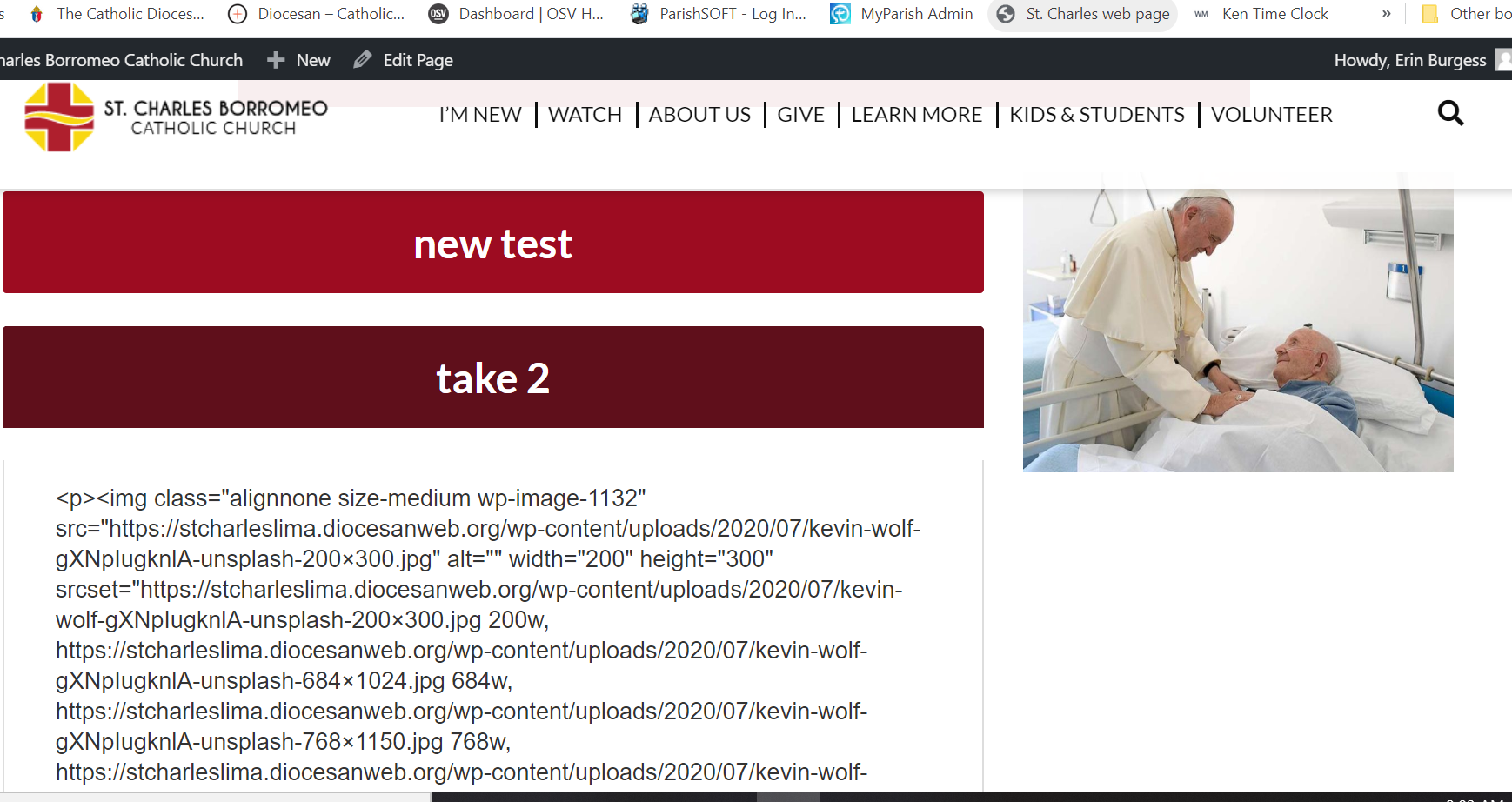
Can you send a screenshot of what it is and I will take a look at it tomorrow morning?
Thank you,
Cody Armock
Thank you,
Cody Armock
Web Department, Diocesan
877-923-0777
Erin Burgess
This is a preview of the page. It is the page titled "Untitled" on the site
Cody Armock
Hello Erin,
I am not sure what is going on there. I will have the developer look into it and see what is going on there.
Thank you,
Cody Armock
I am not sure what is going on there. I will have the developer look into it and see what is going on there.
Thank you,
Cody Armock
Web Department, Diocesan
877-923-0777
Cody Armock
Hello Erin,
I did a little digging and found the issue, so it works right now, but I will have the developer make the change permanent later this week. There shouldn't be a point where it stops working though.
Cody Armock
I did a little digging and found the issue, so it works right now, but I will have the developer make the change permanent later this week. There shouldn't be a point where it stops working though.
Cody Armock
Web Department, Diocesan
877-923-0777
Erin Burgess
Does it work on the entire site? I was just playing on that page. Zach was trying to use it on the "Encounter" page, I think
Cody Armock
It should work on the entire site now. Is it still having issues?
You may want to try a hard refresh, Instructions Here.
That should fix it on the front end.
Cody Armock
You may want to try a hard refresh, Instructions Here.
That should fix it on the front end.
Cody Armock
Web Department, Diocesan
877-923-0777
Erin Burgess
Is this what you need?
Cody Armock
Hello Erin,
Can you try sending that to webdepartment@diocesan.com, whatever you tried to attach or send did not come through basecamp?
Thank you,
Cody Armock
Can you try sending that to webdepartment@diocesan.com, whatever you tried to attach or send did not come through basecamp?
Thank you,
Cody Armock
Web Department, Diocesan
877-923-0777
Cody Armock
Hello Erin,
That was it. Thank you!
Cody Armock
That was it. Thank you!
Cody Armock
Web Department, Diocesan
877-923-0777
Erin Burgess
Hi Cody! Website looks great! Just need to remove the Sunday 5:30PM mass off the banner. We only have that September thru may and with the covid, not sure if we will have it back even then. If you could let me know how to do it for the future I would really appreciate your help.
Thanks
Thanks
Erin Burgess
Good afternoon Cody!
Quick question, how do I give someone editing rights to a page? I assume since we are going live today, that is something I can do going forward
Erin Burgess
Communications Coordinator
2200 West Elm Street, Lima, OH 45805
Phone: 419-228-7635
Fax: 419-229-2835
stcharleslima.org (http://stcharleslima.org)
Quick question, how do I give someone editing rights to a page? I assume since we are going live today, that is something I can do going forward
Erin Burgess
Communications Coordinator
2200 West Elm Street, Lima, OH 45805
Phone: 419-228-7635
Fax: 419-229-2835
stcharleslima.org (http://stcharleslima.org)
Cody Armock
Hello Erin,
We are still waiting for the site to propagate but will be sending you the email tomorrow with the new login URL and other information. To change the 5:30 PM mass would be in the theme settings in the mass schedule tab.
For someone to have editing rights to a page, they would need a user account on the site (just let us know with first and last name, and email and user role, admin or author). Once they have a user account, if it is an admin account they will be able to edit it, if it is an author then you can change the editing rights via the Quick Edit and change the author of it or go to edit the page/post in the backend and switch the author in the Document pane on the right side.
I hope that answers those questions!
Cody Armock
We are still waiting for the site to propagate but will be sending you the email tomorrow with the new login URL and other information. To change the 5:30 PM mass would be in the theme settings in the mass schedule tab.
For someone to have editing rights to a page, they would need a user account on the site (just let us know with first and last name, and email and user role, admin or author). Once they have a user account, if it is an admin account they will be able to edit it, if it is an author then you can change the editing rights via the Quick Edit and change the author of it or go to edit the page/post in the backend and switch the author in the Document pane on the right side.
I hope that answers those questions!
Cody Armock
Web Department, Diocesan
877-923-0777
Erin Burgess
Oh man Cody! I thought it was live! We could see it as live! I made a few changes around 4-5. I hope I didn't screw anything up
Cody Armock
Hello Erin,
If you could see it as live, that is good, sometimes it takes some time for it to propagate all over the world, as of right now, it seems that it has. I would just make sure that the changes that you have made are still saved on the website as sometimes launching the site can overwrite those changes. We will still be sending you an email soon when everything is completely configured.
Thank you,
Cody Armock
If you could see it as live, that is good, sometimes it takes some time for it to propagate all over the world, as of right now, it seems that it has. I would just make sure that the changes that you have made are still saved on the website as sometimes launching the site can overwrite those changes. We will still be sending you an email soon when everything is completely configured.
Thank you,
Cody Armock
Web Department, Diocesan
877-923-0777
Erin Burgess
Hey Cody!
Our parishioners are really loving the new website! Along with that they have found a few issues. For example the featured images on other pages, not the home page, do not seem to be resizing. For reference you could go to Becoming Catholic under Learn more.
Also, the St. Charles branding logo, is too big or in the wrong spot in the footer. You can see it on the same becoming catholic page, it is the same way on the home page as well.
Also, I am trying to put more staff members on the staff page. I can't figure out what I am doing wrong. Is there a way to copy the format, to just change the info or do I have to build it everytime? I've been trying to copy, maybe that is where I am going wrong.
I'm sure I will be emailing more things as more parishioners find the new website.
Our parishioners are really loving the new website! Along with that they have found a few issues. For example the featured images on other pages, not the home page, do not seem to be resizing. For reference you could go to Becoming Catholic under Learn more.
Also, the St. Charles branding logo, is too big or in the wrong spot in the footer. You can see it on the same becoming catholic page, it is the same way on the home page as well.
Also, I am trying to put more staff members on the staff page. I can't figure out what I am doing wrong. Is there a way to copy the format, to just change the info or do I have to build it everytime? I've been trying to copy, maybe that is where I am going wrong.
I'm sure I will be emailing more things as more parishioners find the new website.
Cody Armock
Hello Erin,
I have made the to-dos for the developer about those issues with the Logo and the Featured Image. I don't know how much we will be able to do with the featured image as that is mainly there to be an aesthetic picture (no text). You can add any images that need to size correctly to the content if required, but I am hoping that the fix helps to ameliorate it some. I also found another issue and made a to-do for that as well.
As for the staff, each staff is a columns block. The easiest to way to add new staff would be
I have made the to-dos for the developer about those issues with the Logo and the Featured Image. I don't know how much we will be able to do with the featured image as that is mainly there to be an aesthetic picture (no text). You can add any images that need to size correctly to the content if required, but I am hoping that the fix helps to ameliorate it some. I also found another issue and made a to-do for that as well.
As for the staff, each staff is a columns block. The easiest to way to add new staff would be
- In the top bar click the Block Navigation button (the list icon or Shift+Alt+O for keyboard shortcut)
- Click the last good "Columns" Block (the three vertical bar icon) not the "Column" (no 's') block.
- Once you have in this case, Jodi Roberts' "Columns block selected you can click the vertical three dots (snowman menu)
- Then click duplicate or CTRL + SHIFT + D (for keyboard shortcut) and this will make a new columns block with the same information. You can then replace the image and the information.
- Repeat steps 1-4 for all staff.
I hope that makes sense!
Because the site is now launched, the basecamp project will soon be archived, which means that emails that come through here may not get to us or if they do, they may not be as prompt as before. If you have any further questions please send them to webdepartment@diocesan.com and we will be able to assist you there.
Thank you Erin,
Cody Armock
Because the site is now launched, the basecamp project will soon be archived, which means that emails that come through here may not get to us or if they do, they may not be as prompt as before. If you have any further questions please send them to webdepartment@diocesan.com and we will be able to assist you there.
Thank you Erin,
Cody Armock
Web Department, Diocesan
877-923-0777