












Calendar w/ Colors
Good morning Amy,
Yesterday, I purchased the Google Calendar Pro plugin so that your calendars will reflect the multiple colors. In order for me to set this up, I will need the login information for your Google account. This will allow me to create an API key for the website and will allow the colors you assign to calendars to come through to the website.
Let me know if you have any questions and I look forward to hearing back from you,
Veronica Alvarado
Web Department, Diocesan
877-923-0777
877-923-0777
 Amy Brinker
 Veronica Alvarado
Hello Amy,
I was taking a further look at the Google Calendar that comes with colors and I have some disappointing news.
It seems as though the colors of the events will only show up if the events are all on a single calendar (so what you previously had). BUT in order to display events on each individual parish's pages, they will have to be on separate calendars, so we will need to do both
Free of charge, I'm going to go in and get everything set up for you in your calendar.
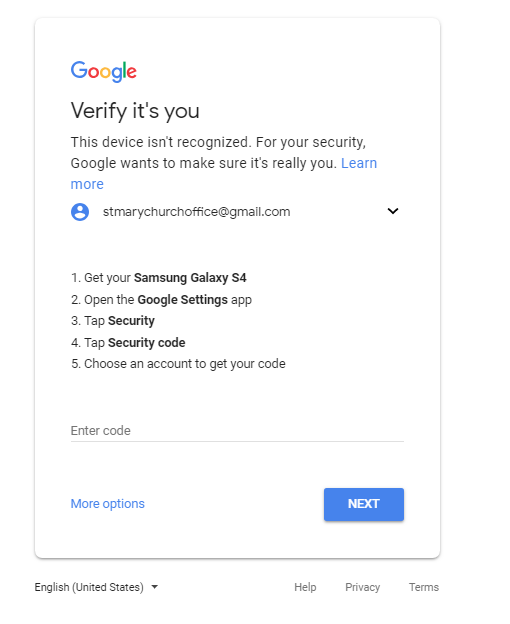
Before I can do any of that, I need you to set up an access code so that I can log into your Google calendar account and set it up. Once you have set this up, please just send the code to me and I will get get started this weekend.
Thank you and so sorry about the confusion!
Veronica Alvarado
Web Department, Diocesan
877-923-0777
877-923-0777
Amy Brinker
No problem Veronica. How do I set that up for you to take care of it? And, at some point I'll want to talk to you some more about using the calendar.
Thanks!
Thanks!
Veronica Alvarado
Good morning Amy,
For the code, I will need you to do the following steps:
- Get your Samsung Galaxy S4
- Open the Google Settings App
- Tap Security
- Tap Security Code
- Choose the Google account
Then, there should be an auto-generated code that you can then copy and email back to me. If it is easier, please send the code to my valvarado@diocesan.com email.
Thank you,
Thank you,
Veronica Alvarado
Web Department, Diocesan
877-923-0777
877-923-0777