













Design Approval
Hi Lisa,
I'm so excited you like the design and are ready to give approval. If you can approve this email we can start to schedule the next phase of the project and get you into our development queue.
Thanks so much for your time and making the design process run very smooth. Let me know if you have any questions and I will be happy to help in any way that I can. Thanks again!
I made the adjustments to the body copy so it is more legible. Please let me know if I can do anything else! Here is the XD link for you to view the design:
https://xd.adobe.com/view/34907964-5b86-4bf6-53be-2edc625f532b-42a1/
Have a great day!
Danae
I'm so excited you like the design and are ready to give approval. If you can approve this email we can start to schedule the next phase of the project and get you into our development queue.
Thanks so much for your time and making the design process run very smooth. Let me know if you have any questions and I will be happy to help in any way that I can. Thanks again!
I made the adjustments to the body copy so it is more legible. Please let me know if I can do anything else! Here is the XD link for you to view the design:
https://xd.adobe.com/view/34907964-5b86-4bf6-53be-2edc625f532b-42a1/
Have a great day!
Danae
 Danae Chudy
Sorry that is the wrong design link: https://xd.adobe.com/view/34907964-5b86-4bf6-53be-2edc625f532b-42a1/
Danae Chudy
Hi Lisa,
I wasn't sure if you were confused with the design approval process so here are some instructions:
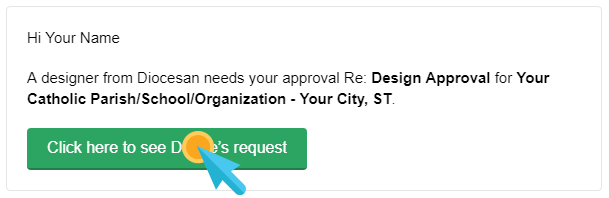
When you receive an email for approval, you should see a green button in the email that reads, "Click here to see [Designer]'s request." Please click on the button to approve or unapprove of the design.
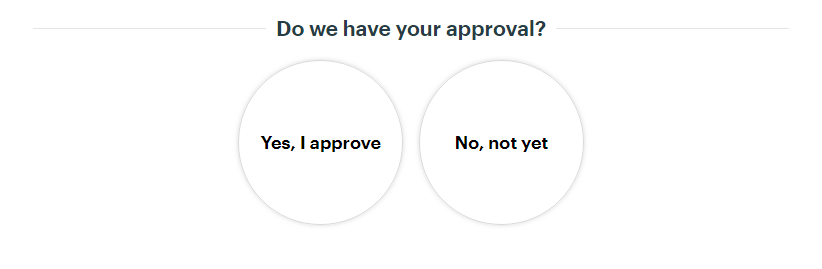
Once you have clicked to view the request, you will come to another screen that gives you the option of saying Yes or No. Please select one or the other.
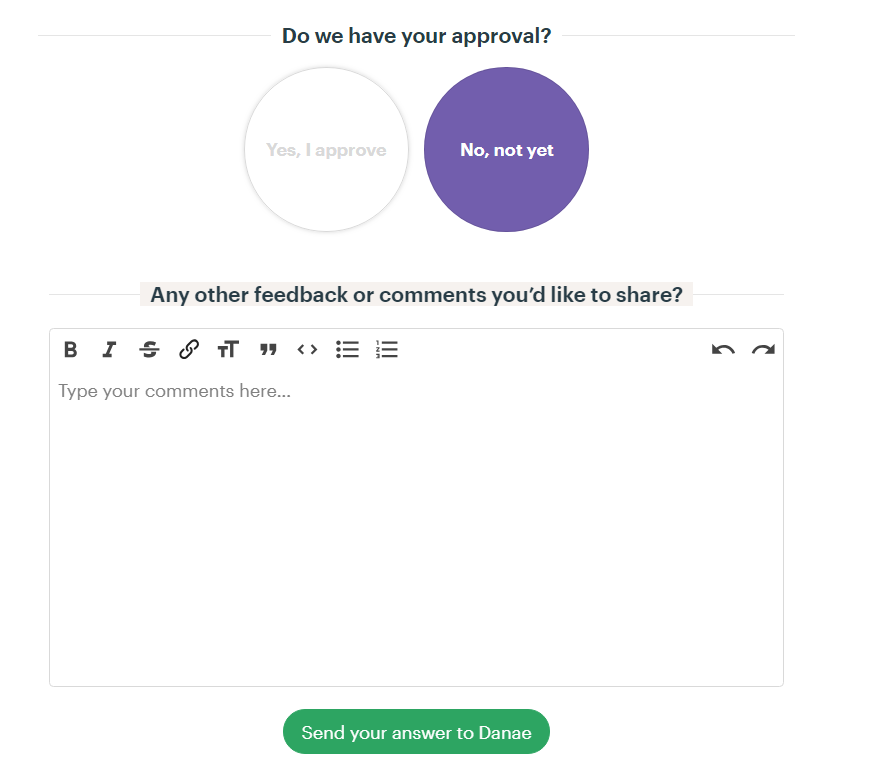
If you select no, you will be prompted to add notes as to what we need to work on before getting your approval.
If you are having trouble seeing the email, please don't hesitate to give us a call at 877-923-0777.
Please let me know if you have any problems with it and I will help you through the process!
Thanks!
Danae
I wasn't sure if you were confused with the design approval process so here are some instructions:
When you receive an email for approval, you should see a green button in the email that reads, "Click here to see [Designer]'s request." Please click on the button to approve or unapprove of the design.
Once you have clicked to view the request, you will come to another screen that gives you the option of saying Yes or No. Please select one or the other.
If you select no, you will be prompted to add notes as to what we need to work on before getting your approval.
If you are having trouble seeing the email, please don't hesitate to give us a call at 877-923-0777.
Please let me know if you have any problems with it and I will help you through the process!
Thanks!
Danae