












Potential Launch Date?
Good Afternoon Amy,
I wanted to check in to see if you had a potential launch date in mind for the site. I don't know if I said it before, but the date should be between Monday and Thursday and please give us at least a week's notice before the desired launch date.
Thank you,
Cody Armock
Web Department, Diocesan
877-923-0777
 Amy Friedman
Hi Cody, Can we launch June 1, 2021? Thank you.
Amy Friedman
Amy Friedman
St. Catherine Laboure Catholic Church
Parish Secretary
afriedman@stcatherinelabourega.org<mailto:afriedman@stcatherinelabourega.org>
Phone: 706-367-7220
Amy Friedman
Amy Friedman
St. Catherine Laboure Catholic Church
Parish Secretary
afriedman@stcatherinelabourega.org<mailto:afriedman@stcatherinelabourega.org>
Phone: 706-367-7220
 Cody Armock
Good Afternoon Amy,
I have it tentatively scheduled for then! I will send out a confirmation email in about a week to make everything is still set to go with it.
Thank you,
Cody Armock
I have it tentatively scheduled for then! I will send out a confirmation email in about a week to make everything is still set to go with it.
Thank you,
Cody Armock
Web Department, Diocesan
877-923-0777
Amy Friedman
Hi Cody,
I have a few questions.
1. Will you Remind me how to upload the bulletin?
2. Can we temporarily “unpublish” a news event or should it be deleted?
Amy Friedman
Amy Friedman
St. Catherine Laboure Catholic Church
Parish Secretary
afriedman@stcatherinelabourega.org<mailto:afriedman@stcatherinelabourega.org>
Phone: 706-367-7220
I have a few questions.
1. Will you Remind me how to upload the bulletin?
2. Can we temporarily “unpublish” a news event or should it be deleted?
Amy Friedman
Amy Friedman
St. Catherine Laboure Catholic Church
Parish Secretary
afriedman@stcatherinelabourega.org<mailto:afriedman@stcatherinelabourega.org>
Phone: 706-367-7220
Cody Armock
Good Morning Amy,
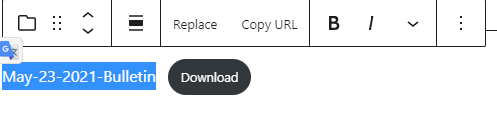
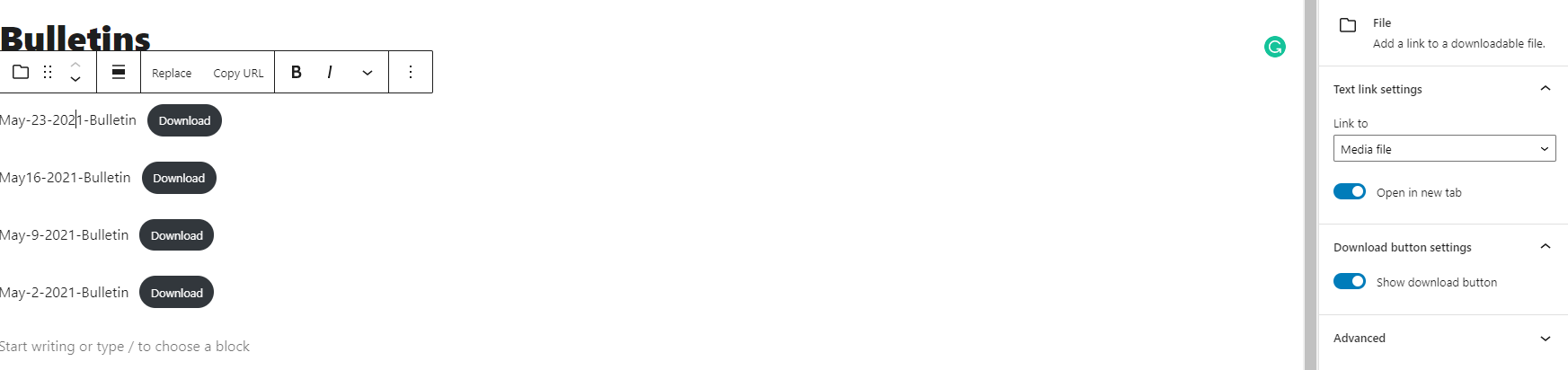
1. If you go to the Bulletins page, and put your cursor after the page title "Bulletins", click "Enter" and type "/file" a menu will appear with a square for file, click that or click "Enter" again. Then click "Upload" or "Media Library" and then just upload the PDF. You can change the text of the Title of the document within the page (picture shown below). You can also toggle the Download button or opening in new tab (pic shown below)in the block pane (I would recommend opening in new tab for all of them, but Download button is up to you.)
1. If you go to the Bulletins page, and put your cursor after the page title "Bulletins", click "Enter" and type "/file" a menu will appear with a square for file, click that or click "Enter" again. Then click "Upload" or "Media Library" and then just upload the PDF. You can change the text of the Title of the document within the page (picture shown below). You can also toggle the Download button or opening in new tab (pic shown below)in the block pane (I would recommend opening in new tab for all of them, but Download button is up to you.)
2. You can set a Post to a draft which will make it unpublished. This way you can edit it again.
- Quick Edit Way -
- Go to the list of all posts.
- Hover over the post you'd like to unpublish and click "Quick Edit" below the title.
- Select "Draft" from the "Status" dropdown on the right side of the box that shows up.
- Click Update.
- Editing Post Way -
- Open the post to edit it.
- In the top-right to the left of the Update button, there is a button to "Switch to draft". Click that.
- Click "Ok" in the box that pops up.
- Voila
I hope that helps, Amy! Happy Pentecost.
Cody Armock
Cody Armock
Web Department, Diocesan
877-923-0777
Amy Friedman
Hi Cody,
I have a few things that I am struggling with on the up and coming website.
1. I created a form - Liturgical Inquiry. I wanted to add the form to Liturgical Ministries as a button. I created the button, but it seems to be attaching as a preview rather that the actual form. What did I do wrong?
2. I need to edit the buttons / banner on the home page and on the Contact Us page. (not sure if button or banner is the correct word here). Where can I edit them? I don't see them on the edit page. Most importantly, I want the join our parish button on the contact us page to link to the parish registration.
Thank you so much for your help with this.
Amy Friedman
Amy Friedman
St. Catherine Laboure Catholic Church
Parish Secretary
afriedman@stcatherinelabourega.org<mailto:afriedman@stcatherinelabourega.org>
Phone: 706-367-7220
I have a few things that I am struggling with on the up and coming website.
1. I created a form - Liturgical Inquiry. I wanted to add the form to Liturgical Ministries as a button. I created the button, but it seems to be attaching as a preview rather that the actual form. What did I do wrong?
2. I need to edit the buttons / banner on the home page and on the Contact Us page. (not sure if button or banner is the correct word here). Where can I edit them? I don't see them on the edit page. Most importantly, I want the join our parish button on the contact us page to link to the parish registration.
Thank you so much for your help with this.
Amy Friedman
Amy Friedman
St. Catherine Laboure Catholic Church
Parish Secretary
afriedman@stcatherinelabourega.org<mailto:afriedman@stcatherinelabourega.org>
Phone: 706-367-7220
Cody Armock
Hello Amy,
1. You would have to add that form to a page. So making a "Liturgical Inquiry Form" page. Then add form block and select the Liturgical Inquiry form and publish that page. After that, then link that page from the button.
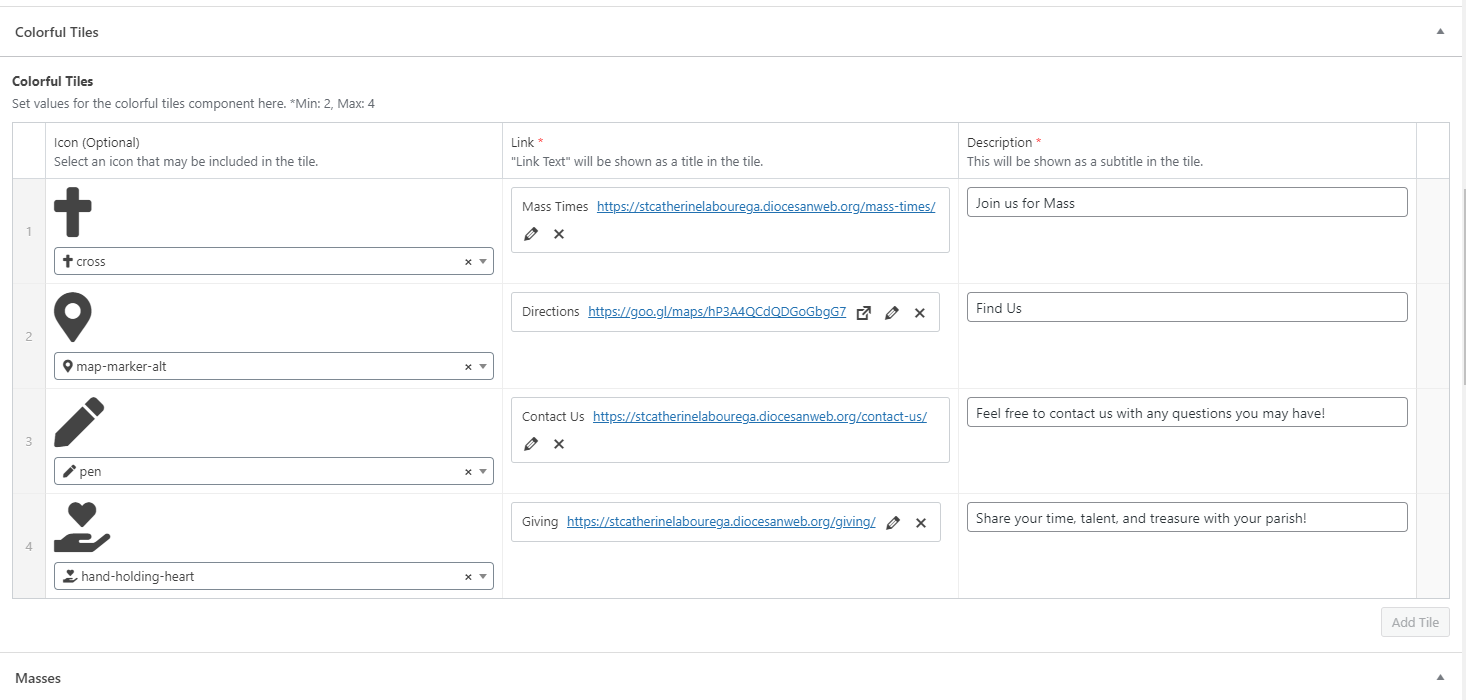
2. The colorful tiles/buttons can be edited in the bottom of the Homepage. The contact us page is not as customizable, but I added the link to the Parish Registration Form. Make sure that the arrow next to the icon is pointing down to edit the homepage tiles.
1. You would have to add that form to a page. So making a "Liturgical Inquiry Form" page. Then add form block and select the Liturgical Inquiry form and publish that page. After that, then link that page from the button.
2. The colorful tiles/buttons can be edited in the bottom of the Homepage. The contact us page is not as customizable, but I added the link to the Parish Registration Form. Make sure that the arrow next to the icon is pointing down to edit the homepage tiles.

Let me know if I need to clarify anything!
Thank you,
Cody Armock
Thank you,
Cody Armock
Web Department, Diocesan
877-923-0777
Amy Friedman
892051
Amy Friedman
Amy Friedman
St. Catherine Laboure Catholic Church
Parish Secretary
afriedman@stcatherinelabourega.org<mailto:afriedman@stcatherinelabourega.org>
Phone: 706-367-7220
Amy Friedman
Amy Friedman
St. Catherine Laboure Catholic Church
Parish Secretary
afriedman@stcatherinelabourega.org<mailto:afriedman@stcatherinelabourega.org>
Phone: 706-367-7220