












Website Content
Good Morning Melissa,
First off, I would just like to thank you for choosing Diocesan. I think our partnership will provide both Saint Brendan the Navigator Church and School a wonderful website that matches your identity and brand.
Typically I, the content specialist, would not be reaching out to you until after the design approval, but I know we are racing the quickly-approaching deadline of July 1. Unfortunately, without design approval we cannot begin website development. At this point of the process, we are left with 2 weeks to develop, whereas most of our projects are developed over a 4 week period.
In order to adhere to the deadline as much as possible, our team will have two developers, Daniel and Kyle, working on your website once we get the official design approval. While we cannot guarantee that we will be ready to launch to the public by Friday, June 29, I know that I can most definitely train you (and/or your staff) by Tuesday, June 26 in order to launch the following week. This way, even as our developers continue to work on the homepage, small details, and mobile responsiveness, your staff can log in. My hope is that you/they can go through the website's content, update things as necessary, and use the week to become more comfortable with the new website before launching.
Here are some things that I would like to get out of the way before we run into issues later:
- Calendar
Do you plan on using a calendar throughout the side to show categorized events? If so, what calendar system do you plan on using?- None
Page content states recurring & "big" dates - Google Calendar
Facilities Scheduler can push to Google Calendar
(re-pushing when adding/editing events) - Calendar within website (Eventon)
$24, one time fee that St Brendan pays
- None
- School Website
Is the school's information on the church website's menu or are they two separate menus? (School's menu displays when on any of the school pages, Church's menu displays when on any of the church pages) - School Information
Who should I get in contact with regarding the school's website content?
Am I migrating all the information from the school's website as it is currently? - Flocknote
In order to link to your Flocknote or to display sign-up forms, we will need the login information for your Flocknote account.
If you are not comfortable with us doing this, you are welcome to put in the Flocknote sign-up forms yourself using this article from Flocknote once you have access to login (post-training)
I will be leaving the office shortly, but please feel free to call me with any questions you may have on Monday.
Thank you and I look forward to talking with you soon,
Veronica Alvarado
Web Department, Diocesan
877-923-0777
877-923-0777
 Melissa Zuk
Hi Veronica,
Great to hear from you. Yes, let’s keep things rolling to meet the deadline! So training by June 26th sounds great.
Calendar
Yes, we do plan on using a calendar. We currently use PDS (Facilities Scheduler) for our scheduling, and we are wanting to sync our PDS with a google calendar to implement throughout the site. We do want to have a main calendar, but also the ability to filter what events show up on different pages, for example: Only the Faith Formation events would show up on the Faith Formation pages, etc.
School Website
The School and the church have two separate menus. School's menu displays when on any of the school pages, Church's menu displays when on any of the church pages)
School Information
Regarding the school's website content, contact the principal, Will Gruber. wgruber@cdeducation.org<mailto:wgruber@cdeducation.org> or 614-876-6132. Yes, we are migtating all the information from the school's website as it is currently.
Flocknote
My login should work for you, as I have the highest permissions. mzuk@stbrendans.net<mailto:mzuk@stbrendans.net>, pw: StJohnPaul2
Let me know if you need anything else!
Melissa Zuk
Marketing & Communications Coordinator
p: 614.876.1272 ex 221
e: mzuk@stbrendans.net<mailto:mzuk@stbrendans.net>
[cid:image001.png@01D3CD1B.FFE75C80]

Great to hear from you. Yes, let’s keep things rolling to meet the deadline! So training by June 26th sounds great.
Calendar
Yes, we do plan on using a calendar. We currently use PDS (Facilities Scheduler) for our scheduling, and we are wanting to sync our PDS with a google calendar to implement throughout the site. We do want to have a main calendar, but also the ability to filter what events show up on different pages, for example: Only the Faith Formation events would show up on the Faith Formation pages, etc.
School Website
The School and the church have two separate menus. School's menu displays when on any of the school pages, Church's menu displays when on any of the church pages)
School Information
Regarding the school's website content, contact the principal, Will Gruber. wgruber@cdeducation.org<mailto:wgruber@cdeducation.org> or 614-876-6132. Yes, we are migtating all the information from the school's website as it is currently.
Flocknote
My login should work for you, as I have the highest permissions. mzuk@stbrendans.net<mailto:mzuk@stbrendans.net>, pw: StJohnPaul2
Let me know if you need anything else!
Melissa Zuk
Marketing & Communications Coordinator
p: 614.876.1272 ex 221
e: mzuk@stbrendans.net<mailto:mzuk@stbrendans.net>
[cid:image001.png@01D3CD1B.FFE75C80]
 Veronica Alvarado
Hello Melissa,
Thank you so much for sending me all of the information I needed. With that information and the things I've migrated, I'm so excited for Saint Brendan to get the new website. It'll be so wonderful for the parishioners to have access to so much information and opportunities to grow their faith!
The only thing I think we need to go into depth with is the calendar. I talked to one of my coworkers here that recently transferred out of PDS software support and double checked that this would be easily doable.
Instructions
Here are PDS' instructions on how to do so: https://wiki.acstechnologies.com/display/PDSFS/Exporting+to+Google+Calendar
("To upload calendars and events to Google" )
Filtering
As for filtering events on pages, you will want to use separate calendars for specific Facility Scheduler Topics. All of their events are categorized into separate Google Calendars (all under one account). These different calendars will be created for different pages. For example, here are the separate calendars that this parish has:
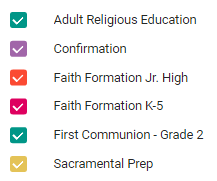
Once these separate calendars have been created, we can make them public and get the Calendar ID in order to display them on the website.
If we need to, we can go over this next week some time after the training. I just want to make sure it doesn't catch us by surprise a day or two before launch.
Thank you,
Veronica Alvarado
Web Department, Diocesan
877-923-0777
877-923-0777
Melissa Zuk
Hi Veronica,
That sounds fantastic. I have used Google Calendars relatively extensively in the past, so that all makes perfect sense.
I’m really excited for our new website, and I know our pastor is too! We really appreciate all of your hard work!
Melissa Zuk
Marketing & Communications Coordinator
p: 614.876.1272 ex 221
e: mzuk@stbrendans.net<mailto:mzuk@stbrendans.net>
[cid:image001.png@01D3CD1B.FFE75C80]

That sounds fantastic. I have used Google Calendars relatively extensively in the past, so that all makes perfect sense.
I’m really excited for our new website, and I know our pastor is too! We really appreciate all of your hard work!
Melissa Zuk
Marketing & Communications Coordinator
p: 614.876.1272 ex 221
e: mzuk@stbrendans.net<mailto:mzuk@stbrendans.net>
[cid:image001.png@01D3CD1B.FFE75C80]
Melissa Zuk
Hi Veronica,
I just wanted to check in and see where we are with the website? When should I tell my staff to plan for training?
Thank you!
Melissa Zuk
Marketing & Communications Coordinator
p: 614.876.1272 ex 221
e: mzuk@stbrendans.net<mailto:mzuk@stbrendans.net>
[cid:image001.png@01D3CD1B.FFE75C80]


I just wanted to check in and see where we are with the website? When should I tell my staff to plan for training?
Thank you!
Melissa Zuk
Marketing & Communications Coordinator
p: 614.876.1272 ex 221
e: mzuk@stbrendans.net<mailto:mzuk@stbrendans.net>
[cid:image001.png@01D3CD1B.FFE75C80]
Veronica Alvarado
Good Morning Melissa,
I was actually just typing up an email to send to you! Here is what I have:
Have you been able to get in touch with your team to figure out a good training date? I will be working from home the next couple days, but Kyle, the developer of your site, will most definitely be able to train you if I am unavailable.
Until then, feel free to take a look at the website: http://stbrendans.diocesanweb.com/ as I continue to move things around and add items to the menu.
Thank you,
Veronica Alvarado
Web Department, Diocesan
877-923-0777
877-923-0777
Melissa Zuk
Hi Veronica,
Is it possible to have our training tomorrow? I know that’s short notice, but that’s really what would work best if possible!
Melissa Zuk
Marketing & Communications Coordinator
p: 614.876.1272 ex 221
e: mzuk@stbrendans.net<mailto:mzuk@stbrendans.net>
[cid:image001.png@01D3CD1B.FFE75C80]

Is it possible to have our training tomorrow? I know that’s short notice, but that’s really what would work best if possible!
Melissa Zuk
Marketing & Communications Coordinator
p: 614.876.1272 ex 221
e: mzuk@stbrendans.net<mailto:mzuk@stbrendans.net>
[cid:image001.png@01D3CD1B.FFE75C80]
Veronica Alvarado
That should work out just fine.
Do you have a specific time in mind?
Thank you,
Do you have a specific time in mind?
Thank you,
Veronica Alvarado
Web Department, Diocesan
877-923-0777
877-923-0777
Melissa Zuk
Morning would be best! Maybe around 10 AM? How long should I tell my staff to plan for the training to take?
Thank you so much!
Melissa Zuk
Marketing & Communications Coordinator
p: 614.876.1272 ex 221
e: mzuk@stbrendans.net<mailto:mzuk@stbrendans.net>
[cid:image001.png@01D3CD1B.FFE75C80]

Thank you so much!
Melissa Zuk
Marketing & Communications Coordinator
p: 614.876.1272 ex 221
e: mzuk@stbrendans.net<mailto:mzuk@stbrendans.net>
[cid:image001.png@01D3CD1B.FFE75C80]
Melissa Zuk
Hi Veronica,
Thanks so much for sending over the link. I’m so glad to finally be able to look around! The design of the site looks good so far! I know the site is still very much in progress, but I just wanted to check on a couple of things that concerned me…
1. In the navigation, there is a new tab called “sacramental preparation” that I have never seen before. I’m not sure where that came from, and all of that information should be rolled under the “Grow Your Faith” tab. Also, we are missing the “Youth Ministry” tab that should be in the top-level navigation.
2. In the “Get Involved” section, we had specifically mocked up a version of these pages. In the mockup, we had each ministry listed out in a two-column format, with a small description and contact info. On the site, I see that the ministries are being listed as drop-down information. I very much prefer the way Sam and I had mocked up this page to what is on the site currently.
Again, I do understand that the site is still being built out and that many things will get moved around and changed. I just wanted to check on these two things that seemed a bit glaringly different than what had been mocked up.
If you need any help in identifying where things should go, please let me know! I am happy to answer any and all questions, and I am available to help wherever needed. I would rather we get this done right the first time rather than having to redo a bunch of work!
Thank you so much for all of your time and effort. I am so excited to see our new site!
Melissa Zuk
Marketing & Communications Coordinator
p: 614.876.1272 ex 221
e: mzuk@stbrendans.net<mailto:mzuk@stbrendans.net>
[cid:image001.png@01D3CD1B.FFE75C80]

Thanks so much for sending over the link. I’m so glad to finally be able to look around! The design of the site looks good so far! I know the site is still very much in progress, but I just wanted to check on a couple of things that concerned me…
1. In the navigation, there is a new tab called “sacramental preparation” that I have never seen before. I’m not sure where that came from, and all of that information should be rolled under the “Grow Your Faith” tab. Also, we are missing the “Youth Ministry” tab that should be in the top-level navigation.
2. In the “Get Involved” section, we had specifically mocked up a version of these pages. In the mockup, we had each ministry listed out in a two-column format, with a small description and contact info. On the site, I see that the ministries are being listed as drop-down information. I very much prefer the way Sam and I had mocked up this page to what is on the site currently.
Again, I do understand that the site is still being built out and that many things will get moved around and changed. I just wanted to check on these two things that seemed a bit glaringly different than what had been mocked up.
If you need any help in identifying where things should go, please let me know! I am happy to answer any and all questions, and I am available to help wherever needed. I would rather we get this done right the first time rather than having to redo a bunch of work!
Thank you so much for all of your time and effort. I am so excited to see our new site!
Melissa Zuk
Marketing & Communications Coordinator
p: 614.876.1272 ex 221
e: mzuk@stbrendans.net<mailto:mzuk@stbrendans.net>
[cid:image001.png@01D3CD1B.FFE75C80]
Veronica Alvarado
Melissa,
10:00 am will be great. The training typically takes about two hours. How many people do you plan on having there?
Yes, I am still working on the site and especially the menu. I first create the pages and deal with the menu last, as that is something that is easily done once I have all the pages created and ready to view.
I have moved Sacramental Information under Grow Your Faith and fixed the Liturgy & Worship page. We will add more space between each row to ensure it looks as it did in the mockup. Please take a look and let me know what you think.
Also, I plan on moving the remainder of the content this afternoon, so the majority of it should be ready by the training tomorrow.
Thank you and I look forward to talking with you tomorrow,
Veronica Alvarado
Web Department, Diocesan
877-923-0777
877-923-0777
Melissa Zuk
Hi Veronica,
Great! Thanks so much for working with our quick time table. We will have about 8 of us there, they will all have access to various areas of the site. What resources/connections do I need to have set up and ready for the training?
Those issues both look better! Thank you!
Thanks so much for all of your work on the site. I know it’s a big one! Like I said before, I do understand that the site is in progress and that content is still being rolled over, so I hope I didn’t step on your toes. Please let me know if you have any questions or need any help!
Melissa Zuk
Marketing & Communications Coordinator
p: 614.876.1272 ex 221
e: mzuk@stbrendans.net<mailto:mzuk@stbrendans.net>
[cid:image001.png@01D3CD1B.FFE75C80]

Great! Thanks so much for working with our quick time table. We will have about 8 of us there, they will all have access to various areas of the site. What resources/connections do I need to have set up and ready for the training?
Those issues both look better! Thank you!
Thanks so much for all of your work on the site. I know it’s a big one! Like I said before, I do understand that the site is in progress and that content is still being rolled over, so I hope I didn’t step on your toes. Please let me know if you have any questions or need any help!
Melissa Zuk
Marketing & Communications Coordinator
p: 614.876.1272 ex 221
e: mzuk@stbrendans.net<mailto:mzuk@stbrendans.net>
[cid:image001.png@01D3CD1B.FFE75C80]
Veronica Alvarado
Melissa,
No need to worry! You're totally fine. Quite honestly, I'm glad we took at look at it now rather than later. Any comments are completely welcome.
For the training, you will need internet access, one computer, a projector (if possible), and a phone with a speakerphone. This way, when I connect to your computer (we will go through this together at the beginning of the training), everyone can see and hear.
Veronica Alvarado
Web Department, Diocesan
877-923-0777
877-923-0777
Melissa Zuk
Hi Veronica,
Great! I’ll let you know if I see anything else super concerning about the website, but for the most part everything is shaping up!
As for the training, we have access to all of that! Well, we have a smart tv that can connect to my computer instead of a projector, but same concept. The phone number to reach the training room is 614-876-1272 ex 228.
Please don’t hesitate to reach out if you need anything before then! Thanks again for all of your hard work 😊
Melissa Zuk
Marketing & Communications Coordinator
p: 614.876.1272 ex 221
e: mzuk@stbrendans.net<mailto:mzuk@stbrendans.net>
[cid:image001.png@01D3CD1B.FFE75C80]

Great! I’ll let you know if I see anything else super concerning about the website, but for the most part everything is shaping up!
As for the training, we have access to all of that! Well, we have a smart tv that can connect to my computer instead of a projector, but same concept. The phone number to reach the training room is 614-876-1272 ex 228.
Please don’t hesitate to reach out if you need anything before then! Thanks again for all of your hard work 😊
Melissa Zuk
Marketing & Communications Coordinator
p: 614.876.1272 ex 221
e: mzuk@stbrendans.net<mailto:mzuk@stbrendans.net>
[cid:image001.png@01D3CD1B.FFE75C80]
Melissa Zuk
Veronica,
I’m so sorry, but is there any way we can push the training back to 10:30 am today? I was just informed that we need to have a short all-staff meeting at 10. Just let me know if that’s not possible!
Thanks,
Melissa Zuk
Marketing & Communications Coordinator
p: 614.876.1272 ex 221
e: mzuk@stbrendans.net<mailto:mzuk@stbrendans.net>
[cid:image001.png@01D3CD1B.FFE75C80]

I’m so sorry, but is there any way we can push the training back to 10:30 am today? I was just informed that we need to have a short all-staff meeting at 10. Just let me know if that’s not possible!
Thanks,
Melissa Zuk
Marketing & Communications Coordinator
p: 614.876.1272 ex 221
e: mzuk@stbrendans.net<mailto:mzuk@stbrendans.net>
[cid:image001.png@01D3CD1B.FFE75C80]
Veronica Alvarado
That will most defnitely work!
I am going to have Kyle, the developer on the project, do the training since I seem to have double booked myself.
I will let him know.
I am going to have Kyle, the developer on the project, do the training since I seem to have double booked myself.
I will let him know.
Veronica Alvarado
Web Department, Diocesan
877-923-0777
877-923-0777
Melissa Zuk
Great! The extension to call is 239.
Thank you!
Melissa Zuk
Marketing & Communications Coordinator
p: 614.876.1272 ex 221
e: mzuk@stbrendans.net<mailto:mzuk@stbrendans.net>
[cid:image001.png@01D3CD1B.FFE75C80]

Thank you!
Melissa Zuk
Marketing & Communications Coordinator
p: 614.876.1272 ex 221
e: mzuk@stbrendans.net<mailto:mzuk@stbrendans.net>
[cid:image001.png@01D3CD1B.FFE75C80]