











Content Strategy
Good Afternoon Fr. Cicero,
I hope you have been doing well since you last spoke with Veronica!
My name is Cody Armock and my role here in Diocesan's web department is as a content specialist. This means I help you find the most effective way to layout your website. I will be helping you in this process from now until the training before the launch of the site.
This not only helps us build you a website that is easier to edit and manage but also allows anyone visiting your website to accurately and consistently find the information for which they are looking.
Below is a link to a live Google document of the proposed sitemap that you are able to edit directly. Given that there is not a lot of content on the Diocese's website about the Parish, just History, Mass Times, and Contact Information, this is a pretty basic sitemap outline that the majority of Church Sites follow and can add onto later. The suggested sitemap is created to optimize the flow and look of your site.
Please let us know when you have gone through the sitemap and have finished making any edits that you want so that we can mark it as approved. The approval means that when the site is built we will be able to go in and add the content (History, Contact Info, and Mass Times as well as some generic text for the Sacraments) without delay.
Thank you for choosing Diocesan and we are very excited to work with you on creating a new website for you and the people at Blessed Sacrament.
Let me know if you have any questions,
Cody Armock
Web Department, Diocesan
877-923-0777
 Father Cicero
Hi Cody,
Can you start with this information from our bulletin cover?
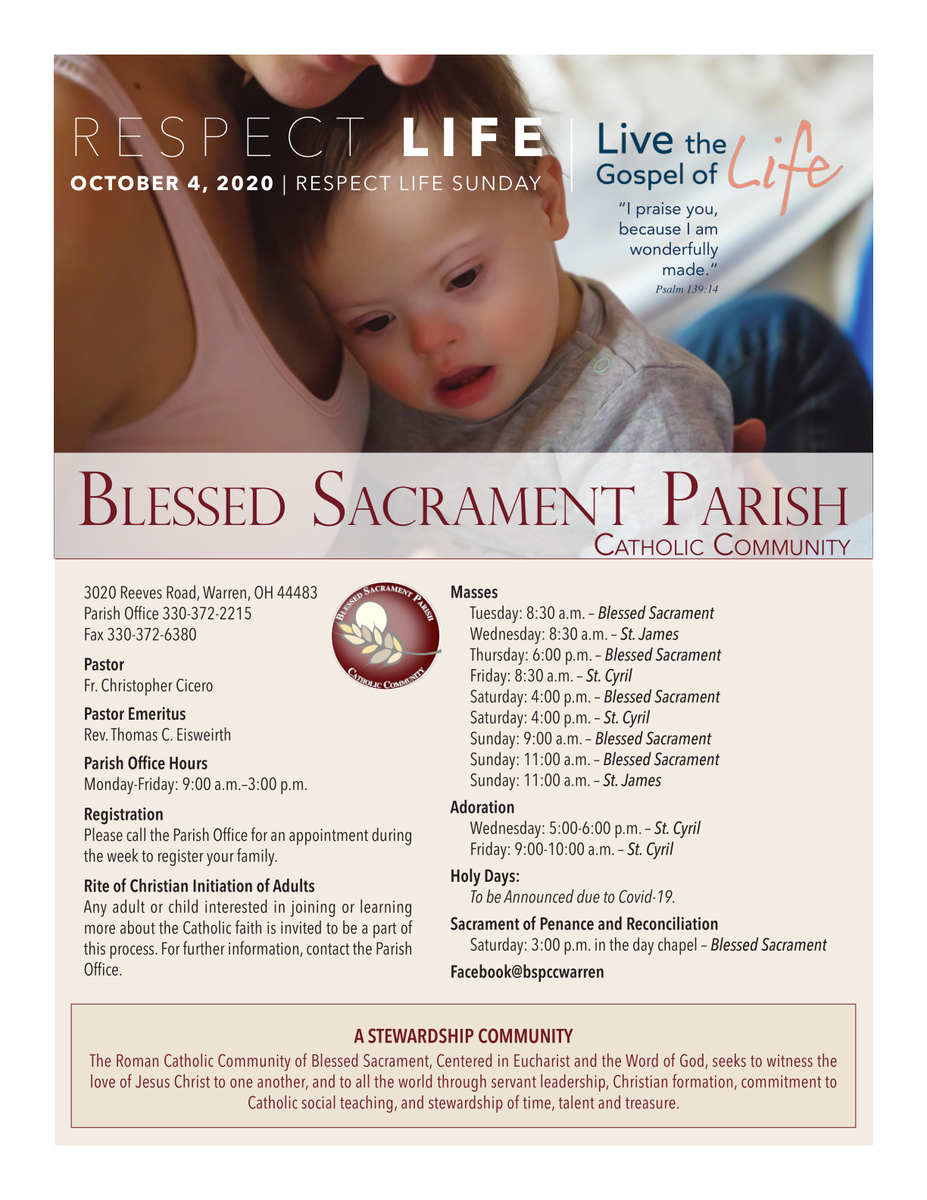
Can you start with this information from our bulletin cover?
 Cody Armock
Hello Fr. Cicero,
We can do that! The site is not quite ready for content yet, but we can add that once it is.
Thank you,
Cody Armock
We can do that! The site is not quite ready for content yet, but we can add that once it is.
Thank you,
Cody Armock
Web Department, Diocesan
877-923-0777
 Veronica Alvarado
Cody, can you create and send them a Client Folder for images and their PDF / Word Doc forms? In our meeting, Father mentioned having some he wanted us to recreate.
Cody Armock
Good Morning Fr. Cicero,
I have made a Google Drive folder for you to upload content, e.g. images and PDF/Word Doc Forms to. You should be able to drag and drop them from your computer or click New in the top left and select file and that will open up your document manager on your computer.
https://drive.google.com/drive/folders/1EXPZF7nXmymhhy2QXZWUeI8JoUxH3nTE?usp=sharing
Cody Armock
I have made a Google Drive folder for you to upload content, e.g. images and PDF/Word Doc Forms to. You should be able to drag and drop them from your computer or click New in the top left and select file and that will open up your document manager on your computer.
https://drive.google.com/drive/folders/1EXPZF7nXmymhhy2QXZWUeI8JoUxH3nTE?usp=sharing
Cody Armock
Web Department, Diocesan
877-923-0777