












Launch Process
Good morning Mary Ann,
I see that you have been updating your website! This is absolutely wonderful.
Since you are keeping up with the website, would you like to go ahead and launch the website to the public? Currently, it is not searchable by Google, Yahoo, Bing, etc., and is still using the development site URL (.diocesanweb.org).
Let me know if you are ready to launch and we can set that up!
Thank you,
Veronica Alvarado
Web Department, Diocesan
877-923-0777
877-923-0777
 Mary Ann Kleinfelder
Sure!
Mary Ann Kleinfelder
Office Manager
St. Anthony Church
804 Idaho St.
Sharon, PA 16146
Phone: 724-342-7391
Fax: 724-342-3349
Office Hours: Mon.-Thurs. 9am-3pm, Closed Fridays
Mary Ann Kleinfelder
Office Manager
St. Anthony Church
804 Idaho St.
Sharon, PA 16146
Phone: 724-342-7391
Fax: 724-342-3349
Office Hours: Mon.-Thurs. 9am-3pm, Closed Fridays
 Veronica Alvarado
Since you don't have a current website, we have started the launch process now!
I will send you an email once you have launched!
Thank you, Mary Ann.
I will send you an email once you have launched!
Thank you, Mary Ann.
Veronica Alvarado
Web Department, Diocesan
877-923-0777
877-923-0777
Mary Ann Kleinfelder
Thanks, Veronica.
I do have a question regarding setting feature clipart. I can't seem to adjust the artwork correctly so that it appears to fit on the news and events page. It's always bigger than what I'd like it to be. Can you please email back with how I can crop it properly so that it fits.
Thanks!!!
ma
Mary Ann Kleinfelder
Office Manager
St. Anthony Church
804 Idaho St.
Sharon, PA 16146
Phone: 724-342-7391
Fax: 724-342-3349
Office Hours: Mon.-Thurs. 9am-3pm, Closed Fridays
I do have a question regarding setting feature clipart. I can't seem to adjust the artwork correctly so that it appears to fit on the news and events page. It's always bigger than what I'd like it to be. Can you please email back with how I can crop it properly so that it fits.
Thanks!!!
ma
Mary Ann Kleinfelder
Office Manager
St. Anthony Church
804 Idaho St.
Sharon, PA 16146
Phone: 724-342-7391
Fax: 724-342-3349
Office Hours: Mon.-Thurs. 9am-3pm, Closed Fridays
Veronica Alvarado
Hi Mary Ann,
I looked into it and the images on your homepage and on your All News & Events page (https://sap-olf.org/parish-news/) are using a ratio of 6:3. So 600px wide by 300 px tall.
This can actually be done within WordPress following these instructions:
NOTE: Cropping an image in the media library will crop ALL instances of the image on your website. The image can be restored back to the original image, if needed.
- Click Add Media.
- Select image.
- On the right side of the screen, click Edit Image.
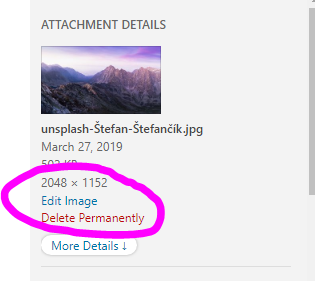
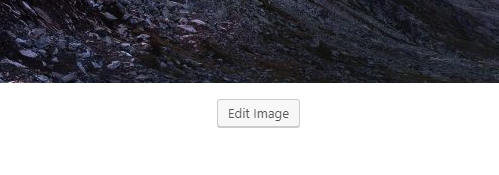
- Click Edit Image below the image>
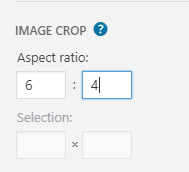
- On the right side, type in 6:4 for the Aspect Ratio.
- Click and drag on the image and it will automatically create a crop size of 6:4 ratio.
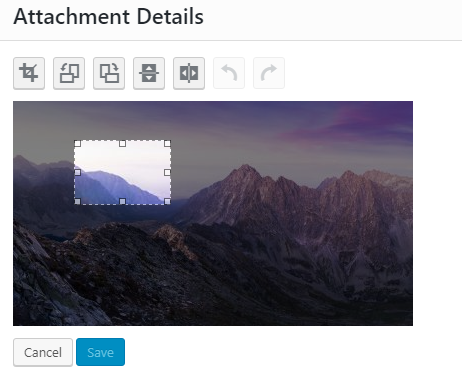
- Click the corners to make it bigger or smaller. Click and drag the selected box to select what area of the picture you'd like to capture.
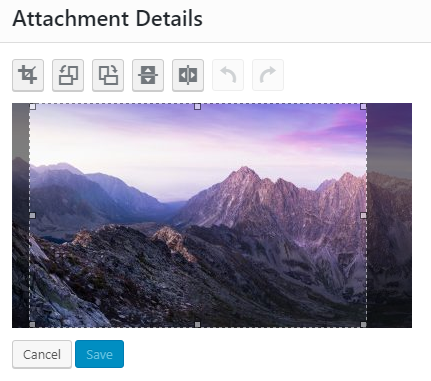
- Click the Crop icon to save the crop changes.
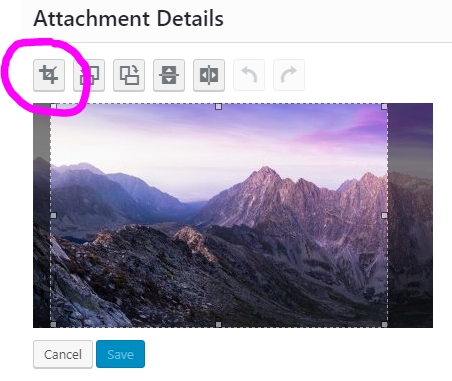
- If this is the crop that you wish to use, click the blue Save button.
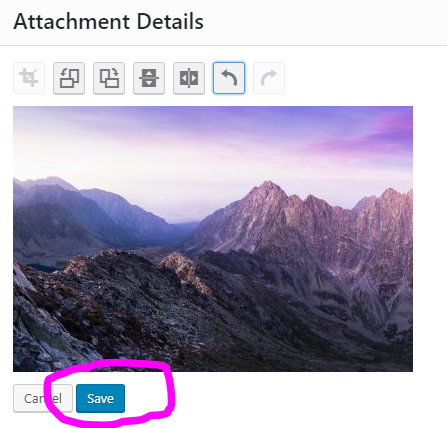
- Your changes have been saved and the image has updated anywhere it was being used on the website. Continue adding image as usual.
Let me know if there is anything else you need, Mary Ann.
Veronica Alvarado
Web Department, Diocesan
877-923-0777
877-923-0777
Mary Ann Kleinfelder
Thanks, Veronica! I will give it a try. :-)
Does this apply also to clipart that I've downloaded from google images?
ma
Mary Ann Kleinfelder
Office Manager
St. Anthony Church
804 Idaho St.
Sharon, PA 16146
Phone: 724-342-7391
Fax: 724-342-3349
Office Hours: Mon.-Thurs. 9am-3pm, Closed Fridays
Does this apply also to clipart that I've downloaded from google images?
ma
Mary Ann Kleinfelder
Office Manager
St. Anthony Church
804 Idaho St.
Sharon, PA 16146
Phone: 724-342-7391
Fax: 724-342-3349
Office Hours: Mon.-Thurs. 9am-3pm, Closed Fridays
Veronica Alvarado
Yes, it does. Something to keep in mind is that if the image isn't big enough, then you can add the image to a white background. You can do so with Microsoft Paint or even Canva (free, template-based, easy-to-use graphic design site).
Veronica Alvarado
Web Department, Diocesan
877-923-0777
877-923-0777