











Scheduling Launch Date
Good morning Everyone,
I have on my calendar that we plan to launch St. Joseph Catholic Church's new website on Monday, January 13th.
I just wanted to make sure that this date still worked for you.
Please let me know,
Merry Christmas!
Cody Armock
Web Department, Diocesan
877-923-0777
877-923-0777
 Cody Armock
Hello Everyone,
Correction: St. Ann Catholic Church's new website, not St. Joseph.
Sorry about that!
Cody Armock
Web Department, Diocesan
877-923-0777
877-923-0777
 Dan DiLuzio
Cody,
Yes, we are still aiming for January 13th. That's not a hard date
though; if something comes up on your end we can push it out,
Dan
Yes, we are still aiming for January 13th. That's not a hard date
though; if something comes up on your end we can push it out,
Dan
 Veronica Alvarado
Perfect!
Let us know if you have any questions in the meantime,
Let us know if you have any questions in the meantime,
Veronica Alvarado
Web Department, Diocesan
877-923-0777
877-923-0777
Dan DiLuzio
Hi, Cody,
Would you please restore the latest version (January 2 ) of the
following page:
https://stannbb.diocesanweb.org/troubled/
Thanks!
Dan
Would you please restore the latest version (January 2 ) of the
following page:
https://stannbb.diocesanweb.org/troubled/
Thanks!
Dan
Cody Armock
Good afternoon Dan,
You can restore revisions by going to the page and in the Document panel on the right side under the "Move to trash" button, it says 14 Revisions, at least right now. Click on that area and at the top middle is a bar with the different revisions that you can slide and find the one you want. You can see who made the revision and when. Just slide it to the one you want and click the button labeled "Restore This Revision". I did not find a revision from January 2nd. I have Dec 20 at 6:08 PM, Jan 3rd (today) at 3:22, Jan 3rd at 3:23pm, and today at 3:27, and the latest of today at 3:59pm. I will let you try and change it to the correct version so that if it is necessary in the future you can do it right then and there and to save you time especially if we are out of the office.
Let me know if you have any other questions,
Cody Armock
You can restore revisions by going to the page and in the Document panel on the right side under the "Move to trash" button, it says 14 Revisions, at least right now. Click on that area and at the top middle is a bar with the different revisions that you can slide and find the one you want. You can see who made the revision and when. Just slide it to the one you want and click the button labeled "Restore This Revision". I did not find a revision from January 2nd. I have Dec 20 at 6:08 PM, Jan 3rd (today) at 3:22, Jan 3rd at 3:23pm, and today at 3:27, and the latest of today at 3:59pm. I will let you try and change it to the correct version so that if it is necessary in the future you can do it right then and there and to save you time especially if we are out of the office.
Let me know if you have any other questions,
Cody Armock
Dan DiLuzio
Cody, thanks; I'll shop around for the correct version to restore. Did not realize the restore process was that straight forward.Thanks for teaching this hungry guy how to fish . . . 😁DanSent from my Verizon, Samsung Galaxy Tablet
Dan DiLuzio
Veronica,
How will the cutover be implemented? I am assuming that we will just
have the current URL (https://www.stannbb.org/) point to the new web
site, but wanted to verify that.
Also, when will the cutover actually occur? If it is effective as of
Monday morning and it is performed Sunday evening, that's fine. But if
you will be cutting over by end of business Friday (so that it is
available on Monday), I'd like to push out to Tuesday. I'm trying to
avoid people being presented with the new site if there is no support
available over the weekend, which is our period of highest activity.
Either way is fine, just let us know!
Dan DiLuzio
How will the cutover be implemented? I am assuming that we will just
have the current URL (https://www.stannbb.org/) point to the new web
site, but wanted to verify that.
Also, when will the cutover actually occur? If it is effective as of
Monday morning and it is performed Sunday evening, that's fine. But if
you will be cutting over by end of business Friday (so that it is
available on Monday), I'd like to push out to Tuesday. I'm trying to
avoid people being presented with the new site if there is no support
available over the weekend, which is our period of highest activity.
Either way is fine, just let us know!
Dan DiLuzio
Dan DiLuzio
Veronica,
How will the cutover be implemented? I am assuming that we will just
have the current URL (https://www.stannbb.org/) point to the new web
site, but wanted to verify that.
Also, when will the cutover actually occur? If it is effective as of
Monday morning and it is performed Sunday evening, that's fine. But if
you will be cutting over by end of business Friday (so that it is
available on Monday), I'd like to push out to Tuesday. I'm trying to
avoid people being presented with the new site if there is no support
available over the weekend, which is our period of highest activity.
Either way is fine, just let us know!
Dan DiLuzio
How will the cutover be implemented? I am assuming that we will just
have the current URL (https://www.stannbb.org/) point to the new web
site, but wanted to verify that.
Also, when will the cutover actually occur? If it is effective as of
Monday morning and it is performed Sunday evening, that's fine. But if
you will be cutting over by end of business Friday (so that it is
available on Monday), I'd like to push out to Tuesday. I'm trying to
avoid people being presented with the new site if there is no support
available over the weekend, which is our period of highest activity.
Either way is fine, just let us know!
Dan DiLuzio
Veronica Alvarado
Good morning Dan,
Since Diocesan has access to your domain, we will be facilitating the entire launch process.
The cutover will occur between 9:00 am and 2:00 pm on Monday. We refrain from scheduling any launches on Fridays for the very reason you mentioned.
Once your site has been launched and updated, we will send you a follow-up email so that you know the new login URL and how to access statistics.
Let me know if you have any other questions,
Veronica Alvarado
Web Department, Diocesan
877-923-0777
877-923-0777
Dan DiLuzio
Good evening, Veronica,
The launch went extremely well, and in the first week we've received
some excellent comments from those of our parishioners who have
expressed their thoughts on the new site. Thanks in large part to the
work that you and Cody and the entire Diocesan team involved with our
project have done, we have a real success story.
There are a couple of things that we are having difficulty with, though.
The first is a problem we are having managing our news items/posts. It
seems the way the short code is operating, the three posts with the most
recent publication dates appear on the home page. The problem is that
we'd like to display the posts according to the dates on which they will
occur, from most immediate to those occurring later. But the more
recently published news items that we enter tend to be further out on
the calendar, but they displace those events which are nearer to their
occurrence date, which we would like to highlight. For example, if we
have 3 events occurring the last week of January and we add an event
occurring in the first week of February, we'll be exhibiting the latter
event first and only two of the three events that occur before it.
I realize that the software can't "look" into the event descriptions to
ascertain which occurs first. But is there any way to either display
only events with a certain tag (we would keep this updated) or to turn
on the "sticky" feature? Right now, we're forcing the correct events to
display by editing the date published, but that is unbelievably
cumbersome.
The second issue is with our header images, especially on the home page.
We're simply not getting acceptable results across devices. I realize
that the different size displays themselves cause a problem, but . . .
I've attached an image we want on the homepage header ("Header 800 x 600
2.png"). I've also attached screenshots from a laptop, a phone, and a
pad. The image is noticably different on the latter two, but is not
even visible on the laptop (1920 x 1080 resolution). I've tried
different image sizes, including 2000 x 1100, 1500 x 1000, 1000 x 700,
1000 x 500, and 740 x 192. I haven't hit on a size that displays a
visible image on all three devices. Question: Is there a "magic
number" for the size of the display image that will display SOMEthing on
all three devices? I've looked at several WP websites and blogs, but
nothing has worked so far.
Thanks, again, Veronica!
Dan DiLuzio
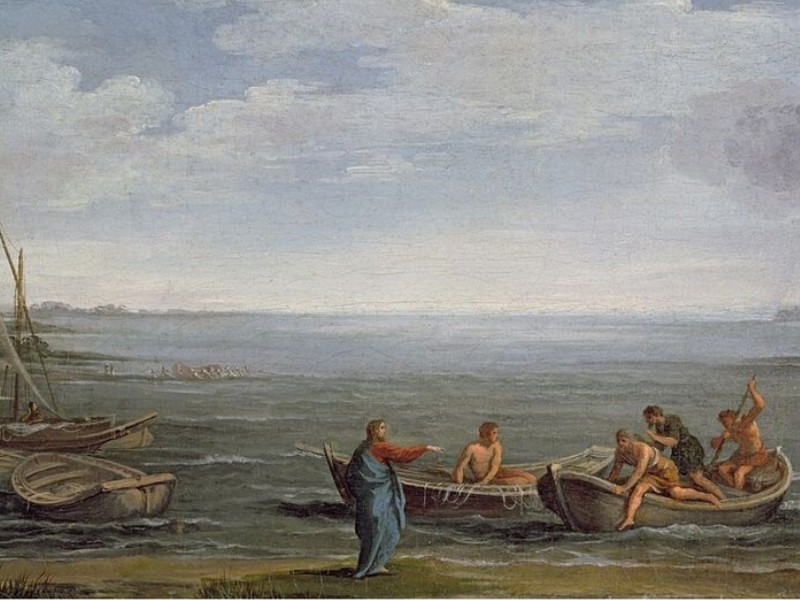
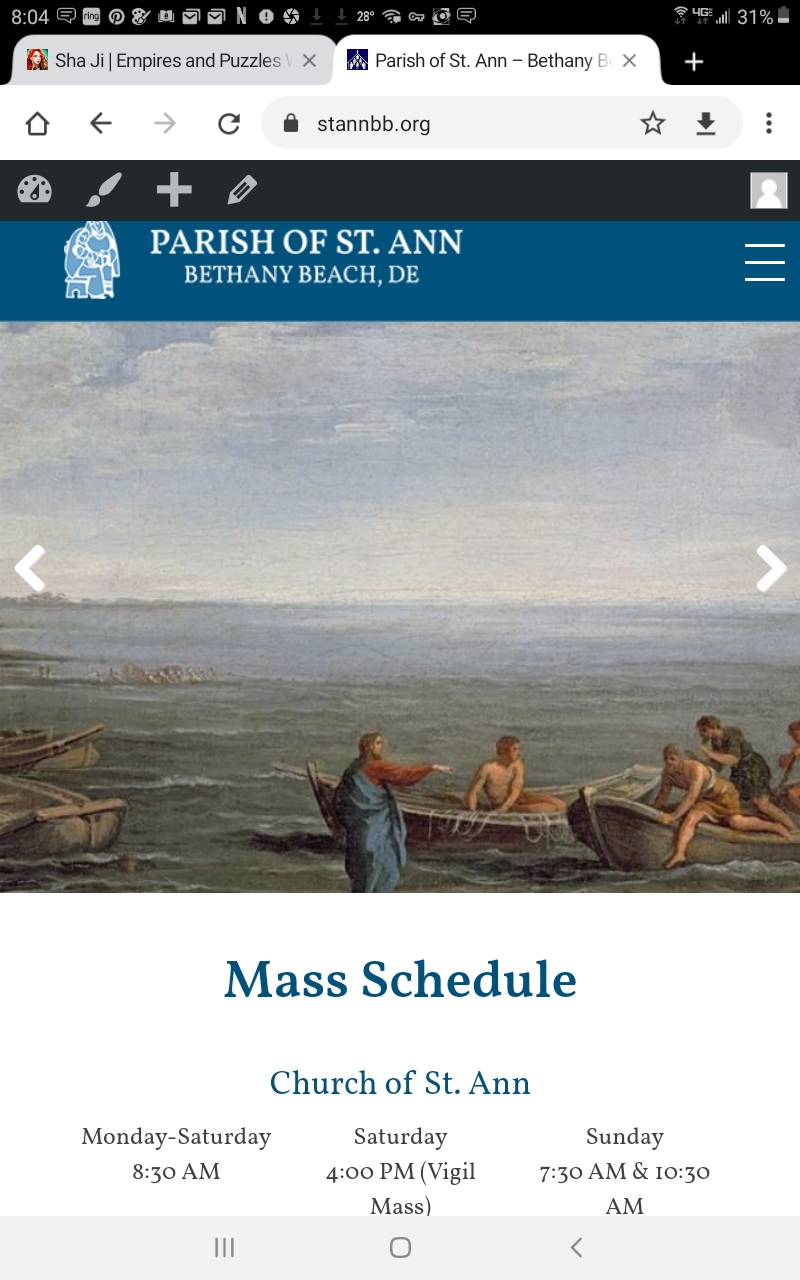
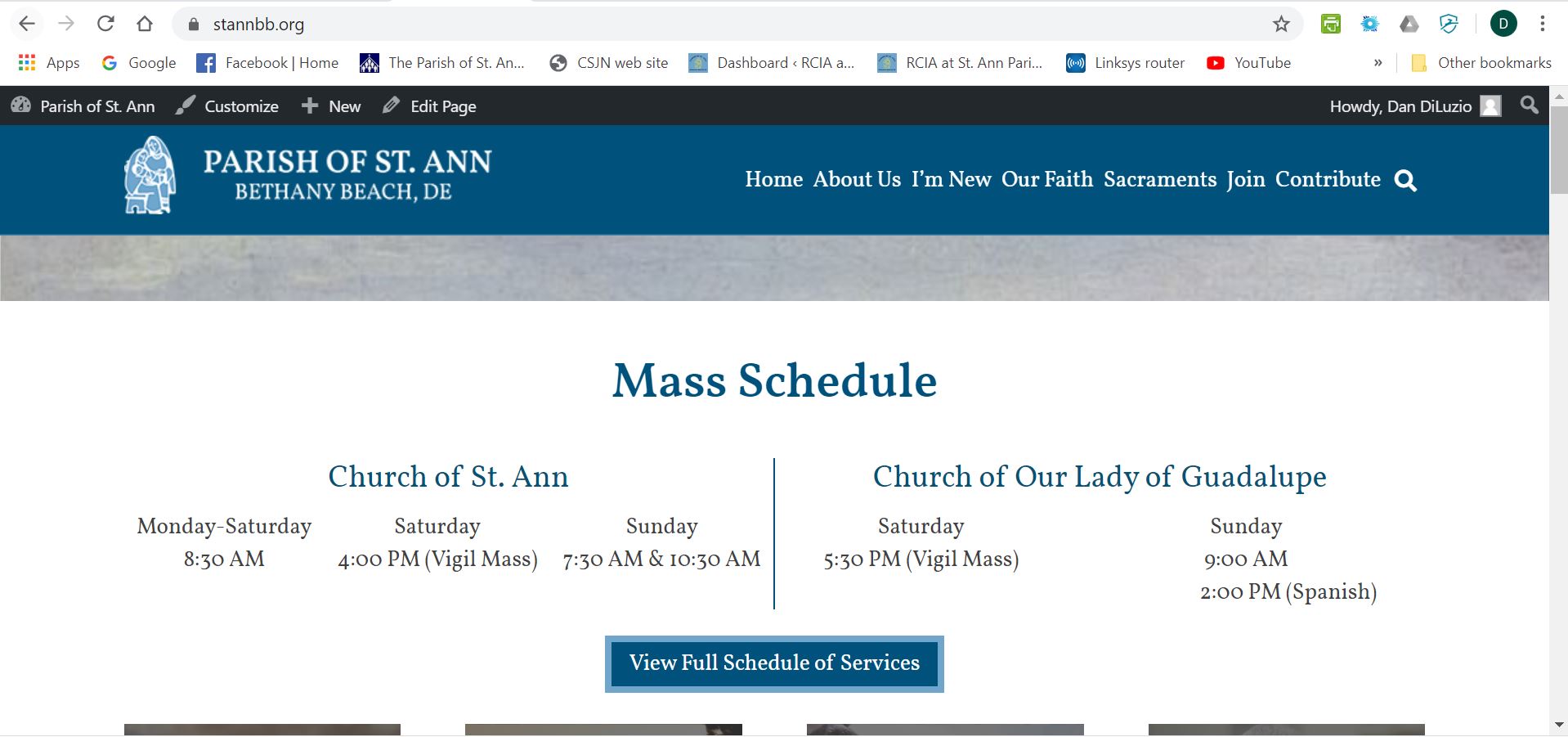
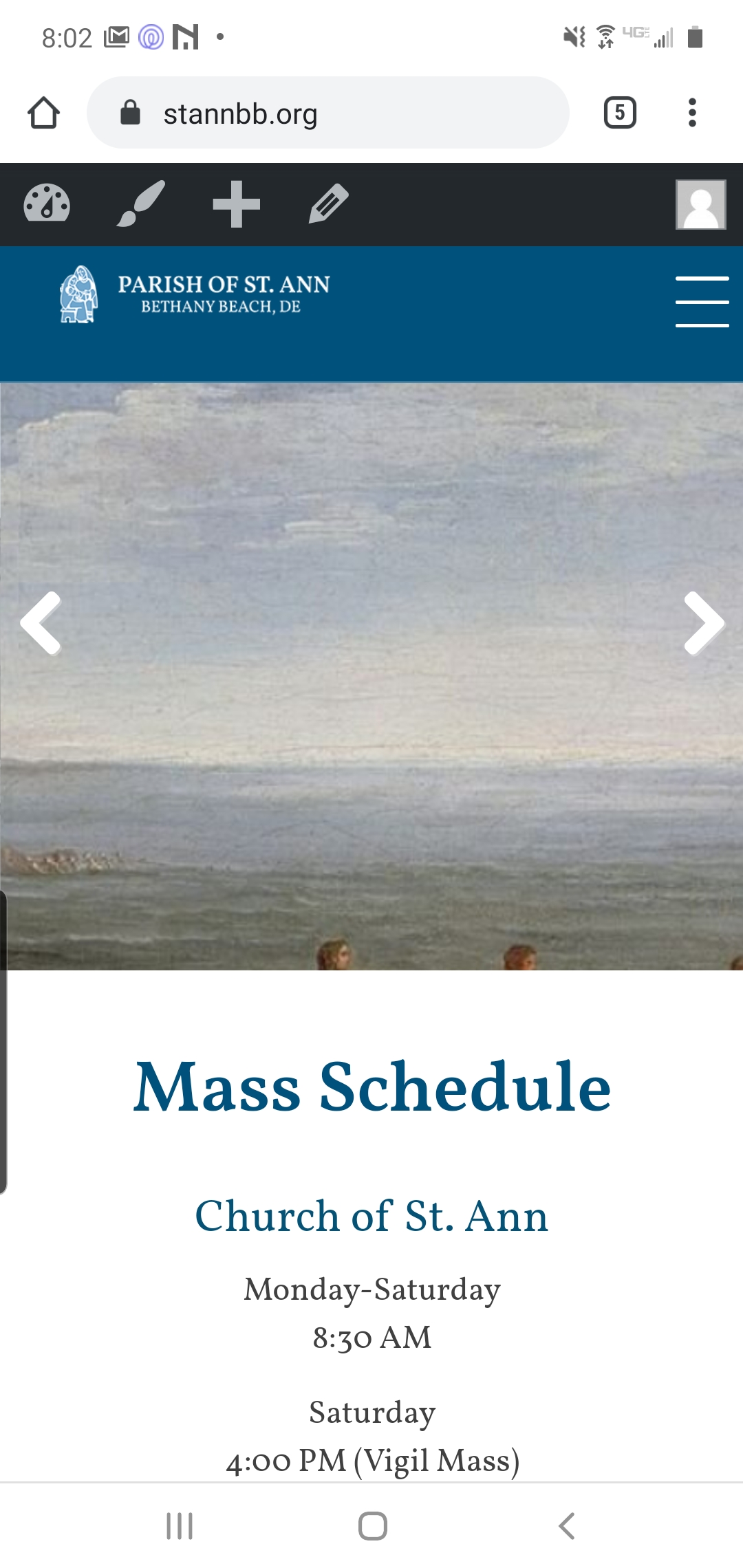
The launch went extremely well, and in the first week we've received
some excellent comments from those of our parishioners who have
expressed their thoughts on the new site. Thanks in large part to the
work that you and Cody and the entire Diocesan team involved with our
project have done, we have a real success story.
There are a couple of things that we are having difficulty with, though.
The first is a problem we are having managing our news items/posts. It
seems the way the short code is operating, the three posts with the most
recent publication dates appear on the home page. The problem is that
we'd like to display the posts according to the dates on which they will
occur, from most immediate to those occurring later. But the more
recently published news items that we enter tend to be further out on
the calendar, but they displace those events which are nearer to their
occurrence date, which we would like to highlight. For example, if we
have 3 events occurring the last week of January and we add an event
occurring in the first week of February, we'll be exhibiting the latter
event first and only two of the three events that occur before it.
I realize that the software can't "look" into the event descriptions to
ascertain which occurs first. But is there any way to either display
only events with a certain tag (we would keep this updated) or to turn
on the "sticky" feature? Right now, we're forcing the correct events to
display by editing the date published, but that is unbelievably
cumbersome.
The second issue is with our header images, especially on the home page.
We're simply not getting acceptable results across devices. I realize
that the different size displays themselves cause a problem, but . . .
I've attached an image we want on the homepage header ("Header 800 x 600
2.png"). I've also attached screenshots from a laptop, a phone, and a
pad. The image is noticably different on the latter two, but is not
even visible on the laptop (1920 x 1080 resolution). I've tried
different image sizes, including 2000 x 1100, 1500 x 1000, 1000 x 700,
1000 x 500, and 740 x 192. I haven't hit on a size that displays a
visible image on all three devices. Question: Is there a "magic
number" for the size of the display image that will display SOMEthing on
all three devices? I've looked at several WP websites and blogs, but
nothing has worked so far.
Thanks, again, Veronica!
Dan DiLuzio
Cody Armock
Good Morning Everyone,
Dan, I left you a voicemail about the fixes that we implemented for the two problems.
Homepage Posts
We made a new category called "Homepage News" that will show on the homepage. It still shows based on Published Date, but it won't be as big of an issue with editing the published dates. You can add or remove posts from that category with Quick Edit or with Editing the post. It will still only show three posts on the homepage and will only show those that are in the Homepage News category.
However, you can have posts in multiple categories. I would recommend having all posts in the News & Events Category, so that they show on the "All News" page and then having only three to four in the Homepage News (the fourth will not show except for when one of the others gets made into a draft, you can also use the Post Expirator to change or remove categories so that it is no longer in the Homepage News category.
Make sure that there are always at least three posts in the Homepage News Category though.
Slider Image
I believe we have solved the issue with the image on laptop sizes. Please make sure that this issue is fixed. You may have to do a hard refresh to see the changes. To do that, follow this guide here. For some reason or another, it was a very specific screen size in which it displayed like that, but we believe that the issue has been resolved. Let us know if it has not been on your end.
Post-launch Assistance
Since the site has launched now, please begin sending any questions or issues that you may have to webdepartment@diocesan.com. This Basecamp project will soon be archived and any emails sent through it may not reach us, whereas the aforementioned email will work indefinitely to get a hold of us.
Thank you and let us know if you have any more questions!
Cody Armock
Web Department, Diocesan
877-923-0777
877-923-0777
Dan DiLuzio
Cody,
Still doesn't appear to be working. On the laptop, it looks like it's
displaying a slice out of the middle of the image. I'm guestimating the
proportions of the image as displayed are about 8:1, which just isn't a
reasonable proportion.
As far as the homepage posts, I understand what you are saying; it's
just that we had hoped to be able to control which articles are
displayed without playing games with the publication dates. That's what
we are doing now, but it's pretty cumbersome. Is there any way of
activating the sticky property?
Dan
PS, do you want me to pass these issues over to
webdepartment@diocesan.com?
Still doesn't appear to be working. On the laptop, it looks like it's
displaying a slice out of the middle of the image. I'm guestimating the
proportions of the image as displayed are about 8:1, which just isn't a
reasonable proportion.
As far as the homepage posts, I understand what you are saying; it's
just that we had hoped to be able to control which articles are
displayed without playing games with the publication dates. That's what
we are doing now, but it's pretty cumbersome. Is there any way of
activating the sticky property?
Dan
PS, do you want me to pass these issues over to
webdepartment@diocesan.com?
Cody Armock
Hello Dan,
You did a hard refresh for the homepage correct? Can you send me another screenshot of what you are seeing, just so I can try to identify the issue better?
As for the posts, you won't have to play games with the published dates. You can put the posts in the News & Events category and the Homepage News category and only the posts in the Homepage News category will show on the Homepage.
What I meant to say earlier was to make sure that there are 3 posts in that category, but if you wanted, you can reorganize those 3 by manipulating the published date! The one with the most recently published date will appear on the far left.
The Sticky property would do the same thing as this homepage news category and you would still have to mess with the published date if you wanted to reorder them, so I don't think that would be the best fix.
Let me know if there are any further questions about this by sending them to webdepartment@diocesan.com. You can send the screenshot for the Homepage slider image there too.
Thank you,
Cody Armock
You did a hard refresh for the homepage correct? Can you send me another screenshot of what you are seeing, just so I can try to identify the issue better?
As for the posts, you won't have to play games with the published dates. You can put the posts in the News & Events category and the Homepage News category and only the posts in the Homepage News category will show on the Homepage.
What I meant to say earlier was to make sure that there are 3 posts in that category, but if you wanted, you can reorganize those 3 by manipulating the published date! The one with the most recently published date will appear on the far left.
The Sticky property would do the same thing as this homepage news category and you would still have to mess with the published date if you wanted to reorder them, so I don't think that would be the best fix.
Let me know if there are any further questions about this by sending them to webdepartment@diocesan.com. You can send the screenshot for the Homepage slider image there too.
Thank you,
Cody Armock
Dan DiLuzio
Hi, Cody,
I've attached both a screenshot and the original image.
I totally misunderstood what you were saying about the news items; yes,
that is perfect!
Thanks!
Dan
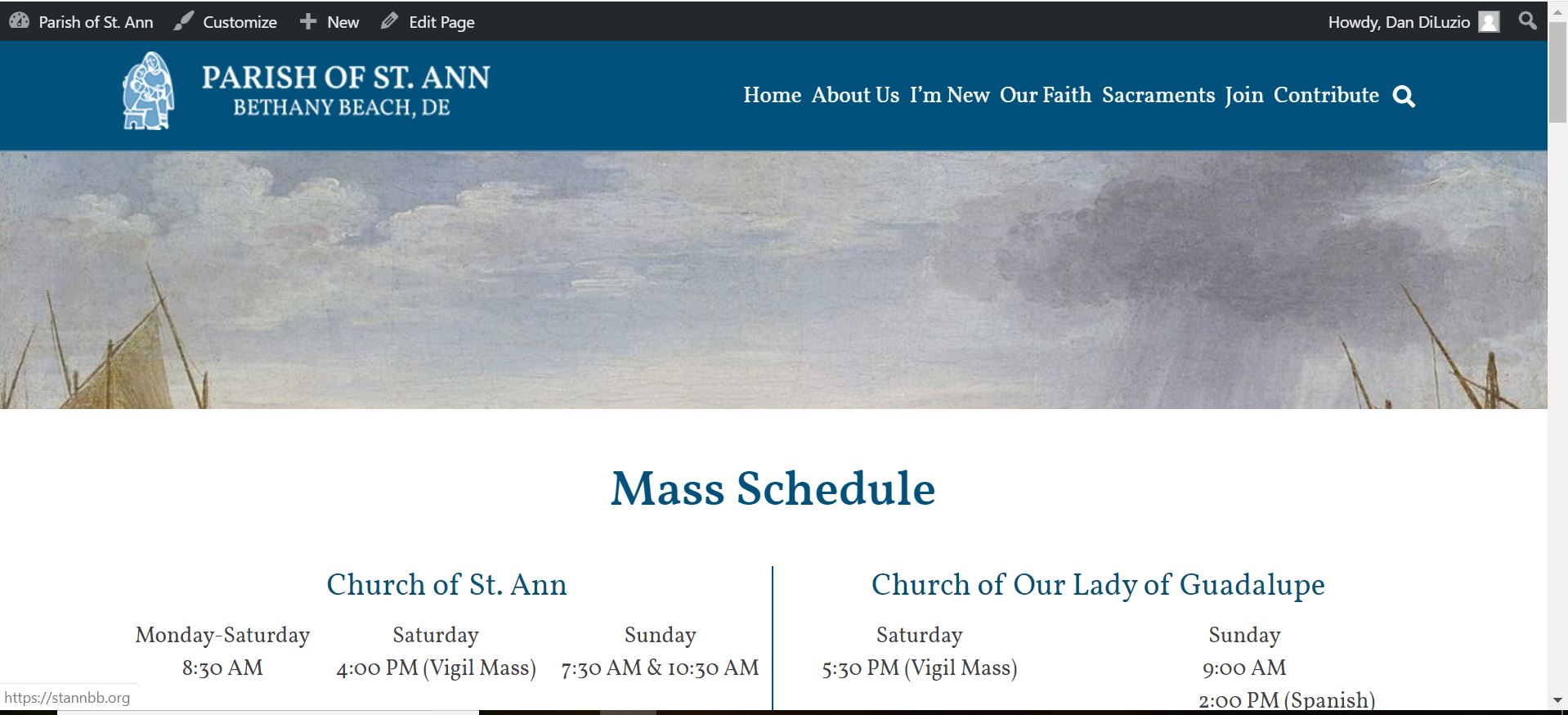
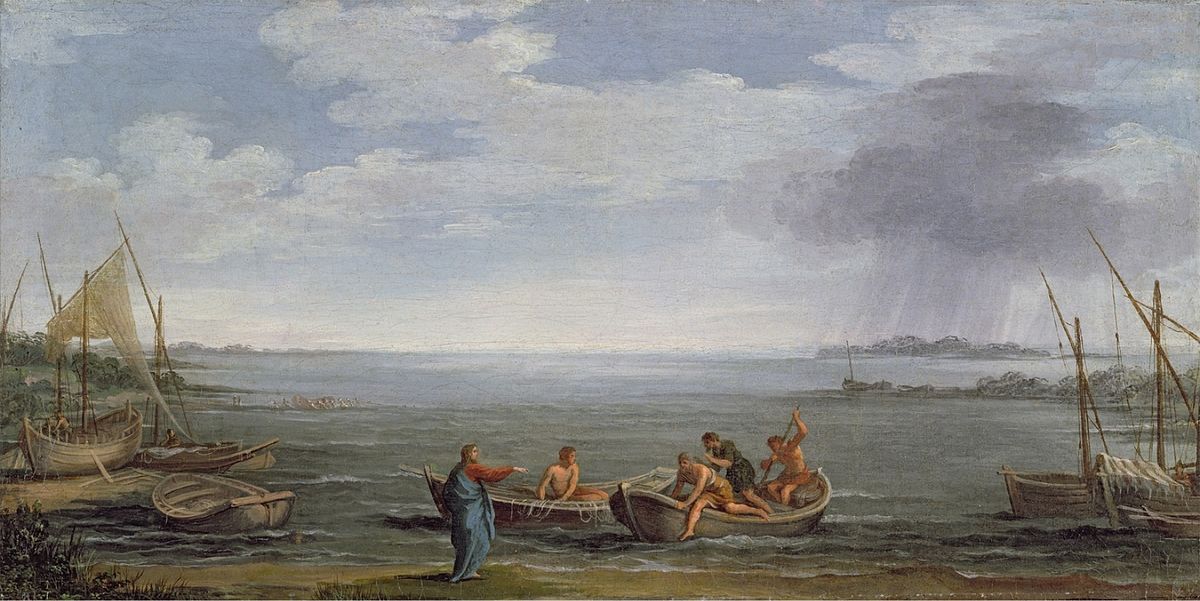
I've attached both a screenshot and the original image.
I totally misunderstood what you were saying about the news items; yes,
that is perfect!
Thanks!
Dan
Cody Armock
Good Morning Dan,
We can bump up the image size a bit, but the problem is that the slider images will display the center center of the image and then fill in what it can around that. Unfortunately, the image of the Calling of St. Peter and St. Andrew, the action of the scene is on the bottom. We can make the slider slightly bigger, but to keep the Mass Schedule somewhat visible, we can't make it too much bigger.
The way I would suggest is to crop the image so that it is not as tall, by chopping off the sky. I have included a screenshot of it. You would have to set as the slider image, but I did upload the cropped image to the media library. The screenshot may vary slightly from what you see, but it should be pretty close.
Let me know if this will work and I will have the developer adjust the height of the image, but you will have to change the image of the slider.
Thank you,
Cody Armock
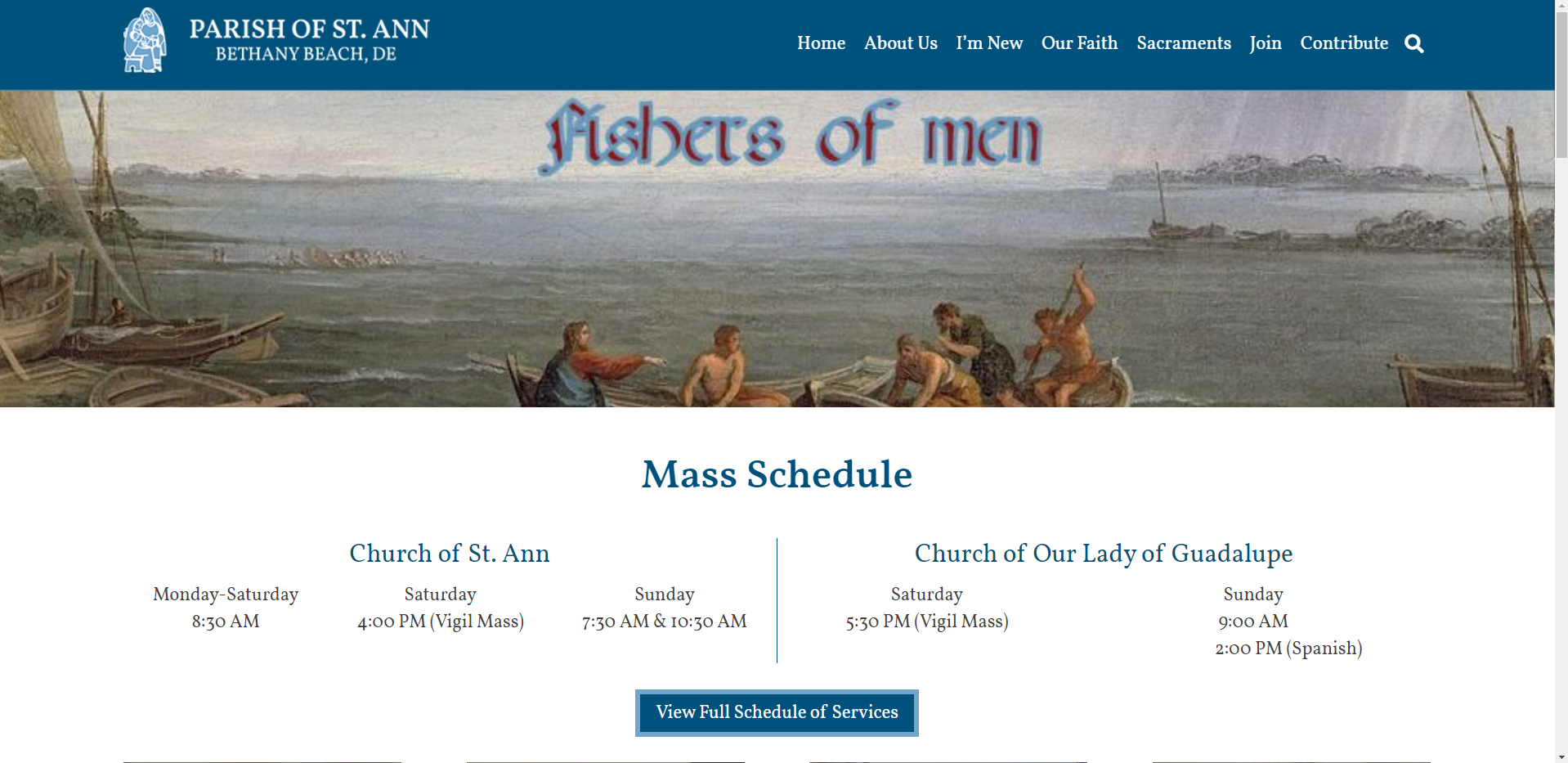
We can bump up the image size a bit, but the problem is that the slider images will display the center center of the image and then fill in what it can around that. Unfortunately, the image of the Calling of St. Peter and St. Andrew, the action of the scene is on the bottom. We can make the slider slightly bigger, but to keep the Mass Schedule somewhat visible, we can't make it too much bigger.
The way I would suggest is to crop the image so that it is not as tall, by chopping off the sky. I have included a screenshot of it. You would have to set as the slider image, but I did upload the cropped image to the media library. The screenshot may vary slightly from what you see, but it should be pretty close.
Let me know if this will work and I will have the developer adjust the height of the image, but you will have to change the image of the slider.
Thank you,
Cody Armock
Dan DiLuzio
Thanks, Cody; I kind of expected that we'e have to be careful in
choosing slider images. We'll just need to select those with a focus on
the center of the image. One question: is there a suggested size or
image ratio we chuild be working with?
Nancy had a look at the calendar today, and it looks like we're having
some problems with calendar entries for a particular day overwriting
those of the following day. I'll send that issue to the webdepartment
address, though.
Thanks,
Dan
choosing slider images. We'll just need to select those with a focus on
the center of the image. One question: is there a suggested size or
image ratio we chuild be working with?
Nancy had a look at the calendar today, and it looks like we're having
some problems with calendar entries for a particular day overwriting
those of the following day. I'll send that issue to the webdepartment
address, though.
Thanks,
Dan
Dan DiLuzio
Hi, Cody,
I tried sending a question to the address you gave me, but it got
bounced back:
===============================
Your message did not reach some or all of the intended recipients.
The following recipient(s) cannot be reached:
'webdepartment@diocesan.com.' - 5.5.0 <webdepartment@diocesan.com.> invalid address 'webdepartment@diocesan.com.'
===============================
dan
I tried sending a question to the address you gave me, but it got
bounced back:
===============================
Your message did not reach some or all of the intended recipients.
The following recipient(s) cannot be reached:
'webdepartment@diocesan.com.' - 5.5.0 <webdepartment@diocesan.com.> invalid address 'webdepartment@diocesan.com.'
===============================
dan
Cody Armock
Hello Dan,
I will be looking into why the email bounced back. To my knowledge, that has never happened before.
As for the image for the slider, focusing on the middle would be best, but the size and/or ratio is hard because of the different screen sizes, but I would say something in the neighborhood of 1900x1000. On desktops, it will show in the neighborhood of 1900x550 and tailor that down for phones and tablets. So focusing on the center would be the best, but having it at least 1900px wide and maybe around 800-1000 pixels high should be pretty good.
Was that the calendar on the homepage that you were having an issue with or on the calendar page? Could you send a screenshot and explain that better here, until we get the email thing sorted out?
As for the email, could you try sending an email to carmock@diocesan.com and see if that works?
Thank you,
Cody Armock
I will be looking into why the email bounced back. To my knowledge, that has never happened before.
As for the image for the slider, focusing on the middle would be best, but the size and/or ratio is hard because of the different screen sizes, but I would say something in the neighborhood of 1900x1000. On desktops, it will show in the neighborhood of 1900x550 and tailor that down for phones and tablets. So focusing on the center would be the best, but having it at least 1900px wide and maybe around 800-1000 pixels high should be pretty good.
Was that the calendar on the homepage that you were having an issue with or on the calendar page? Could you send a screenshot and explain that better here, until we get the email thing sorted out?
As for the email, could you try sending an email to carmock@diocesan.com and see if that works?
Thank you,
Cody Armock
Dan DiLuzio
Cody, thanks!
It was specifically the calendar page that was causing a viewing problem
(screen shot attached), but the home page looks a little hinky as well -
things aren't quite lining up as well as we'd wish.
and here's the home page view:
Dan
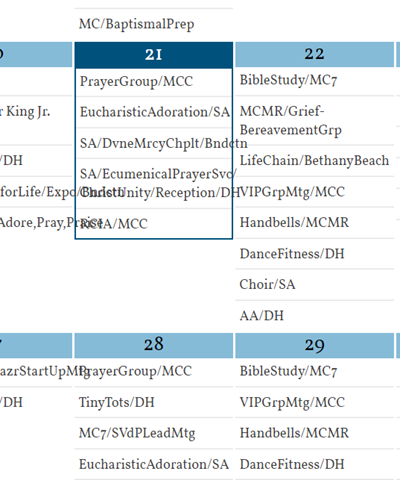
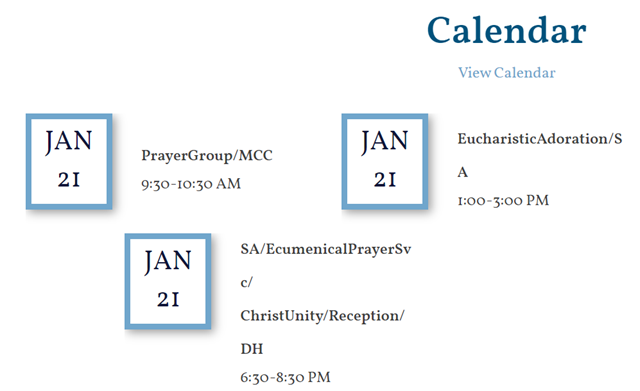
It was specifically the calendar page that was causing a viewing problem
(screen shot attached), but the home page looks a little hinky as well -
things aren't quite lining up as well as we'd wish.
and here's the home page view:
Dan
Cody Armock
Hello Dan,
Thank you for sending the screenshots. A big part of the reason that the calendar events are overlapping is because of the lack of spaces between the words. The words will break to a new line if it can recognize the words, but with no spaces between them, the code thinks it is all just one word, so it tries to wrap it as best as it can. This is why it breaks in weird spots.
The fix for the calendar would be to try that first by adding spaces in between the word and the '/' and then see if the problem still persists. Unfortunately, beyond that, the words will look very weird and the event listing won't look right. However, adding the spaces should fix most, if not all, of the issues with it not looking right.
Let me know if things still don't look right after adding those spaces and as a note, the calendar on the site may take up to 2 hours to bring in all the new changes that you make to the Google calendar.
Thank you,
Cody Armock
Thank you for sending the screenshots. A big part of the reason that the calendar events are overlapping is because of the lack of spaces between the words. The words will break to a new line if it can recognize the words, but with no spaces between them, the code thinks it is all just one word, so it tries to wrap it as best as it can. This is why it breaks in weird spots.
The fix for the calendar would be to try that first by adding spaces in between the word and the '/' and then see if the problem still persists. Unfortunately, beyond that, the words will look very weird and the event listing won't look right. However, adding the spaces should fix most, if not all, of the issues with it not looking right.
Let me know if things still don't look right after adding those spaces and as a note, the calendar on the site may take up to 2 hours to bring in all the new changes that you make to the Google calendar.
Thank you,
Cody Armock